azure
172 TopicsAzure API Management Your Auth Gateway For MCP Servers
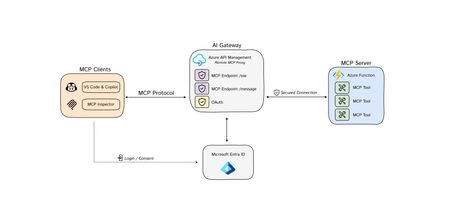
The Model Context Protocol (MCP) is quickly becoming the standard for integrating Tools 🛠️ with Agents 🤖 and Azure API Management is at the fore-front, ready to support this open-source protocol 🚀. You may have already encountered discussions about MCP, so let's clarify some key concepts: Model Context Protocol (MCP) is a standardized way, (a protocol), for AI models to interact with external tools, (and either read data or perform actions) and to enrich context for ANY language models. AI Agents/Assistants are autonomous LLM-powered applications with the ability to use tools to connect to external services required to accomplish tasks on behalf of users. Tools are components made available to Agents allowing them to interact with external systems, perform computation, and take actions to achieve specific goals. Azure API Management: As a platform-as-a-service, API Management supports the complete API lifecycle, enabling organizations to create, publish, secure, and analyze APIs with built-in governance, security, analytics, and scalability. New Cool Kid in Town - MCP AI Agents are becoming widely adopted due to enhanced Large Language Model (LLM) capabilities. However, even the most advanced models face limitations due to their isolation from external data. Each new data source requires custom implementations to extract, prepare, and make data accessible for any model(s). - A lot of heavy lifting. Anthropic developed an open-source standard - the Model Context Protocol (MCP), to connect your agents to external data sources such as local data sources (databases or computer files) or remote services (systems available over the internet through e.g. APIs). MCP Hosts: LLM applications such as chat apps or AI assistant in your IDEs (like GitHub Copilot in VS Code) that need to access external capabilities MCP Clients: Protocol clients that maintain 1:1 connections with servers, inside the host application MCP Servers: Lightweight programs that each expose specific capabilities and provide context, tools, and prompts to clients MCP Protocol: Transport layer in the middle At its core, MCP follows a client-server architecture where a host application can connect to multiple servers. Whenever your MCP host or client needs a tool, it is going to connect to the MCP server. The MCP server will then connect to for example a database or an API. MCP hosts and servers will connect with each other through the MCP protocol. You can create your own custom MCP Servers that connect to your or organizational data sources. For a quick start, please visit our GitHub repository to learn how to build a remote MCP server using Azure Functions without authentication: https://aka.ms/mcp-remote Remote vs. Local MCP Servers The MCP standard supports two modes of operation: Remote MCP servers: MCP clients connect to MCP servers over the Internet, establishing a connection using HTTP and Server-Sent Events (SSE), and authorizing the MCP client access to resources on the user's account using OAuth. Local MCP servers: MCP clients connect to MCP servers on the same machine, using stdio as a local transport method. Azure API Management as the AI Auth Gateway Now that we have learned that MCP servers can connect to remote services through an API. The question now rises, how can we expose our remote MCP servers in a secure and scalable way? This is where Azure API Management comes in. A way that we can securely and safely expose tools as MCP servers. Azure API Management provides: Security: AI agents often need to access sensitive data. API Management as a remote MCP proxy safeguards organizational data through authentication and authorization. Scalability: As the number of LLM interactions and external tool integrations grows, API Management ensures the system can handle the load. Security remains to be a critical piece of building MCP servers, as agents will need to securely connect to protected endpoints (tools) to perform certain actions or read protected data. When building remote MCP servers, you need a way to allow users to login (Authenticate) and allow them to grant the MCP client access to resources on their account (Authorization). MCP - Current Authorization Challenges State: 4/10/2025 Recent changes in MCP authorization have sparked significant debate within the community. 🔍 𝗞𝗲𝘆 𝗖𝗵𝗮𝗹𝗹𝗲𝗻𝗴𝗲𝘀 with the Authorization Changes: The MCP server is now treated as both a resource server AND an authorization server. This dual role has fundamental implications for MCP server developers and runtime operations. 💡 𝗢𝘂𝗿 𝗦𝗼𝗹𝘂𝘁𝗶𝗼𝗻: To address these challenges, we recommend using 𝗔𝘇𝘂𝗿𝗲 𝗔𝗣𝗜 𝗠𝗮𝗻𝗮𝗴𝗲𝗺𝗲𝗻𝘁 as your authorization gateway for remote MCP servers. 🔗For an enterprise-ready solution, please check out our azd up sample repo to learn how to build a remote MCP server using Azure API Management as your authentication gateway: https://aka.ms/mcp-remote-apim-auth The Authorization Flow The workflow involves three core components: the MCP client, the APIM Gateway, and the MCP server, with Microsoft Entra managing authentication (AuthN) and authorization (AuthZ). Using the OAuth protocol, the client starts by calling the APIM Gateway, which redirects the user to Entra for login and consent. Once authenticated, Entra provides an access token to the Gateway, which then exchanges a code with the client to generate an MCP server token. This token allows the client to communicate securely with the server via the Gateway, ensuring user validation and scope verification. Finally, the MCP server establishes a session key for ongoing communication through a dedicated message endpoint. Diagram source: https://aka.ms/mcp-remote-apim-auth-diagram Conclusion Azure API Management (APIM) is an essential tool for enterprise customers looking to integrate AI models with external tools using the Model Context Protocol (MCP). In this blog, we've emphasized the simplicity of connecting AI agents to various data sources through MCP, streamlining previously complex implementations. Given the critical role of secure access to platforms and services for AI agents, APIM offers robust solutions for managing OAuth tokens and ensuring secure access to protected endpoints, making it an invaluable asset for enterprises, despite the challenges of authentication. API Management: An Enterprise Solution for Securing MCP Servers Azure API Management is an essential tool for enterprise customers looking to integrate AI models with external tools using the Model Context Protocol (MCP). It is designed to help you to securely expose your remote MCP servers. MCP servers are still very new, and as the technology evolves, API Management provides an enterprise-ready solution that will evolve with the latest technology. Stay tuned for further feature announcements soon! Acknowledgments This post and work was made possible thanks to the hard work and dedication of our incredible team. Special thanks to Pranami Jhawar, Julia Kasper, Julia Muiruri, Annaji Sharma Ganti Jack Pa, Chaoyi Yuan and Alex Vieira for their invaluable contributions. Additional Resources MCP Client Server integration with APIM as AI gateway Blog Post: https://aka.ms/remote-mcp-apim-auth-blog Sequence Diagram: https://aka.ms/mcp-remote-apim-auth-diagram APIM lab: https://aka.ms/ai-gateway-lab-mcp-client-auth Python: https://aka.ms/mcp-remote-apim-auth .NET: https://aka.ms/mcp-remote-apim-auth-dotnet On-Behalf-Of Authorization: https://aka.ms/mcp-obo-sample 3rd Party APIs – Backend Auth via Credential Manager: Blog Post: https://aka.ms/remote-mcp-apim-lab-blog APIM lab: https://aka.ms/ai-gateway-lab-mcp YouTube Video: https://aka.ms/ai-gateway-lab-demo25KViews12likes4CommentsAnnouncing the availability of TLS 1.3 in Azure API Management in Preview
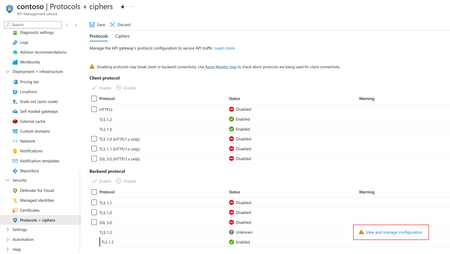
TLS 1.3 is the latest version of the internet’s most deployed security protocol, which encrypts data to provide a secure communication channel between two endpoints. TLS 1.3 support in Azure API Management is planned to rollout during the first week of February 2024. The rollout will happen in stages, this means some regions will get it first as we roll out globally.24KViews2likes6CommentsScaling Logic App Standard for High Throughput Scenarios
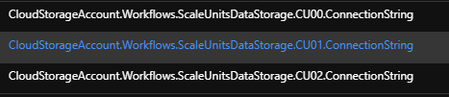
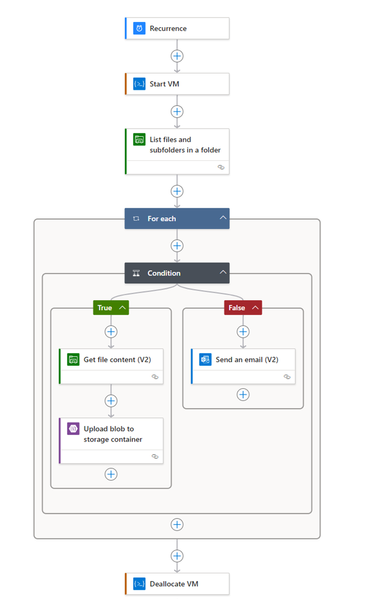
In this blog, we will delve into the scaling characteristics of Logic Apps standard and offer valuable insights on designing scalable Logic Apps for high throughput scenarios. This is the first of a blog series dedicated to exploring the scaling aspects of Logic Apps. We also plan to release subsequent blog posts featuring real-world designs and case studies of Logic Apps successfully handling high throughput workloads. Stay tuned for in-depth examples and practical applications!20KViews3likes1CommentAnnouncing Public Preview of Azure API Management Basic v2 and Standard v2 Tiers
We're thrilled to announce the public preview launch of our latest Azure API Management pricing tiers: Basic v2 and Standard v2. These new tiers address highly sought-after customer requests, bring quality-of-service enhancements, and offer a flexible starting point for API Management, allowing organizations of any size to embark on their API journey.16KViews6likes13CommentsBuild. Secure. Launch Your Private MCP Registry with Azure API Center.
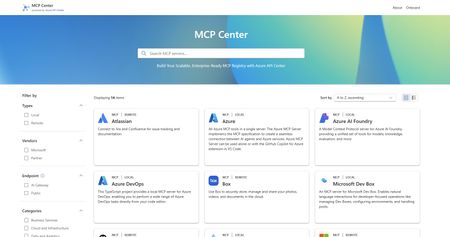
We are thrilled to embrace a new era in the world of MCP registries. As organizations increasingly build and consume MCP servers, the need for a secure, governed, robust and easily discoverable tools catalog has become critical. Today, we are excited to show you how to do just that with MCP Center, a live example demonstrating how Azure API Center (APIC) can serve as a private and enterprise-ready MCP registry. The registry puts your MCPs just one click away for developers, ensuring no setup fuss and a direct path to coding brilliance. Why a private registry? 🤔 Public OSS registries have been instrumental in driving growth and innovation across the MCP ecosystem. But as adoption scales, so does the need for tighter security, governance, and control, this is where private MCP registries step in. This is where Azure API Center steps in. Azure API Center offers a powerful and centralized approach to MCP discovery and governance across diverse teams and services within an organization. Let's delve into the key benefits of leveraging a private MCP registry with Azure API Center. Security and Trust: The Foundation of AI Adoption Review and Verification: Public registries, by their open nature, accept submissions from a wide range of developers. This can introduce risks from tools with limited security practices or even malicious intent. A private registry empowers your organization to thoroughly review and verify every MCP server before it becomes accessible to internal developers or AI agents (like Copilot Studio and AI Foundry). This eliminates the risk of introducing random, potentially vulnerable first or third-party tools into your ecosystem. Reduced Attack Surface: By controlling which MCP servers are accessible, organizations significantly shrink their potential attack surface. When your AI agents interact solely with known and secure internal tools, the likelihood of external attackers exploiting vulnerabilities in unvetted solutions is drastically reduced. Enterprise-Grade Authentication and Authorization: Private registries enable the enforcement of your existing robust enterprise authentication and authorization mechanisms (e.g., OAuth 2) across all MCP servers. Public registries, in contrast, may have varying or less stringent authentication requirements. Enforced AI Gateway Control (Azure API Management): Beyond vetting, a private registry enables organizations to route all MCP server traffic through an AI gateway such as Azure API Management. This ensures that every interaction, whether internal or external, adheres to strict security policies, including centralized authentication, authorization, rate limiting, and threat protection, creating a secure front for your AI services. Governance and Control: Navigating the AI Landscape with Confidence Centralized Oversight and "Single Source of Truth": A private registry provides a centralized "single source of truth" for all AI-related tools and data connections within your organization. This empowers comprehensive oversight of AI initiatives, clearly identifying ownership and accountability for each MCP server. Preventing "Shadow AI": Without a formal registry, individual teams might independently develop or integrate AI tools, leading to "shadow AI" – unmanaged and unmonitored AI deployments that can pose significant risks. A private registry encourages a standardized approach, bringing all AI tools under central governance and visibility. Tailored Tool Development: Organizations can develop and host MCP servers specifically tailored to their unique needs and requirements. This means optimized efficiency and utility, providing specialized tools you won't typically find in broader public registries. Simplified Integration and Accelerated Development: A well-managed private registry simplifies the discovery and integration of internal tools for your AI developers. This significantly accelerates the development and deployment of AI-powered applications, fostering innovation. Good news! Azure API Center can be created for free in any Azure subscription. You can find a detailed guide to help you get started: Inventory and Discover MCP Servers in Your API Center - Azure API Center Get involved 💡 Your remote MCP server can be discoverable on API Center’s MCP Discovery page today! Bring your MCP server and reach Azure customers! These Microsoft partners are shaping the future of the MCP ecosystem by making their remote MCP Servers discoverable via API Center’s MCP Discovery page. Early Partners: Atlassian – Connect to Jira and Confluence for issue tracking and documentation Box – Use Box to securely store, manage and share your photos, videos, and documents in the cloud Neon – Manage and query Neon Postgres databases with natural language Pipedream – Add 1000s of APIs with built-in authentication and 10,000+ tools to your AI assistant or agent - coming soon - Stripe – Payment processing and financial infrastructure tools If partners would like their remote MCP servers to be featured in our Discover Panel, reach out to us here: GitHub/mcp-center and comment under the following GitHub issue: MCP Server Onboarding Request Ready to Get Started? 🚀 Modernize your AI strategy and empower your teams with enhanced discovery, security, and governance of agentic tools. Now's the time to explore creating your own private enterprise MCP registry. Check out MCP Center, a public showcase demonstrating how you can build your own enterprise MCP registry - MCP Center - Build Your Own Enterprise MCP Registry - or go ahead and create your Azure API Center today!12KViews7likes4Comments
Grant Graph API Permission to Azure Automation System assigned Managed Identity
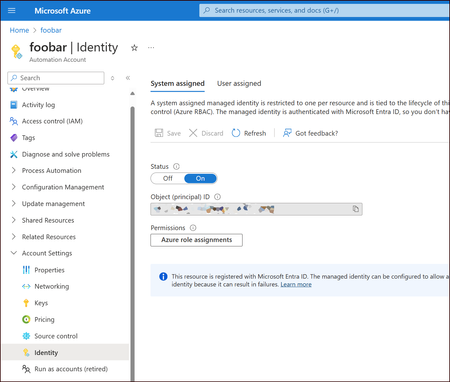
Azure Managed Identity is an identity automatically managed by Azure for applications to use when connecting to resources that support Microsoft Entra (formerly Azure Active Directory) authentication. It eliminates the need to manage credentials and secrets, as the identity is created and managed by Azure. Use Case Use PowerShell scripts that are making certain Microsoft Graph API calls to manage Entra ID users and groups as Azure Automation runbooks. Problem After turning on the system assigned Managed Identity it does not have any permissions to access Microsoft Graph API. And any call to Microsoft Graph API leads to an error. The script can successfully log in with Connect-MgGraph -Identity but fails on insufficient privileges to make any call. When it comes to system assigned Managed Identity, we can't grant Microsoft Graph permissions using Azure Portal user interface. The Grant admin consent button is disabled. Solution Fortunately, we can easily do it with scripting. Here are two PowerShell scripts that assign and remove three Microsoft Graph permissions to system assigned managed identity. You can run them locally or in Cloud Shell. You need to be a Global Administrator in your Tenant. Assign-MgGraphPermissions.ps1 #Requires -Modules "Az.Accounts", "Az.Resources", "Microsoft.Graph.Applications" [CmdletBinding()] param ( [Parameter(Mandatory=$true)] [string]$AutomationAccountName, [Parameter(Mandatory=$true)] [string]$Tenant, [Parameter(Mandatory=$true)] [string]$Subscription ) $GRAPH_APP_ID = "00000003-0000-0000-c000-000000000000" Connect-AzAccount -TenantId $Tenant -Subscription $Subscription | Out-Null Connect-MgGraph -TenantId $Tenant -Scopes "AppRoleAssignment.ReadWrite.All", "Application.Read.All" -NoWelcome Write-Host "AZ context" Get-AzContext | Format-List Write-Host "MG context" Get-MgContext | Format-List $GraphPermissions = "User.Read.All", "Group.ReadWrite.All", "Directory.ReadWrite.All" $AutomationMSI = (Get-AzADServicePrincipal -Filter "displayName eq '$AutomationAccountName'") Write-Host "Assigning permissions to $AutomationAccountName ($($AutomationMSI.Id))" $GraphServicePrincipal = Get-AzADServicePrincipal -Filter "appId eq '$GRAPH_APP_ID'" $GraphAppRoles = $GraphServicePrincipal.AppRole | Where-Object {$_.Value -in $GraphPermissions -and $_.AllowedMemberType -contains "Application"} if($GraphAppRoles.Count -ne $GraphPermissions.Count) { Write-Warning "App roles found: $($GraphAppRoles)" throw "Some App Roles are not found on Graph API service principal" } foreach ($AppRole in $GraphAppRoles) { Write-Host "Assigning $($AppRole.Value) to $($AutomationMSI.DisplayName)" New-MgServicePrincipalAppRoleAssignment -ServicePrincipalId $AutomationMSI.Id -PrincipalId $AutomationMSI.Id -ResourceId $GraphServicePrincipal.Id -AppRoleId $AppRole.Id | Out-Null } Remove-MgGraphPermissions.ps1 #Requires -Modules "Az.Accounts", "Az.Resources", "Microsoft.Graph.Applications" [CmdletBinding()] param ( [Parameter(Mandatory=$true)] [string]$AutomationAccountName, [Parameter(Mandatory=$true)] [string]$Tenant, [Parameter(Mandatory=$true)] [string]$Subscription ) Connect-AzAccount -TenantId $Tenant -Subscription $Subscription | Out-Null Connect-MgGraph -TenantId $Tenant -Scopes "AppRoleAssignment.ReadWrite.All", "Application.Read.All" -NoWelcome Write-Host "AZ context" Get-AzContext | Format-List Write-Host "MG context" Get-MgContext | Format-List $AutomationMSI = (Get-AzADServicePrincipal -Filter "displayName eq '$AutomationAccountName'") Write-Host "Removing permissions from $AutomationAccountName ($($AutomationMSI.Id))" Get-MgServicePrincipalAppRoleAssignment -ServicePrincipalId $AutomationMSI.Id | ForEach-Object { Write-Host "Removing $($_.Id)" Remove-MgServicePrincipalAppRoleAssignment -ServicePrincipalId $AutomationMSI.Id -AppRoleAssignmentId $_.Id } As a result, Microsoft Graph permissions are added despite that the Grant admin consent button is still disabled and we can continue using the comfort and security of system assigned Managed Identity in Automation Account. PS: This post is inspired by Grant Graph API Permission to Managed Identity Object - Microsoft Community Hub.