azure
8073 TopicsKerberos and the End of RC4: Protocol Hardening and Preparing for CVE‑2026‑20833
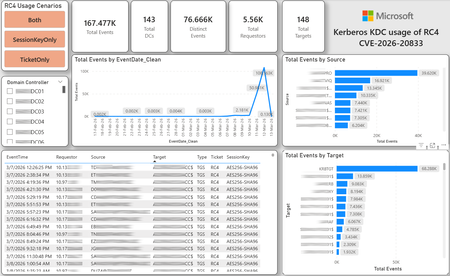
CVE-2026-20833 addresses the continued use of the RC4‑HMAC algorithm within the Kerberos protocol in Active Directory environments. Although RC4 has been retained for many years for compatibility with legacy systems, it is now considered cryptographically weak and unsuitable for modern authentication scenarios. As part of the security evolution of Kerberos, Microsoft has initiated a process of progressive protocol hardening, whose objective is to eliminate RC4 as an implicit fallback, establishing AES128 and AES256 as the default and recommended algorithms. This change should not be treated as optional or merely preventive. It represents a structural change in Kerberos behavior that will be progressively enforced through Windows security updates, culminating in a model where RC4 will no longer be implicitly accepted by the KDC. If Active Directory environments maintain service accounts, applications, or systems dependent on RC4, authentication failures may occur after the application of the updates planned for 2026, especially during the enforcement phases introduced starting in April and finalized in July 2026. For this reason, it is essential that organizations proactively identify and eliminate RC4 dependencies, ensuring that accounts, services, and applications are properly configured to use AES128 or AES256 before the definitive changes to Kerberos protocol behavior take effect. Official Microsoft References CVE-2026-25177 - Security Update Guide - Microsoft - Active Directory Domain Services Elevation of Privilege Vulnerability Microsoft Support – How to manage Kerberos KDC usage of RC4 for service account ticket issuance changes related to CVE-2026-20833 (KB 5073381) Microsoft Learn – Detect and Remediate RC4 Usage in Kerberos AskDS – What is going on with RC4 in Kerberos? Beyond RC4 for Windows authentication | Microsoft Windows Server Blog So, you think you’re ready for enforcing AES for Kerberos? | Microsoft Community Hub Risk Associated with the Vulnerability When RC4 is used in Kerberos tickets, an authenticated attacker can request Service Tickets (TGS) for valid SPNs, capture these tickets, and perform offline brute-force attacks, particularly Kerberoasting scenarios, with the goal of recovering service account passwords. Compared to AES, RC4 allows significantly faster cracking, especially for older accounts or accounts with weak passwords. Technical Overview of the Exploitation In simplified terms, the exploitation flow occurs as follows: The attacker requests a TGS for a valid SPN. The KDC issues the ticket using RC4, when that algorithm is still accepted. The ticket is captured and analyzed offline. The service account password is recovered. The compromised account is used for lateral movement or privilege escalation. Official Timeline Defined by Microsoft Important clarification on enforcement behavior Explicit account encryption type configurations continue to be honored even during enforcement mode. The Kerberos hardening associated with CVE‑2026‑20833 focuses on changing the default behavior of the KDC, enforcing AES-only encryption for TGS ticket issuance when no explicit configuration exists. This approach follows the same enforcement model previously applied to Kerberos session keys in earlier security updates (for example, KB5021131 related to CVE‑2022‑37966), representing another step in the progressive removal of RC4 as an implicit fallback. January 2026 – Audit Phase Starting in January 2026, Microsoft initiated the Audit Phase related to changes in RC4 usage within Kerberos, as described in the official guidance associated with CVE-2026-20833. The primary objective of this phase is to allow organizations to identify existing RC4 dependencies before enforcement changes are applied in later phases. During this phase, no functional breakage is expected, as RC4 is still permitted by the KDC. However, additional auditing mechanisms were introduced, providing greater visibility into how Kerberos tickets are issued in the environment. Analysis is primarily based on the following events recorded in the Security Log of Domain Controllers: Event ID 4768 – Kerberos Authentication Service (AS request / Ticket Granting Ticket) Event ID 4769 – Kerberos Service Ticket Operations (Ticket Granting Service – TGS) Additional events related to the KDCSVC service These events allow identification of: the account that requested authentication the requested service or SPN the source host of the request the encryption algorithm used for the ticket and session key This information is critical for detecting scenarios where RC4 is still being implicitly used, enabling operations teams to plan remediation ahead of the enforcement phase. If these events are not being logged on Domain Controllers, it is necessary to verify whether Kerberos auditing is properly enabled. For Kerberos authentication events to be recorded in the Security Log, the corresponding audit policies must be configured. The minimum recommended configuration is to enable Success auditing for the following subcategories: Kerberos Authentication Service Kerberos Service Ticket Operations Verification can be performed directly on a Domain Controller using the following commands: auditpol /get /subcategory:"Kerberos Service Ticket Operations" auditpol /get /subcategory:"Kerberos Authentication Service" In enterprise environments, the recommended approach is to apply this configuration via Group Policy, ensuring consistency across all Domain Controllers. The corresponding policy can be found at: Computer Configuration - Policies - Windows Settings - Security Settings - Advanced Audit Policy Configuration - Audit Policies - Account Logon Once enabled, these audits record events 4768 and 4769 in the Domain Controllers’ Security Log, allowing analysis tools—such as inventory scripts or SIEM/Log Analytics queries—to accurately identify where RC4 is still present in the Kerberos authentication flow. April 2026 – Enforcement with Manual Rollback With the April 2026 update, the KDC begins operating in AES-only mode (0x18) when the msDS-SupportedEncryptionTypes attribute is not defined. This means RC4 is no longer accepted as an implicit fallback. During this phase, applications, accounts, or computers that still implicitly depend on RC4 may start failing. Manual rollback remains possible via explicit configuration of the attribute in Active Directory. July 2026 – Final Enforcement Starting in July 2026, audit mode and rollback options are removed. RC4 will only function if explicitly configured—a practice that is strongly discouraged. This represents the point of no return in the hardening process. Official Monitoring Approach Microsoft provides official scripts in the repository: https://github.com/microsoft/Kerberos-Crypto/tree/main/scripts The two primary scripts used in this analysis are: Get-KerbEncryptionUsage.ps1 The Get-KerbEncryptionUsage.ps1 script, provided by Microsoft in the Kerberos‑Crypto repository, is designed to identify how Kerberos tickets are issued in the environment by analyzing authentication events recorded on Domain Controllers. Data collection is primarily based on: Event ID 4768 – Kerberos Authentication Service (AS‑REQ / TGT issuance) Event ID 4769 – Kerberos Service Ticket Operations (TGS issuance) From these events, the script extracts and consolidates several relevant fields for authentication flow analysis: Time – when the authentication occurred Requestor – IP address or host that initiated the request Source – account that requested the ticket Target – requested service or SPN Type – operation type (AS or TGS) Ticket – algorithm used to encrypt the ticket SessionKey – algorithm used to protect the session key Based on these fields, it becomes possible to objectively identify which algorithms are being used in the environment, both for ticket issuance and session establishment. This visibility is essential for detecting RC4 dependencies in the Kerberos authentication flow, enabling precise identification of which clients, services, or accounts still rely on this legacy algorithm. Example usage: .\Get-KerbEncryptionUsage.ps1 -Encryption RC4 -Searchscope AllKdcs | Export-Csv -Path .\KerbUsage_RC4_All_ThisDC.csv -NoTypeInformation -Encoding UTF8 Data Consolidation and Analysis In enterprise environments, where event volumes may be high, it is recommended to consolidate script results into analytical tools such as Power BI to facilitate visualization and investigation. The presented image illustrates an example dashboard built from collected results, enabling visibility into: Total events analyzed Number of Domain Controllers involved Number of requesting clients (Requestors) Most frequently involved services or SPNs (Targets) Temporal distribution of events RC4 usage scenarios (Ticket, SessionKey, or both) This type of visualization enables rapid identification of RC4 usage patterns, remediation prioritization, and progress tracking as dependencies are eliminated. Additionally, dashboards help answer key operational questions, such as: Which services still depend on RC4 Which clients are negotiating RC4 for sessions Which Domain Controllers are issuing these tickets Whether RC4 usage is decreasing over time This combined automated collection + analytical visualization approach is the recommended strategy to prepare environments for the Microsoft changes related to CVE‑2026‑20833 and the progressive removal of RC4 in Kerberos. Visualizing Results with Power BI To facilitate analysis and monitoring of RC4 usage in Kerberos, it is recommended to consolidate script results into a Power BI analytical dashboard. 1. Install Power BI Desktop Download and install Power BI Desktop from the official Microsoft website 2. Execute data collection After running the Get-KerbEncryptionUsage.ps1 script, save the generated CSV file to the following directory: C:\Temp\Kerberos_KDC_usage_of_RC4_Logs\KerbEncryptionUsage_RC4.csv 3. Open the dashboard in Power BI Open the file RC4-KerbEncryptionUsage-Dashboards.pbix using Power BI Desktop. If you are interested, please leave a comment on this post with your email address, and I will be happy to share with you. 4. Update the data source If the CSV file is located in a different directory, it will be necessary to adjust the data source path in Power BI. As illustrated, the dashboard uses a parameter named CsvFilePath, which defines the path to the collected CSV file. To adjust it: Open Transform Data in Power BI. Locate the CsvFilePath parameter in the list of Queries. Update the value to the directory where the CSV file was saved. Click Refresh Preview or Refresh to update the data. Click Home → Close & Apply. This approach allows rapid identification of RC4 dependencies, prioritization of remediation actions, and tracking of progress throughout the elimination process. List-AccountKeys.ps1 This script is used to identify which long-term keys are present on user, computer, and service accounts, enabling verification of whether RC4 is still required or whether AES128/AES256 keys are already available. Interpreting Observed Scenarios Microsoft recommends analyzing RC4 usage by jointly considering two key fields present in Kerberos events: Ticket Encryption Type Session Encryption Type Each combination represents a distinct Kerberos behavior, indicating the source of the issue, risk level, and remediation point in the environment. In addition to events 4768 and 4769, updates released starting January 13, 2026, introduce new Kdcsvc events in the System Event Log that assist in identifying RC4 dependencies ahead of enforcement. These events include: Event ID 201 – RC4 usage detected because the client advertises only RC4 and the service does not have msDS-SupportedEncryptionTypes defined. Event ID 202 – RC4 usage detected because the service account does not have AES keys and the msDS-SupportedEncryptionTypes attribute is not defined. Event ID 203 – RC4 usage blocked (enforcement phase) because the client advertises only RC4 and the service does not have msDS-SupportedEncryptionTypes defined. Event ID 204 – RC4 usage blocked (enforcement phase) because the service account does not have AES keys and msDS-SupportedEncryptionTypes is not defined. Event ID 205 – Detection of explicit enablement of insecure algorithms (such as RC4) in the domain policy DefaultDomainSupportedEncTypes. Event ID 206 – RC4 usage detected because the service accepts only AES, but the client does not advertise AES support. Event ID 207 – RC4 usage detected because the service is configured for AES, but the service account does not have AES keys. Event ID 208 – RC4 usage blocked (enforcement phase) because the service accepts only AES and the client does not advertise AES support. Event ID 209 – RC4 usage blocked (enforcement phase) because the service accepts only AES, but the service account does not have AES keys. https://support.microsoft.com/en-gb/topic/how-to-manage-kerberos-kdc-usage-of-rc4-for-service-account-ticket-issuance-changes-related-to-cve-2026-20833-1ebcda33-720a-4da8-93c1-b0496e1910dc They indicate situations where RC4 usage will be blocked in future phases, allowing early detection of configuration issues in clients, services, or accounts. These events are logged under: Log: System Source: Kdcsvc Below are the primary scenarios observed during the analysis of Kerberos authentication behavior, highlighting how RC4 usage manifests across different ticket and session encryption combinations. Each scenario represents a distinct risk profile and indicates specific remediation actions required to ensure compliance with the upcoming enforcement phases. Scenario A – RC4 / RC4 In this scenario, both the Kerberos ticket and the session key are issued using RC4. This is the worst possible scenario from a security and compatibility perspective, as it indicates full and explicit dependence on RC4 in the authentication flow. This condition significantly increases exposure to Kerberoasting attacks, since RC4‑encrypted tickets can be subjected to offline brute-force attacks to recover service account passwords. In addition, environments remaining in this state have a high probability of authentication failure after the April 2026 updates, when RC4 will no longer be accepted as an implicit fallback by the KDC. Events Associated with This Scenario During the Audit Phase, this scenario is typically associated with: Event ID 201 – Kdcsvc Indicates that: the client advertises only RC4 the service does not have msDS-SupportedEncryptionTypes defined the Domain Controller does not have DefaultDomainSupportedEncTypes defined This means RC4 is being used implicitly. This event indicates that the authentication will fail during the enforcement phase. Event ID 202 – Kdcsvc Indicates that: the service account does not have AES keys the service does not have msDS-SupportedEncryptionTypes defined This typically occurs when: legacy accounts have never had their passwords reset only RC4 keys exist in Active Directory Possible Causes Common causes include: the originating client (Requestor) advertises only RC4 the target service (Target) is not explicitly configured to support AES the account has only legacy RC4 keys the msDS-SupportedEncryptionTypes attribute is not defined Recommended Actions To remediate this scenario: Correctly identify the object involved in the authentication flow, typically: a service account (SPN) a computer account or a Domain Controller computer object Verify whether the object has AES keys available using analysis tools or scripts such as List-AccountKeys.ps1. If AES keys are not present, reset the account password, forcing generation of modern cryptographic keys (AES128 and AES256). Explicitly define the msDS-SupportedEncryptionTypes attribute to enable AES support. Recommended value for modern environments: 0x18 (AES128 + AES256) = 24 As illustrated below, this configuration can be applied directly to the msDS-SupportedEncryptionTypes attribute in Active Directory. AES can also be enabled via Active Directory Users and Computers by explicitly selecting: This account supports Kerberos AES 128 bit encryption This account supports Kerberos AES 256 bit encryption These options ensure that new Kerberos tickets are issued using AES algorithms instead of RC4. Temporary RC4 Usage (Controlled Rollback) In transitional scenarios—during migration or troubleshooting—it may be acceptable to temporarily use: 0x1C (RC4 + AES) = 28 This configuration allows the object to accept both RC4 and AES simultaneously, functioning as a controlled rollback while legacy dependencies are identified and corrected. However, the final objective must be to fully eliminate RC4 before the final enforcement phase in July 2026, ensuring the environment operates exclusively with AES128 and AES256. Scenario B – AES / RC4 In this case, the ticket is protected with AES, but the session is still negotiated using RC4. This typically indicates a client limitation, legacy configuration, or restricted advertisement of supported algorithms. Events Associated with This Scenario During the Audit Phase, this scenario may generate: Event ID 206 Indicates that: the service accepts only AES the client does not advertise AES in the Advertised Etypes In this case, the client is the issue. Recommended Action Investigate the Requestor Validate operating system, client type, and advertised algorithms Review legacy GPOs, hardening configurations, or settings that still force RC4 For Linux clients or third‑party applications, review krb5.conf, keytabs, and Kerberos libraries Scenario C – RC4 / AES Here, the session already uses AES, but the ticket is still issued using RC4. This indicates an implicit RC4 dependency on the Target or KDC side, and the environment may fail once enforcement begins. Events Associated with This Scenario This scenario may generate: Event ID 205 Indicates that the domain has explicit insecure algorithm configuration in: DefaultDomainSupportedEncTypes This means RC4 is explicitly allowed at the domain level. Recommended Action Correct the Target object Explicitly define msDS-SupportedEncryptionTypes with 0x18 = 24 Revalidate new ticket issuance to confirm full migration to AES / AES Conclusion CVE‑2026‑20833 represents a structural change in Kerberos behavior within Active Directory environments. Proper monitoring is essential before April 2026, and the msDS-SupportedEncryptionTypes attribute becomes the primary control point for service accounts, computer accounts, and Domain Controllers. July 2026 represents the final enforcement point, after which there will be no implicit rollback to RC4.21KViews4likes12Comments
Network Monitoring
Hi, I recently applied Network Security Groups on Virtual Networks (NSG). Now my question is, is it possible to monitor / record the network traffic? For example, I've configured many rules on the NSG, now a application on a Server won't work and my first guess is the NSG is blocking the communication. How do I see now which port the application is using so I can set a new rule to the NSG? I know when you already know the port you can check it in Network Watcher "IP flow verify and NSG diagnostics" as a whatif state. Traffic Analytics isn't the right answer too or am I seeing it wrong? Vnet Flow Logs should be the right thing. I configured it, applied traffic analytics and a account storage. Applied it for testing on a nic but I don't see anything practical for my use? The only thing Iwish is to see live or logged the traffic if the NSG blocked anything and troubleshoot.557Views0likes5CommentsStorage Accounts - Networking
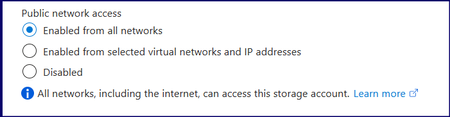
Hi All, Seems like a basic issue, however, I cannot seem to resolve the issue. In a nutshell, a number of storage accounts (and other resources) were created with the Public Network Access set as below: I would like to change them all to them all to Enabled from selected virtual networks and IP addresses or even Disabled. However, when I change to Enabled from selected virtual networks and IP addresses, connectivity from, for example, Power Bi to the Storage Account fails. I have added the VPN IP's my local IP etc. But all continue to fail connection or authentication. Once it is changed back to Enabled for All networks everything works, i.e. Power Bi can access the Azure Blob Storage and refresh successfully. I have also enabled 'Allow Azure services on the trusted services list to access this storage account'. But PBI fails to have access to the data. data Source Credentials error, whether using Key, Service Principal etc, it fails. As soon as I switch it back to Enable From All Networks, it authenticates straight away. One more idea I had was to add ALL of the Resource Instances, as this would white list more Azure services, although PBI should be covered by enabling 'Allow Azure services on the trusted services list to access this storage account'. I thought I might give it a try. Also, I created an NSG and used the ServiceTags file to create an inbound rule to allow Power BI from UK South. Also, I have created a Private Endpoint. This should all have worked but still can’t set it to restricted networks. I must be missing something fundamental or there is something fundamentally off with this tenant. When any of the two restrictive options are selected, do they also block various Microsoft services? Any help would be gratefully appreciated.389Views1like3Comments
Replicate workload from VMWare to Azure using Azure Site Recovery(ASR)
Hello, I am working on a project to replicate worklooad hosted on a VMWare to Azure Site Recovery for disaster recovery purpose. Current Environment: More than 80 VMs hosted on VMWare managed by VMWare Sphere running both Linux and Windows OS.. Databases: Oracle DB, Microsoft SQL and MySQL Requirements: seamless failover and disaster recovery requirements. scalable setup No down-time integrate identity and access mgt. integration with Microsoft Entra ID. RTO < 2 hrs and RPO > 15 minutes Backup: critical database backup every 3 hours App servers: Daily*incremental) and weekly (full) Transaction Logs: every 10 mins backup config. should be Daily Questions I have confirmed ASR supports fail back from Azure- on premise(VMWare specifically). Hence ASR(Azure site recovery) will be used for the project. However, what is the seamless method to replicate the databases(Oracle, Microsoft SQL and MySQL). https://learn.microsoft.com/en-us/azure/site-recovery/vmware-azure-failback What is the best approach to replicate the Application Servers? integrating existing on-premise 3rd party network security tool for firewall etc instead of the azure cloud native security tool. recommendation?? cost optimization techniques/recommendations Best practices for conducting non-destructive DR drills.204Views0likes2Comments
Azure RBAC Custom Role Best Practices or Common Build Patterns
As a platform admin, I want to grant application admins Contributor access while removing their ability to write or delete most Microsoft.Network resource types, with a few exceptions such as Private Endpoints, Network Interfaces, and Application Gateways. Based on the effective control plane permissions logic, we designed two custom roles. The first role is a duplicate of the Contributor role, but with Microsoft.Network//Write and Microsoft.Network//Delete added to notActions. The second role adds back specific Microsoft.Network operations using wildcarded resource types, such as Microsoft.Network/networkInterfaces/*. Application Admin Effective Permissions = Role 1 (Contributor - Microsoft.Network) + Role 2 (for example, Microsoft.Network/networkInterfaces/, Microsoft.Network/networkSecurityGroups/, Microsoft.Network/applicationGateways/write, etc.) I understand that Microsoft RBAC best practices recommend avoiding wildcard (*) operations. However, my team has found that building roles with individual operations is extremely tedious and time-consuming, especially when trying to understand the impact of each operation. Does anyone have suggestions for a simpler or more maintainable pattern for implementing this type of custom RBAC design?213Views1like3CommentsPatterns for low-code Azure config state snapshot + recovery solution for resource groups
I’m looking for patterns that capture resource configuration changes over time and support best-effort recovery (redeployment) of resource config state. I understand that authoritative IaC (Bicep) would be the most mature option, however, I am wondering if anyone has ever implemented a solution similar to what I have described above. Ideally this would be a low-code, Azure native solution.63Views0likes2Comments
Ingesting Logs through Azure Private Link
Hi, We are currently using Azure Private Link within our environment and we are attempting to ingest logs into Log Analytics. When I reached out to Microsoft Support, it appears that the CCF connectors will not work using Private Link and the Azure Functions connectors are becoming depricated. Has anyone else run into this issue and what is the solution for getting logs into Sentinel through the Private Link, specifically API log sources? Did this require a custom app for each of these log sources or some sort of custom script that lives on an AMA host within the Private Link to ingest the logs? Any advice here would be greatly appeciated. Thank you,123Views0likes4CommentsBest practices for Infrastructure as Code CI/CD on Azure
Hello Folks! If your IaC repo has a dev folder, a test folder, and a prod folder that all started out identical and have since drifted in three different directions, this session is for you. At the Microsoft Azure Infrastructure Summit 2026, Jack Tracey and Jared Holgate (the team behind Azure Landing Zones and Azure Verified Modules) laid out, in plain language, how to ship Infrastructure as Code on Azure without leaking secrets, blowing up production, or duplicating thousands of lines of module code across folders. Here are the bits that matter most for IT Pros and platform engineers. 📺 Watch the session: Why IT Pros Should Care You are the one paged at 2am when a pipeline rolls out a broken NSG rule. You are the one carrying the cert that the deploy service principal still uses. You are the one explaining to audit why the prod plan and the prod apply ran with the same Owner-scoped identity. So this session is squarely in your lane. It covers: Why hand-rolled modules are slowly becoming an anti-pattern on Azure. A repo layout that scales to dozens of environments without copy-paste. How to get rid of static client secrets and federated cert auth, for good. Where approvals actually need to live in GitHub vs. Azure DevOps so they cannot be bypassed. The three-layer Terraform state model that Microsoft uses inside Azure Landing Zones. In short, this is the practitioner version of “do IaC properly,” from the people who write the platform code Microsoft ships. The IaC CI/CD problem Jack opened with a slide that gets a knowing laugh from anyone who has been doing this for more than a year. You start with one repo, one Bicep file, one happy team. Eighteen months later, you have a landingzone-prod-v2-final-USE-THIS-ONE folder, a service principal whose secret expired two days ago, and a pipeline nobody dares touch. The drivers of that pain are consistent: Modules written from scratch, never tested the same way twice. Per-environment folders that diverge silently over time. Long-lived secrets and certificates sitting in pipeline variables. One identity doing both plan and apply, with Owner on the management group. No approvals, or approvals in the wrong place. No tests until the deploy fails in prod. The good news is none of these problems are new, and the patterns to fix them are well understood. The session walks through them in the order you would actually adopt them. Patterns that work in production 1. Don’t write modules. Consume Azure Verified Modules. This is best practice number one, and Jack and Jared spent a full chapter on it for a reason. Azure Verified Modules (AVM) is the official Microsoft initiative that consolidates IaC modules for Azure into a single, supported, Well-Architected-aligned library, available in both Bicep and Terraform. The Bicep versions live in the Public Bicep Registry under the avm/ namespace. The Terraform versions live on the HashiCorp Terraform Registry under Azure/avm-*. What you get for free when you consume an AVM module: Defaults that line up with the Well-Architected Framework (RBAC over access policies, TLS 1.2, private endpoint support out of the box). Semantic versioning so you can pin and review the diff before upgrading. Deployment tests on every module, run by the AVM team. A real Microsoft support path, not a random GitHub issue. A great backchannel question came up about brownfield. Jared’s answer: AVM is just standard IaC, no special tooling. In Bicep, brownfield adoption is straightforward because there is no state. In Terraform, the new import blocks make it less painful than it used to be. 2. One folder, one source of truth Repo layout is where most teams go wrong, and the fix is simple. You should have one set of module code, and per-environment differences should be expressed as data, not as duplicated code. In Bicep, that means a single main.bicep and one .bicepparam file per environment. In Terraform, the same main.tf with one .tfvars file per environment. If you find yourself copying a module folder to dev, test, and prod, stop. Within six months those three folders will not look the same, and at that point you no longer have IaC, you have three handwritten environments that happen to be checked into Git. 3. Kill static secrets. Use Workload Identity Federation. This was the chat highlight. The question came in: “So in short, replace all service principals with credential secrets with user-assigned managed identity?” Jack and Jared both replied within seconds: yes, 10 points to you. Workload Identity Federation (OIDC) lets your GitHub Actions or Azure DevOps pipeline exchange a short-lived token from its own OIDC provider for a Microsoft Entra ID token. No client secrets, no certs to rotate, no Key Vault dance to retrieve them. A couple of things to know: Subject claim format differs by platform. GitHub uses repo:org/repo:environment:prod style claims; Azure DevOps uses sc://org/project/connection. Pick the right one or auth silently fails. Use a user-assigned managed identity as the target. It survives the pipeline being deleted and gives you one place to manage role assignments. The Azure Bicep Deploy GitHub Action and the official AzureRM / AzAPI Terraform providers all support OIDC natively. 4. Split plan from apply Even with OIDC, a single Owner-scoped identity that does both terraform plan and terraform apply is a problem. Plan needs Reader (and a few read-data permissions). Apply needs Contributor or Owner depending on what you deploy. Split them into two identities, federated to two different stages of your pipeline, and you have a real least-privilege story to take to your security team. Securing the pipeline Auth is half the story. The other half is making sure only the right pipelines, with the right approvals, can use those identities at all. Governed templates. Keep reusable pipeline templates in a separate, locked-down repo. Pin federated credentials or service connections to those templates via the job_workflow_ref claim on GitHub or required template checks on Azure DevOps. If someone forks the workflow, the OIDC exchange refuses to issue a token. Approvals in the right place. On GitHub, use Environments and require reviewers on prod. On Azure DevOps, put the approval on the Service Connection, not the Environment. The Environment approval can be bypassed by a clever YAML author. The Service Connection approval cannot. Shift left, hard. Pre-commit hooks for bicep format and terraform fmt, lint on every PR, GitHub Advanced Security for secret and code scanning, automated tests on PRs, and ephemeral test environments spun up per PR and torn down at the end. One attendee mentioned using Pester for end-to-end infra tests against a sandbox sub. That is exactly the pattern. Three-layer state. For Terraform on Azure Landing Zones, the recommended split is: platform landing zone (one state), application landing zone / subscription vending (one state per landing zone), application workload (one state per workload). Never collapse all subs into one state file. You will regret it the first time someone runs apply at the wrong time. Getting Started You do not have to do all of this at once. Pick the highest-pain item first. Still using client secrets in pipelines? Fix that this sprint. Wire up OIDC and a user-assigned managed identity. Drifting per-environment folders? Consolidate to one module plus per-env param files. Writing your own storage account module for the fifth time? Try the matching AVM module from the registry. Put approvals on the Service Connection (ADO) or Environment (GitHub) for prod. Add linting and pre-commit hooks. Split plan and apply identities. Layer your Terraform state. It is a roadmap, not a weekend project. Every step pays back the moment you take it. Resources Azure Verified Modules portal. the official AVM home, with module indexes for Bicep and Terraform, specs, and FAQ. Azure Verified Modules on GitHub. the tracking repo and source of truth for module proposals. Bicep on Microsoft Learn. official language docs, deployment guidance, and references for the public registry. Azure Bicep Deploy GitHub Action. the OIDC-friendly action for deploying Bicep from GitHub Actions. GitHub Actions for Azure on Microsoft Learn. Workload Identity Federation setup for GitHub Actions targeting Azure. Configuring OpenID Connect in Azure (GitHub Docs). the canonical OIDC subject claims and federated credential walkthrough for GitHub. Azure Pipelines documentation. service connections, approvals and checks, required templates, and YAML reference. Watch the rest of the Summit This session was one of many at the Microsoft Azure Infrastructure Summit 2026. If you want the keynotes, the Bicep deep dives, the AKS sessions, and the storage track, the full playlist is here: Microsoft Azure Infra Summit 2026 playlist Cheers! Pierre Roman86Views0likes0CommentsBuilding Secure, Well-Architected Azure Workloads with Azure Verified Modules and GitHub Copilot
Hello Folks! If you have been writing Bicep or Terraform for Azure over the last few years, you have probably lived this story. You pick a community module, it works great for six months, then the maintainer moves on, issues stop getting answered, and you are stuck owning code you never wrote. At the Microsoft Azure Infra Summit 2026, Jack Tracy and Jarrod Holgate (tech leads on the Azure Verified Modules project) walked us through how AVM solves that, and how pairing it with GitHub Copilot and Spec Kit changes the way IT pros build Azure workloads. 📺 Watch the session: Why IT Pros Should Care This is not a developer-only topic. If you are the person responsible for landing zones, platform engineering, or the IaC pipelines that other teams ship through, this hits you directly. You stop owning home-grown storage account and VNet modules that no two teams write the same way. You get secure-by-default resources without having to draft a 40-page internal coding standard. You can let application teams move fast without sacrificing the Well-Architected Framework guardrails you care about. You get a supported, Microsoft-backed module library with a clear lifecycle, instead of betting on an abandoned repo. You finally have a deterministic way to put AI to work on infrastructure code without it inventing things you do not want in production. If any of that sounds like a Tuesday for you, this session is worth 40 minutes. What are Azure Verified Modules Azure Verified Modules (AVM) is the official Microsoft infrastructure-as-code module library for both Bicep and Terraform. Jack put it plainly in the session: AVM is the one-time solution that is not going to go away, with ownership, a defined lifecycle, structure, and well-defined specifications. Here is what makes AVM different from the previous landscape of community repos: It is supported in multiple IaC languages today (Bicep and Terraform), with consistent specifications across both. Modules are aligned to the Azure Well-Architected Framework by default. Zone redundancy on, public IPs off, sensible TLS minimums, right out of the box. Everything is still flexible, you can override any of it via a parameter or variable. It is open source. People inside and outside Microsoft can contribute and maintain modules. It consolidates the older CARML and Terraform Verified Modules efforts under one roof, owned by Microsoft FTEs and backed by the AVM core team. AVM has three module classifications, and understanding them is half the battle: Resource modules. A one-to-one mapping to a single resource type, like a storage account or a virtual network. Need ten of them, loop the module ten times. Pattern modules. A collection of resources, usually built on top of resource modules, that delivers a bigger slice of an architecture. The Azure Landing Zone is roughly five pattern modules behind the scenes. Utility modules. Helpers you probably never call directly, but that the library uses for things like region lookups, SKU availability, and naming standards. One thing that gets undersold: AVM is not just for you. The Azure Developer CLI templates use it. Azure Landing Zone and Sovereign Landing Zone are built on it. Internal Microsoft service teams use it. When you adopt AVM, you are using the same building blocks Microsoft uses. Pairing AVM with GitHub Copilot This is where the session gets interesting. AVM gives you the trusted Lego bricks. GitHub Copilot gives you a coding assistant. The problem, as Jack called out, is that AI is non-deterministic by default. It is great at solving ambiguous problems, but you cannot just point it at a blank repo and trust it to stamp out production infrastructure. That is the gap spec-driven development is designed to fill. Spec-driven development is a documentation-first approach. Instead of telling Copilot “write me a Terraform module for a hub-spoke network,” you write a structured specification up front that captures intent, quality bar, security requirements, and coding standards. The AI then uses that spec as the contract, generates code, validates against it, and loops until the output matches what you asked for. Jarrod walked through Spec Kit, the open source toolkit maintained by GitHub and Microsoft, which formalizes this into eight steps: Constitution. The non-negotiables. “We must use AVM. We must comply with PCI. Optimize for cost.” This is your project DNA. Specify. What you actually want to build, focused on user goals and outcomes, not implementation details. Clarify. Copilot scans the spec, finds ambiguities, and asks you targeted questions (IP ranges, bastion SKUs, anything that is fuzzy). Plan. A technical plan that maps the spec to your standards and constraints. Checklist. A quality checklist the agent uses later to validate its own work. Tasks. The plan broken down into small, reviewable steps. Analyze. A consolidated report across the spec, plan, and tasks so you can sanity check the whole package. Implement. Copilot finally writes the code, validating against everything above as it goes. The critical detail: at every one of those gates, you review. You are still the human in the loop. The AI is not flying solo, and you are not signing off on a thousand-line code dump. When you wire AVM into the constitution (“use AVM modules wherever possible”), Copilot stops trying to hand-roll raw resource declarations. It composes solutions out of trusted, tested, WAF-aligned modules. That is what makes the combination so powerful. Spec Kit is not the only option. Jack mentioned two others worth knowing about: OpenSpec. Leaner than Spec Kit, brownfield-first, aimed at smaller experienced teams. Squad. A completely different model built by a Microsoft team. No specs. Instead, a virtual team of agent personas (IaC specialist, UX, deployment, an orchestrator called Ralph) that collaborate to deliver work. Worth a look if your style is more agent-team than document-first. Real-world value So what does this actually buy you when Monday morning hits? Speed without sacrificing the bar. Application teams stop writing storage account boilerplate. They focus on what the workload needs to do, and the AVM modules handle the resilient, compliant defaults. Compliance becomes additive, not a rewrite. If you need to add HIPAA or NIST compliance later, you add another spec on top of your existing constitution and iterate. You do not throw out your modules. Less ambiguity loop, fewer tokens burned. A good spec up front means fewer Copilot iterations. You get to a working answer faster, with less back and forth. Trust in the AI output. Because AVM modules are tested, supported, and WAF-aligned, what Copilot stitches together is built on solid foundations. You can review the spec instead of every line of Terraform. Your developers shift up the stack. They stop writing IaC primitives and start designing architectures and requirements. That is where the business value lives anyway. A note on tradeoffs. AVM modules are intentionally generic and flexible, so you sometimes get parameters you do not need, and the well-architected defaults can be opinionated for your scenario. The fix is simple, override the parameter. You are trading some control for a lot of consistency, and for most teams that trade is the right one. Getting Started If you want to try this for yourself, here is the path I would take: Go to aka.ms/AVM and bookmark it. Everything starts there. Browse the Bicep and Terraform module indexes. Find the resource you would normally hand-write and try the AVM version in a dev subscription. Read the AVM specifications so you understand the contract every module follows. It makes the parameter sets a lot less surprising. Install Spec Kit via the Specify CLI (the GitHub repo has the instructions) and try the AVM example under the experimental “AI-Assisted Solution Development” section on the AVM site. Run the eight-step Spec Kit flow against a small workload. Do not start with your production landing zone. Pick something contained, like a single app with a web tier, a database, and a Key Vault. Keep the human in the loop. Review every spec gate. That is where the quality comes from. Resources Azure Verified Modules portal (aka.ms/AVM) Azure Verified Modules on GitHub Azure Verified Modules on Microsoft Learn GitHub Spec Kit Spec-driven development with AI (GitHub Blog) Implement spec-driven development with Spec Kit (Microsoft Learn) GitHub Copilot Azure Well-Architected Framework Watch the rest of the Summit If you found this useful, there is a lot more where it came from. The Microsoft Azure Infra Summit 2026 playlist covers landing zones, deployment stacks, AKS networking, storage, and the AI side of platform operations. Block out an afternoon and binge it. Microsoft Azure Infra Summit 2026 on YouTube Cheers! Pierre Roman122Views1like0Comments