azure service bus
85 TopicsJSON Structure: A JSON schema language you'll love
We talk to many customers moving structured data through queues and event streams and topics, and we see a strong desire to create more efficient and less brittle communication paths governed by rich data definitions well understood by all parties. The way those definitions are often shared are schema documents. While there is great need, the available schema options and related tool chains are often not great. JSON Schema is popular for its relative simplicity in trivial cases, but quickly becomes unmanageable as users employ more complex constructs. The industry has largely settled on "Draft 7," with subsequent releases seeing weak adoption. There's substantial frustration among developers who try to use JSON Schema for code generation or database mapping—scenarios it was never designed for. JSON Schema is a powerful document validation tool, but it is not a data definition language. We believe it's effectively un-toolable for anything beyond pure validation; practically all available code-generation tools agree by failing at various degrees of complexity. Avro and Protobuf schemas are better for code generation, but tightly coupled to their respective serialization frameworks. For our own work in Microsoft Fabric, we're initially leaning on an Avro-compatible schema with a small set of modifications, but we ultimately need a richer type definition language that ideally builds on people's familiarity with JSON Schema. This isn't just a Microsoft problem. It's an industry-wide gap. That's why we've submitted JSON Structure as a set of Internet Drafts to the IETF, aiming for formal standardization as an RFC. We want a vendor-neutral, standards-track schema language that the entire industry can adopt. What Is JSON Structure? JSON Structure is a modern, strictly typed data definition language that describes JSON-encoded data such that mapping to and from programming languages and databases becomes straightforward. It looks familiar—if you've written "type": "object", "properties": {...} before, you'll feel right at home. But there's a key difference: JSON Structure is designed for code generation and data interchange first, with validation as an optional layer rather than the core concern. This means you get: Precise numeric types: int32 , int64 , decimal with precision and scale, float , double Rich date/time support: date , time , datetime , duration —all with clear semantics Extended compound types: Beyond objects and arrays, you get set , map , tuple , and choice (discriminated unions) Namespaces and modular imports: Organize your schemas like code Currency and unit annotations: Mark a decimal as USD or a double as kilograms Here's a compact example that showcases these features. We start with the schema header and the object definition: { "$schema": "https://json-structure.org/meta/extended/v0/#", "$id": "https://example.com/schemas/OrderEvent.json", "name": "OrderEvent", "type": "object", "properties": { Objects require a name for clean code generation. The $schema points to the JSON Structure meta-schema, and the $id provides a unique identifier for the schema itself. Now let's define the first few properties—identifiers and a timestamp: "orderId": { "type": "uuid" }, "customerId": { "type": "uuid" }, "timestamp": { "type": "datetime" }, The native uuid type maps directly to Guid in .NET, UUID in Java, and uuid in Python. The datetime type uses RFC3339 encoding and becomes DateTimeOffset in .NET, datetime in Python, or Date in JavaScript. No format strings, no guessing. Next comes the order status, modeled as a discriminated union: "status": { "type": "choice", "choices": { "pending": { "type": "null" }, "shipped": { "type": "object", "name": "ShippedInfo", "properties": { "carrier": { "type": "string" }, "trackingId": { "type": "string" } } }, "delivered": { "type": "object", "name": "DeliveredInfo", "properties": { "signedBy": { "type": "string" } } } } }, The choice type is a discriminated union with typed payloads per case. Each variant can carry its own structured data— shipped includes carrier and tracking information, delivered captures who signed for the package, and pending carries no payload at all. This maps to enums with associated values in Swift, sealed classes in Kotlin, or tagged unions in Rust. For monetary values, we use precise decimals: "total": { "type": "decimal", "precision": 12, "scale": 2 }, "currency": { "type": "string", "maxLength": 3 }, The decimal type with explicit precision and scale ensures exact monetary math—no floating-point surprises. A precision of 12 with scale 2 gives you up to 10 digits before the decimal point and exactly 2 after. Line items use an array of tuples for compact, positional data: "items": { "type": "array", "items": { "type": "tuple", "properties": { "sku": { "type": "string" }, "quantity": { "type": "int32" }, "unitPrice": { "type": "decimal", "precision": 10, "scale": 2 } }, "tuple": ["sku", "quantity", "unitPrice"], "required": ["sku", "quantity", "unitPrice"] } }, Tuples are fixed-length typed sequences—ideal for time-series data or line items where position matters. The tuple array specifies the exact order: SKU at position 0, quantity at 1, unit price at 2. The int32 type maps to int in all mainstream languages. Finally, we add extensible metadata using set and map types: "tags": { "type": "set", "items": { "type": "string" } }, "metadata": { "type": "map", "values": { "type": "string" } } }, "required": ["orderId", "customerId", "timestamp", "status", "total", "currency", "items"] } The set type represents unordered, unique elements—perfect for tags. The map type provides string keys with typed values, ideal for extensible key-value metadata without polluting the main schema. Here's what a valid instance of this schema looks like: { "orderId": "f47ac10b-58cc-4372-a567-0e02b2c3d479", "customerId": "7c9e6679-7425-40de-944b-e07fc1f90ae7", "timestamp": "2025-01-15T14:30:00Z", "status": { "shipped": { "carrier": "Litware", "trackingId": "794644790323" } }, "total": "129.97", "currency": "USD", "items": [ ["SKU-1234", 2, "49.99"], ["SKU-5678", 1, "29.99"] ], "tags": ["priority", "gift-wrap"], "metadata": { "source": "web", "campaign": "summer-sale" } } Notice how the choice is encoded as an object with a single key indicating the active case— {"shipped": {...}} —making it easy to parse and route. Tuples serialize as JSON arrays in the declared order. Decimals are encoded as strings to preserve precision across all platforms. Why Does This Matter for Messaging? When you're pushing events through Service Bus, Event Hubs, or Event Grid, schema clarity is everything. Your producers and consumers often live in different codebases, different languages, different teams. A schema that generates clean C# classes, clean Python dataclasses, and clean TypeScript interfaces—from the same source—is not a luxury. It's a requirement. JSON Structure's type system was designed with this polyglot reality in mind. The extended primitive types map directly to what languages actually have. A datetime is a DateTimeOffset in .NET, a datetime in Python, a Date in JavaScript. No more guessing whether that "string with format date-time" will parse correctly on the other side. SDKs Available Now We've built SDKs for the languages you're using today: TypeScript, Python, .NET, Java, Go, Rust, Ruby, Perl, PHP, Swift, and C. All SDKs validate both schemas and instances against schemas. A VS Code extension provides IntelliSense and inline diagnostics. Code and Schema Generation with Structurize Beyond validation, you often need to generate code or database schemas from your type definitions. The Structurize tool converts JSON Structure schemas into SQL DDL for various database dialects, as well as self-serializing classes for multiple programming languages. It can also convert between JSON Structure and other schema formats like Avro, Protobuf, and JSON Schema. Here's a simple example: a postal address schema on the left, and the SQL Server table definition generated by running structurize struct2sql postaladdress.json --dialect sqlserver on the right: JSON Structure Schema Generated SQL Server DDL { "$schema": "https://json-structure.org/meta/extended/v0/#", "$id": "https://example.com/schemas/PostalAddress.json", "name": "PostalAddress", "description": "A postal address for shipping or billing", "type": "object", "properties": { "id": { "type": "uuid", "description": "Unique identifier for the address" }, "street": { "type": "string", "description": "Street address with house number" }, "city": { "type": "string", "description": "City or municipality" }, "state": { "type": "string", "description": "State, province, or region" }, "postalCode": { "type": "string", "description": "ZIP or postal code" }, "country": { "type": "string", "description": "ISO 3166-1 alpha-2 country code" }, "createdAt": { "type": "datetime", "description": "When the address was created" } }, "required": ["id", "street", "city", "postalCode", "country"] } CREATE TABLE [PostalAddress] ( [id] UNIQUEIDENTIFIER, [street] NVARCHAR(200), [city] NVARCHAR(100), [state] NVARCHAR(50), [postalCode] NVARCHAR(20), [country] NVARCHAR(2), [createdAt] DATETIME2, PRIMARY KEY ([id], [street], [city], [postalCode], [country]) ); EXEC sp_addextendedproperty 'MS_Description', 'A postal address for shipping or billing', 'SCHEMA', 'dbo', 'TABLE', 'PostalAddress'; EXEC sp_addextendedproperty 'MS_Description', 'Unique identifier for the address', 'SCHEMA', 'dbo', 'TABLE', 'PostalAddress', 'COLUMN', 'id'; EXEC sp_addextendedproperty 'MS_Description', 'Street address with house number', 'SCHEMA', 'dbo', 'TABLE', 'PostalAddress', 'COLUMN', 'street'; -- ... additional column descriptions The uuid type maps to UNIQUEIDENTIFIER , datetime becomes DATETIME2 , and the schema's description fields are preserved as SQL Server extended properties. The tool supports PostgreSQL, MySQL, SQLite, and other dialects as well. Mind that all this code is provided "as-is" and is in a "draft" state just like the specification set. Feel encouraged to provide feedback and ideas in the GitHub repos for the specifications and SDKs at https://github.com/json-structure/ Learn More We've submitted JSON Structure as a set of Internet Drafts to the IETF, aiming for formal standardization as an RFC. This is an industry-wide issue, and we believe the solution needs to be a vendor-neutral standard. You can track the drafts at the IETF Datatracker. Main site: json-structure.org Primer: JSON Structure Primer Core specification: JSON Structure Core Extensions: Import | Validation | Alternate Names | Units | Composition IETF Drafts: IETF Datatracker GitHub: github.com/json-structure7.7KViews8likes1CommentAnnouncing General Availability of Geo-Replication for Azure Service Bus Premium
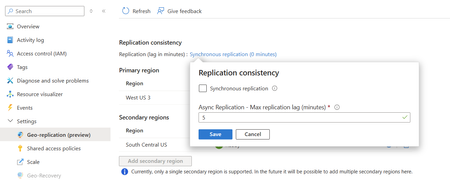
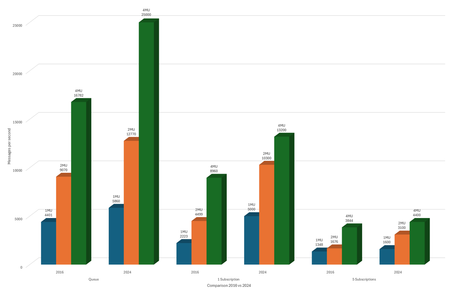
Today we are excited to announce general availability of the Geo-Replication feature for Azure Service Bus in the premium tier. This feature ensures that the metadata and data of a namespace are continuously replicated from a primary region to a secondary region. Moreover, this feature allows promoting a secondary region at any time. The Geo-Replication feature is the latest option to insulate Azure Service Bus applications against outages and disasters. Other options are Geo-Disaster Recovery and Availability Zones. Differentiation There are currently two features that provide Geo-Disaster Recovery in Azure Service Bus for the Premium tier. First, there is Geo-Disaster Recovery (Metadata DR) that just provides replication of metadata. Second, Geo-Replication, which is now GA, provides replication of both metadata and data. Neither Geo-Disaster Recovery feature should be confused with Availability Zones. Regardless of if it is Metadata DR or Geo replication, both geographic recovery features provide resilience between Azure regions such as East US and West US. Availability Zones are available on all Service Bus tiers, and support provides resilience within a specific geographic region, such as East US. For a detailed discussion of disaster recovery in Microsoft Azure, see this article. Concepts The Geo-Replication feature implements metadata and data replication in a primary-secondary replication model. It works with a single namespace, and at a given time there’s only one primary region, which is serving both producers and consumers. There is a single hostname used to connect to the namespace, which always points to the current primary region. After promoting a secondary region, the hostname points to the new primary region, and the old primary region is demoted to secondary region. After the new secondary has been re-initialized, it is possible to promote this region again to primary at any moment. Replication modes There are two replication modes, synchronous and asynchronous. It's important to know the differences between the two modes. Asynchronous replication Using asynchronous replication, all requests are committed on the primary, after which an acknowledgment is sent to the client. Replication to the secondary regions happens asynchronously. Users can configure the maximum acceptable amount of lag time, the offset between the latest action on the primary and the secondary regions. If the lag for an active secondary grows beyond user configuration, the primary will throttle incoming requests. Synchronous replication Using synchronous replication, all requests are replicated to the secondary, which must commit and confirm the operation before committing on the primary. As such, your application publishes at the rate it takes to publish, replicate, acknowledge, and commit. Moreover, it also means that your application is tied to the availability of both regions. If the secondary region goes down, messages aren't acknowledged and committed, and the primary will throttle incoming requests. Promotion The customer is in control of promoting a secondary region, providing full ownership and visibility for outage resolution. When choosing Planned promotion, the service waits to catch up the replication lag before initiating the promotion. On the other hand, when choosing Forced promotion, the service immediately initiates the promotion. Pricing The Premium tier for Service Bus is priced per Messaging Unit. With the Geo-Replication feature, secondary regions run on the same number of MUs as the primary region, and the pricing is calculated over the total number of MUs. Additionally, there is a charge for based on the published bandwidth times the number of secondary regions. More information on this feature can be found in the documentation.1.3KViews4likes0Comments
Bridging Connectivity: Exploring Azure Relay Bridge (azbridge)
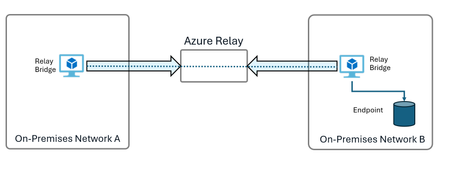
Introduction to Secure Remote Access with Azure Relay and Azbridge In modern IT environments, securely accessing on-premises resources from remote locations is a common challenge. Traditional methods, such as setting up VPNs, often require complex configurations and can introduce significant overhead. For organizations seeking a more streamlined solution, Azure Relay, combined with the open-source tool Azure Relay Bridge (azbridge), offers an efficient way to establish secure, direct connections without the need for VPNs. Azbridge leverages Azure Relay to create TCP, UDP, HTTP, and Unix Socket tunnels, enabling secure traversal through NATs and firewalls using only outbound HTTPS (443) connectivity. This makes it ideal for connecting remote clients to on-premises resources, such as Remote Desktop Protocol (RDP) sessions, without exposing them to the public internet. While Azure Relay is fully supported by Microsoft, it’s important to note that azbridge is an open-source tool and is not covered by Microsoft support. Users can seek assistance for Azure Relay, but azbridge-specific issues should be reported directly on its repository, where response times may vary. In this guide, we’ll walk through the setup process for using azbridge with Azure Relay to create an RDP connection. You’ll learn how to configure a Hybrid Connection in Azure, customize client and server configuration files, and run azbridge as a service across different operating systems. Example Use Case for AZBridge Azbridge enables secure Remote Desktop Protocol (RDP) connections by allowing users to expose a network-isolated socket that can be accessed from an entirely separate network. This approach provides secure, remote access to on-premises resources—such as RDP, databases, or web servers—without the complexity of setting up a VPN, making it ideal for users needing isolated, controlled access across network boundaries. Using Azure Relay, azbridge creates direct tunnels that bypass NATs and firewalls without requiring extensive network configuration. This setup not only simplifies access but also enhances security by enabling RDP connections without exposing sessions to the public internet, thereby reducing potential risks. In many situations, users need access to specific resource endpoints rather than an entire network. Azbridge is especially valuable in scenarios such as accessing billing databases in franchise locations, integrating with secure test systems, or making web service calls to protected applications. By leveraging Azure Relay, azbridge provides a controlled way to reach exactly the endpoint you need without exposing the entire network that it is in. Additionally, azbridge is a cost-effective solution, avoiding traditional VPN licensing fees and charging only for active Azure Relay connections. Because it relies on outbound HTTPS (443), azbridge works seamlessly across restrictive networks, allowing connections without additional firewall adjustments. For developers and IT admins, azbridge provides quick, secure access to on-premises machines from any location, serving as a fast, flexible alternative to traditional VPNs for endpoint-specific connectivity. The diagram above demonstrates how azbridge enables a secure Remote Desktop Protocol (RDP) connection across network boundaries using Azure Relay. In this setup, On-Premises Network A contains the client machine, where azbridge (labeled as "Relay Bridge") is installed. This client is seeking to establish an RDP connection to a remote machine located in a different network, On-Premises Network B. Azure Relay acts as a secure intermediary between the two networks, facilitating the connection without exposing either network to the public internet. By creating a direct tunnel that bypasses NATs and firewalls, Azure Relay allows the client in Network A to communicate with the endpoint in Network B safely. On-Premises Network B contains the target machine with azbridge installed, which is also labeled as "Relay Bridge." This machine hosts the specific endpoint (such as an RDP server) that the client in Network A is trying to access. Through this configuration, azbridge in Network A connects via Azure Relay to reach the endpoint in Network B without requiring a VPN. Only the designated RDP endpoint is exposed to the connection, while the rest of Network B remains isolated and secure. This approach provides a secure, controlled RDP connection across networks, allowing remote access to on-premises resources without exposing the entire network. Prerequisites and Initial Setup To get started, you will first need to set up an Azure Relay Hybrid Connection the basic instructions for doing so are provided below. Presuming you have already gained the Entra id login credentials for Azure, set up some environment variables in your environment: export NAMESPACE=<your_namespace_name> # e.g., mynamespacename export LOCATION=<location_name> # e.g., eastus2 export RELAYNAME=<your_relay_name> # e.g., azbridge Next, use the specified namespace and location to create a resource group: az group create --name $NAMESPACE --location $LOCATION In your resource group, create an azure relay namespace for this example the resource group and the azure relay namespace are identically named: az relay namespace create -g $NAMESPACE --name $NAMESPACE Create a new Hybrid Connection in your Azure Relay namespace: az relay hyco create -g $NAMESPACE --namespace-name $NAMESPACE --name $RELAYNAME Create an authorization rule with your Hybrid Connection, allow send and listen permissions on the authorization rule: az relay hyco authorization-rule create -g $NAMESPACE --namespace-name $NAMESPACE --hybrid-connection-name $RELAYNAME -n sendlisten --rights Send Listen Retrieve the primaryConnectionString for the authorization rule generated. This will be needed for the azbridge configuration files: az relay hyco authorization-rule keys list -g $NAMESPACE --namespace-name $NAMESPACE -n sendlisten --hybrid-connection-name $RELAYNAME --out tsv --query "primaryConnectionString" Setting Up RDP with Azure Relay and Azbridge For this example, we’ll be using the Windows operating system. Install the MSI package on both your client machine and the remote RDP machine. You can download the MSI package for installation from Azure Relay Bridge Releases on GitHub Client Machine Configuration On the client machine, generate a client_config.yaml file with the following contents: LocalForward : - BindAddress: 127.1.0.2 BindPort: 13389 PortName: rdp RelayName: <<RELAYNAME>> ConnectionString: <<primaryConnectionString>> LogLevel: INFO Bind Address: Source address of outbound, forwarding connections, in this example, 127.1.0.2 is used to create a local endpoint on the client machine without affecting 127.0.0.1 BindPort: TCP port mapped to the hybrid connection 13389 is used in this case because Windows does not allow listening on port 3389 on any address. PortName: Primarily used for internal configuration within azbridge to label and map the local and remote ports consistently. This label helps identify the specific purpose of each connection. RelayName: Hybrid Connection on Azure Relay that will be used for this connection ConnectionString: primaryConnectionString created for the Azure Relay Hybrid Connection with Send and Listen permissions. To start the client connection, open up a command prompt and specify the client_config.yml file that was generated. azbridge -f client_config.yml Remote RDP Machine Configuration On the rdp machine, generate a server_config.yml file with the following contents: RemoteForward : - RelayName: <<RELAYNAME>> Host: localhost PortName: rdp HostPort: 3389 ConnectionString: <<primaryConnectionString>> LogLevel: INFO Similar to the Client setup, only this file sets up a remote forwarder that binds the hybrid connection with logical port "rdp" to the Windows RDP endpoint on "localhost", port 3389. To start the local RDP connection, open up a command prompt and specify the server_config.yml file that was generated. azbridge -f server_config.yml Connect via RDP On your client machine, open up a Remote Desktop Connection to your Remote RDP host. For this connection, you will use the 127.1.0.2:13389 specified in your client_config.yml:2.5KViews3likes2Comments
Introducing Local emulator for Azure Service Bus
Azure Service Bus is a fully managed enterprise message broker offering queues and publish-subscribe topics. It decouples applications and services, providing benefits like load-balancing across workers, safe data and control routing, and reliable transactional coordination. In response to your feedback, we are pleased to announce the introduction of a local emulator for Azure Service Bus. This emulator is intended to facilitate local development experience for Service Bus, allowing developers to develop and test their code against Azure Service Bus, in isolation away from cloud interference. Why emulator? Developers across the globe love emulators! While there are numerous compelling reasons to use emulators, here are just a few of those reasons to consider: Optimized development loop: The emulator speeds up dev/testing against Azure Service Bus. Pre-migration trial: Try Azure Service Bus using your existing AMQP applications before migrating to the cloud. Isolated environment: Use the emulator for dev/test setup without network latency or cloud resource constraints. Cost-efficient: The emulator is free and can be run on your local machine for dev/test scenarios. Note: The emulator is intended only for development and testing. It should not be used for production workloads. Official support is not provided, and any issues or suggestions should be reported via GitHub. Get started with Service Bus emulator The emulator is accessible as a Docker image on Microsoft Artifact Registry, and it is platform-independent, capable of running on Windows, macOS, and Linux. You can use our automated scripts from the Installer repository or initiate the emulator container using the docker compose command. The emulator is compatible with the latest service bus client SDKs and supports a wide variety of features within Azure Service Bus. For more details, please visit aka.ms/servicebusemulator Read more about Azure Service Bus: Introduction to Azure Service Bus, an enterprise message broker - Azure Service Bus | Microsoft Learn We appreciate your feedback and encourage you to share it with us. Please provide feedback or report any issues on our GitHub repository. Wishing you a smooth ride with the Service Bus emulator, making all your tests pass! 😊25KViews2likes4CommentsSome Azure Service Bus SDK libraries will be retired on 30 September 2026—migrate to the latest SDKs
On 30 September 2026, we'll retire the Azure Service Bus SDK libraries WindowsAzure.ServiceBus, Microsoft.Azure.ServiceBus, and com.microsoft.azure.servicebus. Migrate to the latest Azure SDK libraries, which offer critical security updates and improved capabilities, before that date.11KViews2likes1Comment