azure kubernetes service
20 Topics
Find anomalies in Prometheus and OpenTelemetry metrics with Dynamic Thresholds (Preview)
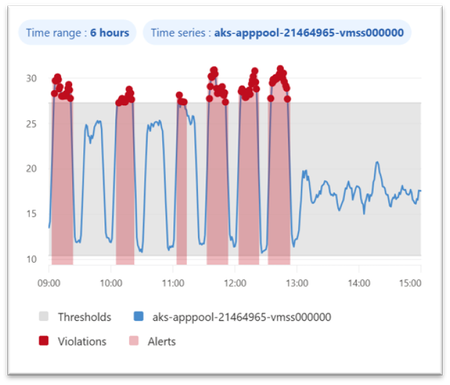
Dynamic thresholds are extended to query-based metric alerts in Azure Monitor, allowing to detect and alert on anomalies in Azure Monitor managed Prometheus metrics and OpenTelemetry metrics stored in an Azure Monitor Workspace. This follows the introduction of Dynamic Thresholds for Log search alerts — Azure Monitor now offers consistent Dynamic Thresholds support across logs and metrics — platform metrics, log search queries, and now query-based metric alerts. A consistent anomaly-detection approach, wherever your signals live. Dynamic thresholds are not a single static formula. They apply a range of machine-learning models and algorithms to historical query results, learn each series’ normal rhythm — including hourly, daily, and weekly seasonality — and automatically fit the most appropriate baseline separately to every time series. This way, a single alert rule can monitor many resources or dimensions while each one gets its own independent, self-refining baseline. Why Dynamic Thresholds Matter Simpler configuration: Reduce the need to define, maintain, and continuously tune static thresholds inside PromQL alert logic. Adaptive monitoring: Let alert thresholds adjust to changing workload behavior, recurring traffic peaks, and seasonal usage patterns. At-scale intelligence: Monitor multiple time series with a single alert rule, while Azure Monitor learns an independent baseline for each resource or dimension combination. Example 1 — Spot CPU anomalies in AKS workloads Scenario: Monitor container CPU utilization across pods or deployments in AKS with a query-based metric alert built on Prometheus metrics. Example query: sum by (microsoft_resource_id, namespace, deployment, container) (rate(container_cpu_usage_seconds_total[5m])) / sum by (microsoft_resource_id, namespace, deployment, container) (container_spec_cpu_quota / container_spec_cpu_period) Why dynamic thresholds help: CPU usage of a Kubernetes workload changes with workload mix, deployment timing, scaling activity, and traffic patterns. Static thresholds can be difficult to tune across namespaces, deployments, and containers. Dynamic thresholds learn a separate baseline for each monitored time series — in this example, for every pod, deployment, and container combination — so genuine CPU spikes stand out while expected variation from autoscaling and traffic mix stays quiet. Example 2 — Catch application latency regressions sooner Scenario: Detect abnormal latency patterns in an application by alerting on custom OpenTelemetry metrics stored in an Azure Monitor Workspace. Example query: histogram_quantile(0.95, sum by (le, service_name, http_route, http_method) (rate(http_server_duration_seconds_bucket[5m]))) Why dynamic thresholds help: Application latency naturally changes with traffic, user behavior, and release cadence. Fixed thresholds can be noisy during peak periods and too loose during quiet ones. Dynamic thresholds learn a separate baseline for each time series — here, for every service, route, and method — so real p95 latency regressions surface even as traffic and release cadence shift throughout the day. Best practices for better results To get the best results from dynamic thresholds for PromQL-based alerts, design your query so Azure Monitor can learn a clear, stable signal over time: Keep the expression numeric. Dynamic thresholds work best when the query returns a continuous numeric signal rather than a Boolean true/false result. For example, use an expression that calculates CPU usage, not a Boolean comparison like CPU > 0.8. Use meaningful dimensions. Split by dimensions such as namespace, deployment, service, or route when you want separate baselines for different workloads or endpoints. Prefer stable entities. Use longer-lived dimensions or aggregate across short-lived entities so the model has enough consistent history to learn from. In Kubernetes, for example, deployment is usually a better baseline dimension than individual pod ID. Choose the right threshold behavior. Decide whether the alert should trigger on values above the learned upper bound, below the lower bound, or both. Start with medium sensitivity. Use Medium as a balanced default, then tune up or down based on noise and missed anomalies. Allow enough historical data. Dynamic thresholds improve as more history is collected. Initial seasonal patterns use recent history, and weekly seasonality becomes more effective after several weeks of data. Get started Ready to try it? Create a query-based metric alert with dynamic thresholds on your metrics in Azure Monitor Workspace. You can create such rules in the Azure portal, where the built-in preview chart shows when your dynamic threshold alert would have fired based on historical baseline analysis. Use the preview chart to tune both the PromQL query and the dynamic threshold sensitivity before enabling the rule. You can also create query-based metric alert rules using programmatic interfaces or resource templates. Figure 1. Dynamic thresholds preview chart showing the learned baseline and the points where an alert would have fired. Dynamic thresholds cut alert noise where it starts — at detection. The alerts that do fire connect into Azure Monitor’s broader AIOps experience, where the Azure Copilot Observability Agent can help correlate signals into investigated issues with explainable reasoning — with humans in control. Next steps Related blog: Anomaly detection made easy with Dynamic thresholds for Log search alerts Dynamic thresholds in Azure Monitor Query-based metric alerts overview Create query-based metric alerts Prometheus metrics in Azure Monitor OpenTelemetry on Azure Monitor Stay connected Follow the Azure Observability Blog for more updates on Azure Monitor, Prometheus-based monitoring, alerting, and troubleshooting experiences. We’ll continue sharing product updates, practical guidance, and examples to help you improve observability across your Azure environments. Feedback We’d love to hear how dynamic thresholds for query-based metric alerts work for your scenarios. Share your feedback through your Microsoft account team, Azure support channels, or the feedback options in the Azure portal so we can continue improving the experience.212Views0likes0Comments
Azure Copilot Observability Agent is generally available, with autonomous operations in preview
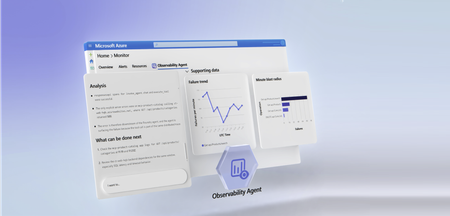
Complex cloud environments have outpaced manual operations. Agentic cloud operations connect people, tools, and data to streamline investigation workflows and move teams from scattered signals to evidence-backed next steps. With unified observability, teams can investigate Azure-monitored applications, Azure Kubernetes Service (AKS) environments, VMs, Foundry telemetry, infrastructure, and platform signals with greater context and control. Powered by Azure Monitor, the Azure Copilot Observability Agent is now generally available. It helps engineering, SRE, DevOps, and operations teams move from telemetry and alert noise to investigated issues, explainable reasoning, and recommended next steps that can reduce Time-To-Mitigate (TTM). Autonomous operations are also available in public preview. They help prepare context and reduce triage work while people remain responsible for mitigation decisions and any changes to the environment. From alert noise to investigated issues The Observability Agent helps teams reduce the effort required to understand operational problems. Instead of starting every investigation from a dashboard, query editor, or alert payload, teams can work with an AI companion that reasons across telemetry, Azure resource context, discovered topology, and custom instructions to identify what changed, what is correlated, and what evidence supports the conclusion. Teams can start with natural-language exploration and continue into deeper investigations when an issue requires more evidence. That light-to-deep workflow helps responders move from broad questions to a structured investigation without losing the reasoning trail. Here's what this looks like in practice: after a deployment, several alerts might fire across an app, database dependency, and compute resource. The Observability Agent can group those signals around the affected service, identify when the regression started, compare related dependencies and infrastructure metrics, and capture the findings in an Azure Monitor issue. The responder can then validate the evidence, add team context, route work to the right owner, and decide whether a rollback, configuration change, or code fix is appropriate. Explainable investigations across Azure-monitored signals Operations teams need more than a chatbot that answers questions. The Observability Agent follows an investigation workflow: it frames hypotheses, gathers evidence, compares signals by time, scope, and type, rules out weak explanations, and shows the reasoning path behind its findings. The Observability Agent can help teams: Investigate incidents and alerts across Azure-monitored applications, Azure Kubernetes Service (AKS) environments, VMs, Foundry telemetry, infrastructure, and platform signals Correlate related signals to reduce noise and surface higher-signal issues with context Explore telemetry using natural language while preserving transparency into the supporting data Compare signals by time, scope, and type to separate likely causes from coincidental changes Provide a reasoning trail that shows what the agent found, what it ruled out, and why Recommend next steps that engineers can review before deciding how to act This same investigation model applies to specialized skills and issue types, including customer's application, Azure Kubernetes Service (AKS), Foundry, VMs, and GenAI issues. When the relevant telemetry is available, the Observability Agent can correlate logs, metrics, traces, alerts, dependencies, resource graph, resource health, activity logs, Foundry telemetry, and changes. This helps teams investigate customer-visible issues with evidence, including latency, token spikes, tool-call failures, agent errors, hallucinations, deployments, API failures, performance regressions, infrastructure dependencies, and platform incidents. This explainability is central to the product. In production operations, trust is earned through evidence. The Observability agent is built to support human judgment, not bypass it. . Azure expertise, with context from your environment Context matters in every investigation. The same symptom can mean different things depending on application architecture, recent deployments, dependencies, historical incidents, and team practices. The Observability Agent brings Microsoft and Azure operational knowledge into the investigation experience. It can use discovered topology, Azure resource context, logs, metrics, traces, and custom instructions to ground investigations in signals that are more relevant to your environment. Native to Azure Monitor, with humans in control Because the Observability Agent is built into Azure Monitor, teams can use it close to the telemetry, alerts, and workflows they already rely on. Investigations can also be captured as Azure Monitor issues, creating a shared case file for humans and agents to collaborate on evidence, reasoning, and next steps. The Observability Agent is designed for governed AI operations inside Azure Monitor. Interactive chat and investigations use the signed-in user's identity and Azure role-based access control (RBAC). Prompts and responses are not used to train foundation models, and the agent doesn't restart resources, change configuration, or resolve issues on its own. Autonomous operations in public preview Alongside general availability, autonomous operations for the Observability Agent are available in public preview. When enabled, the agent can analyze alerts in the background, correlate related alerts when they likely represent the same incident, create Azure Monitor issues automatically, and run deep investigations on agent-created issues. This automatic triage helps reduce alert noise by turning streams of individual alerts into higher-signal issues with context, findings, and recommended next steps. Teams can review the issue, continue the investigation, and decide what action to take. Autonomous operations are designed to prepare context and reduce triage work, not to remove human control. Engineers remain responsible for decisions, approvals, and any changes to the environment. Next steps Check out our latest announcements and related blogs: Azure Blog and OMB Blog. Learn how to use the Observability Agent in Azure Copilot Observability Agent. Explore how investigations work in Deep investigations in the Azure Copilot Observability Agent. Learn more on how to Chat with your observability data Learn how teams preserve context in Azure Monitor issues. Review preview details in Autonomous operations in the Azure Copilot Observability Agent. Stay connected Follow this blog for ongoing deep dives, updates on current capabilities, and a preview of what's coming next. Live webinar - a walkthrough of real Observability Agent scenarios, best practices, and what's available today - along with a look at what's coming next, and live Q&A with the product team. Register for the Observability Agent webinar. We'd love your feedback The Observability agent continues to evolve based on real-world usage and operator feedback. Share your thoughts directly through the Give Feedback option in the experience, or reach us at enauerman@microsoft.com.10KViews6likes0CommentsAccelerating AKS troubleshooting with the Azure Copilot Observability Agent
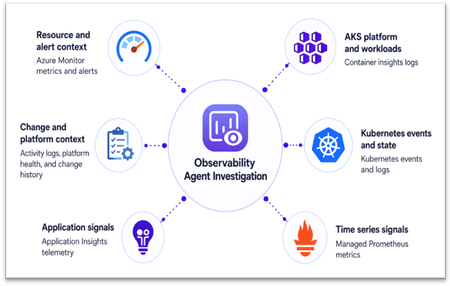
AKS incidents rarely stay within one Kubernetes object, signal, or tool. A latency spike might first appear in application telemetry, but the root cause may sit elsewhere: pod restarts, node pressure, scheduling failures, or a recent configuration change. The Azure Copilot Observability Agent in Azure Monitor helps connect these signals into an explainable investigation, so teams can move from symptoms to evidence-backed next steps. Why AKS troubleshooting is complex Troubleshooting Azure Kubernetes Service (AKS) is complex because failures can originate in workloads, platform components, infrastructure, or the application code running on the cluster. For example, pods stuck in Pending may indicate capacity or scheduling issues, while application latency may be caused by throttling, failed probes, pod restarts, or node pressure below the app. During an incident, simply having more telemetry is not enough. Teams need a way to test likely causes, rule out unrelated signals, and keep the investigation tied to the affected workload and time window. From signal to root cause: the investigation flow The Observability Agent follows a consistent investigation pipeline: Scope the problem by identifying the most likely infrastructure resources involved, plus connected dependencies. Collect data across metrics, logs, traces, change history, and related signals. Detect anomalies using learned baselines (for metrics) and log analysis. Correlate across resources spanning infrastructure and application layers. Run deep diagnostics by invoking resource-specific tools when needed to pinpoint root cause. Summarize findings in a structured format: what happened, why it happened, and what to do next. AKS investigation data sources The agent works with telemetry already available in your Azure Monitor environment. Investigation depth improves as more relevant signals are enabled, including Container insights logs, Kubernetes events and state, Azure managed service for Prometheus, container and pod logs, Application Insights telemetry for AKS-hosted workloads, Azure Activity Log changes, control plane logs routed through diagnostic settings, and resource metadata for the cluster, node pools, workloads, and related Azure resources. Figure 1. AKS investigation data sources You don’t need to enable every telemetry source to get started. The Observability Agent uses the data already available in Azure Monitor, and its findings become more complete as more AKS and application signals are collected. Example 1: AKS infrastructure — explaining why new pods never start Consider a workload rollout on AKS where replacement pods remain stuck in Pending state. What looks like a failed release may stem from the workload definition, cluster state, or underlying infrastructure. Investigation walkthrough Symptom: rollout is blocked Replacement pods remain in Pending during rollout, and Kubernetes events show repeated scheduling failures. This indicates that the rollout is blocked before new pods can start. Workload evidence: scheduling, not startup Pod state identifies the affected workload, while Kubernetes events show repeated placement failures. The issue is therefore tied to scheduling rather than application startup or container crash behavior. Cluster evidence: capacity pressure When enabled, Prometheus node metrics show CPU and memory utilization near capacity. Cluster-level trends show resource pressure increasing at the same time as pending pods and scheduling failures. Likely cause: insufficient schedulable capacity The scheduler cannot place new pods because the relevant node pool does not have enough available capacity. The failed rollout is best explained by capacity pressure in the target node pool rather than an application crash or image startup failure. Recommended action Scale out the affected node pool or adjust workload resource requests, then retry the rollout once schedulable capacity is restored. Figure 2. AKS investigation flow The Observability Agent connects pod state, scheduling events, and node pressure to explain why the rollout is blocked and which capacity action to consider next. Example 2: Joint app-AKS investigation — tracing application latency to pod restarts Now consider a customer-facing application where users see increased latency and intermittent HTTP 5xx errors after deployment. The first symptom appears in application telemetry, but the unhealthy requests are served by pods that are repeatedly restarting in AKS. Investigation walkthrough Symptom: customer-facing service degradation After deployment, application telemetry shows increased latency and HTTP 5xx errors. The first visible impact appears at the application layer. AKS evidence: unstable pods Affected pods enter CrashLoopBackOff, restart counts increase, and Kubernetes events show back-off restarts, probe failures, or image or command errors. Container logs point to startup exceptions, missing configuration, or crash details. Resource evidence: workload-specific pressure Container memory usage approaches configured limits before restarts, while node metrics show no broad node pressure. This suggests the issue is workload-specific rather than cluster-wide capacity related. Change evidence: deployment correlation Deployment history shows a new image or configuration change shortly before restarts began, with no matching platform health event. The timing points to the latest deployment or configuration change. Recommended action Review the latest image or configuration change, inspect container logs, adjust memory limits, or roll back if needed. Focus remediation on the workload change rather than node pool scaling. This pattern shows how an application symptom can map back to AKS workload behavior. Application telemetry establishes the user impact, while Kubernetes events, container logs, and resource metrics help explain why the affected pods keep failing. Operational impact For site reliability engineers, platform teams, and IT professionals, the Observability Agent reduces the time spent moving between application and AKS telemetry. It brings relevant signals into one investigation, surfaces supporting evidence, and applies Azure Monitor and AKS context so your team can review the findings, validate the recommended path, and decide which production changes to make. Figure 3. AKS investigation results Using the Observability Agent You can start using the Observability Agent from the Azure portal in two common AKS troubleshooting flows: Investigation mode: Start an investigation from an Azure Monitor alert on an AKS resource or from an Application Insights alert for an AKS-hosted workload. The agent uses the alert context to scope the incident, correlate application and cluster telemetry, and summarize the likely cause with recommended next steps. Chat-based exploration: Open the Monitor experience in AKS and select the Observability Agent button to chat with your telemetry. Use natural language to ask follow-up questions, explore logs and metrics, detect and inspect anomalies, and narrow down likely causes. Figure 4. Starting Observability Agent from AKS Monitor experience Next steps Azure Copilot Observability Agent overview Monitor Azure Kubernetes Service with Azure Monitor Stay connected Follow this blog for ongoing deep dives, updates on current capabilities, and a preview of what's coming next. Live webinar — A walkthrough of real Observability Agent scenarios, best practices, and what's available today, along with a look at what's coming next and live Q&A with the product team. Register for the Observability Agent webinar. We'd love your feedback The Observability Agent continues to evolve based on real-world usage and operator feedback. Share your thoughts directly through the Give Feedback option in the experience, or reach us at: azureobsagent@microsoft.com345Views0likes0Comments
Connect Metrics to Traces with Exemplars in Azure Monitor
Following Microsoft’s recent GA announcement for OpenTelemetry (OTel) support, we are excited to announce support for Exemplars for customers instrumenting metrics with Prometheus or OpenTelemetry and traces using OpenTelemetry, enhancing Azure Monitor’s integrated observability experience for cloud-native applications. Modern cloud-native applications generate enormous volumes of telemetry. Metrics help teams detect that something is wrong, but traces explain why. Exemplars bridge these two worlds by attaching trace references directly to metric data points, making it dramatically easier to pivot from a spike in latency or errors to the exact distributed trace responsible for the issue. With Azure Monitor, customers can now ingest metrics with exemplars and visualize them in Azure Managed Grafana. This enables seamless correlation between metrics and traces, helping engineering teams troubleshoot issues faster and reduce mean time to resolution (MTTR). Why Exemplars Matter Traditional monitoring workflows often require users to manually correlate data across multiple systems. Exemplars simplify this workflow by embedding trace context directly into metric samples. For example, if a latency metric spikes at a specific timestamp, the exemplar associated with that data point can link directly to the distributed trace responsible for the outlier. This provides several benefits: Faster root cause analysis Quicker transition from aggregate metrics to request-level details Simplified debugging workflows for SRE and platform teams Better observability experiences for microservices and distributed applications Unified Observability with Azure Monitor With Azure Monitor and Azure Managed Grafana, you can now: Ingest OTLP or Prometheus metrics with exemplars into Azure Monitor Workspace Store and analyze traces in Azure Monitor Application Insights Visualize exemplar markers directly in Grafana charts Navigate from a metric spike to the exact distributed trace associated with that data point By combining these signals in a single observability platform, organizations can correlate infrastructure health, application behavior, and request traces without context switching between tooling. How It Works Once metrics, exemplars, and traces are ingested into Azure Monitor, Azure Managed Grafana can consume exemplar information from the configured Prometheus data source. When exemplars are enabled in Grafana dashboards, users will see markers associated with individual metric data points. Selecting an exemplar opens the associated trace in Azure Monitor, providing end-to-end diagnostic context. Getting Started Setup data ingestion: Instrument your application to emit OpenTelemetry traces, OpenTelemetry or Prometheus metrics with exemplars, and enable ingestion of the same to Azure Monitor using OpenTelemetry Collector. Follow the instructions in Ingest OTLP Data into Azure Monitor with OTel Collector - Azure Monitor | Microsoft Learn. After this step, you will have the Log Analytics Workspace, Azure Monitor Workspace and Application Insights resources all set up to store the telemetry data. Create an Azure Managed Grafana instance and connect it with the Azure Monitor Workspace by navigating to your Azure Monitor Workspace in the Azure portal and then clicking on “Linked Grafana workspaces”. To learn more, see Manage an Azure Monitor workspace - Azure Monitor | Microsoft Learn Optionally, enable Azure Managed Prometheus on your AKS cluster or use remote-write and configure it to use the same Azure Monitor Workspace to centralize infrastructure and application metrics. Enable Exemplars in Azure Managed Grafana: After setting up the data ingestion, ensure that logs and traces are flowing into Log Analytics Workspace, and metrics are flowing into Azure Monitor Workspace. Step 1: Enable Exemplars on Prometheus Data Source in Azure Managed Grafana Navigate to Connections -> Data Sources in Azure Managed Grafana. Since you have connected Azure Managed Grafana to Azure Monitor Workspace, you will see the data source (Managed_Prometheus_<AMW-Name>) already configured. If the data source is not configured, follow the steps here to add your Azure Monitor Workspace as a data source. Open the data source configuration. Click Add Exemplars to enable exemplar support. Step 2: Configure Trace Linking with Azure Monitor In the exemplar configuration section, toggle Internal Link to On. Select Azure Monitor as the data source. In the Label Name, enter the name of the field in the labels object that should be used to get the trace id, eg. trace_id. Click Save & Test. This configuration enables direct navigation from exemplar markers in Grafana charts to the associated traces stored in Azure Monitor. Azure Managed Grafana also supports trace correlation from other solutions like Jaeger etc. To use your trace solution, use the appropriate links. Step 3: Enable Exemplars in Dashboards Navigate to a Grafana dashboard that uses your configured Prometheus data source. Open the panel options for a metrics chart. Toggle Exemplars to On. Once enabled, exemplar markers will appear on supported metric visualizations. Clicking on it will show exemplar details along with an option to open the corresponding distributed trace in Azure Monitor. To learn more, visit https://aka.ms/azmon-exemplars329Views1like0CommentsWhat’s new in Observability at Build 2026
At Build 2026, Azure Monitor introduces major advancements in end-to-end observability, extending across AI agents, applications, and infrastructure with OpenTelemetry at its core. New capabilities with Azure Copilot Observability agent, SLI/SLO support, and smarter alerting help teams move faster from detection to root cause while reducing noise and manual effort. Together, these innovations enable developers and SREs to operate modern, AI-driven systems with greater insight, efficiency, and alignment to customer experience.1.2KViews2likes0Comments
Is Your Monitoring Actually Working? What's New in Monitoring Coverage
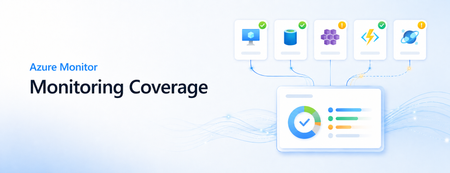
Monitoring is only useful when the right signals are collected, the right alerts are in place, and the data is actually flowing when teams need it. In large Azure environments, confirming all three across every VM and AKS cluster can still take too much manual work. At Microsoft Ignite, we introduced Monitoring Coverage in Azure Monitor, a centralized preview experience for finding coverage gaps and enabling recommended VM and container monitoring at scale. At Microsoft Build, we are expanding that experience with two new capabilities that make monitoring easier to operationalize: data flow status and at-scale recommended alert enablement for virtual machines and Azure Kubernetes Service (AKS). With these updates, teams can move beyond asking whether monitoring was configured. They can see whether recommended monitoring is enabled, whether important alert coverage is missing, and whether configuration issues may prevent monitoring data from reaching its destination. Monitoring Coverage overview with recommendations and data flow status. What is Monitoring Coverage? Monitoring Coverage in Azure Monitor gives you a single place to review recommended monitoring across supported Azure resources. The Overview page summarizes coverage across your selected scope, shows Azure Advisor observability recommendations, and provides quick actions to enable recommended monitoring settings. Coverage is grouped into basic, partial, and enhanced monitoring so you can quickly understand whether a resource is using only default monitoring or has the Microsoft-recommended configuration enabled. From there, you can drill into the Monitoring Details tab to review individual resources and take action. New: data flow status The most important question after enabling monitoring is simple: is the data flowing? Data flow status helps answer that question directly from Monitoring Coverage. The new data flow status summary shows how many resources need attention, passed initial checks, or are not configured for validation. It also highlights top resources that need attention so operators can start with the most important issues first. When you open data flow status for a resource, Azure Monitor shows validation checks across areas such as: Resource configuration Data collection rule associations Network connectivity Data flows to the configured destination Detected issues are prioritized at the top of the details pane, and each validation check includes a recommended action. After making a fix, you can run validation again to confirm that data flow issues are resolved. Data flow status details with validation checks and recommended actions. Alternatively, you can visualize your data flows and identify problems from there. New: enable recommended alerts at scale Monitoring Coverage now also helps close alerting gaps. From the Overview page, you can see recommendations such as Enable VM Recommended Alerts and Enable AKS Recommended Alerts, then select Apply to configure recommended alert rules from a centralized flow. For virtual machines, you can enable alerts across an entire subscription or choose selected resources. Subscription scope is useful when you want recommended alerts to apply broadly, including to future VMs in the selected subscription. Selected resource scope gives you more granular control when you want to enable alert rules for a specific set of VMs. The enablement flow lets you review recommended alert rules, adjust thresholds, and configure notification options such as email, Azure Resource Manager role notifications, Azure mobile app notifications, or an existing action group. Some VMs may already have alerts configured, and new rules are designed not to duplicate existing alerts. For AKS, Monitoring Coverage can surface recommended alert gaps and start the same guided pattern: review impacted resources, configure recommended alert settings, and use Review + Enable to create the alert rules. A resource-centric view for follow-up The Monitoring Details tab brings coverage and data flow into the same resource list. Two columns are especially useful for triage: Monitoring coverage and Data flow status. Select either value to open resource-level details. Monitoring coverage details show what is configured for the resource, including VM Insights, recommended alerts, data collection rules, data sources, destinations, and agent version when available. Data flow details show validation results and recommended remediation steps. This makes it easier to move from a high-level gap to the specific resource and configuration that needs attention. Getting started Monitoring Coverage is available in preview from the Azure portal. Open Monitor, select Monitoring Coverage (preview), and choose the subscriptions and resources you want to review. From the Overview page, you can: Review coverage across VMs and AKS resources. Apply recommendations to enable VM Insights, container monitoring, and recommended alerts. Use data flow status to find resources whose monitoring data needs attention. Open Monitoring Details for resource-level coverage and validation results. A few preview notes: enablement operations include up to 100 resources at a time, and enabling monitoring or alert rules may create data collection rules, deploy Azure Monitor Agent, configure destinations, or create alert rules. Data collection, workspace ingestion, and alert rules may incur costs based on the settings you enable. To learn more, see Monitoring coverage in Azure Monitor (preview). Looking ahead Monitoring Coverage is part of our continued work to make Azure Monitor easier to operationalize at scale. We want teams to spend less time hunting for monitoring gaps and more time acting on reliable, validated signals. We would love your feedback as you try these new Build updates and we look to expand support beyond this set of resource types. Use the Azure portal feedback options or share feedback through your Microsoft account team.385Views1like0CommentsTroubleshoot with OpenTelemetry in Azure Monitor - Public Preview
OpenTelemetry is fast becoming the industry standard for modern telemetry collection and ingestion pipelines. With Azure Monitor’s new OpenTelemetry Protocol (OTLP) support, you can ship logs, metrics, and traces from wherever you run workloads to analyze and act on your observability data in one place. What’s in the preview Direct OTLP ingestion into Azure Monitor for logs, metrics, and traces. Automated onboarding for AKS workloads. Application Insights on OTLP for distributed tracing, performance and troubleshooting experiences. Pre-built Grafana dashboards to visualize signals quickly. Prometheus for metric storage and query. OpenTelemetry semantic conventions for logs and traces, so your data lands in a familiar standard-based schema. How to send OTLP to Azure Monitor: pick your path AKS: Auto-instrument Java and Node.js workloads using the Azure Monitor OpenTelemetry distro, or auto-configure any OpenTelemetry SDK-instrumented workload to export OTLP to Azure Monitor. Get started Limited preview: Auto-instrumentation for .NET and Python is also available. Get started VMs/VM Scale Sets (and Azure Arc-enabled compute): Use the Azure Monitor Agent (AMA) to receive OTLP from your apps and export it to Azure Monitor. Get started Any environment: Use the OpenTelemetry Collector to receive OTLP signals and export directly to Azure Monitor cloud ingestion endpoints. Get started Under the hood: where your telemetry lands Metrics: Stored in an Azure Monitor Workspace, a Prometheus metrics store. Logs + traces: Stored in a Log Analytics workspace using an OpenTelemetry semantic conventions–based schema. Troubleshooting: Application Insights lights up distributed tracing and end-to-end performance investigations, backed by Azure Monitor. Why it matters Standardize once: Instrument with OpenTelemetry and keep your telemetry portable. Reduce overhead: Fewer bespoke exporters and pipelines to maintain. Debug faster: Correlate metrics, logs, and traces to get from alert to root cause with less guesswork. Observe with confidence: Use dashboards and tracing views that are ready on day one. Next step: Try the OTLP preview in your environment, then validate end-to-end signal flow with Application Insights and Grafana dashboards. Learn More623Views3likes0CommentsGenerally Available - Azure Monitor Private Link Scope (AMPLS) Scale Limits Increased by 10x!
Introduction We are excited to announce the General Availability (GA) of Azure Monitor Private Link Scope (AMPLS) scale limit increase, delivering 10x scalability improvements compared to previous limits. This enhancement empowers customers to securely connect more Azure Monitor resources via Private Link, ensuring network isolation, compliance, and Zero Trust alignment for large-scale environments. What is Azure Monitor Private Link Scope (AMPLS)? Azure Monitor Private Link Scope (AMPLS) is a feature that allows you to securely connect Azure Monitor resources to your virtual network using private endpoints. This ensures that your monitoring data is accessed only through authorized private networks, preventing data exfiltration and keeping all traffic inside the Azure backbone network. AMPLS – Scale Limits Increased by 10x in Public Cloud & Sovereign Cloud (Fairfax/Mooncake) - Regions In a groundbreaking development, we are excited to share that the scale limits for Azure Monitor Private Link Scope (AMPLS) have been significantly increased by tenfold (10x) in Public & Sovereign Cloud regions as part of the General Availability! This substantial enhancement empowers our customers to manage their resources more efficiently and securely with private links using AMPLS, ensuring that workload logs are routed via the Microsoft backbone network. What’s New? 10x Scale Increase Connect up to 3,000 Log Analytics workspaces per AMPLS (previously 300) Connect up to 10,000 Application Insights components per AMPLS (previously 1,000) 20x Resource Connectivity Each Azure Monitor resource can now connect to 100 AMPLS resources (previously 5) Enhanced UX/UI Redesigned AMPLS interface supports loading 13,000+ resources with pagination for smooth navigation Private Endpoint Support Each AMPLS object can connect to 10 private endpoints, ensuring secure telemetry flows Why It Matters Top Azure Strategic 500 customers, including major Telecom service providers and Banking & Financial Services organizations, have noted that previous AMPLS limits did not adequately support their increasing requirements. The demand for private links has grown 3–5 times over existing capacity, affecting both network isolation and integration of essential workloads. This General Availability release resolves these issues, providing centralized monitoring at scale while maintaining robust security and performance. Customer Stories Our solution now enables customers to scale their Azure Monitor resources significantly, ensuring seamless network configurations and enhanced performance. Customer B - Case Study: Leading Banking & Financial Services Customer Challenge: The Banking Customer faced complexity in delivering personalized insights due to intricate workflows and content systems. They needed a solution that could scale securely while maintaining compliance and performance for business-critical applications. Solution: The Banking Customer has implemented Microsoft Private Links Services (AMPLS) to enhance the security and performance of financial models for smart finance assistants, leading to greater efficiency and improved client engagement. To ensure secure telemetry flow and compliance, the banking customer implemented Azure Monitor with Private Link Scope (AMPLS) and leveraged the AMPLS Scale Limit Increase feature. Business Impact: Strengthened security posture aligned with Zero Trust principles Improved operational efficiency for monitoring and reporting Delivered a future-ready architecture that scales with evolving compliance and performance demands Customer B - Case Study: Leading Telecom Service Provider - Scaling Secure Monitoring with AMPLS Architecture: A Leading Telecom Service Provider employs a highly micro-segmented design where each DevOps team operates in its own workspace to maximize security and isolation. Challenge: While this design strengthens security, it introduces complexity for large-scale monitoring and reporting due to physical and logical limitations on Azure Monitor Private Link Scope (AMPLS). Previous scale limits made it difficult to centralize telemetry without compromising isolation. Solution: The AMPLS Scale Limit Increase feature enabled the Telecom Service Provider to expand Azure Monitor resources significantly. Monitoring traffic now routes through Microsoft’s backbone network, reducing data exfiltration risks and supporting Zero Trust principles. Impact & Benefits Scalability: Supports up to 3,000 Log Analytics workspaces and 10,000 Application Insights components per AMPLS (10× increase). Efficiency: Each Azure Monitor resource can now connect to 100 AMPLS resources (20× increase). Security: Private connectivity via Microsoft backbone mitigates data exfiltration risks. Operational Excellence: Simplifies configuration for 13K+ Azure Monitor resources, reducing overhead for DevOps teams. Customer Benefits & Results Our solution significantly enhances customers’ ability to manage Azure Monitor resources securely and at scale using Azure Monitor Private Link Scope (AMPLS). Key Benefits Massive Scale Increase 3,000 Log Analytics workspaces (previously 300) 10,000 Application Insights components (previously 1,000) Each AMPLS object can now connect to: Azure Monitor resources can now connect with up to 100 AMPLS resources (20× increase). Broader Resource Support - Supported resource types include: Data Collection Endpoints (DCE) Log Analytics Workspaces (LA WS) Application Insights components (AI) Improved UX/UI Redesigned AMPLS interface supports loading 13,000+ Azure Monitor resources with pagination for smooth navigation. Private Endpoint Connectivity Each AMPLS object can connect to 10 private endpoints, ensuring secure telemetry flows. Resources: Explore the new capabilities of Azure Monitor Private Link Scope (AMPLS) and see how it can transform your network isolation and resource management. Visit our Azure Monitor Private Link Scope (AMPLS) documentation page for more details and start leveraging these enhancements today! For detailed information on configuring Azure Monitor private link scope and azure monitor resources, please refer to the following link: Use Azure Private Link to connect networks to Azure Monitor - Azure Monitor | Microsoft Learn Design your Azure Private Link setup - Azure Monitor | Microsoft Learn Configure your private link - Azure Monitor | Microsoft Learn862Views0likes0CommentsAnnouncing General Availability: Azure Monitor dashboards with Grafana
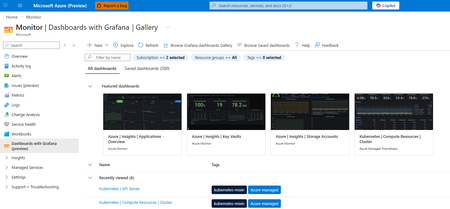
Continuing our commitment to open-source solutions, we are announcing the general availability of Azure Monitor dashboards with Grafana. This service offers a powerful solution for cloud-native monitoring and visualizing all your Azure data. Dashboards with Grafana enable you to create and edit Grafana dashboards directly in the Azure portal without additional cost and less administrative overhead compared to self-hosting Grafana or using managed Grafana services. Built-in Grafana controls and components allow you to apply a rich set of visualization panels and client-side transformations to Azure monitoring data to create custom dashboards. Start quickly with pre-built and community dashboards Dozens of pre-built Grafana dashboards for Azure Kubernetes Services, Application Insights, Storage Accounts, Cosmos DB, Azure PostgreSQL, OpenTelemetry metrics and dozens of other Azure resources are included and enabled by default. Additionally, you can import dashboards from thousands of publicly available Grafana community and open-source dashboards for the supported data sources: Prometheus, Azure Monitor (metrics, logs, traces, Azure Resource Graph), and Azure Data Explorer. Streamline monitoring with open-source compatibility and Azure enterprise capabilities Azure Monitor dashboards with Grafana are fully compatible with open-source Grafana dashboards and are portable across any Grafana instances regardless of where they are hosted. Furthermore, dashboards are native Azure resources supporting Azure RBAC to assign permissions, and automation via ARM and Bicep templates. Import, edit and create dashboards in 30+ Azure regions Choose from any language in the Azure Portal for your Grafana user interface Manage dashboard content as part of the ARM resource Automatically generate ARM templates to automate deployment and manage dashboards Take advantage of Grafana Explore and New Dashboards Leverage Grafana Explore to quickly create ad-hoc queries without modifying dashboards and add queries and visualizations to new or existing dashboards New out of the box dashboards for additional Azure resources: Additional Azure Kubernetes Service support including AKS Automatic and AKS Arc connected clusters Azure Container Apps monitoring dashboards Microsoft Foundry monitoring dashboards Azure Monitor Application Insights dashboards OpenTelemetry metrics Microsoft Agent Framework High Performance Computing dashboards with dedicated GPU monitoring When to step up to Azure Managed Grafana? If you store your telemetry data in Azure, Dashboards with Grafana in the Azure portal is a great way to get started with Grafana. If you have additional 3rd-party data sources, or need full enterprise capabilities in Grafana, you can choose to upgrade to Azure Managed Grafana, a fully managed hosted service for the Grafana Enterprise software. See a detailed solution comparison of Dashboards with Grafana and Azure Managed Grafana here. Get started with Azure Monitor dashboards with Grafana today.1.3KViews3likes0Comments
Simplify Application Monitoring for AKS with Azure Monitor (Public Preview)
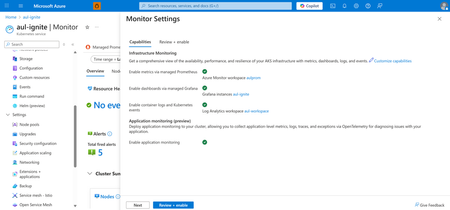
As cloud-native workloads scale, customers increasingly expect application and infrastructure observability to be unified, automated, and devops-friendly. Azure Monitor is advancing this vision with Application Monitoring for Azure Kubernetes Service (AKS). With seamless onboarding and troubleshooting experiences in the Azure Portal, now in Public Preview. This new capability brings first-class OpenTelemetry support, seamless onboarding from the AKS cluster blade, and auto-instrumentation and auto-configuration options that make it easier than ever to collect application performance data into Azure Monitor and Application Insights—without modifying application code or maintaining custom agents. Enable application monitoring for your AKS deployed apps directly from the Azure Portal in two steps: 1. Enable application monitoring for the AKS cluster in Monitor Settings 2. Choose the namespaces for application monitoring and configure namespace-wide onboarding to route application signals to an App Insights resource. Optionally, leverage Custom Resource Definitions (CRDs) for more granular enablement and per-deployment onboarding. Feature Highlights Auto-instrumentation Auto-instrument Java and NodeJS applications without code changes. This approach instruments workloads with the AzureMonitor OpenTelemetry distro and routes telemetry to Application Insights. Now available in both CLI and Azure portal for addon enablement and namespace configuration. Unified Monitoring and Troubleshooting Switch seamlessly between infrastructure and application layers with improved navigation between Container Insights and Application Insights, curated OpenTelemetry workbooks, and Azure-curated Grafana dashboards. When looking into your deployment controllers from Container Insights, you can also see the application performance metrics alongside to identify problematic requests or failures. From there, you can seamlessly transition over to your Application Insights to get a more detailed diagnosis. View your application performance next to your infrastructure metrics in Container Insights Full-Stack Dashboards with Grafana This new application monitoring capability becomes even more powerful when paired with Dashboards with Grafana for Azure Monitor. With curated, Azure-hosted Grafana dashboards built specifically for Application Insights and OpenTelemetry data, teams can extend their AKS application monitoring experience with rich, full-stack visualizations tailored for cloud-native workloads. Application monitoring dashboards available through Dashboards with Grafana These dashboards allow you to: Bring application traces, requests, dependencies, and exception data from Application Insights into Grafana dashboards optimized for app-centric troubleshooting. Correlate application performance with AKS infrastructure metrics, including node, pod, and container health, to rapidly identify cross-layer issues. Visualize OpenTelemetry signals flowing through Azure Monitor in a unified, standards-based format without needing to build dashboards from scratch. Customize and extend dashboards with your own OTel metrics or additional Application Insights dimensions for deeper app performance analytics. By combining Application Monitoring for AKS with Dashboards for Grafana, developers and operators gain a complete, end-to-end view of application behavior, making it faster and easier to diagnose issues, validate deployments, and understand the health of microservices running on AKS. Call to Action Start simplifying application observability today with Azure Monitor for AKS. Unify your metrics, logs, and traces in a single monitoring experience powered by OpenTelemetry and Azure Monitor. Explore the documentation and get started: https://learn.microsoft.com/azure/azure-monitor/app/kubernetes-codeless Learn more about our new features for OpenTelemetry in Azure Monitor: https://aka.ms/igniteotelblog566Views1like0Comments