azure kubernetes service
20 Topics
Azure Copilot Observability Agent is generally available, with autonomous operations in preview
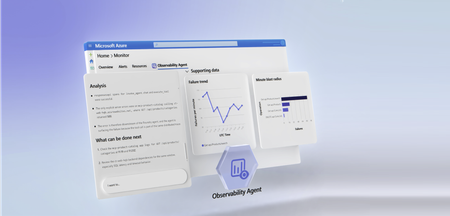
Complex cloud environments have outpaced manual operations. Agentic cloud operations connect people, tools, and data to streamline investigation workflows and move teams from scattered signals to evidence-backed next steps. With unified observability, teams can investigate Azure-monitored applications, Azure Kubernetes Service (AKS) environments, VMs, Foundry telemetry, infrastructure, and platform signals with greater context and control. Powered by Azure Monitor, the Azure Copilot Observability Agent is now generally available. It helps engineering, SRE, DevOps, and operations teams move from telemetry and alert noise to investigated issues, explainable reasoning, and recommended next steps that can reduce Time-To-Mitigate (TTM). Autonomous operations are also available in public preview. They help prepare context and reduce triage work while people remain responsible for mitigation decisions and any changes to the environment. From alert noise to investigated issues The Observability Agent helps teams reduce the effort required to understand operational problems. Instead of starting every investigation from a dashboard, query editor, or alert payload, teams can work with an AI companion that reasons across telemetry, Azure resource context, discovered topology, and custom instructions to identify what changed, what is correlated, and what evidence supports the conclusion. Teams can start with natural-language exploration and continue into deeper investigations when an issue requires more evidence. That light-to-deep workflow helps responders move from broad questions to a structured investigation without losing the reasoning trail. Here's what this looks like in practice: after a deployment, several alerts might fire across an app, database dependency, and compute resource. The Observability Agent can group those signals around the affected service, identify when the regression started, compare related dependencies and infrastructure metrics, and capture the findings in an Azure Monitor issue. The responder can then validate the evidence, add team context, route work to the right owner, and decide whether a rollback, configuration change, or code fix is appropriate. Explainable investigations across Azure-monitored signals Operations teams need more than a chatbot that answers questions. The Observability Agent follows an investigation workflow: it frames hypotheses, gathers evidence, compares signals by time, scope, and type, rules out weak explanations, and shows the reasoning path behind its findings. The Observability Agent can help teams: Investigate incidents and alerts across Azure-monitored applications, Azure Kubernetes Service (AKS) environments, VMs, Foundry telemetry, infrastructure, and platform signals Correlate related signals to reduce noise and surface higher-signal issues with context Explore telemetry using natural language while preserving transparency into the supporting data Compare signals by time, scope, and type to separate likely causes from coincidental changes Provide a reasoning trail that shows what the agent found, what it ruled out, and why Recommend next steps that engineers can review before deciding how to act This same investigation model applies to specialized skills and issue types, including customer's application, Azure Kubernetes Service (AKS), Foundry, VMs, and GenAI issues. When the relevant telemetry is available, the Observability Agent can correlate logs, metrics, traces, alerts, dependencies, resource graph, resource health, activity logs, Foundry telemetry, and changes. This helps teams investigate customer-visible issues with evidence, including latency, token spikes, tool-call failures, agent errors, hallucinations, deployments, API failures, performance regressions, infrastructure dependencies, and platform incidents. This explainability is central to the product. In production operations, trust is earned through evidence. The Observability agent is built to support human judgment, not bypass it. . Azure expertise, with context from your environment Context matters in every investigation. The same symptom can mean different things depending on application architecture, recent deployments, dependencies, historical incidents, and team practices. The Observability Agent brings Microsoft and Azure operational knowledge into the investigation experience. It can use discovered topology, Azure resource context, logs, metrics, traces, and custom instructions to ground investigations in signals that are more relevant to your environment. Native to Azure Monitor, with humans in control Because the Observability Agent is built into Azure Monitor, teams can use it close to the telemetry, alerts, and workflows they already rely on. Investigations can also be captured as Azure Monitor issues, creating a shared case file for humans and agents to collaborate on evidence, reasoning, and next steps. The Observability Agent is designed for governed AI operations inside Azure Monitor. Interactive chat and investigations use the signed-in user's identity and Azure role-based access control (RBAC). Prompts and responses are not used to train foundation models, and the agent doesn't restart resources, change configuration, or resolve issues on its own. Autonomous operations in public preview Alongside general availability, autonomous operations for the Observability Agent are available in public preview. When enabled, the agent can analyze alerts in the background, correlate related alerts when they likely represent the same incident, create Azure Monitor issues automatically, and run deep investigations on agent-created issues. This automatic triage helps reduce alert noise by turning streams of individual alerts into higher-signal issues with context, findings, and recommended next steps. Teams can review the issue, continue the investigation, and decide what action to take. Autonomous operations are designed to prepare context and reduce triage work, not to remove human control. Engineers remain responsible for decisions, approvals, and any changes to the environment. Next steps Check out our latest announcements and related blogs: Azure Blog and OMB Blog. Learn how to use the Observability Agent in Azure Copilot Observability Agent. Explore how investigations work in Deep investigations in the Azure Copilot Observability Agent. Learn more on how to Chat with your observability data Learn how teams preserve context in Azure Monitor issues. Review preview details in Autonomous operations in the Azure Copilot Observability Agent. Stay connected Follow this blog for ongoing deep dives, updates on current capabilities, and a preview of what's coming next. Live webinar - a walkthrough of real Observability Agent scenarios, best practices, and what's available today - along with a look at what's coming next, and live Q&A with the product team. Register for the Observability Agent webinar. We'd love your feedback The Observability agent continues to evolve based on real-world usage and operator feedback. Share your thoughts directly through the Give Feedback option in the experience, or reach us at enauerman@microsoft.com.9.8KViews6likes0CommentsWhat’s new in Observability at Build 2025
At Build 2025, we are excited to announce new features in Azure Monitor designed to enhance observability for developers and SREs, making it easier for you to streamline troubleshooting, improve monitoring efficiency, and gain deeper insights into application performance. With our new AI-powered tools, customizable alerts, and advanced visualization capabilities, we’re empowering developers to deliver high-quality, resilient applications with greater operational efficiency. AI-Powered Troubleshooting Capabilities We are excited to disclose two new AI-powered features, as well as share an update to a GA feature, which enhance troubleshooting and monitoring: AI-powered investigations (Public Preview): Identifies possible explanations for service degradations via automated analyses, consolidating all observability-related data for faster problem mitigation. Attend our live demo at Build and learn more here. Health models (Public Preview – coming in June 2025): Significantly improves the efficiency of detecting business-impacting issues in workloads, empowering organizations to deliver applications with operational efficiency and resilience through a full-stack view of workload health. Attend our live demo at Build to get a preview of the experience and learn more here. AI-powered Application Insights Code Optimizations (GA): Provides code-level suggestions for running .NET apps on Azure. Now, it’s easier to get code-level suggestions with GitHub Copilot coding agent (preview) and GitHub Copilot for Azure in VS Code. Learn more here. Enhanced AI and agent observability Azure Monitor and Azure AI Foundry now jointly offer real-time monitoring and continuous evaluation of AI apps and agentic systems in production. These capabilities are deeply integrated with the Foundry Observability experience and allow you to track key metrics such as performance, quality, safety, and resource usage. Features include: Unified observability dashboard for generative AI apps and agents (Public Preview): Provides full-stack visibility of AI apps and infrastructure with AI app metrics surfaced in both Azure Monitor and Foundry Observability. Alerts: Data is published to Azure Monitor Application Insights, allowing users to set alerts and analyze them for troubleshooting. Debug with tracing capabilities: Enables detailed root-cause analysis of issues like groundedness regressions. Learn more in our breakout session at Build! Improved Visualization We have expanded our visualization capabilities, particularly for Kubernetes services: Azure Monitor dashboards with Grafana (Public Preview): Create and edit Grafana dashboards directly in the Azure Portal with no additional cost. This includes dashboards for Azure Kubernetes Services (AKS) and other Azure resources. Learn more. Managed Prometheus Visualizations: Supports managed Prometheus visualizations for both AKS clusters (GA) and Arc-enabled Kubernetes clusters (Public Preview), offering a more cost-efficient and performant solution. Learn more. Customized and Simplified Monitoring Through enhancements to alert customization, we’re making it easier for you to get started with monitoring: Prometheus community recommended alerts: Offers one-click enablement of Prometheus recommended alerts for AKS clusters (GA) and Arc-enabled Kubernetes clusters (Public Preview), providing comprehensive alerting coverage across cluster, node, and pod levels. Simple log alerts (Public Preview): Designed to provide a simplified and more intuitive experience for monitoring and alerting, Simple log alerts evaluate each row individually, providing faster alerting compared to traditional log alerts. Simple log alerts support multiple log tiers, including Analytics and Basic Logs, which previously did not have any alerting solution. Learn more. Customizable email subjects for log search alerts (Public Preview): Allows customers to personalize the subject lines of alert emails including dynamic values, making it easier to quickly identify and respond to alerts. Send a custom event from the Azure Monitor OpenTelemetry Distro (GA): Offers developers a way to track user or system actions that matter the most to their business objectives, now available in the Azure Monitor OpenTelemetry Distro. Learn more. Application Insights auto-instrumentation for Java and Node Microservices on AKS (Public Preview): Easily monitor your Java and Node deployments without changing your code by leveraging auto-instrumentation that is integrated into the AKS cluster. These capabilities will help you easily assess the performance of your application and identify the cause of incidents efficiently. Learn more. Enhancements for Large Enterprises and Government Entities Azure Monitor Logs is introducing several new features aimed at supporting highly sensitive and high-volume logs, empowering large enterprises and government entities. With better data control and access, developers at these organizations can work better with IT Professionals to improve the reliability of their applications. Workspace replication (GA): Enhances resilience to regional incidents by enabling cross-regional workspace replication. Logs are ingested in both regions, ensuring continued observability through dashboards, alerts, and advanced solutions like Microsoft Sentinel. Granular RBAC (Public Preview): Supports granular role-based access control (RBAC) using Azure Attribute-Based Access Control (ABAC). This allows organizations to have row-level control on which data is visible to specific users. Data deletion capability (GA): Allows customers to quickly mark unwanted log entries, such as sensitive or corrupt data, as deleted without physically removing them from storage. It’s useful for unplanned deletions using filters to target specific records, ensuring data integrity for analysis. Process more log records in the Azure Portal (GA): Supports up to 100,000 records per query in the Azure Portal, enabling deeper investigations and broader data analysis directly within the portal without need for additional tools. We’re proud to further Azure Monitor's commitment to providing comprehensive and efficient observability solutions for developers, SREs, and IT Professionals alike. For more information, chat with Observability experts through the following sessions at Build 2025: BRK168: AI and Agent Observability with Azure AI Foundry and Azure Monitor BRK188: Power your AI Apps Across Cloud and Edge with Azure Arc DEM547: Enable application monitoring and troubleshooting faster with Azure Monitor DEM537: Mastering Azure Monitor: Essential Tips in 15 Minutes Expo Hall (Meet the Experts): Azure Arc and Azure Monitor booth4.2KViews2likes0CommentsAzure Copilot observability agent: Intelligent Investigations Across Your Azure Stack
Cloud operations require more than reactive troubleshooting; they demand intelligent observability that scales across resources and interfaces and provides actionable insights when services are not operating as expected. We are introducing the Azure Copilot observability agent that materializes this promise. Azure Copilot observability agent extends and builds on top of what was previously known was the Azure Monitor investigation capability and introduces a slick experience, combining the power of agentic investigations with expanded capabilities for deeper visibility and faster resolution. Smarter insights, faster recovery, deeper visibility across your Azure stack. What it is The Azure Copilot observability agent works within your Azure workflows to make troubleshooting faster and smarter. It helps you: Automatically isolate problems in complex applications across the stack Detect and correlate anomalies from metrics, logs and other observability signals to help identify cause of an issue Correlate data from multiple sources for full context. Generate actionable findings and next steps described in clear human language. Preserve results for collaboration and tracking. Integrated with alerts, the Azure portal, and Azure Copilot (gated preview), the Azure Copilot observability agent ensures investigations are seamless and actionable. How it works When you get an alert and need to investigate it quickly and take action, simply click on the ‘Investigate’ button. Next, you’ll see a list of AI-generated findings to select from. Each finding suggests possible causes behind what went wrong and offers a starting point for troubleshooting. In order to get a better understanding of the summary, you can easily access the supporting Data. Behind the scenes, the observability agent uses the power of AI, Machine learning models for anomaly detection and correlation, and large language models (LLMs) to deliver these insights. Expanded intelligence for critical resources The Azure Copilot observability agent now delivers intelligent, AI-driven investigations across your Azure stack, from application services down to the underlying infrastructure. It automatically scopes from the resource to dependent components and infrastructure layers, correlating metrics, logs, and health signals for deeper visibility and faster root cause analysis. This includes support across a customer’s application services and critical Azure resources such as Virtual Machines (VM), Azure Kubernetes Service (AKS) clusters, and more, providing true full-stack coverage for complex environments. For these environments, investigations leverage multiple analysis types to deliver deeper insights: Metric analysis - detect abnormal CPU, memory, or network utilization patterns in VMs and AKS nodes, helping identify resource pressure before it impacts workloads. Recent alerts correlation - when a spike in AKS pod restarts occurs, the observability agent correlates with recent alerts to highlight cascading issues across cluster components. Resource health checks - surface health signals for VMs and AKS nodes alongside anomaly findings, enabling operators to validate whether infrastructure degradation is contributing to application instability. Resource diagnostics tools integration - findings are automatically connected to built-in Azure diagnostics for quick validation and remediation steps without leaving the investigation workflow Log-based metric analysis - for AKS and VM environments, enrich metric anomaly detection with contextual tags and data derived from logs, enabling more precise root cause identification. Extended regional availability The Azure Copilot observability agent is now supported in most Azure regions, so you can leverage its capabilities wherever your workloads run Copilot support With Copilot, you can instantly interact with your alerts in a natural way. Just ask questions like ‘Show me my critical alerts’ or ‘Which alerts need my attention?’ Copilot will surface a clear list of alerts for you. From there, simply click an alert to view its details and access the Investigate button -your gateway to the Azure Copilot observability agent. With one click, you can dive deeper, uncover potential root causes, and get actionable insights to resolve issues faster. Looking ahead The Azure Copilot observability agent is evolving toward a broader role in your observability strategy. While today it focuses on investigations, we have an exciting roadmap to make investigations even smarter and more actionable. Future releases will also expand into advanced scenarios, such as correlating issues and managing monitoring configurations without adding complexity. Start using the Azure Copilot observability agent today Available in preview, the Azure Copilot observability agent is integrated into your existing Azure workflows. Access it from alerts, the Azure portal, or Azure Copilot (gated preview) and experience a smarter way to resolve issues. Learn more: documentation for full details on capabilities and setup. We’re committed to evolving the observability agent based on your feedback. Share your thoughts via azmoninvestigation@microsoft.com or through the Give Feedback form in the experience. Don’t Miss What’s Next Ignite Session: Unlock cloud-scale observability and optimization with Azure December Webinar: Updates, best practices, and live Q&A, 👉 to secure your spot! NEW Deep Preview! In parallel with this preview, we are starting a preview of new exciting investigation capabilities, enabling deeper and more precise investigation insights. We have enabled Azure Copilot observability agent with deep agentic reasoning, also enabling dialog with the developer in natural language, enabling deep, interactive investigation of the issues. Click here to sign up for preview.3.3KViews0likes0CommentsGeneral Availability of Azure Monitor Network Security Perimeter Features
We’re excited to announce that Azure Monitor Network Security Perimeter features are now generally available! This update is an important step forward for Azure Monitor’s security, providing comprehensive network isolation for your monitoring data. In this post, we’ll explain what Network Security Perimeter is, why it matters, and how it benefits Azure Monitor users. Network Security Perimeter is purpose-built to strengthen network security and monitoring, enabling customers to establish a more secure and isolated environment. As enterprise interest grows, it’s clear that this feature will play a key role in elevating the protection of Azure PaaS resources against evolving security threats. What is Network Security Perimeter and Why Does It Matter? Network Security Perimeter is a network isolation feature for Azure PaaS services that creates a trusted boundary around your resources. Azure Monitor’s key components (like Log Analytics workspaces and Application Insights) run outside of customer virtual networks; Network security perimeter allows these services to communicate only within an explicit perimeter and blocks any unauthorized public access. In essence, the security perimeter acts as a virtual firewall at the Azure service level – by default it restricts public network access to resources inside the perimeter, and only permits traffic that meets your defined rules. This prevents unwanted network connections and helps prevent data exfiltration (sensitive monitoring data stays within your control). For Azure Monitor customers, Network Security Perimeter is a game-changer. It addresses a common ask from enterprises for “zero trust” network security on Azure’s monitoring platform. Previously, while you could use Private Link to secure traffic from your VNets to Azure Monitor, Azure Monitor’s own service endpoints were still accessible over the public internet. The security perimeter closes that gap by enforcing network controls on Azure’s side. This means you can lock down your Log Analytics workspace or Application Insights to only accept data from specific sources (e.g. certain IP ranges, or other resources in your perimeter) and only send data out to authorized destinations. If anything or anyone outside those rules attempts to access your monitoring resources, Network Security Perimeter will deny it and log the attempt for auditing. In short, Network Security Perimeter brings a new level of security to Azure Monitor: it allows organizations to create a logical network boundary around their monitoring resources, much like a private enclave. This is crucial for customers in regulated industries (finance, government, healthcare) who need to ensure their cloud services adhere to strict network isolation policies. By using the security perimeter, Azure Monitor can be safely deployed in environments that demand no public exposure and thorough auditing of network access. It’s an important step in strengthening Azure Monitor’s security posture and aligning with enterprise zero-trust networking principles. Key Benefits of Network Security Perimeter in Azure Monitor With Network Security Perimeter now generally available, Azure Monitor users gain several powerful capabilities: 🔒 Enhanced Security & Data Protection: Azure PaaS resources in a perimeter can communicate freely with each other, but external access is blocked by default. You define explicit inbound/outbound rules for any allowed public traffic, ensuring no unauthorized network access to your Log Analytics workspaces, Application Insights components, or other perimeter resources. This greatly reduces the risk of data exfiltration and unauthorized access to monitoring data. ⚖️ Granular Access Control: Network Security Perimeter supports fine-grained rules to tailor access. You can allow inbound access by specific IP address ranges or Azure subscription IDs, and allow outbound calls to specific Fully Qualified Domain Names (FQDNs). For example, you might permit only your corporate IP range to send telemetry to a workspace, or allow a workspace to send data out only to contoso-api.azurewebsites.net. This level of control ensures that only trusted sources and destinations are used. 📜 Comprehensive Logging & Auditing: Every allowed or denied connection governed by Network Security Perimeter can be logged. Azure Monitor’s Network Security Perimeter integration provides unified access logs for all resources in the perimeter. These logs give you visibility into exactly what connections were attempted, from where, and whether they were permitted or blocked. This is invaluable for auditing and compliance – for instance, proving that no external IPs accessed your workspace, or detecting unexpected outbound calls. The logs can be sent to a Log Analytics workspace or storage for retention and analysis. 🔧 Seamless Integration with Azure Monitor Services: Network Security Perimeter is natively integrated across Azure Monitor’s services and workflows. Log Analytics workspaces and Application Insights components support Network Security Perimeter out-of-the-box, meaning ingestion, queries, and alerts all enforce perimeter rules behind the scenes. Azure Monitor Alerts (scheduled query rules) and Action Groups also work with Network Security Perimeter , so that alert notifications or automation actions respect the perimeter (for example, an alert sending to an Event Hub will check Network Security Perimeter rules). This end-to-end integration ensures that securing your monitoring environment with Network Security Perimeter doesn’t break any functionality – everything continues to work, but within your defined security boundary. 🤝 Consistent, Centralized Management: Network Security Perimeter introduces a uniform way to manage network access for multiple resources. You can group resources from different services (and even different subscriptions) into one perimeter and manage network rules in one place. This “single pane of glass” approach simplifies operations: network admins can define a perimeter once and apply it to all relevant Azure Monitor components (and other supported services). It’s a more scalable and consistent method than maintaining disparate firewall settings on each service. Network Security Perimeter uses Azure’s standard API and portal experience, so setting up a perimeter and rules is straightforward. 🌐 No-Compromise Isolation (with Private Link): Network Security Perimeter complements existing network security options. If you’re already using Azure Private Link to keep traffic off the internet, Network Security Perimeter adds another layer of protection. Private Link secures traffic between your VNet and Azure Monitor; Network Security Perimeter secures Azure Monitor’s service endpoints themselves. Used together, you achieve defense-in-depth: e.g., a workspace can be accessible only via private endpoint and only accept data from certain sources due to Network Security Perimeter . This layered approach helps meet even the most stringent security requirements. In conclusion, Network Security Perimeter for Azure Monitor provides strong network isolation, flexible control, and visibility – all integrated into the Azure platform. It helps organizations confidently use Azure Monitor in scenarios where they need to lock down network access and simplify compliance. For detailed information on configuring Azure Monitor with a Network Security Perimeter, please refer to the following link: Configure Azure Monitor with Network Security Perimeter.1.6KViews1like0CommentsAnnouncing General Availability: Azure Monitor dashboards with Grafana
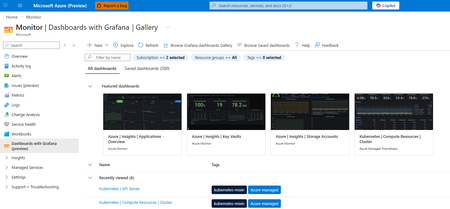
Continuing our commitment to open-source solutions, we are announcing the general availability of Azure Monitor dashboards with Grafana. This service offers a powerful solution for cloud-native monitoring and visualizing all your Azure data. Dashboards with Grafana enable you to create and edit Grafana dashboards directly in the Azure portal without additional cost and less administrative overhead compared to self-hosting Grafana or using managed Grafana services. Built-in Grafana controls and components allow you to apply a rich set of visualization panels and client-side transformations to Azure monitoring data to create custom dashboards. Start quickly with pre-built and community dashboards Dozens of pre-built Grafana dashboards for Azure Kubernetes Services, Application Insights, Storage Accounts, Cosmos DB, Azure PostgreSQL, OpenTelemetry metrics and dozens of other Azure resources are included and enabled by default. Additionally, you can import dashboards from thousands of publicly available Grafana community and open-source dashboards for the supported data sources: Prometheus, Azure Monitor (metrics, logs, traces, Azure Resource Graph), and Azure Data Explorer. Streamline monitoring with open-source compatibility and Azure enterprise capabilities Azure Monitor dashboards with Grafana are fully compatible with open-source Grafana dashboards and are portable across any Grafana instances regardless of where they are hosted. Furthermore, dashboards are native Azure resources supporting Azure RBAC to assign permissions, and automation via ARM and Bicep templates. Import, edit and create dashboards in 30+ Azure regions Choose from any language in the Azure Portal for your Grafana user interface Manage dashboard content as part of the ARM resource Automatically generate ARM templates to automate deployment and manage dashboards Take advantage of Grafana Explore and New Dashboards Leverage Grafana Explore to quickly create ad-hoc queries without modifying dashboards and add queries and visualizations to new or existing dashboards New out of the box dashboards for additional Azure resources: Additional Azure Kubernetes Service support including AKS Automatic and AKS Arc connected clusters Azure Container Apps monitoring dashboards Microsoft Foundry monitoring dashboards Azure Monitor Application Insights dashboards OpenTelemetry metrics Microsoft Agent Framework High Performance Computing dashboards with dedicated GPU monitoring When to step up to Azure Managed Grafana? If you store your telemetry data in Azure, Dashboards with Grafana in the Azure portal is a great way to get started with Grafana. If you have additional 3rd-party data sources, or need full enterprise capabilities in Grafana, you can choose to upgrade to Azure Managed Grafana, a fully managed hosted service for the Grafana Enterprise software. See a detailed solution comparison of Dashboards with Grafana and Azure Managed Grafana here. Get started with Azure Monitor dashboards with Grafana today.1.3KViews3likes0CommentsTroubleshoot with OTLP signals in Azure Monitor (Limited Public Preview)
As organizations increasingly rely on distributed cloud-native applications, the need for comprehensive standards-based observability has never been greater. OpenTelemetry (OTel) has emerged as the industry standard for collecting and transmitting telemetry data, enabling unified monitoring across diverse platforms and services. Microsoft is among the top contributors to OpenTelemetry. Azure Monitor is expanding its support for the OTel standard with this preview, empowering developers and operations teams to seamlessly capture, analyze, and act on critical signals from their applications and infrastructure. With this limited preview (sign-up here), regardless of where your applications are running, you can channel the OpenTelemetry Protocol (OTLP) logs, metrics and traces to Azure Monitor directly. On Azure compute platforms, we have simpler collection orchestration that also unifies application and infrastructure telemetry collection with the Azure Monitor collection offerings for VM/VMSS or AKS. On Azure VMs/VMSS (or any Azure Arc supported compute), you can use the Azure Monitor Agent (AMA) that you are already using to collect infrastructure logs. On AKS, the Azure Monitor add-ons that orchestrate Container Insights and managed Prometheus, will also auto configure the collection of OTLP signals from your applications (or auto-instrument with Azure Monitor OTel Distro for supported languages). On these platforms or anywhere else, you can choose to use OpenTelemetry Collector, and channel the OTLP signals from your OTel SDK instrumented application directly to Azure Monitor cloud ingestion endpoints. OTLP metrics will be stored in Azure Monitor Workspace, a Prometheus metrics store. Logs and traces will be stored in Azure Monitor Log Analytics Workspace in an OTel semantic conventions-based schema. Application Insights experiences will light up, enabling all distributed tracing and troubleshooting experiences powered by Azure Monitor, as well as out of the box Dashboards with Grafana from the community. With this preview, we are also extending the support for auto-instrumentation of applications on AKS to .NET and Python applications and introducing OTLP metrics collection from all auto-instrumented applications (Java/Node/.NET/Python). Sign-up for the preview here: https://aka.ms/azuremonitorotelpreview.1.2KViews1like0Comments
What’s new in Observability at Build 2026
At Build 2026, Azure Monitor introduces major advancements in end-to-end observability, extending across AI agents, applications, and infrastructure with OpenTelemetry at its core. New capabilities with Azure Copilot Observability agent, SLI/SLO support, and smarter alerting help teams move faster from detection to root cause while reducing noise and manual effort. Together, these innovations enable developers and SREs to operate modern, AI-driven systems with greater insight, efficiency, and alignment to customer experience.1.1KViews2likes0CommentsAzure Monitor Application Insights Auto-Instrumentation for Java and Node Microservices on AKS
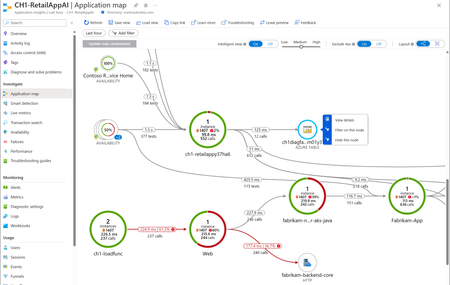
Key Takeaways (TLDR) Monitor Java and Node applications with zero code changes Fast onboarding: just 2 steps Supports distributed tracing, logs, and metrics Correlates application-level telemetry in Application Insights with infrastructure-level telemetry in Container Insights Available today in public preview Introduction Monitoring your applications is now easier than ever with the public preview release of Auto-Instrumentation for Azure Kubernetes Service (AKS). You can now easily monitor your Java and Node deployments without changing your code by leveraging auto-instrumentation that is integrated into the AKS cluster. This feature is ideal for developers or operators who are... Looking to add monitoring in the easiest way possible, without modifying code and avoiding ongoing SDK update maintenance. Starting out on their monitoring journey and looking to benefit from carefully chosen default configurations with the ability to tweak them over time. Working with someone else’s code and looking to instrument at scale. Or considering monitoring for the first time at the time of deployment. Before the introduction of this feature, users needed to manually instrument code, install language-specific SDKs, and manage updates on their own—a process that involved significant effort and numerous opportunities for errors. Now, all you need to do is follow a simple two-step process to instrument your applications and automatically send correlated OpenTelemetry-based application-level logs, metrics, and distributed tracing to your Application Insights resource. With AKS Auto-Instrumentation, you will be able to assess the performance of your application and identify the cause of any incidents more efficiently using the robust application performance monitoring capabilities of Azure Monitor Application Insights. This streamlined approach not only saves time but also ensures that your monitoring setup is both reliable and scalable. Feature Enablement and Onboarding To onboard to this feature, you will need to follow a two-step process: Prepare your cluster by installing the application monitoring webhook. Choose between namespace-wide onboarding or per-deployment onboarding by creating K8’s custom resources. Namespace-wide onboarding is the easiest method. It allows you to instrument all Java or Node deployments in your namespace and direct telemetry to a single Application Insights resource. Per-deployment onboarding allows more control by targeting specific deployments and directing telemetry to different Application Insights resources. Once the custom resource is created, you will need to deploy or redeploy your application, and telemetry will start flowing to Application Insights. For step-by-step instructions and to learn more about onboarding visit our official documentation on MS Learn. The Application Insights experience Once telemetry begins flowing, you can take advantage of Application Insights features such as Application Map, Failures/Performance Views, Availability, and more to help you efficiently diagnose and troubleshoot application issues. Let’s look at an example: I have an auto-instrumented distributed application running in the demoapp namespace of my AKS cluster. It consists of: One Java microservice Two Node.js microservices MongoDB and Redis as its data layer Scenario: End users have been complaining about some latency in the application. As the DRI, I can start my troubleshooting journey by going to the Application Map to get a topological view of my distributed application. I open Application Map and notice MicroserviceA has a red border - 50% of calls are erroring. The Container Insights card shows healthy pods - no failed pods or high CPU/memory usage. I can eliminate infrastructure issues as the cause of the slowness. In the Performance card, I spot that the rescuepet operation has an average duration of 10 seconds. That's pretty long. I drill in to get a distributed trace of the operation and find the root cause: an OutOfMemoryError. In this scenario, the issue has been identified as an out-of-memory error at the application layer. However, when the root cause is not in the code but in the infrastructure I get a full set of resource properties with every distributed trace so I can easily identify the infra resources running each span of my trace. I can click the investigate pods button to transition to Azure Monitor Container Insights and investigate my pods further. This correlation between application-level and infrastructure-level telemetry makes it much easier to determine whether the issue is caused by the application or the infrastructure. Pricing There is no additional cost to use AKS auto-instrumentation to send data to Azure Monitor. You will be only charged as per the current pricing. What’s Next Language Support This integration supports Java and Node workloads by leveraging the Azure Monitor OpenTelemetry distro. We have distros for .NET and Python as well and we are working to integrate these distros into this solution. At that point, this integration will support .NET, Python, Java and Node.js. For customers that want to instrument workloads in other languages such as Go, Ruby, PHP, etc. we plan to leverage open-source instrumentations available in the Open Telemetry community. In this scenario, customers will instrument their code using open source OpenTelemetry instrumentations, and we will provide mechanisms that will make it easy to channel the telemetry to Application Insights. Application Insights will expose an endpoint that accepts OpenTelemetry Language Protocol (OTLP) signals and configure the instrumented workload to channel the telemetry to this endpoint. Operating Systems and K8’s Controllers Right now, you can only instrument kubernetes deployments running on Linux node pools, but we plan to expand support to introduce support for Linux ARM64 node pools as well as support for StatefulSet, Job, Cronjob, and Replicaset controller types. Portal Experiences We are also working on Azure portal experiences to make onboarding easier. When our portal experiences for onboarding are released, users will be able to install the Application Insights extension for AKS using the portal and use a portal user interface to instrument their workloads instead of having to create custom resources. Beyond onboarding, we are working to build Application Insights consumption experiences within the AKS namespace and workloads blade. You will be able to see application-level telemetry right there in the AKS portal without having to navigate away from your cluster to Application Insights. FAQs: What are the advantages of AKS Auto-Instrumentation? No code changes required No access to source code required No configuration changes required Eliminates instrumentation maintenance What languages are supported by AKS Auto-Instrumentation? Currently, AKS Auto-Instrumentation supports Java and Node.js applications. Python and .NET support is coming soon. Moreover, we will be adding support for all OTel supported languages like Go soon via native OTLP ingestion. Does AKS Auto-Instrumentation support custom metrics? For Node.js applications, custom metrics require manual instrumentation with the Azure Monitor OpenTelemetry Distro. Java applications allow custom metrics with auto-instrumentation. Click here for more FAQs. This article was co-authored by Rishab Jolly and Abinet Abate1.1KViews0likes0CommentsAzure Monitor managed service for Prometheus now includes native Grafana dashboards
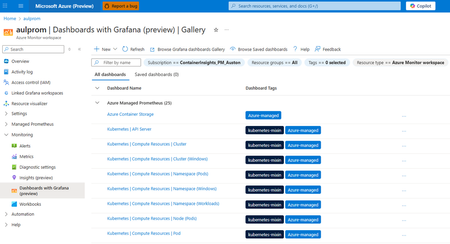
We are excited to announce that Azure Monitor managed service for Prometheus now includes native Grafana dashboards within the Azure portal at no additional cost. This integration marks a major milestone in our mission to simplify observability reducing the administrative overhead and complexity compared to deploying and maintaining your own Grafana instances. The use of open-source observability tools continues to grow for cloud-native scenarios such as application and infrastructure monitoring using Prometheus metrics and OpenTelemetry logs and traces. For these scenarios, DevOps and SRE teams need streamlined and cost-effective access to industry-standard tooling like Prometheus metrics and Grafana dashboards within their cloud-hosted environments. For many teams, this usually means deploying and managing separate monitoring stacks with some versions self-hosted or partner-managed Prometheus and Grafana. However, Azure Monitor's latest integrations with Grafana provides this capability out-of-the-box by enabling you to view Prometheus metrics and Azure other observability data in Grafana dashboards fully integrated into the Azure portal. Azure Monitor dashboards with Grafana delivers powerful visualization and data transformation capabilities on Prometheus metrics, Azure resource metrics, logs, and traces stored in Azure Monitor. Pre-built dashboards are included for several key scenarios like Azure Kubernetes Service, Azure Container Apps, Container Insights, and Application Insights. Why Grafana in Azure portal? Grafana dashboards are widely adopted visualization tool used with Prometheus metrics and cloud-native observability tools. Embedding it natively in Azure Portal offers: Unified Azure experience: No additional RBAC or network configuration required, users Azure login credentials and Azure RBAC are used to access dashboards and data. View Grafana dashboards alongside all your other Azure resources and Azure Monitor views in the same portal. No management overhead or compute costs: Dashboards with Grafana use a fully SaaS model built into Azure Monitor, where you do not have to administer the Grafana server or the compute on which it runs. Access to community dashboards: Open-source and Grafana community dashboards using Prometheus or Azure Monitor data sources can be imported with no modifications. These capabilities mean faster troubleshooting, deeper insights, and a more consistent observability platform for Azure-centric workloads. Figure 1: Dashboards with Grafana landing page in the context of Azure Monitor Workspace in the Azure portal Getting Started To get started, enable Managed Prometheus for your AKS cluster and then navigate to the Azure Monitor workspace or AKS cluster in the Azure portal and select Monitoring > Dashboards with Grafana (preview). From this page you can view, edit, create and import Grafana dashboards. Simply click on one of the pre-built dashboards to get started. You may use these dashboards as they have been provided or edit and add panels, update visualizations and create variables to create your own custom dashboards. With this approach, no Grafana servers or additional Azure resources need to be provisioned or maintained. Teams can quickly leverage and customize Grafana dashboards within the Azure portal, reducing their deployment and management time while still gaining the benefits of dashboards and visualizations to improve monitoring and troubleshooting times. Figure 2: Kubernetes Compute Resources dashboard being viewed in the context of Azure Monitor Workspace in the Azure portal When to upgrade to Azure Managed Grafana? Dashboards with Grafana in the Azure portal cover most common Prometheus scenarios but, Azure Managed Grafana remains the right choice for several advanced use cases, including: Extended data source support for non-Azure data sources e.g. open-source and third-party data stores Private networking and advanced authentication options Multi-cloud, hybrid and on-premises data source connectivity. See When to use Azure Managed Grafana for more details. Get started with Azure Monitor dashboards with Grafana today.1KViews1like0CommentsGenerally Available - Azure Monitor Private Link Scope (AMPLS) Scale Limits Increased by 10x!
Introduction We are excited to announce the General Availability (GA) of Azure Monitor Private Link Scope (AMPLS) scale limit increase, delivering 10x scalability improvements compared to previous limits. This enhancement empowers customers to securely connect more Azure Monitor resources via Private Link, ensuring network isolation, compliance, and Zero Trust alignment for large-scale environments. What is Azure Monitor Private Link Scope (AMPLS)? Azure Monitor Private Link Scope (AMPLS) is a feature that allows you to securely connect Azure Monitor resources to your virtual network using private endpoints. This ensures that your monitoring data is accessed only through authorized private networks, preventing data exfiltration and keeping all traffic inside the Azure backbone network. AMPLS – Scale Limits Increased by 10x in Public Cloud & Sovereign Cloud (Fairfax/Mooncake) - Regions In a groundbreaking development, we are excited to share that the scale limits for Azure Monitor Private Link Scope (AMPLS) have been significantly increased by tenfold (10x) in Public & Sovereign Cloud regions as part of the General Availability! This substantial enhancement empowers our customers to manage their resources more efficiently and securely with private links using AMPLS, ensuring that workload logs are routed via the Microsoft backbone network. What’s New? 10x Scale Increase Connect up to 3,000 Log Analytics workspaces per AMPLS (previously 300) Connect up to 10,000 Application Insights components per AMPLS (previously 1,000) 20x Resource Connectivity Each Azure Monitor resource can now connect to 100 AMPLS resources (previously 5) Enhanced UX/UI Redesigned AMPLS interface supports loading 13,000+ resources with pagination for smooth navigation Private Endpoint Support Each AMPLS object can connect to 10 private endpoints, ensuring secure telemetry flows Why It Matters Top Azure Strategic 500 customers, including major Telecom service providers and Banking & Financial Services organizations, have noted that previous AMPLS limits did not adequately support their increasing requirements. The demand for private links has grown 3–5 times over existing capacity, affecting both network isolation and integration of essential workloads. This General Availability release resolves these issues, providing centralized monitoring at scale while maintaining robust security and performance. Customer Stories Our solution now enables customers to scale their Azure Monitor resources significantly, ensuring seamless network configurations and enhanced performance. Customer B - Case Study: Leading Banking & Financial Services Customer Challenge: The Banking Customer faced complexity in delivering personalized insights due to intricate workflows and content systems. They needed a solution that could scale securely while maintaining compliance and performance for business-critical applications. Solution: The Banking Customer has implemented Microsoft Private Links Services (AMPLS) to enhance the security and performance of financial models for smart finance assistants, leading to greater efficiency and improved client engagement. To ensure secure telemetry flow and compliance, the banking customer implemented Azure Monitor with Private Link Scope (AMPLS) and leveraged the AMPLS Scale Limit Increase feature. Business Impact: Strengthened security posture aligned with Zero Trust principles Improved operational efficiency for monitoring and reporting Delivered a future-ready architecture that scales with evolving compliance and performance demands Customer B - Case Study: Leading Telecom Service Provider - Scaling Secure Monitoring with AMPLS Architecture: A Leading Telecom Service Provider employs a highly micro-segmented design where each DevOps team operates in its own workspace to maximize security and isolation. Challenge: While this design strengthens security, it introduces complexity for large-scale monitoring and reporting due to physical and logical limitations on Azure Monitor Private Link Scope (AMPLS). Previous scale limits made it difficult to centralize telemetry without compromising isolation. Solution: The AMPLS Scale Limit Increase feature enabled the Telecom Service Provider to expand Azure Monitor resources significantly. Monitoring traffic now routes through Microsoft’s backbone network, reducing data exfiltration risks and supporting Zero Trust principles. Impact & Benefits Scalability: Supports up to 3,000 Log Analytics workspaces and 10,000 Application Insights components per AMPLS (10× increase). Efficiency: Each Azure Monitor resource can now connect to 100 AMPLS resources (20× increase). Security: Private connectivity via Microsoft backbone mitigates data exfiltration risks. Operational Excellence: Simplifies configuration for 13K+ Azure Monitor resources, reducing overhead for DevOps teams. Customer Benefits & Results Our solution significantly enhances customers’ ability to manage Azure Monitor resources securely and at scale using Azure Monitor Private Link Scope (AMPLS). Key Benefits Massive Scale Increase 3,000 Log Analytics workspaces (previously 300) 10,000 Application Insights components (previously 1,000) Each AMPLS object can now connect to: Azure Monitor resources can now connect with up to 100 AMPLS resources (20× increase). Broader Resource Support - Supported resource types include: Data Collection Endpoints (DCE) Log Analytics Workspaces (LA WS) Application Insights components (AI) Improved UX/UI Redesigned AMPLS interface supports loading 13,000+ Azure Monitor resources with pagination for smooth navigation. Private Endpoint Connectivity Each AMPLS object can connect to 10 private endpoints, ensuring secure telemetry flows. Resources: Explore the new capabilities of Azure Monitor Private Link Scope (AMPLS) and see how it can transform your network isolation and resource management. Visit our Azure Monitor Private Link Scope (AMPLS) documentation page for more details and start leveraging these enhancements today! For detailed information on configuring Azure Monitor private link scope and azure monitor resources, please refer to the following link: Use Azure Private Link to connect networks to Azure Monitor - Azure Monitor | Microsoft Learn Design your Azure Private Link setup - Azure Monitor | Microsoft Learn Configure your private link - Azure Monitor | Microsoft Learn800Views0likes0Comments