azure kubernetes service
20 Topics
Azure Copilot Observability Agent is generally available, with autonomous operations in preview
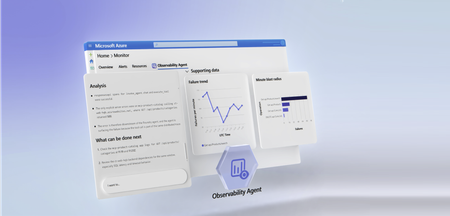
Complex cloud environments have outpaced manual operations. Agentic cloud operations connect people, tools, and data to streamline investigation workflows and move teams from scattered signals to evidence-backed next steps. With unified observability, teams can investigate Azure-monitored applications, Azure Kubernetes Service (AKS) environments, VMs, Foundry telemetry, infrastructure, and platform signals with greater context and control. Powered by Azure Monitor, the Azure Copilot Observability Agent is now generally available. It helps engineering, SRE, DevOps, and operations teams move from telemetry and alert noise to investigated issues, explainable reasoning, and recommended next steps that can reduce Time-To-Mitigate (TTM). Autonomous operations are also available in public preview. They help prepare context and reduce triage work while people remain responsible for mitigation decisions and any changes to the environment. From alert noise to investigated issues The Observability Agent helps teams reduce the effort required to understand operational problems. Instead of starting every investigation from a dashboard, query editor, or alert payload, teams can work with an AI companion that reasons across telemetry, Azure resource context, discovered topology, and custom instructions to identify what changed, what is correlated, and what evidence supports the conclusion. Teams can start with natural-language exploration and continue into deeper investigations when an issue requires more evidence. That light-to-deep workflow helps responders move from broad questions to a structured investigation without losing the reasoning trail. Here's what this looks like in practice: after a deployment, several alerts might fire across an app, database dependency, and compute resource. The Observability Agent can group those signals around the affected service, identify when the regression started, compare related dependencies and infrastructure metrics, and capture the findings in an Azure Monitor issue. The responder can then validate the evidence, add team context, route work to the right owner, and decide whether a rollback, configuration change, or code fix is appropriate. Explainable investigations across Azure-monitored signals Operations teams need more than a chatbot that answers questions. The Observability Agent follows an investigation workflow: it frames hypotheses, gathers evidence, compares signals by time, scope, and type, rules out weak explanations, and shows the reasoning path behind its findings. The Observability Agent can help teams: Investigate incidents and alerts across Azure-monitored applications, Azure Kubernetes Service (AKS) environments, VMs, Foundry telemetry, infrastructure, and platform signals Correlate related signals to reduce noise and surface higher-signal issues with context Explore telemetry using natural language while preserving transparency into the supporting data Compare signals by time, scope, and type to separate likely causes from coincidental changes Provide a reasoning trail that shows what the agent found, what it ruled out, and why Recommend next steps that engineers can review before deciding how to act This same investigation model applies to specialized skills and issue types, including customer's application, Azure Kubernetes Service (AKS), Foundry, VMs, and GenAI issues. When the relevant telemetry is available, the Observability Agent can correlate logs, metrics, traces, alerts, dependencies, resource graph, resource health, activity logs, Foundry telemetry, and changes. This helps teams investigate customer-visible issues with evidence, including latency, token spikes, tool-call failures, agent errors, hallucinations, deployments, API failures, performance regressions, infrastructure dependencies, and platform incidents. This explainability is central to the product. In production operations, trust is earned through evidence. The Observability agent is built to support human judgment, not bypass it. . Azure expertise, with context from your environment Context matters in every investigation. The same symptom can mean different things depending on application architecture, recent deployments, dependencies, historical incidents, and team practices. The Observability Agent brings Microsoft and Azure operational knowledge into the investigation experience. It can use discovered topology, Azure resource context, logs, metrics, traces, and custom instructions to ground investigations in signals that are more relevant to your environment. Native to Azure Monitor, with humans in control Because the Observability Agent is built into Azure Monitor, teams can use it close to the telemetry, alerts, and workflows they already rely on. Investigations can also be captured as Azure Monitor issues, creating a shared case file for humans and agents to collaborate on evidence, reasoning, and next steps. The Observability Agent is designed for governed AI operations inside Azure Monitor. Interactive chat and investigations use the signed-in user's identity and Azure role-based access control (RBAC). Prompts and responses are not used to train foundation models, and the agent doesn't restart resources, change configuration, or resolve issues on its own. Autonomous operations in public preview Alongside general availability, autonomous operations for the Observability Agent are available in public preview. When enabled, the agent can analyze alerts in the background, correlate related alerts when they likely represent the same incident, create Azure Monitor issues automatically, and run deep investigations on agent-created issues. This automatic triage helps reduce alert noise by turning streams of individual alerts into higher-signal issues with context, findings, and recommended next steps. Teams can review the issue, continue the investigation, and decide what action to take. Autonomous operations are designed to prepare context and reduce triage work, not to remove human control. Engineers remain responsible for decisions, approvals, and any changes to the environment. Next steps Check out our latest announcements and related blogs: Azure Blog and OMB Blog. Learn how to use the Observability Agent in Azure Copilot Observability Agent. Explore how investigations work in Deep investigations in the Azure Copilot Observability Agent. Learn more on how to Chat with your observability data Learn how teams preserve context in Azure Monitor issues. Review preview details in Autonomous operations in the Azure Copilot Observability Agent. Stay connected Follow this blog for ongoing deep dives, updates on current capabilities, and a preview of what's coming next. Live webinar - a walkthrough of real Observability Agent scenarios, best practices, and what's available today - along with a look at what's coming next, and live Q&A with the product team. Register for the Observability Agent webinar. We'd love your feedback The Observability agent continues to evolve based on real-world usage and operator feedback. Share your thoughts directly through the Give Feedback option in the experience, or reach us at enauerman@microsoft.com.10KViews6likes0CommentsTroubleshoot with OpenTelemetry in Azure Monitor - Public Preview
OpenTelemetry is fast becoming the industry standard for modern telemetry collection and ingestion pipelines. With Azure Monitor’s new OpenTelemetry Protocol (OTLP) support, you can ship logs, metrics, and traces from wherever you run workloads to analyze and act on your observability data in one place. What’s in the preview Direct OTLP ingestion into Azure Monitor for logs, metrics, and traces. Automated onboarding for AKS workloads. Application Insights on OTLP for distributed tracing, performance and troubleshooting experiences. Pre-built Grafana dashboards to visualize signals quickly. Prometheus for metric storage and query. OpenTelemetry semantic conventions for logs and traces, so your data lands in a familiar standard-based schema. How to send OTLP to Azure Monitor: pick your path AKS: Auto-instrument Java and Node.js workloads using the Azure Monitor OpenTelemetry distro, or auto-configure any OpenTelemetry SDK-instrumented workload to export OTLP to Azure Monitor. Get started Limited preview: Auto-instrumentation for .NET and Python is also available. Get started VMs/VM Scale Sets (and Azure Arc-enabled compute): Use the Azure Monitor Agent (AMA) to receive OTLP from your apps and export it to Azure Monitor. Get started Any environment: Use the OpenTelemetry Collector to receive OTLP signals and export directly to Azure Monitor cloud ingestion endpoints. Get started Under the hood: where your telemetry lands Metrics: Stored in an Azure Monitor Workspace, a Prometheus metrics store. Logs + traces: Stored in a Log Analytics workspace using an OpenTelemetry semantic conventions–based schema. Troubleshooting: Application Insights lights up distributed tracing and end-to-end performance investigations, backed by Azure Monitor. Why it matters Standardize once: Instrument with OpenTelemetry and keep your telemetry portable. Reduce overhead: Fewer bespoke exporters and pipelines to maintain. Debug faster: Correlate metrics, logs, and traces to get from alert to root cause with less guesswork. Observe with confidence: Use dashboards and tracing views that are ready on day one. Next step: Try the OTLP preview in your environment, then validate end-to-end signal flow with Application Insights and Grafana dashboards. Learn More623Views3likes0CommentsAnnouncing General Availability: Azure Monitor dashboards with Grafana
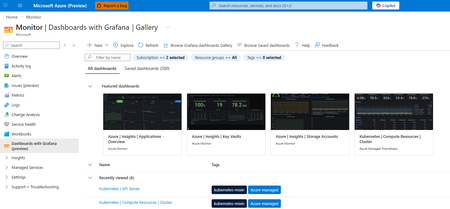
Continuing our commitment to open-source solutions, we are announcing the general availability of Azure Monitor dashboards with Grafana. This service offers a powerful solution for cloud-native monitoring and visualizing all your Azure data. Dashboards with Grafana enable you to create and edit Grafana dashboards directly in the Azure portal without additional cost and less administrative overhead compared to self-hosting Grafana or using managed Grafana services. Built-in Grafana controls and components allow you to apply a rich set of visualization panels and client-side transformations to Azure monitoring data to create custom dashboards. Start quickly with pre-built and community dashboards Dozens of pre-built Grafana dashboards for Azure Kubernetes Services, Application Insights, Storage Accounts, Cosmos DB, Azure PostgreSQL, OpenTelemetry metrics and dozens of other Azure resources are included and enabled by default. Additionally, you can import dashboards from thousands of publicly available Grafana community and open-source dashboards for the supported data sources: Prometheus, Azure Monitor (metrics, logs, traces, Azure Resource Graph), and Azure Data Explorer. Streamline monitoring with open-source compatibility and Azure enterprise capabilities Azure Monitor dashboards with Grafana are fully compatible with open-source Grafana dashboards and are portable across any Grafana instances regardless of where they are hosted. Furthermore, dashboards are native Azure resources supporting Azure RBAC to assign permissions, and automation via ARM and Bicep templates. Import, edit and create dashboards in 30+ Azure regions Choose from any language in the Azure Portal for your Grafana user interface Manage dashboard content as part of the ARM resource Automatically generate ARM templates to automate deployment and manage dashboards Take advantage of Grafana Explore and New Dashboards Leverage Grafana Explore to quickly create ad-hoc queries without modifying dashboards and add queries and visualizations to new or existing dashboards New out of the box dashboards for additional Azure resources: Additional Azure Kubernetes Service support including AKS Automatic and AKS Arc connected clusters Azure Container Apps monitoring dashboards Microsoft Foundry monitoring dashboards Azure Monitor Application Insights dashboards OpenTelemetry metrics Microsoft Agent Framework High Performance Computing dashboards with dedicated GPU monitoring When to step up to Azure Managed Grafana? If you store your telemetry data in Azure, Dashboards with Grafana in the Azure portal is a great way to get started with Grafana. If you have additional 3rd-party data sources, or need full enterprise capabilities in Grafana, you can choose to upgrade to Azure Managed Grafana, a fully managed hosted service for the Grafana Enterprise software. See a detailed solution comparison of Dashboards with Grafana and Azure Managed Grafana here. Get started with Azure Monitor dashboards with Grafana today.1.3KViews3likes0Comments
Public Preview: Metrics usage insights for Azure Monitor Workspace
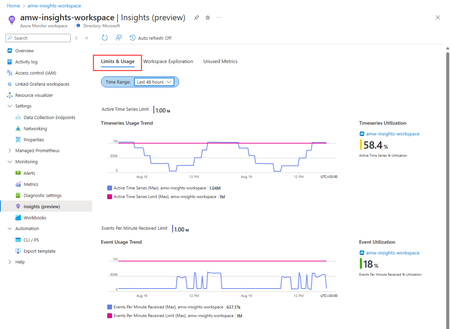
As organizations expand their services and applications, reliability and high availability are a top priority to ensure they provide a high level of quality to their customers. As the complexity of these services and applications grows, organizations continue to collect more telemetry to ensure higher observability. However, many are facing a common challenge: increasing costs driven by the ever-growing volume of telemetry data. Over time, as products grow and evolve, not all telemetry remains valuable. In fact, over instrumentation can create unnecessary noise, generating data that contributes to higher costs without delivering actionable insights. In a time where every team is being asked to do more with less, identifying which telemetry streams truly matter has become essential. To address this need we are announcing the Public Preview of ‘metrics usage insights’, a feature currently designed for Azure Managed Prometheus users which will analyze all metrics ingested in Azure Managed Workspace (AMW), surfacing actionable insights to optimize your observability setup. Metrics usage insights is built to empower teams with the visibility and tools the organizations need to manage observability costs effectively. It empowers customers to pinpoint metrics that align with their business objectives, uncover areas of unnecessary spend by identifying unused metrics, and sustain a streamlined, cost-effective monitoring approach. Metrics usage insights sends usage data to a Log Analytics Workspace (LAW) for analysis. This is a free offering, and there is no charge associated for the data sent to the Log Analytics workspace, storage or queries. Customers will be guided to enable the feature as part of the standard out of the box experience during new AMW resource creation. For existing AMWs this can be configured using diagnostic settings. Key Features 1.Understanding Limits and Quotas for Effective Resource Management Monitoring limits and quotas is crucial for system performance and resource optimization. Tracking usage aids in efficient scaling and cost avoidance. Metrics usage insights provides tools to monitor thresholds, resolve throttling, and ensure cost-effective operations without the need for creating support incidents. 2.Workspace Exploration This experience lets customers explore their AMW data and gain insights. It provides a detailed analysis of data points and samples ingested for billing, both at metric and workspace levels. Customers can evaluate individual metrics by examining their quantity, ingestion volume, and financial impact. 3.Identifying and Removing Unused Metrics The metrics usage insights feature helps identify underutilized metrics that are being ingested, but not used through dashboards, monitors, and API calls. Users facing high storage and ingestion costs can use this feature to delete unused metrics to optimize high-cost metrics, and reclaim capacity. Enable metrics usage insights To enable metrics usage insights, you create a diagnostic setting, which instructs the AMW to send data supporting the insights queries and workbooks to a Log Analytics Workspace (LAW). You'll be prompted to enable it automatically when you create a new Azure Monitor workspace. You can enable it later for an existing Azure Monitor workspace. Read More736Views3likes0Comments
What’s new in Observability at Build 2026
At Build 2026, Azure Monitor introduces major advancements in end-to-end observability, extending across AI agents, applications, and infrastructure with OpenTelemetry at its core. New capabilities with Azure Copilot Observability agent, SLI/SLO support, and smarter alerting help teams move faster from detection to root cause while reducing noise and manual effort. Together, these innovations enable developers and SREs to operate modern, AI-driven systems with greater insight, efficiency, and alignment to customer experience.1.2KViews2likes0Comments
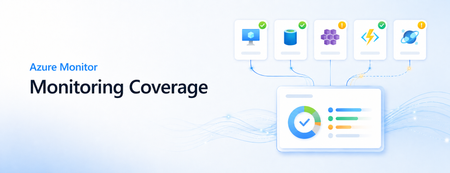
Introducing Monitoring Coverage: Assess and Improve Your Monitoring Posture at Scale
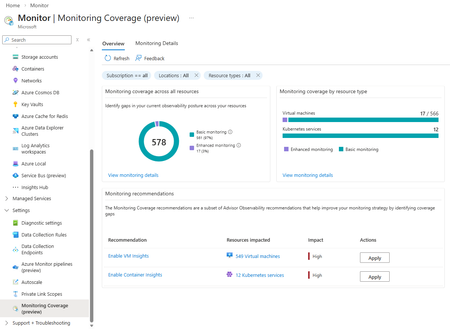
As organizations grow their Azure footprint, ensuring consistent monitoring coverage across resources becomes increasingly important. The new Monitoring Coverage (preview) feature in Azure Monitor provides a single, centralized experience to assess, configure at-scale, and enhance monitoring across your environment with ease. A unified view of your monitoring health Monitoring Coverage consolidates insights from Azure Advisor to highlight where monitoring can be improved. You can see which Azure resources already have basic out-of-box telemetry enabled and which could benefit from additional recommended settings, helping you close gaps in your observability strategy at scale. Key capabilities Comprehensive visibility: Get an overview of monitoring coverage across common Azure resource types. Actionable recommendations: Identify and apply Azure Advisor recommendations at-scale to strengthen your monitoring posture. Centralized configuration: Enable recommended monitoring settings for multiple resources from a single pane of glass. Detailed resource insights: Explore individual resource details to review active monitoring configurations and applicable recommendations. How to access In the Azure portal, open Azure Monitor. Under the Settings section of the left navigation, select Monitoring Coverage (preview). You can scope the view using standard Azure filters; Subscriptions, Resource groups, Tags, Locations, and Resource types, allowing you to focus on the resources you manage. Supported resource types During preview, Monitoring Coverage supports Virtual Machines (VMs) and Azure Kubernetes Service (AKS) clusters. Support for additional Azure services will roll out in future updates. Overview tab The Overview tab provides a snapshot of your overall monitoring landscape, showing which resources have: Basic monitoring: Default metrics and logs enabled upon creation. Enhanced monitoring: Microsoft-recommended configurations for deeper insights and improved observability. This view makes it easy to identify coverage gaps and take quick action to enable enhanced monitoring, which may incur additional cost depending on your configuration. Streamlined enablement experience When you choose to enable monitoring: The Enablement screen lists all resources included in the operation. You can deselect specific resources if needed. Selecting View details and configure allows customization by resource type—for example, selecting a Log Analytics workspace. The Review and Enable tab summarizes all changes before application. Once enabled, data typically begins flowing to the designated workspace within 30–60 minutes. During this preview, you can enable monitoring for up to 100 resources at a time, and an existing Log Analytics workspace or Azure Monitor Workspace is required. Monitoring Details page For a deeper look, the Monitoring Details page lets you: View resources as a list or group them by recommendation. Filter using standard Azure filters. See the Monitoring coverage column summarizing enabled recommendations and data collection rules. Enable individual monitoring settings directly from this view when managing resources one at a time. Share your feedback We’re actively evolving Monitoring Coverage based on user input. To share your feedback or suggest new capabilities, use the Feedback link at the top of the page in the Azure portal. Your insights will help shape the future of Azure Monitor. Try Monitoring Coverage (preview) today in the Azure portal to assess your observability coverage and take the next step toward proactive, consistent monitoring across your Azure environment.778Views2likes0CommentsWhat’s new in Observability at Build 2025
At Build 2025, we are excited to announce new features in Azure Monitor designed to enhance observability for developers and SREs, making it easier for you to streamline troubleshooting, improve monitoring efficiency, and gain deeper insights into application performance. With our new AI-powered tools, customizable alerts, and advanced visualization capabilities, we’re empowering developers to deliver high-quality, resilient applications with greater operational efficiency. AI-Powered Troubleshooting Capabilities We are excited to disclose two new AI-powered features, as well as share an update to a GA feature, which enhance troubleshooting and monitoring: AI-powered investigations (Public Preview): Identifies possible explanations for service degradations via automated analyses, consolidating all observability-related data for faster problem mitigation. Attend our live demo at Build and learn more here. Health models (Public Preview – coming in June 2025): Significantly improves the efficiency of detecting business-impacting issues in workloads, empowering organizations to deliver applications with operational efficiency and resilience through a full-stack view of workload health. Attend our live demo at Build to get a preview of the experience and learn more here. AI-powered Application Insights Code Optimizations (GA): Provides code-level suggestions for running .NET apps on Azure. Now, it’s easier to get code-level suggestions with GitHub Copilot coding agent (preview) and GitHub Copilot for Azure in VS Code. Learn more here. Enhanced AI and agent observability Azure Monitor and Azure AI Foundry now jointly offer real-time monitoring and continuous evaluation of AI apps and agentic systems in production. These capabilities are deeply integrated with the Foundry Observability experience and allow you to track key metrics such as performance, quality, safety, and resource usage. Features include: Unified observability dashboard for generative AI apps and agents (Public Preview): Provides full-stack visibility of AI apps and infrastructure with AI app metrics surfaced in both Azure Monitor and Foundry Observability. Alerts: Data is published to Azure Monitor Application Insights, allowing users to set alerts and analyze them for troubleshooting. Debug with tracing capabilities: Enables detailed root-cause analysis of issues like groundedness regressions. Learn more in our breakout session at Build! Improved Visualization We have expanded our visualization capabilities, particularly for Kubernetes services: Azure Monitor dashboards with Grafana (Public Preview): Create and edit Grafana dashboards directly in the Azure Portal with no additional cost. This includes dashboards for Azure Kubernetes Services (AKS) and other Azure resources. Learn more. Managed Prometheus Visualizations: Supports managed Prometheus visualizations for both AKS clusters (GA) and Arc-enabled Kubernetes clusters (Public Preview), offering a more cost-efficient and performant solution. Learn more. Customized and Simplified Monitoring Through enhancements to alert customization, we’re making it easier for you to get started with monitoring: Prometheus community recommended alerts: Offers one-click enablement of Prometheus recommended alerts for AKS clusters (GA) and Arc-enabled Kubernetes clusters (Public Preview), providing comprehensive alerting coverage across cluster, node, and pod levels. Simple log alerts (Public Preview): Designed to provide a simplified and more intuitive experience for monitoring and alerting, Simple log alerts evaluate each row individually, providing faster alerting compared to traditional log alerts. Simple log alerts support multiple log tiers, including Analytics and Basic Logs, which previously did not have any alerting solution. Learn more. Customizable email subjects for log search alerts (Public Preview): Allows customers to personalize the subject lines of alert emails including dynamic values, making it easier to quickly identify and respond to alerts. Send a custom event from the Azure Monitor OpenTelemetry Distro (GA): Offers developers a way to track user or system actions that matter the most to their business objectives, now available in the Azure Monitor OpenTelemetry Distro. Learn more. Application Insights auto-instrumentation for Java and Node Microservices on AKS (Public Preview): Easily monitor your Java and Node deployments without changing your code by leveraging auto-instrumentation that is integrated into the AKS cluster. These capabilities will help you easily assess the performance of your application and identify the cause of incidents efficiently. Learn more. Enhancements for Large Enterprises and Government Entities Azure Monitor Logs is introducing several new features aimed at supporting highly sensitive and high-volume logs, empowering large enterprises and government entities. With better data control and access, developers at these organizations can work better with IT Professionals to improve the reliability of their applications. Workspace replication (GA): Enhances resilience to regional incidents by enabling cross-regional workspace replication. Logs are ingested in both regions, ensuring continued observability through dashboards, alerts, and advanced solutions like Microsoft Sentinel. Granular RBAC (Public Preview): Supports granular role-based access control (RBAC) using Azure Attribute-Based Access Control (ABAC). This allows organizations to have row-level control on which data is visible to specific users. Data deletion capability (GA): Allows customers to quickly mark unwanted log entries, such as sensitive or corrupt data, as deleted without physically removing them from storage. It’s useful for unplanned deletions using filters to target specific records, ensuring data integrity for analysis. Process more log records in the Azure Portal (GA): Supports up to 100,000 records per query in the Azure Portal, enabling deeper investigations and broader data analysis directly within the portal without need for additional tools. We’re proud to further Azure Monitor's commitment to providing comprehensive and efficient observability solutions for developers, SREs, and IT Professionals alike. For more information, chat with Observability experts through the following sessions at Build 2025: BRK168: AI and Agent Observability with Azure AI Foundry and Azure Monitor BRK188: Power your AI Apps Across Cloud and Edge with Azure Arc DEM547: Enable application monitoring and troubleshooting faster with Azure Monitor DEM537: Mastering Azure Monitor: Essential Tips in 15 Minutes Expo Hall (Meet the Experts): Azure Arc and Azure Monitor booth4.2KViews2likes0CommentsConnect Metrics to Traces with Exemplars in Azure Monitor
Following Microsoft’s recent GA announcement for OpenTelemetry (OTel) support, we are excited to announce support for Exemplars for customers instrumenting metrics with Prometheus or OpenTelemetry and traces using OpenTelemetry, enhancing Azure Monitor’s integrated observability experience for cloud-native applications. Modern cloud-native applications generate enormous volumes of telemetry. Metrics help teams detect that something is wrong, but traces explain why. Exemplars bridge these two worlds by attaching trace references directly to metric data points, making it dramatically easier to pivot from a spike in latency or errors to the exact distributed trace responsible for the issue. With Azure Monitor, customers can now ingest metrics with exemplars and visualize them in Azure Managed Grafana. This enables seamless correlation between metrics and traces, helping engineering teams troubleshoot issues faster and reduce mean time to resolution (MTTR). Why Exemplars Matter Traditional monitoring workflows often require users to manually correlate data across multiple systems. Exemplars simplify this workflow by embedding trace context directly into metric samples. For example, if a latency metric spikes at a specific timestamp, the exemplar associated with that data point can link directly to the distributed trace responsible for the outlier. This provides several benefits: Faster root cause analysis Quicker transition from aggregate metrics to request-level details Simplified debugging workflows for SRE and platform teams Better observability experiences for microservices and distributed applications Unified Observability with Azure Monitor With Azure Monitor and Azure Managed Grafana, you can now: Ingest OTLP or Prometheus metrics with exemplars into Azure Monitor Workspace Store and analyze traces in Azure Monitor Application Insights Visualize exemplar markers directly in Grafana charts Navigate from a metric spike to the exact distributed trace associated with that data point By combining these signals in a single observability platform, organizations can correlate infrastructure health, application behavior, and request traces without context switching between tooling. How It Works Once metrics, exemplars, and traces are ingested into Azure Monitor, Azure Managed Grafana can consume exemplar information from the configured Prometheus data source. When exemplars are enabled in Grafana dashboards, users will see markers associated with individual metric data points. Selecting an exemplar opens the associated trace in Azure Monitor, providing end-to-end diagnostic context. Getting Started Setup data ingestion: Instrument your application to emit OpenTelemetry traces, OpenTelemetry or Prometheus metrics with exemplars, and enable ingestion of the same to Azure Monitor using OpenTelemetry Collector. Follow the instructions in Ingest OTLP Data into Azure Monitor with OTel Collector - Azure Monitor | Microsoft Learn. After this step, you will have the Log Analytics Workspace, Azure Monitor Workspace and Application Insights resources all set up to store the telemetry data. Create an Azure Managed Grafana instance and connect it with the Azure Monitor Workspace by navigating to your Azure Monitor Workspace in the Azure portal and then clicking on “Linked Grafana workspaces”. To learn more, see Manage an Azure Monitor workspace - Azure Monitor | Microsoft Learn Optionally, enable Azure Managed Prometheus on your AKS cluster or use remote-write and configure it to use the same Azure Monitor Workspace to centralize infrastructure and application metrics. Enable Exemplars in Azure Managed Grafana: After setting up the data ingestion, ensure that logs and traces are flowing into Log Analytics Workspace, and metrics are flowing into Azure Monitor Workspace. Step 1: Enable Exemplars on Prometheus Data Source in Azure Managed Grafana Navigate to Connections -> Data Sources in Azure Managed Grafana. Since you have connected Azure Managed Grafana to Azure Monitor Workspace, you will see the data source (Managed_Prometheus_<AMW-Name>) already configured. If the data source is not configured, follow the steps here to add your Azure Monitor Workspace as a data source. Open the data source configuration. Click Add Exemplars to enable exemplar support. Step 2: Configure Trace Linking with Azure Monitor In the exemplar configuration section, toggle Internal Link to On. Select Azure Monitor as the data source. In the Label Name, enter the name of the field in the labels object that should be used to get the trace id, eg. trace_id. Click Save & Test. This configuration enables direct navigation from exemplar markers in Grafana charts to the associated traces stored in Azure Monitor. Azure Managed Grafana also supports trace correlation from other solutions like Jaeger etc. To use your trace solution, use the appropriate links. Step 3: Enable Exemplars in Dashboards Navigate to a Grafana dashboard that uses your configured Prometheus data source. Open the panel options for a metrics chart. Toggle Exemplars to On. Once enabled, exemplar markers will appear on supported metric visualizations. Clicking on it will show exemplar details along with an option to open the corresponding distributed trace in Azure Monitor. To learn more, visit https://aka.ms/azmon-exemplars329Views1like0CommentsIs Your Monitoring Actually Working? What's New in Monitoring Coverage
Monitoring is only useful when the right signals are collected, the right alerts are in place, and the data is actually flowing when teams need it. In large Azure environments, confirming all three across every VM and AKS cluster can still take too much manual work. At Microsoft Ignite, we introduced Monitoring Coverage in Azure Monitor, a centralized preview experience for finding coverage gaps and enabling recommended VM and container monitoring at scale. At Microsoft Build, we are expanding that experience with two new capabilities that make monitoring easier to operationalize: data flow status and at-scale recommended alert enablement for virtual machines and Azure Kubernetes Service (AKS). With these updates, teams can move beyond asking whether monitoring was configured. They can see whether recommended monitoring is enabled, whether important alert coverage is missing, and whether configuration issues may prevent monitoring data from reaching its destination. Monitoring Coverage overview with recommendations and data flow status. What is Monitoring Coverage? Monitoring Coverage in Azure Monitor gives you a single place to review recommended monitoring across supported Azure resources. The Overview page summarizes coverage across your selected scope, shows Azure Advisor observability recommendations, and provides quick actions to enable recommended monitoring settings. Coverage is grouped into basic, partial, and enhanced monitoring so you can quickly understand whether a resource is using only default monitoring or has the Microsoft-recommended configuration enabled. From there, you can drill into the Monitoring Details tab to review individual resources and take action. New: data flow status The most important question after enabling monitoring is simple: is the data flowing? Data flow status helps answer that question directly from Monitoring Coverage. The new data flow status summary shows how many resources need attention, passed initial checks, or are not configured for validation. It also highlights top resources that need attention so operators can start with the most important issues first. When you open data flow status for a resource, Azure Monitor shows validation checks across areas such as: Resource configuration Data collection rule associations Network connectivity Data flows to the configured destination Detected issues are prioritized at the top of the details pane, and each validation check includes a recommended action. After making a fix, you can run validation again to confirm that data flow issues are resolved. Data flow status details with validation checks and recommended actions. Alternatively, you can visualize your data flows and identify problems from there. New: enable recommended alerts at scale Monitoring Coverage now also helps close alerting gaps. From the Overview page, you can see recommendations such as Enable VM Recommended Alerts and Enable AKS Recommended Alerts, then select Apply to configure recommended alert rules from a centralized flow. For virtual machines, you can enable alerts across an entire subscription or choose selected resources. Subscription scope is useful when you want recommended alerts to apply broadly, including to future VMs in the selected subscription. Selected resource scope gives you more granular control when you want to enable alert rules for a specific set of VMs. The enablement flow lets you review recommended alert rules, adjust thresholds, and configure notification options such as email, Azure Resource Manager role notifications, Azure mobile app notifications, or an existing action group. Some VMs may already have alerts configured, and new rules are designed not to duplicate existing alerts. For AKS, Monitoring Coverage can surface recommended alert gaps and start the same guided pattern: review impacted resources, configure recommended alert settings, and use Review + Enable to create the alert rules. A resource-centric view for follow-up The Monitoring Details tab brings coverage and data flow into the same resource list. Two columns are especially useful for triage: Monitoring coverage and Data flow status. Select either value to open resource-level details. Monitoring coverage details show what is configured for the resource, including VM Insights, recommended alerts, data collection rules, data sources, destinations, and agent version when available. Data flow details show validation results and recommended remediation steps. This makes it easier to move from a high-level gap to the specific resource and configuration that needs attention. Getting started Monitoring Coverage is available in preview from the Azure portal. Open Monitor, select Monitoring Coverage (preview), and choose the subscriptions and resources you want to review. From the Overview page, you can: Review coverage across VMs and AKS resources. Apply recommendations to enable VM Insights, container monitoring, and recommended alerts. Use data flow status to find resources whose monitoring data needs attention. Open Monitoring Details for resource-level coverage and validation results. A few preview notes: enablement operations include up to 100 resources at a time, and enabling monitoring or alert rules may create data collection rules, deploy Azure Monitor Agent, configure destinations, or create alert rules. Data collection, workspace ingestion, and alert rules may incur costs based on the settings you enable. To learn more, see Monitoring coverage in Azure Monitor (preview). Looking ahead Monitoring Coverage is part of our continued work to make Azure Monitor easier to operationalize at scale. We want teams to spend less time hunting for monitoring gaps and more time acting on reliable, validated signals. We would love your feedback as you try these new Build updates and we look to expand support beyond this set of resource types. Use the Azure portal feedback options or share feedback through your Microsoft account team.385Views1like0Comments
Simplify Application Monitoring for AKS with Azure Monitor (Public Preview)
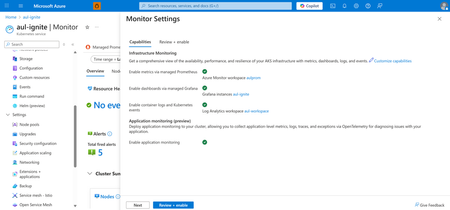
As cloud-native workloads scale, customers increasingly expect application and infrastructure observability to be unified, automated, and devops-friendly. Azure Monitor is advancing this vision with Application Monitoring for Azure Kubernetes Service (AKS). With seamless onboarding and troubleshooting experiences in the Azure Portal, now in Public Preview. This new capability brings first-class OpenTelemetry support, seamless onboarding from the AKS cluster blade, and auto-instrumentation and auto-configuration options that make it easier than ever to collect application performance data into Azure Monitor and Application Insights—without modifying application code or maintaining custom agents. Enable application monitoring for your AKS deployed apps directly from the Azure Portal in two steps: 1. Enable application monitoring for the AKS cluster in Monitor Settings 2. Choose the namespaces for application monitoring and configure namespace-wide onboarding to route application signals to an App Insights resource. Optionally, leverage Custom Resource Definitions (CRDs) for more granular enablement and per-deployment onboarding. Feature Highlights Auto-instrumentation Auto-instrument Java and NodeJS applications without code changes. This approach instruments workloads with the AzureMonitor OpenTelemetry distro and routes telemetry to Application Insights. Now available in both CLI and Azure portal for addon enablement and namespace configuration. Unified Monitoring and Troubleshooting Switch seamlessly between infrastructure and application layers with improved navigation between Container Insights and Application Insights, curated OpenTelemetry workbooks, and Azure-curated Grafana dashboards. When looking into your deployment controllers from Container Insights, you can also see the application performance metrics alongside to identify problematic requests or failures. From there, you can seamlessly transition over to your Application Insights to get a more detailed diagnosis. View your application performance next to your infrastructure metrics in Container Insights Full-Stack Dashboards with Grafana This new application monitoring capability becomes even more powerful when paired with Dashboards with Grafana for Azure Monitor. With curated, Azure-hosted Grafana dashboards built specifically for Application Insights and OpenTelemetry data, teams can extend their AKS application monitoring experience with rich, full-stack visualizations tailored for cloud-native workloads. Application monitoring dashboards available through Dashboards with Grafana These dashboards allow you to: Bring application traces, requests, dependencies, and exception data from Application Insights into Grafana dashboards optimized for app-centric troubleshooting. Correlate application performance with AKS infrastructure metrics, including node, pod, and container health, to rapidly identify cross-layer issues. Visualize OpenTelemetry signals flowing through Azure Monitor in a unified, standards-based format without needing to build dashboards from scratch. Customize and extend dashboards with your own OTel metrics or additional Application Insights dimensions for deeper app performance analytics. By combining Application Monitoring for AKS with Dashboards for Grafana, developers and operators gain a complete, end-to-end view of application behavior, making it faster and easier to diagnose issues, validate deployments, and understand the health of microservices running on AKS. Call to Action Start simplifying application observability today with Azure Monitor for AKS. Unify your metrics, logs, and traces in a single monitoring experience powered by OpenTelemetry and Azure Monitor. Explore the documentation and get started: https://learn.microsoft.com/azure/azure-monitor/app/kubernetes-codeless Learn more about our new features for OpenTelemetry in Azure Monitor: https://aka.ms/igniteotelblog566Views1like0Comments