azure functions
14 TopicsLogic Apps Aviators Newsletter - June 2026
In this issue: Ace Aviator of the Month News from our product group News from our community Ace Aviator of the Month June 2026's Ace Aviator: Florian De Langhe LinkedIn: https://www.linkedin.com/in/floriandelanghe/ What's your role and title? What are your responsibilities? Lead Expert/Team Lead for the Microsoft Integration team at delaware. I have a wide range of responsibilities: - People management - Resource planning - Design and operate our integration solutions at our customers, what we brand as "SmartLink". Next to this, as many of us, I follow the latest AI news closely to keep up to date and try to stay ahead of the curve. Can you give us some insights into your day-to-day activities? I wear many hats so no two days look the same. That is also what keeps it interesting. A typical day starts with reviewing resource planning across our active projects, followed by a technical design review for a new integration. Sprinkle some one-on-one coaching conversations and research into new technologies/features and you have my day. The balance between People leadership and hands-on technical work is what I enjoy most. What motivates and inspires you to be an active member of the Aviators/Microsoft community? I started out being an active member on the Microsoft Logic App forum 10 years ago. I remember going back and forth with Wagner through the forum posts trying to solve questions. Good times. Integration is one of those disciplines where you're constantly connecting systems, teams, and ideas. What motivates me is seeing how members of our community across different companies and countries solve similar problems in completely different ways. The Aviators community has that right mix of deep technical knowledge and willingness to help each other out. Since discovering Integration and the Microsoft community, I basically never left. Looking back, what advice do you wish you had been given earlier? Document everything and treat documentation as a deliverable, not an afterthought. Early in my career I saw documentation as the boring part that you do after the development work. Now I see it as the leverage point. A well-written design document doesn't just help the next person understand what you built, it compounds. It feeds code generation, easier onboarding of new members and validation with your customers on what and how to build it. What has helped you grow professionally? Two things: 1) Always challenge yourself and your implementations; everything can be better, so I am always pushing myself to keep learning, stay up to date, and think about every idea/solution posted in this community—how it could improve my way of thinking or solutions that I am building/have built. 2) Focus on understanding the integration concepts and patterns. At the end of the day everything is a pattern; it is how you implement where we make the difference. So knowing the base layer itself helps a lot when building integration solutions. If you had a magic wand that could create a feature in Logic Apps, what would it be? To be able to control scaling of the workflow service plans more fine grained. Being able to control this would unlock a lot of use cases, especially for the combination of Logic Apps and Service Bus concurrency and throughput. News from our product group Write Logic Apps in C#: introducing the Logic Apps Standard SDK This article introduces the Logic Apps Standard SDK (Microsoft.Azure.Workflows.Sdk), a code-first way to define Logic Apps Standard workflows in C#. Developers compose workflows using a fluent builder with strongly typed triggers and actions, including both built-in and managed connector operations. The SDK preserves the existing runtime, connectors, monitoring, and run history while changing only the authoring experience. It supports control flow constructs, custom C# code steps, and run-after conditions for fault handling. Guidance covers getting started in VS Code, project layout, local F5 execution, and preview limitations such as no service provider connectors and work-in-progress managed identity support. New AI gateway capabilities in Azure API Management Azure API Management expands its AI gateway with a Unified Model API (preview) that lets clients use a single OpenAI-style format across providers, plus model aliases and discovery. GA updates include support for Anthropic and Google Vertex AI and content safety for MCP and Agent-to-Agent (A2A) traffic. Token observability now tracks cached, reasoning, and thinking tokens in Application Insights. Foundry import adds Anthropic API operations. A2A APIs reach GA with richer diagnostics and availability in classic tiers. Together, these features standardize governance, security, and observability for multi-model, multi-protocol AI applications. 🎉 Automation just became a team sport. Meet Azure Logic Apps Automation. Azure Logic Apps Automation (public preview) is a new SKU that delivers a managed, SaaS-like experience for building and running workflow automations. It keeps the enterprise-grade Logic Apps engine while simplifying onboarding, collaboration, and governance with projects and applications, flexible permissions, and policy inheritance. The experience is AI-native with natural language authoring, first-class agents, tools via MCP, and managed sandboxes. It introduces a modern designer, draft mode, live run history, JavaScript expressions, elastic scale to zero, and knowledge-as-a-service integration—aimed at helping teams prototype quickly and operate securely at scale. 📢 Announcing Knowledge as a Service for Azure Logic Apps Knowledge as a Service (public preview) provides a managed knowledge layer for Logic Apps that turns documents into a ready-to-use knowledge base without building a custom RAG pipeline. The service handles ingestion (parsing, chunking, embeddings) and retrieval (query rewriting, semantic search, ranking) and integrates with agentic workflows in Logic Apps Standard and the Automation SKU. On Standard, teams bring their own vector store and models; on Automation, the platform hosts them on behalf of the user. It supports Entra authentication and focuses on secure, grounded responses for agents and workflows. Better Together: Build Agents in Microsoft Foundry, Automate them with Azure Logic Apps This post outlines a combined stack for agentic applications: Microsoft Foundry for building and hosting agents, and Azure Logic Apps for invoking and orchestrating them. New capabilities let teams create or select Foundry agents directly from the Logic Apps designer, pair any trigger with an agent for autonomous execution, and expose 1,400+ Logic Apps connectors and entire workflows as agent tools. The approach enables agents to act across systems, handle long-running processes, and integrate with enterprise events, making deterministic workflows and AI-driven reasoning work together in production. What's new in Azure API Management at Microsoft Build 2026 This roundup covers Build 2026 updates for API Management and API Center: GA for agent registration, assessment, and Git sync in API Center, plus a data plane MCP server for enterprise discovery. API Management adds GA support for JSON‑RPC agent‑to‑agent (A2A) APIs and extends content safety controls to MCP and A2A flows. Unified Model API enters preview to standardize client integration across model providers, and AI Gateway expands to Anthropic and Vertex AI with broader token metrics. Platform enhancements include multi‑domain and wildcard custom hostnames in v2 tiers and workspace support on the built‑in gateway. Azure Connector Namespaces: managed integration for any Azure compute Azure Connector Namespace (preview) offers a fully managed integration layer that brings the Logic Apps connector ecosystem to any Azure or self‑hosted compute without requiring a workflow engine. Apps call strongly typed SDKs for C#, Node.js, or Python to invoke actions and subscribe to triggers, while the namespace handles auth, token rotation, retries, throttling, and webhook delivery. It also projects connectors as MCP servers for agents, and supports hosted MCP servers like Playwright and Azure SQL. The post details building blocks, scenarios, security, governance, and preview limitations. What's new in Azure Logic Apps at Microsoft Build 2026 This Build 2026 overview highlights Logic Apps Automation (public preview), GA for the Logic Apps MCP Server to expose workflows as MCP tools, direct invocation of Microsoft Foundry agents from Logic Apps, Knowledge as a Service, and code‑first development with the Logic Apps Standard SDK (Codeful Workflows). It also introduces a Migration Agent to help modernize from legacy platforms. The theme is making enterprise‑grade automation more accessible while preserving governance, reliability, and operational controls for production use. Hosted MCP Servers in Connector Namespace (Preview) Hosted MCP servers in Connector Namespace let teams deploy managed, enterprise‑ready MCP servers from a curated catalog in minutes. The platform handles deployment, scaling, authentication (inbound with Entra ID, outbound with managed identity or on‑behalf‑of), availability, and observability via Application Insights. Preview servers include Playwright for browser automation and Azure SQL via Data API Builder, enabling agents to use reliable tools without the overhead of self‑hosting. The post explains setup, benefits over self‑hosted servers, and areas of ongoing investment like catalog expansion and VNet support. MCP Test Console and Git Repository synch in Azure API Center Azure API Center adds a built‑in MCP Test Console in the developer portal and Git repository synchronization for MCP servers and other assets. Developers can validate MCP tools interactively on the Documentation tab and browse server tiles with endpoints and schemas. Git sync keeps the API Center inventory aligned with source‑controlled definitions, with secure access via Key Vault and managed identity. Together, these additions streamline discovery, testing, and governance of MCP assets across the enterprise. Bringing all your Integration workloads to Logic Apps Standard This post outlines Microsoft’s guided path for moving enterprise integration workloads—especially BizTalk—to Azure Logic Apps Standard. It introduces the open-source Logic Apps Migration Agent, which delivers an AI‑assisted, stage‑gated process across discovery, planning, baseline conversion, and continuous validation with human‑in‑the‑loop checkpoints. The workflow integrates with VS Code and GitHub Copilot, supports incremental “flow‑group” migration, and accommodates existing black‑box tests. The article also previews mission‑critical capabilities arriving for Standard and Hybrid (HL7, MLLP, Rules Engine, MSMQ, Oracle DB, flat‑file generation, Integration Accounts, and more), giving teams a repeatable, auditable modernization path with reduced risk. Announcing Microsoft Host Integration Server 2028: Modern connectivity for IBM Mainframes Midranges Host Integration Server 2028 (HIS 2028) is the next HIS release, delivered as a standalone SKU decoupled from BizTalk. It modernizes platform foundations (.NET 10) and, for non‑SNA features, introduces Linux support. New investments include Foundry integration for agent scenarios, REST APIs for DB2 and Transaction Integrator workloads, Entra ID and Azure Arc for hybrid management, a move to Visual Studio Code for designers, and alignment with newer IBM middleware. The post also lists product cleanup and deprecations (e.g., 32‑bit, WMI/WCF, BizTalk adapters), helping enterprises secure, govern, and operate host connectivity for years ahead. Easy Auth Configuration for Logic App Standard through CI/CD Enabling App Service Easy Auth on Logic Apps Standard can break run‑history views because SAS‑based runtime calls are blocked before the Logic Apps engine can validate them. This article explains two remedies: allow unauthenticated requests (so the runtime enforces its own auth), or keep Easy Auth strict and exclude runtime endpoints (e.g., /runtime/*) using authsettingsV2. It provides CI/CD‑ready approaches via ARM/Bicep templates or a post‑deployment REST API call, and highlights key settings such as requireAuthentication, unauthenticatedClientAction, excludedPaths, and allowedApplications. The guidance restores run‑history usability while maintaining enterprise authentication policies. Run Javascript code on Agent Loop Azure Logic Apps Agent Loop now supports a JavaScript code interpreter, extending earlier code‑execution support and enabling reliable computations, validations, and transformations alongside LLMs. The runtime executes generated or pre‑written code inside a V8 isolate using the isolated‑vm library, providing memory limits, timeouts, and failure isolation (not a full sandbox) to reduce blast radius. A worked example shows expense‑validation with agent tools orchestrated in a workflow. For Consumption, attaching an Integration Account provides isolated compute for the interpreter. The capability helps teams combine deterministic steps with agentic reasoning to deliver robust, auditable outcomes. Bulk-configure diagnostic settings on Azure Logic Apps Consumptions LA‑BulkDiag is a single‑file PowerShell script that bulk‑applies diagnostic settings across Logic Apps Consumption in a resource group. It inventories workflows, supports quick scopes (bare/all/pick), verifies destinations, auto‑renames on name collisions, and ships with 129 Pester tests. Presets cover logs, metrics, and workflow‑runtime categories; selection grammar enables non‑interactive runs suitable for CI. The post includes quick‑start commands and clarifies scope: it targets Consumption only (not Standard) and doesn’t configure Event Hub sinks. The result is faster, consistent observability at scale without repetitive portal clicks or accidental overwrites. Clean up idle and always-failing Azure Logic App Consumption LA‑CleanUp is a PowerShell utility that scans a subscription for Logic Apps Consumption workflows, classifying them as Idle (no runs in N days) or AlwaysFailing (runs in the window with zero successes). It can export candidates to CSV, then guide per‑item deletion with y/N/q prompts, reporting final counts. Under the hood, it uses OData filters and $top=1 queries for fast server‑side checks, caches an ARM token once, and intentionally avoids cross‑subscription operations. Scope notes: it doesn’t touch Standard workflows or API connections. The tool reduces noise, costs, and operational drag from abandoned or broken apps. News from our community Spec2Integration Post by Balbir Singh Spec2Integration proposes a spec-driven approach to building Azure Integration Services solutions. The open-source toolkit guides teams from a product brief through specification, modeling, contracts, mapping, and architecture to a deployable implementation targeting Azure Logic Apps, Functions, and related services. It includes governance gates for idempotency, observability, retries, and PII handling, plus a VS Code extension that visualizes pipeline status and the integration representation. Templates and tooling support greenfield projects and BizTalk migrations. The result aims to standardize repeatable steps, reduce failure modes, and accelerate delivery while keeping architectural control outside individual workflows. Stateful Orchestration in Azure: When Logic Apps Break, and What to Do Instead Post by Al Ghoniem, MBA This article examines where stateful orchestration with Azure Logic Apps can fall short and how to design around those gaps. It differentiates execution state from business state and highlights common failure modes: long-running instances, retry-induced duplicates, partial completion across SAP/Oracle/APIs, lost correlation, and unowned DLQs. It then contrasts orchestration choices—stateful Logic Apps, Durable Functions, Service Bus–backed orchestration, and choreography—emphasizing idempotency, correlation, reconciliation, and compensation. The guidance steers architects toward a control and observability layer so production incidents can be traced, replayed, and recovered without relying on workflow run history alone. Logic Apps Announcements at Microsoft Build Video by Sebastian Meyer This video recaps Logic Apps announcements from Microsoft Build with insights from a member of the product team. It highlights newly introduced capabilities and shares resources for deeper dives. Viewers get a concise overview of what’s new, why it matters for integration practitioners, and where to learn more. The discussion points architects toward practical use cases and next steps, making it a useful primer for anyone assessing roadmap impacts on existing or upcoming Azure Integration Services projects. Logic Apps Standard vs. Consumption: Which Plan Should You Choose? Post by Chiranjib Ghatak The article compares Logic Apps Standard and Consumption, explaining differences in hosting models, pricing, networking, and development experience. It outlines when to pick each plan, noting Standard’s single-tenant model, VNet/private endpoints, built-in connectors, and local DevOps workflow, versus Consumption’s pay-per-execution model and simplicity for sporadic or low-volume workloads. It also covers performance trade-offs, stateful vs. stateless options available in Standard, and typical enterprise scenarios where Standard provides predictable costs and better throughput. Azure Connector Namespaces: Managed Connectors Beyond Logic Apps Post by Şahin Özdemir This post introduces Azure Connector Namespaces and previews managed connectors for Azure Functions, extending the Logic Apps connector ecosystem to more compute services. It explains the motivation, how namespaces decouple connectors from workflows, and the benefits: reduced custom code, consistent authentication via managed identity, and reuse of Microsoft-managed integrations. A step-by-step walkthrough shows creating a namespace, adding a managed connector, and using the Azure Connectors .NET SDK in Functions, illustrating how teams can standardize connectivity while keeping business logic in code. Stop working harder and start flowing smarter, with Logic Apps Automation Post by Sonny Gillissen Sonny Gillissen explores Logic Apps Automation, a new, governed experience for building enterprise automations. He explains the Project → Application → Workflow model, dedicated portal (auto.azure.com), and reusable Sandboxes for agent code. The post shows how the AI assistant can scaffold workflows from intent, with Knowledge sources to ground agents, while monitoring and analytics provide visibility. Benefits include familiar Logic Apps design, reduced operational overhead, and scale-to-zero. Current gaps are noted—OBO auth shift, occasional assistant syntax issues, managed vs. built‑in connector choices, no migration tooling yet, and pending VNet/private endpoint support. Stop Using Static Filters! Automate DIXF Exports with Logic App Post by Anitha Eswaran Anitha Eswaran demonstrates how to make DIXF exports in D365FO dynamic using Azure Logic Apps and a small X++ customization. A custom OData action updates the DIXF Definition Group filter at runtime based on a parameter such as Customer Group. A Logic App triggered by a business event parses the input, stores the value, calls the OData action, invokes the standard ExportToPackage API, and then retrieves the download URL via GetExportedPackageUrl to fetch the ZIP with a time‑limited SAS token. Screenshots and code samples illustrate the end‑to‑end flow and implementation details. Logic Apps Agent Loops: Master Class Video by Stephen W Thomas Stephen W Thomas compiles his full Logic Apps Agent Loop series into one master‑class video. It covers getting started with Agent Loop on Logic Apps Standard, a human‑in‑the‑loop pattern used to resolve failed code translations, interactive chat agents with secure website embedding via Easy Auth, and when to choose the Consumption tier for simpler, pay‑as‑you‑go deployments. The chaptered format lets viewers jump to relevant topics. The emphasis is on the orchestration pattern—agents that select and compose tools to achieve goals—offering a practical foundation for teams moving from deterministic workflows toward agentic automation. Forget Sampling — This One host.json Setting Cuts Logic Apps Telemetry Costs by 80% Post by Daniel Jonathan This article tackles high Application Insights ingestion costs in Logic Apps Standard and shows a data‑driven path to reduce spend. Through a controlled experiment, it demonstrates that switching Runtime.ApplicationInsightTelemetryVersion to v2 in host.json delivers ~80% reduction without sacrificing troubleshooting. Further options include disabling dependency tracking (eliminates AppDependencies with the trade‑off of losing per‑call HTTP detail) and using adaptive sampling for marginal additional savings, while excluding exceptions. It also explains why some run‑level telemetry bypasses sampling and how to toggle sampling via an environment variable for short‑term diagnostics. Production Is the Only Truth in Integration Post by Marcelo Gomes This piece reframes integration success through a production‑first lens. It argues that reliability emerges when systems are designed for failure as the norm, not the exception. The article urges separating orchestration from business logic—using tools like Azure Logic Apps for coordination and Azure Functions for rules and transformations—to keep retries safe and evolution predictable. It positions production‑readiness as a design concern, emphasizing idempotency, replay, observability, runbooks, and ownership. The practical outcome is reduced operational risk and cost, more predictable behavior, and greater business trust in automated processes. DevUP Talks #05 – Logic Apps Tips & Tricks with Sandro Pereira Video by Mattias Lögdberg In this session, Sandro Pereira distills practical guidance from real projects to help teams build more resilient Logic Apps. Topics include applying environment‑specific timer conditions, deploying Logic Apps in a disabled state to control activation during releases, and using User‑Managed Identity with Azure Service Bus in Logic Apps Standard. The video focuses on patterns that improve reliability, security, and operational control across environments, offering actionable advice for developers and architects working in Azure Integration Services who want fewer surprises in production and a smoother deployment lifecycle. Logic Apps: Service Bus with User‑Assigned Managed Identity Post by Sandro Pereira This best‑practices guide shows how to configure the Azure Service Bus connector in Logic Apps Standard to use a user‑assigned managed identity. Sandro Pereira explains why system‑assigned identities complicate CI/CD—RBAC can’t be fully declared until the identity exists—then demonstrates a pattern that keeps deployments reproducible. The approach uses app settings for the Service Bus namespace and identity resource ID, a custom serviceProviderConnections entry referencing those settings, and workflow actions bound to that connection. The result is secretless, declarative authentication that avoids RBAC timing issues across environments. Logic App Consumption Bulk Failed Runs Resubmit Tool Post by Sandro Pereira Sandro Pereira introduces a small .NET Windows utility that lists and bulk resubmits failed Logic Apps Consumption runs. After authenticating to Azure, users supply the Logic App name, resource group and subscription. The tool can optionally filter by a date range, otherwise it returns up to 250 failed runs for fast triage. It targets a common pain point the portal features don’t fully streamline and includes a link to the GitHub source so teams can adapt or integrate it into operational workflows. A concise “one‑minute brief” outlines the problem and practical benefits. Control the Initial State of Logic Apps Standard Workflows Post by Sandro Pereira This tip explains how to prevent Logic Apps Standard workflows from starting immediately after deployment—a common production risk. Instead of a state property in ARM/Bicep, the initial state is controlled via App Settings on the underlying App Service. By setting Workflows..FlowState to Disabled (in local.settings.json and/or app settings), teams ensure workflows deploy in a safe, non‑running state. The article outlines the rationale, differences from Consumption, and provides concrete examples and screenshots to adopt the practice across environments.
Easy Auth Configuration for Logic App Standard through CI/CD
Problem Statement When Easy Auth (Azure App Service’s built-in authentication and authorization) is enabled on a Logic App Standard, users frequently report that they cannot open the run history. Specifically, the inputs and outputs of the trigger and actions fail to load on the run details page, even though the workflow itself runs and the user has access to the resource. Background — How Easy Auth Interacts with Logic Apps Easy Auth is a feature of Azure App Service. Every request that reaches a Logic App Standard is first routed through the App Service layer, and only then handed off to the Logic App runtime for further processing. When Easy Auth is enabled, App Service authenticates each incoming request and decides whether it should be allowed or blocked — before the Logic App runtime ever sees it. This dual-layer model is what causes the run-history symptom: The Logic App runtime authenticates run-history requests using a SAS token specific to that run, generated from the Logic App access keys. The portal calls that load the inputs and outputs of historical runs do not carry a bearer token — they carry the SAS. Because App Service only knows how to validate Easy Auth tokens (not SAS), it blocks these requests whenever unauthenticatedClientAction is set to disallow unauthenticated traffic. The request never reaches the runtime, so the runtime cannot apply its SAS validation, and the inputs/outputs panel stays empty. Solution There are two ways to fix this, depending on what your security policy allows. Option 1 — Allow unauthenticated requests The simplest fix is to configure Easy Auth to allow unauthenticated requests. This does not mean anyone can invoke the workflow. Instead, all calls (failed and successful) are routed through to the Logic App runtime, and the runtime decides how to handle them: A workflow trigger call with no token → the runtime applies its own auth (SAS, AAD, etc.) and rejects unauthorized invocations. A run-history call carrying a valid SAS → App Service marks it as “failed Easy Auth” but still forwards it; the runtime sees the valid SAS and returns the data. The underlying App Service platform has no knowledge of SAS or any other Logic-App-specific auth scheme, so letting the runtime arbitrate is what makes the run-history experience work. Option 2 — Keep Easy Auth strict, but exclude the runtime paths In many enterprises the security team will not permit “Allow unauthenticated requests.” For those cases, you can leave authentication required but add the runtime endpoints to the excludedPaths list, so App Service skips Easy Auth specifically for those calls. The Logic App runtime continues to authenticate them via SAS. Important: The Azure portal lets you toggle Easy Auth, but it does not expose the excludedPaths setting. You must configure it through ARM, Bicep, the REST API, or CLI — which is exactly why this needs to live in your CI/CD pipeline. There are two ways to apply this through CI/CD. Approach 1 — ARM Template ( Microsoft.Web/sites/config ) Add a Microsoft.Web/sites/config resource of type authsettingsV2 to the same ARM template that deploys the Logic App. Below is the sample template: { "$schema": "https://schema.management.azure.com/schemas/2019-04-01/deploymentTemplate.json#", "contentVersion": "1.0.0.0", "parameters": { "logicAppName": { "type": "string" }, "location": { "type": "string", "defaultValue": "[resourceGroup().location]" }, "tenantID": { "type": "string" }, "ClientID": { "type": "string" } }, "variables": {}, "resources": [ { "type": "Microsoft.Web/sites", "apiVersion": "2022-03-01", "name": "[parameters('logicAppName')]", "location": "[parameters('location')]", "kind": "functionapp,workflowapp", "identity": { "type": "SystemAssigned" }, "properties": { "serverFarmId": "<App Service Plan ID>", "siteConfig": { "appSettings": [ { "name": "FUNCTIONS_EXTENSION_VERSION", "value": "~4" }, { "name": "FUNCTIONS_WORKER_RUNTIME", "value": "dotnet" }, { "name": "AzureWebJobsStorage", "value": "<Storage Account Connection String>" }, { "name": "APP_KIND", "value": "workflowApp" } ] }, "httpsOnly": true } }, { "type": "Microsoft.Web/sites/config", "apiVersion": "2021-02-01", "name": "[concat(parameters('logicAppName'), '/authsettingsV2')]", "location": "[parameters('location')]", "properties": { "platform": { "enabled": true, "runtimeVersion": "~1" }, "globalValidation": { "requireAuthentication": true, "unauthenticatedClientAction": "Return401", "excludedPaths": ["/runtime/*"] }, "identityProviders": { "azureActiveDirectory": { "enabled": true, "registration": { "openIdIssuer": "[concat('https://sts.windows.net/', parameters('tenantID'), '/v2.0')]", "clientId": "parameters('ClientID')", "clientSecretSettingName": "OVERRIDE_USE_MI_FIC_ASSERTION_CLIENTID" }, "login": { "disableWWWAuthenticate": false }, "validation": { "jwtClaimChecks": {}, "allowedAudiences": [], "defaultAuthorizationPolicy": { "allowedPrincipals": {}, "allowedApplications": ["<LIST OF ALLOWED APPLICATIONS ID>"] } } } } }, "dependsOn": [ "[resourceId('Microsoft.Web/sites', parameters('logicAppName'))]" ] } ], "outputs": {} } Key things to notice in the template: requireAuthentication: true and unauthenticatedClientAction: Return401 keep Easy Auth strict for the public surface. excludedPaths: ["/runtime/*"] carves out the runtime endpoints so the SAS-authenticated run-history calls aren’t blocked. allowedApplications lets you whitelist specific AAD app IDs that are allowed to call the workflow. Reference: Microsoft.Web/sites/config — authsettingsV2 (ARM template) · Bicep variant This is the easiest way to add or update Easy Auth on a new or existing Logic App. Approach 2 — REST API call as a post-deployment pipeline step If you’d rather keep your infra template lean (or you’re updating Easy Auth on a Logic App that already exists), add a step to your CI/CD pipeline that calls the App Service authsettingsV2 REST API after the Logic App infra deployment completes. The payload mirrors the properties block from the ARM example above — including excludedPaths: ["/runtime/*"] . This approach is useful when: The Logic App is provisioned by a different pipeline or team than the one owning auth configuration. You need to update Easy Auth settings without redeploying the site. You want to apply environment-specific values (tenant ID, client ID, allowed application list) at release time rather than template-compile time. Reference: Web Apps - Update Auth Settings V2 - REST API (Azure App Service) | Microsoft Learn · GlobalValidation Summary The “inputs/outputs don’t load on run history” symptom after enabling Easy Auth is caused by App Service blocking SAS-authenticated runtime calls before the Logic App runtime can see them. Either allow unauthenticated requests (and let the runtime do all the auth), or keep Easy Auth strict and exclude /runtime/* . Because the portal doesn’t expose excludedPaths , the production-grade fix is to deploy it through CI/CD — either by adding an authsettingsV2 config resource to your ARM template or by calling the App Service auth REST API as a pipeline step after deployment.407Views0likes0CommentsNetwork Connectivity Check APIs for Logic App Standard
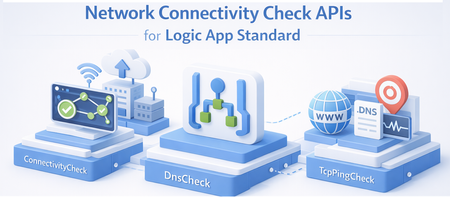
Introduction When your Logic App Standard is integrated with a Virtual Network (VNET), you can use these APIs to troubleshoot connectivity issues to downstream resources like SQL databases, Storage Accounts, Service Bus, Key Vault, and more. The checks run directly from the worker hosting your Logic App, so the results reflect the actual network path your workflows use. API Overview API HTTP Method Route Suffix Purpose ConnectivityCheck POST /connectivityCheck Validates end-to-end connectivity to an Azure resource (SQL, Key Vault, Storage, Service Bus, etc.) DnsCheck POST /dnsCheck Performs DNS resolution for a hostname TcpPingCheck POST /tcpPingCheck Performs a TCP ping to a host and port How to Call Using Azure API Playground Sign in with your Azure account. https://portal.azure.com/#view/Microsoft_Azure_Resources/ArmPlayground.ReactView Use POST method with the URLs below. Instead of API playground you can also use PowerShell or Az Rest URL Pattern Production slot: POST https://management.azure.com/subscriptions/{subscriptionId}/resourceGroups/{resourceGroupName}/providers/Microsoft.Web/sites/{logicAppName}/connectivityCheck?api-version=2026-03-01-preview Deployment slot: POST https://management.azure.com/subscriptions/{subscriptionId}/resourceGroups/{resourceGroupName}/providers/Microsoft.Web/sites/{logicAppName}/slots/{slotName}/connectivityCheck?api-version=2026-03-01-preview Replace connectivityCheck with dnsCheck or tcpPingCheck as needed. all the requests should be Json 1. ConnectivityCheck Tests end-to-end connectivity from your Logic App to an Azure resource. This validates DNS, TCP, and authentication in a single call. Supported Provider Types ProviderType Use For KeyVault Azure Key Vault SQL Azure SQL Database / SQL Server ServiceBus Azure Service Bus EventHubs Azure Event Hubs BlobStorage Azure Blob Storage FileShare Azure File Share (see Port 445 limitation) only tese 443 QueueStorage Azure Queue Storage TableStorage Azure Table Storage Web Any HTTP/HTTPS endpoint Credential Types CredentialType When to Use ConnectionString You have a connection string to provide directly Authentication You have an endpoint URL with username and password CredentialReference You want to reference an existing connection string or app setting by name AppSetting You want to reference an app setting configured on the Logic App ManagedIdentity Your Logic App uses Managed Identity to authenticate Sample Request — Connection String (SQL Database) POST https://management.azure.com/subscriptions/{subId}/resourceGroups/{rg}/providers/Microsoft.Web/sites/{logicAppName}/connectivityCheck?api-version=2026-03-01-preview Content-Type: application/json { "properties": { "providerType": "SQL", "credentials": { "credentialType": "ConnectionString", "connectionString": "Server=tcp:myserver.database.windows.net,1433;Database=mydb;User ID=myuser;Password=mypassword;Encrypt=True;TrustServerCertificate=False;" }, "resourceMetadata": { "entityName": "" } } } Sample Request — App Setting Reference (Service Bus) Use this when your connection string is stored in an app setting on the Logic App (e.g., ServiceBusConnection). { "properties": { "providerType": "ServiceBus", "credentials": { "credentialType": "AppSetting", "appSetting": "ServiceBusConnection" }, "resourceMetadata": { "entityName": "myqueue" } } } Sample Request — Managed Identity (Blob Storage) Use this when your Logic App authenticates using Managed Identity. { "properties": { "providerType": "BlobStorage", "credentials": { "credentialType": "ManagedIdentity", "managedIdentity": { "targetResourceUrl": "https://mystorageaccount.blob.core.windows.net", "clientId": "" } }, "resourceMetadata": { "entityName": "" } } } Tip: Leave clientId empty to use the system-assigned managed identity. Provide a client ID to use a specific user-assigned managed identity. 2. DnsCheck Tests whether a hostname can be resolved from your Logic App's worker. This is useful for verifying private DNS zones and private endpoints are configured correctly. Sample Request POST https://management.azure.com/subscriptions/{subId}/resourceGroups/{rg}/providers/Microsoft.Web/sites/{logicAppName}/dnsCheck?api-version=2026-03-01-preview Content-Type: application/json { "properties": { "dnsName": "myserver.database.windows.net" } } 3. TcpPingCheck Tests whether a TCP connection can be established from your Logic App to a specific host and port. This is useful for checking if a port is open and reachable through your VNET. Sample Request POST https://management.azure.com/subscriptions/{subId}/resourceGroups/{rg}/providers/Microsoft.Web/sites/{logicAppName}/tcpPingCheck?api-version=2026-03-01-preview Content-Type: application/json { "properties": { "host": "myserver.database.windows.net", "port": "1433" } } Port 445 (SMB / Azure File Share) — Known Limitation Port 445 cannot be reliably tested using TcpPingCheck or ConnectivityCheck with the FileShare provider type. Restricted Outgoing Ports Regardless of address, applications cannot connect to anywhere using ports 445, 137, 138, and 139. In other words, even if connecting to a non-private IP address or the address of a virtual network, connections to ports 445, 137, 138, and 139 are not permitted.
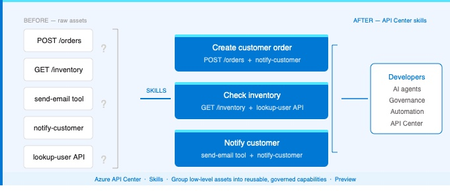
Introducing Skills in Azure API Center
The problem Modern applications depend on more than APIs. A single AI workflow might call an LLM, invoke an MCP tool, integrate a third-party service, and reference a business capability spanning dozens of endpoints. Without a central inventory, these assets become impossible to discover, easy to duplicate, and painful to govern. Azure API Center — part of the Azure API Management platform — already catalogs models, agents, and MCP servers alongside traditional APIs. Skills extend that foundation to cover reusable AI capabilities. What is a Skill? As AI agents become more capable, organizations need a way to define and govern what those agents can actually do. Skills are the answer. A Skill in Azure API Center is a reusable, registered capability that AI agents can discover and consume to extend their functionality. Each skill is backed by source code — typically hosted in a Git repository — and describes what it does, what APIs or MCP servers it can access, and who owns it. Think of skills as the building blocks of AI agent behavior, promoted into a governed inventory alongside your APIs, MCP servers, models, and agents. Example: A "Code Review Skill" performs automated code reviews using static analysis. It is registered in API Center with a Source URL pointing to its GitHub repo, allowed to access your code analysis API, and discoverable by any AI agent in your organization. How Skills work in API Center Skills can be added to your inventory in two ways: registered manually through the Azure portal, or synchronized automatically from a connected Git repository. Both approaches end up in the same governed catalog, discoverable through the API Center portal. Option 1: Register a Skill manually Use the Azure portal to register a skill directly. Navigate to Inventory > Assets in your API center, select + Register an asset > Skill, and fill in the registration form. Figure 2: Register a skill form in the Azure portal. The form captures everything needed to make a skill discoverable and governable: Field Description Title Display name for the skill (e.g. Code Review Skill). Identification Auto-generated URL slug based on the title. Editable. Summary One-line description of what the skill does. Description Full detail on capabilities, use cases, and expected behavior. Lifecycle stage Current state: Design, Preview, Production, or Deprecated. Source URL Git repository URL for the skill source code. Allowed tools The APIs or MCP servers from your inventory this skill is permitted to access. Enforces governance at the capability level. License Licensing terms: MIT, Apache 2.0, Proprietary, etc. Contact information Owner or support contact for the skill. Governance note: The Allowed tools field is key for AI governance. It explicitly defines which APIs and MCP servers a skill can invoke — preventing uncontrolled access and making security review straightforward. Option 2: Sync Skills from a Git repository For teams managing skills in source control, API Center can integrate directly with a Git repository and synchronize skill information automatically. This is the recommended approach for teams practicing GitOps or managing many skills at scale. Figure 3: Integrating a Git repository to sync skills automatically into API Center. When you configure a Git integration, API Center: Creates an Environment representing the repository as a source of skills Scans for files matching the configured pattern (default: **/skill.md) Syncs matching skills into your inventory and keeps them current as the repo changes For private repositories, a Personal Access Token (PAT) stored in Azure Key Vault is used for authentication. API Center's managed identity retrieves the PAT securely — no credentials are stored in the service itself. Tip: Use the Automatically configure managed identity and assign permissions option when setting up the integration if you haven't pre-configured a managed identity. API Center handles the Key Vault permissions automatically. Discovering Skills in your catalog Once registered — manually or via Git — skills appear in the Inventory > Assets page alongside all other asset types. Linked skills (synced from Git) are visually identified with a link icon, so teams can see at a glance which skills are source-controlled. From the API Center portal, developers and other stakeholders can browse the full skill catalog, filter by lifecycle stage or type, and view detailed information about each skill — including its source URL, allowed tools, and contact information. Figure 4: Skills catalog in API Center portal, showing registered skills and the details related to the skill. Developer experience: The API Center portal gives teams a self-service way to discover approved skills without needing to ask around or search GitHub. The catalog becomes the authoritative source of what's available and what's allowed. Why this matters for AI development teams Skills close a critical gap in AI governance. As organizations deploy AI agents, they need to know — and control — what those agents can do. Without a governed skill registry, capability discovery is ad hoc, reuse is low, and security review is difficult. By bringing skills into Azure API Center alongside APIs, MCP servers, models, and agents, teams get: A single inventory for all the assets AI agents depend on Explicit governance over which resources each skill can access via Allowed tools Automated, source-controlled skill registration via Git integration Discoverability for developers and AI systems through the API Center portal Consistent lifecycle management — Design through Production to Deprecated API Center, as part of the Azure API Management platform and the broader AI Gateway vision, is evolving into the system of record for AI-ready development. Skills are the latest step in that direction. Available now Skills are available today in Azure API Center (preview). To register your first skill: Sign in to the Azure portal and navigate to your API Center instance In the sidebar, select Inventory > Assets Select + Register an asset > Skill Fill in the registration form and select Create → Register and discover skills in Azure API Center (docs) → Set up your API Center portal → Explore the Azure API Management platform2.6KViews0likes2CommentsLogic Apps Aviators Newsletter - November 2025
In this issue: Ace Aviator of the Month News from our product group News from our community Ace Aviator of the Month Novembers’s Ace Aviator: Al Ghoniem What's your role and title? What are your responsibilities? As a Senior Integration Consultant, I design and deliver enterprise-grade integration on Microsoft Azure, primarily using Logic Apps Standard, API Management, Service Bus, Event Grid and Azure Functions. My remit covers reference architectures, “golden” templates, governance and FinOps guardrails, CI/CD automation (Bicep and YAML), and production-ready patterns for reliability, observability and cost efficiency. Alongside my technical work, I lead teams of consultants and engineers, helping them adopt standardised delivery models, mentor through code reviews and architectural walkthroughs, and ensure we deliver consistent, high-quality outcomes across projects. I also help teams apply decisioning patterns (embedded versus external rules) and integrate AI responsibly within enterprise workflows. Can you give us some insights into your day-to-day activities and what a typical day in your role looks like? Architecture and patterns: refining solution designs, sequence diagrams and rules models for new and existing integrations. Build and automation: evolving reusable Logic App Standard templates, Bicep modules and pipelines, embedding monitoring, alerts and identity-first security. Problem-solving: addressing performance tuning, transient fault handling, poison/DLQ flows and “design for reprocessing.” Leadership and enablement: mentoring consultants, facilitating technical discussions, and ensuring knowledge is shared across teams. Community and writing: publishing articles and examples to demystify real-world integration trade-offs. What motivates and inspires you to be an active member of the Aviators/Microsoft community? The community continuously turns hard-won lessons into reusable practices. Sharing patterns (and anti-patterns) saves others time and incidents, while learning from peers strengthens my own work. Microsoft’s product teams also listen closely, and seeing customer feedback directly shape the platform is genuinely rewarding. Looking back, what advice do you wish you had been given earlier that you'd now share with those looking to get into STEM/technology? Optimise for learning speed, not titles. Choose problems that stretch you and deliver in small, measurable increments. Master the fundamentals. Naming, idempotency, retries and observability are not glamorous but make systems dependable. Document everything. Diagrams, runbooks and ADRs multiply your impact. Understand trade-offs. Every decision buys something and costs something; acknowledge both sides clearly. Value collaboration over heroics. Ask questions, share knowledge and give credit freely. What has helped you grow professionally? Reusable scaffolding: creating golden templates and reference repositories that capture best practice once and reuse it everywhere. Feedback loops: leveraging telemetry, post-incident reviews and peer critique to improve. Teaching and mentoring: explaining concepts to others brings clarity and strengthens leadership. Cross-disciplinary curiosity: combining architecture, DevOps, FinOps and AI to address problems holistically. If you had a magic wand that could create a feature in Logic Apps, what would it be and why? "Stateful Sessions and Decisions” as a first-class capability: Built-in session state across multiple workflows, durable correlation and resumable orchestrations without external storage. A native decisioning activity with versioned decision tables and rule auditing (“why this rule fired”). A local-first developer experience with fast testing and contract validation for confident iteration. This would simplify complex, human-in-the-loop and event-driven scenarios, reduce custom plumbing, and make advanced orchestration patterns accessible to a wider audience. News from our product group Logic Apps Community Day 2025 Did you miss or want to catch up again on your favorite Logic Apps Community Day videos – jump back into action on this four hours long learning session, with 10 sessions from our Community Experts. And stay tuned for individual sessions being shared throughout the week. Announcing Parse & Chunk with Metadata in Logic Apps: Build Context-Aware RAG Agents New Parse & Chunk actions add metadata like page numbers and sentence completeness—perfect for context-aware document Q&A using Azure AI Search and Agent Loop. Introducing the RabbitMQ Connector (Public Preview) The new connector (Public Preview) lets you send and receive messages with RabbitMQ in Logic Apps Standard and Hybrid—ideal for scalable, reliable messaging across industries. News from our community EventGrid And Entra Auth In Logic Apps Standard Post by Riccardo Viglianisi Learn how to use Entra Auth for webhook authentication, ditch SAS tokens, and configure private endpoints with public access rules—perfect for secure, scalable integrations. Debugging XSLT Made Easy in VS Code: .NET-Based Debugging for Logic Apps Post by Daniel Jonathan A new .NET-based extension brings real debugging to XSLT for Logic Apps. Set breakpoints, step through transformations, and inspect variables—making XSLT development clear and productive. This is the 3 rd post in a 5 part series, so worth checking out the other posts too. Modifying the Logic App Azure Workbook: Custom Views for Multi Workflow Monitoring Post by Jeff Wessling Learn how to tailor dashboards with KQL, multi-workflow views, and context panes—boosting visibility, troubleshooting speed, and operational efficiency across your integrations. Azure AI Agents in Logic Apps: A Guide to Automate Decisions Post by Imashi Kinigama Discover how GPT-powered agents, created using Logic Apps Agent Loop, automate decisions, extract data, and adapt in real time. Build intelligent workflows with minimal effort—no hardcoding, just instructions and tools. How to Turn Logic App Connectors into MCP Servers (Step-by-Step Guide) Post by Stephen W. Thomas Learn how to expose connectors like Google Drive or Salesforce as MCP endpoints using Azure API Center—giving AI agents secure, real-time access to 1,400+ services directly from VS Code. Custom SAP MCP Server with Logic Apps Post by Sebastian Meyer Learn how to turn Logic Apps into AI-accessible tools using MCP. From workflow descriptions to Easy Auth setup and VS Code integration—this guide unlocks SAP automation with Copilot. How Azure Logic Apps as MCP Servers Accelerate AI Agent Development Post by Monisha S Turn 1,400+ connectors into AI tools with Logic Apps Standard. Build agents fast, integrate with legacy systems, and scale intelligent workflows across your organization. Designing Business Rules in Azure Logic Apps: When to Go Embedded vs External Post by Al Ghoniem Learn when to use Logic Apps' native Rules Engine or offload to Azure Functions with NRules or JSON RulesEngine. Discover hybrid patterns for scalable, testable decision automation. Syncing SharePoint with Azure Blob Storage using Logic Apps & Azure Functions for Azure AI Search Post by Daniel Jonathan Solve folder delete issues by tagging blobs with SharePoint metadata. Use Logic Apps and a custom Azure Function to clean up orphaned files and keep Azure AI Search in sync. Step-by-Step Guide: Building a Conversational Agent in Azure Logic Apps Post by Stephen W. Thomas Use Azure AI Foundry and Logic Apps Standard to create chatbots that shuffle cards, answer questions, and embed into websites—no code required, just smart workflows and EasyAuth. You can hide sensitive data from the Logic App run history Post by Francisco Leal Learn how to protect sensitive data like authentication tokens, credentials, and personal information in Logic App, so this data don’t appear in the run history, which could pose security and privacy risks.2.1KViews0likes0Comments🚀 New in Azure API Management: MCP in v2 SKUs + external MCP-compliant server support
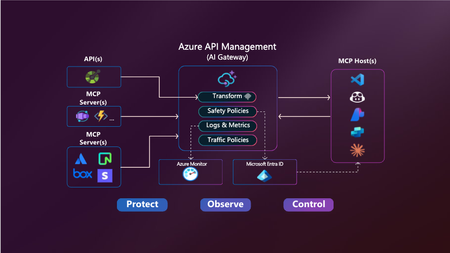
Your APIs are becoming tools. Your users are becoming agents. Your platform needs to adapt. Azure API Management is becoming the secure, scalable control plane for connecting agents, tools, and APIs — with governance built in. -------------------------------------------------------------------------------------------------------------------------------------------------------------------- Today, we’re announcing two major updates to bring the power of the Model Context Protocol (MCP) in Azure API Management to more environments and scenarios: MCP support in v2 SKUs — now in public preview Expose existing MCP-compliant servers through API Management These features make it easier than ever to connect APIs and agents with enterprise-grade control—without rewriting your backends. Why MCP? MCP is an open protocol that enables AI agents—like GitHub Copilot, ChatGPT, and Azure OpenAI—to discover and invoke APIs as tools. It turns traditional REST APIs into structured, secure tools that agents can call during execution — powering real-time, context-aware workflows. Why API Management for MCP? Azure API Management is the single, secure control plane for exposing and governing MCP capabilities — whether from your REST APIs, Azure-hosted services, or external MCP-compliant runtimes. With built-in support for: Security using OAuth 2.1, Microsoft Entra ID, API keys, IP filtering, and rate limiting. Outbound token injection via Credential Manager with policy-based routing. Monitoring and diagnostics using Azure Monitor, Logs, and Application Insights. Discovery and reuse with Azure API Center integration. Comprehensive policy engine for request/response transformation, caching, validation, header manipulation, throttling, and more. …you get end-to-end governance for both inbound and outbound agent interactions — with no new infrastructure or code rewrites. ✅ What’s New? 1. MCP support in v2 SKUs Previously available only in classic tiers (Basic, Standard, Premium), MCP support is now in public preview for v2 SKUs — Basic v2, Standard v2, and Premium v2 — with no pre-requisites or manual enablement required. You can now: Expose any REST API as an MCP server in v2 SKUs Protect it with Microsoft Entra ID, keys or tokens Register tools in Azure API Center 2. Expose existing MCP-compliant servers (pass-through scenario) Already using tools hosted in Logic Apps, Azure Functions, LangChain or custom runtimes? Now you can govern those external tool servers by exposing them through API Management. Use API Management to: Secure external MCP servers with OAuth, rate limits, and Credential Manager Monitor and log usage with Azure Monitor and Application Insights Unify discovery with internal tools via Azure API Center 🔗 You bring the tools. API Management brings the governance. 🧭 What’s Next We’re actively expanding MCP capabilities in API Management: Tool-level access policies for granular governance Support for MCP resources and prompts to expand beyond tools 📚 Get Started 📘 Expose APIs as MCP servers 🌐 Connect external MCP servers 🔐 Secure access to MCP servers 🔎 Discover tools in API Center Summary Azure API Management is your single control plane for agents, tools and APIs — whether you're building internal copilots or connecting external toolchains. This preview unlocks more flexibility, less friction, and a secure foundation for the next wave of agent-powered applications. No new infrastructure. Secure by default. Built for the future.3.9KViews2likes3Comments
Troubleshoot Az Module within Logic App Standard
In Logic App Standard, you can use Powershell Code, using the Execute Powershell Script action If your powershell script depends on Az Module, then the logic app will try to download and install the Az Module within the runtime In some cases, when the logic app is VNET integrated (has NSG, or routed to Virtual Appliance), or hosted within internal ASE, the logic app will be unable to reach the needed Powershell endpoints, and the download would fail, and the action would fail with below error This can be seen within the log folder in Kudo site (Path: C:\home\LogFiles\Application\Functions\Function\Powershell), and the error would appear as: Exception: Failed to install function app dependencies. Error: 'Failed to install function app dependencies. Error: 'The running command stopped because the preference variable "ErrorActionPreference" or common parameter is set to Stop: Unable to save the module 'Az'.' To troubleshoot this, you need to assure that logic app can reach the needed urls, you can try the simple below steps: From Kudo console, you can try this curl command: curl https://cdn.powershellgallery.com/packages/az.accounts.5.1.1.nupkg --output az.accounts.5.1.1.nupkg It should respond as below: If there is reachability issue, you would see the below response: Also, you can test by creating simple workflow, as below: When you run the HTTP action, it should succeed, however, if you have reachability issue, it would fail as below: This means logic app cannot reach the needed endpoint, which are clarified in our documentation (Troubleshooting cmdlets - PowerShell | Microsoft Learn) To resolve this, assure that the NSG, Firewall, or Virtual appliance allows the logic app to reach the mentioned endpoints., Another scenario where the Az module installation could fail, is if the storage account capacity is almost utilized, and there is no space available to download the Az module, you can confirm this by only referencing the Az.Accounts module; as this module is small in size. if the Az.Accounts module worked, then the issue is highly likely due to storage capacityAnnouncing General Availability: Azure Logic Apps Standard Custom Code with .NET 8
We’re excited to announce the General Availability (GA) of Custom Code support in Azure Logic Apps Standard with .NET 8. This release marks a significant step forward in enabling developers to build more powerful, flexible, and maintainable integration workflows using familiar .NET tools and practices. With this capability, developers can now embed custom .NET 8 code directly within their Logic Apps Standard workflows. This unlocks advanced logic scenarios, promotes code reuse, and allows seamless integration with existing .NET libraries and services—making it easier than ever to build enterprise-grade solutions on Azure. What’s New in GA This GA release introduces several key enhancements that improve the development experience and expand the capabilities of custom code in Logic Apps: Bring Your Own Packages Developers can now include and manage their own NuGet packages within custom code projects without having to resolve conflicts with the dependencies used by the language worker host. The update includes the ability to load the assembly dependencies of the custom code project into a separate Assembly context allowing you to bring any NET8 compatible dependent assembly versions that your project need. There are only three exceptions to this rule: Microsoft.Extensions.Logging.Abstractions Microsoft.Extensions.DependencyInjection.Abstractions Microsoft.Azure.Functions.Extensions.Workflows.Abstractions Dependency Injection Native Support Custom code now supports native Dependency Injection (DI), enabling better separation of concerns and more testable, maintainable code. This aligns with modern .NET development patterns and simplifies service management within your custom logic. To enable Dependency Injection, developers will need to provide a StartupConfiguration class, defining the list of dependencies: using Microsoft.Azure.Functions.Extensions.Workflows; using Microsoft.Extensions.DependencyInjection; public class StartupConfiguration : IConfigureStartup { /// <summary> /// Configures services for the Azure Functions application. /// </summary> /// <param name="services">The service collection to configure.</param> public void Configure(IServiceCollection services) { // Register the routing service with dependency injection services.AddSingleton<IRoutingService, OrderRoutingService>(); services.AddSingleton<IDiscountService, DiscountService>(); } } You will also need to initialize those register those services during your custom code class constructor: public class MySampleFunction { private readonly ILogger<MySampleFunction> logger; private readonly IRoutingService routingService; private readonly IDiscountService discountService; public MySampleFunction(ILoggerFactory loggerFactory, IRoutingService routingService, IDiscountService discountService) { this.logger = loggerFactory.CreateLogger<MySampleFunction>(); this.routingService = routingService; this.discountService = discountService; } // your function logic here } Improved Authoring Experience The development experience has been significantly enhanced with improved tooling and templates. Whether you're using Visual Studio or Visual Studio Code, you’ll benefit from streamlined scaffolding, local debugging, and deployment workflows that make building and managing custom code faster and more intuitive. The following user experience improvements were added: Local functions metadata are kept between VS Code sessions, so you don't receive validation errors when editing workflows that depend on the local functions. Projects are also built when designer starts, so you don't have to manually update references. New context menu gestures, allowing you to create new local functions or build your functions project directly from the explorer area Unified debugging experience, making it easer for you to debug. We have now a single task for debugging custom code and logic apps, which makes starting a new debug session as easy as pressing F5. Learn More To get started with custom code in Azure Logic Apps Standard, visit the official Microsoft Learn documentation: Create and run custom code in Azure Logic Apps Standard You can also find example code for Dependency injection wsilveiranz/CustomCode-Dependency-Injection1.1KViews1like0CommentsAzure API Management Your Auth Gateway For MCP Servers
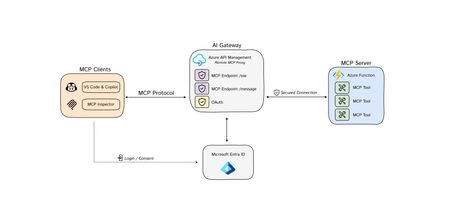
The Model Context Protocol (MCP) is quickly becoming the standard for integrating Tools 🛠️ with Agents 🤖 and Azure API Management is at the fore-front, ready to support this open-source protocol 🚀. You may have already encountered discussions about MCP, so let's clarify some key concepts: Model Context Protocol (MCP) is a standardized way, (a protocol), for AI models to interact with external tools, (and either read data or perform actions) and to enrich context for ANY language models. AI Agents/Assistants are autonomous LLM-powered applications with the ability to use tools to connect to external services required to accomplish tasks on behalf of users. Tools are components made available to Agents allowing them to interact with external systems, perform computation, and take actions to achieve specific goals. Azure API Management: As a platform-as-a-service, API Management supports the complete API lifecycle, enabling organizations to create, publish, secure, and analyze APIs with built-in governance, security, analytics, and scalability. New Cool Kid in Town - MCP AI Agents are becoming widely adopted due to enhanced Large Language Model (LLM) capabilities. However, even the most advanced models face limitations due to their isolation from external data. Each new data source requires custom implementations to extract, prepare, and make data accessible for any model(s). - A lot of heavy lifting. Anthropic developed an open-source standard - the Model Context Protocol (MCP), to connect your agents to external data sources such as local data sources (databases or computer files) or remote services (systems available over the internet through e.g. APIs). MCP Hosts: LLM applications such as chat apps or AI assistant in your IDEs (like GitHub Copilot in VS Code) that need to access external capabilities MCP Clients: Protocol clients that maintain 1:1 connections with servers, inside the host application MCP Servers: Lightweight programs that each expose specific capabilities and provide context, tools, and prompts to clients MCP Protocol: Transport layer in the middle At its core, MCP follows a client-server architecture where a host application can connect to multiple servers. Whenever your MCP host or client needs a tool, it is going to connect to the MCP server. The MCP server will then connect to for example a database or an API. MCP hosts and servers will connect with each other through the MCP protocol. You can create your own custom MCP Servers that connect to your or organizational data sources. For a quick start, please visit our GitHub repository to learn how to build a remote MCP server using Azure Functions without authentication: https://aka.ms/mcp-remote Remote vs. Local MCP Servers The MCP standard supports two modes of operation: Remote MCP servers: MCP clients connect to MCP servers over the Internet, establishing a connection using HTTP and Server-Sent Events (SSE), and authorizing the MCP client access to resources on the user's account using OAuth. Local MCP servers: MCP clients connect to MCP servers on the same machine, using stdio as a local transport method. Azure API Management as the AI Auth Gateway Now that we have learned that MCP servers can connect to remote services through an API. The question now rises, how can we expose our remote MCP servers in a secure and scalable way? This is where Azure API Management comes in. A way that we can securely and safely expose tools as MCP servers. Azure API Management provides: Security: AI agents often need to access sensitive data. API Management as a remote MCP proxy safeguards organizational data through authentication and authorization. Scalability: As the number of LLM interactions and external tool integrations grows, API Management ensures the system can handle the load. Security remains to be a critical piece of building MCP servers, as agents will need to securely connect to protected endpoints (tools) to perform certain actions or read protected data. When building remote MCP servers, you need a way to allow users to login (Authenticate) and allow them to grant the MCP client access to resources on their account (Authorization). MCP - Current Authorization Challenges State: 4/10/2025 Recent changes in MCP authorization have sparked significant debate within the community. 🔍 𝗞𝗲𝘆 𝗖𝗵𝗮𝗹𝗹𝗲𝗻𝗴𝗲𝘀 with the Authorization Changes: The MCP server is now treated as both a resource server AND an authorization server. This dual role has fundamental implications for MCP server developers and runtime operations. 💡 𝗢𝘂𝗿 𝗦𝗼𝗹𝘂𝘁𝗶𝗼𝗻: To address these challenges, we recommend using 𝗔𝘇𝘂𝗿𝗲 𝗔𝗣𝗜 𝗠𝗮𝗻𝗮𝗴𝗲𝗺𝗲𝗻𝘁 as your authorization gateway for remote MCP servers. 🔗For an enterprise-ready solution, please check out our azd up sample repo to learn how to build a remote MCP server using Azure API Management as your authentication gateway: https://aka.ms/mcp-remote-apim-auth The Authorization Flow The workflow involves three core components: the MCP client, the APIM Gateway, and the MCP server, with Microsoft Entra managing authentication (AuthN) and authorization (AuthZ). Using the OAuth protocol, the client starts by calling the APIM Gateway, which redirects the user to Entra for login and consent. Once authenticated, Entra provides an access token to the Gateway, which then exchanges a code with the client to generate an MCP server token. This token allows the client to communicate securely with the server via the Gateway, ensuring user validation and scope verification. Finally, the MCP server establishes a session key for ongoing communication through a dedicated message endpoint. Diagram source: https://aka.ms/mcp-remote-apim-auth-diagram Conclusion Azure API Management (APIM) is an essential tool for enterprise customers looking to integrate AI models with external tools using the Model Context Protocol (MCP). In this blog, we've emphasized the simplicity of connecting AI agents to various data sources through MCP, streamlining previously complex implementations. Given the critical role of secure access to platforms and services for AI agents, APIM offers robust solutions for managing OAuth tokens and ensuring secure access to protected endpoints, making it an invaluable asset for enterprises, despite the challenges of authentication. API Management: An Enterprise Solution for Securing MCP Servers Azure API Management is an essential tool for enterprise customers looking to integrate AI models with external tools using the Model Context Protocol (MCP). It is designed to help you to securely expose your remote MCP servers. MCP servers are still very new, and as the technology evolves, API Management provides an enterprise-ready solution that will evolve with the latest technology. Stay tuned for further feature announcements soon! Acknowledgments This post and work was made possible thanks to the hard work and dedication of our incredible team. Special thanks to Pranami Jhawar, Julia Kasper, Julia Muiruri, Annaji Sharma Ganti Jack Pa, Chaoyi Yuan and Alex Vieira for their invaluable contributions. Additional Resources MCP Client Server integration with APIM as AI gateway Blog Post: https://aka.ms/remote-mcp-apim-auth-blog Sequence Diagram: https://aka.ms/mcp-remote-apim-auth-diagram APIM lab: https://aka.ms/ai-gateway-lab-mcp-client-auth Python: https://aka.ms/mcp-remote-apim-auth .NET: https://aka.ms/mcp-remote-apim-auth-dotnet On-Behalf-Of Authorization: https://aka.ms/mcp-obo-sample 3rd Party APIs – Backend Auth via Credential Manager: Blog Post: https://aka.ms/remote-mcp-apim-lab-blog APIM lab: https://aka.ms/ai-gateway-lab-mcp YouTube Video: https://aka.ms/ai-gateway-lab-demo25KViews12likes4CommentsGet Ready for Azure Integration Services at Microsoft Ignite 2024
Microsoft Ignite 2024 is just around the corner, and we’re excited to share how Azure Integration Services is taking center stage this year! Whether you're attending in person in Chicago or virtually from anywhere in the world, this is your chance to dive deep into the latest innovations in enterprise integration, AI-powered automation, API governance, and much more. Mark your calendars for these must-see sessions: Breakout sessions Modernize Enterprise Integration with Azure Integration Services Date: Thursday, November 21, 2024 Time: 12:30 PM - 1:15 PM Pacific Standard Time Session Code: BRK150 Speakers: Divya Swarnkar, Kent Weare In today’s rapidly evolving digital world, modernizing enterprise integration is critical to maintaining a competitive edge. This session will explore how Azure Integration Services can streamline and automate your processes, ensuring business continuity while driving transformation. We’ll cover how hybrid deployment models seamlessly connect on-premises systems with the cloud and demonstrate how to transition from legacy platforms like BizTalk to Azure Integration Services—all while preserving your existing investments. Now that you have a solid foundation, we’ll showcase how Azure Logic Apps can integrate AI into your workflows, reshape every business process, and reinvent customer experiences. If you’re looking to modernize your enterprise integration, unlock new opportunities, and stay ahead without disrupting your business operations, this session is for you. Effective API Governance in the Era of AI with Azure API Management Date: Wednesday, November 20, 2024 Time: 3:00 PM - 3:45 PM Pacific Standard Time Session Code: BRK143 Speakers: Mike Budzynski, Julia Kasper As APIs continue to drive innovation, effective governance becomes more important—especially when it comes to managing the complexity of AI-driven workloads. In this session, we’ll dive into how Azure API Management can help you implement a robust API governance model that ensures security, compliance, and scalability for AI and other critical APIs. Learn how to leverage Azure’s powerful tools like Azure API Management, Azure Policy, and Microsoft Defender for Cloud to accelerate API development, enhance reliability, and stay ahead of evolving security requirements—all without slowing down innovation. Demo GenAI Gateway Capabilities in Azure API Management Date: Wednesday, November 20, 2024 Time: 9:00 AM - 9:15 AM Pacific Standard Time Session Code: THR509 Speakers: Nima Kamoosi, Fernando Mejia GenAI apps are pushing the boundaries of what’s possible with APIs. This quick but impactful demo will show you how GenAI gateway capabilities in Azure API Management can help overcome scalability, security, and monitoring challenges in GenAI app development. We’ll demonstrate how you can configure Azure API Management to authenticate and authorize LLM (Large Language Model) endpoints, enforce token consumption limits, monitor usage, and implement load balancing—all within the familiar environment of Azure. Don’t miss this opportunity to see how these capabilities can streamline your GenAI app development. In-Person Expert Meetup at Microsoft Hub Want to dive even deeper into the world of Azure Integration Services? Join us at the Expert Meetup stations in the Microsoft Hub at Ignite for in-person demos and to ask questions directly to the product experts and team members. This is a great opportunity to engage with the people behind the solutions and get tailored advice on your integration challenges. Don’t Miss Out! Microsoft Ignite 2024 offers a unique chance to gain firsthand insights into the latest trends and solutions shaping the future of enterprise integration and API management. Register today to secure your spot and take advantage of these exciting sessions, demos, and expert meetups.616Views0likes0Comments