azure credits for students
14 Topics
Lab Credits and First course
Hello everyone, I’m reaching out to learn how other colleges handle student access to Azure when offering introductory AI or cloud-based courses my goal is to teach Microsoft Azure AI fundamentals. My understanding is that each student is asked to pay individually for Azure access. This model won’t work well for our institution or our student population. I would also like more than 30 day trial of Azure to test out the materials. For those of you who teach AI, cloud computing, or Microsoft Learn for Educators courses, I’d really appreciate your insight: How does your college provide Azure access for students? Do you use institution-wide Azure credits or centrally fund Azure usage? Are there specific Microsoft AI courses (e.g., Microsoft Azure AI fundamentals) that your institution uses as their first one? Any details about processes would be extremely helpful. My goal is to offer hands-on AI learning without placing a financial burden on students, and I’m hoping to learn from your approaches. Thank you in advance for your guidance and experiences! Best regards, Joe473Views2likes3Comments
SKU, quota and policy restrictions on Azure for Students and Free Subscriptions
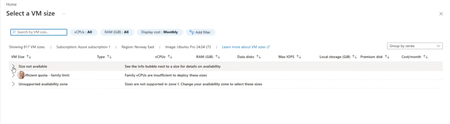
Subject: Azure for Students VM Availability Appears Inconsistent Across Students Hello everyone! We're seeing an issue across multiple cohorts using Azure for Students subscriptions, and I'm hoping someone can clarify whether there are additional restrictions being applied behind the scenes. We understand and accept the recent changes regarding: Allowed deployment regions for Azure for Students subscriptions The 4 vCPU quota limitations Regional capacity constraints We've updated our teaching materials accordingly and have troubleshooting guidance for students. However, we're observing behaviour that appears inconsistent between students with what seem to be identical subscription types. Examples: Student A can deploy several B-series VM sizes in an approved region. Student B can deploy only one VM size in the same approved region. Student C sees "Size not available" for every VM size in multiple approved regions. Student D eventually succeeds only after trying several approved regions, despite having available credit and no existing VMs. In one recent case, a student had: A Free subscription $200 credit available No deployed VMs No Allowed Regions policy visible (which made troubleshooting particularly confusing) Most regions the student tested showed one or more of the following: No available VM sizes Family quota limit messages Unsupported availability zone messages Eventually, Denmark East allowed deployment of a Standard_B2als_v2 VM, while several other regions did not. I have collected examples from multiple students and am seeing several different failure modes: Total Regional Core quota exceeded (expected and understandable) Allowed Locations policy restrictions VM size unavailable in approved regions Policy assignments showing "Not Registered" because Microsoft.PolicyInsights is not registered The challenge is that students with apparently identical Azure for Students subscriptions are not encountering the same restrictions. Has Microsoft introduced additional backend controls, SKU filtering, capacity restrictions, or subscription-specific policies that are not surfaced clearly through the Azure portal? From an educational perspective, the lack of consistency is making it difficult to provide reliable lab instructions because one student's successful deployment path may not work for another student with the same subscription type. My questions are: Are there additional backend restrictions beyond the visible Allowed Locations policy and published vCPU quotas? Is VM size availability being dynamically restricted per student subscription? Are regional capacity controls being applied differently across Azure for Students subscriptions? Is there a recommended method for identifying which regions and VM families are actually deployable for a specific student before beginning a lab exercise? Any clarification would be greatly appreciated, as we're trying to reduce classroom troubleshooting time and provide students with more reliable deployment guidance. Thank you.Solved542Views1like4Comments
Microsoft AI-900
Hi Carlos, I am still confused, to be honest! I got the skillable email, so what should I do now? Is it to """copy its content and forward it to students""" as is? + Add the links in Step (4) about studying AI-900? BUT, (I) the link does not work! (II) Should we guide students about where to find the course or create account? whereare these instructions? and (iii) Should I attach in the email and links about the exam voucher? I hope you can advise, as it is not clear to me what to send to students and what not send which is confusing! Regards AmirSolved303Views1like1CommentMicrosoft AI-900
Hi How can I enroll my students to take the module AI-900 and get them examined for free? I used to do that 3 years ago when these modules were maintained by a training manager, but since then, it has become community-based, which is why I come to you with the question. I hope you can help me. I need to explain to students how to enroll in the module, how to use it and make the labs, and give them information about the free exam. Kindly advise Regards Dr. Amir Aly University of Plymouth, UKSolved2.1KViews1like24CommentsMicrosoft Resources for Startups, Students and Developers at GitHub Universe 2023
Explore the dynamic offerings at GitHub Universe 2023, via a collaboration between Microsoft and GitHub, designed to empower developers, students, and startups. Delve into resources and workshops covering AI programming, application security, and developer experience enhancements. Uncover an array of resources shared during the event, including cloud skills challenges preparing for GitHub Certification, AI applications, and GitHub Copilot for seamless coding. Microsoft extends support to startups through the Founders Hub, provides Azure credits for student experimentation, and offers GitHub Codespaces for Startups and students can benefit from diverse open-source curricula spanning AI, data science, machine learning, web development, and IoT. Access these invaluable resources conveniently through provided QR codes, ensuring a comprehensive and enriching learning experience for all attendees.13KViews1like0Comments