azure credits for students
14 Topics
Azure For Students Subscriptions - "Your email domain is not currently registered with us"
Hello, I am a teacher at a vocational school and we are experiencing a recurring issue with Azure for Students academic verification, affecting multiple students at the same time. Our school setup (for context) Our institution is structured as follows: We have a student domain that is registered and whitelisted with Microsoft as an academic domain, for example: email address removed for privacy reasons We also have a separate organisational domain used for staff and business operations, for example: email address removed for privacy reasons Students are instructed to: Sign in to Azure using their personal Microsoft account (typically Outlook/Hotmail) Use their school email address only for academic verification during the Azure for Students sign-up flow This setup has worked historically, but we are now seeing repeated failures. The issue we are seeing Students complete CAPTCHA and email verification successfully. The process then fails with: “Sorry, your academic status could not be verified.” or similar This happens even when: Students use a private/incognito browser session VPNs and ad blockers are disabled Only one Microsoft account is signed in No account switching occurs during the flow The issue affects multiple students from the same institution, often within the same timeframe. Because Azure for Students verification appears to allow only one attempt, students who fail once are effectively blocked and end up in a support loop. Observations Based on volume and timing, this does not appear to be individual user error. We suspect one or more of the following: A backend verification or account-linking issue An institutional configuration mismatch that is not clearly surfaced A generic or outdated error message that does not accurately reflect the real cause of failure At this point, I am not fully convinced that the error message always represents a true eligibility problem. What we are hoping to learn Are other schools using a similar setup (personal Microsoft account + separate student email domain for verification)? Are there known best practices or preferred configurations for institutions with multiple domains? Is there guidance we can pass on to our IT team to improve compatibility with Azure for Students verification? Is there a way for failed verifications to be reviewed or reset when the institution and domain are valid? Our goal is not just to fix individual cases, but to understand whether our institutional setup could be improved to prevent this issue going forward. Any insight from Microsoft staff or other educators would be greatly appreciated. RobinLBaldwin Mahlah_Murray797Views0likes2Comments
How can I save PowerPoint presentations from SlideShare for offline use?
I use Microsoft PowerPoint for studying and creating presentations, and sometimes I find useful presentations on SlideShare that I’d like to keep for offline reference. What is the easiest way to save a SlideShare presentation in a format that can be opened or edited with Microsoft PowerPoint? I came across ahttp:// https://slidesextract.com/ that can download presentations for offline use Would this be a suitable option for getting a presentation and then opening it in PowerPoint?63Views0likes0Comments
Azure for Students eligibility for a newly nominated Microsoft Learn for Educators institution
Hello Microsoft Learn for Educators Community, My name is Hussam Al-Hmoud. I am a Microsoft Certified Trainer (MCT) since 2010 and the Microsoft Learn for Educators (MSLE) Program Advisor for ITA Academy. Our institution has recently been successfully nominated in the Microsoft Learn for Educators (MSLE) program. I am preparing to deliver a Cloud Computing Security course and would like to ensure that our students can take full advantage of the resources available through MSLE. I would appreciate your guidance on the following questions: 1. Is ITA Academy eligible to provide Azure for Students accounts or any Azure-related student benefits through MSLE? 2. If yes, what is the process for enabling these Azure benefits for our students? 3. Is our institution eligible to request Microsoft certification exam vouchers for students through MSLE? 4. If student vouchers are available, which Microsoft certification exams are currently eligible, and what requirements must be met before requesting them? Our goal is to provide every student with hands-on Microsoft Azure experience and, where possible, help them earn Microsoft certifications as part of their learning journey. Thank you for your time and guidance. I look forward to your response. Best regards, Hussam Al-Hmoud Microsoft Certified Trainer (MCT) since 2010 Microsoft Learn for Educators (MSLE) Program Advisor ITA AcademySolved371Views0likes7Comments
Azure for Students eligibility issue
Hello, I have an active GitHub Student Developer Pack verified until March 16, 2028. I successfully connected my GitHub account to my Microsoft account. When I try to activate Azure for Students (offer MS-AZR-0170P), I receive: "You're not eligible for an Azure free account." My Azure Portal has no subscriptions, and I have never activated Azure for Students on this Microsoft account. Could you please check my eligibility and help me activate Azure for Students? Thank you.183Views0likes1Comment
Azure for students - issues after University name change
Hello, I work as a lecturer at a university that recently changed its name. Since the change, our students have been unable to enroll in Azure for Students - they keep receiving the message “we’re unable to verify your student status.” Could you advise who can help resolve this issue? Our university helpdesk hasn’t been able to assist, and I’d like to support my students myself. P.S. I will provide the changed university name in a private message. 🙂202Views0likes2CommentsAzure for Students Starter missing?
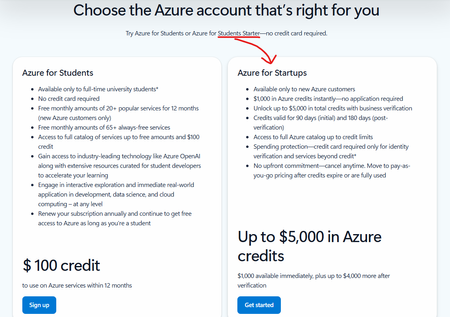
Hi, I noticed this on the Azure for Students sign-up page a couple of months ago: "Azure for Students Starter" is still mentioned as an option, but the card on the page is for "Azure for Startups". This seems like a mistake. I was wondering where the correct place to report this is? Or, is Azure for Students Starter no longer available?189Views0likes1CommentSKU, quota and policy restrictions on Azure for Students and Free Subscriptions
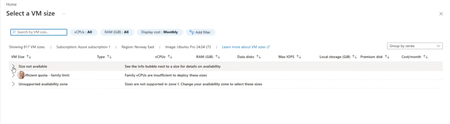
Subject: Azure for Students VM Availability Appears Inconsistent Across Students Hello everyone! We're seeing an issue across multiple cohorts using Azure for Students subscriptions, and I'm hoping someone can clarify whether there are additional restrictions being applied behind the scenes. We understand and accept the recent changes regarding: Allowed deployment regions for Azure for Students subscriptions The 4 vCPU quota limitations Regional capacity constraints We've updated our teaching materials accordingly and have troubleshooting guidance for students. However, we're observing behaviour that appears inconsistent between students with what seem to be identical subscription types. Examples: Student A can deploy several B-series VM sizes in an approved region. Student B can deploy only one VM size in the same approved region. Student C sees "Size not available" for every VM size in multiple approved regions. Student D eventually succeeds only after trying several approved regions, despite having available credit and no existing VMs. In one recent case, a student had: A Free subscription $200 credit available No deployed VMs No Allowed Regions policy visible (which made troubleshooting particularly confusing) Most regions the student tested showed one or more of the following: No available VM sizes Family quota limit messages Unsupported availability zone messages Eventually, Denmark East allowed deployment of a Standard_B2als_v2 VM, while several other regions did not. I have collected examples from multiple students and am seeing several different failure modes: Total Regional Core quota exceeded (expected and understandable) Allowed Locations policy restrictions VM size unavailable in approved regions Policy assignments showing "Not Registered" because Microsoft.PolicyInsights is not registered The challenge is that students with apparently identical Azure for Students subscriptions are not encountering the same restrictions. Has Microsoft introduced additional backend controls, SKU filtering, capacity restrictions, or subscription-specific policies that are not surfaced clearly through the Azure portal? From an educational perspective, the lack of consistency is making it difficult to provide reliable lab instructions because one student's successful deployment path may not work for another student with the same subscription type. My questions are: Are there additional backend restrictions beyond the visible Allowed Locations policy and published vCPU quotas? Is VM size availability being dynamically restricted per student subscription? Are regional capacity controls being applied differently across Azure for Students subscriptions? Is there a recommended method for identifying which regions and VM families are actually deployable for a specific student before beginning a lab exercise? Any clarification would be greatly appreciated, as we're trying to reduce classroom troubleshooting time and provide students with more reliable deployment guidance. Thank you.Solved542Views1like4CommentsLab Credits and First course
Hello everyone, I’m reaching out to learn how other colleges handle student access to Azure when offering introductory AI or cloud-based courses my goal is to teach Microsoft Azure AI fundamentals. My understanding is that each student is asked to pay individually for Azure access. This model won’t work well for our institution or our student population. I would also like more than 30 day trial of Azure to test out the materials. For those of you who teach AI, cloud computing, or Microsoft Learn for Educators courses, I’d really appreciate your insight: How does your college provide Azure access for students? Do you use institution-wide Azure credits or centrally fund Azure usage? Are there specific Microsoft AI courses (e.g., Microsoft Azure AI fundamentals) that your institution uses as their first one? Any details about processes would be extremely helpful. My goal is to offer hands-on AI learning without placing a financial burden on students, and I’m hoping to learn from your approaches. Thank you in advance for your guidance and experiences! Best regards, Joe473Views2likes3CommentsWounded Warrior Seeking Microsoft Sentinel Training from Scratch
Hello, My name is America Cobb. I am a U.S. military veteran and wounded warrior. I sustained serious injuries from an IED explosion—including traumatic brain injury, damage to my left eye, shoulder trauma, and a robotic prosthetic in my right arm. Despite these challenges, I remain committed to national security and remote defense work. Years ago, while stationed in Germany, I was part of a Wounded Warrior Project unit that received a visit from Microsoft leadership. The CEO himself showed deep support for soldiers with cognitive injuries and mobility constraints. He offered jobs to many of us—even before we officially transitioned out—and provided special access cards for remote training. I was one of those recipients. Unfortunately, due to repeated hospitalizations and relocations, I lost that card and have been unable to reconnect with the program. I’m now trying to start from scratch and requalify for remote surveillance and threat detection roles using Microsoft Sentinel. I have prior exposure to the platform from my military service, but I’ve forgotten everything and need structured, beginner-level training. I’m willing to pay for certification or diploma-level access if needed. My goal is to work remotely in high-impact surveillance roles. I’ve already researched viable paths in: Remote Surveillance Defense Systems Security Missile Telemetry & Threat Detection If anyone here—especially someone familiar with Sentinel training—can guide me toward a structured path to learn and certify, I would be deeply grateful. I’m not asking for charity. I’m asking for a chance to re-enter the mission with dignity and purpose. I want to volunteer if possible at Microsoft remotely to gain experience at no charge. Respectfully, Wounded Warrior BA Oregon State UniversitySolved
Question about AI-900
Hi To start an AI-900 standalone course, I tried to follow these instructions (unsuccessfully): ************ here's Step-by-step: How to Offer AI-900 to Students with Exam Access Create Your Course in the MSLE Portal Go to https://aka.ms/MSLEPort Register or log in as an educator Create your AI-900 course and link it to your institution Agree to Lab Usage Terms During course setup, you’ll be prompted to accept lab usage terms This enables access to hands-on labs provided by Skillable Wait for Skillable Email (48–72 Hours) After setup, you’ll receive an email from Skillable with next steps This includes lab access instructions for your students Guide Students to Study and Certify Students can study AI-900 on https://learn.microsoft.com/en-us/training/paths/get-started-ai-fundamentals/ They can request a discounted exam voucher at https://aka.ms/StudentCertification **************************** BUT, I am still confused, to be honest! I got the skillable email, so what should I do now? Is it to """copy its content and forward it to students""" as is? + Add the links in Step (4) about studying AI-900? BUT, (I) the link ( https://learn.microsoft.com/en-us/training/paths/get-started-ai-fundamentals/) does not work! (II) Should we guide students about where to find the course or create account? whereare these instructions? and (iii) Should I attach in the email and links about the exam voucher? I hope you can advise, as it is not clear to me what to send to students and what not send, which is very confusing! Pls show me an example of the email I should send them! Regards Amir AlySolved345Views0likes1Comment