azure communication services
16 TopicsAzure Communication Services AMA
We are very excited to announce an Azure Communication Services AMA! An AMA is a live text-based online event similar to a “YamJam” on Yammer or an “Ask Me Anything” on Reddit. This AMA gives you the opportunity to connect with Microsoft product experts who will be on hand to answer your questions and listen to feedback. Feel free to post your questions about Azure Communication Services anytime in the comments below beforehand, if it fits your schedule or time zone better, though questions will not be answered until the live hour.146KViews14likes67CommentsAzure Communication Services AMA
We are very excited to announce an Azure Communication Services AMA! An AMA is a live text-based online event similar to a “YamJam” on Yammer or an “Ask Me Anything” on Reddit. This AMA gives you the opportunity to connect with Microsoft product experts who will be on hand to answer your questions and listen to feedback. Feel free to post your questions about Azure Communication Services anytime in the comments below beforehand, if it fits your schedule or time zone better, though questions will not be answered until the live hour.12KViews5likes27CommentsAzure Communication Services AMA
We are very excited to announce an Azure Communication Services AMA! An AMA is a live text-based online event similar to a “YamJam” on Yammer or an “Ask Me Anything” on Reddit. This AMA gives you the opportunity to connect with Microsoft product experts who will be on hand to answer your questions and listen to feedback. Feel free to post your questions about Azure Communication Services anytime in the comments below beforehand, if it fits your schedule or time zone better, though questions will not be answered until the live hour.8.3KViews7likes49CommentsAzure Communication Services and Microsoft Teams AMA
We are excited to welcome you to the Azure Communication Services and Microsoft Teams AMA. We'll talk about the possibilities of connecting Teams with the communication capabilities in Azure and the cool stuff we can build with it. We are looking forward to hearing your ideas, concerns or top of mind and answer any questions you might have about Azure Communication Services interoperability into Microsoft Teams. The AMA will take place on Wednesday, March 8 from 9:00 a.m. to 10:00 a.m. PT in the comment section below. This AMA is text only – meaning there will not be any video nor audio. An AMA is a live online event similar to an “Ask Me Anything” on Reddit. This AMA gives you the opportunity to connect with members of Microsoft trainers and the product engineering team who will be on hand to answer your questions and listen to feedback. Feel free to post your questions anytime in the comments below beforehand, if it fits your schedule or time zone better, though questions will not be answered until the live hour.7.6KViews3likes46CommentsAzure Communication Services AMA
Join us for the Azure Communication Services Ask Microsoft Anything session! Following the exciting announcements of new features at Microsoft Build, we invite you to engage with us through this AMA. Whether you have general inquiries about Azure Communication Services or specific questions regarding our latest updates, we are eager to talk to you and foster meaningful discussions. Don't miss this opportunity to interact with our experts and gain valuable insights. The AMA will take place on Thursday, June 8 from 9:00 a.m. to 10:00 a.m. PT in the comment section below. This AMA is text only – meaning there will not be any video nor audio. An AMA is a live online event similar to an “Ask Me Anything” on Reddit. This AMA gives you the opportunity to connect with members of the product engineering team who will be on hand to answer your questions and listen to feedback. Feel free to post your questions anytime in the comments below beforehand, if it fits your schedule or time zone better, though questions will not be answered until the live hour.4KViews0likes23CommentsStreamline your contact center telephony with Teams Phone extensibility
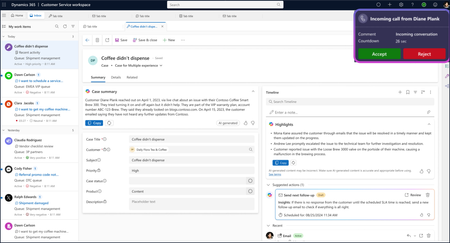
Microsoft Teams Phone brings intelligent, cloud-based calling to Teams, streamlining operations and delivering secure, reliable voice experiences. Until recently, however, enabling enterprise calling in the contact center meant deploying separate solutions, adding administrative complexity and redundant costs. Today, we’re excited to announce the general availability of Teams Phone extensibility for a growing ecosystem of contact center solutions, including Microsoft Dynamics 365 Contact Center. This new capability allows customers to extend Teams Phone investments into the contact center, enabling customers to use a single, integrated calling solution across both unified communications (UCaaS) and contact center (CCaaS) environments. Organizations can leverage Teams Phone extensibility to: Apply existing Teams Phone licenses to enable telephony for users of Dynamics 365 Contact Center or other certified ISV contact center solutions 1 . Avoid procuring, configuring, managing, and training users on a separate phone system for contact center deployments. Leverage the broad geographic availability of Teams Phone through calling plans available in 36 countries, Operator Connect in 96 countries, and Direct Routing globally. Benefit from the extensive features of Teams Phone, including the familiar Teams management interface. With these benefits, you can now streamline your telephony and reduce the number of solutions to license and manage across your organization. Learn more about the features of Teams Phone extensibility including conversational AI integration. Unify your calling capabilities for time and cost savings Teams Phone extensibility is a significant development for customers. It reflects how Dynamics 365 Contact Center helps organizations innovate faster and reduce costs with Microsoft’s unified cloud platform, low-code tools, and built-in AI – making it easier to build, manage, and scale contact center solutions without complex infrastructure or costly custom development. Teams Phone extensibility enables organizations to unify calling and contact center experiences for both agents and customers, all within a secure, familiar Microsoft environment. A commissioned Total Economic Impact™ study conducted by Forrester Consulting found that organizations using Teams Phone extensibility with Dynamics 365 Contact Center could achieve a projected return on investment up to 345% over three years 2 . These savings stem from lower operational and service fees, streamlined administration, and greater call center efficiency. With its certification in progress, Teams Phone extensibility with Dynamics 365 Contact Center is more than an integration. It’s a shift toward unified, intelligent communication that helps businesses operate smarter and deliver better customer experiences. Download the full study to learn more. ISV partners provide additional choice and flexibility Teams Phone extensibility is also supported by contact center ISV solutions that utilize the Teams Unify integration model. With Unify, ISVs build directly on Microsoft infrastructure, using Azure Communication Services (ACS) and gaining access to Microsoft Copilot and Cognitive Services. This approach enables them to embed advanced features and intelligence, resulting in richer, more unified solutions that help organizations deliver efficient, secure, and customer-focused interactions. ISV solutions that have completed certification for Teams Phone extensibility include AudioCodes, CentrePal, ComputerTalk, Heedify, and Landis. 1 We look forward to adding additional certified contact solutions to this growing ecosystem in the months ahead. If you are a contact center developer, learn more about enabling Teams Phone calling for your CCaaS solution. Contact center ISVs that are Unify-model certified for Teams Phone extensibility include AudioCodes, CentrePal, ComputerTalk, Heedify, and Landis. Power your contact center with the calling capabilities of Teams Phone If you're already using Teams Phone and Dynamics 365 Contact Center or any of the certified ISV solutions, you can start taking advantage of Teams Phone extensibility today. Not yet using these solutions? You can set up trials for both Teams Phone and Dynamics 365 Contact Center to explore the benefits firsthand. If you're interested in trialing Teams Phone extensibility with a certified ISV contact center solution, please contact your preferred CCaaS vendor for more information. 1 While certification is not required to access the Azure Communication Services API that enables Teams Phone extensibility, we recommend selecting a contact center solution that has completed the certification process for the best experience. 2 Projected benefits for a composite customer. New Technology: The Projected Total Economic Impact™ Of Microsoft Dynamics 365 Contact Center with Teams Phone extensibility, Forrester Consulting, Casey Sirotnak, Jonathan Lipsitz, August 2025.2.4KViews5likes1CommentLearn Azure Communication Services - a series of how-to blog posts
Azure Communication Services (ACS) is Microsoft’s latest platform which empowers developers to build communication capabilities into their applications. Through a series of blog posts (15 at the time of this post) and accompanying videos I’m going to talk about what ACS is, what it can do and how you can use it. It’s a series aimed at developers but if you’re non-technical you will still get a lot out of the first few days where we discuss capabilities and considerations. To start: visit https://learnacs.dev I hope you find this series of blog posts useful on your ACS journey. I’d love to hear your feedback on Twitter. And, if you do like this content and find it useful, consider subscribing to my YouTube channel for more videos like these, my RSS feed for more blog posts like these or my email newsletter for a weekly round-up of what’s new. I talk about building solutions with Microsoft Teams, Microsoft Bot Framework, Microsoft Cognitive Services, Azure Communication Services. 1.8KViews1like0Comments
Access to Teams Transcripts with Azure Communication Services
I'm using Azure Communication Services to write an app that connects to a Teams meeting that is recording and creating a live transcript. Is there a way to access and show that transcript to the client using my app -- who may have joined as an anonymous user? I see there is a Communications Service API -- as well as functionality in Graph API -- to get the state of recording and transcripting, so we can notify the client that the call is being recorded and transcripted. But I see no way to actually access and show the live transcription (unless they are actually using MS Teams). I want to show the transcription in my app. Thanks!Solved1.5KViews0likes1CommentSeeking Insights on Marketing/Campaign Emails with Azure Communication Services
Hi everyone! I'm currently exploring options for sending marketing/campaign emails, and I'm particularly interested in knowing if there's a way to utilize Azure Communication Services for this purpose. Has anyone delved into this before? Any insights or experiences you could share would be greatly appreciated! Additionally, I'm curious about the integration possibilities with Sendy and Azure Communication Services. Can someone provide guidance on whether Sendy can be seamlessly integrated with Azure Communication Services, akin to how it works with Amazon SES? On a broader note, it seems like a great idea for Microsoft to expand the options for marketing/campaign emails within Azure Communication Services. Perhaps having upfront deployment features, surpassing the Microsoft 365 Email Sending Limits, could add significant value. Your valuable insights on these topics would not only assist me in making informed decisions but could also benefit others in the community. Please feel free to share your thoughts and experiences! Looking forward to hearing from you.Solved1.2KViews2likes1Comment
Calling a phone and playing a message from logic apps
Hi, My objective is to have a logic app that makes a server side outbound phone call, and plays a prerecorded message, that's it. I've been looking at https://github.com/Azure-Samples/communication-services-dotnet-quickstarts/tree/main/OutboundCallReminder but I'm getting lost in understanding all the moving parts. Is there a demo walkthrough article or webinar available ? Alternatively, is there a power automate connector available for this scenario ? Or has anybody done this just using REST API for Azure Communication Services ? A simplified sample would be exactly what I'm looking for. Stephane881Views0likes2Comments