azure arc
303 TopicsWhat’s new for small form factor infrastructure
At Microsoft Build, we introduced smaller form factor infrastructure in public preview. Today, we’re refreshing that preview with version 2607, available right now in the Azure portal. This release introduces several new features: Expanded support for multiple network interfaces (NICs) and additional disks Just-in-Time (JIT) device access through the new Connect experience Cloud-managed operating system updates and recovery using an A/B image model These new capabilities give operators greater flexibility in how edge devices are configured, accessed, and maintained throughout their lifecycle. Let’s look at what each capability delivers and what it looked like in practice when I deployed the release on an OnLogic Helix 521. Greater networking and storage flexibility Small form factor infrastructure now supports multiple network interfaces (NICs) and disks on a single device. To give you full control, each NIC appears natively in Azure Resource Manager (ARM) as a child resource of the Machine, which you can view and configure through Azure portal and Azure CLI. Distributed infrastructure often faces unique and challenging requirements: for example, a device on a factory floor may need one network for management traffic and a separate, isolated network for operational technology (OT) or workload traffic, while a retail or robotics deployment may need additional local storage for AI models, video, or sensor data that shouldn’t leave the site. Support for multiple NICs allows a single device to connect to more than one network for segmentation, redundancy, or reaching equipment on a dedicated segment, while support for additional disks lets customers size local capacity to the workload rather than constraining the workload to fit the device. From Azure, you can configure each network interface individually, applying values like IP address, DNS server, and more. Azure also automatically detects and flags configuration drift to help maintain consistency with the desired state. resolve. This is an exciting step forward since the initial preview. Previously, each device was limited to a single network path and its built-in storage, forcing customers to compromise on network separation, add external hardware, or offload data sooner than they would like. Now the same compact device can support real-world network topologies and larger local datasets, without stepping up to larger, more costly infrastructure. Together, these enhancements allow Azure Local devices to align more closely with real-world edge deployment requirements without requiring additional infrastructure. Secure access when you need it: Just-in-Time (JIT) access Connecting to a distributed edge device for maintenance has traditionally required a difficult trade-off. Troubleshooting a device requires administrative access and granting that access permanently means standing permissions that remain in place on the resource whether or not anyone is using them. Across a fleet of hundreds or thousands of devices, often deployed in physically exposed locations such as store back rooms, remote sites, or factory floors, those always-on credentials become a persistent and hard-to-audit part of the attack surface. Just-In-Time (JIT) access, delivered through the new Connect experience, eliminates standing access. Rather than holding permanent permissions, users are granted eligible roles through Microsoft Entra Privileged Identity Management (PIM) and activate them only when access is actually needed. Activation requires a business justification and administrator approval, is bound to a defined duration of up to eight hours and connects the user to the device over SSH using a short-lived certificate. When the window expires, the role is deactivated automatically. The result is a model where access is the exception rather than the default: every session is requested, justified, approved, time-bound, and logged. For organizations operating critical infrastructure at the edge, administrators retain the ability to reach any device the moment they need to, without maintaining persistent access on every device for the rest of the time. Simplified OS lifecycle management with A/B image updates Last month’s preview introduced a novel capability: provisioning a bare metal OS onto an edge machine from Azure. With 2607, we’re building on that capability with the capability to update a bare metal OS using an image-swap approach. Updates now use an A/B image-swap model, one of the most impactful reliability improvements in this release. The new image is installed on an inactive partition while the current operating system continues running. During reboot, the device switches to the updated image. If the new image fails to boot successfully, the device automatically rolls back to the last known-good version. This design keeps the risk of a failed update tightly contained. Because the update is staged in the inactive slot while the current image stays live, workload downtime is minimal, and because the previous image is always preserved, a failed update rolls back on its own rather than leaving a device stranded. Every device either comes up healthy on the new image or returns to the one that was working. For organizations managing thousands of devices in locations with no on-site IT, this safeguard can be very helpful because a failed update has historically been one of the most costly failures to recover from: a device that does not come back online can require a costly on-site visit or a physical replacement. Putting it to the test on an OnLogic Helix 521 To see how these capabilities come together in practice, I deployed the release on an OnLogic Helix 521, one of the validated small form factor devices for Azure Local. The Helix 521 is great for exercising the new networking features, with its I/O dense design featuring four Ethernet ports on its front side. These new features move small form factor infrastructure closer to what production edge deployments require: the flexibility to match real network and storage needs, access that is secure by default, and updates that can be rolled out across an entire fleet with confidence. To try preview version 2607 for yourself, visit Microsoft Learn for information about supported hardware and https://learn.microsoft.com/azure/azure-local/small-form-factor/small-form-factor-overview in Azure portal. The preview is free of charge and typically takes about an hour to set up.463Views2likes1CommentEpisode 1: Onboarding Azure Arc at Scale | The Azure Arc Check-In
Once a month the Azure Arc team will release an episode covering a variety of topics. To request a topic or view additional episodes please visit: aka.ms/the-azure-arc-check-in Episode 1: Onboarding Azure Arc at Scale Scenario: Imagine your organization has 1,000 Windows and Linux servers spread across multiple locations. You want them all in Azure Arc, but first you need to deploy the Azure Connected Machine agent at scale. Try now in Azure aka.ms/aaci-episode1 Why onboarding strategy matters Interactive sign-in works well for testing and proof-of-concepts, but it quickly becomes impractical when you’re onboarding large server estates. At scale, organizations need a deployment model that can: Automate onboarding across many machines Align with existing management tooling Apply consistent configuration and governance from day one Minimize manual effort and human error This episode focuses on using non-interactive authentication and automation to onboard large server fleets efficiently. One of the key recommendations is to use a dedicated authentication mechanism designed for scale rather than relying on interactive administrator sign-ins. Onboard a Linux fleet with Ansible The Ansible deployment begins with an Ansible node that is already connected to Azure Arc. The deployment uses the credential on the Ansible node to deploy the Azure Connected Machine agent to the Linux fleet. To enable this, the managed identity of the Ansible node has the Azure Connected Machine Onboarding role in Azure assigned. Below are the steps for role assignment in the Azure portal: Open the resource group where the servers will be deployed. In Access control, add a role assignment. Select the Azure Connected Machine Onboarding role. Choose managed identities, select Machine - Azure Arc, and find the Ansible node. Review and assign the role. Configure the Ansible playbook With the permissions in place, the deployment uses three files: inventory.ini: Represents the machines configured by the playbook. arc-vars.yml: Contains non-secret configuration, including the resource group name, subscription and tenant IDs, location, and tags. arc-onboard.yml: References arc-vars.yml and configures the playbook to use managed identity, or MSI, for authentication. After the playbook runs, Ansible deploys the Azure Connected Machine agent to the Linux fleet. You can return to the resource group, refresh the view, and verify that your Linux machines appear as Azure Arc connected servers. Onboard Windows machines with Group Policy For Windows Server environments joined to Active Directory, Group Policy remains one of the simplest and most scalable deployment mechanisms. The process includes: Creating the required onboarding identity Preparing a shared location for deployment assets Downloading the Azure Arc GPO deployment package Generating a Group Policy Object with the required settings Linking that GPO to the appropriate organizational unit (OU) Allowing targeted servers to automatically onboard during policy refresh cycles For organizations that already manage Windows Server through Active Directory, this approach enables onboarding at scale without introducing additional management infrastructure. FAQs What is the best way to onboard servers to Azure Arc at scale? For large Windows and Linux server environments, use automated deployment with non-interactive authentication rather than signing in interactively on each machine. This approach lets you deploy the Azure Connected Machine agent consistently across many servers while reducing manual effort and human error. Azure Connected Machine Agent Deployment Options - Azure Arc Can I use Ansible to onboard Linux servers to Azure Arc? Yes. You can use an Azure Arc-enabled Ansible node to deploy the Azure Connected Machine agent across a Linux server fleet. In the approach demonstrated here, the Ansible node uses its managed identity, which is assigned the Azure Connected Machine Onboarding role, to authenticate the deployment. Connect machines to Azure Arc at scale using Ansible - Azure Arc Can I use Group Policy to onboard Windows servers to Azure Arc? Yes. Group Policy can automate Azure Arc onboarding for Windows Server machines that are joined to Active Directory. The process uses a Group Policy Object linked to the appropriate organizational unit, allowing targeted servers to onboard automatically during Group Policy refresh cycles. Connect machines at scale using Group Policy with a PowerShell script - Azure Arc What files are needed to onboard Linux servers to Azure Arc with Ansible? The Ansible deployment shown in this episode uses three files: inventory.ini to identify the target machines, arc-vars.yml to store non-secret configuration such as subscription, tenant, resource group, location, and tags, and arc-onboard.yml to run the onboarding playbook using managed identity authentication. Should I use Ansible or Group Policy for Azure Arc onboarding? Use Ansible when onboarding Linux servers in an environment that already uses Ansible playbooks and automation. Use Group Policy when onboarding domain-joined Windows servers managed through Active Directory. Both approaches help organizations automate Azure Connected Machine agent deployment by using tools already present in their server-management environment. Additional options are available for onboarding servers at scale. See Azure Connected Machine Agent deployment options.208Views1like0CommentsGenerally Available: Windows Server 2016 Extended Security Updates enabled by Azure Arc
Today, the Azure Arc team is pleased to announce that Extended Security Updates (ESUs) enabled by Azure Arc is now generally available for Windows Server 2016. By connecting your Windows Server 2016 machines to Azure Arc-enabled servers, you can enroll in ESUs and receive security updates. Enroll machines into ESUs through the Azure portal, a streamlined, cloud-connected experience that protects your on-premises and multicloud workloads while you plan your upgrade or migration journey. Extended Security Updates give you access to Critical and Important security updates for Windows Server 2016 for up to three years after end of support, covering January 12, 2027 through January 2030. They provide a supported bridge for business-critical applications that need more time to migrate, without new features or non-security fixes, and without leaving systems exposed while you plan your move. Extended Security Updates enabled by Azure Arc Once your servers are connected to Azure Arc, ESUs enabled by Azure Arc provide flexible pricing and simpler delivery. Key benefits include: Pay-as-you-go billing means a monthly subscription you can stop when a server is migrated or decommissioned, so you only pay for the coverage you use. Azure-billed pricing draws down from your existing Microsoft Azure Consumption Commitment (MACC) and lets you analyze spend with Microsoft Cost Management and Billing. Built-in asset inventory shows the coverage and enrollment status of your machines directly in the Azure portal, highlighting gaps at a glance. Keyless delivery removes the need to acquire, install, or activate keys on each server. Access to Azure management services When you enroll eligible Azure Arc-enabled servers in Windows Server 2016 ESUs or you have Windows Server Software Assurance, you also gain free access to a set of Azure services that help you manage and secure those machines from the Azure portal: Azure Update Manager is a unified service which provides assessing, scheduling, deploying and managing OS updates across Azure and hybrid machines, including visibility into ESU patch compliance for your Windows Server 2016 estate. Change Tracking and Inventory provides a centralized asset inventory and tracks changes to servers hosted in Azure, on-premises, and other public cloud environments. Azure Policy guest configuration helps define, enforce, and audit compliance rules for Azure resources and guest OS settings across hybrid environments. It includes out of the box policy rules to help meet standards like CIS Benchmark. How to get started Everything starts by connecting your servers to Azure Arc, whether they run on-premises or in other public clouds. Getting started takes only a few steps: Connect your Windows Server 2016 machines to Azure Arc by installing the Azure Connected Machine agent. Enroll eligible servers in Extended Security Updates from the Azure portal, or at scale using Azure Policy (no keys required). Check out our click through demo to see how to apply Extended Security Updates using the Azure portal. Deliver ESU patches through Azure Update Manager or your existing patching solution once servers are enrolled. Extended Security Updates support the Standard and Datacenter editions of Windows Server 2016 and generally require Software Assurance through a Volume Licensing program (machines licensed through SPLA or a Server Subscription do not). For larger estates, you can onboard at scale using Configuration Manager, a Group Policy scheduled task, or VMware vCenter and SCVMM integration with Azure Arc. Beyond Extended Security Updates Enrolling in ESUs is often a customer's first step into Azure Arc — and it opens the door to more. Because your Windows Server 2016 machines are now attached to Azure Arc, you can manage, secure, and govern them alongside your wider hybrid and multicloud estate with Azure Policy, Azure Update Manager, and Microsoft Defender for Cloud. That same Arc foundation makes your next step easier when you are ready: upgrading to Windows Server 2025 or migrating to Azure. Learn more To plan for Windows Server 2016 end of support, explore these resources: Extended security updates enabled by Azure Arc guide Planning ahead for Windows Server 2016 end of support Windows Server and SQL Server End of Support | Microsoft Prepare to deliver Extended Security Updates through Azure Arc Join the Azure Arc customer and engineering virtual meetup Fill in this short intake form to join the quarterly Azure Arc and Windows Server customer meetup: https://aka.ms/arcserverforumsignup1.6KViews2likes0CommentsAzure Arc Server June Forum
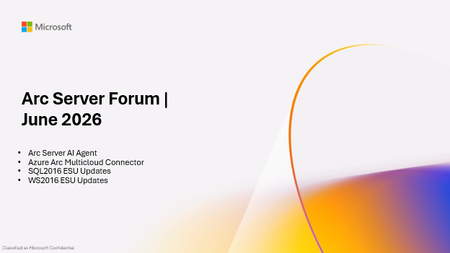
Please find the recording for the monthly Azure Arc Server Forum on YouTube! During the June 2026 Azure Arc Server Forum, we discussed: Arc Server AI Agent assists with onboarding and troubleshooting through an integrated LLM with plans for surfacing the experience through Azure Copilot and in Azure Portal. Azure Arc Multicloud Connector Updates focused on both the Public Preview of the Google Cloud Platform (GCP) Connector and Public Preview of Azure Arc-enablement of detected EKS Clusters. WS 2016 ESU Updates with planned changes versus WS 2012 ESUs and expected timelines anticipating the WS 2016 end-of-support date of January 2027. Note, WS 2012 ESUs will end in October 2026. SQL 2016 ESU Updates discussed enrollment processes, licensing basics, and overall guidance with end-of-support in July 2026. To sign up for the Azure Arc Server Forum and newsletter, please register with contact details at https://aka.ms/arcserverforumsignup/. For the latest agent release notes, check out What's new with Azure Connected Machine agent - Azure Arc | Microsoft Learn. We are skipping July and August, and will resume after summer holidays with the September forum to be held on Thursday, September 17 at 9:30 AM PST / 12:30 PM EST. Finally, I wanted to thank everyone for the attendance and community over the last few years, I will no longer be leading the community calls. Please stay in touch, and Mason Torres, Yunis Hussein, and Meagan McCrory from the Arc PM team will be taking the community forward. We look forward to you joining us, thank you!223Views1like0CommentsHow Mesh Systems Builds on Azure IoT Hub and Azure IoT Operations to Accelerate Industrial AI
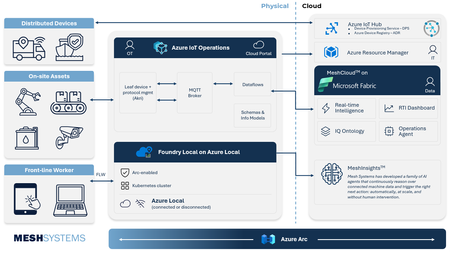
Manufacturers generate vast amounts of operational data, yet its complexity and fragmentation across historians, Operational Technology (OT) systems, and cloud platforms can slow AI adoption at scale. As organizations invest in AI to enhance productivity, quality, and decision making, the ability to connect and contextualize operational data becomes critical. Azure IoT Hub, Azure IoT Operations, and Mesh address this challenge together, spanning the full path from device connectivity to actionable AI-powered insights. Mesh brings deep Azure IoT platform experience and a practical path to industrial AI, with MeshCloud built on Azure IoT Hub, an open-source .NET Akri framework for Azure IoT Operations, and MeshInsights delivering generative AI-powered operational intelligence. This expertise is backed by a long history with Azure; Mesh launched its first IoT solution on Azure in private preview in 2009 and remained an early adopter of every major Azure IoT service since. Together, Azure IoT Hub, Azure IoT Operations, and Mesh give manufacturers a streamlined way to unify operational data and apply AI where it matters most. Unlocking legacy data with Mesh's Akri Connector Industrial organizations often struggle to modernize operations because critical operational data sits isolated inside historians and legacy Operational Technology (OT) systems. Many manufacturers are also wary of integrations that create new dependencies and limit future flexibility. Azure IoT Operations addresses this through an open architecture built around Akri, connecting industrial data sources while preserving interoperability across hardware and software environments. Mesh built on this foundation with its Akri Historian Connector, bringing historian and legacy operational data into Azure IoT Operations through prebuilt connectivity rather than source-by-source integration work. The result is faster access to operational data ready for analytics, AI, and industrial automation. The key features of this connector include: Restart-safe data continuity: Manufacturers can trust that operational data keeps flowing even through outages or restarts, with no data loss and no time spent recovering or reprocessing data. Secure, flexible authentication: Modern and legacy industrial systems connect under one security model, meeting enterprise-grade authentication standards without restructuring existing infrastructure. A foundation other connectors can be built on: The underlying framework handles the heavy lifting, so teams only need to build what's unique to each new OT data source. This means faster time to value for every new data source. Built in alignment with Azure IoT Operations roadmap: The connector stays up to date automatically, as new Azure IoT Operations features become available. This means manufacturers have access to the latest capabilities as the platform evolves. Together, Mesh and Azure IoT Operations give organizations a production-ready path from the shop floor into Azure IoT Operations and onward to Microsoft Fabric. Delivering Scalable Connected Products with Azure IoT Hub and MeshCloud MeshCloud helps manufacturers move from connected product pilots to fleet scale deployments faster by providing a platform build on Azure IoT Hub and other Azure native services. Azure IoT Hub provides per-device identity, support for MQTT, AMQP, and HTTPS, and built-in capabilities like device twins, direct methods, and rules-based message routing. Azure Device Provisioning Service (DPS) extends this foundation with zero-touch, just-in-time onboarding using X.509, TPM, or symmetric key attestation. Mesh operates as one cohesive engineering practice across the full connected product lifecycle, delivering hardware, firmware, wireless, edge, and cloud integration natively for Azure IoT Hub and Azure IoT Operations. That end-to-end scope is what MeshCloud, their Azure-native connected product platform, brings together. MeshCloud embeds Azure IoT Hub and DPS into an Azure-native connected product platform, giving organizations a faster path to connected product delivery without sacrificing control, scale, or solution ownership. The platform comes together across four layers: Edge to cloud: Connected devices, from MCU controllers to tablets and phones, register and authenticate through DPS and connect securely to IoT Hub, giving organizations a direct, secure line from shop floor to enterprise systems. Messaging and command: Event Hubs and Container Apps move telemetry and commands between devices and the cloud, with asset and ontology data exposed for digital twin management and device control. IT and operations: Azure Monitor, OpenTelemetry, Microsoft Entra, and Application Gateway bring platform observability, identity management, and secure ingress together, equipping IT and operations teams with a unified way to manage and secure the environment. Analytics and visualization: Telemetry flows into Azure Data Explorer and Microsoft Fabric for processing and storage, with Grafana, Power BI, and a Device Health UI giving teams fleet-wide visibility. This architecture enables organizations to move from pilot projects to fleet-scale deployments using Azure-native services, while maintaining interoperability across devices, connectivity protocols, and analytics platforms. For manufacturers, this means less time integrating infrastructure and more time delivering operational insights, connected services, and AI-powered workflows. Advancing Industrial Intelligence with MeshInsights As organizations connect more assets and operational systems, the next challenge becomes turning information into consistent actions and decisions. Microsoft Azure provides the cloud, data, and AI foundation for intelligent operational workflows, while giving organizations control over their data and business processes. Mesh extends this foundation through MeshInsights. MeshInsights is Mesh's AI agent offering for connected-product manufacturers. Mesh works with organizations to define a specific operational decision worth automating, such as classifying an alert or determining the right service response, and builds an evaluation standard from real telemetry, service history, and expert-validated examples. AI agents are then developed and measured against that standard, acting automatically on high-confidence cases and routing the rest to the organization's own experts. This extends connected systems beyond monitoring and reporting into trusted, auditable operational decisions. By combining Azure IoT platform services with MeshInsights, Mesh helps organizations move from connected infrastructure to autonomous, AI-driven action without changing where their data lives or who owns the architecture. Why This Matters Industrial transformation increasingly depends on strong collaboration between hyperscale cloud platforms and ecosystem partners who bring operational expertise, deployment acceleration, and industry-specific engineering capabilities. Mesh Systems demonstrates how partners can build differentiated value on top of Azure IoT platform services while helping organizations accelerate deployment timelines, standardize industrial data architectures, and operationalize AI across connected environments. Organizations are already putting this value to work in everyday operations. BUNN's cloud-connected coffee machines now give technicians a head start before every service call. As Kurt Powell, Executive Vice President at BUNN, put it: "With this solution, we know exactly which component to fix before we get there." WLS Lighting Systems has turned that same visibility into measurable savings at scale. Built on MeshCloud and Azure IoT, WLS's netLiNK gives property owners remote monitoring and control over individual light fixtures. Kevin Fletcher, President National Accounts at WLS, shared that the company has saved customers a little over $50 million in electrical costs since bringing netLiNK to market. Together, Azure IoT Hub, Azure IoT Operations, and Mesh Systems help manufacturers reduce integration complexity and operationalize industrial data, creating a foundation for AI driven operations spanning plant, edge, and cloud. The result: manufacturers spend less time on integration and more time improving productivity, resiliency, and decision making across their operations. Learn More Explore Mesh Systems solutions on Azure Marketplace: Microsoft Marketplace | cloud solutions, AI apps, and agents Read customer success stories: https://meshsystems.com/case-study-eaton-1/ Learn more about Azure IoT Operations: https://azure.microsoft.com/products/iot-operations/269Views1like0CommentsPlan for Upcoming Changes to Extended Security Updates on Azure Local
Beginning April 1 2026, Microsoft introduced a consistent pricing model for Extended Security Updates (ESU) for SQL Server and Windows products, including SQL Server 2016, Windows 10 Enterprise LTSB 2016 and Windows Server 2016. This update aims to simplify the Extended Security Update pricing so that customers pay the same list price for ESUs regardless of deployment location (Azure, on-premises, or other public clouds) or purchasing channel (Microsoft Customer Agreement, Enterprise agreements, Cloud Solution Provider program, or other licensing programs). ESUs on Azure Local This pricing change affects any new Extended Security Update offerings starting on or after April 1, 2026, including Windows 10 Enterprise LTSB 2016 (reaching end of support October 13, 2026) and Windows Server 2016 (reaching end of support January 12, 2027). Existing ESU offerings, including Windows Server 2012 or Windows 10 version 22H2, are not affected by this pricing change. This means that customers who already leverage ESUs will continue to have them available on Azure Local at no cost through Azure Verification for VMs. Next Steps As products reach end of support, it is recommended to upgrade your servers to the latest release available. For customers needing to remain on older versions after the end of support date has passed, further guidance on pricing and availability of ESUs will be shared in the coming months. Keep an eye on Extended Security Updates on Azure Local for more details. For More Information Microsoft Services: Pricing Consistency Update | Microsoft Licensing Resources Plan for Windows Server 2016 and Windows 10 2016 LTSB end of support - Windows IT Pro Blog573Views0likes0CommentsAzure Arc Server May 2026 Forum
Please find the recording for the monthly Azure Arc Server Forum on YouTube! During the May 2026 Azure Arc Server Forum, we discussed: Private Preview of Windows Server 2016 Extended Security Updates (ESUs): Customers with Windows Server 2016 Servers with an NDA and willingness to provide feedback can sign up at https://aka.ms/WS2016ESU-PrivatePreview Special Announcement: Windows Server Hotpatch enabled by Azure Arc is now available at no additional cost for Windows Server 2025 machines connected to Azure Arc Feedback opportunity to product group on Azure Arc + RDP Capability: Customers can sign up at https://aka.ms/arc-rdp To sign up for the Azure Arc Server Forum and newsletter, please register with contact details at https://aka.ms/arcserverforumsignup/. For the latest agent release notes, check out What's new with Azure Connected Machine agent - Azure Arc | Microsoft Learn. Our June 2026 forum will be held on Thursday, June 18 at 9:30 AM PST / 12:30 PM EST. We look forward to you joining us, thank you!443Views1like1Comment
At-Scale Failure Reporting for Azure Update Manager
Introduction Azure Update Manager simplifies patching across Azure virtual machines and Azure Arc-enabled servers by providing a centralized platform for patch assessment and installation. However, as environments scale, a key challenge emerges—efficiently identifying and troubleshooting patch failures across large fleets of machines. While Azure Update Manager surfaces detailed error messages in the Azure portal, this information is typically available only at an individual machine level. In enterprise environments managing hundreds or thousands of systems, drilling into each VM to find error details quickly becomes impractical. In this article, we walk through a real-world use case and demonstrate how to leverage Azure Resource Graph (ARG) to extract failed machines along with their error details for a specific maintenance run—using a single query. The Challenge: Scaling Patch Failure Visibility In a large enterprise deployment, Azure Update Manager was configured to manage patching across: Windows and Linux virtual machines Azure cloud VMs and Arc-enabled on‑premises servers Multiple regions and subscriptions While patching operations were largely successful, a subset of machines experienced failures. The key challenges faced by the operations team were: Error messages were visible only by drilling into each failed VM in the portal No built‑in way to aggregate failures across all machines Lack of a simple mechanism to export: Failed VMs Error codes Error messages The team needed a scalable, query‑driven approach to analyze failures across an entire maintenance run. Key Insight: Where Azure Update Manager Stores Data Azure Update Manager does not rely on Log Analytics to store operational results. Instead: Patch assessment and installation results are stored in Azure Resource Graph Azure Resource Graph acts as a centralized, queryable store for update operations This design enables powerful querying without requiring additional ingestion, configuration, or cost overhead. Understanding Maintenance Runs and Correlation IDs Each Azure Update Manager maintenance run generates a unique identifier: properties.correlationId represents the maintenance (schedule) run ID All machines involved in the same patch cycle share this ID This allows all machines within a single patch execution to be correlated and queried collectively. The Solution: Query Failed VMs with Error Messages Azure Resource Graph allows querying failures at scale using the maintenanceresources dataset. Core Query (Kusto Query Language) 1 maintenanceresources 2 | where type =~ "microsoft.maintenance/applyupdates" 3 | where tostring(properties.correlationId) contains "<YourMaintenanceRunID>" 4 | where tostring(properties.status) =~ "Failed" 5 | project properties.resourceId, properties.errorCode, properties.errorMessage What This Query Delivers All machines that failed in a specific maintenance run Error codes for troubleshooting Full error messages that are otherwise visible only in the Azure portal Note: Property names for error information can vary by environment. Validate available fields using Azure Resource Graph Explorer and adjust the project clause if required. Sample Output (Conceptual) Resource ID Error Code Error Message vm-01 0x80244007 Windows Update API failed vm-02 0x80072f8f Connectivity issue vm-03 1C WSUS configuration issue Advanced Scenario: Automatically Detecting the Latest Failed Maintenance Run In real-world scenarios, you may not always know the maintenance run ID. The following query dynamically identifies the most recent maintenance run that had failures, and then retrieves all failed machines from that run. 1 // Step 1: Identify the latest maintenance run ID with failures 2 let lastFailedRun = toscalar( 3 maintenanceresources 4 | extend runId = extract(@"applyupdates/(\d+)$", 1, properties.correlationId) 5 | where type =~ "microsoft.maintenance/applyupdates" 6 | where tostring(properties.status) =~ "Failed" 7 | order by tostring(properties.startDateTime) desc 8 | take 1 9 | project runId 10 ); 11 // Step 2: Query all failed VMs from that run 12 maintenanceresources 13 | where type =~ "microsoft.maintenance/applyupdates" 14 | where tostring(properties.correlationId) contains lastFailedRun 15 | where tostring(properties.status) =~ "Failed" 16 | project properties.resourceId, properties.errorCode, properties.errorMessage This approach is ideal for automation, scheduled reporting, and dashboard scenarios. Why This Approach Matters Operational Efficiency Eliminates manual portal navigation Provides consolidated failure insights in seconds Scalability Works across large, distributed environments Supports both Azure and hybrid (Arc‑enabled) machines Automation Ready Can be integrated into scripts, dashboards, and reporting pipelines Enables proactive monitoring and alerting scenarios Best Practices for Enterprise Patch Reporting To maximize the value of this approach: Capture and track maintenance run IDs Use Azure Resource Graph as the primary reporting layer Build reusable queries for different patch scenarios Export reports for compliance and auditing Correlate failures with root‑cause trends over time Conclusion As organizations scale patching operations with Azure Update Manager, visibility, speed, and automation become essential. While the Azure portal is effective for per‑machine troubleshooting, it is not optimized for fleet‑level analysis. Azure Resource Graph fills this gap by enabling a shift from manual troubleshooting to automated, query‑driven failure analysis at scale. By adopting this approach, teams can significantly improve operational efficiency, reduce mean time to resolution, and build a more mature patch management strategy. Final takeaway: Don’t rely only on the portal Leverage Azure Resource Graph to operationalize patch insights at enterprise scale References Azure Update Manager – Query resources with Azure Resource Graph https://learn.microsoft.com/azure/update-manager/query-logs Azure Update Manager – Troubleshooting guide https://learn.microsoft.com/azure/update-manager/troubleshoot Sample Azure Resource Graph queries for Azure Update Manager https://github.com/MicrosoftDocs/azure-docs/blob/main/articles/update-manager/sample-query-logs.mdUnlocking the Human Telemetry Layer for Safer Industrial Operations
What if we could track human health & safety conditions as precisely as we do with machines, and take immediate actions to protect our greatest asset, our people? Many industrial organizations still lack visibility into real-time human conditions, even as worker safety and operational risk remain major investment priorities. One of the most important operational signals has largely remained outside the industrial data estate: the human telemetry. VOORMI and Microsoft have joined forces to fill this gap in understanding real human conditions. Through the Mij™ platform, VOORMI brings human telemetry into Azure IoT, enabling enterprises to integrate worker conditions such as heat stress and fatigue into the same operational architecture already used for machines and industrial systems. VOORMI, SWNR’s performance apparel brand, is among the first to bring this technology into garments designed for real industrial field conditions. This integration brings their proprietary wearable technology directly into high-impact worker safety and field operations scenarios. The partnership helps establish a new telemetry layer for industrial operations, allowing human, machine, and environmental signals to converge and drive safer operations, real-time awareness, and adaptive AI workflows. Bringing the Human Signal into Industrial AI with Azure Industrial organizations increasingly recognize that many safety, productivity, and operational challenges occur at the intersection of people and machines. Workers operate in high-heat environments, hazardous conditions, remote sites, and physically demanding field scenarios where situational awareness matters in real time. Historically, worker telemetry has remained fragmented across proprietary wearable platforms and disconnected safety systems, creating governance and operational challenges for enterprise IT and OT teams. Mij™ is designed differently, integrating directly into customer-controlled Azure environments through Azure IoT Operations running at the edge or Azure IoT Hub in the cloud rather than introducing another isolated platform. Running intelligence at the edge enables virtual safety agents and operational workflows to execute closer to the worker, supporting low-latency responses, local interaction with OT systems, and operational resilience even in disconnected or bandwidth-constrained environments. This gives enterprises flexibility to support real-time worker safety responses at the edge while also enabling long-term analytics, reporting, and operational intelligence through Microsoft Fabric. Telemetry from garment-integrated sensors flows through edge gateways into Azure services including Azure IoT Operations, Azure Data Explorer, Azure Managed Grafana, and Microsoft Fabric. The result is a unified operational environment where worker telemetry can live beside machine, site, and environmental data under the customer’s existing identity, security, governance, and analytics model. The vision is simple and transformative: make human telemetry a trusted, first-class industrial data source. Azure Digital Operations as the Intelligence Layer The reference architecture demonstrates how Azure IoT Operations can serve as a scalable operational intelligence layer for worker safety and connected operations scenarios across manufacturing, energy, and field environments. Mij™-enabled garments broadcast Bluetooth Low Energy (BLE) telemetry that can be processed locally through edge gateways and routed into Azure IoT Operations using MQTT and dataflows. Data is then operationalized through Azure Data Explorer and visualized using Azure Managed Grafana dashboards for field operations, worker safety, fleet health, gateway monitoring, and operational readiness scenarios. Telemetry can also be made available to Foundry Local-hosted GenAI agents to support real-time, context aware safety guidance, such as prompting workers operating in high-heat conditions to hydrate or seek cooler environments. While Mij™-enabled garments are the initial implementation, the edge device-to-cloud architecture creates a broader onboarding point for additional wearable, sensor, and field telemetry scenarios over time. This allows enterprises to bring more human and operational signals into a unified Azure-native operational environment. The architecture also supports flexible ingestion patterns for environments where dedicated edge gateways are not practical. Using Microsoft Entra External ID, Azure Container Apps, and Azure IoT Hub, telemetry can securely flow into Azure services without exposing operational infrastructure credentials to client devices. This pattern aligns with the broader Azure adaptive cloud approach: enabling customers to run distributed edge-native services on Arc-enabled Kubernetes infrastructure while maintaining centralized security, governance, and analytics capabilities across the enterprise. Depending on customer architecture preferences, telemetry can be processed through Azure IoT Operations at the edge or ingested directly through Azure IoT Hub for cloud-first analytics and downstream processing in services such as Microsoft Fabric. Edge processing also enables real-time sensor fusion across worker telemetry, ambient environmental conditions, machine parameters, and site-level operational signals, supporting faster safety interventions and more context-aware operational decisions. This gives enterprises flexibility in how they balance edge processing, operational responsiveness, governance and privacy requirements. Enabling the Next Generation of Industrial Workflows The long-term opportunity extends well beyond visualization dashboards. As worker telemetry becomes part of the operational fabric, enterprises can begin building more adaptive and intelligent workflows across worker safety, field readiness, incident response, compliance, environmental monitoring, and industrial AI systems. Human telemetry can provide critical real-time context that complements machine and environmental signals enabling more responsive operations and eventually more autonomous decision-support experiences. By bringing human telemetry into enterprise AI and analytics workflows, organizations can build more adaptive operational systems that improve worker safety, situational awareness, and real-time decision making at scale. This partnership reflects a broader industry shift: industrial transformation is no longer only about connected machines. It is about connected operations where people, equipment, environments, and AI systems participate in a shared operational intelligence layer. With SWNR’s Mij™platform and Azure IoT Operations, Microsoft and VOORMI are helping unlock that future. Learn more: Mij™ product page: https://swnrtechnologies.com/pages/mij Learn more about Azure IoT Operations: Documentation & Getting Started See what’s new with Azure IoT Hub: Preview Documentation To get started with a pilot, contact: pilots@swnrtechnologies.com412Views1like0Comments
Your first model deployment on Foundry Local on Azure Local: from catalog to inference in 10 minutes
Foundry Local on Azure Local lets you run open-source models directly on your own Azure Local cluster, behind an OpenAI-compatible AP. It's the same experience you've gotten used to in the cloud, but the inference runs on hardware you own. Foundry Local on Azure Local is in public preview at the time of this writing. You've installed Foundry Local on your Azure Local cluster. The operator's pods are running, the CRDs are registered, you've checked it twice with kubectl get pods . Now what? This blog covers the part that comes right before all of that - the lifecycle pattern you'll use to deploy any model on Foundry Local on Azure Local. Our recent announcement covers the bigger picture: multi-node inference, vLLM as a first-class runtime alongside ONNX-GenAI, and an expanded catalog. We'll keep this walkthrough single-node for clarity, but the same ModelDeployment pattern scales without changes to your client code or workflow. By the end of this walkthrough, you'll have gone from an empty kubectl prompt to a working, OpenAI-compatible inference endpoint serving Phi-4. All in about ten minutes, using nothing but kubectl , Python, and a small sample script. We'll also show you how to switch that same flow to the new vLLM runtime by changing roughly five lines of YAML. All the code lives in Azure-Samples/foundry-local-model-catalog. Clone it and follow along. What you'll build The sample walks through five steps, each driven by the same Python script with different flags: Query the model catalog - read the ConfigMap the operator syncs from the Microsoft Foundry catalog API. Deploy a model - create a ModelDeployment custom resource pointing at one catalog entry. Wait for ready - the operator pulls the model image, schedules pods, and reports state. Run inference - call the OpenAI-compatible /v1/chat/completions endpoint with an API key the operator generates for you. Clean up - delete the deployment. The same five steps apply whether you're serving an ONNX model on a CPU node or a vLLM model on a GPU node. We'll start with the simpler path: Phi-4 on CPU on the ONNX runtime, then show you the vLLM variant at the end. Before you start You'll need: An Azure Local cluster (or any Arc-enabled Kubernetes cluster) with the Foundry Local extension installed. If you haven't set this up yet, the Foundry Local on Azure Local install guide walks through the cluster, extension, and resource requirements. kubectl configured against that cluster, with permissions to read ConfigMaps and Secrets and to create ModelDeployment resources in the foundry-local-operator namespace. Python 3.9 or later. Verify the operator is alive before you go further: kubectl get pods -n foundry-local-operator kubectl get crd | grep foundry You should see operator pods in Running state and at least one CRD named modeldeployments.foundrylocal.azure.com . If you don't, the install docs are the right place to back up to. Then clone and install: git clone https://github.com/Azure-Samples/foundry-local-model-catalog.git && cd foundry-local-model-catalog && python3 -m venv .venv && source .venv/bin/activate && pip install -r requirements.txt Step 1 - See what's in your catalog Start with the lowest-risk command in the sample, it talks to the cluster but changes nothing: python catalog_sample.py --catalog-only A few things to notice in that table: Most models appear more than once. The same model gets packaged for different runtime/hardware combinations, and the operator picks the right container image based on which entry you reference. There's a RUNTIME column. We'll come back to vLLM at the end of this post; for now, the default Phi-4-generic-cpu ONNX entry is what we'll deploy. The catalog itself is just a ConfigMap. No magic, no hidden registry. The operator syncs it from the Microsoft Foundry catalog API on a CronJob, and the sample reads it the same way you would: kubectl get configmap foundry-local-catalog -n foundry-local-operator -o yaml If you ever wonder what's actually available on your cluster, that's the source of truth. Step 2 - Deploy a model Now the side-effecting part. We're going to ask the operator to deploy Phi-4 on CPU: python catalog_sample.py --deploy-only Under the hood, the sample builds and applies a ModelDeployment manifest that looks like this: apiVersion: foundrylocal.azure.com/v1 kind: ModelDeployment metadata: name: phi-4-generic-cpu namespace: foundry-local-operator spec: model: catalog: name: Phi-4-generic-cpu workloadType: generative compute: cpu replicas: 1 port: 5000 The operator takes it from there. It pulls the model container image, schedules a pod, generates an API-key Secret named phi-4-generic-cpu-api-keys , and walks the deployment through Pending → Creating → Running states. The sample polls until both status.state == Running and status.deploymentReady == true . Step 3 - Run inference The endpoint is up. Time to actually use it. If you're running this script from inside the cluster (say, from a debug pod), the endpoint lives at the in-cluster service DNS and the sample picks that up automatically. Most readers will be running from a laptop, though, so we'll cover that path explicitly. In one terminal, port-forward the deployment's service: kubectl port-forward svc/phi-4-generic-cpu 5000:5000 -n foundry-local-operator In another, run the sample's inference-only mode against the forwarded endpoint: python catalog_sample.py --infer-only --endpoint https://localhost:5000 --insecure The sample reads the API key from the auto-generated Secret and sends it as Authorization: Bearer <key>. same pattern as cloud OpenAI. The request body is the standard OpenAI chat-completions shape: { "model": "Phi-4-generic-cpu:1.0.0", "messages": [ {"role": "system", "content": "You are a helpful assistant."}, {"role": "user", "content": "What is the capital of France? Reply in one sentence."} ], "max_tokens": 256 } That response just traveled from your terminal, through kubectl port-forward , into a model serving inside your Azure Local cluster, and back. Step 4 - Clean up The sample's default flow deletes the deployment on its way out, so if you ran the full python catalog_sample.py (no flags) you're already clean. If you used --deploy-only or --skip-cleanup , drop it explicitly: kubectl delete modeldeployment phi-4-generic-cpu -n foundry-local-operator The operator garbage-collects the pod, service, and API-key Secret. The cached model image stays on its PersistentVolume, so your next deploy of the same model skips the image pull. Going beyond CPU: vLLM in 5 lines Now for the variant we've been pointing at. The same ModelDeployment CR, the same OpenAI-compatible endpoint, switched to a runtime built for concurrent users, demonstrated on a popular open-source model. The diff against the manifest from Step 2: spec: - compute: cpu + compute: gpu + runtime: vllm model: catalog: - name: Phi-4-generic-cpu + name: Mistral-7B-v0.2 The same sample script handles it: python catalog_sample.py \ --model Mistral-7B-v0.2 \ --compute gpu \ --runtime vllm What you get back is the same OpenAI-compatible endpoint your client code already knows, but now backed by vLLM's PagedAttention, continuous batching, and automatic planner-tuned configuration. Your application code doesn't need to know any of that; it's still POST /v1/chat/completions with a Bearer token. That's the point of the lifecycle pattern: ONNX or vLLM, CPU or GPU, the platform engineer's deployment loop looks the same. For the architectural "why" behind multi-node, vLLM, and the expanded catalog, read the announcement. What you've built Ten minutes ago you had an installed-but-empty Foundry Local cluster. You now have: A working OpenAI-compatible chat endpoint serving Phi-4. A clear sense of what the operator manages for you ( ModelDeployment CR, model image cache, API-key Secret) and what stays in your hands (which model, which runtime, which compute target). A small, modular script you can wire into three things: A smoke test for every new cluster you stand up ( --catalog-only → --deploy-only → --infer-only is a one-line CI step). An internal demo when you need to show a team that Foundry Local on Azure Local is real and reachable. The foundation for your team's own deployment automation - copy the manifest builder, drop the CLI, and wire it into your existing GitOps or platform tooling. From endpoint to chat surface The model deployment above exposes a standard OpenAI-compatible API - enough for any existing chat client to point at. If you'd like to see exactly that, Azure-Samples/local-chat-with-foundry-local picks up where this walkthrough ends: it wires the running endpoint into the Sovereign Chat Experience starter UI. About ten more minutes from working endpoint to working chat in the browser. Where to go from here Try the rest of the sample: --catalog-only , --deploy-only , --infer-only , and --skip-cleanup compose into whichever workflow you're testing. Read the announcement for the architectural why behind multi-node, vLLM, and the expanded catalog. Read the docs for the full operator and CRD reference. Feel free to share your feedback with us at FoundryLocalOnAzure@microsoft.com. The product is in public preview, so your feedback shapes what ships next.719Views0likes0Comments