azure ai
291 TopicsAzure AI Foundry Agent Unable to Use Credentials Stored in Key Vault Through Playwright MCP Tool
Hello everyone, I am trying to understand how Azure AI Foundry agents interact with Azure Key Vault when using custom MCP tools, and I would appreciate any guidance from the community. My Setup - Created an Azure AI Foundry agent. - Created an Azure Key Vault and configured all permissions according to Microsoft's official documentation. - Stored the required website credentials (username and password) in the Key Vault. - Deployed the official Playwright MCP Docker image. - Exposed the MCP server using ngrok and verified that the endpoint is accessible. - Connected the MCP endpoint as a Custom MCP Tool in Azure AI Foundry. - Performed all configuration through the Azure portal, Foundry UI, and Playground only (no SDK or custom application code involved). The Issue The agent can access and use the Playwright MCP tool. However, when I ask it to log in to a website using credentials that are already stored in Key Vault, it does not populate the username and password fields. My expectation was that the agent would be able to retrieve the secrets from Key Vault and provide them to the Playwright tool during execution. Questions Is there currently a supported mechanism for Azure AI Foundry agents to automatically retrieve Key Vault secrets and pass them to a Custom MCP tool? Does the Playwright MCP Docker image have any built-in integration with Azure Key Vault? When using only the Foundry UI (without SDK code), can a Foundry agent securely inject Key Vault secrets into MCP tool calls? Are additional configurations required beyond Key Vault permissions and agent connections? Has anyone successfully implemented a similar setup where a Foundry agent uses credentials stored in Key Vault to perform browser automation through Playwright MCP? Any clarification on the expected architecture and whether this scenario is currently supported in Azure AI Foundry would be greatly appreciated. Thank you.19Views0likes0CommentsResource Guide: Making Physical AI Practical for Real‑World Industrial Operations
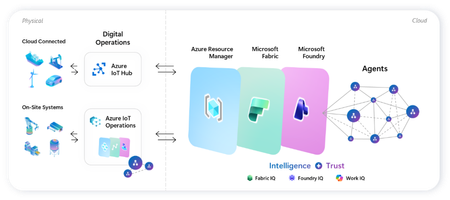
Microsoft’s adaptive cloud approach enables organizations to turn operational technology (OT) data into intelligent actions, autonomously, without requiring everything to live in the cloud by unifying cloud-to-edge management plane, data plane, and intelligence platform. At the center of this approach are key foundational technologies: Key Purpose Offering Direct-to-cloud device management + telemetry ingestion Azure IoT Hub Industrial connectivity + edge data plane Azure IoT Operations Unified analytics + real-time intelligence Microsoft Fabric On-device AI inferencing runtime Foundry Local Microsoft Azure IoT Gartner winner: Microsoft named a Leader in the 2025 Gartner® Magic Quadrant™ for Global Industrial IoT Platforms See it all come together Before diving into each component, watch this end-to-end demo showing how Azure IoT Operations, Azure IoT Hub, Microsoft Fabric, and Foundry Local work as one stack across the edge-to-cloud lifecycle - Making industrial AI practical for real-world operations with adaptive cloud. How these components work together Azure IoT Operations and Azure IoT Hub collect real-time data from operational assets and send semantically-ready, modeled data to Microsoft Fabric, where it's contextualized with enterprise data for downstream analytics. Microsoft Foundry extends to the edge through Foundry Local, so the same tooling used to deploy and manage AI models in the cloud applies to edge use cases. All of it integrates into Azure Resource Manager, bringing OT devices, assets, and edge AI models into the same management and security paradigm as every other Azure-managed resource. This blog walks through where to get started with each product capability: 1. Manage Cloud-Connected Devices and Telemetry with Azure IoT Hub Azure IoT Hub is a fully managed cloud service that enables secure bidirectional communication, device-to-cloud telemetry ingestion, cloud-to-device command execution, per-device authentication, remote management and more. Telemetry from IoT Hub can also be routed downstream into analytics platforms like Microsoft Fabric for visualization or AI modeling. Recommended Usage: Devices that utilize IoT Hub are distributed, stand-alone devices with fixed-functions. These devices typically do not require cloud-managed containerized workloads or cloud-managed proximal industrial protocol connectivity. Examples of appropriate device-to-cloud IoT Hub endpoint devices include water monitoring stations, vehicle telematics, distributed fluid level sensors, etc. Resources Current in-market services overview: IoT Hub: What is Azure IoT Hub? - Azure IoT Hub DPS: Overview of Azure IoT Hub Device Provisioning Service - Azure IoT Hub Device Provisioning Service ADU: Introduction to Device Update for Azure IoT Hub Building scalable solutions with Azure IoT platform: Best practices for large-scale IoT deployments - Azure IoT Hub Device Provisioning Service Scale Out an Azure IoT Hub-based Solution to Support Millions of Devices - Azure Architecture Center Azure IoT Hub scaling Try out our preview of new IoT Hub capabilities (integration with Azure Device Registry and Certificate Management) Learn more about these capabilities on our blog post: Azure IoT Hub + Azure Device Registry (Preview Refresh): Device Trust and Management at Fleet Scale… Integration with Azure Device Registry (preview): Integration with Azure Device Registry (preview) - Azure IoT Hub Microsoft-backed X.509 certificate management (preview): What is Microsoft-backed X.509 Certificate Management (Preview)? - Azure IoT Hub How to start with the preview: Deploy IoT Hub with ADR integration and certificate management (Preview) - Azure IoT Hub 2. Connect Industrial Assets with Azure IoT Operations Azure IoT Operations provides a unified data plane for the edge that runs on Azure Arc–enabled Kubernetes clusters and supports open industrial standards. It allows organizations to connect and capture equipment telemetry, normalize OT data locally, route hot-path signals to real-time analytics, securely manage layered industrial networks, and more. Edge‑processed data can then be sent upstream to Microsoft Fabric for AI‑driven analysis. Recommended Usage: Azure IoT Operations is intended to be the data plane for an adaptive cloud deployment extending the management, data, and AI capabilities of the Microsoft cloud to an on-prem device. This device binds to these cloud planes providing a platform for local data processing and intermittent connectivity. The target for these devices range from a small-gateway-style PC to a full data center. Azure IoT Operations endpoints enable cloud-managed containerized workloads and cloud-managed proximal industrial protocol connectivity. Examples of appropriate adaptive cloud and Azure IoT Operations endpoints include, on-robot computers, industrial machine controllers, retail store sensor/vision processing, and top-of-factory site infrastructure for line of business applications. Resources Azure IoT Operations Overview Azure IoT Operations Documentation Hub Quickstart: explore-iot-operations/quickstart at main · Azure-Samples/explore-iot-operations Open-source framework for scaling robotics from simulation to production on Azure + NVIDIA: microsoft/physical-ai-toolchain Demo video showcasing this in action: Making industrial AI practical for real-world operations with adaptive cloud How we built the demo: explore-iot-operations/quickstart at main · Azure-Samples/explore-iot-operations Edge-AI: microsoft/edge-ai: Production-ready Infrastructure as Code, applications, pluggable components, and… Latest Announcements & Blogs Making Physical AI Practical for Real-World Industrial Operations: Part 1 | Microsoft Community Hub Making Physical AI Practical for Real-World Industrial Operations: Part 2 | Microsoft Community Hub Unlock Industrial Intelligence | Microsoft Hannover Messe 2026 From pilots to production: How Microsoft and partners are accelerating intelligent operations 3. Advanced Analytics with Microsoft Fabric Microsoft Fabric delivers a unified, end‑to‑end analytics platform that transforms streaming OT telemetry into real‑time insights and live dashboards. Fabric Operations Agents monitor industrial signals to recommend targeted actions, while Fabric IQ provides a shared semantic foundation that enables AI agents to reason over enterprise data with business context. Together, Fabric turns live industrial data into AI‑powered operational intelligence. Resources Get Started with Microsoft Fabric Learning Path Fabric Real-Time Intelligence documentation - Microsoft Fabric | Microsoft Learn Create and Configure Operations Agents - Microsoft Fabric | Microsoft Learn Fabric IQ documentation - Microsoft Fabric | Microsoft Learn 4.Run AI Models On‑Device with Foundry Local Foundry Local extends on‑device AI to Arc‑enabled Kubernetes edge clusters, providing a Microsoft‑validated inferencing layer for running AI models in industrial, disconnected or sovereign environments. Resources Foundry Local on Azure Local Documentation Participate in Foundry Local on Azure Local preview form Foundry Local on Azure Local: HELM deployment Demo Customer Stories Chevron: Chevron plans facilities of the future with Azure IoT Operations Husqvarna: Husqvarna Group Boosts Operational Efficiency with Azure Adaptive Cloud Ecopetrol: Azure IoT Operations and Azure IoT for energy help Ecopetrol optimize energy distribution while lowering operational costs P&G: Procter & Gamble cuts model deployment time up to 90% with Azure IoT Operations Toyota: Toyota Industries innovates its paint shop processes with Azure industrial AI and Azure IoT Hub740Views1like0CommentsEvaluate before you ship: introducing the Voice Live Evaluation Harness
You've built a voice agent on Azure Voice Live. It demos beautifully. Then a teammate asks the question that keeps every voice-agent team up at night: "How do we know it's actually good — across 200 customer calls, not the three we just listened to?" Until today, the honest answer was: put on headphones. Manual listening. Subjective scoring in a spreadsheet. No baseline, no regression signal, no way to defend a model swap with data. We're releasing the Voice Live Evaluation Harness to change that. It's an open-source, deployable evaluation pipeline that runs pre-recorded multi-turn audio through your Voice Live agent and scores every turn with the same evaluators built into Microsoft Foundry — automatically, repeatably, and in parallel. TL;DR Two flavors, one repo. Run the CLI harness locally against a Foundry project for fast iteration, or deploy the evaluation agent into your Azure subscription with the Azure Developer CLI (azd) for a fully-hosted evaluation backend. 13 built-in evaluators score every turn — intent resolution, task adherence, task completion, response completeness, tool-call accuracy, groundedness, and more — viewable per-turn and in aggregate inside the Foundry portal. Supports the three Voice Live modes you actually ship in — Semantic VAD, Push-to-Talk, and Foundry Agent mode — including multi-turn conversations with tool calls and grounding. Grows with your agent. Start with the sample datasets, then layer in audio collected from user testing and production traffic so your evaluation set matures alongside the agent. 🔗 Repo: microsoft-foundry/voicelive-evaluation · Docs: Evaluate Voice Live agents (preview) Why systematic evaluation matters for voice agents Text agents have a mature evaluation story. Voice agents don't — and the gaps actually matter more, because every voice failure happens in real time, in front of a customer, on a phone line you can't easily replay. The Voice Live Evaluation Harness closes that gap with four concrete capabilities: Establish a quality baseline. Run a representative audio dataset through your agent and get scores you can publish as your launch bar. Compare configurations side-by-side. Swap the underlying model (GPT-Realtime 1.5, Azure-Realtime, MAI-Transcribe-1.5), change the voice, tune VAD thresholds — and see exactly which knobs moved which scores. Catch regressions before users do. Wire it into CI and fail the build when intent resolution drops below your threshold. Optimize with data, not vibes. When task-completion drops, drill into the per-turn scores to see whether the agent failed to call the right tool, misunderstood intent, or generated an incomplete response. Keep iterating as production data rolls in. Start with the sample datasets, then grow your evaluation set with audio captured from internal testing, pilot users, and real production traffic. Re-run after every prompt tweak or model swap so the harness becomes a continuous quality signal — not a one-time launch checklist. How it works The pipeline is a five-stage loop: Audio Dataset. Multi-turn audio + expected behaviors in a simple JSONL schema. Four sample datasets ship in the repo (travel planning, complex data analytics, tool-calling tests, batch multi-conversation) so you can run end-to-end on day one. Voice Live API. Pick your Voice Live mode (Semantic VAD, PTT, or Foundry Agent), model, voice, and turn-detection settings via a JSON config file, then stream each turn of audio through the API — locally with the CLI harness, or, if you've deployed the evaluation agent, via the hosted Container App for long-running batches in your own subscription. Transcript + Response. Every turn produces an agent transcript, the model's response, and any tool calls it made — captured automatically for scoring. Foundry Evaluators. 13 built-in evaluators — powered by the same Foundry evaluator models (GPT-4.1-mini and o4-mini) used across Microsoft Foundry — judge every turn on intent resolution, task adherence, tool-call accuracy, groundedness, and more. Quality Scores. Per-turn and aggregate scores land in the Microsoft Foundry portal under your project's Evaluation tab — sortable, filterable, comparable across runs. Then loop. Audio captured from internal testing, pilots, and production traffic feeds back into the dataset — each pass makes the next evaluation more representative of what users actually do. What gets measured The accelerator ships 13 built-in evaluators out of the box, covering the dimensions that matter most for production voice agents: Category Evaluators Intent & task quality Intent Resolution · Task Adherence · Task Completion · Response Completeness Tool calling Tool Call Accuracy · Tool Call Parameter Validity · Tool Result Usage · Tool Call Success Content quality Groundedness · Relevance · Fluency · Coherence Conversational dynamics Turn-taking quality Every evaluator runs against the same Foundry evaluator models (GPT-4.1-mini and o4-mini) that power evaluation across the rest of Microsoft Foundry — so your voice-agent scores are directly comparable to your text-agent scores. Run the CLI locally against your existing Voice Live endpoint If you already have a Voice Live agent deployed and just want fast iteration on a laptop: git clone https://github.com/microsoft-foundry/voicelive-evaluation.git cd voicelive-evaluation/evaluation_harness python -m venv .venv && source .venv/bin/activate pip install -r requirements.txt cp .sample_env .env # Edit .env with your AZURE_VOICELIVE_ENDPOINT python voice_agent_evaluation.py \ --config configs/sample_vad_realtime.json The full walkthrough — dataset schema, configuration reference, score interpretation, and troubleshooting — is in the documentation. Get started Repo: microsoft-foundry/voicelive-evaluation Docs: How to evaluate Voice Live agents (preview) We'd love your feedback — try it, file issues, and tell us which evaluators you wish you had.164Views0likes0CommentsMigrating to GPT-5.x Without Breaking GPT-4: A Practical, Backward-Compatible Playbook
The first request your service sends after swapping gpt-4o for gpt-5.1 in production will return HTTP 400. Not in two weeks. On the first call. And the parameter the error points to isn't one you set anywhere in your code - it's bound onto the request by a LangChain helper you've used for two years. This post walks through every breaking change between the GPT-4 and GPT-5 families on Azure OpenAI in Microsoft Foundry, the integration cliffs nobody warns you about, and the small set of files you need so the same call sites work against both model families without branching. Who this is for: engineers maintaining an existing production codebase that calls Azure OpenAI / OpenAI - directly or through LangChain - and needs to onboard GPT-5.x while keeping the GPT-4 deployments alive during rollout. What you'll leave with: one copy-paste compatibility module, a tiny LangChain subclass, a prompt-audit harness, and a 10-step rollout checklist. 1. Why this migration is different Every previous Azure OpenAI bump - 3.5 → 4, 4 → 4o, 4o → 4o-mini - was additive. You changed engine="gpt-4o" and everything kept working. GPT-5.x is the first generation that is subtractive: parameters you used to send now return 400 Unsupported parameter. The wire protocol itself changed because GPT-5 is a reasoning model - it spends tokens thinking internally before it answers, so the parameters that controlled the old sampling pipeline (temperature, top_p, presence_penalty, frequency_penalty) no longer exist on the request schema. What this means for production code: A passing test suite against gpt-4o will fail on the first call against gpt-5.1 with HTTP 400. A passing test suite against gpt-5.1 will fail on every legacy gpt-4* deployment because the new reasoning controls (reasoning_effort, verbosity) are not recognised there. LangChain helpers that worked unmodified for two years (notably create_sql_query_chain) silently bind stop=[...] onto your LLM and trigger the same 400. Source-grep won't find the offending line because it lives inside the library. The good news: the divergence is mechanical. With one detection helper, one parameter-builder, and one tiny LangChain subclass you can run the same code against both families. 2. The breaking-changes matrix Concern GPT-4 / GPT-4o (legacy) GPT-5.x / o1 / o3 (reasoning) Output budget max_tokens max_completion_tokens (rejects max_tokens) temperature 0.0–1.0 Only the default (1) is accepted - omit it top_p Supported Rejected presence_penalty, frequency_penalty Supported Rejected logprobs, logit_bias Supported Rejected stop sequences Supported Rejected on most reasoning deployments reasoning_effort Rejected New: minimal | low | medium | high verbosity Rejected New: low | medium | high (sometimes via extra_body) System instruction role system developer recommended; system still works as alias Output token cost Output tokens only Output + reasoning tokens count against your cap Recommended API version 2024-12-01-preview or earlier 2025-03-01-preview or later Two consequences are easy to miss: max_completion_tokens is a shared budget. GPT-5.1 can burn 2–4× more tokens internally before emitting the first response token. A cap of 4096 that comfortably held a SQL query on GPT-4o now silently truncates the answer mid-token on GPT-5.1. Multiply your legacy budgets by ~2.5× and add a floor (e.g. 4096) before sending. The stop parameter is the silent killer. Any helper that calls llm.bind(stop=[...]) - and there are several in langchain - will turn a working code path into a 400 the moment you swap deployments. 3. Compatibility strategy: detect, don't fork The temptation is to fork: one branch for GPT-4, one for GPT-5. Don't. The right unit of abstraction is one function that classifies the deployment into a family, and one function that builds a kwargs dict the SDK will accept for that family. Every call site - SDK, LangChain, raw HTTP - drains into the same kwargs builder. When you eventually retire GPT-4 you delete the legacy branch in one file, not in fifty. 4. The industry-agnostic compatibility module Drop the following file into your project. It has no Azure / OpenAI / LangChain imports at module load time, so the same file works from a web service, a serverless function, a notebook, or a CLI tool. 4.1 model_compat.py """ Model compatibility helper for GPT-5.x with GPT-4 backward compatibility. This module centralises the parameter translation needed to talk to the "reasoning" generation of OpenAI / Azure OpenAI models (GPT-5, GPT-5.1, o1, o3, o4) while keeping older deployments (gpt-4, gpt-4o, gpt-4-32k, gpt-3.5-turbo, etc.) working unchanged. """ from __future__ import annotations import logging import os import re from typing import Any, Dict, Iterable, Mapping, Optional # --------------------------------------------------------------------------- # Family detection # --------------------------------------------------------------------------- _REASONING_PATTERNS = ( # gpt-5, gpt5, gpt-5.1, gpt_5, GPT 5, gpt5mini-prod-eu, ... re.compile(r"(?i)(^|[^a-z0-9])gpt[-_ ]?5(\.\d+)?([^0-9]|$)"), # o1, o3, o4, o1-mini, o3-preview ... re.compile(r"(?i)(^|[^a-z0-9])o[134](-mini|-preview)?([^a-z0-9]|$)"), ) _LEGACY_PATTERNS = ( re.compile(r"(?i)gpt[-_ ]?4o"), re.compile(r"(?i)gpt[-_ ]?4(?!\d)"), re.compile(r"(?i)gpt[-_ ]?4[-_ ]?32k"), re.compile(r"(?i)gpt[-_ ]?3\.?5"), re.compile(r"(?i)gpt[-_ ]?35"), ) def get_model_family(model_or_deployment: Optional[str]) -> str: """Return ``"reasoning"`` for GPT-5.x / o-series, ``"legacy"`` otherwise. Honours an ``OPENAI_MODEL_FAMILY`` env-var override for deployments whose user-defined name does not embed the model family (e.g. ``prod-default``). """ override = (os.getenv("OPENAI_MODEL_FAMILY") or "").strip().lower() if override in {"reasoning", "gpt-5", "gpt5", "gpt-5.1", "o-series", "o1", "o3"}: return "reasoning" if override in {"legacy", "gpt-4", "gpt4", "gpt-3.5", "gpt35", "chat"}: return "legacy" name = (model_or_deployment or "").strip() if not name: # Fail closed: when we don't know, assume legacy so old code keeps # working. Misclassifying a reasoning deployment as legacy fails fast # with a clear "Unsupported parameter" 400; the reverse silently # drops parameters the caller expected. return "legacy" for pat in _REASONING_PATTERNS: if pat.search(name): return "reasoning" for pat in _LEGACY_PATTERNS: if pat.search(name): return "legacy" return "legacy" def is_reasoning_model(model_or_deployment: Optional[str]) -> bool: return get_model_family(model_or_deployment) == "reasoning" # --------------------------------------------------------------------------- # Reasoning controls # --------------------------------------------------------------------------- _VALID_REASONING_EFFORT = {"minimal", "low", "medium", "high"} _VALID_VERBOSITY = {"low", "medium", "high"} def _coerce_choice(raw: Optional[str], valid: Iterable[str]) -> Optional[str]: if raw is None: return None value = str(raw).strip().lower() if not value: return None if value not in set(valid): logging.warning( "Ignoring unsupported value '%s'; expected one of %s", raw, sorted(valid), ) return None return value def get_reasoning_effort(override: Optional[str] = None) -> Optional[str]: return _coerce_choice( override if override is not None else os.getenv("OPENAI_REASONING_EFFORT"), _VALID_REASONING_EFFORT, ) def get_verbosity(override: Optional[str] = None) -> Optional[str]: return _coerce_choice( override if override is not None else os.getenv("OPENAI_VERBOSITY"), _VALID_VERBOSITY, ) # --------------------------------------------------------------------------- # max_completion_tokens scaling # --------------------------------------------------------------------------- def _reasoning_token_scale() -> float: """Multiplier applied to legacy ``max_tokens`` when targeting a reasoning model.""" try: scale = float(os.getenv("OPENAI_REASONING_TOKEN_SCALE", "2.5")) except (TypeError, ValueError): scale = 2.5 return scale if scale > 0 else 1.0 def _reasoning_token_floor() -> int: try: floor = int(os.getenv("OPENAI_REASONING_TOKEN_FLOOR", "4096")) except (TypeError, ValueError): floor = 4096 return floor if floor > 0 else 4096 def scale_max_tokens_for_reasoning(max_tokens: Optional[int]) -> Optional[int]: """Scale a legacy ``max_tokens`` budget up for reasoning models. ``None`` and ``-1`` ("no explicit cap") are passed through. """ if max_tokens is None: return None if max_tokens == -1: return -1 return max(int(round(max_tokens * _reasoning_token_scale())), _reasoning_token_floor()) # --------------------------------------------------------------------------- # Kwargs builders # --------------------------------------------------------------------------- _SAMPLING_KEYS = ("temperature", "top_p", "presence_penalty", "frequency_penalty") def _drop_none(mapping: Mapping[str, Any]) -> Dict[str, Any]: return {k: v for k, v in mapping.items() if v is not None} def build_openai_chat_kwargs( model: str, *, max_tokens: Optional[int] = None, temperature: Optional[float] = None, top_p: Optional[float] = None, presence_penalty: Optional[float] = None, frequency_penalty: Optional[float] = None, reasoning_effort: Optional[str] = None, verbosity: Optional[str] = None, extra: Optional[Mapping[str, Any]] = None, ) -> Dict[str, Any]: """Build kwargs for ``openai.OpenAI / AzureOpenAI .chat.completions.create``. Splat the result directly: ``client.chat.completions.create(**kwargs)``. Unsupported parameters are silently omitted for reasoning models; legacy deployments retain the historical behaviour. """ family = get_model_family(model) kwargs: Dict[str, Any] = {"model": model} # ---- output budget ---- if max_tokens is not None and max_tokens != -1: if family == "reasoning": kwargs["max_completion_tokens"] = scale_max_tokens_for_reasoning(int(max_tokens)) else: kwargs["max_tokens"] = int(max_tokens) # ---- sampling ---- if family == "legacy": kwargs.update(_drop_none({ "temperature": temperature, "top_p": top_p, "presence_penalty": presence_penalty, "frequency_penalty": frequency_penalty, })) else: for key, value in ( ("temperature", temperature), ("top_p", top_p), ("presence_penalty", presence_penalty), ("frequency_penalty", frequency_penalty), ): if value is not None: logging.debug( "Dropping unsupported parameter '%s' for reasoning model '%s'", key, model, ) # ---- reasoning controls ---- if family == "reasoning": effort = get_reasoning_effort(reasoning_effort) if effort is not None: kwargs["reasoning_effort"] = effort verb = get_verbosity(verbosity) if verb is not None: # ``verbosity`` is not a top-level kwarg in openai-python <= 1.65.x; # route it via ``extra_body`` so it lands in the JSON without a # TypeError from the SDK. kwargs.setdefault("extra_body", {})["verbosity"] = verb # ---- caller-supplied extras (already filtered) ---- if extra: for key, value in extra.items(): if value is None: continue if family == "reasoning" and key in _SAMPLING_KEYS: continue kwargs[key] = value return kwargs def build_langchain_chat_kwargs( deployment_name: str, *, max_tokens: Optional[int] = None, temperature: Optional[float] = None, top_p: Optional[float] = None, reasoning_effort: Optional[str] = None, verbosity: Optional[str] = None, ) -> Dict[str, Any]: """Build kwargs for ``langchain_openai.AzureChatOpenAI`` / ``ChatOpenAI``. Older ``langchain-openai`` releases don't expose ``max_completion_tokens`` as a top-level kwarg, so we forward it through ``model_kwargs`` (which langchain passes straight to the SDK). """ family = get_model_family(deployment_name) kwargs: Dict[str, Any] = {} model_kwargs: Dict[str, Any] = {} if max_tokens is not None and max_tokens != -1: if family == "reasoning": model_kwargs["max_completion_tokens"] = scale_max_tokens_for_reasoning(int(max_tokens)) else: kwargs["max_tokens"] = int(max_tokens) if family == "reasoning": effort = get_reasoning_effort(reasoning_effort) if effort is not None: model_kwargs["reasoning_effort"] = effort verb = get_verbosity(verbosity) if verb is not None: model_kwargs.setdefault("extra_body", {})["verbosity"] = verb else: if temperature is not None: kwargs["temperature"] = temperature if top_p is not None: kwargs["top_p"] = top_p if model_kwargs: kwargs["model_kwargs"] = model_kwargs return kwargs def get_system_role(model_or_deployment: Optional[str] = None) -> str: """Return ``"developer"`` for reasoning models when opted in, ``"system"`` otherwise. Defaulting to ``"system"`` preserves compatibility with LangChain prompt templates and SDK helpers that don't yet recognise the new role. Opt in with ``OPENAI_USE_DEVELOPER_ROLE=1`` once your stack supports it. """ if not is_reasoning_model(model_or_deployment): return "system" raw = os.getenv("OPENAI_USE_DEVELOPER_ROLE", "") return "developer" if raw.strip().lower() in {"1", "true", "yes", "on"} else "system" 4.2 What this buys you Every direct-SDK call collapses to two lines: from openai import AzureOpenAI from model_compat import build_openai_chat_kwargs client = AzureOpenAI( azure_endpoint=os.environ["AZURE_OPENAI_ENDPOINT"], api_version=os.environ["OPENAI_API_VERSION"], api_key=os.environ["AZURE_OPENAI_API_KEY"], ) kwargs = build_openai_chat_kwargs( model=os.environ["OPENAI_ENGINE"], max_tokens=4096, # automatically becomes max_completion_tokens for GPT-5 temperature=0.2, # automatically dropped for GPT-5 reasoning_effort="low", # automatically dropped for GPT-4 ) response = client.chat.completions.create( messages=[ {"role": "system", "content": "You are a helpful assistant."}, {"role": "user", "content": user_input}, ], **kwargs, ) The same call site now correctly targets gpt-5.1, gpt-4o, gpt-4-32k, o3-mini, or any future deployment whose name embeds the family - and you can override with the OPENAI_MODEL_FAMILY env var when the deployment alias is opaque. 4.3 Raw HTTP call sites Some legacy code paths bypass the SDK and POST JSON directly. The same builder works there: import json import requests from model_compat import build_openai_chat_kwargs, get_system_role deployment = os.environ["OPENAI_ENGINE"] api_version = os.environ["OPENAI_API_VERSION"] endpoint = ( f"{os.environ['AZURE_OPENAI_ENDPOINT']}/openai/deployments/{deployment}" f"/chat/completions?api-version={api_version}" ) payload = { "messages": [ {"role": get_system_role(deployment), "content": system_prompt}, {"role": "user", "content": user_prompt}, ], } # Splat the kwargs into the payload, then strip the SDK-only ``model`` key. payload.update(build_openai_chat_kwargs( model=deployment, max_tokens=800, temperature=0.7, top_p=0.95, reasoning_effort="low", )) payload.pop("model", None) # ``model`` is encoded in the URL for Azure payload.pop("extra_body", None) # already on the payload root resp = requests.post( endpoint, headers={"Content-Type": "application/json", "api-key": api_key}, data=json.dumps(payload), timeout=60, ) resp.raise_for_status() 5. LangChain: the hidden stop parameter langchain.chains.sql_database.query.create_sql_query_chain calls llm.bind(stop=["\nSQLResult:"]) internally to terminate the model's output before the example block in its prompt. That stop value is forwarded to the SDK on every invocation. GPT-5.1 rejects it: openai.BadRequestError: Error code: 400 - {'error': { 'message': "Unsupported parameter: 'stop' is not supported with this model.", 'type': 'invalid_request_error', 'param': 'stop', }} You can't reach into the chain to disable it. The clean fix is a thin AzureChatOpenAI subclass that drops stop for reasoning models only: 5.1 langchain_compat.py """LangChain-side compatibility shim for reasoning-class deployments.""" from __future__ import annotations from typing import Any, List, Optional from langchain_core.callbacks.manager import ( AsyncCallbackManagerForLLMRun, CallbackManagerForLLMRun, ) from langchain_core.messages import BaseMessage from langchain_core.outputs import ChatResult from langchain_openai import AzureChatOpenAI # use ChatOpenAI for non-Azure from model_compat import is_reasoning_model class ReasoningSafeAzureChatOpenAI(AzureChatOpenAI): """``AzureChatOpenAI`` variant that hides parameters reasoning models reject. Reasoning models (GPT-5.x, o1/o3/o4) return HTTP 400 when a request payload carries ``stop``. LangChain's SQL helpers unconditionally bind it, so the unsupported parameter reaches the SDK regardless of how the caller configured the LLM. This subclass strips ``stop`` for reasoning deployments while forwarding it unchanged for legacy GPT-4 / GPT-3.5 deployments - the behaviour is byte-identical to upstream LangChain for those models. """ def _deployment_id(self) -> str: # ``langchain-openai`` >= 0.2 exposes ``azure_deployment``; older # releases use ``deployment_name``. Either may be set by the caller. return ( getattr(self, "azure_deployment", None) or getattr(self, "deployment_name", None) or "" ) def _generate( self, messages: List[BaseMessage], stop: Optional[List[str]] = None, run_manager: Optional[CallbackManagerForLLMRun] = None, **kwargs: Any, ) -> ChatResult: if is_reasoning_model(self._deployment_id()): stop = None return super()._generate(messages, stop=stop, run_manager=run_manager, **kwargs) async def _agenerate( self, messages: List[BaseMessage], stop: Optional[List[str]] = None, run_manager: Optional[AsyncCallbackManagerForLLMRun] = None, **kwargs: Any, ) -> ChatResult: if is_reasoning_model(self._deployment_id()): stop = None return await super()._agenerate(messages, stop=stop, run_manager=run_manager, **kwargs) Use it as a drop-in replacement: from langchain_compat import ReasoningSafeAzureChatOpenAI from model_compat import build_langchain_chat_kwargs llm_kwargs = build_langchain_chat_kwargs( deployment_name=os.environ["OPENAI_ENGINE"], max_tokens=6000, temperature=0, reasoning_effort="low", ) llm = ReasoningSafeAzureChatOpenAI( azure_endpoint=os.environ["AZURE_OPENAI_ENDPOINT"], azure_deployment=os.environ["OPENAI_ENGINE"], openai_api_version=os.environ["OPENAI_API_VERSION"], api_key=os.environ["AZURE_OPENAI_API_KEY"], **llm_kwargs, ) That single substitution makes create_sql_query_chain, SQLDatabaseChain, and the ChatOpenAI-based RAG helpers all work against GPT-5.1 without any other changes. 6. The second LangChain gotcha: prose where SQL should be create_sql_query_chain is documented to return the literal string "I don't know" (or a similar fallback) when the LLM cannot form a query. The default code path takes the chain output and runs it against the database: sql = chain.invoke({...}) # -> "I don't know" result = db.run(sql) # -> sends "I don't know" to pyodbc The database faithfully returns: [42000] Unclosed quotation mark after the character string 't know'. (105) Which surfaces to the end user as a misleading "SQL syntax error". The mitigation is a one-line guard that validates the chain output looks like SQL before execution: import re _SQL_START_RE = re.compile( r"^\s*(?:WITH|SELECT|INSERT|UPDATE|DELETE|CREATE|DROP|ALTER|MERGE|EXEC|EXECUTE|TRUNCATE)\b", re.IGNORECASE, ) def looks_like_sql(text: str) -> bool: """True only if ``text`` starts with a recognised SQL DML/DDL keyword.""" if not text or not text.strip(): return False return bool(_SQL_START_RE.match(text)) sql = extract_sql_query(chain.invoke({...})) if not looks_like_sql(sql): logging.warning("SQL chain returned a non-SQL response: %r", sql[:200]) return ( "I couldn't form a SQL query for that question. " "Please rephrase or add more context." ) result = db.run(sql) This isn't specific to GPT-5.1 - it's good hygiene for any LLM that backs a SQL agent - but the failure mode becomes much more frequent on reasoning models because they're better at refusing. 7. Cleaning Markdown out of create_sql_query_chain output Reasoning models like to wrap their answer in a markdown fence and append a "Note:" or "Explanation:" paragraph. None of that survives db.run(). A defensive extract_sql_query handles all the variants: import re def extract_sql_query(text: str) -> str: """Strip markdown fences, leading prose, and trailing explanations.""" # 1) Prefer SQL inside a markdown code fence. m = re.search(r"```(?:sql|SQL|Sql)?\s*\n(.*?)\n```", text, re.DOTALL) if m: text = m.group(1) text = text.strip() # 2) Drop any prose *before* the SQL by jumping to the first SQL keyword. m = re.search( r"(?im)^\s*(WITH|SELECT|INSERT|UPDATE|DELETE|CREATE|DROP|ALTER|MERGE|EXEC|EXECUTE|TRUNCATE)\b", text, ) if m: text = text[m.start(1):] # 3) Cut at the first "Explanation:" / "Note:" / "This query..." marker. m = re.compile( r"(?im)^\s*(?:Explanation|Note|Notes|Here(?:'|\u2019)?s|" r"This\s+(?:query|SQL|statement|returns|counts|selects|will|gets|finds)|" r"The\s+(?:query|SQL|above|result|statement)|" r"Result|Results|Description|Output|Answer)\b[^\n]*" ).search(text) if m: text = text[: m.start()].rstrip() # 4) Drop any trailing fence that survived step 1. if text.endswith("```"): text = text[:-3].rstrip() return text.strip() 8. Package versioning The bare minimum your requirements.txt / environment.yml needs: Package Last GPT-4-only version First GPT-5.x-safe version Notes openai 1.55.x 1.65.x (recommend 1.65.4+) Earlier versions reject max_completion_tokens and reasoning_effort as unknown kwargs langchain-openai 0.2.14 0.3.7+ 0.3.x line exposes azure_deployment and forwards model_kwargs correctly to the new SDK langchain 0.3.14 0.3.21+ Pin together with langchain-openai and langchain-core langchain-core 0.3.29 0.3.49+ Update in lockstep with the others langchain-community 0.3.14 0.3.20+ Mostly transitive; needed for SQLDatabase helpers tiktoken 0.7.x 0.8.0+ Encodings for GPT-5.1 ship in 0.8.0; older versions fall back to cl100k_base for unknown models tokencost (optional) 0.1.16 0.1.20+ Update for GPT-5.x price tables Azure OpenAI API version 2024-12-01-preview 2025-03-01-preview First version that ships reasoning_effort and the GPT-5.x routing Pin exact versions after testing - LangChain has a habit of moving public re-exports between minor releases. requirements.txt snippet: openai==1.65.4 langchain==0.3.21 langchain-core==0.3.49 langchain-openai==0.3.7 langchain-community==0.3.20 tiktoken==0.8.0 9. New GPT-5.x knobs worth using Once you're on a reasoning deployment, two new parameters become available. Both are optional, both default to a sensible value, and both are stripped by the kwargs builder above when the target is a legacy model. reasoning_effort minimal - one-shot lookups, classification. low - deterministic structured output (SQL, JSON-schema extraction, rule-based rewrites). Lowest cost overhead. medium (default) - RAG, summarisation, normal Q&A. high - multi-step analytical reasoning, complex code synthesis. A useful pattern is to choose the level by task profile rather than at the call site: TASK_EFFORT = { "sql": "low", "structured_extract": "low", "kg_cleaning": "low", "rag_qa": "medium", "vision": "medium", "analytical": "high", } verbosity low | medium | high. Controls the length of the response, not its substance. Useful for grounding chat UIs where you want crisp answers - set low for /answer endpoints and high for "explain like a senior engineer" panels. Note: in openai-python <= 1.65.x, verbosity is not yet a top-level keyword argument; pass it through extra_body (the builder above already does this). developer role GPT-5.x prefers {"role": "developer", "content": "..."} for instructions that previously used system. The change is non-breaking on the Azure side - system is still accepted as an alias - but some downstream LangChain prompt templates predate the role and will reject it on construction. Treat developer as opt-in (OPENAI_USE_DEVELOPER_ROLE=1) for now; flip the default after your prompt-template version is known good. 10. Auditing your existing prompts When the wire-level migration is done your service will talk to GPT-5.x - but that doesn't mean it says the right thing. Reasoning models read prompts differently in ways that won't show up as 400s: They take instructions more literally. A prompt that worked when GPT-4o rounded the corners may surface every edge case verbatim. They refuse more often. "I don't know" / "I cannot help with that" are more frequent because reasoning models are less willing to confabulate. They ignore "be concise" / "be terse". Use the new verbosity knob. Step-by-step / chain-of-thought instructions become redundant. The model already reasons internally; extra "think before you answer" prose competes with its own chain of thought and often hurts output quality. Negative-only instructions can backfire. "Never output X" prompts occasionally cause refusals where you'd rather have a workaround. 10.1 Build a prompt regression harness Capture every system+user prompt your service emits in a CSV, then replay each one against both deployments and diff the output. The diff is the single most useful artefact you can produce before the cutover: # prompt_audit.py - minimal differential tester import csv from openai import AzureOpenAI from model_compat import build_openai_chat_kwargs LEGACY = "gpt-4o" REASONING = "gpt-5.1" client = AzureOpenAI( azure_endpoint=os.environ["AZURE_OPENAI_ENDPOINT"], api_version=os.environ["OPENAI_API_VERSION"], api_key=os.environ["AZURE_OPENAI_API_KEY"], ) def run(model: str, system: str, user: str) -> str: kw = build_openai_chat_kwargs( model=model, max_tokens=4096, temperature=0.2, # auto-dropped for reasoning reasoning_effort="medium", # auto-dropped for legacy ) resp = client.chat.completions.create( messages=[ {"role": "system", "content": system}, {"role": "user", "content": user}, ], **kw, ) return resp.choices[0].message.content or "" with open("prompts.csv") as f_in, open("diff.tsv", "w", newline="") as f_out: writer = csv.writer(f_out, delimiter="\t") writer.writerow(["id", "legacy_first80", "reasoning_first80", "len_legacy", "len_new", "identical"]) for row in csv.DictReader(f_in): legacy = run(LEGACY, row["system"], row["user"]) new = run(REASONING, row["system"], row["user"]) writer.writerow([ row["id"], legacy[:80].replace("\n", " "), new[:80].replace("\n", " "), len(legacy), len(new), legacy.strip() == new.strip(), ]) Capture three signals per prompt - they're enough to triage 95% of drift: Format compliance. Did the output still parse as the expected JSON / YAML / Markdown / SQL? Run your existing downstream parser on both columns. Token cost delta. Reasoning models tend to be more verbose by default. Anything beyond +20% is a candidate for the verbosity="low" knob. Semantic drift. Spot-check 5–10% of rows by hand. You're looking for changes in intent, not changes in wording. 10.2 Common rewrites to make prompts model-agnostic The goal isn't to write two prompts. It's to write one prompt that produces correct output on both families by moving constraints out of the natural-language body and into the request shape. 10.2a. Format constraints belong in response_format, not the prose Don't: Output ONLY a JSON object with keys `name` and `score`. Do not include any explanation. Do not wrap in markdown. Do not say anything else. Do: resp = client.chat.completions.create( messages=[...], response_format={ "type": "json_schema", "json_schema": { "name": "scored_entity", "schema": { "type": "object", "properties": { "name": {"type": "string"}, "score": {"type": "number"}, }, "required": ["name", "score"], "additionalProperties": False, }, "strict": True, }, }, **kw, ) response_format is honoured by both gpt-4o (>= 2024-08-06) and the entire GPT-5.x line. The prompt loses three lines of brittle natural-language constraints and you get schema-validated output for free. 10.2b. Replace "think step by step" with reasoning_effort Don't: Let's think step by step. First identify the entity. Then find the category. Then compute the score. Then format the answer. Do: delete the prose and pass reasoning_effort="medium" (or "high") for reasoning deployments. The kwargs builder drops the parameter automatically for GPT-4 models, so the same prompt now produces: step-by-step reasoning internally on GPT-5.x (lower output token cost), the same final answer on GPT-4o that the verbose prompt used to elicit. 10.2c. Replace temperature-based variety with n sampling If your code relied on temperature=0.9 to get diverse completions, GPT-5.x will return roughly the same answer every time. Generate variety the explicit way: resp = client.chat.completions.create(messages=[...], n=5, **kw) candidates = [c.message.content for c in resp.choices] Or call the model N times with slightly different framings. Both patterns work against either family with no further code changes. 10.2d. Move procedural instructions to the developer role For multi-step workflows, the new developer role gives clearer separation between what the system enforces and what the user is asking: messages = [ {"role": get_system_role(deployment), "content": role_card_for_assistant}, {"role": "developer", "content": procedural_instructions}, {"role": "user", "content": user_question}, ] get_system_role returns "system" for legacy models and "developer" for reasoning models opted in via OPENAI_USE_DEVELOPER_ROLE=1. Once your LangChain templates support the new role you can flip the default. 10.2e. Add a literal-execution header for strict formats For prompts where the exact output shape matters (table generation, SQL with a fixed column order, structured incident reports), prepend an explicit literal-execution header so reasoning models don't drift into "helpful improvements": LITERAL_EXECUTION_HEADER = ( "Execution mode: follow the instructions below literally and in order. " "Do not infer intent, skip, reorder, merge, or add steps. Honour the " "exact formatting, tone, and verbosity specified. If a step is " "ambiguous, respond with the literal interpretation and flag the " "ambiguity instead of guessing." ) def apply_literal_execution(prompt: str) -> str: if LITERAL_EXECUTION_HEADER in prompt: return prompt return f"{LITERAL_EXECUTION_HEADER}\n\n{prompt}" It's a no-op on GPT-4o (the older models already follow instructions literally enough) and a meaningful guard rail on GPT-5.1. Wire it behind an OPENAI_LITERAL_EXECUTION flag so you can disable it without redeploying. 10.3 A prompt-shaped checklist Run every prompt your service emits past these questions: Question Action Does it specify output format in prose? Move to response_format (10.2a) Does it include "think step by step"? Remove; set reasoning_effort (10.2b) Does it set tone constraints ("be concise")? Use verbosity Does it use negative-only instructions ("never X")? Add positive alternative ("do Y instead") Does it embed example outputs with values that would change? Replace concrete values with placeholder tokens (<VALUE>) Does it rely on temperature > 0 for variety? Use n=K sampling (10.2c) Is the system prompt > 2k tokens? Split into role-card (system) + procedure (developer) Does output ordering matter? Add the literal-execution header (10.2e) 10.4 Score before you ship Don't approve a rewritten prompt by eyeballing one example. Score it: Format compliance rate. Percentage of N=50 outputs that pass your existing downstream parser / JSON schema validation. Token cost delta. Cap regression at +20% versus the legacy baseline. Beyond that, dial verbosity="low" or tighten the prompt. Latency p50 / p95 delta. Reasoning models add tail latency. If your SLA is tight, set reasoning_effort="low" for the path or move it to a background queue. A prompt that regresses on any of those by more than your tolerance window ships behind a feature flag with rollback wired in. 11. Testing strategy Two test layers catch >90% of regressions: Family-classification tests import pytest from model_compat import get_model_family, build_openai_chat_kwargs @pytest.mark.parametrize("name,expected", [ ("gpt-5.1", "reasoning"), ("gpt5", "reasoning"), ("gpt-5-prod-eu", "reasoning"), ("o3-mini", "reasoning"), ("o1", "reasoning"), ("gpt-4o", "legacy"), ("gpt-4", "legacy"), ("gpt-4-32k", "legacy"), ("gpt-35-turbo", "legacy"), ("", "legacy"), # unknown -> fail closed to legacy (None, "legacy"), ]) def test_family(name, expected): assert get_model_family(name) == expected def test_kwargs_for_reasoning_drops_temperature(): kw = build_openai_chat_kwargs( model="gpt-5.1", max_tokens=1000, temperature=0.2, top_p=0.9, reasoning_effort="low", ) assert "temperature" not in kw assert "top_p" not in kw assert kw["max_completion_tokens"] >= 4096 # floor applied assert kw["reasoning_effort"] == "low" def test_kwargs_for_legacy_keeps_temperature(): kw = build_openai_chat_kwargs( model="gpt-4o", max_tokens=1000, temperature=0.2, top_p=0.9, ) assert kw["max_tokens"] == 1000 assert kw["temperature"] == 0.2 assert kw["top_p"] == 0.9 assert "reasoning_effort" not in kw Wire-level smoke tests For each LLM call site you maintain, write a single integration test that exercises the chain against a real (or mocked) endpoint and asserts: HTTP 200, non-empty content, finish_reason != "length" (so you catch silent truncation), (optional) classifier-style assertions against a golden output. Run those tests once against the legacy deployment and once against the new one - same test code, two OPENAI_ENGINE values. 12. Things that don't change It's easy to over-correct. Several pieces of plumbing keep working without modification: Authentication. AAD token providers, managed identity, and API keys are unchanged. Embeddings. text-embedding-3-small, text-embedding-3-large, and text-embedding-ada-002 are not part of the reasoning generation; the embeddings call shape is identical. Function calling / tool use. Same JSON schema, same response shape. Streaming. SSE format is unchanged. Token counters. tiktoken still works, but bump to 0.8.0+ so the new model name resolves to the right encoding instead of silently falling back to cl100k_base. 13. Next steps If you only do four things from this post, do these - in order: Deploy a GPT-5.1 model side-by-side with your current GPT-4 deployment in Microsoft Foundry. Keep the GPT-4 deployment live; you'll need both for the parallel-run period. Drop model_compat.py and langchain_compat.py into your project (Sections 4 and 5). Replace every AzureChatOpenAI(...) construction with ReasoningSafeAzureChatOpenAI and route every kwargs literal through the builders. Run the prompt-audit harness (Section 10.1) against your top 50 most frequently invoked prompts. Triage the diff with the checklist in 10.3. Roll out behind a percentage-based flag. Start at 5% of traffic for 24 hours, compare quality and cost telemetry against the GPT-4o baseline, then ramp. Reference material Azure OpenAI in Microsoft Foundry - model overview Azure OpenAI model retirements and deprecations Reasoning models in Azure OpenAI Structured Outputs in Azure OpenAI openai-python SDK changelog langchain-openai release notes Talk to us Open an issue on the Microsoft Foundry GitHub samples repository if you hit a gap this post didn't cover. Share your migration story or numbers in the comments below - field data is the fastest way to make this guide better for the next team. If you operate a regulated workload (finance, health, public sector) and need help sequencing the rollout with your model retirement deadlines, reach out to your Microsoft account team or a Microsoft Foundry partner. GPT-5.x is the first major model bump in two years that requires code changes - but the changes collapse into one small compatibility module and a one-line LangChain subclass. With those in place your code is forwards-compatible (works on reasoning models today) and backwards- compatible (still works on every GPT-4 deployment you haven't migrated yet). The investment pays a recurring dividend: when the next reasoning bump ships, the only file that needs updating is model_compat.py. Appendix A - Minimal .env template # Endpoint and auth (unchanged between families) AZURE_OPENAI_ENDPOINT=https://<resource>.openai.azure.com AZURE_OPENAI_API_KEY=<key> # The deployment name decides the family. The classifier reads it. OPENAI_ENGINE=gpt-5.1 OPENAI_API_VERSION=2025-03-01-preview # Optional override for opaque deployment names # OPENAI_MODEL_FAMILY=reasoning # or "legacy" # Optional reasoning controls (ignored for legacy deployments) OPENAI_REASONING_EFFORT=medium OPENAI_VERBOSITY=medium OPENAI_REASONING_TOKEN_SCALE=2.5 OPENAI_REASONING_TOKEN_FLOOR=4096 # Flip when your LangChain templates support it # OPENAI_USE_DEVELOPER_ROLE=1 Appendix B - One-liner sanity checks # Does a deployment name classify correctly? python -c "from model_compat import get_model_family; print(get_model_family('gpt-5.1'))" # -> reasoning # Does the LangChain LLM strip ``stop`` when the deployment is GPT-5.1? python -c " from langchain_compat import ReasoningSafeAzureChatOpenAI import inspect; print(inspect.getsource(ReasoningSafeAzureChatOpenAI._generate)) " Companion repository: drop model_compat.py and langchain_compat.py next to each other in your utils/ package. They are zero-dependency on import, so you can vendor them into any service - web, function, batch job - without dragging Azure SDK or LangChain into module-load.403Views0likes0CommentsAzure Incident Retrospective - Please register! Session 2 - Tracking ID: KHC9-Y0G & KJ59-_5Z
Join our upcoming live webcast for a transparent discussion about this recent Azure service incident — led by our engineering teams. Azure OpenAI request failures in East US 2 Tracking ID: KHC9-Y0G & KJ59-_5Z | Impacted: 27-28 April 2026 Same content presented in both sessions — pick the one that works best for your timezone! What to expect 📚 Understand What happened, how we responded, and what we learned 💬 Ask Live Q&A with our engineering experts throughout the session 🛠 Learn The fixes we've put in place and guidance for workload resiliency Choose your session Same content presented at both times — pick the one that works best for your timezone: Session 1 17:30 UTC Wednesday, 27 May 2026 Register now → Session 2 05:30 UTC Thursday, 28 May 2026 Register now → 9:30 AM US Pacific (PDT) 12:30 PM US Eastern (EDT) 5:30 PM London (BST) 1:30 AM +1 Beijing (CST) 4:30 AM +1 Sydney (AEDT) 6:30 AM +1 Auckland (NZDT) 9:30 PM -1 US Pacific (PDT) 12:30 AM US Eastern (EDT) 5:30 AM London (BST) 1:30 PM Beijing (CST) 4:30 PM Sydney (AEDT) 6:30 PM Auckland (NZDT) Our engineering leaders Chip Locke Principal Architect Azure AI Platform LinkedIn Daniel Huang Senior Software Engineer Azure AI Platform LinkedIn ⚠️ Prepare before the livestream Read the Post Incident Review (PIR) ahead of time so you can ask any follow up questions during the live Q&A Helpful resources 🔔 Azure Service Health Alerts Get alerts for relevant incidents by setting up notifications via email, SMS, or webhook 🎥 Past Retrospective Recordings Watch recordings of previous retrospective livestreams 📄 Azure Post Incident Reviews Learn more about PIRs and the retrospective program66Views0likes0CommentsAzure Incident Retrospective - Please register! Session 1 - Tracking ID: KHC9-Y0G & KJ59-_5Z
Join our upcoming live webcast for a transparent discussion about this recent Azure service incident — led by our engineering teams. Azure OpenAI request failures in East US 2 Tracking ID: KHC9-Y0G & KJ59-_5Z | Impacted: 27-28 April 2026 Same content presented in both sessions — pick the one that works best for your timezone! What to expect 📚 Understand What happened, how we responded, and what we learned 💬 Ask Live Q&A with our engineering experts throughout the session 🛠 Learn The fixes we've put in place and guidance for workload resiliency Choose your session Same content presented at both times — pick the one that works best for your timezone: Session 1 17:30 UTC Wednesday, 27 May 2026 Register now → Session 2 05:30 UTC Thursday, 28 May 2026 Register now → 9:30 AM US Pacific (PDT) 12:30 PM US Eastern (EDT) 5:30 PM London (BST) 1:30 AM +1 Beijing (CST) 4:30 AM +1 Sydney (AEDT) 6:30 AM +1 Auckland (NZDT) 9:30 PM -1 US Pacific (PDT) 12:30 AM US Eastern (EDT) 5:30 AM London (BST) 1:30 PM Beijing (CST) 4:30 PM Sydney (AEDT) 6:30 PM Auckland (NZDT) Our engineering leaders Chip Locke Principal Architect Azure AI Platform LinkedIn Daniel Huang Senior Software Engineer Azure AI Platform LinkedIn ⚠️ Prepare before the livestream Read the Post Incident Review (PIR) ahead of time so you can ask any follow up questions during the live Q&A Helpful resources 🔔 Azure Service Health Alerts Get alerts for relevant incidents by setting up notifications via email, SMS, or webhook 🎥 Past Retrospective Recordings Watch recordings of previous retrospective livestreams 📄 Azure Post Incident Reviews Learn more about PIRs and the retrospective program81Views0likes0CommentsEmbracing Responsible AI: A Comprehensive Guide and Call to Action
In an age where artificial intelligence (AI) is becoming increasingly integrated into our daily lives, the need for responsible AI practices has never been more critical. From healthcare to finance, AI systems influence decisions affecting millions of people. As developers, organizations, and users, we are responsible for ensuring that these technologies are designed, deployed, and evaluated ethically. This blog will delve into the principles of responsible AI, the importance of assessing generative AI applications, and provide a call to action to engage with the Microsoft Learn Module on responsible AI evaluations. What is Responsible AI? Responsible AI encompasses a set of principles and practices aimed at ensuring that AI technologies are developed and used in ways that are ethical, fair, and accountable. Here are the core principles that define responsible AI: Fairness AI systems must be designed to avoid bias and discrimination. This means ensuring that the data used to train these systems is representative and that the algorithms do not favor one group over another. Fairness is crucial in applications like hiring, lending, and law enforcement, where biased AI can lead to significant societal harm. Transparency Transparency involves making AI systems understandable to users and stakeholders. This includes providing clear explanations of how AI models make decisions and what data they use. Transparency builds trust and allows users to challenge or question AI decisions when necessary. Accountability Developers and organizations must be held accountable for the outcomes of their AI systems. This includes establishing clear lines of responsibility for AI decisions and ensuring that there are mechanisms in place to address any negative consequences that arise from AI use. Privacy AI systems often rely on vast amounts of data, raising concerns about user privacy. Responsible AI practices involve implementing robust data protection measures, ensuring compliance with regulations like GDPR, and being transparent about how user data is collected, stored, and used. The Importance of Evaluating Generative AI Applications Generative AI, which includes technologies that can create text, images, music, and more, presents unique challenges and opportunities. Evaluating these applications is essential for several reasons: Quality Assessment Evaluating the output quality of generative AI applications is crucial to ensure that they meet user expectations and ethical standards. Poor-quality outputs can lead to misinformation, misrepresentation, and a loss of trust in AI technologies. Custom Evaluators Learning to create and use custom evaluators allows developers to tailor assessments to specific applications and contexts. This flexibility is vital in ensuring that the evaluation process aligns with the intended use of the AI system. Synthetic Datasets Generative AI can be used to create synthetic datasets, which can help in training AI models while addressing privacy concerns and data scarcity. Evaluating these synthetic datasets is essential to ensure they are representative and do not introduce bias. Call to Action: Engage with the Microsoft Learn Module To deepen your understanding of responsible AI and enhance your skills in evaluating generative AI applications, I encourage you to explore the Microsoft Learn Module available at this link. What You Will Learn: Concepts and Methodologies: The module covers essential frameworks for evaluating generative AI, including best practices and methodologies that can be applied across various domains. Hands-On Exercises: Engage in practical, code-first exercises that simulate real-world scenarios. These exercises will help you apply the concepts learned tangibly, reinforcing your understanding. Prerequisites: An Azure subscription (you can create one for free). Basic familiarity with Azure and Python programming. Tools like Docker and Visual Studio Code for local development. Why This Matters By participating in this module, you are not just enhancing your skills; you are contributing to a broader movement towards responsible AI. As AI technologies continue to evolve, the demand for professionals who understand and prioritize ethical considerations will only grow. Your engagement in this learning journey can help shape the future of AI, ensuring it serves humanity positively and equitably. Conclusion As we navigate the complexities of AI technology, we must prioritize responsible AI practices. By engaging with educational resources like the Microsoft Learn Module on responsible AI evaluations, we can equip ourselves with the knowledge and skills necessary to create AI systems that are not only innovative but also ethical and responsible. Join the movement towards responsible AI today! Take the first step by exploring the Microsoft Learn Module and become an advocate for ethical AI practices in your community and beyond. Together, we can ensure that AI serves as a force for good in our society. References Evaluate generative AI applications https://learn.microsoft.com/en-us/training/paths/evaluate-generative-ai-apps/?wt.mc_id=studentamb_263805 Azure Subscription for Students https://azure.microsoft.com/en-us/free/students/?wt.mc_id=studentamb_263805 Visual Studio Code https://code.visualstudio.com/?wt.mc_id=studentamb_263805922Views0likes0CommentsFine-Tuning and Deploying Phi-3.5 Model with Azure and AI Toolkit
What is Phi-3.5? Phi-3.5 as a state-of-the-art language model with strong multilingual capabilities. Emphasize that it is designed to handle multiple languages with high proficiency, making it a versatile tool for Natural Language Processing (NLP) tasks across different linguistic backgrounds. Key Features of Phi-3.5 Highlight the core features of the Phi-3.5 model: Multilingual Capabilities: Explain that the model supports a wide variety of languages, including major world languages such as English, Spanish, Chinese, French, and others. You can provide an example of its ability to handle a sentence or document translation from one language to another without losing context or meaning. Fine-Tuning Ability: Discuss how the model can be fine-tuned for specific use cases. For instance, in a customer support setting, the Phi-3.5 model can be fine-tuned to understand the nuances of different languages used by customers across the globe, improving response accuracy. High Performance in NLP Tasks: Phi-3.5 is optimized for tasks like text classification, machine translation, summarization, and more. It has superior performance in handling large-scale datasets and producing coherent, contextually correct language outputs. Applications in Real-World Scenarios To make this section more engaging, provide a few real-world applications where the Phi-3.5 model can be utilized: Customer Support Chatbots: For companies with global customer bases, the model’s multilingual support can enhance chatbot capabilities, allowing for real-time responses in a customer’s native language, no matter where they are located. Content Creation for Global Markets: Discuss how businesses can use Phi-3.5 to automatically generate or translate content for different regions. For example, marketing copy can be adapted to fit cultural and linguistic nuances in multiple languages. Document Summarization Across Languages: Highlight how the model can be used to summarize long documents or articles written in one language and then translate the summary into another language, improving access to information for non-native speakers. Why Choose Phi-3.5 for Your Project? End this section by emphasizing why someone should use Phi-3.5: Versatility: It’s not limited to just one or two languages but performs well across many. Customization: The ability to fine-tune it for particular use cases or industries makes it highly adaptable. Ease of Deployment: With tools like Azure ML and Ollama, deploying Phi-3.5 in the cloud or locally is accessible even for smaller teams. Objective Of Blog Specialized Language Models (SLMs) are at the forefront of advancements in Natural Language Processing, offering fine-tuned, high-performance solutions for specific tasks and languages. Among these, the Phi-3.5 model has emerged as a powerful tool, excelling in its multilingual capabilities. Whether you're working with English, Spanish, Mandarin, or any other major world language, Phi-3.5 offers robust, reliable language processing that adapts to various real-world applications. This makes it an ideal choice for businesses looking to deploy multilingual chatbots, automate content generation, or translate customer interactions in real time. Moreover, its fine-tuning ability allows for customization, making Phi-3.5 versatile across industries and tasks. Customization and Fine-Tuning for Different Applications The Phi-3.5 model is not just limited to general language understanding tasks. It can be fine-tuned for specific applications, industries, and language models, allowing users to tailor its performance to meet their needs. Customizable for Industry-Specific Use Cases: With fine-tuning, the model can be trained further on domain-specific data to handle particular use cases like legal document translation, medical records analysis, or technical support. Example: A healthcare company can fine-tune Phi-3.5 to understand medical terminology in multiple languages, enabling it to assist in processing patient records or generating multilingual health reports. Adapting for Specialized Tasks: You can train Phi-3.5 to perform specialized tasks like sentiment analysis, text summarization, or named entity recognition in specific languages. Fine-tuning helps enhance the model's ability to handle unique text formats or requirements. Example: A marketing team can fine-tune the model to analyse customer feedback in different languages to identify trends or sentiment across various regions. The model can quickly classify feedback as positive, negative, or neutral, even in less widely spoken languages like Arabic or Korean. Applications in Real-World Scenarios To illustrate the versatility of Phi-3.5, here are some real-world applications where this model excels, demonstrating its multilingual capabilities and customization potential: Case Study 1: Multilingual Customer Support Chatbots Many global companies rely on chatbots to handle customer queries in real-time. With Phi-3.5’s multilingual abilities, businesses can deploy a single model that understands and responds in multiple languages, cutting down on the need to create language-specific chatbots. Example: A global airline can use Phi-3.5 to power its customer service bot. Passengers from different countries can inquire about their flight status or baggage policies in their native languages—whether it's Japanese, Hindi, or Portuguese—and the model responds accurately in the appropriate language. Case Study 2: Multilingual Content Generation Phi-3.5 is also useful for businesses that need to generate content in different languages. For example, marketing campaigns often require creating region-specific ads or blog posts in multiple languages. Phi-3.5 can help automate this process by generating localized content that is not just translated but adapted to fit the cultural context of the target audience. Example: An international cosmetics brand can use Phi-3.5 to automatically generate product descriptions for different regions. Instead of merely translating a product description from English to Spanish, the model can tailor the description to fit cultural expectations, using language that resonates with Spanish-speaking audiences. Case Study 3: Document Translation and Summarization Phi-3.5 can be used to translate or summarize complex documents across languages. Its ability to preserve meaning and context across languages makes it ideal for industries where accuracy is crucial, such as legal or academic fields. Example: A legal firm working on cross-border cases can use Phi-3.5 to translate contracts or legal briefs from German to English, ensuring the context and legal terminology are accurately preserved. It can also summarize lengthy documents in multiple languages, saving time for legal teams. Fine-Tuning Phi-3.5 Model Fine-tuning a language model like Phi-3.5 is a crucial step in adapting it to perform specific tasks or cater to specific domains. This section will walk through what fine-tuning is, its importance in NLP, and how to fine-tune the Phi-3.5 model using Azure Model Catalog for different languages and tasks. We'll also explore a code example and best practices for evaluating and validating the fine-tuned model. What is Fine-Tuning? Fine-tuning refers to the process of taking a pre-trained model and adapting it to a specific task or dataset by training it further on domain-specific data. In the context of NLP, fine-tuning is often required to ensure that the language model understands the nuances of a particular language, industry-specific terminology, or a specific use case. Why Fine-Tuning is Necessary Pre-trained Large Language Models (LLMs) are trained on diverse datasets and can handle various tasks like text summarization, generation, and question answering. However, they may not perform optimally in specialized domains without fine-tuning. The goal of fine-tuning is to enhance the model's performance on specific tasks by leveraging its prior knowledge while adapting it to new contexts. Challenges of Fine-Tuning Resource Intensiveness: Fine-tuning large models can be computationally expensive, requiring significant hardware resources. Storage Costs: Each fine-tuned model can be large, leading to increased storage needs when deploying multiple models for different tasks. LoRA and QLoRA To address these challenges, techniques like LoRA (Low-rank Adaptation) and QLoRA (Quantized Low-rank Adaptation) have emerged. Both methods aim to make the fine-tuning process more efficient: LoRA: This technique reduces the number of trainable parameters by introducing low-rank matrices into the model while keeping the original model weights frozen. This approach minimizes memory usage and speeds up the fine-tuning process. QLoRA: An enhancement of LoRA, QLoRA incorporates quantization techniques to further reduce memory requirements and increase the efficiency of the fine-tuning process. It allows for the deployment of large models on consumer hardware without the extensive resource demands typically associated with full fine-tuning. from transformers import AutoModelForSequenceClassification, Trainer, TrainingArguments from peft import get_peft_model, LoraConfig # Load a pre-trained model model = AutoModelForSequenceClassification.from_pretrained("bert-base-uncased") # Configure LoRA lora_config = LoraConfig( r=16, # Rank lora_alpha=32, lora_dropout=0.1, ) # Wrap the model with LoRA model = get_peft_model(model, lora_config) # Define training arguments training_args = TrainingArguments( output_dir="./results", evaluation_strategy="epoch", learning_rate=2e-5, per_device_train_batch_size=16, per_device_eval_batch_size=16, num_train_epochs=3, ) # Create a Trainer trainer = Trainer( model=model, args=training_args, train_dataset=train_dataset, eval_dataset=eval_dataset, ) # Start fine-tuning trainer.train() This code outlines how to set up a model for fine-tuning using LoRA, which can significantly reduce the resource requirements while still adapting the model effectively to specific tasks. In summary, fine-tuning with methods like LoRA and QLoRA is essential for optimizing pre-trained models for specific applications in NLP, making it feasible to deploy these powerful models in various domains efficiently. Why is Fine-Tuning Important in NLP? Task-Specific Performance: Fine-tuning helps improve performance for tasks like text classification, machine translation, or sentiment analysis in specific domains (e.g., legal, healthcare). Language-Specific Adaptation: Since models like Phi-3.5 are trained on general datasets, fine-tuning helps them handle industry-specific jargon or linguistic quirks. Efficient Resource Utilization: Instead of training a model from scratch, fine-tuning leverages pre-trained knowledge, saving computational resources and time. Steps to Fine-Tune Phi-3.5 in Azure AI Foundry Fine-tuning the Phi-3.5 model in Azure AI Foundry involves several key steps. Azure provides a user-friendly interface to streamline model customization, allowing you to quickly configure, train, and deploy models. Step 1: Setting Up the Environment in Azure AI Foundry Access Azure AI Foundry: Log in to Azure AI Foundry. If you don’t have an account, you can create one and set up a workspace. Create a New Experiment: Once in the Azure AI Foundry, create a new training experiment. Choose the Phi-3.5 model from the pre-trained models provided in the Azure Model Zoo. Set Up the Data for Fine-Tuning: Upload your custom dataset for fine-tuning. Ensure the dataset is in a compatible format (e.g., CSV, JSON). For instance, if you are fine-tuning the model for a customer service chatbot, you could upload customer queries in different languages. Step 2: Configure Fine-Tuning Settings Select the Training Dataset: Select the dataset you uploaded and link it to the Phi-3.5 model. 2) Configure the Hyperparameters: Set up training hyperparameters like the number of epochs, learning rate, and batch size. You may need to experiment with these settings to achieve optimal performance. 3) Choose the Task Type: Specify the task you are fine-tuning for, such as text classification, translation, or summarization. This helps Azure AI Foundry understand how to optimize the model during fine-tuning. 4) Fine-Tuning for Specific Languages: If you are fine-tuning for a specific language or multilingual tasks, ensure that the dataset is labeled appropriately and contains enough examples in the target language(s). This will allow Phi-3.5 to learn language-specific features effectively. Step 3: Train the Model Launch the Training Process: Once the configuration is complete, launch the training process in Azure AI Foundry. Depending on the size of your dataset and the complexity of the model, this could take some time. Monitor Training Progress: Use Azure AI Foundry’s built-in monitoring tools to track performance metrics such as loss, accuracy, and F1 score. You can view the model’s progress during training to ensure that it is learning effectively. Code Example: Fine-Tuning Phi-3.5 for a Specific Use Case Here's a code snippet for fine-tuning the Phi-3.5 model using Python and Azure AI Foundry SDK. In this example, we are fine-tuning the model for a customer support chatbot in multiple languages. from azure.ai import Foundry from azure.ai.model import Model # Initialize Azure AI Foundry foundry = Foundry() # Load the Phi-3.5 model model = Model.load("phi-3.5") # Set up the training dataset training_data = foundry.load_dataset("customer_queries_dataset") # Fine-tune the model model.fine_tune(training_data, epochs=5, learning_rate=0.001) # Save the fine-tuned model model.save("fine_tuned_phi_3.5") Best Practices for Evaluating and Validating Fine-Tuned Models Once the model is fine-tuned, it's essential to evaluate and validate its performance before deploying it in production. Split Data for Validation: Always split your dataset into training and validation sets. This ensures that the model is evaluated on unseen data to prevent overfitting. Evaluate Key Metrics: Measure performance using key metrics such as: Accuracy: The proportion of correct predictions. F1 Score: A measure of precision and recall. Confusion Matrix: Helps visualize true vs. false predictions for classification tasks. Cross-Language Validation: If the model is fine-tuned for multiple languages, test its performance across all supported languages to ensure consistency and accuracy. Test in Production-Like Environments: Before full deployment, test the fine-tuned model in a production-like environment to catch any potential issues. Continuous Monitoring and Re-Fine-Tuning: Once deployed, continuously monitor the model’s performance and re-fine-tune it periodically as new data becomes available. Deploying Phi-3.5 Model After fine-tuning the Phi-3.5 model, the next crucial step is deploying it to make it accessible for real-world applications. This section will cover two key deployment strategies: deploying in Azure for cloud-based scaling and reliability, and deploying locally with AI Toolkit for simpler offline usage. Each deployment strategy offers its own advantages depending on the use case. Deploying in Azure Azure provides a powerful environment for deploying machine learning models at scale, enabling organizations to deploy models like Phi-3.5 with high availability, scalability, and robust security features. Azure AI Foundry simplifies the entire deployment pipeline. Set Up Azure AI Foundry Workspace: Log in to Azure AI Foundry and navigate to the workspace where the Phi-3.5 model was fine-tuned. Go to the Deployments section and create a new deployment environment for the model. Choose Compute Resources: Compute Target: Select a compute target suitable for your deployment. For large-scale usage, it’s advisable to choose a GPU-based compute instance. Example: Choose an Azure Kubernetes Service (AKS) cluster for handling large-scale requests efficiently. Configure Scaling Options: Azure allows you to set up auto-scaling based on traffic. This ensures that the model can handle surges in demand without affecting performance. Model Deployment Configuration: Create an Inference Pipeline: In Azure AI Foundry, set up an inference pipeline for your model. Specify the Model: Link the fine-tuned Phi-3.5 model to the deployment pipeline. Deploy the Model: Select the option to deploy the model to the chosen compute resource. Test the Deployment: Once the model is deployed, test the endpoint by sending sample requests to verify the predictions. Configuration Steps (Compute, Resources, Scaling) During deployment, Azure AI Foundry allows you to configure essential aspects like compute type, resource allocation, and scaling options. Compute Type: Choose between CPU or GPU clusters depending on the computational intensity of the model. Resource Allocation: Define the minimum and maximum resources to be allocated for the deployment. For real-time applications, use Azure Kubernetes Service (AKS) for high availability. For batch inference, Azure Container Instances (ACI) is suitable. Auto-Scaling: Set up automatic scaling of the compute instances based on the number of requests. For example, configure the deployment to start with 1 node and scale to 10 nodes during peak usage. Cost Comparison: Phi-3.5 vs. Larger Language Models When comparing the costs of using Phi-3.5 with larger language models (LLMs), several factors come into play, including computational resources, pricing structures, and performance efficiency. Here’s a breakdown: Cost Efficiency Phi-3.5: Designed as a Small Language Model (SLM), Phi-3.5 is optimized for lower computational costs. It offers competitive performance at a fraction of the cost of larger models, making it suitable for budget-conscious projects. The smaller size (3.8 billion parameters) allows for reduced resource consumption during both training and inference. Larger Language Models (e.g., GPT-3.5): Typically require more computational resources, leading to higher operational costs. Larger models may incur additional costs for storage and processing power, especially in cloud environments. Performance vs. Cost Performance Parity: Phi-3.5 has been shown to achieve performance parity with larger models on various benchmarks, including language comprehension and reasoning tasks. This means that for many applications, Phi-3.5 can deliver similar results to larger models without the associated costs. Use Case Suitability: For simpler tasks or applications that do not require extensive factual knowledge, Phi-3.5 is often the more cost-effective choice. Larger models may still be preferred for complex tasks requiring deep contextual understanding or extensive factual recall. Pricing Structure Azure Pricing: Phi-3.5 is available through Azure with a pay-as-you-go billing model, allowing users to scale costs based on usage. Pricing details for Phi-3.5 can be found on the Azure pricing page, where users can customize options based on their needs. Code Example: API Setup and Endpoints for Live Interaction Below is a Python code snippet demonstrating how to interact with a deployed Phi-3.5 model via an API in Azure: import requests # Define the API endpoint and your API key api_url = "https://<your-azure-endpoint>/predict" api_key = "YOUR_API_KEY" # Prepare the input data input_data = { "text": "What are the benefits of renewable energy?" } # Make the API request response = requests.post(api_url, json=input_data, headers={"Authorization": f"Bearer {api_key}"}) # Print the model's response if response.status_code == 200: print("Model Response:", response.json()) else: print("Error:", response.status_code, response.text) Deploying Locally with AI Toolkit For developers who prefer to run models on their local machines, the AI Toolkit provides a convenient solution. The AI Toolkit is a lightweight platform that simplifies local deployment of AI models, allowing for offline usage, experimentation, and rapid prototyping. Deploying the Phi-3.5 model locally using the AI Toolkit is straightforward and can be used for personal projects, testing, or scenarios where cloud access is limited. Introduction to AI Toolkit The AI Toolkit is an easy-to-use platform for deploying language models locally without relying on cloud infrastructure. It supports a range of AI models and enables developers to work in a low-latency environment. Advantages of deploying locally with AI Toolkit: Offline Capability: No need for continuous internet access. Quick Experimentation: Rapid prototyping and testing without the delays of cloud deployments. Setup Guide: Installing and Running Phi-3.5 Locally Using AI Toolkit Install AI Toolkit: Go to the AI Toolkit website and download the platform for your operating system (Linux, macOS, or Windows). Install AI Toolkit by running the appropriate installation command in your terminal. Download the Phi-3.5 Model: Once AI Toolkit is installed, you can download the Phi-3.5 model locally by running: 3. Run the Model Locally: After downloading the model, start a local session by running: This will launch a local server on your machine where the model will be available for interaction. Code Example: Using Phi-3.5 Locally in a Project Below is a Python code example demonstrating how to send a query to the locally deployed Phi-3.5 model running on the AI Toolkit. import requests # Define the local endpoint local_url = "http://localhost:8000/predict" # Prepare the input data input_data = { "text": "What are the benefits of renewable energy?" } # Make the API request response = requests.post(local_url, json=input_data) # Print the model's response if response.status_code == 200: print("Model Response:", response.json()) else: print("Error:", response.status_code, response.text) Comparing Language Capabilities Test Results: How Phi-3.5 Handles Different Languages The Phi-3.5 model demonstrates robust multilingual capabilities, effectively processing and generating text in various languages. Below are comparative examples showcasing its performance in English, Spanish, and Mandarin: English Example: Input: "What are the benefits of renewable energy?" Output: "Renewable energy sources, such as solar and wind, reduce greenhouse gas emissions and promote sustainability." Spanish Example: Input: "¿Cuáles son los beneficios de la energía renovable?" Output: "Las fuentes de energía renovable, como la solar y la eólica, reducen las emisiones de gases de efecto invernadero y promueven la sostenibilidad." Mandarin Example: Input: "可再生能源的好处是什么?" Output: "可再生能源,如太阳能和风能,减少温室气体排放,促进可持续发展。" Performance Benchmarking and Evaluation Across Different Languages Benchmarking Phi-3.5 across different languages involves evaluating its accuracy, fluency, and contextual understanding. For instance, using BLEU scores and human evaluations, the model can be assessed on its translation quality and coherence in various languages. Real-World Use Case: Multilingual Customer Service Chatbot A practical application of Phi-3.5's multilingual capabilities is in developing a customer service chatbot that can interact with users in their preferred language. For instance, the chatbot could provide support in English, Spanish, and Mandarin, ensuring a wider reach and better user experience. Optimizing and Validating Phi-3.5 Model Model Performance Metrics To validate the model's performance in different scenarios, consider the following metrics: Accuracy: Measure how often the model's outputs are correct or align with expected results. Fluency: Assess the naturalness and readability of the generated text. Contextual Understanding: Evaluate how well the model understands and responds to context-specific queries. Tools to Use in Azure and Ollama for Evaluation Azure Cognitive Services: Utilize tools like Text Analytics and Translator to evaluate performance. Ollama: Use local testing environments to quickly iterate and validate model outputs. Conclusion In summary, Phi-3.5 exhibits impressive multilingual capabilities, effective deployment options, and robust performance metrics. Its ability to handle various languages makes it a versatile tool for natural language processing applications. Phi-3.5 stands out for its adaptability and performance in multilingual contexts, making it an excellent choice for future NLP projects, especially those requiring diverse language support. We encourage readers to experiment with the Phi-3.5 model using Azure AI Foundry or the AI Toolkit, explore fine-tuning techniques for their specific use cases, and share their findings with the community. For more information on optimized fine-tuning techniques, check out the Ignite Fine-Tuning Workshop. References Customize the Phi-3.5 family of models with LoRA fine-tuning in Azure Fine-tune Phi-3.5 models in Azure Fine Tuning with Azure AI Foundry and Microsoft Olive Hands on Labs and Workshop Customize a model with fine-tuning https://learn.microsoft.com/en-us/azure/ai-services/openai/how-to/fine-tuning?tabs=azure-openai%2Cturbo%2Cpython-new&pivots=programming-language-studio Microsoft AI Toolkit - AI Toolkit for VSCode1.8KViews1like2CommentsExploring Azure OpenAI Assistants and Azure AI Agent Services: Benefits and Opportunities
In the rapidly evolving landscape of artificial intelligence, businesses are increasingly turning to cloud-based solutions to harness the power of AI. Microsoft Azure offers two prominent services in this domain: Azure OpenAI Assistants and Azure AI Agent Services. While both services aim to enhance user experiences and streamline operations, they cater to different needs and use cases. This blog post will delve into the details of each service, their benefits, and the opportunities they present for businesses. Understanding Azure OpenAI Assistants What Are Azure OpenAI Assistants? Azure OpenAI Assistants are designed to leverage the capabilities of OpenAI's models, such as GPT-3 and its successors. These assistants are tailored for applications that require advanced natural language processing (NLP) and understanding, making them ideal for conversational agents, chatbots, and other interactive applications. Key Features Pre-trained Models: Azure OpenAI Assistants utilize pre-trained models from OpenAI, which means they come with a wealth of knowledge and language understanding out of the box. This reduces the time and effort required for training models from scratch. Customizability: While the models are pre-trained, developers can fine-tune them to meet specific business needs. This allows for the creation of personalized experiences that resonate with users. Integration with Azure Ecosystem: Azure OpenAI Assistants seamlessly integrate with other Azure services, such as Azure Functions, Azure Logic Apps, and Azure Cognitive Services. This enables businesses to build comprehensive solutions that leverage multiple Azure capabilities. Benefits of Azure OpenAI Assistants Enhanced User Experience: By utilizing advanced NLP capabilities, Azure OpenAI Assistants can provide more natural and engaging interactions. This leads to improved customer satisfaction and loyalty. Rapid Deployment: The availability of pre-trained models allows businesses to deploy AI solutions quickly. This is particularly beneficial for organizations looking to implement AI without extensive development time. Scalability: Azure's cloud infrastructure ensures that applications built with OpenAI Assistants can scale to meet growing user demands without compromising performance. Understanding Azure AI Agent Services What Are Azure AI Agent Services? Azure AI Agent Services provide a more flexible framework for building AI-driven applications. Unlike Azure OpenAI Assistants, which are limited to OpenAI models, Azure AI Agent Services allow developers to utilize a variety of AI models, including those from other providers or custom-built models. Key Features Model Agnosticism: Developers can choose from a wide range of AI models, enabling them to select the best fit for their specific use case. This flexibility encourages innovation and experimentation. Custom Agent Development: Azure AI Agent Services support the creation of custom agents that can perform a variety of tasks, from simple queries to complex decision-making processes. Integration with Other AI Services: Like OpenAI Assistants, Azure AI Agent Services can integrate with other Azure services, allowing for the creation of sophisticated AI solutions that leverage multiple technologies. Benefits of Azure AI Agent Services Diverse Use Cases: The ability to use any AI model opens a world of possibilities for businesses. Whether it's a specialized model for sentiment analysis or a custom-built model for a niche application, organizations can tailor their solutions to meet specific needs. Enhanced Automation: AI agents can automate repetitive tasks, freeing up human resources for more strategic activities. This leads to increased efficiency and productivity. Cost-Effectiveness: By allowing the use of various models, businesses can choose cost-effective solutions that align with their budget and performance requirements. Opportunities for Businesses Improved Customer Engagement Both Azure OpenAI Assistants and Azure AI Agent Services can significantly enhance customer engagement. By providing personalized and context-aware interactions, businesses can create a more satisfying user experience. For example, a retail company can use an AI assistant to provide tailored product recommendations based on customer preferences and past purchases. Data-Driven Decision Making AI agents can analyze vast amounts of data and provide actionable insights. This capability enables organizations to make informed decisions based on real-time data analysis. For instance, a financial institution can deploy an AI agent to monitor market trends and provide investment recommendations to clients. Streamlined Operations By automating routine tasks, businesses can streamline their operations and reduce operational costs. For example, a customer support team can use AI agents to handle common inquiries, allowing human agents to focus on more complex issues. Innovation and Experimentation The flexibility of Azure AI Agent Services encourages innovation. Developers can experiment with different models and approaches to find the most effective solutions for their specific challenges. This culture of experimentation can lead to breakthroughs in product development and service delivery. Enhanced Analytics and Insights Integrating AI agents with analytics tools can provide businesses with deeper insights into customer behavior and preferences. This data can inform marketing strategies, product development, and customer service improvements. For example, a company can analyze interactions with an AI assistant to identify common customer pain points, allowing them to address these issues proactively. Conclusion In summary, both Azure OpenAI Assistants and Azure AI Agent Services offer unique advantages that can significantly benefit businesses looking to leverage AI technology. Azure OpenAI Assistants provide a robust framework for building conversational agents using advanced OpenAI models, making them ideal for applications that require sophisticated natural language understanding and generation. Their ease of integration, rapid deployment, and enhanced user experience make them a compelling choice for businesses focused on customer engagement. Azure AI Agent Services, on the other hand, offer unparalleled flexibility by allowing developers to utilize a variety of AI models. This model-agnostic approach encourages innovation and experimentation, enabling businesses to tailor solutions to their specific needs. The ability to automate tasks and streamline operations can lead to significant cost savings and increased efficiency. Additional Resources To further explore Azure OpenAI Assistants and Azure AI Agent Services, consider the following resources: Agent Service on Microsoft Learn Docs Watch On-Demand Sessions Streamlining Customer Service with AI-Powered Agents: Building Intelligent Multi-Agent Systems with Azure AI Microsoft learn Develop AI agents on Azure - Training | Microsoft Learn Community and Announcements Tech Community Announcement: Introducing Azure AI Agent Service Bonus Blog Post: Announcing the Public Preview of Azure AI Agent Service AI Agents for Beginners 10 Lesson Course https://aka.ms/ai-agents-beginners5.9KViews0likes2CommentsLearn How to Build Smarter AI Agents with Microsoft’s MCP Resources Hub
If you've been curious about how to build your own AI agents that can talk to APIs, connect with tools like databases, or even follow documentation you're in the right place. Microsoft has created something called MCP, which stands for Model‑Context‑Protocol. And to help you learn it step by step, they’ve made an amazing MCP Resources Hub on GitHub. In this blog, I’ll Walk you through what MCP is, why it matters, and how to use this hub to get started, even if you're new to AI development. What is MCP (Model‑Context‑Protocol)? Think of MCP like a communication bridge between your AI model and the outside world. Normally, when we chat with AI (like ChatGPT), it only knows what’s in its training data. But with MCP, you can give your AI real-time context from: APIs Documents Databases Websites This makes your AI agent smarter and more useful just like a real developer who looks up things online, checks documentation, and queries databases. What’s Inside the MCP Resources Hub? The MCP Resources Hub is a collection of everything you need to learn MCP: Videos Blogs Code examples Here are some beginner-friendly videos that explain MCP: Title What You'll Learn VS Code Agent Mode Just Changed Everything See how VS Code and MCP build an app with AI connecting to a database and following docs. The Future of AI in VS Code Learn how MCP makes GitHub Copilot smarter with real-time tools. Build MCP Servers using Azure Functions Host your own MCP servers using Azure in C#, .NET, or TypeScript. Use APIs as Tools with MCP See how to use APIs as tools inside your AI agent. Blazor Chat App with MCP + Aspire Create a chat app powered by MCP in .NET Aspire Tip: Start with the VS Code videos if you’re just beginning. Blogs Deep Dives and How-To Guides Microsoft has also written blogs that explain MCP concepts in detail. Some of the best ones include: Build AI agent tools using remote MCP with Azure Functions: Learn how to deploy MCP servers remotely using Azure. Create an MCP Server with Azure AI Agent Service : Enables Developers to create an agent with Azure AI Agent Service and uses the model context protocol (MCP) for consumption of the agents in compatible clients (VS Code, Cursor, Claude Desktop). Vibe coding with GitHub Copilot: Agent mode and MCP support: MCP allows you to equip agent mode with the context and capabilities it needs to help you, like a USB port for intelligence. When you enter a chat prompt in agent mode within VS Code, the model can use different tools to handle tasks like understanding database schema or querying the web. Enhancing AI Integrations with MCP and Azure API Management Enhance AI integrations using MCP and Azure API Management Understanding and Mitigating Security Risks in MCP Implementations Overview of security risks and mitigation strategies for MCP implementations Protecting Against Indirect Injection Attacks in MCP Strategies to prevent indirect injection attacks in MCP implementations Microsoft Copilot Studio MCP Announcement of the Microsoft Copilot Studio MCP lab Getting started with MCP for Beginners 9 part course on MCP Client and Servers Code Repositories Try it Yourself Want to build something with MCP? Microsoft has shared open-source sample code in Python, .NET, and TypeScript: Repo Name Language Description Azure-Samples/remote-mcp-apim-functions-python Python Recommended for Secure remote hosting Sample Python Azure Functions demonstrating remote MCP integration with Azure API Management Azure-Samples/remote-mcp-functions-python Python Sample Python Azure Functions demonstrating remote MCP integration Azure-Samples/remote-mcp-functions-dotnet C# Sample .NET Azure Functions demonstrating remote MCP integration Azure-Samples/remote-mcp-functions-typescript TypeScript Sample TypeScript Azure Functions demonstrating remote MCP integration Microsoft Copilot Studio MCP TypeScript Microsoft Copilot Studio MCP lab You can clone the repo, open it in VS Code, and follow the instructions to run your own MCP server. Using MCP with the AI Toolkit in Visual Studio Code To make your MCP journey even easier, Microsoft provides the AI Toolkit for Visual Studio Code. This toolkit includes: A built-in model catalog Tools to help you deploy and run models locally Seamless integration with MCP agent tools You can install the AI Toolkit extension from the Visual Studio Code Marketplace. Once installed, it helps you: Discover and select models quickly Connect those models to MCP agents Develop and test AI workflows locally before deploying to the cloud You can explore the full documentation here: Overview of the AI Toolkit for Visual Studio Code – Microsoft Learn This is perfect for developers who want to test things on their own system without needing a cloud setup right away. Why Should You Care About MCP? Because MCP: Makes your AI tools more powerful by giving them real-time knowledge Works with GitHub Copilot, Azure, and VS Code tools you may already use Is open-source and beginner-friendly with lots of tutorials and sample code It’s the future of AI development connecting models to the real world. Final Thoughts If you're learning AI or building software agents, don’t miss this valuable MCP Resources Hub. It’s like a starter kit for building smart, connected agents with Microsoft tools. Try one video or repo today. Experiment. Learn by doing and start your journey with the MCP for Beginners curricula.3.6KViews2likes2Comments