automation
477 TopicsDeploying hosted agents in Foundry Agent Service via Terraform
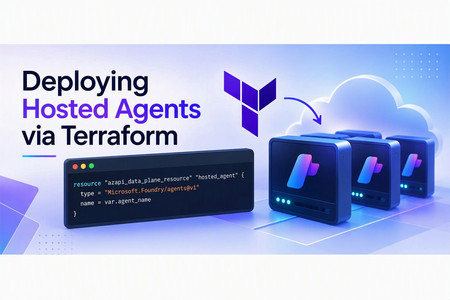
Background Your Terraform workflow already manages your Azure infrastructure but deploying hosted agents still requires manual SDK calls or REST API scripts. This post shows you how to bring agent deployments into your existing IaC pipeline using the AzAPI provider, so your entire Foundry stack can be versioned, reviewed, and deployed together. For this post we will focus on leveraging Foundry Hosted Agents. At a high level hosted agents will abstract the overhead of managing your agents compute. Conceptually, think of taking the compute today, that might be in Azure Container Apps (ACA) or Azure Functions and moving it into Foundry. For more information can check out my previous blog on this topic. In this example Foundry runs the agent code on managed compute from a container image. For this specific example we need to use Azure Container Registry to house our code artifact. If wanting to deploy directly from source refer to my previous blog Deploying Foundry Hosted Agents from Source Why an Infrastructure as Code Approach? Hosted agents today in Foundry support SDK and REST API deployments, why should we look at leveraging an IaC provider to handle our agents today? Many organizations subscribe to an IaC strategy for managing their Azure Resources. A hosted agent, at its core, is configuring and allocating infrastructure resources behind Foundry. This would be similar to how we configure plan sizes for products like App Services. Additionally, anything defined by IaC makes it easier to version the configuration in source control and incorporate it into repeatable CI/CD pipelines. Production workflows should also account for remote state, approval controls, and image-version promotion. Another added benefit for anything under IaC is the ability to apply custom policies, Azure or otherwise, over the codebase. Prerequisites An Azure subscription with permission to create resources and role assignments. Access to a region and model deployment with sufficient quota for Foundry Hosted Agents. Azure CLI, Terraform, Git, and Docker installed. Docker must support building linux/amd64 images. Permission to push images to Azure Container Registry and create agents in the Foundry project. The provided sample creates or configures the supporting Azure Container Registry, Foundry account and project, model deployment, managed identity, project connection, and hosted-agent deployment. Hosted agents require a Linux AMD64 (linux/amd64) container image. When building from an ARM-based workstation, including Apple Silicon, explicitly target linux/amd64 and ensure Docker cross-platform emulation is available. See Microsoft’s hosted-agent container requirements. docker build --platform linux/amd64 -t <registry-name>.azurecr.io/<image-name>:<tag> To get started quickly I have a repository w/ all the prerequisites and reviewed code at simple-hosted-agent-deploy-azapi Deploy the Sample To deploy the sample: Clone the repository and reopen it in the included development container. Authenticate to Azure and select the target subscription. Copy and update the example Terraform variable files with your environment-specific values. Run the included deployment script to provision the base resources, build and push the container image, and create the hosted agent. Confirm that the generated agent version reaches an active state before invoking it. Refer to the repository README for the current commands, configuration values, and cleanup steps. Process Overview Let’s level set on what our end-to-end process may look like. In many large organizations, the agent deployment process could be decoupled from the Foundry base architecture. Components such as the Foundry account, project, connections, and model may be controlled by a centralized team. These shared components often follow a different deployment lifecycle from an individual agent. A development team may own the code. We need the code to deploy the hosted agent. Quite the chicken-and-egg problem. So let’s break it down from a day 1 perspective: Deploy Foundry Base Architecture Foundry Account Foundry Project Model Project Connection Application Insights Build and Push code to Azure Container Registry Deploy the hosted agent pointed to the image defined in Azure Container Registry For this example, I assume that Azure Container Registry is managed outside the Foundry lifecycle because many organizations prefer to consolidate container images into a smaller number of shared registries. For illustration purposes, the provided example includes the registry deployment. Day n perspective would potentially look like: Build and Push code to Azure Container Registry Deploy the hosted agent pointed to the image defined in Azure Container Registry Updating the hosted-agent configuration creates a new agent version under the existing logical agent. Foundry manages the version history, while Terraform manages the logical agent configuration represented by the azapi_data_plane_resource. After each deployment, confirm that the new version reaches an active state before directing workloads to it. Technical Details At this time, let’s take a minute and discuss some of the technical details around how the hosted agent is created in Foundry. The Foundry project and its connections are Azure Resource Manager control-plane resources. The logical agent is created through the Foundry project’s data-plane API, while Foundry manages the supporting deployment resources required to host it. This is in contrast to services represented directly as Azure Resource Manager resources, such as App Service (Microsoft.Web/sites) and Azure Container Apps (Microsoft.App/containerApps). Here is a visual that depicts the data plane vs control plane objects: The Foundry project is the agent’s logical parent and provides the data-plane endpoint through which the agent is created. The project itself is deployed as the Azure Resource Manager resource Microsoft.CognitiveServices/accounts/projects Foundry connections can be deployed as Microsoft.CognitiveServices/accounts/projects/connections. In this case, the connection is used for connecting and authenticating to Azure Container Registry. At this point, the project and connection resources can be deployed through AzAPI or Bicep. The next step requires a data-plane call. For Terraform deployments, this operation can be managed declaratively with the AzAPI provider’s azapi_data_plane_resource. Foundry also supports agent deployment through its SDKs and REST API. azapi_data_plane_resource The AzAPI provider’s azapi_data_plane_resource resource is the key component for deploying a hosted agent in Foundry Agent Service through Terraform. Per official MS Learn documentation: Some Azure services expose a separate data plane API—a service-specific HTTPS endpoint where you interact directly with the service rather than through ARM. Examples include the Key Vault secrets API at {vaultName}.vault.azure.net, the Azure AI Search index API at {searchServiceName}.search.windows.net, and the Synapse workspace pipeline API at {workspaceName}.dev.azuresynapse.net. azapi_data_plane_resource bridges this gap by enabling Terraform to manage resources on these data plane endpoints using the same AzAPI provider authentication and lifecycle model. https://learn.microsoft.com/en-us/azure/developer/terraform/concept-azapi-data-plane-framework So how would a terraform implementation for this work? First let’s create the appropriate resource type, name and parent reference, in this case the Foundry Project: resource "azapi_data_plane_resource" "hosted_agent" { type = "Microsoft.Foundry/agents@v1" name = var.agent_name # AzAPI data-plane parents use the endpoint host/path without a URI scheme. parent_id = trimprefix(var.project_endpoint, "https://") …} Now we need to pass in the dedicated parameters as part of the body. To find these parameters refer to the Foundry REST API documentation. body = { name = var.agent_name definition = { kind = "hosted" container_configuration = { image = var.image_uri } cpu = var.cpu memory = var.memory protocol_versions = [ { # The hosted container must implement this Foundry Responses contract. protocol = "responses" version = "2.0.0" } ] environment_variables = merge(var.environment_variables, { AZURE_AI_MODEL_DEPLOYMENT_NAME = var.model_deployment_name }) rai_config = { # Hosted agents require the full policy ARM ID; model deployments use its name. rai_policy_name = var.rai_policy_id } } } For the entire reusable module check out https://github.com/JFolberth/simple-hosted-agent-deploy-azapi/tree/main/simple_agent/azure/infra/modules/hosted_agent Conclusion Hosted Agents in Foundry Agent Service provides a way to run custom agent code on Foundry-managed compute while reducing the operational overhead of managing the underlying hosting infrastructure. By using the AzAPI provider’s azapi_data_plane_resource, teams can incorporate the logical agent deployment into an existing Terraform workflow alongside the Foundry project, model, connections, identity, and container registry resources it depends on. This approach is especially useful when platform and application responsibilities are separated. A platform team can manage the shared Foundry and Azure infrastructure, while application teams independently build, publish, and deploy new versions of their agent container. With the appropriate remote state, access controls, image-versioning strategy, and deployment validation in place, the same pattern can be extended into a repeatable CI/CD workflow for both initial deployment and ongoing agent updates. The linked sample demonstrates this end-to-end pattern, from provisioning the supporting Azure resources and publishing the container image through creating the hosted agent with Terraform. Use it as a starting point, then adapt its state management, access controls, artifact promotion, and validation steps to meet your organization’s production requirements.566Views0likes0CommentsIntegrating ServiceNow with Azure DevOps: Use Cases That Actually Show Up in Practice
I have been working in the integration space for quite some time. Though I work as a Content Manager, I am always curious to see how users handle integrations between multiple systems. Usually, the service desk runs on ServiceNow, and the build happens in Azure DevOps. But these tools aren't inherently connected, and someone has to manually relay information between them. So, the records never show consistent data. You need a way for the data to pass automatically between them. Even within this setup, a lot of scenarios come forth: from a single ServiceNow instance connecting to a single Azure DevOps org, up to companies running six or seven orgs off a shared service layer. Here's the full range of use cases I keep seeing, organized by what they're actually solving. Native Tools vs. a Dedicated Integration Layer Before the use cases, it's worth being clear on when you need more than what's built in. ServiceNow's IntegrationHub can push data through flows, and there's a spoke for looking up and creating basic Azure DevOps work items. Azure DevOps also has a native extension for pipeline-to-change-management syncing. These native options work fine when the integration is simple: one team, clean field mappings, developers on hand to maintain it. They start to struggle once you're crossing org boundaries, crossing company lines, or dealing with fields and states that don't line up between the two systems. At that point, a dedicated integration layer that handles the mapping and keeps each side's access separate is usually the better fit. Core Sync Use Cases 1. Sync ServiceNow Requests to Azure DevOps User Stories Current setup: Support or service teams work in ServiceNow. When a request needs development, someone has to get it onto an Azure DevOps board as a User Story. Problem: A person creates the work item by hand, copies the request details, and checks back later for updates. When the work item closes, the ServiceNow request often doesn't reflect that, so the requester never hears back. The two records aren't linked. Solution: A trigger, filtered by assignment group, category, or a manual send action, creates the User Story automatically. The link between the two records gets stored on both sides. Updates to the work item flow back to the request, and closing one side closes the other. 2. Sync Comments and State Back to ServiceNow Current setup: ServiceNow holds the ticket the requester sees. Azure DevOps holds the actual dev work. Problem: When the work item moves in Azure DevOps, the ServiceNow ticket's state doesn't follow. Comments the dev team adds stay in Azure DevOps, so the service team keeps pinging developers for status. Solution: As the work item's state changes, it updates the linked ServiceNow ticket. Comments from the dev side sync back too. The service team sees progress without opening Azure DevOps or chasing anyone. 3. Sync ServiceNow Catalog Items to Azure DevOps Current setup: Users order catalog items in ServiceNow. Fulfilling some of them takes real development work tracked in Azure DevOps. Problem: The catalog task sits in ServiceNow while the work happens somewhere the requester can't see. Someone bridges the two manually, and the catalog item's status stops meaning anything. Solution: The catalog item creates a matching work item in Azure DevOps with the request details attached. As the dev team works, status and comments sync back, so the catalog task shows real progress and closes when the work item does. 4. Cut Duplication Between Incidents and User Stories Current setup: Incidents land in ServiceNow. Some get tracked as User Stories in Azure DevOps so the dev team can work them alongside the rest of the backlog. Problem: The same information gets documented twice, updated twice, and the two records drift apart over time. Solution: Incidents create linked User Stories automatically, with comments and status syncing both ways. Update one side and the other reflects it, so nobody's working the same incident twice without realizing it. 5. Sync Bugs with Attachments Across Multiple Orgs Current setup: Bugs get raised in ServiceNow, often by a separate first-line support team, while product teams work across several distinct Azure DevOps orgs. Problem: Recreating bugs by hand loses attachments and context, and there's no clean way to route each bug to the right org out of several. When a bug's fixed, ServiceNow doesn't hear about it. Solution: A bug creates a matching Bug work item in the correct Azure DevOps org, attachments included. Status and comments flow back to ServiceNow when it's resolved. Each connection runs independently, so the first-line team stays in ServiceNow without needing access to the other side. 6. Project-to-Hypercare Handover Current setup: During a build, everyone works in Azure DevOps. Once it goes live and moves into maintenance, incidents and requests need to land in ServiceNow, sometimes a brand-new instance. Problem: Teams used to living in Azure DevOps now need a maintenance process in ServiceNow, with no link back to the developers who built the thing. Solution: Incidents raised during hypercare reach the dev team in Azure DevOps, and fixes flow back to ServiceNow. Because the connection is independent of either team's existing workflow, you can add it without disrupting how people already work. 7. Bidirectional Field and Lifecycle Sync Current setup: A demand owner in ServiceNow needs to track a Feature as it moves through scoping, active work, testing, and deployment in Azure DevOps. Problem: If effort, status, and assignment only live in Azure DevOps, the ServiceNow record goes stale. Fields on each side use different names and values, so a raw pass-through just creates mismatches. Solution: Key fields sync in both directions with explicit mappings. From Azure DevOps: iteration path, change reference, estimated effort, assignment, and lifecycle status. From ServiceNow: design documents, portfolio area, demand type, and requirement details. As the Feature moves through its stages, the ServiceNow record updates in real time. 8. Multiple Azure DevOps Orgs to a Central ServiceNow Instance Current setup: Each business unit runs its own Azure DevOps org, often from an acquisition or separate supplier setup. A central ServiceNow layer needs visibility across all of them without forcing a shared workflow. Problem: Without a sync, someone manually pulls data between systems and chases updates. It doesn't scale as orgs get added. Solution: Each org gets its own connection, configured independently, feeding the central ServiceNow instance. Every org keeps its own states and fields while leadership gets a single view across all of them. 9. Selective Field Sharing Between Separately Hosted Environments Current setup: One side runs cloud-hosted, the other on-prem or in a regulated environment, and neither can open full network-level access to the other. Problem: A basic integration either oversprays fields it shouldn't, or requires a network connection security won't approve. Each side wants control over exactly what leaves its environment. Solution: Outgoing and incoming rules configured independently on each side let each admin decide what leaves and what gets accepted. The two environments sync over a secured channel without either side getting direct access to the other's system. 10. Handling Closed and Read-Only Tickets Cleanly Current setup: ServiceNow access controls block updates to closed incidents. Your sync runs across tickets through their full lifecycle, including closure. Problem: A basic sync throws errors every time it tries to write to something already closed. Solution: Filter closed tickets out of the sync entirely so they never trigger a write, or let the errors surface where your team can see and review them. Which approach you pick is a team decision, not a technical constraint. 11. MSP Routing by Assignment Group Current setup: An MSP runs ServiceNow as its operational layer. Clients work in their own delivery tools, some in Azure DevOps, some elsewhere. Manual handoffs work for a couple of clients and fall apart past a handful. Problem: An engineer resolves an incident and forgets to update the client's system. A comment added on one side never reaches the other. Status shows "in progress" on one side long after it's resolved on the other. As client count grows, the gap between what your team knows and what clients see widens. Solution: An automated rule sends each incident to the right client system based on the ServiceNow assignment group. Set a filter (for example, database issues route to one client's system, network issues to another), and connections run independently with no crossover between clients. The original incident reference gets written into the client ticket, and status values map across cleanly. A couple of related patterns worth knowing: Internal notes can be filtered separately from customer-facing updates, so only what the client should see crosses over. A new client typically reuses your existing ServiceNow authentication, so onboarding is closer to registering their system and setting a routing rule than rebuilding the integration from scratch. 12. Conditional Escalation from Multiple ServiceNow Instances Current setup: Several ServiceNow instances feed a single Azure DevOps org. Only tickets that genuinely need developer attention should reach the board. Problem: Escalating everything floods the board with tickets the dev team shouldn't be handling. Solution: A conditional trigger escalates only tickets meeting a specific condition, so agents push what actually qualifies and everything else stays put. Multiple instances can each feed the same Azure DevOps org under their own trigger logic. 13. Demand Management to Feature Delivery Current setup: A demand process runs in ServiceNow end to end: submission, review, approval, and an approved Requirement. The build happens in Azure DevOps as a Feature, through scoping, active work, testing, deployment, and closure. Problem: Once a Requirement's approved, there's no automatic handoff. Someone recreates the Feature by hand and keeps both sides updated manually. The demand owner can't see effort, status, or assignment as work progresses, so the Requirement goes stale. When the Feature closes in Azure DevOps, the Requirement stays open until someone remembers to close it. Solution: A bidirectional sync connects the full flow. Feature creation: A Requirement creates a Feature automatically, carrying demand context (design sign-off, demand reference, portfolio area, stakeholders, description) so developers get what they need without opening ServiceNow. Field sync: Updates flow both ways, each field mapped to a specific direction. Azure DevOps to ServiceNow: iteration path, change reference, effort, priority, assignment, lifecycle state. ServiceNow to Azure DevOps: the demand and design fields above. Lifecycle feedback: As the Feature moves through its stages, effort, status, and assignment feed back into the Requirement in real time. Closure: When the Feature closes, the linked Requirement closes with it, and the demand gets marked fulfilled. ServiceNow stays the system of record for demand, Azure DevOps for execution, and each side keeps authority over what it owns. What Actually Makes These Work A few capabilities show up across almost every use case above: Attachment sync. Bugs and incidents depend on screenshots and logs. If attachments don't carry over, developers end up back on email. Custom field mappings. Out-of-the-box mappings only go so far. Real setups need custom fields like portfolio area or demand type mapped explicitly, with values transformed, not just copied. State mappings. ServiceNow states and Azure DevOps states don't share vocabulary. Map them explicitly, and decide upfront which side is authoritative when a state changes after creation. Selective sync. Filter by assignment group, area path, work item type, or a custom field. Fewer records crossing means less to govern and less risk of leaking internal data across a boundary. Security and access. For most Azure DevOps admins, this comes down to what gets checked in a security review anyway: Entra ID or OAuth over shared credentials, role-based access, audit logging, and real isolation between connections when multiple clients or companies are involved. For a single team with clean, one-direction mappings, a native option usually covers it. Once you're crossing orgs, crossing companies, or running a full demand-to-delivery flow with real field transformations, that's when a dedicated integration layer kind of becomes necessary. Let's discuss whether any of these match what you're dealing with, or if you've hit an edge case that isn't on this list.332Views1like2Comments
Automating Azure SQL DB index and statistics maintenance using Elastic Jobs.
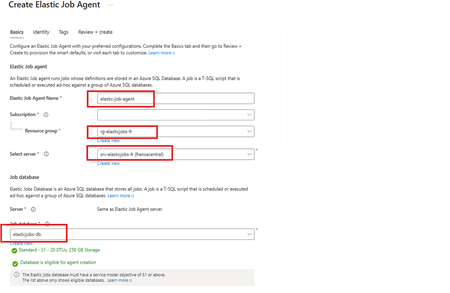
Using as a reference of this article. Automating Azure SQL DB index and statistics maintenance using Azure Automation | Microsoft Community Hub To provide complete solution to maintain you Azure SQL DB statistics and maintenance we provide our maintenance script here What's an elastic job? Create and schedule elastic jobs that periodically run against one or many Azure SQL databases. The jobs run Transact-SQL (T-SQL) queries and perform maintenance tasks. What's required? Create an empty Azure SQL Database with the S1 tier or higher. The Elastic Job Agent will use this database to store job information, job definitions, and other related data. The database must be created on the same Azure SQL Server as the Elastic Job Agent. During the Elastic Job Agent setup, this database is used as the job database. Microsoft Entra authentication with a user-assigned managed identity (UMI) (recommended). The elastic job must be able to log in to each target server or database. Create an elastic job agent. It’s a managed service that lets you run and schedule jobs across Azure SQL databases. Creating the Azure SQL database and UMI should be fairly straightforward, but I’ve included the code below in case you’d like to follow along. # This is sample code, so feel free to replace the names and location with the values that suit your environment. # Resource Group New-AzResourceGroup -Name "rg-elasticjobs-fr" -Location "FranceCentral" # Azure SQL Database - Elastic Jobs New-AzSqlServer -ResourceGroupName "rg-elasticjobs-fr" -ServerName "srv-elasticjobs-fr" -Location "FranceCentral" -ExternalAdminName "XXXXXXXXX@msft.com" -EnableActiveDirectoryOnlyAuthentication New-AzSqlDatabase -ResourceGroupName "rg-elasticjobs-fr" -ServerName "srv-elasticjobs-fr" -DatabaseName "elasticjobs-db" -Edition "Standard" -RequestedServiceObjectiveName "S1" # Azure SQL Database - Target New-AzSqlServer -ResourceGroupName "rg-elasticjobs-fr" -ServerName "srv-target-fr" -Location "FranceCentral" -ExternalAdminName "XXXXXXXXX@msft.com" -EnableActiveDirectoryOnlyAuthentication New-AzSqlDatabase -ResourceGroupName "rg-elasticjobs-fr" -ServerName "srv-target-fr" -DatabaseName "target-db" -Edition "Standard" -RequestedServiceObjectiveName "S0" -SampleName "AdventureWorksLT" # User Managed Identity New-AzUserAssignedIdentity -ResourceGroupName "rg-elasticjobs-fr" -Name "umi_fr_user" -Location "francecentral" In the search box at the top, type Elastic Job Agent, then select it and create a new Elastic Job Agent. On the identity tab, select the UMI and then click on Review + Create Now, let's create a target group (The set of servers, pools, and databases to run a job against.) and add targets for the jobs. Elastic Jobs Agent - Jobs - Target Groups - Create, once created, then click on the name, create again and add a Target Group Member. On each of the target databases, create the required objects for the maintenance script, create a contained user linked to the UMI, and grant the user the permissions needed to run the job scripts. Note: This is sample code. Please adjust the permissions based on your requirements and apply least privilege. Next, let’s schedule a job! For an Elastic Job that runs once every week, the ISO 8601 repeating interval is: P1W Add steps to each elastic job. A target group must be chosen for each job step. If you would like to see the current status of the jobs, head to Jobs, Job Executions. If further information is required, connect to the elasticjobs-db database and run the following query: SELECT TOP (10) * FROM jobs.job_executions WHERE lifecycle <> 'Succeeded' ORDER BY create_time DESC; References: Automation in Azure SQL overview - Azure SQL Database & Azure SQL Managed Instance & Azure Synapse Analytics | Microsoft Learn Elastic Jobs Overview - Azure SQL Database | Microsoft Learn Create, configure, and manage elastic jobs - Azure SQL Database | Microsoft Learn Disclaimer Please note that products and options presented in this article are subject to change. This article reflects for Azure SQL Database in September 2026. I hope this article was helpful for you, please feel free to share your feedback in the comments section.420Views1like1Comment
The Hidden Reason Your Sentinel Playbook Won't Show Up in Automation Rules (It's Not RBAC)
If a Logic App using the native Microsoft Sentinel incident trigger doesn't show up in the "Run playbook" picker of an Automation Rule — even though permissions, region, and connection are all correct — check the internal action name of the trigger in the JSON code view. If the Logic App was created while the Azure portal was set to a non-English language, the designer may generate a localized action name instead of the expected Microsoft_Sentinel_incident, and the playbook won't be picked up. Environment Microsoft Sentinel (Log Analytics workspace) Logic Apps (Consumption plan) Trigger: native Microsoft Sentinel connector, "Incident" trigger (/incident-creation path) Authentication: system-assigned Managed Identity Same subscription, resource group, and region as the Sentinel workspace Problem Two Logic Apps, both triggered by the native Microsoft Sentinel incident trigger, both using a system-assigned managed identity with the Microsoft Sentinel Responder role granted on the workspace. Same subscription, same resource group, same region. Only one of the two appeared in the "Run playbook" dropdown when configuring an Automation Rule in Sentinel. The other was simply absent — no error message, no warning, nothing in the run history to explain it. Investigation The usual suspects were checked and ruled out one by one: API connection health — one azuresentinel connection was indeed in an "Error" state, but it turned out not to be the one referenced by the affected trigger. Managed identity RBAC — the Microsoft Sentinel Responder role was correctly assigned to the Logic App's managed identity on the Sentinel workspace. User's own RBAC/PIM role — the Logic App Contributor role (required for the account configuring the Automation Rule to even see the resource) was active via PIM at the time of testing. Region/subscription/resource group — identical for both Logic Apps. Trigger type — both used the native "Incident in Microsoft Sentinel" trigger added through the visual designer, not a generic HTTP trigger or a deprecated connector. Every documented requirement was met. The playbook was still invisible. Root Cause Comparing the raw JSON (Logic app > Development tools > Code view) revealed the actual difference. Working Logic App (visible in the picker): "triggers": { "Microsoft_Sentinel_incident": { "type": "ApiConnectionWebhook", "inputs": { "body": { "callback_url": "@{listCallbackUrl()}" }, "path": "/incident-creation" } } } Broken Logic App (invisible in the picker): "triggers": { "Incident_dans_Microsoft_Sentinel": { "type": "ApiConnectionWebhook", "inputs": { "body": { "callback_url": "@listCallbackUrl()" }, "path": "/incident-creation" } } } The connector type and the path (/incident-creation) are identical. The one meaningful structural difference is the trigger's action name: Microsoft_Sentinel_incident versus Incident_dans_Microsoft_Sentinel. The second Logic App's trigger had been added while the Azure portal was set to French. The designer generated a localized action name instead of the canonical English one. Everything points to Sentinel's playbook discovery mechanism scanning Logic App definitions for that exact canonical action name (Microsoft_Sentinel_incident) to identify a resource as a valid Sentinel playbook — rather than relying solely on the connector type or the webhook path, as one would reasonably expect. Fix Renaming the trigger's action key in the JSON to the canonical name was enough: "triggers": { "Microsoft_Sentinel_incident": { ... } } No permission, connection, or region change was required — only this rename. Takeaways The Sentinel Automation Rule playbook picker appears to depend on the exact trigger action name, not just its type or functional behavior — a dependency that isn't documented anywhere in the official Microsoft docs as of this writing. The Azure portal's display language at the time a trigger is added has a direct impact on that Logic App's compatibility with Sentinel Automation Rules. A playbook can be fully functional (running without errors when triggered manually or through an older automation mechanism) while still being invisible in the newer Automation Rule selector — which makes this particular issue easy to miss, since nothing explicitly flags it. Recommendations Temporarily switch the Azure portal to English (Portal settings > Language and region) before adding a Sentinel trigger to a Logic App, if your team usually works in another language. If an existing Logic App won't show up despite an otherwise correct configuration, check the trigger's action name in the JSON code view first — it's a 30-second check that can save hours of RBAC/connection troubleshooting. Document this in your internal runbooks if your team works in a localized portal — this kind of detail is easy to lose and can cost significant troubleshooting time down the line. Has anyone else run into similar localization-related quirks in Sentinel or Logic Apps? Would be curious to hear about other cases in the comments.230Views0likes0CommentsThe Hidden Reason Your Sentinel Playbook Won't Show Up in Automation Rules (It's Not RBAC)
If a Logic App using the native Microsoft Sentinel incident trigger doesn't show up in the "Run playbook" picker of an Automation Rule — even though permissions, region, and connection are all correct — check the internal action name of the trigger in the JSON code view. If the Logic App was created while the Azure portal was set to a non-English language, the designer may generate a localized action name instead of the expected Microsoft_Sentinel_incident, and the playbook won't be picked up. Environment Microsoft Sentinel (Log Analytics workspace) Logic Apps (Consumption plan) Trigger: native Microsoft Sentinel connector, "Incident" trigger (/incident-creation path) Authentication: system-assigned Managed Identity Same subscription, resource group, and region as the Sentinel workspace Problem Two Logic Apps, both triggered by the native Microsoft Sentinel incident trigger, both using a system-assigned managed identity with the Microsoft Sentinel Responder role granted on the workspace. Same subscription, same resource group, same region. Only one of the two appeared in the "Run playbook" dropdown when configuring an Automation Rule in Sentinel. The other was simply absent — no error message, no warning, nothing in the run history to explain it. Investigation The usual suspects were checked and ruled out one by one: API connection health — one azuresentinel connection was indeed in an "Error" state, but it turned out not to be the one referenced by the affected trigger. Managed identity RBAC — the Microsoft Sentinel Responder role was correctly assigned to the Logic App's managed identity on the Sentinel workspace. User's own RBAC/PIM role — the Logic App Contributor role (required for the account configuring the Automation Rule to even see the resource) was active via PIM at the time of testing. Region/subscription/resource group — identical for both Logic Apps. Trigger type — both used the native "Incident in Microsoft Sentinel" trigger added through the visual designer, not a generic HTTP trigger or a deprecated connector. Every documented requirement was met. The playbook was still invisible. Root Cause Comparing the raw JSON (Logic app > Development tools > Code view) revealed the actual difference. Working Logic App (visible in the picker): "triggers": { "Microsoft_Sentinel_incident": { "type": "ApiConnectionWebhook", "inputs": { "body": { "callback_url": "@{listCallbackUrl()}" }, "path": "/incident-creation" } } } Broken Logic App (invisible in the picker): "triggers": { "Incident_dans_Microsoft_Sentinel": { "type": "ApiConnectionWebhook", "inputs": { "body": { "callback_url": "@listCallbackUrl()" }, "path": "/incident-creation" } } } The connector type and the path (/incident-creation) are235Views0likes0CommentsPower Automate - don't trust the green tick too much
There isn't actually any HTML tag in the text you pasted. The issue is most likely caused by special characters or formatting that Microsoft Tech Community's editor is interpreting incorrectly. The most suspicious part is: Request submitted -> SharePoint item created -> Approval sent -> Status updated -> Notification sent. If you're copying this from another editor, hidden formatting characters can sometimes get carried over. Also, Markdown formatting such as: Succeeded What happened? Input validation may not always paste cleanly depending on where you're posting it. For Microsoft Tech Community, I'd use a plain-text version with simple formatting: A green tick in Power Automate doesn't always mean the process succeeded. This is something I understood better after working with business-critical flows. Imagine a flow like this: Request submitted → SharePoint item created → Approval sent → Status updated → Notification sent. The flow run shows "Succeeded". Looks good. But what if the notification didn't reach the user? Or the approval is still pending after three days? Or the flow was triggered twice and created duplicate records? Or the process stopped after updating the status but before completing the next business step? From Power Automate's point of view, individual actions may have completed successfully. But from the business user's point of view, the process may still be stuck. That's where I think automation design becomes more important than simply knowing which connector or action to use. For important processes, I usually think about: Input validation • Duplicate handling • Timeout scenarios • Error handling • Retry • Logging • Notifications • Recovery • Monitoring Especially with flows running hundreds or thousands of transactions, you can't depend on someone opening the run history every time something goes wrong. The flow should give you enough information to answer: What happened? Where did it fail? Which transaction was affected? Can we safely run it again? For me, that's the difference between a flow that simply works and an automation that can actually be supported in production. What is one Power Automate issue you've faced where the run showed "Succeeded", but the business process wasn't actually completed?129Views0likes0CommentsSyncing Multiple Azure DevOps Orgs to One ServiceNow Instance Without Forcing a Shared Workflow
If your organization runs more than one Azure DevOps org, whether from an acquisition, a spun-up subsidiary, or business units that never consolidated onto one instance, you already know the visibility gap. Central ServiceNow has no idea what's happening in any of them unless someone checks manually. Your team ends up pulling status updates by hand, chasing changes across orgs, and reconciling what got closed where. That works well for a couple of orgs, but it falls apart past that. Why a Shared Workflow Usually Creates a Bigger Problem Migrating everyone onto a single Azure DevOps org would close the visibility gap on paper. Each org's area paths, iterations, states, and processes took years to get right, and a forced migration undoes all of it. A sync layer between each Azure DevOps org and your central ServiceNow instance closes the same gap without touching how any individual org works day to day. Each org keeps its own configuration. ServiceNow ends up with a rolled-up view across all of them. Common Use Cases Post-Acquisition Org Sprawl Current Setup: A company acquires another company, or runs several business units, each with its own Azure DevOps org and its own way of working. Problem: Central ops has no single view across orgs, and checking each one by hand doesn't scale past a few teams. Solution: Connect each Azure DevOps org to the central ServiceNow instance separately, each with its own sync rules. ServiceNow gets one rolled-up view, and no org has to change how it works. Bi-Directional Status Sync Between Delivery and Support Current Setup: Support logs incidents in ServiceNow. Development tracks the corresponding work in Azure DevOps, sometimes across several orgs. Problem: Support has to ask developers for status or check Azure DevOps boards directly, and developers end up relaying the same update twice. Solution: Sync status, comments, and priority both ways, so an update in either system shows up automatically on the other side. Field-Level Control Per Org Current Setup: Each business unit or subsidiary has its own rules about what data can leave its Azure DevOps org. Problem: A single shared integration with one set of mapping rules risks exposing fields an org never agreed to share outside its own boundary. Solution: Give each org's connection its own outgoing rules, so a subsidiary decides exactly which fields leave its Azure DevOps org, field by field. Handling Closed and Read-Only Work Items Current Setup: ServiceNow blocks writes to closed incidents through ACLs, and Azure DevOps can hit a similar restriction on closed or read-only work items. Problem: A sync that keeps trying to write to a closed item throws the same error repeatedly, and the real problems get buried under the noise. Solution: Filter closed and read-only states out of the sync, or let the errors surface if operations wants visibility into them. What to Evaluate When Choosing an Approach A few criteria matter more than others once you're running this across multiple orgs. Decentralized configuration: does each Azure DevOps org get its own connection and its own rules, or does everything route through one shared setup? Filtering: can you scope the sync with something like WIQL queries on the Azure DevOps side, by area path, iteration, work item type, or tag? Field mapping: does it handle the difference between ServiceNow's field structure and Azure DevOps work item fields without dropping data? Common pairs are ServiceNow State to Azure DevOps State, ServiceNow Priority to Azure DevOps Priority, and ServiceNow Assignment Group to Azure DevOps Area Path. Custom fields usually need explicit mapping rules. Conflict handling: what happens when both sides update the same field at the same time, and what happens with closed or read-only items specifically? Security: Entra ID or OAuth authentication, PAT management per org, role-based access, audit logging, and whatever compliance certifications your security team asks for during review. Direction: bidirectional where both teams update shared fields, one-way where only one side should ever write. Technical Approaches Service Hooks and REST APIs Azure DevOps Service Hooks paired with the ServiceNow REST API give you sync in both directions. A change in Azure DevOps triggers a Service Hook, which calls the ServiceNow API to update the record, and the same flow runs in reverse. This is the most direct route if you're comfortable building and maintaining the webhook logic yourself. Custom Middleware For anything more complex, custom middleware gives you full control over field transformation, routing, and error handling. Azure Functions, Logic Apps, or a small Node.js or Python service usually does the job. The trade-off is maintenance. You own the retry logic, the error handling, and every update when either platform changes its API. Dedicated Integration Platforms Plenty of teams skip building this from scratch and use a dedicated integration platform instead. These typically come with pre-built connectors for both Azure DevOps and ServiceNow, a way to configure field mapping and filters without writing much code, and managed infrastructure so you're not hosting your own sync server. What they usually cover: Pre-configured connectors that already understand both platforms' data structures Visual or scripting configuration for field mapping and filters Managed infrastructure, so nothing runs on your own servers Built-in retry and error handling for API failures Audit logging for tracking what synced and when Support for multi-org routing and conditional logic out of the box The trade-off runs the other way: a subscription cost instead of a one-time build, less control over the exact implementation, and your data passing through a third party's infrastructure. For teams running more than 2 or 3 orgs against one ServiceNow instance, this usually ends up being less overhead than maintaining custom middleware long-term. Every org here has probably solved a version of this differently. Curious what's worked for you, especially with 3 or more Azure DevOps orgs feeding into one ServiceNow instance, and which part of the setup gave you the most trouble.200Views1like0CommentsBuilding Microsoft Sentinel Connectors in Minutes with the Sentinel Connector Builder Agent
Overview We previously announced the public preview of the Microsoft Sentinel connector builder agent via VS code extension, that helps developers build Microsoft Sentinel codeless connectors faster with low-code and AI-assisted prompts. This post walks through a hands-on lab using a mock Network Log API to demonstrate how the Sentinel connector builder agent simplifies building Codeless Connector Framework (CCF) pull connectors. Instead of manually creating ingestion infrastructure and configuration files, you’ll use a guided, conversational workflow in VS Code to generate connector artifacts, test them against a live API, and deploy them into Microsoft Sentinel. The lab focuses on the end-to-end experience ranging from API setup to validated connector deployment so you can see how quickly a working integration can be produced. For additional guidance beyond this lab, refer to our MS Learn documentation. The Lab Environment This lab is built around a mock Network Log API hosted as an Azure Function App. The purpose of the lab environment is to give us a live API that we can use to build, validate, and test the Sentinel CCF connector builder agent against end to end. The API exposes 50 synthetic network activity records that look and behave like a real product data source, including web traffic, DNS requests, blocked remote access attempts, malware command-and-control blocks, VPN activity, and other common network events. That makes it a useful stand-in for the type of telemetry many teams want to onboard into Microsoft Sentinel. The API is intentionally shaped like the kind of source a customer might expose for telemetry retrieval. It uses API key authentication through the X-API-Key header, returns paginated results through a nextLink model, and provides a predictable response structure that the builder agent can map into a pull connector configuration. The repo contains everything needed for the walkthrough. There is an ARM template to deploy the Function App, reference documentation for the API, and a sample connector package showing the generated polling config, table schema, DCR, and connector definition. The end goal of the lab is straightforward: use the builder agent to generate a CCF pull connector that ingests this API into the custom NetworkLogAPIGetNetworkLogs_CL table in Sentinel. Prerequisites Before starting, make sure you have the following: Azure subscription -- with Contributor access on a resource group (for deploying the Function App) and Microsoft Sentinel Contributor access on a Sentinel-enabled workspace (for deploying the connector) Microsoft Sentinel workspace -- an existing Log Analytics workspace with Sentinel enabled. See Onboard Microsoft Sentinel to a Log Analytics workspace for more information. Azure CLI -- See How to install the Azure CLI for more information. VS Code with the Microsoft Sentinel for Visual Studio Code extension installed. GitHub Copilot -- with access to premium models. The connector builder agent requires Claude Sonnet 4.5 or 4.6, which uses Copilot premium model credits. Lab Repository -- Once the aforementioned prerequisites are met, you can access the lab repository here: Azure-Sentinel/Tools/CCF-Connector-Builder-Agent-Accelerator at master · Azure/Azure-Sentinel Deploying the Mock API The full CLI commands for this section are available in the repo. For a simpler option, you can use GitHub Copilot to handle the deployment. Enter this prompt: Follow the deployment instructions in Sentinel-CCF-Pull-Connector-Builder-Agent-Accelerator/agent-instructions.md. Let’s deploy the Network Log API and build a CCF pull connector. At a high level, the setup is four steps: clone the repo, create a resource group, ensure you have a Sentinel-enabled workspace, and deploy the Function App using the included ARM template. The template takes two parameters: an ApiKey of your choice (the secret the CCF connector will use to authenticate) and your Log Analytics workspace resource ID for Application Insights. Deployment takes about two to three minutes and outputs the FunctionAppName and endpoint URLs you will need later. Once deployed, verify the API is live: curl -s -H "X-API-Key: <your-api-key>" \ "https://<functionappname>.azurewebsites.net/api/GetNetworkLogs?page=1&pageSize=3" </functionappname></your-api-key> You should see a response like this: The API also exposes an /api/RefreshData endpoint that regenerates the 50 sample records with fresh timestamps. This is useful later in the walkthrough when you want to produce new events and trigger an immediate ingestion cycle without waiting for the next polling interval: curl -s -X POST -H "X-API-Key: <your-api-key>" \ "https://<functionappname>.azurewebsites.net/api/RefreshData" </functionappname></your-api-key> Building the Connector with the Sentinel Connector Builder Agent With the Microsoft Sentinel extension installed and GitHub Copilot running in agent mode, open a Copilot chat and enter a single prompt pointing at the API documentation file: That is the entire invocation. The agent takes it from there. It works through a structured seven-step sequence: preparation, polling config, table schema, DCR, connector definition, package validation, and summary. The agent produces four files in a sentinel-connectors/NetworkLogAPI_CCF/ output folder: NetworkLogAPI_PollingConfig.json – This is the API poller configuration. The agent reads the documentation and correctly identifies the GET /api/GetNetworkLogs endpoint, configures API Key authentication via the X-API-Key header, sets up NextPageUrl pagination using $.metadata.nextLink with a $.metadata.hasNextPage stop condition, and wires up the since query parameter for incremental delta pulls using the timestamp field. The RefreshData endpoint is correctly excluded, which the agent recognizes as a maintenance operation, not a security data stream. NetworkLogAPI_Table.json – This is the custom Log Analytics table schema for NetworkLogAPIGetNetworkLogs_CL . All 20 fields from the API response are mapped to the correct column types, with timestamp promoted to TimeGenerated as the standard Sentinel time column. NetworkLogAPI_DCR.json – This is the Data Collection Rule. This defines the stream declaration, the workspace destination, and the KQL transform that maps the raw snake_case API fields ( sourceIp , destinationIp , threatIndicator , etc.) to their PascalCase table columns. NetworkLogAPI_ConnectorDefinition.json – This is the connector UI configuration. This drives what the connector page looks like in Microsoft Sentinel: the title, description, prerequisite instructions, the BaseUrl and ApiKey input fields, sample KQL queries, and the connectivity status logic. The only point where the agent paused for input was to propose a connector description and ask for confirmation before writing it to the file. Everything else such as endpoint selection, auth type, pagination pattern, schema mapping, KQL transform, cross-file consistency was selected autonomously. To put that in perspective: without the agent, a developer building this connector from scratch would need to manually author four JSON files, understand the CCF schema for polling configs, DCRs, and connector definitions, write the KQL transform by hand, and validate that every cross-file reference lines up correctly. The agent compresses that work, typically hours of reading documentation, trial-and-error, and portal debugging, into a single prompt. Testing the Connector Before deploying anything to a Sentinel workspace, the Microsoft Sentinel connector builder agent lets you validate the generated polling config against the live API directly from your editor. Right-click the sentinel-connectors/NetworkLogAPI_CCF folder, select Microsoft Sentinel → Test Connector (Preview), and a Configuration Variables panel opens asking for the two template variables from the polling config: BaseUrl and apiKey . For other API patterns, there may be additional and different inputs. For example, apiKey input could be swapped with clientID and secret if the API supports OAUTH. Enter the Function App base URL and your API key, and the test runner connects immediately. The panel shows a live polling session. Poll #1 returns HTTP 200 with 50 events, and a countdown timer shows when the next poll will fire. Switching to the Events tab displays the ingested records in a tabular view with columns for timestamp , severity , action , bytesIn , bytesOut , category , and the rest of the mapped fields fresh from the API. Additionally, there are tabs for Headers, Payload, and Response, which can be useful for verifying that your pollerconfig.json configuration provides the expected request to your api with a working response. Data Extracted: The Test Connector feature can be used to visualize the response data in a table format to verify that data will land in a Sentinel table based on your configuration. Request from Poller: The Test Connector feature can be used to validate the request and response headers that will go out to the API based on the generated poller configuration. Request Response: The Test Connector feature shows you the live response from the API with respect to the request going to the API based on the poller configuration. This is a meaningful pre-flight check. It confirms that auth is working, the $.data events path resolves correctly, pagination is functional, and the polling interval fires as configured all before a single file is deployed to Azure. The most common connector configuration issues (wrong base URL, incorrect header name, mismatched JSON path) surface here in seconds rather than after a failed deployment and a 20-minute wait for Sentinel to attempt its first ingestion cycle. It is also the fastest way to troubleshoot if something goes wrong after deployment, far quicker than pushing changes to Azure and waiting for the connector to poll again. Deploying and Enabling the Connector With the connector tested and passing, deployment is the same right-click menu: right-click the sentinel-connectors/NetworkLogAPI_CCF folder, select Microsoft Sentinel → Deploy Connector (Preview). If you are not already signed in to Azure, the extension will prompt you to authenticate. The agent will also provide a clickbox in the chat window to invoke a connector deployment. Right Click Deploy Connector: UI Prompt Based Deploy Method: Once signed in, a workspace picker lists all available Log Analytics workspaces across your subscriptions. Select the one with Sentinel enabled and click Deploy. The extension deploys all four files to the workspace in the correct order: table schema first, then DCR, polling config, and connector definition. Once deployed, navigate to your Sentinel workspace via https://security.microsoft.com, go to Data Connectors, and find the Network Log API connector. The connector page shows the description, prerequisite notes, and the two credential fields generated by the agent: API Base URL and API Key. Enter your Function App base URL and API key and click Connect. The status updates to show the connector is connected and the deployment succeeded. Note: Data will appear in the workspace within 5 to 30 minutes depending on the polling interval. Run this query in Log Analytics to confirm ingestion. Note that the agent derives the table name from the vendor name and endpoint, so yours may differ slightly from the example below. Check the agent's summary output or the NetworkLogAPI_Table.json file for the exact name: NetworkLogAPIGetNetworkLogs_CL | sort by TimeGenerated desc | take 10 If you want to generate a fresh batch of events immediately rather than waiting for the next polling cycle, use the RefreshData endpoint to reset the sample records with new timestamps: curl -s -X POST -H "X-API-Key: " \ "https://.azurewebsites.net/api/RefreshData" Next Steps If you want to go further: Try it with your own API. The lab repo includes documentation on adapting the polling config, schema, and KQL transform to a real data source. Review the CCF connector schema documentation to understand the full range of supported configurations: pagination patterns, auth types, incremental pull strategies, and delta filter expressions. Explore the Microsoft Sentinel content hub to see how published connectors are structured and what the certification requirements look like for production submissions. Conclusion Following these steps, you saw how a working Sentinel connector can be generated, tested, and deployed in minutes rather than requiring days of manual configuration and infrastructure setup. If you are an ISV building a Sentinel integration and want hands-on support, Microsoft’s App Assure program is available to help. We partner with ISVs on connector development, validation, and deployment and provide guidance through implementation, testing, and readiness for production. You can get started by reaching out through our intake form. See our other Sentinel connector feature’s hands-on labs Building a CCF Nested API Pull Connector: A Technical Lab Walkthrough1.1KViews0likes0Comments
Looking for a simple deployment guide
MS Learn is a great starting point, but it just doesn't seem to cover the steps needed to get up and running safely. I have concerns about adding or setting something that suddenly creates a vulnerability or exposure. Where is the installation guide that installs and configures the solution then tells you, "You are now protected". Do I really want to set my own policies? Why aren't the default set of rules good enough, safe enough. I can't have a solution that is so complicated I need to hire a team to manage it 24 hours a day. I am okay investigating an alert and helping a user solve a pop-up question. Why is every major corporation around the world required to re-invent the same or similar policies the company next door is creating to make this tool work? I want to onboard all of our Intune devices and monitor anything that CAN'T be stopped by default security measures. Just the fact that Sentinel appears to be changing as an embedded tool within Defender gives me hope that this will be getting closer to a more manageable tool. But that still seems a way off. I am ready to do the reading and research to get this set up but I am hoping for a guide that is specific enough to achieve a final result. Thank for understanding my challenges here.505Views1like2CommentsFeature Request: Manual Invocation Mode for Embedded Security Copilot Experiences to reduce cost !
Hello, I see that Copilot for Security in XDR dashboards , if used in embedded mode (I mean whenever you are opening a case to investigate) you get AUTOMATICALLY a summary of the incident , and you are consuming SCU costs. I want a way either globally as a tenant option, or through a pwsh to be able to DISABLE this, or be able to PRESS the AI button AND THEN generate the AI reply (and consume SCU credits ..) Current behavior: Open Incident --> Copilot automatically generates Incident Summary --> SCUs ARE consumed Desired behavior: Open Incident --> No AI execution --> Click "Generate Summary" MANUALLY --> SCUs consumed I am not talking about RBAC controls to assign WHO of my admins can use Security Copilot, I have set that, BUT I want my admin to decide IF they want AI to help them (and consume - pay for that SCU credits-costs) OR NOT !! At the moment I havent found any solution, except to educate my admin to press CANCEL the moment he/she opens such an XDR dashboard ! :) Does anyone knows something ? Regards, Panos469Views0likes2Comments