artificial intelligence
89 Topics
From Prompt to Production: Building Azure Architecture Diagrams with AI
Author: Arturo Quiroga, Senior Partner Solutions Architect — Microsoft Cloud architects spend significant time translating ideas into architecture diagrams. They toggle between Visio, draw.io, pricing calculators, and documentation. According to the 2024 Stack Overflow Developer Survey, 61% of developers spend more than 30 minutes a day searching for answers or solutions, time lost to context-switching rather than design. What if you could describe your architecture in plain English and get a diagram, cost estimate, and deployment guide in minutes? The Challenge: Fragmented Architecture Workflows Designing Azure architectures today typically involves multiple disconnected steps: Sketch the architecture in a diagramming tool Look up official Azure icons and drag them into place Research pricing across regions using the Azure Pricing Calculator Validate the design against the Well-Architected Framework (WAF) Write deployment documentation and Infrastructure as Code templates Compare alternative designs manually Each step lives in a different tool, and keeping them in sync as designs evolve is costly. The Azure Architecture Diagram Builder brings these workflows together in a single browser-based experience. How It Works Describe your architecture in natural language, for example "A HIPAA-compliant healthcare platform with FHIR APIs, event-driven processing, and multi-region disaster recovery", and the AI generates a diagram with grouped services, data flow connections, and logical organization. Figure 1. Enter a natural-language prompt describing your architecture. Curated example prompts help you get started, and you can optionally upload an existing diagram for the AI to analyze. The tool uses Azure OpenAI to power generation across multiple models, enabling you to choose the model that best fits your scenario — from fast iterations to deeper reasoning. Key Features AI-Powered Architecture Generation Describe what you need in plain English, and the AI creates an architecture diagram with: 714 official Azure service icons across 29 categories Smart grouping: services are logically organized (Frontend, Backend, Data, Security) Data flow connections: labeled edges showing how data moves through the system 13 curated example prompts: from simple web apps to complex enterprise scenarios like Zero Trust networks, Industrial IoT with 5,000+ sensors, and global multiplayer gaming backends Figure 2. A generated industrial IoT architecture. Top: the clean diagram view as initially produced. Bottom: the same diagram with per-service monthly cost overlays toggled on, plus a running subscription total in the toolbar. Architecture Image Import Already have an architecture on a whiteboard or in a screenshot? Upload the image and let the AI analyze it, mapping services to official Azure icons and recreating the architecture as an editable, interactive diagram. Figure 3. Upload a photo of a whiteboard sketch (top-right reference panel) and the AI recreates it as an editable diagram with official Azure service icons and labeled data flow connections. ARM Template Import Import existing ARM templates to visualize your current infrastructure. The AI parses resource definitions and dependencies, groups related resources into logical layers, and produces a meaningful diagram of what you actually have deployed — a fast way to document an inherited environment or sanity-check a template before deployment. Figure 4. ARM template import in action. Top: the parser status banner while resources and dependencies are being analyzed. Bottom: the resulting diagram, with resources auto-grouped into logical layers (Web Tier, Data Layer, Container Platform, Observability & Logging) and a Generated from: ARM Template badge linking the diagram back to its source file. Well-Architected Framework Validation Validate your architecture against all five WAF pillars — Security, Reliability, Performance Efficiency, Cost Optimization, and Operational Excellence. The validator provides: An overall WAF score with pillar-level breakdowns Specific findings with severity levels Actionable recommendations you can select and apply Select the recommendations you agree with, and the AI regenerates an improved architecture incorporating those changes. Figure 5. WAF validation results showing the overall score, per-pillar breakdowns, and individual findings with severity badges. Tick the recommendations you want and the AI rebuilds the diagram with those changes applied. Multi-Model Comparison Run the same architecture prompt through multiple AI models side-by-side and compare: Architecture Comparison: service counts, connection counts, groups, token usage, and latency Validation Comparison: WAF scores across models, severity breakdowns, and finding counts Apply Winner: pick the best result and apply it to the canvas with one click Present Critique: a talking avatar narrates the AI-generated ranking with live closed captions Figure 6. Multi-model comparison. Top: select the models and reasoning effort, then enter the prompt. Bottom: side-by-side results across all selected models with service counts, latency, token usage, and Fastest / Cheapest / Most Thorough badges. Multi-Region Cost Estimation Get cost estimates from the Azure Retail Prices API across 8 Azure regions: East US 2, Australia East, Canada Central, Brazil South, Mexico Central, West Europe, Sweden Central, and Southeast Asia. Features include: Color-coded cost legend (green / yellow / red thresholds) SKU and tier information for each service Export options: CSV, JSON, plain-text summary, and an analysis report with top cost drivers, Reserved Instance flags, and a ranked multi-region comparison table Figure 7. The cost legend overlay shows per-service pricing with color-coded thresholds. The region selector in the toolbar lets you re-price the entire architecture in any of eight Azure regions. Deployment Guide Generation with Bicep Generate step-by-step deployment documentation including: Prerequisites and Azure resource requirements Step-by-step deployment instructions Bicep templates for each service (Infrastructure as Code) Post-deployment verification steps Security configuration recommendations Figure 8. Each generated Deployment Guide opens with the architecture name, an estimated deployment time, and a prerequisites checklist covering subscription roles, CLI versions, Microsoft Entra ID permissions, and region requirements, followed by numbered, copy-ready deployment steps. Figure 9. The Infrastructure as Code section produces a main.bicep orchestrator plus a per-service module (Log Analytics, Key Vault, Cosmos DB, SQL Database, Event Hubs, Azure Functions, and more). The Download All Templates button packages everything into a ready-to-deploy folder. Workflow Animation & Avatar Presenter Visualize how data flows through your architecture with step-by-step animations that highlight services on the canvas as each step plays. When the Azure Speech Service is configured, a photorealistic talking avatar can narrate the workflow or present model comparison results, with live word-by-word closed captions in a draggable, resizable panel. Figure 10. A workflow step is highlighted on the canvas as the Avatar Presenter narrates that step. Live word-by-word closed captions appear in a draggable, resizable panel, useful for accessibility and stakeholder demos. Export Options Figure 11. A single-slide PowerPoint export, available in dark or light theme, ready to drop straight into a stakeholder deck. Format Use Case PNG Documentation, presentations SVG Scalable vector graphics PPTX Single PowerPoint slide (dark or light theme) Draw.io Edit in diagrams.net JSON Backup, version control CSV / ZIP Cost analysis with multi-region comparison Highlights The Azure Architecture Diagram Builder unifies the architecture design lifecycle in a single tool: End-to-end workflow: from natural-language description to deployable Bicep templates without tool switching Official Azure icons: 714 icons across 29 categories, mapped directly from the Azure service catalog Live pricing: queries the Azure Retail Prices API at design time rather than relying on static estimates WAF-integrated validation: architectural best practices built into the design loop rather than applied after the fact Multi-model flexibility: choose the AI model that best suits each task, with fast models for iteration and reasoning models for complex designs Open source: the source code is available for customization and contribution One-Command Deploy with Azure Developer CLI The fastest way to get your own instance running is with azd : # Install azd (once) brew tap azure/azd && brew install azd # macOS winget install microsoft.azd # Windows # Clone, configure, and deploy git clone https://github.com/Arturo-Quiroga-MSFT/azure-architecture-diagram-builder cd azure-architecture-diagram-builder azd auth login azd env set AZURE_OPENAI_ENDPOINT "https://your-resource.openai.azure.com/" azd env set AZURE_OPENAI_API_KEY "your-key" azd up # Provisions infrastructure + builds + deploys (~8 min) azd up provisions the following via Bicep: Resource Purpose Azure Container Registry Stores the Docker image Azure Container Apps Runs the app (nginx + token server) Log Analytics + Application Insights Monitoring and telemetry Azure Speech (S0) Avatar Presenter (optional, keyless auth via managed identity) Try It Today The Azure Architecture Diagram Builder is available now: Live demo: https://aka.ms/diagram-builder Source code: GitHub repository Documentation: See the Getting Started Guide for detailed setup instructions We welcome feedback and contributions. Use the GitHub Issues page to report bugs, suggest features, or share your experience. Tags: artificial intelligence · application · apps & devops · well architected · infrastructure5.8KViews3likes4CommentsFrom Features to Flow: How Real-World Adoption Reshaped the Azure Architecture Diagram Builder
In May, I introduced the open-source Azure Architecture Diagram Builder as a way to move from a natural-language prompt to an Azure architecture diagram, cost estimate, Well-Architected assessment, and deployment guidance. In July, I shared how the project had become agent-ready through Model Context Protocol (MCP). Those posts described what the tool could do. The more interesting story came next: what happened when people actually used it. As adoption grew, the central product question changed. It was no longer simply, Can AI generate an Azure architecture? It became: How do we help an architect choose how to begin, improve a result without losing their work, validate it responsibly, and turn it into something another person can use? That question reshaped the Azure Architecture Diagram Builder from a collection of capabilities into a guided workflow: Create → Refine → Validate & Improve → Share or Build This post explains what we learned, what changed in the product, and why the hardest part of AI-assisted architecture is not the first diagram. It is everything that comes after it. TL;DR. Growing adoption created a feedback loop. Aggregate usage showed that people moved beyond generation into validation, recommendations, exports, and deployment guidance. Privacy-safe feedback revealed recurring problems with diagram integrity, preservation of human edits, cost credibility, export quality, and validation continuity. Those signals led to a four-stage architecture journey that keeps human judgment and professional review at the center. The same lesson now shapes agent access and the next product boundary: distinguish logical proposals from evidence-backed physical architecture. Adoption created a product feedback loop As of August 5, 2026, the first two Azure Architecture Blog articles had accumulated approximately 12,100 combined views. A refreshed view of deduplicated application telemetry through August 13 recorded: Activity Aggregate count Architecture generation and refinement events 5,023 Well-Architected validations 960 Recommendations applied 175 Diagram exports 2,020 Deployment guides generated 212 As of August 13, the public repository had reached 45 stars and 14 forks. In GitHub’s current rolling 14-day window, the repository recorded 277 unique visitors and 67 unique cloners. These numbers measure different things and should not be added together. Article views are not unique readers. Application activity uses anonymous telemetry identifiers, not verified people. GitHub traffic is a rolling aggregate window. The signals are useful because of the pattern they reveal, not because they can be combined into one headline user count. Activity also accelerated during the period following the second article. Compared with the May 19–July 9 baseline, daily activity from July 10 through August 13 was approximately 7.0 times higher for architecture generation and refinement, 5.6 times higher for Well-Architected validation, and 5.9 times higher for recommendation application. The timing coincided with publication; it does not prove that the article alone caused the growth. The important product lesson was simpler: people were not stopping after the first diagram. They were testing alternatives, validating designs, applying recommendations, exporting artifacts, and asking how to move toward implementation. Generation was the entry point, not the complete job. The first guided-journey signals reinforce the need for more than one starting path. Through August 13, the new journey instrumentation recorded 880 interactions from 174 anonymous identifiers across 241 sessions. At first start, structured brief/image generation and Guided Chat were selected at almost the same frequency (158 and 156 events), while template and live-Azure import added another 68 selections. These are interaction counts, not unique people or conversion rates, and the window is still too early to claim that the journey improves completion. They are enough to show that architecture work does not begin in one uniform way. In-product Start Here panel showing the four-stage Azure Architecture Diagram Builder journey: Create, Refine, Validate and Improve, and Share or Build. Figure 1. The in-product Start Here panel explains one complete architecture loop. The stages are recommendations, not gates, and direct access to every tool remains available. Stage 1: Create — make the starting choice explicit As capabilities accumulated, the first screen became harder to interpret. Architecture Chat and structured generation were both useful, but they competed for attention. Importing an existing architecture was available, yet easy to miss. The new starting experience makes three paths explicit: Starting path Best suited for Guided Chat Exploring requirements conversationally and refining them over multiple turns Generate Diagram Providing a structured brief or image and producing a first architecture quickly Import Existing Opening an existing architecture or infrastructure artifact for analysis and editing This is not a marketing landing page placed in front of the tool. It is a small decision point inside the authoring experience. Once a path is selected, the user lands on the real canvas. The distinction matters because different architecture tasks begin with different levels of certainty. Sometimes the architect knows the target services. Sometimes the problem needs discovery. Sometimes the architecture already exists and the work is to understand or improve it. The product should acknowledge those differences instead of pretending every design starts with a perfect prompt. Start chooser presenting Guided Chat, Generate Diagram, and Import Existing as three equal entry paths. Figure 2. Three starting paths reflect three different architecture situations: discovery, structured generation, and analysis of an existing design. Stage 2: Refine — preserve human work One of the clearest feedback themes was not about adding another AI capability. It was about preventing AI from casually undoing human effort. An architect might spend time arranging a one-page diagram for a review, resizing groups, moving labels, or emphasizing a specific boundary. A subsequent AI refinement could improve the service selection while disrupting that carefully prepared layout. The design principle that emerged was straightforward: AI acceleration should preserve deliberate human work by default. Refinement now retains existing node positions, group geometry, sizes, and viewport context whenever possible. The model can change the architecture without treating every turn as permission to redraw the entire document. The same principle applies beyond geometry: Preserve the prior validation result when recommendations change the architecture. Preserve the active light or dark theme in exported artifacts. Preserve the distinction between the authoring canvas and the presentation deliverable. Preserve user-configured pricing assumptions rather than replacing them with one fixed estimate. This is a broader lesson for AI-assisted tools. A generated result is not the only source of value. The edits, judgments, and communication choices a person adds afterward are part of the artifact too. Before-and-after AADB canvases showing an AI refinement that adds Azure Front Door and WAF while retaining the positions of eight existing services and the anchors of four existing groups. Figure 3. In this controlled synthetic refinement, all eight existing service positions and four group anchors remained unchanged. The containing Application group expanded to accommodate the new edge tier, so preservation does not imply that every group dimension stays fixed. Quality is structural, not only visual A diagram can look polished while still being architecturally confusing. Early feedback exposed cases where a generated service appeared disconnected because a model referenced a display name instead of the service identifier used by the canvas. The correction was not another prompt instruction alone. The application now resolves connection endpoints across identifiers, normalized service names, and service-type aliases. It repairs valid edges, drops invalid or self-referential edges, detects remaining orphan nodes, and records aggregate integrity signals. That creates a more useful definition of diagram quality: Are the services connected as intended? Were any generated edges repaired or dropped? Are there orphaned nodes? Did refinement preserve the existing layout? Did an architecture change receive a fresh validation? Visual polish still matters, especially when an artifact leaves the editor. But structural integrity gives the product something deterministic to test and monitor. Stage 3: Validate & Improve — treat validation as a lifecycle The Azure Well-Architected Framework is most useful when validation becomes iterative rather than ceremonial. The Diagram Builder can assess a proposed design across the five Well-Architected pillars, surface findings, and apply selected recommendations. But that workflow exposed an important state-management problem: when the architecture changed, the prior validation result disappeared along with the obvious route back to revalidation. The updated experience keeps the previous report, marks it Revalidate Needed, and makes clear that the score describes an earlier state of the architecture. A new validation replaces it only after the updated design has been assessed. This distinction prevents a stale score from looking current. It also clarifies what an architecture-level assessment can and cannot prove. A diagram may show that a WAF, cache, backup service, or secondary region exists. It usually cannot prove that purge protection, diagnostic routing, encryption settings, role assignments, health probes, or failover policies are configured correctly. That is why validation findings need to distinguish between: Pattern-level gaps — missing or misplaced architectural components Configuration-level gaps — required settings that must be verified in Infrastructure as Code or the deployed environment Generated scores and recommendations help architects review a design; they do not replace an Azure Well-Architected Review, security review, deployment validation, or professional judgment. Validation result retained after architecture recommendations are applied, with a Revalidate Needed status and action. Figure 4. Architecture changes make a previous validation historical, not useless. The result remains available while the interface clearly asks for a fresh validation. Stage 4: Share or Build — design for the artifact’s destination The editing canvas and the final deliverable serve different purposes. Canvas dots, handles, navigation controls, and selection states help during authoring. They can make an exported diagram feel unfinished. The Diagram Builder now separates those concerns with Plain, Dots, and Grid export backgrounds while preserving the active light or dark theme. The same AADB architecture shown first on the editing canvas with the export menu open and then as the resulting Plain PNG without authoring controls. Figure 5. Authoring and delivery are different contexts. The upper view shows the editable canvas and its real export controls; the lower view is the Plain PNG produced from that same canvas, without editing chrome. Cost language is deliberately qualified. Azure services often combine fixed, usage-based, and configuration-dependent charges. A baseline that includes six numerically priced services but excludes 20 usage-based items is not the total cost of the architecture. The output identifies those exclusions rather than treating missing values as zero. The final stage also includes deployment guides and Infrastructure as Code. Here, honesty about artifact coverage is essential. A generated Bicep file may be a useful starter while still omitting private endpoints, diagnostic settings, failover configuration, or service-specific resources. The artifact should state what it implements, what remains conceptual, and whether Azure Resource Manager validation passed. AI-generated diagrams, costs, validation results, deployment guides, and Infrastructure as Code should all be reviewed and validated before production use. The same journey now extends to agents The MCP server introduced in the previous article makes the Diagram Builder available to agent experiences such as Microsoft Scout. The four-stage journey provides a useful way to think about agent orchestration too: Import or create one canonical architecture. Refine it without silently changing the intended topology. Validate it, apply supported improvements, and revalidate. Render or generate artifacts with explicit coverage and limitations. The current MCP surface exposes 12 tools, three resources, and three reusable prompts. It can normalize an existing architecture, validate and harden it deterministically, estimate regional costs from a dated pricing snapshot, render presentation/technical/cost views, and generate Bicep, Terraform, and deployment guidance. The calling agent still owns orchestration and reasoning; the MCP server is intended to remain a deterministic architecture capability, not a second hidden agent. The native MCP renderer can project one canonical architecture into three communication profiles: Presentation emphasizes the primary request path, reduces supporting labels, and removes pricing. Technical preserves complete connection detail for engineering inspection. Cost retains the focused composition while adding service-level pricing assumptions, a fixed-priced baseline, and explicit exclusions. These are MCP-generated SVG views, not Blueprint diagrams or screenshots of the editable web canvas. The services, connections, and groups remain the same; only the information treatment changes. The AADB MCP renderer projecting the same canonical architecture into presentation, technical, and cost SVG profiles. Figure 6. Native AADB MCP output from one 8-service, 9-connection, 4-group architecture. Presentation prioritizes the story, Technical exposes connection detail, and Cost foregrounds pricing assumptions and exclusions. Recent work on the MCP renderer added purpose-built presentation, technical, and cost profiles. More importantly, testing agent-generated artifacts reinforced an accountability principle: a polished diagram and a compiled Bicep file do not prove deployability. An agent workflow should report whether topology changed, whether validation improved, which services are represented only conceptually, and whether the generated IaC passed Azure preflight. That is more useful than an unsupported claim that a design is production-ready. Trust also includes the tool boundary itself. The hosted MCP endpoints now require a bearer token for real session operations; missing or incorrect credentials are rejected. A shared token is appropriate for the current controlled integration, but it is not the end state for enterprise multi-user access. Entra ID/OAuth, per-client authorization, rotation, and revocation remain future hardening work. Microsoft Scout response after an authenticated Azure Architecture Diagram Builder MCP workflow, showing the tools used, initial and final validation scores, cost scope, Bicep classification, rendered architecture, artifact links, coverage gaps, and no-deployment warning. Figure 7. The guided lifecycle extends beyond the web application. In this synthetic Scout run with GPT-5.6 Sol, the agent used authenticated AADB MCP tools to validate, harden, cost, render, and generate starter artifacts while explicitly reporting coverage gaps and that nothing was deployed. Learning from adoption without identifying people Product learning does not require reconstructing individual identities. The findings behind this article use aggregate, deduplicated application telemetry, public article counters, public repository totals, and paraphrased feedback themes. They do not correlate Application Insights identifiers, feedback records, GitHub accounts, or email addresses. Written feedback remains submittable without contact information. When someone explicitly opts into follow-up, the email address is stored with the feedback record in Cosmos DB and is not sent to normal product telemetry. The current 180-day expiry field is a retention marker; automated deletion must be implemented and verified before describing that retention period as enforced. Those boundaries matter for both product design and public writing: Aggregate activity rather than profiling individuals. Paraphrase themes rather than publishing comments without permission. Keep optional contact consent separate from telemetry. Avoid presenting anonymous identifiers as confirmed people. Avoid claiming that publication timing proves acquisition causality. This is not a claim of legal compliance. It is a product discipline: collect less, preserve user agency, and make only the claims the evidence supports. What changed The guided journey is the visible result, but the deeper change is how the project now evaluates progress. Earlier question Better question Did the model generate a diagram? Did it generate a connected and understandable architecture? Did the user click Validate? Was the current architecture validated, and was it revalidated after changes? Did export start? Did a professional artifact finish generating successfully? Does the IaC compile? What does it actually implement, and does Azure preflight pass? How many features exist? Can an architect understand the next useful step? The model portfolio continued to evolve as well. The production selector now contains 15 configured entries, including MAI-Thinking-1 (Public Preview). But the more consequential changes in this article are deliberately model-independent: preserve human work, keep state and provenance explicit, qualify generated artifacts, and authenticate the tools agents can call. The goal is not to remove flexibility. Architects can still open any tool directly, rearrange the canvas, reject recommendations, change pricing assumptions, or export at any point. The goal is to make the workflow coherent without pretending architecture itself is linear. The next boundary: logical versus physical architecture Recent feedback points to a harder problem than adding another model or export format. Architects working with private Azure AI landing zones need to distinguish shared platform resources from project-owned resources, preserve VNet and subnet boundaries, and reason about CIDRs, NSGs, route tables, private endpoints, DNS, and managed identities. The current Topology mode can show services and relationships, but it should not imply exact physical fidelity when those facts are absent. A useful logical diagram answers what exists and how it interacts. A physical or low-level design must answer where it is deployed, how it is isolated, and which values came from evidence. That is the next technical direction I am exploring: an evidence-aware Physical Architecture view backed by deterministic reconstruction from Terraform plan/state, ARM, or a live Azure inventory. Exact fields would be labeled as observed or resolved; AI suggestions would remain explicitly proposed; unsupported or missing inputs would be reported instead of silently invented. This capability is not shipped today, and it will require its own schema, validation rules, layout, security review, and evaluation set. That distinction matters. The lesson from adoption is not to put every architecture concern into one crowded canvas. It is to make each artifact’s purpose and evidence boundary clear. Try it, challenge it, help shape what comes next The Azure Architecture Diagram Builder remains open source, and the live experience is available today: Live app: https://aka.ms/diagram-builder Source code: github.com/Arturo-Quiroga-MSFT/azure-architecture-diagram-builder Getting started: Documentation and deployment guidance The next phase is to measure whether the guided journey helps people complete the full loop, especially recommendation-to-revalidation and artifact-generation success. In parallel, I am beginning the narrower physical-architecture investigation described above. Both efforts will use aggregate signals, reviewed fixtures, and sufficiently large cohorts rather than individual journey reconstruction. Try the workflow with a real architecture problem. Tell me where the handoffs are unclear, where the diagram loses intent, or where an artifact claims more than it implements. Those are the gaps worth fixing next. Measurement note: Article views are rounded public counters observed August 5, 2026. Application figures use deduplicated retained telemetry through August 13 and anonymous identifiers. GitHub totals and rolling 14-day traffic were observed August 13. The comparison windows are May 19–July 9 and July 10–August 13. These signals have different populations and must not be added together. Timing comparisons show concurrent activity, not causal attribution.1.1KViews1like2Comments
Agent experience with data in Onelake using Fabric IQ
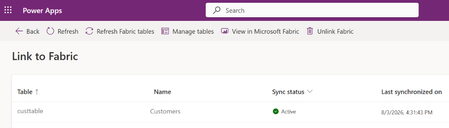
Business Scenario A retail organization runs multiple promotional sales events across its store network in different cities, featuring various product categories. Data is captured from: Third-party systems (products, stores, sales events) ERP system i.e. Finance and Operations (customer data) Customers are linked to stores based on city in the ERP system, and each store hosts specific sales events. However, while significant investments are made in marketing campaigns, inventory allocation, and event planning, the organization needs to identify Which stores generate the highest revenue during events Which locations are having majority of customer footprint Solution: Rather than creating custom reports on raw data, an agent can leverage the data in Onelake and use Fabric semantic models and Fabric IQ to provide conversational analytics. The agent can intelligently normalize user inputs and return accurate results even when values such as city names are entered with spelling errors or variations. Advantage: Because the data comes from two disconnected worlds (third-party systems for products/stores/events, ERP for customers), the "join" between them — customer → city → store → event → product — is business logic, not a database key. Fabric Ontology captures exactly that: entity types, relationships, rules and source mappings, so agents don't have to rediscover it from raw tables each time. A. Prerequisite: Data Sources & Relationships Overview Product, store, and sales event data are sourced from third-party systems. Customer data is sourced from the ERP (Dynamics 365 Finance & Operations) system through Fabric lakehouse. How the data is connected: Customers are linked to stores based on city alignment (customer city = store location). Sales events are associated with: The products being sold, and The stores where the events are conducted. Licenses and access requirement: Component License / Requirement Microsoft Fabric Fabric Capacity F2 or higher OR Power BI Premium Capacity P1 or higher with Fabric enabled Fabric IQ Ontology Ontology (Preview) enabled and an active Ontology item in Fabric Copilot Studio A Copilot Studio environment where MCP tools are allowed D365 F&O Valid Dynamics 365 Finance and/or Supply Chain Management licenses for the source users and data access Data movement Fabric ingestion pattern (Lakehouse, OneLake, Dataflow, Link to Fabric, etc.) as applicable B. Step by step configuration: Push the data to OneLake : Connect D365 F&O customer data to Fabric Lakehouse through PowerPlatform Ref: Link your Dataverse environment to Microsoft Fabric and unlock deep insights - Power Apps | Microsoft Learn A Lake house will be created in Fabric with the data Ingest the Data for Store , Sales event and Product from third party system to Fabric using any of the methods as outlined in the documentation below (as relevant) Ref: https://learn.microsoft.com/en-us/fabric/data-engineering/load-data-lakehouse Create a semantic model and relationship between them Ref: https://learn.microsoft.com/en-us/fabric/data-engineering/tutorial-lakehouse-build-report Create Ontology using the semantic model Ref: https://learn.microsoft.com/en-us/fabric/iq/ontology/concepts-generate Ref: Create an Ontology with Fabric IQ - Training | Microsoft Learn Click on View entity type details > click on manage relationship > click on the relation Configure the source and target entity names and connected fields. Repeat similar setup for others as relevant Login to https://copilotstudio.preview.microsoft.com/ and Create Copilot studio agent with following instruction: When processing a user query: Determine whether the user input contains a city name, location name, region, state, or geographical reference. If a location reference is detected: o Identify potential spelling mistakes, abbreviations, alternate spellings, phonetic variations, or non-standard user input using the <<custom prompt>>. o Normalize the value to the most likely official city name used in the enterprise data model. o Examples: "Bombay" → "Mumbai" "NYC" → "New York" Use only the normalized location value when querying Fabric IQ. If confidence in the normalization is high, proceed automatically without asking the user for confirmation. If multiple cities are equally likely matches, ask a clarifying question before querying Fabric IQ. When invoking Fabric IQ MCP: o Replace the original user-entered city value with the normalized city value. o Use the normalized value consistently across all ontology searches and filters. Never expose the internal normalization process unless the user explicitly asks how the result was determined. Return the business result based on data retrieved from Fabric IQ, not based on assumptions. Example: User: "Show sales for Bangaluru last quarter" Normalized City: "Bengaluru" Fabric IQ Query: "Show sales for Bengaluru last quarter" Add Fabric IQ MCP tool Click on Fabric IQ MCP and provide workspace ID and Ontology ID as retrieved from the Ontology URL in Fabric To find the URL, follow these steps: Open your ontology item in Fabric. View the URL in the browser, in the format https://app.fabric.microsoft.com/groups/<workspace-ID>/ontologies/<ontology-item-ID>. Copy the values of <workspace-ID> and <ontology-item-ID> from the URL. Form the MCP server URL by entering the copied values into this string: https://api.fabric.microsoft.com/v1/mcp/dataPlane/workspaces/<workspace-ID>/items/<ontology-item-ID>/ontologyEndpoint.You use this MCP server URL in the next section Following figures explains the details once the process Ref: https://learn.microsoft.com/en-us/fabric/iq/ontology/how-to-create-agent-copilot-studio Add a tool Prompt to ensure normalised search for any user input (e.g. City) Put the following instruction in a custom prompt : You are a location normalization expert. Your task is to identify the most likely city name from the user's input, even when: - The city name contains spelling mistakes. - The city name is partially entered. - The city is entered using an old or alternate name. - The city contains abbreviations or phonetic spellings. Rules: Determine the most likely official city name. Correct spelling mistakes using geographic knowledge. Expand abbreviations where appropriate. Return only the normalized city name. If confidence is below 80%, return "AMBIGUOUS". Never invent a city when multiple equally likely matches exist. Examples: Input: Banglore Output: Bengaluru Input: Mumbi Output: Mumbai Input: BNG Output: Bengaluru Input: Londn Output: London City input: {{CityName}} Output format: { "normalizedCity": "Bengaluru", "confidence": 0.95 } Test the agent Open the Test pane using the Test button in the top right corner of the screen. Enter NL query Allow the MCP tool when prompted Test case 1: What is the top product revenue across all stores? Test case 2: Intelligent Location Normalization with Fabric IQ When a user submits a query such as "Compare the customer footfall between city Blr and Hyd", the agent first applies an AI-powered normalization layer before querying enterprise data. The normalization prompt analyses abbreviations, alternate spellings, phonetic variations, and non-standard location references, mapping them to their canonical business values. In this example: Blr → Bengaluru (Bangalore) Hyd → Hyderabad The normalized city names are then passed to Fabric IQ for semantic retrieval against the ontology and underlying data sources. This approach improves query accuracy, reduces dependency on exact user input, and enables a more natural conversational experience while ensuring consistent reporting and analytics results. Process Flow : User Query → AI Prompt Normalization → Canonical City Resolution (Bengaluru, Hyderabad) → Fabric IQ Semantic Search → Data Retrieval & Comparison Results331Views1like0Comments
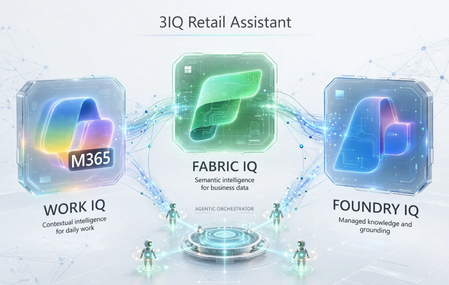
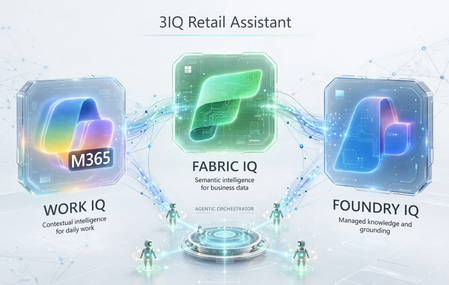
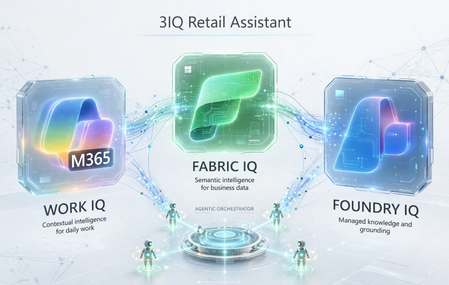
Building 3IQ Retail Assistant Demo – Part 1
Introduction Recently I received a request from one of our GSI partners to demonstrate them 4IQs on a retail industry scenario. Unfortunately, Web IQ is still not in public preview. Hence, I promised them to come back with an example later with Web IQ. But even with the remaining Fabric IQ, Foundry IQ and Work IQ, the issue is finding the right set of data and then build a story around it to demonstrate an agentic solution addressing some practical real-life scenario. After doing some research with available data, I formulated a plan to prepare an assistant for customer reps to address incoming questions and requests from customers. This article describes how to build such an environment to demonstrate the capability of 3IQs together. First, we need an Azure subscription with option to provision Fabric capacity, need Foundry, M365, and Copilot Studio access. Once you have those, let’s move to set up our environment. Environment Set Up I have limited time in hand. So, I went ahead with existing templates to implement Foundry and surrounding services on Azure. I used this Bicep template: foundry-samples/infrastructure/infrastructure-setup-bicep/16-private-network-standard-agent-apim-setup at main · microsoft-foundry/foundry-samples. There are several other templates available on that page. You can choose any one of those based on your preference. This template puts all resources including Foundry behind private endpoints with no public internet access. You can add a jumpbox as a Bastion host to connect to all these services. Or time to time you can make those services public to complete your work. Setting up Fabric We will start with data layer which is Fabric. It is not provisioned yet. I provisioned a Fabric capacity with minimum size/SKU (F2) within the Resource Group generated by the Bicep template earlier. Fabric is an expensive service, especially the higher SKUs are. So, we need to be careful not spend too much and surpass our monthly Azure quota. Once provisioned, go to https://app.fabric.microsoft.com/ and create a Workspace using the same Fabric Capacity we provisioned earlier. Here “Fabric3IQ” is the name of my Fabric capacity. As the workspace is created now, let’s create a Lakehouse inside the Workspace and start loading data into the Lakehouse. But prior to that, let’s go to the Fabric capacity on Azure Portal and increase the size to a bigger SKU such as F64. We will load AdventureWorks sales data into the Lakehouse. There is a detail description here showing how to do it: Quickstart: Create Your First Graph in Microsoft Fabric - Microsoft Fabric | Microsoft Learn. Only follow the “Load Sample Data” section. One done, it should look like this: Now is the time to create our Ontology. People who are not familiar can find a guide in this tutorial: Tutorial Part 1: Create an Ontology - Microsoft Fabric | Microsoft Learn. We added each table from Lakehouse as entities and build relationship within those entities. Here is how it looks like now: Next is adding a Data Agent to the Fabric Workspace. Once added, now add a data source and select the Ontology you created earlier. Now, as your Data Agent is ready ask few complex questions like: “What are the top 5 categories sold?”, “Give me the seller's name who handled most orders in numbers and not in total sale amount?”, “List those customers who didn't purchase anything” and see the result. Once, satisfied, let’s pause the Fabric Capacity from Azure Portal and reduce the size of the capacity to F2. We will resume and rescale it once everything is ready.442Views0likes0CommentsBuilding 3IQ Retail Assistant Demo – Part 2
In part 1 while setting up the Azure environment, I informed the template puts everything under VNET and all the services are having only private endpoints. Which is great from the security point of view. We also spoke about creating a jumpbox as a Bastion host to work on those services. If you did it already – great, if not, we can bypass the situation by opening the public endpoint from Networking menu for each of these following services. Setting up Blob Storage Container Unlike structured data used for Foundry, we will use some unstructured data (pdf files) for Foundry and build knowledge source and knowledge base and will use those with our Foundry agent. To start with, I used 3 PDF files as listed below: Adventure Works Inc Retail Customer Support Representative Guide.pdf Adventure Works Inc. – Retail Customer Terms and Conditions.pdf Adventure Works Inc. – Retail Customer Payment, Purchase, Shipping & Refund Information.pdf I used synthetic data for these PDF files. You can use Copilot, ChatGPT, Gemini, or Claude to generate the content. Once done, we will create a Blob Container. There is a Storage Account created already by the template. You can use it to create the Blob Container. Now upload these 3 files there. You may have to add your account as a Storage Blob Data Contributor to upload the files if not already there. We need to add few more permissions to this container. Add Storage Blob Data Reader access to: Foundry account's managed identity Foundry Project's managed identity Azure AI Search service's managed identity Setting up Search A search service is already provisioned by the template. Use this to set up your knowledgebase and knowledgesource. Create the knowledgesource with similar set up: Then create a knowledgebase using this knowledgesource and with the following description: “Use this to answer questions related to Adventure Works Inc.'s retail customer policies, including the Support Representative Guide, Terms and Conditions, and Payment, Purchase, Shipping & Refund information”. I kept the Retrieval Reasoning Effect as Minimal and didn’t add any Chat completion model as such. Setting up Foundry Agent It’s time now to set up our Foundry Agent. Create a simple prompt agent and use any Chat completion model. It can be any LLM or SLM of your choice. This agent can be pro-code one using either Agent Service SDK or a hosted agent using MAF or LangGraph. But we would like to keep it simple for this demo. For the Instructions I have written – “You are an intelligent agent to answer questions on Adventure Works Inc. Retail Customer Support Representative Guide, Retail Customer Terms and Conditions, Retail Customer Payment, Purchase, Shipping & Refund Information. Please answer from the knowledgebase only. If answer is not available within knowledgebase say not available politely”. And now add the knowledgebase you created within the search service. That’s pretty much it. Your Foundry Agent with IQ is ready and you can now ask a few complex questions to it like – “Can customer get refund if the delivery is returned due to wrong address?”, "Can customer get refund if the shipping is delayed?", “Customer wants to return but she doesn't have the bill. Can she return the product?” etc. At last, make sure you turn your Foundry service public on Azure Portal by going to Resource Management > Networking > Firewall and Virtual Networks. This is required to publish the Foundry Agent to M365 Copilot: As of today, you cannot publish the agent if it has a private endpoint. There are workarounds by creating the Bot service separately (the publish option does the magic silently) and exposing the Agent endpoint using APIM/App Gateway etc. I haven’t taken that route for this demo to make it simple. But here are some links just in case someone would like to explore: Publish agents to Microsoft 365 and Teams by using the REST API - Microsoft Foundry | Microsoft Learn Publish Foundry Agents to Teams Behind a Private Endpoint · Russ Rimmerman graemefoster/locked-down-foundry-m365-agent342Views0likes0CommentsBuilding 3IQ Retail Assistant Demo – Part 3
We are now at the last part of our demo. We will build a Copilot Agent to connect it to a SharePoint List holding data related to Support case raised by the customers. Then connect the other 2 agents (Fabric Data Agent and Foundry Prompt Agent) to it. But before doing it ensure Work IQ is activated with your Copilot, and you can build agents in Copilot Studio using Work IQ. Contact your Admin if it is not available. Also, Go ahead and rescale the Fabric Capacity to F64 and Resume it from the Azure Portal. Setting up SharePoint List Create a list in your M365 SharePoint site of choice and add the following entries. I referred to the customer/sales data available in our Fabric Lakehouse: You can add more entries referring to the related data from Lakehouse. These 2 entries are enough for the time being for our demo purpose. Setting up Copilot Agent Now open your Copilot Studio and start creating an agent. Give it a name of your choice and select “GPT-5 Chat” as the model. Once created, in the Agents tab click on “Add an agent” and then “Connect to an external agent”. You can add both your Fabric Data Agent and Foundry Prompt Agent through this. Next, open the Knowledge tab and click on “Add knowledge” and then on “SharePoint (Powered by Work IQ)”. Here you add your SharePoint list and add it to the agent. At the end, In the instruction write the following. Change the name of your Data and Prompt agents and SharePoint knowledge source suitably: “You are an intelligent agent assisting customer service representatives of Adventure Works Inc. You have different sources to retrieve data. Give least priority to answers generated by the LLM model and give highest priorities to the data retrieved from these data sources. To start with if the requirement is customer support, then ask for customer name, sales order id, and if they are calling due to an existing support request then support case id. Then use following sources to get data: Foundry IQ Agent - use this connected agent to answers questions on Adventure Works Inc. Retail Customer Support Representative Guide, Retail Customer Terms and Conditions, Retail Customer Payment, Purchase, Shipping & Refund Information. AWDataAgent - use this connected agent to retrieve sales data about orders by the customers, about sellers/employees, about products and product subcategories and categories. This is based on Ontology that defines the relationships among the entities. Use the knowledge source Support_Data through SharePoint to fetch data about the support request/case/ticket raised by the customer previously. If the customer has previous support case open bring that info additionally once you get information about the customer. If given a Sales Order ID, or Customer Name, Customer ID and the question is not relevant to support case then use AWDataAgent connected agent. If it is specific to existing support request, then use SharePoint List knowledge source.” That’s it. Our demo is ready. Now test it with a series of relevant questions: “I have to help a customer”. “The Sales Order ID is 58970”. “Is there any support case opened by this customer?”. “Customer is asking the Half Finger Gloves are not up to the quality and she wants to return. But she used it. Can we do that?”. That’s it. Your demo is ready for the show.281Views0likes0Comments
Choosing the Right Agent in Microsoft Foundry
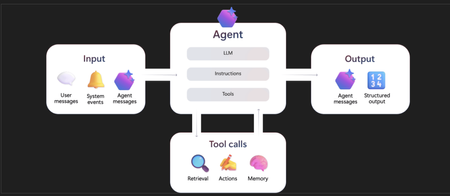
Many discussions about Microsoft Foundry Agent Service eventually arrive at the same question: should this workload be implemented as a Prompt Agent or a Hosted Agent? While the documentation explains both options well, the architectural decision usually comes down to something much simpler: where do you want the orchestration logic to live? First, what actually makes something an agent? A basic AI assistant generates an answer. An agent can also decide what to do next, call tools, access data, maintain context and complete work across multiple steps. At the center of most agents are three building blocks: Model: provides language understanding, generation, and reasoning. Instructions: define the job, boundaries, role, and expected behaviour. Tools: connect the agent to knowledge and actions such as search, APIs, databases, code execution, MCP servers or business systems. For enterprise use, that is only the starting point. You also need identity, authorization, network controls, content safety, session management, evaluation, tracing, versioning, rollback, and cost controls. Foundry Agent Service provides the surrounding platform capabilities, while letting you choose how much runtime logic your team owns. Where should orchestration logic live and who should own the runtime? Understanding the Runtime Boundary When evaluating Foundry Agent Service, many teams focus on models. In practice, models are rarely the architectural differentiator. Most architecture reviews eventually come down to three questions: Who owns orchestration? Who owns state? Who owns operations? Foundry Agent Service provides a managed platform for these concerns, but the amount of control retained by engineering teams depends on the selected agent type. For most teams, the architectural decision usually comes down to one of two operating models Prompt agents: declarative agents defined by a model, instructions, and tools, with a managed runtime. Hosted agents: code-based agents that you package and run in Foundry, while the service manages the endpoint, identity, scaling, sessions, and observability. Prompt Agents With a Prompt Agent, engineering teams focus primarily on defining the model, instructions, tools, knowledge sources and identity configuration, while Foundry takes responsibility for the surrounding runtime. Why teams start here Prompt agents are usually the fastest route from an idea to a working, governed agent. They are a good fit when the behaviour can be expressed clearly through instructions and supported tools. You need to deliver quickly. The agent follows a fairly straightforward reasoning and tool-use loop. Foundry-supported tools cover the required integrations. You do not need custom libraries, middleware, or orchestration code. You want Foundry to own compute, scaling, and patching. Reviewers need an agent definition that is easy to inspect. Good examples Enterprise knowledge assistant. Employees ask about policies, engineering standards, procedures, or product information. The agent retrieves approved content and cites its sources. Document review assistant. The agent checks a proposal or design against an approved rubric and returns structured findings, while a human keeps responsibility for the final decision. Employee self-service agent. The agent answers questions and performs a small number of tightly scoped actions, such as checking request status or creating a support case. A useful warning sign A Prompt agent is probably becoming the wrong fit when the prompt starts looking like application code. Large branching instructions, retry logic written in prose, state-machine behaviour, custom payload handling, framework middleware or real-time media are all signs that runtime logic belongs in code instead. Hosted Agents Hosted Agents move the responsibility boundary. Instead of defining behaviour through configuration alone, engineers deploy an actual application into Foundry Agent Service. Hosted Agents are framework-agnostic. Whether your team builds with Agent Framework, LangGraph, Semantic Kernel, OpenAI Agents SDK, or a custom runtime, Foundry can host the application while managing the surrounding operational services. When Hosted agents make sense You need a particular agent framework or custom orchestration engine. The flow includes branching, parallel work, fan-out and fan-in, or human approvals. Business rules require a deterministic state machine around model reasoning. You need custom packages, middleware, algorithms, retries, caching, or error handling. The client sends custom payloads or webhooks. The session needs persistent files or custom state. The design includes multi-agent orchestration or real-time voice. Good examples A bank onboarding workflow where uploaded documents must be validated, checked against multiple systems, and routed to a human when confidence drops below a threshold. A fraud investigation agent that gathers transaction history, enriches data from multiple internal systems, applies bank-specific risk rules, requests additional evidence when required, and generates a recommended outcome for an investigator. The process involves long-running workflows, branching logic and audit requirements that are better suited to code-based orchestration. A lending workflow that coordinates document collection, credit bureau checks, income verification, affordability assessments, policy exceptions, and approval routing. The process spans multiple systems and often requires deterministic decision paths that extend beyond prompt-driven orchestration. A security operations agent that aggregates alerts from SIEM platforms, enriches incidents with threat intelligence, executes automated containment actions, opens tickets, requests approvals for high-impact remediation steps, and maintains a complete audit trail of decisions and actions. The trade-off More control also means more ownership. Your team must secure and patch the code and dependencies, test the runtime, manage supply-chain risk, and think about compute sizing, cold starts, session lifecycle, and cost. Hosted agents reduce platform plumbing, but they do not remove application engineering. Choosing Prompt Agent/Hosted Agents 1) Runtime Control Is Usually the Real Requirement A pattern I see quite often is teams arriving at the solution before they've fully articulated the requirement. The conversation usually starts with "We need a Hosted Agent," but after digging into the workload, the real requirements turn out to be things like persistent state, webhook processing, custom orchestration, background execution, framework-specific capabilities, or human approval workflows. These are runtime concerns, not agent concerns and they're usually the factors that determine whether a Hosted Agent is necessary. Hosted Agents are valuable because they give engineering teams control over those aspects of execution while still offloading much of the operational infrastructure to Foundry. This is also where teams most commonly choose the wrong agent type. A frequent assumption is that existing investments in frameworks such as LangGraph or Semantic Kernel automatically imply a Hosted Agent architecture. In practice, many of these workloads are relatively simple orchestration scenarios that can be implemented effectively as Prompt Agents, with lower operational overhead and less infrastructure to manage. My advice is usually to start by identifying the runtime requirements rather than selecting an agent type. Once those requirements are clear, the right architecture often becomes obvious. 2) When Hosted Agents become mandatory The moment you need custom Python packages, long-running workflows, external SDKs, deterministic orchestration or framework-specific capabilities, the conversation shifts from Prompt Agents to Hosted Agents. What I would choose today If I were starting a new project today, I'd begin with a Prompt Agent unless there was a clear reason not to. In my experience, Prompt Agents cover far more enterprise use cases than many teams initially expect. The best projects tend to start simple, prove value, learn where the limitations are, and then introduce Hosted Agents only when runtime customization becomes a genuine requirement. That progression is usually far less risky than leading with a fully custom solution. Quickstart: Create a prompt agent - Microsoft Foundry | Microsoft Learn Hosted agents in Foundry Agent Service - Microsoft Foundry | Microsoft Learn1.1KViews0likes0CommentsSkill or Sub-Agent. Choosing AI Capabilities You Will Actually Reuse
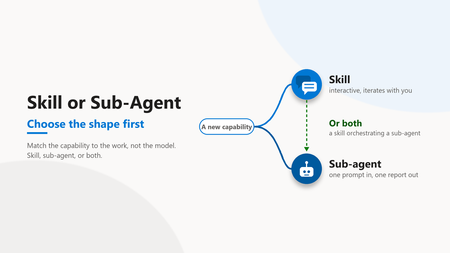
Audience: Cloud architects, platform engineers, engineering leaders The wrong first question Most teams building AI capabilities start with the wrong question. They ask which model to use. The model matters less than the shape of the capability around it. The first real fork is this. Are you building a skill or a sub-agent? Get that wrong and no model choice will save you. A skill and a sub-agent are two different delivery shapes, and each one fails at the other one's job. The insight The choice between a skill and a sub-agent is not about model power. It comes down to four checks. How the work iterates, whether the output carries a voice, how far an early wrong turn spreads, and how often it recurs. Score each, count which way they lean, and the shape falls out. An even split means build both, and let the skill drive the sub-agent. The three sections below take the checks worth a pause. Frequency is the plain one: a one-off craft piece leans to a skill, a repeatable batch job to a sub-agent. A skill lives inside the conversation. It reads files, asks a question, refines with the author, and keeps a human in the loop mid-flight. A sub-agent takes one prompt, runs to completion, and returns one report. Both are useful, for different work. Dimension Skill Sub-agent Iteration Conversation, many turns One hand-off, one pass Voice Holds a style profile and applies it Drifts toward generic by design Human gate Every turn Once, at the end Best for Craft, subjective output Bounded, structured output Table 1. The same three dimensions decide the shape every time. 1. Decide the iteration model first Before anything else, architects should ask how the work actually happens. Is it a conversation or a hand-off? That single answer removes most of the ambiguity. Craft work needs back and forth Batch work needs one clean pass Conversations need memory of the thread Hand-offs need a bounded input and a clear output A skill is right when the value comes from iteration. A blog post, a design review, a tricky refactor. A sub-agent is right when the work is well defined and the output is the deliverable. In practice The pattern that works: use a skill when the team expects three or four rounds of "close, but change this". The trade-off: a skill costs more attention per run because a human stays involved. The trap to avoid: forcing iterative craft into a one-shot agent and then editing the output by hand every time. 2. Voice fidelity decides craft work Some outputs have a voice. An article, a customer email, an architecture narrative. Others do not. A query result, a data export, a status summary. The line between them is not cosmetic. It decides which shape survives review. Voice-heavy work favours a skill Voice-neutral work favours a sub-agent Skills can hold a style profile and apply it Sub-agents drift toward generic by design When the output carries a name, fidelity is the whole game. A capable model with no voice anchor produces text that reads like it came from a committee. In practice The pattern that works: give a skill an explicit voice profile with banned phrases and cadence rules. Let it self-check before it shows anyone anything. The trade-off: the profile takes real effort to write once. The trap to avoid: expecting a stateless agent to match a personal style from a single prompt. Implementation note A voice profile is not documentation. It lives in the skill definition, an executable contract the skill checks itself against before a draft is ever shown. A small profile goes a long way. # voice-profile (excerpt) banned_phrases: [seamless, robust, game-changing, leverage the power] forbid: [em-dash, semicolon, exclamation in body] max_avg_sentence_words: 20 require: - one "In practice" block per section - a closing discussion question self_check: run before any draft is shown to a human 3. Put the human gate where the risk is Every AI capability needs a human review gate. The design question is where that gate sits. Placement is the difference between catching a problem early and unpicking it later. Skills gate continuously, turn by turn Sub-agents gate once, at the end Continuous gates catch drift early End gates are cheaper but riskier for craft If a wrong turn early corrupts everything after it, the team wants a skill. If the work is bounded and a bad output is easy to spot and discard, an end gate is fine. In practice The pattern that works: match the gate to the blast radius. High blast radius and subjective quality point to a skill. Low blast radius and objective output point to a sub-agent. The trap to avoid: a one-shot agent doing forty minutes of unattended work that a human then has to unpick. 4. The pattern that scales is both The mature answer is not one or the other. It is a skill on top of a sub-agent. The two shapes compose cleanly when each one keeps to its own job. The skill orchestrates and holds the voice The sub-agent executes bounded sub-tasks The human reviews at the skill layer Each layer does what it is good at Figure 1. In the combined pattern the human reviews at the skill layer, and the sub-agent only touches the bounded task. The skill runs the conversation and keeps quality. When it needs a bounded, repeatable job done, it delegates to a sub-agent. The result is iteration where craft lives and automation where the work is mechanical. In practice The pattern that works: a skill drafts and refines an article with the author, and calls a sub-agent to fetch and summarise reference material. The trade-off: two layers are more to build than one. The trap to avoid: collapsing both into a single agent and losing either the voice or the automation. The operational trade-offs Shape is not only a design choice. It shows up in cost, latency, and how you debug a bad run. Architects should price these in before committing to a pattern. A skill spends more tokens and more human minutes per run A sub-agent spends compute once and returns fast A skill fails in small, visible steps you can correct A sub-agent fails as one block you inspect after the fact The cost of a skill is attention. Someone stays in the loop and that time is real. The cost of a sub-agent is rework. When a one-shot run goes wrong, the whole output is suspect and someone redoes it. Observability follows the same split. A skill leaves a turn-by-turn trail you can read. A sub-agent leaves one input and one output. You instrument the boundary and log the prompt and the result. Pick the shape whose failure mode your team can afford. The wrong shape does not announce itself. It shows up later as a cost line or a rewrite. Two capabilities, one team Consider a team standardising its engineering work with AI. Two capabilities land on the backlog in the same week. The first is recurring status queries. Well defined input, structured output, no voice. A stateless sub-agent fits. One prompt in, one report out, gate at the end. It works on day one and keeps working. The second is authored technical content. Subjective, voice-heavy, many rounds of refinement. The reflex is to reuse the sub-agent that just shipped. That reflex is the mistake. The queries stay clean. The content reads flat and generic, and every draft needs a heavy human rewrite. Rebuilt as a skill with a voice profile and a turn-by-turn gate, the same work compounds instead of fighting back. Same team, same models, two different shapes of work, and only one right tool for each. What teams get wrong The common pattern is defaulting to whichever shape the team built first. A team ships one sub-agent, likes it, and forces every new problem into a sub-agent. Or it builds one skill and runs everything as a conversation, including batch work that should be automated. It looks like consistency. It feels like reuse. But it leads to craft work that reads generic and batch work that needs babysitting. The fix is not a better model. It is naming the shape of the work before picking the tool. The three shapes to watch for in your own stack: A voiced deliverable coming out of a one-shot agent, rewritten by hand every run. A skill wearing a sub-agent costume. A batch job run as a conversation and babysat turn by turn. A sub-agent wearing a skill costume. A large workflow forced into one agent that holds neither the voice nor the automation. Two shapes collapsed into one. Name which one you are looking at, and the fix picks itself. A quick way to decide When a new capability lands on the backlog, run four checks before picking a tool. Iteration: conversation or one hand-off Output: subjective and voiced, or structured and neutral Blast radius: does an early wrong turn corrupt the rest Frequency: a one-off craft piece, or a repeatable batch job Three or more answers leaning subjective and iterative point to a skill. Three or more leaning structured and repeatable point to a sub-agent. A split answer usually means a skill orchestrating a sub-agent underneath. Figure 2. Score the four checks and count the leanings. Three or four one way pick the shape. An even split means a skill orchestrating a sub-agent. Where to start depends on what you have already built The framework is the destination. Where you start depends on what your team has shipped so far. Find your stage and take the one first move for it this week. Stage First move, this week Watch out for Just starting, nothing built yet Pick the single task you repeat most and write a one-paragraph capability brief for it, iteration, output, blast radius, and frequency, before you build. The brief names the shape, and the shape names the tool. Building a general assistant before you have named one concrete job. One capability, reused for everything List every job you push through the one tool, find the one whose shape does not match, and rebuild just that one in the right shape. You do not need to replace what works. Forcing new work into the tool you already have. A small fleet, a handful of capabilities Take your largest layered workflow and split it, a skill that holds the voice and the human gate on top, a sub-agent that does the bounded work underneath. Capabilities that duplicate each other with no composition between them. Table 2. Same framework, different first move. What you have already built decides where the leverage is this week. Your setup also shapes the answer. A solo builder should optimise for their own voice and iteration speed, where one strong skill beats three thin ones. A platform team should standardise the capability brief and a shared voice profile, so the fleet stays consistent as more people add to it, and a new capability inherits the house style instead of drifting from it. Figure 3. Whatever you have built so far, the first move has the same shape. Name the work before the tool, then match the shape to the tool. The shift The shift is from "what can the model do" to "what shape is the work". Model capability is table stakes now. The advantage is in matching the capability to the work. Our own capability fleet is built this way, interactive skills and autonomous sub-agents in separate places with an orchestrator on top, and that split is what keeps it maintainable as it grows. Iterative and voice-heavy points to a skill. Bounded and mechanical points to a sub-agent. Large and layered points to a skill orchestrating sub-agents. Decide that first, and the model becomes a detail the team can change later without rebuilding anything. Most teams collapse both ideas into "automation" and end up with neither. The teams that separate them build capabilities they actually reuse. Want to discuss? Drop a comment with patterns you have seen in your environment. I read every reply.1.7KViews0likes4Comments
Token Economics in Practice
Introduction: The cheap-token trap Token prices alone are a poor economic model for agents. The price of reaching a fixed capability has fallen sharply — In a 2025 Report Stanford's AI Index reported a roughly 280-fold drop in the cost of GPT-3.5-level inference between late 2022 and late 2024, and Epoch AI tracks steep (if uneven) per-benchmark price declines. The intuitive conclusion is that agents are getting cheaper to run. The operational reality is the opposite. Agents turn cheaper inference into longer, stochastic trajectories: growing context windows, repeated tool schemas, retries, reflection loops, and sub-agent fan-out. In one study of agentic coding, repeated runs of the same agent on the same task varied in token cost by as much as 30× for coding agents. When a single logical task can cost you thirty times more depending on the path the agent takes, optimizing average cost per token will happily make the wrong system look efficient. Similar argument can be made for other agentic systems where we may need more than one tries, more than one MCP Calls, Reasoning or use of multiple skills, hooks or tool calls to arrive at a completed task. So, the leading question of token economics isn't "what's the token price?" It's "what does it cost to get one accepted unit of useful work — and how confident can we be in that number before the agent runs?" The unit that actually matters: Cost per accepted task I use token economics to mean managing the unit economics of useful AI work under uncertainty. The meaningful unit is cost per accepted task, not cost per token. Let A = 1 mean a task passed its acceptance rubric. The long-run unit cost of a policy π is approximately: The numerator is expected task cost; the denominator is the probability the output is actually acceptable. This follows the FinOps distinction between successful and unsuccessful AI outputs and the recommendation to connect cost with workload value. It is a working definition for this project, not a quoted standard — but it reframes the engineering problem immediately. A "cheaper" policy that halves cost while dropping acceptance from 95% to 70% is more expensive per accepted task, and only this ratio makes that visible. That reframing turns "pick the cheapest model" into a five-step discipline: Forecast a distribution, not a single token estimate. Select a cost policy that is plausible for the task and its risk. Enforce routing, context, cache, and budget controls during execution. Evaluate whether the output still clears a workload-specific quality floor. Revert unsafe savings, reconcile predicted vs. actual usage, and calibrate the next forecast. From a metric to a controller If cost is a random variable, the objective is a stochastic one. Minimize expected task cost subject to two constraints — a quality floor on every workload segment, and a bound on how often you blow the budget subject to a per-segment quality floor: and a chance constraint on budget breach: Here π is the policy; C_task is total task cost; Q_s is quality for a supported segment s with floor Q_min; B is the budget; and ε is the tolerated breach probability. The pieces are all borrowed — stochastic optimization for the expected-cost objective; FrugalGPT and Confident Adaptive Language Modeling for the LLM precedent of cutting cost while preserving performance; SRE service-level objectives for treating "acceptable service" as an action-driving threshold and Group DRO for the insight that averages hide group failures; and Charnes–Cooper chance-constrained programming for the probabilistic budget limit. The synthesis — wiring them into one agent controller — is the contribution. Two honest caveats travel with this controller: Q_s needs a confidence-adjusted lower bound (sparse segments shouldn't trigger changes on two samples), and the chance constraint is not a guarantee until your forecast's percentile coverage is calibrated against real traces. A modeled P95 is a planning estimate, not a promised 5% breach bound. Two halves of the loop: feed-forward and feedback The current work is result of two self-prototypes — FutureTokenPredictor and TokenGov — built to make agent unit economics operable on Azure. These are reusable implementation patterns and experiments. The controller splits cleanly into a planning half and a runtime half. FutureTokenPredictor is the feed-forward side. It models workflow archetypes and uncertain iteration counts to produce P50/P95-style planning estimates before execution and recommends a policy. It stays outside the request path. TokenGov is the feedback side. Its request path applies the admitted cost policy; an out-of-band control plane evaluates outcomes and changes externalized policy when quality regresses. Runtime telemetry then flows back to the predictor as calibration data for the next forecast. Neither half is sufficient alone. Prediction without control is a spreadsheet. Control without quality feedback silently degrades your hardest segments. The value is the wire between them: a forecast that becomes an enforceable policy, an eval verdict that can reverse a cost action, and actuals that sharpen the next forecast. How the equation lands on Azure This is where token economics stops being a metric and becomes architecture. Each term in the controller maps to a concrete Azure control: Controller term Azure control in practice π (policy) Externalized in Azure App Configuration; enforced by API Management GenAI gateway (routing, context, cache, token policies) E[C_task | π] (expected cost) Reconstructed from APIM gateway, model, and Application Insights telemetry Q_s (segment quality) Azure AI Foundry evaluation over golden sets and sampled production traces B, ε (budget, breach tolerance) Forecast-informed limits and Azure Monitor alerts; Cost Management for allocation Reversion A Monitor-triggered Azure Function tightens or reverts policy in App Configuration — closing the eval-to-enforcement loop without a code deployment Most of these primitives already exist and are individually documented: APIM provides token quotas, semantic caching, and token metrics; Foundry Model Router offers cost/balanced/quality routing modes; Foundry cloud evaluation scores datasets and sampled traces. The interesting gap they don't close on their own is the connected mechanism — an evaluation verdict that can constrain or reverse a cost-saving action, and actual usage that improves the next forecast. Here is the full two-plane view. FutureTokenPredictor forecasts and recommends before execution; TokenGov owns runtime enforcement and quality-triggered reversion; prediction IDs join forecasts to actual telemetry so calibration can improve the next estimate. From Concept to Implementation Version 1 release the Token Prediction and forecast ability using a local mcp server called FutureTokenPredictor using a local MCP server modeled behind a simple UI, where you can create an assessment for your UI Workload. It lets you simple describe the AI / Agentic Solution you want to build and suggested a topology for it. From there , depending on your model selection, the studio, helps you predict the range of token usage and its estimated costs. In full version, this forecast is used to build a policy and govern your AI Spend accordingly. If you want to read more about the FutureTokenPredictor and how it works, check out my earlier blog Agentic Currency – Tokens and AI Infra: Full-Stack Cost Prediction for Autonomous Agents Version 2 with full governance and control will be released soon. TokenEconomics is available in the GitHub Repo TokenEconomics Clone it, experiment and test it out. Please provide feedback via a pull request on the repo or directly here via comments Happy Reading! References The 2025 AI Index Report | Stanford HAI Chance-Constrained Programming | JSTOR How are AI agents spending your tokens? - Stanford Digital Economy Lab FinOps for AI Overview AI gateway capabilities in Azure API Management | Microsoft Learn Model router for Microsoft Foundry concepts - Microsoft Foundry | Microsoft Learn Also Read Optimizing GitHub Copilot Cost in the Usage-Based Billing Era | Microsoft Community Hub Token Economics: The New FinOps for Agentic AI | Microsoft Community Hub1.3KViews2likes0Comments