apps
38 Topics
Word friert ständig ein
Hallo, bei mir friert seit einer Woche immer wieder die Word App ein und ich weiß nicht, was ich tun soll. Ich habe alles geupdated, automatisches Speichern abgestellt, mein IPad neugestartet, das Internet immer wieder aus und angemacht und ich weiß einfach nicht weiter. Ich schreibe nicht mal einen ganzen Satz und schon friert alles ein und ich darf es schließen und erneut öffnen, nur damit dasselbe wieder geschieht. Ich brauche dringend Hilfe!86Views0likes0Comments
How to fix "upload pending" error message in Microsoft word
I dealt with this frustrating issue for over a year, but here's how you can fix it. Example image: How to fix: 1. Make sure Finder is open and all office apps are closed, including Microsoft Word. 2. Click on "GO" in the top bar. 3. Once the drop down menu descends, hold down the OPTION key on your keyboard. You'll see that a folder called "LIBRARY" appears. Click on "LIBRARY". 4. Once inside "LIBRARY", click on a folder called "CONTAINERS." 5. Scroll down until you find a folder called "com.microsoft.Word". 6. Once you've found it, delete "com.microsoft.Word" off your computer. 7. Now, reopen Microsoft Word, and make sure the upload pending error message is gone. It should be, and you should now be able to delete the file if you so choose. Also, if you're experiencing this problem with Excel and/or Powerpoint, you can probably fix it the same way. You'd just have to delete "com.microsoft.Excel" and/or "com.microsoft.Powerpoint" respectively, instead of "com.microsoft.Word". All the steps leading up to that would remain the same. I really hope this helps other people who are dealing with this problem. And if for some reason it doesn't work for you, reach out to Microsoft support while signed into your Microsoft account and get into a chat room. Chatting with a specialist was the only reason I was able to figure this out in the first place.32KViews0likes2Comments
Please help - creating word document in Office online & Office app on computer launching problem
Microsoft Login There's a problem and you can't sign in right now. Please try again later. The Microsoft account sign-in server detected too many repeated authentication attempts. Wait a while and try again. this message is displayed in edge after logging in here: https://www.microsoft.com/pl-pl/microsoft-365/free-office-online-for-the-web to https://www.microsoft365.com/?auth=1 when I click on Word Blank document on my computer In firefox it is Unable to open document We created a document, but it can't be opened. Copy the link below and open it in your web browser. Correlation ID: 9195e098-7298-478c-a60c-17cf7ece4ee6 (changes every time I try) and when I click on Microsoft 356 (Office) in the start menu bar it quickly flashes the messages "Unfortunately, There was a problem loading this app." with subsequent "id"s and "correlation ID"s The Office app on my phone allows me to log in and create a word document with my credentials. As instructed during a chat with Microsoft technical support I cleared cache and cookies in my browser, restarted my computer and the above described problems persist. Technical support instructed me to post here and left the chat. Can you help? Thank you858Views0likes1CommentOffice Add-ins error: Cannot connect to catalog
One of our admin-managed add-ins (Adobe Sign) has gone AWOL from the ribbon of the Word desktop app recently (it still shows up in the web-app version of Word). One of the suggested troubleshooting steps is to check review the Office Add-ins from within the app itself. When doing so, I receive an error: Insert ribbon-->Add-ins section-->My Add-ins-->See all...-->Admin Managed "Cannot connect to catalog" I've tried: signing out, back in, clearing the Office cache, and redeploying the add-in from central management. The deployment always reports that it was successful. Can anyone else reproduce this "Cannot connect to catalog" issue, or suggest additional troubleshooting steps/workarounds?73KViews1like21CommentsAdd a signature field and restrict editing
Hi, We're looking for a way to add a signature box where a user can draw or sign while the document is restricted. The user should be able to sign using Word Online, Desktop App, Tablet and Mobile. Please let us know the best way to achieve this.776Views0likes1Comment
drag images doesn't follow the mouse path
Hello, Until yesterday, it was always easy for me to move images in Word. I could just click and drag, and the image would follow the path I was making with my mouse. However, since today this doesn't work anymore. I can still click and drag, but the images won't follow my mouse. This makes it really difficult to choose the correct position for my images. It is strange because if I group an image and a caption and then move the image in the group, it does follow my mouse. I suspect it has something to do with the anchor position, but I don't know how to switch this off. Word version = Version 2404 Build 16.0.17531.20140) How can I solve this issue? Thanks in advance. How can I solve this isse? Thanks in advance.2.3KViews0likes9CommentsMail Merge from Access
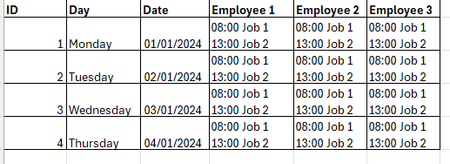
Hello everyone, I am having a problem when merging into word from Access. I am trying to set up a document that is a work diary that merges from access. The first 3 columns are ID, Day and Date and the next 30 columns are the names of the staff members. I want to be able to group by Staff Member so that all the jobs are shown together for each date I.e. Staff Member 1 - Monday 01/01/2024 08:00 Job 1 13:00 Job 2 / Tuesday 02/01/2024 - 08:00 Job 1 13:00 Job 2 / Wednesday 03/01/2024 08:00 Job 1 13:00 Job 2 Thursday 04/01/2024 - 08:00 Job 1 13:00 Job 2 then Staff Member 2 - Monday 01/01/2024 08:00 Job 1 13:00 Job 2 / Tuesday 02/01/2024 - 08:00 Job 1 13:00 Job 2 / Wednesday 03/01/2024 08:00 Job 1 13:00 Job 2 Thursday 04/01/2024 - 08:00 Job 1 13:00 Job 2 etc. Please can someone help!414Views0likes1Comment
create a master template with insrtable sections with prefilled lists to select to create docs easy
I need to create a word template for a fillable document with pre-outlined sections and structure for quick document creation for each job we do. The document is a JSA (Job Safety Analysis and set up) the outline of the document will have the following sections Required Tools and supplies for jobsite" then have a list of some sort of any and all tools and supplies we have and use so you can pick the items needed for this specific job and it stays structured on the document every time.. example : (5 gal drums, screw driver, shop vac, hammer, etc) so the next section would be PPE Required training required (list of various trainings needed for specific job site example : Confined Space entry, LOTO, Fork Lidt, Respiratory,) engineering controls (supervisor tasks, to dos, processes et job site hazards clickable hazards for the following categories with all relevent info for the main hazards and then ability to add new custom hazards -chemical hazards (potential hazard, task/steps to do to avoid, consequences of hazard) -safety hazards (potential hazard, task/steps to do to avoid, consequences of hazard) enviromental hazards (potential hazard, task/steps to do to avoid, consequences of hazard) Before and end of job tasks finally it would be saved and renamed and printed for our employees to check off any sections that require checkboxes such as supplies needed then can fill in anything on document during job and be turned in to office once complete. How can I achieve creating this template and what controls/fields/document properties / form controls etc are required and how to i do it ? Attached is a sample JSA for reference1.8KViews0likes11Comments