app
49 Topics
2026.02.20 - Planner UI update is worse
The UI changes to Planner within the latest Teams desktop app update (version 26032.208.4399.5) has regressed in its functionality and is worse than before. Previously, all of the contents of an item in the Planner were visible at the same time. Now I have to tab between Task Details, Attachments and Checklist, and am unable to view these at once, which has become a critical workflow for me. It is extremely irritating, as I've developed a workflow around how Planner was presented (which was that everything within a task was visible at once), and now it has been compartmentalised. Please unwind this - it is a regressive update and provides less information and requires more interaction to work through the detail of a task.4.2KViews31likes22CommentsWhen can we drag files, outlook items and attachment to Planner?
The flow to flag mail getting into a task in Planner is great but the attachment of mail is not included. We like to use Planner as Trello for complaints handling by different assignees. The complaint mail is getting into Planner but the attached complaint file doesn't come with it by this flow. So to get this into Planner i would like to drag and drop attachments and files what Trello facilitates. Anybody smart alternatives or workaround or better smart Flow ideas?? I prefer to stick to the MS apps, so no 3rd party apps.12KViews17likes10Comments
Filtering tasks based on custom columns in Microsoft Planner?
In Microsoft Planner, I can add a custom column, and it appears in the table view. However, I do not see an option to filter tasks based on the new column. Is this a supported feature, or is there any workaround to enable filtering on custom fields?Solved454Views3likes2Comments
Which tool when: Project or Planner?
There's a reasonably new project management tool in play. When should you use Microsoft Project versus the newer Microsoft Planner? There are pros and cons to both and it's important you know them before getting started. That, and proponents of Project may be going overkill now that there's a user-friendly 'competitor'. Here's some guidance to help you along the way. Hopefully you find this info useful! https://icsh.pt/ProjectOrPlanner1.1KViews3likes0CommentsPlans from Planner are not showing in Flow or third party Add-ins
I have seen several case where Plans from the Planner are not showing in the API. This means you will not be able to use Microsoft Flows for the Planner or use third party Add-ins with the Planner. I am not sure why this happens and I have only seen this on af few O365 tenants. It is a big prblem for these organisation and the Planner is simply not a useful tool. Please advice? and it would be interesting to hear if any other have the same problem.6KViews2likes15Comments
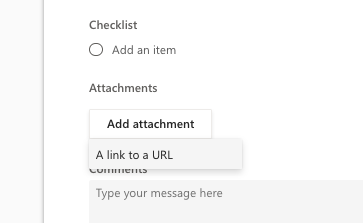
“Add attachment” in Planner no longer allows file uploads
Hello Microsoft Teams Community, We are experiencing a serious issue: the “Add attachment” option in Microsoft Planner tasks no longer offers the ability to upload files. Until recently, we had three options: Upload from computer Attach from Teams/SharePoint files Add a link to a URL Now, only the “Link to a URL” option appears. This affects all users in our organization and happens across all platforms (Teams desktop, Teams web, and Planner web at tasks.office.com). This is not a permissions or setup issue: The plan is connected to a Microsoft 365 Group File uploads via the “Files” tab in Teams still work No settings have been changed on our side This is critical for our business: we and our clients rely on uploading documents directly to tasks for project tracking. Without this function, Planner becomes unusable for us, and we’ll have to consider switching to a different tool. Can someone from Microsoft confirm: Is this a bug or a recent product change? When can we expect the file upload functionality to return? Thank you in advance for any help or clarification.3.1KViews2likes2CommentsWebhook for Planner
Developers can use the Planner API in Microsoft Graph to manage Planner tasks and assign them to users in a Group in Microsoft 365. Other MS 365 App Notifications have already been created for Teams, SharePoint Lists, Onedrive, Outlook and others but not for Planner. Webhook Notifications for the new To Dos have been recently developed and are now in Preview. When can we expect a Planner Webhook to support the many use cases and opportunities for integrations?4.3KViews2likes0CommentsGet the Planner mobile app on iPhone, iPad, and Android!
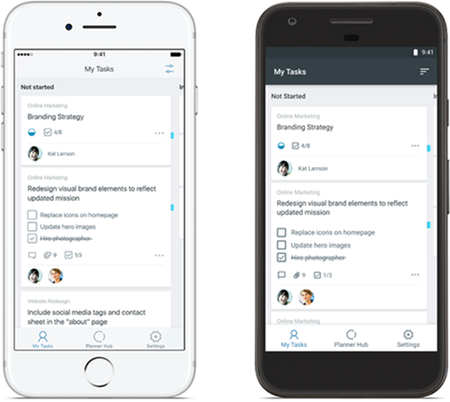
Capture tasks, update progress, continue conversations and more with the Planner mobile app on iPhone, iPad, and Android. Download the app now: Planner for iOS Planner for Android Frequently asked questions What is Planner? Planner provides a simple, visual way to organize teamwork. The Planner mobile app for iOS and Android enables your team to organize and assign tasks, share files, chat about what you’re working on and get updates on progress. How can I access Planner? If you’re new to Planner, you can install the Planner mobile apps to start creating and building your plans. If you don’t have an eligible license of Office 365, please visit our product page to learn more about which subscriptions include Planner. If you have an eligible license and would like to learn more about Planner, please visit our support page. Which features are coming next? We continually update our apps and plan to add more types of push notifications soon. We look forward to hearing your feedback about how we can improve the Microsoft Planner mobile experience. Where can I learn more about the functionality of the Planner mobile app? Please visit iOS supportand Android support to learn more about features and functionality of the mobile app.7.2KViews2likes2Comments
Is using Planner for tracking OKRs a good idea?
So our team has been trying to use Planner to track OKRs. We set up buckets for each objective and tasks for key results. It kinda works for a small team but now that leadership wants to roll it out company wide, its getting messy. Theres no way to show progress rollups from team-level OKRs to company-level ones, no percentage tracking on key results, and managers cant see a consolidated view across teams. Has anyone found a decent way to make Planner work for OKR tracking at scale?490Views1like3Comments