apis
497 Topics
Develop enterprise-grade, AI-ready custom apps with SharePoint Embedded
“Just add documents” sounds simple. Until it isn’t. Once enterprise requirements enter the picture, a simple document feature can become an entire platform: content management, permissions, collaboration, governance, agentic experiences, recovery, and administration. The question becomes: Do you want to build all of that, or build on it? With SharePoint Embedded, developers can use Microsoft 365 as the document platform behind their application while owning the experience in front of it. That can mean more time building what makes your app different, and less time rebuilding commodity content services. Learn how SharePoint Embedded can help you build collaborative, enterprise applications on governed content in the latest SharePoint Embedded blog post: https://devblogs.microsoft.com/microsoft365dev/your-app-needs-documents-do-you-really-want-to-build-a-document-platform Want to learn more about recent updates? Check out our other recent blog posts: Develop enterprise-grade apps with SharePoint Embedded: https://devblogs.microsoft.com/microsoft365dev/develop-enterprise-grade-apps-with-sharepoint-embedded/ Explore the latest SharePoint Embedded guidance to help you plan with confidence, design for reliability at scale, and strengthen governance. Get clearer guidance on limits, throttling, authentication, and authorization to inform your production decisions. Streamline creation and management of AI-ready, custom apps with SharePoint Embedded: https://devblogs.microsoft.com/microsoft365dev/streamline-creation-and-management-of-ai-ready-custom-apps-with-sharepoint-embedded/?utm_source=social-MTC: Learn how the Apps experience in the SharePoint admin center gives admins a centralized place to create and review SharePoint Embedded apps, reducing the need for PowerShell scripts or Graph connectors for app creation. The experience supports registering or associating a Microsoft Entra app, assigning owners, and configuring billing as part of the creation flow. Next steps Get started quickly by pointing your coding assistant at the SharePoint Embedded MCP server (preview) (https://learn.microsoft.com/sharepoint/dev/embedded/build/SharePoint-Embedded-MCP-Server) to provision and manage resources through natural language. Run: npx Microsoft/spe-mcp (https://github.com/microsoft/SharePoint-Embedded-MCP-Server) and then ask it to create a SharePoint Embedded project and a sample app you can upload files to. Prefer to start with a guided view? Use the SharePoint Embedded Visual Studio Code extension (https://marketplace.visualstudio.com/items?itemName=SharepointEmbedded.ms-sharepoint-embedded-vscode-extension) to create a container type, configure the owning app and billing, register the container type, create containers, and load a sample app. Not sure where to start? Visit the SharePoint Embedded documentation hub (https://learn.microsoft.com/sharepoint/dev/embedded/sharepoint-embedded-documentation) to learn more about SharePoint Embedded and whether it fits your use case (https://learn.microsoft.com/sharepoint/dev/embedded/scenarios-and-use-cases). Transparency: I support the SharePoint Embedded product team.111Views0likes0Comments
SPFx Web Part Not Visible for External User in Client Tenant
Hi everyone, One of our team members has developed an SPFx web part that we have deployed and published in our client's SharePoint tenant using a service account. The web part is working as expected when we access the client tenant using the service account. However, when I access the same client tenant using my external/guest user account, I cannot see or use the SPFx web part. Current setup: The SPFx web part was developed by one of our team members. The solution has been deployed and published in the client's SharePoint tenant using a service account. The service account can see and use the web part successfully. My account has also been added to the client tenant as an external/guest user. However, when I access the same SharePoint site using my external account, the SPFx web part is not visible/available. I would like to understand whether this is expected behavior for SPFx web parts when accessed by external/guest users, or if we are missing some configuration. Could this be related to SharePoint permissions, Entra ID guest-user settings, the App Catalog, API permissions, or the SPFx solution deployment configuration? Are there any specific permissions or tenant-level settings that we should check to allow external users to access the SPFx web part? Is there any Microsoft-side restriction that prevents external/guest users from accessing SPFx web parts? Any guidance on what could be causing this issue and how we can troubleshoot or resolve it would be greatly appreciated. Thanks in advance!203Views0likes0Comments
Invoke-PnPSiteTemplate AND Set-PnPDefaultColumnValues error since this morning
Since this morning we experience a blocking issue with Invoke-PnPSiteTemplate cmdlet which is failing as soon as there are lists included in a pnp site template (which is pretty much every template in our case). We see this behaviour on all of our own tenants and all customer tenants. This is a very important part of our provioning engine so it's blocking all new sites & teams in all tenants. Context We have a provisioning engine that runs in Azure. It automatically creates SharePoint-sites and applies a configured PnP site template (either .pnp or .xml) Expected behavior Normally, the template gets applied correctly without any error Actual behavior An error occurs in our logging, also visible when reproducing this locally: Error applying default column values Microsoft.SharePoint.Client.ServerException: Exception of type 'Microsoft.SharePoint.Client.ServiceUnavailableException' was thrown. Microsoft.SharePoint.Client.ClientRequest.ProcessResponseStream(Stream responseStream) StackTrace: at Microsoft.SharePoint.Client.ListExtensions.SetDefaultColumnValuesImplementation(List list, IEnumerable1 columnValues) at Microsoft.SharePoint.Client.ListExtensions.SetDefaultColumnValues(List list, IEnumerable1 columnValues, Boolean overwriteExistingDefaultColumnValues) at PnP.Framework.Provisioning.ObjectHandlers.ObjectListInstance.ProvisionObjects(Web web, ProvisioningTemplate template, TokenParser parser, ProvisioningTemplateApplyingInformation applyingInformation) at PnP.Framework.Provisioning.ObjectHandlers.SiteToTemplateConversion.ApplyRemoteTemplate(Web web, ProvisioningTemplate template, ProvisioningTemplateApplyingInformation provisioningInfo, Boolean calledFromHierarchy, TokenParser tokenParser) at CallSite.Target(Closure , CallSite , Object , Object , Object , Object ) Steps to reproduce behavior Create a PnP template Apply the template, using invoke-pnpsitetemplate -Path "..." We also see the same error happening when executing this cmdlet: Set-PnPDefaultColumnValues -List "Documents" -Field Status -Value "MyDefaultValue" -Connection $pnpConnTargetSite So it seems related... anyone getting the same issues?1.2KViews6likes10Comments
SharePoint Multi-geo: accessing a user's home-geo custom SharePoint properties from a different geo
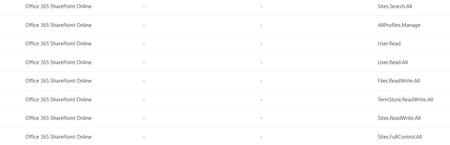
Setup M365 tenant, multi-geo (NAM + EMEA). SharePoint custom user profile properties are synced only in the user’s home geo (their Preferred Data Location). SPFx webparts running on the NAM tenant, using PnP/SP or AadTokenProvider. Goal: when an EMEA user opens a NAM page, read their SharePoint custom properties from the EMEA tenant. Issue 1 — Can’t read profile properties from a different geo-tenant What I’m doing const sp = spfi(emeaTenantUrl).using(SPFx(webpartContext), SPFxToken(webpartContext)); const result = await sp.profiles.getPropertiesFor(basicInfo.data.LoginName); Error Access Denied: This application does not have the required permissions to access profile information. The core problem — token is missing my approved scopes Approved Scopes in webApiPermissionManagement (Office 365 SharePoint Online) in SharePoint Admin Center: Sites.Search.All, AllProfiles.Manage, User.Read, User.Read.All, Files.ReadWrite.All, TermStore.ReadWrite.All, Sites.ReadWrite.All, Sites.FullControl.All. Token issued for the SharePoint resource only contains: Files.ReadWrite.All, M365BillingPlatform.Read.All, Sites.FullControl.All, Sites.ReadWrite.All, TermStore.ReadWrite.All. So AllProfiles.Manage, User.Read.All, Sites.Search.All are not in the token and an unexpected M365BillingPlatform.Read.All is. Also tried calling the SharePoint REST API directly with a token from AadTokenProvider → same Access Denied. Questions Why is the issued token missing my approved scopes (and where is M365BillingPlatform.Read.All coming from)? Is there a supported way to read a user’s SharePoint profile custom properties from a different geo-tenant from an SPFx webpart? Approved Scopes in Admin center Issue 2 — Search query template {User.*} properties not resolving cross-geo What I’m doing A SharePoint Search query in the webpart uses a query template that pulls custom user properties dynamically: {|owstaxidmetadataalltagsinfo:{User.customProperty1}} OR {|owstaxidmetadataalltagsinfo:{User.customProperty2}} The SP object is created the same way as in Issue 1. What’s not working When an EMEA user loads the webpart on the NAM tenant, the {User.*} tokens don’t resolve — the query modification shows the static property name itself instead of the user’s values from EMEA. Question How do I get the query template to resolve {User.customProperty} using the user’s home-geo (EMEA) profile values?227Views0likes0Comments
Clarification on SharePoint Macro Consent Flow and Permissions
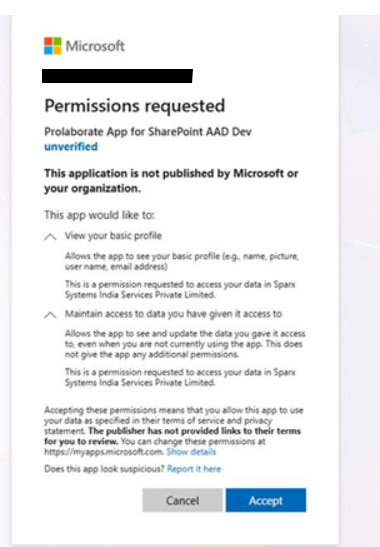
Hi Team, We have a customer using SharePoint in a secure environment. While configuring the Prolaborate SharePoint Macro on their site, a consent popup is displayed during the approval process. Previously, our macro implementation used the Admin Consent flow. Based on the customer’s security and approval requirements, we have modified the consent to use the User Consent flow instead. The customer has requested additional clarification regarding the consent process. Specifically, they would like to understand: The exact API calls triggered for these two consents View your basic profile Maintain access to data you have given it access to The permissions being requested from Microsoft Graph or SharePoint Whether the application requests any tenant-wide or high-privilege permissions Whether minimal permissions such as Sites.Selected can be used instead of broader scopes Current concern: The customer feels the current permission request is too broad for approval within their secure environment (Banking customer). Reason: Their internal approval process requires clear visibility into the exact API and permission scopes being requested, as different permissions are reviewed and approved by different internal teams (for example, User.Read is managed by the Identity team). From our implementation side, we are using only custom APIs and are not directly calling Microsoft Graph APIs. This information will help us provide a clear response to the customer and support their internal approval process.456Views0likes1Comment
Is Creating Multiple ClientContext Instances Efficient in CSOM for one Site Url?
Is it efficient to create a new ClientContext for each site URL and for each query, such as getting site users, lists, groups, and group members from the Web object? These queries can return a very large number of items, and CSOM does not support paging when retrieving data from Web properties. Because of this, there is a risk of memory issues. In this case, is creating multiple ClientContext objects a good approach? Also, how does ClientContext work internally, and how does it handle memory and performance?179Views0likes0Comments
Origin and Synchronization of User Profile Properties in SharePoint Online
Hi everyone, I’m trying to understand exactly where the User Profile properties in SharePoint Online come from and how (or if) they are synchronized from Microsoft Entra ID (formerly Azure AD). I’ve extracted a complete list of the properties I see in my tenant, for example: AboutMe AccountName ADGuid Assistant CellPhone Country DelveFlags Department Fax FirstName HomePhone LastName Manager msOnline-ObjectId Office ... SPS-Responsibility SPS-Interests SPS-PictureExchangeSyncState SPS-UserPrincipalName WorkEmail WorkPhone I would like to understand: Which of these come from Microsoft Entra ID, Which are automatically synchronized to the User Profile Application (UPA), And which are local SharePoint or Delve properties, not connected to Entra. So far, I’ve only found this official documentation: About user profile synchronization in SharePoint Online However, it only lists a limited subset of properties (“The following Microsoft Entra user attributes are synced to the UPA…”), and it does not cover all the properties present in the UPA schema. I’m looking for a more complete or up-to-date reference — or at least an official explanation as to why there isn’t a public, full mapping between Entra ID and UPA. Does anyone know if there is an official complete list or a way to verify the actual source of each property (Entra ID, Exchange, Delve, local SharePoint, etc.)? Thanks in advance for any clarification or useful resources!437Views0likes3CommentsSharepoint SitePage
Using Graph API . I want to access a specific Sitepage , I need to know the Sitepageid, based on /pages it will return all Page id within the Site, Is there a way to get the Sitepage id directtly based on the Sitepage name.aspx ? I want to detect files changes on that Sitepage and be able to downlaod the files from the sitepage ? How can we do that using Graph API I know we can detect files changed at the drive level within a site. I am looking for Sitepage can we do the same ?what API can be used ?100Views0likes0CommentsError 'Cannot get value for projected field...' when users without email were set to the field
SharePoint List Setup I have a simple list with a Person field Approvers which allows multiple selections. One of the list items has a user set to the Approvers but the said user does not have email configured. REST API used https://xxx.sharepoint.com/sites/xxx/_api/Web/Lists(guid'xxx')/items/?$filter=ID eq xxx&$select=*,Approvers%2FEMail&$expand=Approvers REST API response Error { "odata.error": { "code": "-2146232832, Microsoft.SharePoint.SPException", "message": { "lang": "en-US", "value": "Cannot get value for projected field Approvers_x005f_EMail." } } } Graph API used https://graph.microsoft.com/v1.0/sites/xxx/lists/xxx/items?$filter=startswith(fields/Title, 'xxx')&$expand=fields($select=Title,Approvers) Graph API response Success "Approvers": [ { "LookupId": 1, "LookupValue": "User A", "Email": "" }, { "LookupId": 2, "LookupValue": "User B", "Email": "" }, { "LookupId": 3, "LookupValue": "User C", "Email": "******@outlook.com" } ] Question Is there anyway we can tell the REST API to react the same way as Graph API, instead of failing, return the data as-is?359Views0likes3Comments
Connection was forcibly closed by TPC RST packet from Microsoft servers
We are experiencing intermittent but frequent connection terminations during communication with SharePoint Online via REST API. After several internal investigations, we were unable to identify any root cause on our end. We have observed unexpected connection resets originating from Microsoft servers, specifically during or after the TLS handshake. Packet trace including the TCP RST. This packet appears to be an unsolicited TCP RST sent from Microsoft side. 396 19.654862 SharePoint IP Client IP TLSv1.2 357 Application Data 397 19.655259 SharePoint IP Client IP TLSv1.2 1013 Application Data 398 19.655344 Client IP SharePoint IP TCP 1514 443 → Random Port [ACK] Seq=... Ack=... Win=4194560 Len=1460 [TCP PDU reassembled in 402] 399 19.655376 Client IP SharePoint IP TCP 1514 443 → Random Port [ACK] Seq=... Ack=... Win=4194560 Len=1460 [TCP PDU reassembled in 402] 400 19.655387 Client IP SharePoint IP TCP 1514 443 → Random Port [ACK] Seq=... Ack=... Win=4194560 Len=1460 [TCP PDU reassembled in 402] 401 19.655376 Client IP SharePoint IP TCP 1514 443 → Random Port [ACK] Seq=... Ack=... Win=4194560 Len=1460 [TCP PDU reassembled in 402] 402 19.655387 SharePoint IP Client IP TLSv1.2 1448 Application Data 403 19.655476 Client IP SharePoint IP TCP 1514 443 → Random Port [ACK] Seq=... Ack=... Win=4194560 Len=1460 [TCP PDU reassembled in 405] 404 19.655495 Client IP SharePoint IP TCP 1514 443 → Random Port [ACK] Seq=... Ack=... Win=4194560 Len=1460 [TCP PDU reassembled in 405] 405 19.656337 SharePoint IP Client IP TLSv1.2 1212 Application Data 406 19.656367 Client IP SharePoint IP TCP 1514 443 → Random Port [ACK] Seq=... Ack=... Win=4194560 Len=1460 [TCP PDU reassembled in 408] 407 19.656412 Client IP SharePoint IP TCP 1514 443 → Random Port [ACK] Seq=... Ack=... Win=4194560 Len=1460 [TCP PDU reassembled in 408] 408 19.656412 SharePoint IP Client IP TLSv1.2 1070 Application Data 409 19.657129 Client IP SharePoint IP TCP 1514 443 → Random Port [ACK] Seq=... Ack=... Win=4194560 Len=1460 [TCP PDU reassembled in 411] 410 19.657192 Client IP SharePoint IP TCP 1514 443 → Random Port [ACK] Seq=... Ack=... Win=4194560 Len=1460 [TCP PDU reassembled in 411] 411 19.657292 SharePoint IP Client IP TLSv1.2 992 Application Data 412 19.657325 Client IP SharePoint IP TCP 1514 443 → Random Port [ACK] Seq=... Ack=... Win=4194560 Len=1460 [TCP PDU reassembled in 414] 413 19.657435 Client IP SharePoint IP TCP 1514 443 → Random Port [ACK] Seq=... Ack=... Win=4194560 Len=1460 [TCP PDU reassembled in 414] 414 19.657523 SharePoint IP Client IP TLSv1.2 992 Application Data 415 19.659729 SharePoint IP Client IP TCP 60 443 → Random Port [RST] Seq=... Win=0 Len=0 416 19.660127 SharePoint IP Client IP TCP 60 443 → Random Port [RST] Seq=... Win=0 Len=0 417 19.660216 SharePoint IP Client IP TCP 60 443 → Random Port [RST] Seq=... Win=0 Len=0 418 19.660317 SharePoint IP Client IP TCP 60 443 → Random Port [RST] Seq=... Win=0 Len=0 419 19.660318 SharePoint IP Client IP TCP 60 443 → Random Port [RST] Seq=... Win=0 Len=0 420 19.661139 SharePoint IP Client IP TCP 60 443 → Random Port [RST] Seq=... Win=0 Len=0 421 19.661235 SharePoint IP Client IP TCP 60 443 → Random Port [RST] Seq=... Win=0 Len=0 422 19.662135 SharePoint IP Client IP TCP 60 443 → Random Port [RST] Seq=... Win=0 Len=0 423 19.662212 SharePoint IP Client IP TCP 60 443 → Random Port [RST] Seq=... Win=0 Len=0 424 19.665417 Client IP SharePoint IP TCP 1514 443 → Random Port [ACK] Seq=... Ack=... Win=4194560 Len=1460 425 19.766395 Client IP SharePoint IP TCP 1514 [TCP Retransmission] 443 → Random Port [ACK] Seq=... Ack=... Win=4194560 Len=1460 426 20.367148 Client IP SharePoint IP TCP 1514 [TCP Retransmission] 443 → Random Port [ACK] Seq=... Ack=... Win=4194560 Len=1460 427 21.167413 Client IP SharePoint IP TCP 1514 [TCP Retransmission] 443 → Random Port [ACK] Seq=... Ack=... Win=4194560 Len=1460 428 21.179165 Client IP SharePoint IP TCP 1514 [TCP Spurious Retransmission] 443 → Random Port [ACK] Seq=... Ack=... Win=4194560 Len=1460 429 21.773431 Client IP SharePoint IP TCP 1514 443 [SYN, ECE, CWR] Seq=0 Win=64240 Len=0 MSS=1460 WS=256 SACK_PERM TLS Handshake Behavior: .NET-based applications on our server report the following exception: System.IO.IOException: Unable to read data from the transport connection: An existing connection was forcibly closed by the remote host. ---] System.Net.Sockets.SocketException (10054): An existing connection was forcibly closed by the remote host. We have included packet traces showing: - Successful TCP and TLS handshakes - Encrypted application data sent by our client - Acknowledge packets from your server - Connection then abruptly closed by a TCP RST without any visible application-layer error Environment & Testing: - Operating System: Windows Server 2022 - Frameworks: .NET 6 / .NET 8 - Connectivity: REST API calls to SharePoint Online (no sync, no OneDrive, no hybrid setup), TLS1.2 used and set up based on Microsoft recommendations Observations: - Approximately 70% of API calls fail intermittently - Issue occurs across multiple SharePoint sites and folders - Affects all users (admin, regular users, etc.). - No firewall, hardware, or configuration changes have occurred on the affected server - Disabling security software had no impact - Temporary switch to IPv6 improved stability for ~24 hours before the issue returned - New development: - We moved some applications to a separate VPS — those are working correctly. - However, a similar issue has now started occurring on a completely different server hosted by a customer, indicating this may not be isolated to a single environment or IP. Is this expected behavior under specific policies (e.g., IP reputation, rate limiting, User-Agent filtering)? Could there be a misconfiguration or conditional access policy silently blocking some connections? Is this possibly related to throttling or regional backend issues? Thank you for any support in this case.502Views0likes1Comment