api
248 Topics[Announcing] Open Sourcing the Microsoft Graph Explorer!
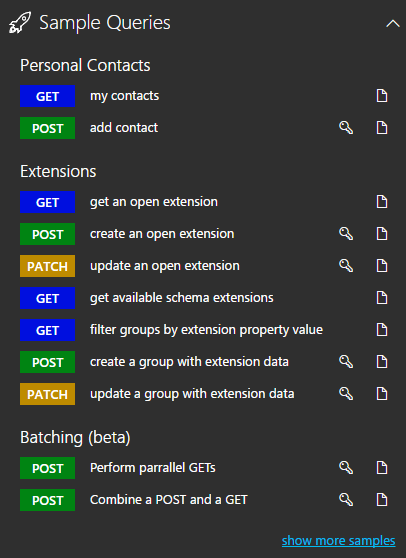
The Microsoft Graph Explorer is a tool that lets developers easily experiment with the Microsoft Graph API from their browser. Last month, we announced an update with new features including sample queries, a refreshed user interface, custom permissions and more. Today, we'e thrilled to be releasing the Graph Explorer as an open source project on GitHub under the MIT license. Learn more on the blog.2.6KViews3likes1Comment
Slow UI update for deleted events
I've built an integration that continuously syncs events between an external scheduling system and Exchange Online using Microsoft Graph. I'm observing a recurring issue when deleting calendar events via Graph: A DELETE request to Graph returns success (204 No Content). A subsequent GET /events/{id} returns 404, confirming the event is deleted server-side. However, the event continues to appear in the Outlook UI (both Outlook Web and desktop) for an extended period (sometimes hours), even after page reloads or app restarts. The odd behaviour The event is still displayed in the user interface for up to several hours The event persist through page reloads If the user clicks the event it opens briefly and immediately closes, the event disappears from the UI afterward. Additional details Delete endpoint: /users/{id}/events/{id} Graph response: 204 No Content Verified deletion via GET → 404 Reproduces in both Outlook Web and Outlook desktop Questions Is this a known Outlook client caching or calendar view indexing issue? Is there a way to force client reconciliation after deletes? Are there Graph or Exchange constraints around rapid create/update/delete cycles that could cause this UI inconsistency?412Views2likes1Comment
Set work location via API (Graph?)
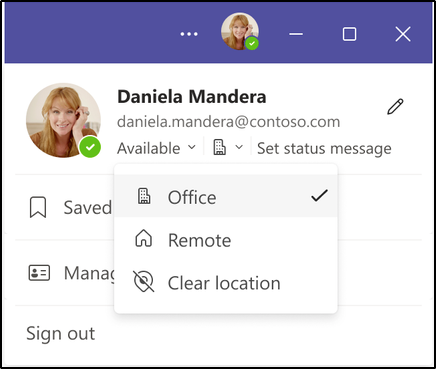
Hi Graph Team! We would like to set the work location ("Office", "Remote") via Graph API endpoint. We want to synchronize the work location in Teams / O365 with information from our internal tool. This workaround here is not applicable to our use case: https://techcommunity.microsoft.com/t5/teams-developer/set-work-location-via-api-graph/m-p/3874804#M8092 There seems to be a high interest in this capability. Can you add this function to Microsoft Graph? Thanks! Jens4.1KViews2likes3Comments
Query Regarding Duplicate Message IDs from Microsoft Graph API
Hello Microsoft Support Team, I am currently using the Microsoft Graph API to fetch email messages from the inbox of a my support email in my PHP application. However, I am encountering an issue where the API returns duplicate message IDs for emails. This is causing problems as emails with the same id are being processed multiple times, which results in duplicate ticket creation in my CRM system. To avoid this, I am currently checking and skipping duplicate IDs manually in my application. However, I would like to understand the root cause of these duplicates and whether there is an official recommendation or best practice to handle such cases effectively. Here are some additional details: API Endpoint: GET graph.microsoft.com/beta/users/$userEmailEncoded/mailFolders/Inbox/messages?\$top=20&\$orderby=receivedDateTime%20desc Issue: Duplicate message IDs (id) returned for the same email. Current Handling: I am skipping already processed emails using a tracking for message IDs to prevent duplicate ticket creation. Additionally, I have a few more queries regarding the use of internetMessageId and fetching attachments: Problem with internetMessageId: When I use internetMessageId, the internetMessageId of a replied message returns null. How can I use this ID effectively to manage or track message threads and replies? Attachments with internetMessageId: Is it possible to fetch attachments for a message using the internetMessageId? I am trying to retrieve attachments for a specific email using this ID, but I am not sure how to do this efficiently. Could you please advise on the following: Is there a recommended way to handle or filter out duplicate emails when fetching email data from the Graph API? Is there any mechanism in the API to ensure unique messages, especially when calling this endpoint frequently? How can I properly use internetMessageId for tracking message threads and replies, and why is it returning null for replied messages? Can I retrieve attachments using internetMessageId or is there another method for doing so? I would greatly appreciate any guidance or suggestions you can provide. Thank you for your time and assistance. Best regards, Krishna Adroja email address removed for privacy reasons323Views1like2Comments
Clone Team endpoint is broken
Microsoft Graph's "clone Team" endpoint is not working as intended and changes its behaviour without any communication from Microsoft. The problem is the new feature that enables users to name the primary channel. Until yesterday, the primary channel was just created as a "normal" channel in the cloned team and an additional primary channel with the default name "General" was created. Since yesterday, the primary channel is now cloned "correctly", but now the tabs are completely ignored and not even the default "Notes" tab is created in the primary channel. So when cloning a team, the primary channel itself is created, but it is just completely empty. Will this be fixed and if so, when? And are there any additional resources for changes in the Graph API that I don't know about? Because this is not mentioned in the Graph API changelog. It seems like Microsoft is indeed working on this, but this last change does not fix anything, it makes it even worse.74Views1like0CommentsReorder Teams Channel tabs, move a 3rd tab to be the last tab?
I have an automate power automate flow which Create a Teams site, channels & tabs. now inside the General channel, we add the following custom tabs (Active DashBoard, Incident -12: Tasks and Template & training), as follow:- but i will get those 3 built-in tabs; Posts, Files and Notes.. now how i can move the Notes tab to be last tab ? using Graph API? Thanks131Views1like0CommentsGet-MgProfile : The term 'Get-MgProfile' is not recognized as the name of a cmdlet, function, script
Hi everyone, The cmdlet Get-MgProfile is no longer available after updating to v2.1.0 Even the link is no longer available: https://learn.microsoft.com/en-us/powershell/module/microsoft.graph.people/get-mguserprofile What is the replacement Graph SDK cmdlet to get the existing Microsoft Graph PowerShell SDK connection profile name? Thanks in advance.17KViews1like5CommentsIntune Device Compliance policy assignment POST - No OData route exists
I have created a compliance policy via Graph API but another command, New-MgDeviceManagementDeviceCompliancePolicyAssignment, is needed to assign a group to that compliance policy. I have found ID of "All Users" older compliance policy has assigned via Get-MgDeviceManagementDeviceCompliancePolicyAssignment and used that same ID of the group but I got the following error: New-MgDeviceManagementDeviceCompliancePolicyAssignment_CreateExpanded: No OData route exists that match template ~/singleton/navigation/key/navigation with http verb POST for request /DeviceConfiguration_2305/StatelessDeviceConfigurationFEService/deviceManagement/deviceCompliancePolicies('67a65edf-8f06-4f36-9e75-be894ea58f30')/assignments. I have tried to do the same thing via Graph Explorer since I thought maybe the PowerShell Graph has a bug but still I get the same error, also on v1.0 and beta1.7KViews1like4Comments