ai
1038 TopicsWhat to Expect from the Copilot & AI Sessions at Microsoft 365 Community Conference
AI isn’t a side conversation at the Microsoft 365 Community Conference—it’s at the center of how work is changing. The Copilot, Agents, & Copilot Services Sessions are designed for anyone who wants to move beyond curiosity and into real-world application. This is an opportunity to learn how Copilot works today and how agents extend it. You will also explore how organizations can govern, scale, and operationalize AI across Microsoft 365. Questions these sessions will help answer: How do we move from experimentation to real value? How do we scale AI responsibly? How do agents fit into the way we already work? What skills do teams need next? Business leaders, IT pros, developers, and community practitioners will join sessions to find practical insights into how AI shows up in your daily work, and what it takes to deploy it responsibly and effectively. There will also be a focus on change management, champion programs, and adoption frameworks, because deploying AI isn’t just a technical decision, it’s a cultural one. From Copilot to Agents: The Shift from Assistance to Action One of the biggest themes across the sessions are the evolution from AI as a helper to AI as an active participant in work. If you’re curious about what “agentic AI” actually means in practice, attending these sessions will make it concrete. Join your peers as you learn how Microsoft 365 Copilot is being extended through agents that reason, act, and automate. Learn about agent orchestration across tools like Copilot Studio, SharePoint, Teams, Planner, and Power Platform. Discover new agent patterns including declarative agents, multi-agent configurations, workflows agents, and computer-use agents. In these sessions you’ll explore how agents can: Take action on your behalf and do more than suggest content. Work across apps, data sources, and workflows. Participate alongside humans as part of the team. Real Adoption Stories (Not Just Demos)! Go beyond feature walkthroughs to focus on how organizations are actually adopting Copilot and agents at scale. In these adoption stories you’ll hear: How Microsoft uses Copilot and agents internally as Customer Zero. What adoption looks like across large enterprises, frontline environments, and regulated industries. Lessons learned from early adopters—what worked, what didn’t, and what they’d do differently. Governance, Trust, and Control Are Front and Center AI adoption only works when people trust it—and trust is built through strong governance. Learn how organizations are balancing innovation with oversight and enabling teams to build and use agents while maintaining enterprise-grade guardrails. A significant portion of the Copilot & AI track is dedicated to: Agent lifecycle management. Security, compliance, and data protection. Preventing oversharing and managing risk. Observability and control using tools like Agent 365, Microsoft Purview, and Copilot Control System. This is especially valuable for IT and security leaders who are being asked to “move fast” without compromising standards. Building with Copilot: No-Code, Low-Code, and Pro-Code Paths No matter where you sit on the technical spectrum, there’s a clear path to learning how to build responsibly and effectively. Not everyone builds the same way and organizations need prompt engineering that delivers results. In these sessions you’ll learn how to choose the right agent type for the job, extending Copilot with enterprise data, and designing agents that are production ready—not just impressive in demos. These sessions are tailored to: Business users and makers getting started with Copilot Studio Low-code developers extending Copilot with workflows, connectors, and prompts Pro developers building advanced agents using APIs, MCP servers, Microsoft Graph, SharePoint Embedded, and Azure AI Copilot in the Flow of Everyday Work Rather than abstract AI concepts, you’ll see end-to-end workflows that demonstrate how Copilot helps people save time, reduce manual work, and focus on higher-value outcomes. The emphasis in these sessions is on practical impact, not hype showing how AI is grounded in real work. These sessions will showcase Copilot and agents embedded into: Meetings, chats, and channels. Task and project management. Content creation and knowledge management. Business processes and frontline operations. Why the Copilot and AI track matters If AI is part of your roadmap, or already part of your day, this track will show you how strategy can meet execution. Join us to explore clear mental models for Copilots and agents, see real examples you can apply to your work, and gain a better understanding of what’s now—and what’s coming next. Each year, #M365Con26 is built around one simple idea: bringing our global community together to learn, grow, innovate, and get hands-on with the technologies shaping the next era of work. This year’s conference delivers our most expansive program yet, including: 200+ sessions, workshops, and AMAs, covering Microsoft 365 Copilot, Teams, SharePoint, OneDrive, Copilot Studio, and more. 100+ Microsoft-led sessions, giving you unprecedented access to the people building the apps and AI capabilities you use every day. A keynote lineup featuring Microsoft leaders including Jeff Teper, Charles Lamanna, Vasu Jakkal, Rohan Kumar, Jaime Teevan, and many more. Deep-dive workshops to elevate your skills with real-world scenarios and hands-on learning. Exclusive attendee parties and networking events where you can connect with peers and icons. You’ll also get the chance to meet hundreds of Microsoft executives, engineers, and product leaders—ask questions, share feedback, and help shape the roadmap of the technologies you rely on. Register now, save $150 with code SAVE150 - https://aka.ms/M365ConRegister67Views0likes0CommentsAgentic AI security: Prompt injection and manipulation attacks
As AI apps and autonomous agents gain more reasoning and independence, they also open new pathways for adversarial attacks. Join this webinar and hear how the most critical risks are broken down—prompt injection, goal hijacking, and memory poisoning—and how they the impact real AI applications. Learn practical defenses your teams can implement today, including input validation, behavioral detection, and robust architectural patterns that keep agentic systems aligned and secure. Learn more and sign up to attend this webinar or watch the recording after. Agentic manipulation: Prompt injection, goal hijacking & memory poisoning | Microsoft Community HubLearn to maximize your productivity at the proMX Project Operations + AI Summit 2026
As organizations accelerate AI adoption across business applications, mastering how Microsoft Dynamics 365 solutions, Copilot, and agents work together is becoming a strategic priority. Fortunately, businesses no longer need to rely on speculation — they can gain practical insights with fellow industry professionals during a unique two-day event: On April 21-22, 2026, Microsoft and proMX will jointly host the fourth edition of proMX Project Operations Summit at the Microsoft office in Munich, but this time with an AI edge. The summit brings together Dynamics 365 customers and Microsoft and proMX experts to explore how AI is reshaping project delivery, resource management, and operational decision‑making across industries. On day one, participants will discover how Dynamics 365 Project Operations, Copilot, Project Online, proMX 365 PPM, and Contact Center can strategically transform business processes and drive organizational growth. On day two, they can explore the technical side of these solutions. Secure your spot! What to expect from the summit Expert-led, actionable insights Join interactive sessions led by Microsoft and proMX experts to learn practical AI and Dynamics 365 skills you can use right away. Inspiring keynotes Gain future-focused perspectives on Dynamics 365, Copilot, and AI to prepare your organization for what’s next. In between our special guests we have Microsoft's Rupa Mantravadi, Chief Product Officer, Dynamics 365 Project Operations, Rob Nehrbas, Head of AI Business Solutions, Archana Prasad, Worldwide FastTrack Leader for Project Operations, and Mathias Klaas, Partner Development Manager. Hands-on AI workshops Take part in workshops where Sebastian Sieber, Global Technology Director (proMX) and Microsoft MVP will show the newest AI features in Dynamics 365, giving you real-world experience with innovative tools. Connect with industry leaders Engage with experts through Q&A sessions, round tables, and personalized Connect Meetings for tailored guidance on your business needs. Real customer success stories Hear case studies from proMX customers who are already using Dynamics 365 solutions and learn proven strategies for successful digital transformation. Who should attend? This summit is tailored for business and IT decision-makers that are using Dynamics 365 solutions and want to drive more business impact with AI, but also for those who might be planning to move away from other project management solutions such as Project Online and need practical guidance grounded in real-life implementations. Date: Apr 21 & 22, 2026 | 2 -Days event Location: Microsoft Munich, Walter-Gropius Straße 5, Munich, Bavaria, DE, 80807 Ready to maximize your productivity? Register here.41Views0likes0CommentsproMX Project Operations + AI Summit 2026
Ready to learn how you can turn your project challenges into business success with Dynamics 365 AI solutions? Join Microsoft and proMX on April 21st and 22nd at Microsoft Munich for the in-person proMX Project Operations + AI Summit 2026 – Turning data into productivity assets with Copilot + Agents in Dynamics 365 solutions. On DAY 1, discover how Dynamics 365 Project Operations, Copilot, Project Online, proMX 365 PPM, and Contact Center can strategically transform business processes and drive organizational growth. On DAY 2, we’ll take a deep dive into the technical side of these solutions. ✅Book a one-to-one slot with proMX, proMX customers or our Microsoft guests ✅ Explore our booths to talk to Microsoft MVPs and proMX experts ✅ Exchange ideas, project expertise, and more! Register now to secure your spot at this exclusive and free event: proMX Project Operations + AI Summit 2026 You still have questions? Feel free to contact us! Jelena Yaruchyk (Global Marketing Director) - Jelena.Yaruchyk@promx.net Kateryna Marchak (Marketing and Content Lead) - Kateryna.Marchak@promx.net20Views1like0CommentsBuilding an AI solution is just the first step - turning it into revenue is where real growth begins
As partners bring AI-powered apps and agents to market at record speed, many struggle with how to price, license, and operationalize their offers for long-term success. This article breaks down how to design monetization early and avoid common pitfalls when publishing on Microsoft Marketplace. Learn how the Marketplace Monetization Checklist helps SaaS and container offers establish secure licensing, effective pricing models, and scalable fulfillment. See how App Advisor translates guidance into action, and how AI Envisioning sessions help align teams on strategy before you build and publish. If you want Marketplace to become a predictable revenue engine—not just a distribution channel read the full article to learn how to monetize your AI apps and agents and drive sustainable growth. Read more: Monetize your AI apps and agents on Marketplace to realize growthLevel up your Python + AI skills with our complete series
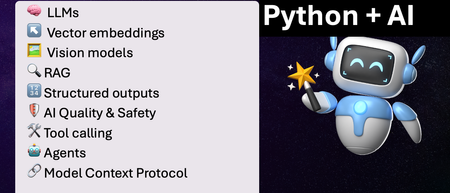
We've just wrapped up our live series on Python + AI, a comprehensive nine-part journey diving deep into how to use generative AI models from Python. The series introduced multiple types of models, including LLMs, embedding models, and vision models. We dug into popular techniques like RAG, tool calling, and structured outputs. We assessed AI quality and safety using automated evaluations and red-teaming. Finally, we developed AI agents using popular Python agents frameworks and explored the new Model Context Protocol (MCP). To help you apply what you've learned, all of our code examples work with GitHub Models, a service that provides free models to every GitHub account holder for experimentation and education. Even if you missed the live series, you can still access all the material using the links below! If you're an instructor, feel free to use the slides and code examples in your own classes. If you're a Spanish speaker, check out the Spanish version of the series. Python + AI: Large Language Models 📺 Watch recording In this session, we explore Large Language Models (LLMs), the models that power ChatGPT and GitHub Copilot. We use Python to interact with LLMs using popular packages like the OpenAI SDK and LangChain. We experiment with prompt engineering and few-shot examples to improve outputs. We also demonstrate how to build a full-stack app powered by LLMs and explain the importance of concurrency and streaming for user-facing AI apps. Slides for this session Code repository with examples: python-openai-demos Python + AI: Vector embeddings 📺 Watch recording In our second session, we dive into a different type of model: the vector embedding model. A vector embedding is a way to encode text or images as an array of floating-point numbers. Vector embeddings enable similarity search across many types of content. In this session, we explore different vector embedding models, such as the OpenAI text-embedding-3 series, through both visualizations and Python code. We compare distance metrics, use quantization to reduce vector size, and experiment with multimodal embedding models. Slides for this session Code repository with examples: vector-embedding-demos Python + AI: Retrieval Augmented Generation 📺 Watch recording In our third session, we explore one of the most popular techniques used with LLMs: Retrieval Augmented Generation. RAG is an approach that provides context to the LLM, enabling it to deliver well-grounded answers for a particular domain. The RAG approach works with many types of data sources, including CSVs, webpages, documents, and databases. In this session, we walk through RAG flows in Python, starting with a simple flow and culminating in a full-stack RAG application based on Azure AI Search. Slides for this session Code repository with examples: python-openai-demos Python + AI: Vision models 📺 Watch recording Our fourth session is all about vision models! Vision models are LLMs that can accept both text and images, such as GPT-4o and GPT-4o mini. You can use these models for image captioning, data extraction, question answering, classification, and more! We use Python to send images to vision models, build a basic chat-with-images app, and create a multimodal search engine. Slides for this session Code repository with examples: openai-chat-vision-quickstart Python + AI: Structured outputs 📺 Watch recording In our fifth session, we discover how to get LLMs to output structured responses that adhere to a schema. In Python, all you need to do is define a Pydantic BaseModel to get validated output that perfectly meets your needs. We focus on the structured outputs mode available in OpenAI models, but you can use similar techniques with other model providers. Our examples demonstrate the many ways you can use structured responses, such as entity extraction, classification, and agentic workflows. Slides for this session Code repository with examples: python-openai-demos Python + AI: Quality and safety 📺 Watch recording This session covers a crucial topic: how to use AI safely and how to evaluate the quality of AI outputs. There are multiple mitigation layers when working with LLMs: the model itself, a safety system on top, the prompting and context, and the application user experience. We focus on Azure tools that make it easier to deploy safe AI systems into production. We demonstrate how to configure the Azure AI Content Safety system when working with Azure AI models and how to handle errors in Python code. Then we use the Azure AI Evaluation SDK to evaluate the safety and quality of output from your LLM. Slides for this session Code repository with examples: ai-quality-safety-demos Python + AI: Tool calling 📺 Watch recording In the final part of the series, we focus on the technologies needed to build AI agents, starting with the foundation: tool calling (also known as function calling). We define tool call specifications using both JSON schema and Python function definitions, then send these definitions to the LLM. We demonstrate how to properly handle tool call responses from LLMs, enable parallel tool calling, and iterate over multiple tool calls. Understanding tool calling is absolutely essential before diving into agents, so don't skip over this foundational session. Slides for this session Code repository with examples: python-openai-demos Python + AI: Agents 📺 Watch recording In the penultimate session, we build AI agents! We use Python AI agent frameworks such as the new agent-framework from Microsoft and the popular LangGraph framework. Our agents start simple and then increase in complexity, demonstrating different architectures such as multiple tools, supervisor patterns, graphs, and human-in-the-loop workflows. Slides for this session Code repository with examples: python-ai-agent-frameworks-demos Python + AI: Model Context Protocol 📺 Watch recording In the final session, we dive into the hottest technology of 2025: MCP (Model Context Protocol). This open protocol makes it easy to extend AI agents and chatbots with custom functionality, making them more powerful and flexible. We demonstrate how to use the Python FastMCP SDK to build an MCP server running locally and consume that server from chatbots like GitHub Copilot. Then we build our own MCP client to consume the server. Finally, we discover how easy it is to connect AI agent frameworks like LangGraph and Microsoft agent-framework to MCP servers. With great power comes great responsibility, so we briefly discuss the security risks that come with MCP, both as a user and as a developer. Slides for this session Code repository with examples: python-mcp-demo4.1KViews1like0CommentsBringing AI fluency to every corner of the organization (even yours!)
Ashley Masters Hall joined Microsoft more than five years ago, just a month after earning her undergraduate degree. She’s currently a learning manager at Microsoft, focused on AI skilling for business pros. In this first blog post in a series of three, she shares her insightful and relatable perspective on AI fluency and skills for everyone in the organization. I was driving to an appointment recently, and I was reminded of the days when we used to print out directions at home and then try to follow them while driving. That was until GPS and later map apps came along. Suddenly, we had real-time guidance and rerouting from our phones. At first, we might have been reluctant to give up our familiar (though inefficient and unsafe) habit of wrangling printed directions behind the wheel. But once we experienced the speed and simplicity of GPS, there was no going back. AI is having its GPS moment. Two years ago, AI was this mysterious thing, a shiny object we weren’t sure we needed. Now, it’s the default way to navigate (and even orchestrate) work. Just like GPS didn’t replace driving, AI doesn’t replace thinking. It removes friction, gives us faster paths, and lets us focus on better outcomes. So the question isn’t, “Will AI change work?” It already has. The real question is, “Are you fluent enough to lead with it?” Regardless of your role or team, AI is likely already part of your world. In this blog post, the first in a series of three, I share practical tips, including six easy steps, that turn AI from a buzzword into your work GPS. What I mean by AI fluency (no jargon, I promise) Let me first define AI fluency. AI fluency is the degree of understanding and ability to interact effectively with generative AI. It’s recognizing when AI will add value and inspiration, plus having the skills to incorporate it into your workflows and tasks. AI skills are now foundational for everyone in every department. These skills not only help set you apart but also help keep you in the mix as work and roles evolve. We’ve seen a shift in the job market toward skills efficiency rather than work experience. In fact, according to the January 2025 LinkedIn Economic Graph Work Change Report: AI Is Coming to Work, “By 2030, 70% of the skills used in most jobs will change, with AI emerging as a catalyst.” Five years ago, when I was interviewing for jobs, my differentiators were my work experience and the Microsoft Certifications I had earned, which verified my expertise and abilities with Microsoft Office apps. But in interviews last year, most of the questions I got were about how I use AI today and how I’d apply it in the role. That’s the reality: AI fluency isn’t a future skill, it’s a “now skill.” It’s the differentiator that hiring managers seek. They want to know the real-world ways that you’re putting AI to work. Why this matters for your role (for every role, actually) If you’re wondering what AI looks like in your day-to-day work, you’re not alone. Let’s explore its practical applications for different teams and tasks. Marketing. If you’ve ever stared at a blank page trying to translate “We need a campaign” into an actual brief, AI can get you to a starting point fast. Maybe not the final answer, but a decent first draft that you can shape in your voice, for your audience and your goals. Sales and other customer-facing roles. AI is fantastic for meeting prep and follow-ups, like summarizing account notes, pulling themes from call transcripts (if they’re available), and drafting a clean recap email for you to personalize. The magic isn’t the email itself; it’s being able to more quickly and more clearly join in the conversation. Finance. Sometimes the hard part isn’t the analysis but the explanation. AI can help you draft the narrative: what moved, why, what questions a leader might ask, and what you should verify before you hit Send. Human resources (HR). AI can help turn good intentions into clear language, like job descriptions that match the role, onboarding plans that don’t overwhelm people, and summaries of themes you’re hearing so you can act on them before they get lost in the noise. Operations and program management. If your job involves herding context across multiple stakeholders, AI can help you turn chaos into structure, with action trackers, risk lists, crisp status updates, and decision logs you don’t have to rewrite every time. Legal/compliance (with the right guardrails). AI can help you triage, summarize, and spot inconsistencies. And then (pay close attention to this part) people do the actual review. Fluency includes knowing when to stop and bring a human into the loop. If you’re looking for a practical first step, regardless of your role, start with something familiar: email. Watch How to Prompt: Drafting Emails, and learn how Microsoft 365 Copilot can help you get to a first draft in seconds. One thing we shouldn’t gloss over here: AI can speed you up, but it doesn’t take responsibility for you. If you send it to a customer, put it in a deck, or use it to make a decision, you own it, so don’t forget the human layer. That’s the job. It doesn’t need to be scary, but it shouldn’t be overlooked. Get started with AI this week (an easy six-step plan that fits in your real life) If you do one thing after reading this post, don’t make it “Learn AI.” Make it “Pick one task you already do, and run it through a better workflow.” Choose one repeatable workflow. Think of something you do weekly, like meeting prep, a status update, a customer recap, a brief, or a summary. Decide what “better” means to you. Faster? Clearer? Fewer back-and-forth edits? More consistent output? Start with low-risk inputs. Use public info or your own notes while you get more comfortable with the tools. Give Microsoft 365 Copilot a task. Tell it the goal, context, source, and expectations, including the format you need, like bullets, a table, an email, or a memo. Check the work. Verify the facts, including names, numbers, and anything sensitive. Ask Copilot what might be missing. Save the good prompt. Keep it for future reference and reuse. No need to reinvent the wheel every time. Start strong with AI Skills Navigator When people ask me where to start, I have a simple answer: AI Skills Navigator, an agentic learning space that helps you build AI skills (even without a technical background) by bringing together AI-powered skilling experiences, credentials, and training. It makes learning feel approachable. Flexible formats, like short videos, AI‑generated podcasts, quick summaries, and guided skilling sessions, fit naturally into your day in the ways you learn best. This mix of formats helps you get started without feeling overwhelmed, stay engaged as priorities change, and keep up your momentum. AI doesn’t have to feel big. Make it small. Pick one task. Do it once with help. Keep what worked. Repeat it next week. And if you want an easy way to stay on track, start with (and keep coming back to) AI Skills Navigator. It’s like a learning “home base.” Assess where you are, choose a pathway by role or function, and build a habit of learning with small, steady steps. You may be surprised by how far a little AI fluency can take you.429Views1like0Comments
SharePoint at 25: The knowledge platform for Copilot and agents
Join us for a global digital event to celebrate the 25th birthday of SharePoint! Gear up for an exciting look at SharePoint’s historic moments along with an exclusive look ahead to the next chapter of SharePoint’s AI future! You will discover how SharePoint’s new content AI capabilities and intelligent experiences will transform the way people create, manage, and collaborate. Be sure to stick around after for our live Ask Microsoft Anything (AMA), where you can ask your questions about the exciting new SharePoint features directly to the product team! 🛠️ Don’t miss the SharePoint Hackathon in March 2026 Design, create, share! We are excited to invite you to a hackathon dedicated to crafting exceptional employee experiences using AI and the latest SharePoint features. More details coming soon. Event Link5.5KViews19likes16CommentsMonetize your AI apps and agents on Marketplace to realize growth
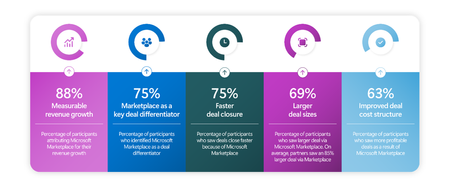
Ready to stop guessing how to monetize your offer? Skip right to App Advisor Software development companies are building faster than ever. But when it comes to sales, the key to monetization happens early. Monetization, packaging, and operational execution helps determine whether your AI solution becomes a growth engine on Microsoft Marketplace. New data reinforces the opportunity. According to Omdia research highlighted in Microsoft’s blog on the partner revenue opportunity: 88% of partners selling through Marketplace report revenue growth, 75% close deals faster, 69% secure larger deals, 60% agree Marketplace improved their deal structure. The Omdia study found that among partners that sell through Marketplace (compared to direct go-to-market and sales motions), they saw incredible gains with Marketplace. The opportunity is clear. The question is how to capture it consistently. How the AI app and agent monetization checklist helps The time to think about sales is when you’re building, not just when you hit “publish” on an offer. That’s why the Microsoft Marketplace Monetization Checklist for SaaS and Container Offers was created as part of the AI envisioning sessions. It gives your team a structured, practical framework to move from idea to revenue with confidence. A solution can offer immense value, but because monetization decisions are made too late, it can perform worse than expected. Pricing models, packaging tiers, metering accuracy, and subscription flows are often bolted on after architecture is finalized. The checklist changes that. It organizes monetization strategy around the five pillars of the Well-Architected Framework so that revenue design and technical design stay aligned. This checklist is also featured in App Advisor Build and Publish stage, so that you don’t miss a single step along the way. This ensures your offer is: Secure and enterprise-ready, Reliable across subscription lifecycle events, Cost-optimized for margin protection, Performance-aligned to your pricing model, Operationally structured for scale. Instead of guessing, you follow a clear path. Monetizing your offer the right way While designed for Saas and Azure Container offers, this checklist can be helpful for any offer. It guides you through key decisions that directly impact growth: Define your revenue model early during design, not after deployment, Model cost of goods sold against pricing tiers to protect margin, Package plans intentionally (Starter, Pro, Enterprise) to drive upsell, Implement secure licensing and Marketplace API validation to prevent revenue leakage, Optimize trial-to-paid conversion with structured upgrade paths. The checklist also reinforces operational execution with best practices for both SaaS and Azure Container offers. The result: an offer built for revenue, not just deployment. From build to publish to monetization on Microsoft Marketplace Building a great app or agent for your customers is the goal, but scaling your sales helps you grow. You’re not just publishing an offer, you’re building: A pricing strategy aligned to architecture, A subscription model aligned to customer value, An operational model aligned to Marketplace growth. This is how your company can turn Marketplace from a just listing platform into a revenue multiplier. Ready to monetize apps and agents on Microsoft Marketplace? You don’t have to guess how to grow. Use these resources to monetize your app or agent and get world-class Microsoft best practices, curated for you: Download the Marketplace Monetization Checklist, See the opportunity for your revenue growth in App Advisor, Watch sessions with experts by signing up for the AI Envisioning sessions.76Views6likes0CommentsBuilding HIPAA-Compliant Medical Transcription with Local AI
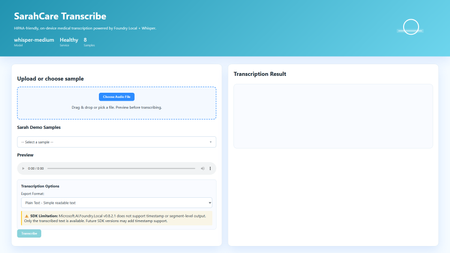
Building HIPAA-Compliant Medical Transcription with Local AI Introduction Healthcare organizations generate vast amounts of spoken content, patient consultations, research interviews, clinical notes, medical conferences. Transcribing these recordings traditionally requires either manual typing (time-consuming and expensive) or cloud transcription services (creating immediate HIPAA compliance concerns). Every audio file sent to external APIs exposes Protected Health Information (PHI), requires Business Associate Agreements, creates audit trails on third-party servers, and introduces potential breach vectors. This sample solution lies in on-premises voice-to-text systems that process audio entirely locally, never sending PHI beyond organizational boundaries. This article demonstrates building a sample medical transcription application using FLWhisper, ASP.NET Core, C#, and Microsoft Foundry Local with OpenAI Whisper models. You'll learn how to build sample HIPAA-compliant audio processing, integrate Whisper models for medical terminology accuracy, design privacy-first API patterns, and build responsive web UIs for healthcare workflows. Whether you're developing electronic health record (EHR) integrations, building clinical research platforms, or implementing dictation systems for medical practices, this sample could be a great starting point for privacy-first speech recognition. Why Local Transcription Is Critical for Healthcare Healthcare data handling is fundamentally different from general business data due to HIPAA regulations, state privacy laws, and professional ethics obligations. Understanding these requirements explains why cloud transcription services, despite their convenience, create unacceptable risks for medical applications. HIPAA compliance mandates strict controls over PHI. Every system that touches patient data must implement administrative, physical, and technical safeguards. Cloud transcription APIs require Business Associate Agreements (BAAs), but even with paperwork, you're entrusting PHI to external systems. Every API call creates logs on vendor servers, potentially in multiple jurisdictions. Data breaches at transcription vendors expose patient information, creating liability for healthcare organizations. On-premises processing eliminates these third-party risks entirely, PHI never leaves your controlled environment. US State laws increasingly add requirements beyond HIPAA. California's CCPA, New York's SHIELD Act, and similar legislation create additional compliance obligations. International regulations like GDPR prohibit transferring health data outside approved jurisdictions. Local processing simplifies compliance by keeping data within organizational boundaries. Research applications face even stricter requirements. Institutional Review Boards (IRBs) often require explicit consent for data sharing with external parties. Cloud transcription may violate study protocols that promise "no third-party data sharing." Clinical trials in pharmaceutical development handle proprietary information alongside PHI, double jeopardy for data exposure. Local transcription maintains research integrity while enabling audio analysis. Cost considerations favor local deployment at scale. Medical organizations generate substantial audio, thousands of patient encounters monthly. Cloud APIs charge per minute of audio, creating significant recurring costs. Local models have fixed infrastructure costs that scale economically. A modest GPU server can process hundreds of hours monthly at predictable expense. Latency matters for clinical workflows. Doctors and nurses need transcriptions available immediately after patient encounters to review and edit while details are fresh. Cloud APIs introduce network delays, especially problematic in rural health facilities with limited connectivity. Local inference provides <1 second turnaround for typical consultation lengths. Application Architecture: ASP.NET Core with Foundry Local The sample FLWhisper application implements clean separation between audio handling, AI inference, and state management using modern .NET patterns: The ASP.NET Core 10 minimal API provides HTTP endpoints for health checks, audio transcription, and sample file streaming. Minimal APIs reduce boilerplate while maintaining full middleware support for error handling, authentication, and CORS. The API design follows OpenAI's transcription endpoint specification, enabling drop-in replacement for existing integrations. The service layer encapsulates business logic: FoundryModelService manages model loading and lifetime, TranscriptionService handles audio processing and AI inference, and SampleAudioService provides demonstration files for testing. This separation enables easy testing, dependency injection, and service swapping. Foundry Local integration uses the Microsoft.AI.Foundry.Local.WinML SDK. Unlike cloud APIs requiring authentication and network calls, this SDK communicates directly with the local Foundry service via in-process calls. Models load once at startup, remaining resident in memory for sub-second inference on subsequent requests. The static file frontend delivers vanilla HTML/CSS/JavaScript, no framework overhead. This simplicity aids healthcare IT security audits and enables deployment on locked-down hospital networks. The UI provides file upload, sample selection, audio preview, transcription requests, and result display with copy-to-clipboard functionality. Here's the architectural flow for transcription requests: Web UI (Upload Audio File) ↓ POST /v1/audio/transcriptions (Multipart Form Data) ↓ ASP.NET Core API Route ↓ TranscriptionService.TranscribeAudio(audioStream) ↓ Foundry Local Model (Whisper Medium locally) ↓ Text Result + Metadata (language, duration) ↓ Return JSON/Text Response ↓ Display in UI This architecture embodies several healthcare system design principles: Data never leaves the device: All processing occurs on-premises, no external API calls No data persistence by default: Audio and transcripts are session-only, never saved unless explicitly configured Comprehensive health checks: System readiness verification before accepting PHI Audit logging support: Structured logging for compliance documentation Graceful degradation: Clear error messages when models unavailable rather than silent failures Setting Up Foundry Local with Whisper Models Foundry Local supports multiple Whisper model sizes, each with different accuracy/speed tradeoffs. For medical transcription, accuracy is paramount—misheard drug names or dosages create patient safety risks: # Install Foundry Local (Windows) winget install Microsoft.FoundryLocal # Verify installation foundry --version # Download Whisper Medium model (optimal for medical accuracy) foundry model add openai-whisper-medium-generic-cpu:1 # Check model availability foundry model list Whisper Medium (769M parameters) provides the best balance for medical use. Smaller models (Tiny, Base) miss medical terminology frequently. Larger models (Large) offer marginal accuracy gains at 3x inference time. Medium handles medical vocabulary well, drug names, anatomical terms, procedure names, while processing typical consultation audio (5-10 minutes) in under 30 seconds. The application detects and loads the model automatically: // Services/FoundryModelService.cs using Microsoft.AI.Foundry.Local.WinML; public class FoundryModelService { private readonly ILogger _logger; private readonly FoundryOptions _options; private ILocalAIModel? _loadedModel; public FoundryModelService( ILogger logger, IOptions options) { _logger = logger; _options = options.Value; } public async Task InitializeModelAsync() { try { _logger.LogInformation( "Loading Foundry model: {ModelAlias}", _options.ModelAlias ); // Load model from Foundry Local _loadedModel = await FoundryClient.LoadModelAsync( modelAlias: _options.ModelAlias, cancellationToken: CancellationToken.None ); if (_loadedModel == null) { _logger.LogWarning("Model loaded but returned null instance"); return false; } _logger.LogInformation( "Successfully loaded model: {ModelAlias}", _options.ModelAlias ); return true; } catch (Exception ex) { _logger.LogError( ex, "Failed to load Foundry model: {ModelAlias}", _options.ModelAlias ); return false; } } public ILocalAIModel? GetLoadedModel() => _loadedModel; public async Task UnloadModelAsync() { if (_loadedModel != null) { await FoundryClient.UnloadModelAsync(_loadedModel); _loadedModel = null; _logger.LogInformation("Model unloaded"); } } } Configuration lives in appsettings.json , enabling easy customization without code changes: { "Foundry": { "ModelAlias": "whisper-medium", "LogLevel": "Information" }, "Transcription": { "MaxAudioDurationSeconds": 300, "SupportedFormats": ["wav", "mp3", "m4a", "flac"], "DefaultLanguage": "en" } } Implementing Privacy-First Transcription Service The transcription service handles audio processing while maintaining strict privacy controls. No audio or transcript persists beyond the HTTP request lifecycle unless explicitly configured: // Services/TranscriptionService.cs public class TranscriptionService { private readonly FoundryModelService _modelService; private readonly ILogger _logger; public async Task TranscribeAudioAsync( Stream audioStream, string originalFileName, TranscriptionOptions? options = null) { options ??= new TranscriptionOptions(); var startTime = DateTime.UtcNow; try { // Validate audio format ValidateAudioFormat(originalFileName); // Get loaded model var model = _modelService.GetLoadedModel(); if (model == null) { throw new InvalidOperationException("Whisper model not loaded"); } // Create temporary file (automatically deleted after transcription) using var tempFile = new TempAudioFile(audioStream); // Execute transcription _logger.LogInformation( "Starting transcription for file: {FileName}", originalFileName ); var transcription = await model.TranscribeAsync( audioFilePath: tempFile.Path, language: options.Language, cancellationToken: CancellationToken.None ); var duration = (DateTime.UtcNow - startTime).TotalSeconds; _logger.LogInformation( "Transcription completed in {Duration:F2}s", duration ); return new TranscriptionResult { Text = transcription.Text, Language = transcription.Language ?? options.Language, Duration = transcription.AudioDuration, ProcessingTimeSeconds = duration, FileName = originalFileName, Timestamp = DateTime.UtcNow }; } catch (Exception ex) { _logger.LogError( ex, "Transcription failed for file: {FileName}", originalFileName ); throw; } } private void ValidateAudioFormat(string fileName) { var extension = Path.GetExtension(fileName).TrimStart('.'); var supportedFormats = new[] { "wav", "mp3", "m4a", "flac", "ogg" }; if (!supportedFormats.Contains(extension.ToLowerInvariant())) { throw new ArgumentException( $"Unsupported audio format: {extension}. " + $"Supported: {string.Join(", ", supportedFormats)}" ); } } } // Temporary file wrapper that auto-deletes internal class TempAudioFile : IDisposable { public string Path { get; } public TempAudioFile(Stream sourceStream) { Path = System.IO.Path.GetTempFileName(); using var fileStream = File.OpenWrite(Path); sourceStream.CopyTo(fileStream); } public void Dispose() { try { if (File.Exists(Path)) { File.Delete(Path); } } catch { // Ignore deletion errors in temp folder } } } This service demonstrates several privacy-first patterns: Temporary file lifecycle management: Audio written to temp storage, automatically deleted after transcription No implicit persistence: Results returned to caller, not saved by service Format validation: Accept only supported audio formats to prevent processing errors Comprehensive logging: Audit trail for compliance without logging PHI content Error isolation: Exceptions contain diagnostic info but no patient data Building the OpenAI-Compatible REST API The API endpoint mirrors OpenAI's transcription API specification, enabling existing integrations to work without modifications: // Program.cs var builder = WebApplication.CreateBuilder(args); // Configure services builder.Services.Configure( builder.Configuration.GetSection("Foundry") ); builder.Services.AddSingleton(); builder.Services.AddScoped(); builder.Services.AddHealthChecks() .AddCheck("foundry-health"); var app = builder.Build(); // Load model at startup var modelService = app.Services.GetRequiredService(); await modelService.InitializeModelAsync(); app.UseHealthChecks("/health"); app.MapHealthChecks("/api/health/status"); // OpenAI-compatible transcription endpoint app.MapPost("/v1/audio/transcriptions", async ( HttpRequest request, TranscriptionService transcriptionService, ILogger logger) => { if (!request.HasFormContentType) { return Results.BadRequest(new { error = "Content-Type must be multipart/form-data" }); } var form = await request.ReadFormAsync(); // Extract audio file var audioFile = form.Files.GetFile("file"); if (audioFile == null || audioFile.Length == 0) { return Results.BadRequest(new { error = "Audio file required in 'file' field" }); } // Parse options var format = form["format"].ToString() ?? "text"; var language = form["language"].ToString() ?? "en"; try { // Process transcription using var stream = audioFile.OpenReadStream(); var result = await transcriptionService.TranscribeAudioAsync( audioStream: stream, originalFileName: audioFile.FileName, options: new TranscriptionOptions { Language = language } ); // Return in requested format if (format == "json") { return Results.Json(new { text = result.Text, language = result.Language, duration = result.Duration }); } else { // Default: plain text return Results.Text(result.Text); } } catch (Exception ex) { logger.LogError(ex, "Transcription request failed"); return Results.StatusCode(500); } }) .DisableAntiforgery() // File uploads need CSRF exemption .WithName("TranscribeAudio") .WithOpenApi(); app.Run(); Example API usage: # PowerShell $audioFile = Get-Item "consultation-recording.wav" $response = Invoke-RestMethod ` -Uri "http://localhost:5192/v1/audio/transcriptions" ` -Method Post ` -Form @{ file = $audioFile; format = "json" } Write-Output $response.text # cURL curl -X POST http://localhost:5192/v1/audio/transcriptions \ -F "file=@consultation-recording.wav" \ -F "format=json" Building the Interactive Web Frontend The web UI provides a user-friendly interface for non-technical medical staff to transcribe recordings: SarahCare Medical Transcription The JavaScript handles file uploads and API interactions: // wwwroot/app.js let selectedFile = null; async function checkHealth() { try { const response = await fetch('/health'); const statusEl = document.getElementById('status'); if (response.ok) { statusEl.className = 'status-badge online'; statusEl.textContent = '✓ System Ready'; } else { statusEl.className = 'status-badge offline'; statusEl.textContent = '✗ System Unavailable'; } } catch (error) { console.error('Health check failed:', error); } } function handleFileSelect(event) { const file = event.target.files[0]; if (!file) return; selectedFile = file; // Show file info const fileInfo = document.getElementById('fileInfo'); fileInfo.textContent = `Selected: ${file.name} (${formatFileSize(file.size)})`; fileInfo.classList.remove('hidden'); // Enable audio preview const preview = document.getElementById('audioPreview'); preview.src = URL.createObjectURL(file); preview.classList.remove('hidden'); // Enable transcribe button document.getElementById('transcribeBtn').disabled = false; } async function transcribeAudio() { if (!selectedFile) return; const loadingEl = document.getElementById('loadingIndicator'); const resultEl = document.getElementById('resultSection'); const transcribeBtn = document.getElementById('transcribeBtn'); // Show loading state loadingEl.classList.remove('hidden'); resultEl.classList.add('hidden'); transcribeBtn.disabled = true; try { const formData = new FormData(); formData.append('file', selectedFile); formData.append('format', 'json'); const startTime = Date.now(); const response = await fetch('/v1/audio/transcriptions', { method: 'POST', body: formData }); if (!response.ok) { throw new Error(`HTTP ${response.status}: ${response.statusText}`); } const result = await response.json(); const processingTime = ((Date.now() - startTime) / 1000).toFixed(1); // Display results document.getElementById('transcriptionText').value = result.text; document.getElementById('resultDuration').textContent = `Duration: ${result.duration.toFixed(1)}s`; document.getElementById('resultLanguage').textContent = `Language: ${result.language}`; resultEl.classList.remove('hidden'); console.log(`Transcription completed in ${processingTime}s`); } catch (error) { console.error('Transcription failed:', error); alert(`Transcription failed: ${error.message}`); } finally { loadingEl.classList.add('hidden'); transcribeBtn.disabled = false; } } function copyToClipboard() { const text = document.getElementById('transcriptionText').value; navigator.clipboard.writeText(text) .then(() => alert('Copied to clipboard')) .catch(err => console.error('Copy failed:', err)); } // Initialize window.addEventListener('load', () => { checkHealth(); loadSamplesList(); }); Key Takeaways and Production Considerations Building HIPAA-compliant voice-to-text systems requires architectural decisions that prioritize data privacy over convenience. The FLWhisper application demonstrates that you can achieve accurate medical transcription, fast processing times, and intuitive user experiences entirely on-premises. Critical lessons for healthcare AI: Privacy by architecture: Design systems where PHI never exists outside controlled environments, not as a configuration option No persistence by default: Audio and transcripts should be ephemeral unless explicitly saved with proper access controls Model selection matters: Whisper Medium provides medical terminology accuracy that smaller models miss Health checks enable reliability: Systems should verify model availability before accepting PHI Audit logging without content logging: Track operations for compliance without storing sensitive data in logs For production deployment in clinical settings, integrate with EHR systems via HL7/FHIR interfaces. Implement role-based access control with Active Directory integration. Add digital signatures for transcript authentication. Configure automatic PHI redaction using clinical NLP models. Deploy on HIPAA-compliant infrastructure with proper physical security. Implement comprehensive audit logging meeting compliance requirements. The complete implementation with ASP.NET Core API, Foundry Local integration, sample audio files, and comprehensive tests is available at github.com/leestott/FLWhisper. Clone the repository and follow the setup guide to experience privacy-first medical transcription. Resources and Further Reading FLWhisper Repository - Complete C# implementation with .NET 10 Quick Start Guide - Installation and usage instructions Microsoft Foundry Local Documentation - SDK reference and model catalog OpenAI Whisper Documentation - Model architecture and capabilities HIPAA Compliance Guidelines - HHS official guidance Testing Guide - Comprehensive test suite documentation