ai
95 TopicsIntroducing the Logic Apps local CLI: develop Standard workflows from your terminal
We're introducing the public preview of the Logic Apps Standard extension for the Azure command-line interface (CLI). It brings local project creation, connector discovery, connection configuration, runtime management, and execution diagnostics into az logicapp . Why a CLI for Logic Apps Standard? The designer remains useful for understanding and editing workflows visually. The CLI gives you another interface to the development work around that workflow: checking dependencies, discovering operations, validating definitions, starting the local host, and inspecting runs without switching tools at every step. You can use those commands yourself, put them in a script, or let a coding agent invoke them with your approval. Existing Azure CLI app-management and app-settings commands remain a separate part of the same CLI surface. This extension adds Standard developer workflows; it doesn't replace the designer or reinterpret existing resource-management commands. Your coding agent needs more than workflow JSON A coding agent can propose a plausible connector action. Plausible isn't authoritative. The operation identifier, required inputs, and authentication parameters need to come from the connector catalog for your target, not from the agent's recollection of a similar example. That's where deterministic tools matter. The CLI gives the agent a defined operation to execute and evidence to inspect: discover the connector, read its operation schema, author the workflow, validate it, then examine execution results. It reduces guesswork and avoids making the agent reconstruct platform calls it doesn't have available by default. The CLI doesn't make the agent's decisions deterministic, and a successful command doesn't prove your business process is correct. You still review the workflow and its effects. But now that review is grounded on the same type of information the extension and runtime's have. Install the public preview The preview package is logicapp version 1.0.0b1 . It declares Azure CLI 2.67.0 or later and Python 3.10 or later for the interpreter hosting Azure CLI. Install it through the public Azure CLI extension mechanism: az extension add --name logicapp --allow-preview true az extension show --name logicapp --query version --output tsv az logicapp --help For later releases, use az extension update --name logicapp --allow-preview true . Local runtime dependencies are separate from extension installation. What can you do with the extension? The preview registers 59 extension-owned commands. Every group below follows az logicapp ; inherited core commands aren't included. Group Commands Purpose project create Scaffold a local Standard project. context create, use, list, show, update, delete Save target coordinates. workflow create, validate, list, show, export, set, delete, enable, disable Author, inspect, and manage workflows. dependency check, install, uninstall Manage supported local tools. runtime doctor, start, show, stop Diagnose and operate local hosts. connector , connector operation list, show in each Discover runtime connectors and operations. connector managed , connector managed operation list, show in each Discover regional managed APIs. connection create, list, show, test, delete Create local service-provider wiring; inspect and manage deployed connections. connection managed create Create, authorize, and wire a deployed managed connection. connection acl list, show, add, remove Manage connection access policies. identity assign, show, remove Manage deployed app identities. run start, list, show, wait, cancel, resubmit Invoke, observe, and control supported executions. run action list, show, show-content Inspect action results. trigger history resubmit Replay an exact retained trigger event. deployment package Build a deterministic ZIP. test create, plan, run Scaffold, plan, and execute tests, with limitations described below. test results show Inspect test results. Walkthrough: save email attachments to Blob Storage Use Office 365 Outlook as the managed connector and Azure Blob Storage as the in-process service-provider connector. The workflow runs on your workstation; the mailbox, managed connection, and storage account remain in Azure and Microsoft 365. Local doesn't mean offline. Use a test mailbox, a storage container, and an existing non-production Standard app with an assigned identity and valid connections.json . You need permissions for connection creation, consent, access policies, and storage data access. The PowerShell examples use placeholders: replace them before execution. Don't run them against production. 1. Create the project and check the environment From a new solution directory, keep the host under app and create a sibling artifacts folder for exports and packages. az logicapp project create --path .\app --workflow save-attachments --workflow-kind Stateful az logicapp context create --name attachments-local --path .\app --port 7071 --use az logicapp dependency check --path .\app az logicapp runtime doctor --path .\app --port 7071 Install only missing supported tools with dependency install --kind <kind> . The command doesn't install the .NET SDK. Read the doctor's findings: exit code 2 can mean compatibility is unknown, not that everything needs reinstalling. Contexts save coordinates, not your Azure subscription or credentials. 2. Discover both connector catalogs Use az login and check az account show before querying the Azure catalog. These are standard Azure CLI commands. az logicapp runtime start --path .\app --port 7071 --background --ready-timeout 90 az logicapp runtime show --port 7071 az logicapp connector list --local --port 7071 az logicapp connector show --local --port 7071 --connector "<blob-connector-id>" az logicapp connector operation list --local --port 7071 --connector "<blob-connector-id>" --search "upload" az logicapp connector managed show --location "<region>" --connector office365 az logicapp connector managed operation list --location "<region>" --connector office365 --kind trigger az logicapp connector managed operation show --location "<region>" --connector office365 --operation OnNewEmailV3 az logicapp connector operation show --local --port 7071 --connector "<blob-connector-id>" --operation uploadBlob Take the Blob connector identifier from connector list . Runtime catalogs describe the service provider; the regional managed catalog describes Outlook. They aren't interchangeable. Use each family's operation show command to inspect the selected operation before authoring it. This is a useful agent task: "Read both connector schemas. Identify an email trigger, attachment retrieval, and Blob upload. Show me the required inputs and authentication before changing the workflow." The Outlook reference documents attachment retrieval through GetAttachment_V2 ; the Blob service-provider reference documents uploadBlob . 3. Create Outlook access, then wire the local project Stop the discovery host with az logicapp runtime stop --port 7071 before changing settings. Then create the managed connection: az logicapp connection managed create --resource-group "<group>" --logic-app-name "<nonproduction-app>" --name outlook-local --connector office365 --location "<region>" --auth-mode oauth az ad signed-in-user show --query id --output tsv az logicapp connection acl add --resource-group "<group>" --connection outlook-local --object-id "<developer-object-id>" --tenant-id "<tenant-id>" Approve mailbox consent in the browser. Creation also adds the app's access policy and changes the deployed app's connection wiring. The additional policy authorizes your local developer principal. These are real Azure changes, even though the example workflow stays local. Failed creation can retain resources; inspect them and the wiring before retrying. The CLI doesn't write local managed-connector wiring. Read the created entry with connection show against that app and deliberately use --show-runtime-urls for this setup step. Manually merge its API identifier, connection identifier, runtime endpoint, and ManagedServiceIdentity authentication into the local managedApiConnections.outlook-local entry. Keep the runtime endpoint in a private app setting, referenced with @appsetting('OUTLOOK_RUNTIME_URL') ; don't paste returned URLs into the post or shared logs. The documented local identity feature requires the Standard VS Code extension 5.961.19 or later and workflow bundle 1.165.52 or later. Merge this value into both the project's local.settings.json and its workflow-designtime\local.settings.json , preserving existing settings: "WORKFLOWS_AUTHENTICATION_METHOD": "managedServiceIdentity" After completing the connection configuration, start the local runtime as shown in step 5 so it loads the updated settings. Make sure the local runtime authenticates as the developer identity you granted access to the managed connection. 4. Configure Blob access without an account key Read the service provider's managed-identity parameter set and endpoint parameter from discovery. Don't reuse the managed Blob connector's parameter-set name. Substitute those discovered values in this local wiring command: az logicapp connection create --path .\app --name blob-local --connector "<blob-connector-id>" --parameter-set "<discovered-identity-set>" --% --parameter "<endpoint-parameter>=@appsetting('BLOB_ENDPOINT')" authProvider.Type=ManagedServiceIdentity --app-setting BLOB_ENDPOINT=https://<storage-account>.blob.core.windows.net Keep this PowerShell command on one line. The --% marker preserves the app-setting expression through az.cmd ; variables don't expand after it. Review the discovered identity fields before using the command. Grant the local developer Storage Blob Data Contributor at the intended container scope, using your approved Azure role-assignment process. In Azure, grant the app's managed identity its own required access. A workstation doesn't impersonate that identity, and assigning an identity to an app doesn't grant storage permissions. 5. Author and validate the workflow Replace the scaffold's starter definition with Outlook's polling When a new email arrives (V3) trigger, OnNewEmailV3 , an attachment loop, GetAttachment_V2 , and the Blob upload action. Configure the trigger's recurrence and message splitting from its schema. Bind Outlook operations to outlook-local and Blob operations to blob-local . Set includeAttachments to false and retrieve attachments separately. Map each message and attachment identifier explicitly. For uploadBlob , supply containerName , blobName , and content . Decode Outlook's base64 contentBytes before writing binary content; use a unique blob name so repeated filenames don't overwrite unrelated attachments. These are workflow-authoring decisions, not generated business logic from the CLI. For an attachment action named Get_attachment , the upload content expression is @base64ToBinary(body('Get_attachment')?['contentBytes']) . Match action names to your authored definition. Validate offline, restart with the new settings, then validate against that host: az logicapp workflow validate --path .\app --workflow save-attachments az logicapp runtime start --path .\app --port 7071 --background --ready-timeout 90 az logicapp runtime show --port 7071 az logicapp workflow validate --path .\app --all --with-runtime --local --port 7071 Check that the host is running, readiness.managementEndpointReachable is true, and the workflow is registered. Validation doesn't establish connector authorization or business correctness. Static reference warnings can remain after runtime validation and block --fail-on-warning ; don't remove configuration references to manufacture a pass. 6. Send a test email and inspect the run Send a synthetic email with one harmless attachment. Identify the matching execution by timing and message correlation, not by assuming the newest run is yours. az logicapp run list --local --port 7071 --workflow save-attachments --max-items 10 --query "value[].{runId:runId,status:status,startTime:startTime}" --output table az logicapp run wait --local --port 7071 --workflow save-attachments --run-id "<actual-run-id>" --timeout 300 az logicapp run action list --local --port 7071 --workflow save-attachments --run-id "<actual-run-id>" az logicapp run action show-content --local --port 7071 --workflow save-attachments --run-id "<actual-run-id>" --action "<actual-action-name>" --max-bytes 16384 For Stateful runs, run wait exits 0 only after observing success. Its timeout doesn't cancel execution. If outputs are absent, use run action show for failure metadata. Bounded content can still contain private data. Verify the saved blob's bytes independently; a green status isn't an attachment-integrity check. 7. Stop and package az logicapp runtime stop --port 7071 az logicapp deployment package --path .\app --output-path .\artifacts\attachments.zip Verify shutdown, including unshared CLI-owned Azurite processes. Review the package manifest and ZIP: exclude local settings, design-time files, editor content, reports, and private fixtures through .funcignore . Don't confuse it with .gitignore . Packaging is deterministic archive creation, not validation, deployment, or a guarantee that no secrets exist. Add the Logic Apps skill to GitHub Copilot The azure-logic-apps-standard-cli skill is now available on Awesome Copilot. It gives Copilot procedures for using the CLI: inspect the project first, discover connector schemas, preserve existing layouts, prefer managed identity for new connections, and distinguish validation from actual execution. It covers Logic Apps Standard, not Consumption-only development. Install the complete skill package With GitHub CLI 2.90.0 or later, preview the skill and review its bundled references before installing. The following commands install it for your personal Copilot use across projects: gh skill preview github/awesome-copilot azure-logic-apps-standard-cli gh skill install github/awesome-copilot azure-logic-apps-standard-cli --agent github-copilot --scope user For a repository-specific installation, run the install command from that repository with --scope project instead. The installer places the package in the appropriate skills directory. Alternatively, download the complete skill folder and place it under .github\skills in your repository or .copilot\skills in your home directory. Keep SKILL.md , README.md , and all five references files together; copying only SKILL.md leaves required procedures unavailable. The skill is guidance, not the Azure CLI extension or a runtime installer. Install the extension separately as described above; runtime and test dependencies still need their own checks and approval. Use it in Copilot CLI Start copilot from your project directory. If a session is already open, reload skills, then check that the package is available: /skills reload /skills info azure-logic-apps-standard-cli Copilot can select relevant skills automatically. To request this one explicitly, name it in your prompt: Use the /azure-logic-apps-standard-cli skill to inspect this existing Standard project and validate its workflows offline. Preserve its layout, workflow kinds, and authentication. Do not start a host, install dependencies, or access Azure. Report any checks you cannot complete. To approach the attachment walkthrough with Copilot, begin with a plan rather than authorizing every operation at once: Use the /azure-logic-apps-standard-cli skill to plan an Outlook-to-Blob workflow for this project. Identify the connector discovery steps, authentication requirements, and permissions needed. Separate offline work from host startup and Azure changes, and wait for approval before those operations. Review proposed commands and their effects before approving them. The skill requires operation-specific bundled procedures and explicit authorization for cloud changes, replay, and native-test prerequisites; it doesn't replace Copilot's permission controls or prove that a workflow works. See GitHub's Copilot CLI skills guide for installation and usage details. Beyond this walkthrough Use workflow list/show/export against a running host to inspect or save a definition. Against Azure, connection list/show/test , connection acl list , and identity show expose wiring and access. A connection with no available test remains unverified. For compatible callable triggers, run start invokes a workflow; it doesn't manufacture an incoming Outlook email. Cancellation and replay are explicit operations with external effects. Guarded workflow replacement and state changes also need deliberate approval; they aren't transactional shortcuts. Before you build: preview realities and what comes next Commands and outputs can change during preview. Testing commands already provide scaffolding, planning, approved SDK execution, and result inspection, but the current SDK/engine combination has a reported typed-output limitation. They aren't part of this walkthrough. Proposed improvements include testing, local connection inspection, trigger/history discovery, and managed-connection deployment export. These are areas of work, not delivery commitments or commands you can use today. Try it with a workflow you know Take a non-production workflow and ask your coding agent to discover its connectors before editing it. Compare the proposal with the catalog, then inspect the actual execution. If a command is missing or the results don't help you diagnose a failure, tell us which step broke and what you needed instead. Giving us feedback early will help us getting the features ready to you faster!🆕Orchestrate Foundry Prompt and Hosted Agents with Logic Apps Automation
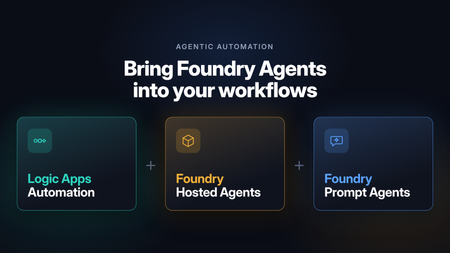
Microsoft Foundry is retiring workflows on December 1, 2026. After that date, the visual workflow designer and running workflows in the Foundry portal won’t be supported. For business process automation that combines deterministic steps with AI reasoning, the Foundry migration guide recommends Azure Logic Apps. Logic Apps is especially well suited to building these processes visually: Foundry agents become steps in a workflow, running alongside built-in actions, APIs, and MCP servers in the same run. Beyond the migration, there’s a broader question many teams face once an agent is working. Most agents start out as interactive, chat-based experiences: a person asks, and the agent responds. Putting that same agent to work in a business process means it has to run autonomously, started by an API call or an event instead of a person, running in the background and at scale. It also has to fit alongside the deterministic steps the process already depends on, such as gathering data before the agent runs and validating and acting on its output afterward. With support for Foundry Prompt Agents and Foundry Hosted Agents, Azure Logic Apps Automation gives you a direct way to do this. Any agent you’ve built in Foundry can become a step in a workflow. It can be started by an API call, a schedule, or an event from one of 1,400+ connectors, run in the background at scale, and sit between the deterministic steps that come before and after it. Before we get to the workflow side, here’s a quick look at the two agent types. If you want the full picture, the Foundry Agent Service overview compares them in detail. What are Foundry Prompt Agents A Prompt Agent is an agent you configure rather than code. You write instructions, pick a model, attach tools, and Foundry runs it. There’s nothing to deploy and no scaling to think about. It can use the Foundry model and tool catalogs, including knowledge sources like Azure AI Search and Foundry IQ. You pay for the tokens and tool calls it uses, with no separate platform charge. If you can write down what the agent should do and which tools it needs, a Prompt Agent will usually do the job, and it’s the quickest way to get something working. The prompt agent quickstart walks through building one. What are Foundry Hosted Agents A Hosted Agent is your own agent code, packaged as a container and run on Microsoft Foundry Agent Service. You can build it with Microsoft Agent Framework, LangGraph, the OpenAI Agents SDK, or your own code. Foundry handles the hosting and scaling. Since it’s your code, you decide how the agent loop works. Each session gets its own isolated sandbox with the CPU and memory you choose, and files and state persist between turns. Each Hosted Agent also gets its own Microsoft Entra agent identity, so you can see and audit what it does like any other identity in your tenant. Hosted Agents use the same models and tools as Prompt Agents. On top of tokens and tool calls, you pay for the compute they use (vCPU and memory hours). You can read more about how Hosted Agents work. A simple way to choose: start with a Prompt Agent. Move to a Hosted Agent when you need custom code or custom orchestration or want to bring your own code and framework. Orchestrate Foundry agents with Logic Apps workflows An agent in Foundry runs when someone or something calls it. Most business processes start somewhere else: an email comes in, a ticket is opened, a file lands in SharePoint, or a schedule fires. They usually end somewhere else too, with a record updated or someone getting a message. Logic Apps covers both ends and everything in between: a trigger to start the agent, deterministic steps around it, and branching, retries, timeouts, and parallel branches for the agent call. The next two sections show what that looks like. Every run shows up in run history, with the inputs, what the agent returned, and what happened next. When something goes wrong, you can see exactly where. The Learn article on automating Foundry agents with workflows covers the setup step by step. Run agents autonomously from any trigger The simplest setup is a trigger, an agent, and an action. Say a support email arrives in Outlook. The workflow sends it to a Prompt Agent that classifies it and drafts a reply, then creates a ticket with the result. This runs every time an email arrives, with no one starting it. Schedules work the same way. A recurrence trigger could call a Hosted Agent every Monday to go through last week’s data and post a summary in Teams. Mix agentic reasoning with deterministic steps Most processes are largely rule-based, with a step or two that needs adaptive reasoning or a decision. In Logic Apps you use an agent for those steps and keep everything else as deterministic steps. Before the agent runs, collect what it needs. Look up the customer in your CRM, pull the contract from SharePoint, or query a database, and pass all of it in. After it runs, check what came back. Validate it against a schema, apply your business rules, and send anything uncertain to a person for approval. Then write the result to the right system with a connector. Use both agent types in one workflow You don’t have to pick one type of agent per process. A workflow can call a Prompt Agent for a quick classification and send only the harder cases to a Hosted Agent for a longer analysis. The workflow passes output from one agent to the next, runs agents in parallel when they don’t depend on each other, and brings the results back together. Each agent stays small, and the end-to-end logic lives in the workflow, where you can see it and change it. How to use Foundry Agents from Workflows Hosted Agent You can create Foundry Hosted Agents directly from your Logic Apps Automation application. Pick your Foundry project and model deployment, and the app takes care of identity, permissions, and readiness checks for you. In a workflow, the Foundry Hosted agent action sends the agent its instructions, task, files, and any workflow actions you’ve added as tools. It returns the agent’s final response and generated files for the next steps to use. For details, see Foundry Hosted Agents for an overview and Create and use a Foundry Hosted Agent for step-by-step setup. https://youtu.be/foN9oPu5lRE Prompt Agent You can call an existing Foundry Prompt Agent from a workflow or create a new one right from the designer . Connect to your Foundry project, then either pick an agent from the list or select Create new agent and give it a name, a model, and instructions. The agent is created and hosted in Foundry. You can also give the agent tools from Logic Apps: actions from 1,400+ connectors, built-in actions, APIs, MCP servers, and other workflows. https://youtu.be/YkM7dHzHjdM Roadmap Today, workflows can invoke Hosted Agents that you create from your Logic Apps Automation app. We’re adding support for selecting an existing Hosted Agent from your Foundry project and invoking it from a workflow. Get Started Read to automate! Start building at auto.azure.com Automation QuickStart Automation Documentation - https://auto.azure.com/docs/631Views1like0Comments💲Announcing Free Grant and Pricing for Logic Apps Automation
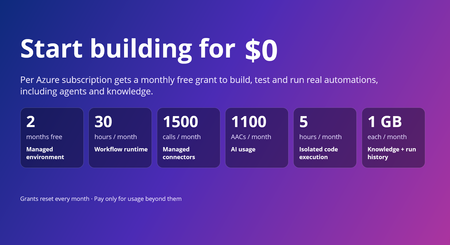
Today, we're announcing pricing for Azure Logic Apps Automation, now in public preview, along with monthly free grants that make it easier to start building, experimenting, and bringing automations to life. Logic Apps Automation is Azure's fully managed platform for business process automation and orchestration, including AI-powered automation. It's built for every builder with an automation problem, not just developers, and the free grants make it easy to go from idea to a working automation without a purchase decision up front. The free grant covers one managed environment per subscription and includes usage across key Logic Apps Automation capabilities, so you can start with your first use case, experiment with AI-powered automation, and run workloads in production within the included limits; then move to paid usage as your needs grow. Start today @ https://auto.azure.com/ Start free with monthly grants Every Azure subscription gets a monthly free grant across the platform. The only exception is Managed Environment which is a one-time free grant for first 60 days. When the usage stays within these limits you pay nothing. When it goes beyond these limits, you pay only for the additional usage. Usage Component Monthly free grant (per subscription) Core Platform Managed environment One environment, free for the first 60 days (2 months) Core Platform Workflow runtime 108,000 execution-seconds (about 30 hours) Core Platform Data retention 1 GB Optional Capabilities Managed connector calls 1,000 Standard + 500 Enterprise Optional Capabilities Knowledge storage 1 GB Optional Capabilities AI usage 1,100 AACs Optional Capabilities Isolated code execution 18,000 seconds (about 5 hours) What this means in practice Explore the platform, not a trimmed-down experience. The grants include workflow runtime, AI usage, knowledge, connectors, and sandboxed code, so you can explore every capability from day one. Build and iterate without watching the meter. With approximately 30 hours of execution time included each month, you can author, test, and run workflows as you build out your automation. Scale into paid usage as your needs grow. Grants reset every month, and you pay only for usage beyond them. Simple, usage-based pricing Beyond the included grants, Logic Apps Automation uses a pay-as-you-go pricing model across the capabilities your automations use. Billing has two parts: Core Platform: the managed environment, workflow runtime, and run-history retention that provide the foundation for your automations. Optional Capabilities: AI usage, knowledge storage, isolated code execution via sandbox and managed connectors, billed only when your workflows use them. For rates, regional pricing, and a worked monthly cost example, see Azure Logic Apps Automation pricing. How does the free grant works The free grant applies to the first environment you create in a subscription. Look for the Free tag next to an environment's name to see which is the free one Free environment period: The managed environment is free for 60 days, starting from the time you create it. Existing customers: If you already use Logic Apps Automation, create a new environment to use the free grant. The first new environment you create in your subscription receives it. Track your usage: In your environment, go to Settings and select the Free Grants tab to see your monthly limits and how much you've used. Important: Free grants are tied to the free environment. If you delete your free environment, you lose the ability to use the free grants, and you can't get them back by creating a new environment. Availability Logic Apps Automation is in public preview in Australia East, East Asia, North Central US, Southeast Asia, Sweden Central, UK South, and West US. Preview pricing and availability may change before general availability. Get started If you already have an Azure subscription, your included grants are available to help you start building today. Create your first Automation project, start from a template or with the AI workflow assistant, and explore what you can build with Logic Apps Automation. Get started with Logic Apps Automation Quickstart: build your first workflow Read the full pricing details MS Learn documentation Watch the Logic Apps Automation video series Share feedback or request a feature, or just let us know what you build with Automation!696Views0likes0Comments
Update network rules for the API Management service tag
To improve Azure API Management resiliency and scalability, we’re expanding our infrastructure and adding control-plane IP addresses. These addresses are included in the ApiManagement service tag. If you use VNet internal or VNET external with the classic (v1) tiers, check your network security groups (NSGs), user-defined routes (UDRs), and firewalls. Replace hard-coded API Management IP addresses with the service tag wherever supported. Make this change by November 30, 2026, to avoid disruption to management access. If network rules block connectivity to the management endpoint after that date, you may be unable to manage your API Management configuration—such as APIs, operations, and policies—from the Azure portal or CLI. This change affects management-plane traffic only. Runtime traffic, including API calls to your services, is not impacted. Find the ApiManagement tag in Microsoft’s Azure service tags overview or the latest Azure IP Ranges and Service Tags JSON download. If your firewall doesn’t support service tags, use the published list and keep your IP rules synchronized with its latest version. Don’t rely on a fixed, point-in-time IP list. During the transition, the service tag includes both existing and new addresses. For reference: Use API Management in an internal virtual networkLogic Apps Aviators Newsletter - September 2026
In this issue: Ace Aviator of the Month News from our product group News from our community Ace Aviator of the Month September 2026's Ace Aviator: Parth Talaviya What's your role and title? What are your responsibilities? AI-Powered Azure/.NET Solution Architect I work as an Azure/.NET Solution Architect, combining technical leadership with building a Microsoft-focused boutique company. My work mainly revolves around application modernization and migration, cloud architecture, integrations, and team leadership. I also stay hands-on with development, architecture reviews, production troubleshooting, and mentoring developers. Can you give us some insights into your day-to-day activities and what a typical day in your role looks like? My day usually starts with thinking about how we can add more value to our clients' businesses. It includes reviewing project priorities, solving technical challenges, discussing architecture, supporting developers, and collaborating with stakeholders. I mainly work across .NET, Azure, APIs, integrations, DevOps, and AI automation, so every day brings something new to learn and solve. What motivates and inspires you to be an active member of the Aviators/Microsoft community? What really motivates me is how active and supportive the Microsoft community is. People are genuinely willing to help each other, share experiences, and solve problems together. Being able to use my own experience to help someone overcome a challenge genuinely makes my day, while learning from others keeps me motivated to continuously improve. Looking back, what advice do you wish you had been given earlier that you'd now share with those looking to get into STEM/technology? You don’t have to do everything alone. In technology, especially when you are stuck on a very specific problem, it can sometimes feel that way. Asking questions, learning from the community, and collaborating with others can make a huge difference. I would also say: embrace AI early, but use it wisely. Don’t use AI only to generate code. Use it to understand concepts, challenge your thinking, explore better approaches, review your work, and become a better problem-solver. What has helped you grow professionally? Continuous learning and solving real-world challenges have helped me grow the most. Working on legacy modernization, cloud architecture, large-scale data systems, automation, and AI has taught me to think beyond writing code and understand the broader business impact. Being part of a strong technical community has also helped significantly. Whenever you are stuck, there is often someone who has faced a similar challenge and is willing to share their experience. If you had a magic wand that could create a feature in Logic Apps, what would it be and why? I would create an AI-powered Copilot troubleshooting and self-healing assistant for Logic Apps. It could analyze failed workflows, understand the execution context, identify the likely root cause, suggest a fix, and provide safe recovery options. For complex integrations, this could save significant troubleshooting time and allow developers to focus more on building solutions rather than spending hours finding where something went wrong. News from our product group Use connectors with Managed Identity in the Logic Apps Standard extension Managed Identity is Azure's built-in way to authenticate to Microsoft Entra-protected resources without storing credentials, secrets, or connection strings. Deployed Logic Apps have supported it for some time, and this post explains connector support in the Logic Apps Standard extension. Introducing dependency telemetry in Application Insights for Azure API Management policies Running API platforms at scale requires both handling load and understanding where inefficiencies occur. This post introduces dependency telemetry in Application Insights for Azure API Management policies to help teams identify performance bottlenecks. Power Azure SRE Agent with the tools it needs Azure SRE Agent is an AI-powered service designed to reduce operational toil. Teams can use it to investigate incidents, identify probable causes, and automate health-related operational work using connected tools. Give your Copilot agents real tools, without hand-wiring MCP GitHub Copilot coding agents can work independently on branches, but some tasks require access to external systems. This post shows how to equip agents with real tools without manually wiring Model Context Protocol integrations. Zonal redundancy in API management Standard v2 APIs power modern mobile experiences, microservices, AI-driven applications, and business-critical integrations. This post explains zonal redundancy in Azure API Management Standard v2 for improving resilience as customers modernize their API platforms. BizTalk Server 2020 End-of-Sale Announcement Microsoft announces that BizTalk Server 2020 and Host Integration Server 2020 sales are expected to end on March 31, 2027. Existing licensed deployments can continue to be used, while mainstream support for BizTalk Server 2020 is scheduled through April 12, 2028. An optional paid extended-mainstream support offering is planned for eligible customers through April 10, 2030, with final terms to be published later. The post recommends beginning migration planning now, evaluating Azure Logic Apps Standard or Azure Logic Apps Hybrid, inventorying dependencies, and using the Logic Apps Migration Agent to assess and convert supported workloads. Logic App Storage Inspector Logic App Storage Inspector is a read-only Kudu site extension for examining storage used by an Azure Logic App Standard application. It supports searching workflow action and trigger history by workflow, date, or text, with results exportable as CSV or JSON. Users can browse and compare workflow-definition versions, review table and queue information, and monitor health indicators and refresh status. The extension isolates access to the current Logic App site, uses asynchronous paged operations for large storage accounts, and can be installed from Kudu Site Extensions. News from our community Azure Logic Apps Automation – A Practical Infrastructure Lab with Agentic Remediation Post by João Paulo Costa João Paulo Costa tests Azure Logic Apps Automation through an after-hours virtual-machine remediation lab. The workflow uses an agent to inspect VM metadata, tags, and runtime state, then apply guardrails before deciding whether to deallocate the resource, leave it unchanged, or request review. The article contrasts agentic decision-making with deterministic workflows, documents tool and connector choices, and examines preview limitations such as runtime-state retrieval and managed-identity support. It also emphasizes constrained permissions, explicit policies, verification after actions, and negative testing for production, exemptions, missing ownership, and disabled remediation. Agentic Integration: Non-Deterministic Experience, Solid Core Post by Massimo Crippa Massimo Crippa examines whether agentic capabilities make enterprise integration non-deterministic. He separates an agent’s variable decision-making from the predictable integration layer that executes selected capabilities. The article highlights durable messaging, reliable contracts, idempotency, transactional boundaries, retries, compensation, governance, and observability as continuing requirements. It presents tools as the boundary between reasoning and execution: agents determine what should happen, while integration platforms control how operations are performed safely. Azure Logic Apps is positioned as both a deterministic integration foundation and a platform that can expose governed capabilities to emerging agentic experiences. Build AI Agents in Azure Logic Apps (Conversational + Autonomous) Video by Rafsan Huseynov Rafsan Huseynov presents a video on building conversational and autonomous AI agents with Azure Logic Apps. The session describes Logic Apps as more than a background integration layer, covering orchestration, managed identities, agent loops, and the use of workflows as MCP tools. Demonstrations explore connections with Document Intelligence, Blob Storage, Microsoft Foundry, and Copilot Studio workflows, alongside conversational and autonomous agent patterns. The video also introduces a separate low-code automation experience with scoped permissions, while noting that the demonstrations use synthetic data and that the experience remains in preview. BizTalk to Logic Apps migration (three things, everyone gets wrong) Post by Brajesh Sinha Brajesh Sinha explains why simple counts of BizTalk orchestrations and maps produce unreliable Logic Apps migration estimates. One orchestration can fan out into several Azure resources, supposedly simple maps may hide substantial transformation complexity, and operational requirements are often omitted from statements of work. The article highlights the architecture, mapping, and production-readiness effort that teams frequently underestimate. It encourages migration planners to assess actual behavior and dependencies rather than relying on inventory totals, helping create more realistic timelines, scope, and delivery expectations. Hybrid Logic Apps on RKE2: a self-managed cluster with MetalLB Post by Sonny Gillissen Sonny Gillissen demonstrates how to run Azure Logic Apps Hybrid on a self-managed RKE2 Kubernetes cluster. Because RKE2 does not include a native load balancer, the walkthrough uses MetalLB to assign the ingress IP required by the deployment. It covers creating the cluster, configuring networking, connecting the environment to Azure Arc, and handling the platform-specific details needed for Logic Apps. The article provides a practical alternative for teams evaluating hybrid integration workloads outside managed Kubernetes services, extending earlier guidance for OpenShift environments. An Introduction to Logic Apps Standard SDK Video by Marcel Medina Marcel Medina shares a Coding Night ANZ recording introducing the Logic Apps Standard SDK. The session shows how the SDK brings a modern, code-first .NET development experience to Azure Logic Apps while retaining the platform’s connectors, triggers, monitoring, and managed runtime. It is aimed at developers who want familiar tooling and stronger source-driven workflow development without giving up managed integration capabilities. The post also thanks the community for its questions and participation and provides the complete session recording for anyone who missed the live event. Managed Identity in Logic Apps Standard: A Zero Trust Read Post by Steef-Jan Wiggers Steef-Jan Wiggers examines new Managed Identity support for connectors in the Logic Apps Standard local development experience. Developers can now use a consistent authentication model from development through production instead of swapping connection strings before deployment, removing a common source of unmanaged secrets. The article frames this improvement through Zero Trust while stressing that authentication alone does not replace disciplined RBAC. A working azd sample demonstrates the setup and highlights a critical application setting whose absence causes the otherwise correctly configured connection, access policy, and role assignment to fail.738Views0likes0CommentsAI Gateway tier of Azure API Management — August 2026 updates
The August 2026 update for the AI Gateway tier (preview) of Azure API Management introduces new capabilities for observing AI workloads and governing model spend. Release highlights Richer OpenTelemetry observability: AI Gateway can now emit logs, distributed traces, token metrics, and estimated cost metrics through the OpenTelemetry Protocol. The built-in monitoring experience helps teams investigate model and MCP tool activity, policy execution, latency, errors, token consumption, and individual traces. Model cost monitoring and budget enforcement: Teams can review estimated model spend by API key and model, then use cost limit policies to set calendar-based budgets and block requests when configured limits are reached. The release also streamlines Microsoft Foundry model imports, refines provider onboarding, improves portal reliability and error guidance, expands Anthropic Messages compatibility, and adds an in-product What's new experience. For configuration guidance, important upgrade information, and the complete list of changes, read the full August 2026 release notes in the AI Gateway portal. Try the latest capabilities in the AI Gateway portal.980Views0likes0CommentsIntroducing APIOps CLI
APIOps CLI helps teams extract, version, review, preview, and publish Azure API Management configuration through source-controlled DevOps workflows. Today, we're excited to announce APIOps CLI, a new command-line experience designed to help organizations manage Azure API Management (APIM) using modern configuration-as-code and GitOps practices. As APIs become increasingly central to digital transformation, organizations need a reliable way to manage API definitions, policies, products, diagnostics, and gateway configuration across multiple environments. APIOps CLI provides a streamlined, developer-friendly approach to extract, version, review, and publish API Management configuration through familiar DevOps workflows. Why APIOps CLI? Traditional API management processes often rely on manual configuration changes, environment-specific customizations, and limited visibility into what changed and why. As API estates grow, these approaches become difficult to scale, audit, and govern. APIOps CLI addresses these challenges by enabling teams to manage API Management configuration as source-controlled artifacts. Every change can be reviewed through pull requests, tracked through Git history, and promoted consistently across development, test, and production environments. The result is improved governance, greater reliability, better collaboration between API developers and platform operators, and a simpler path toward enterprise-scale API operations. What APIOps CLI Enables APIOps CLI provides capabilities that help organizations adopt a true APIOps model: Extract API Management configuration into local artifact files Store and version configuration in Git repositories Review changes through standard pull request workflows Publish approved artifacts back into API Management environments Promote configuration consistently across environments Scaffold GitHub Actions and Azure DevOps pipelines Support automated CI/CD deployment patterns Enable auditable, repeatable API configuration management By treating API Management configuration as code, organizations gain the same operational excellence practices that software development teams have relied on for years. A Modern GitOps Workflow for APIs The APIOps CLI workflow follows a simple yet powerful pattern: Extract configuration from an existing API Management instance. Store the generated artifacts in source control. Review and approve changes through pull requests. Run automated validation and deployment pipelines. Publish approved configuration back to target API Management environments. This approach creates a clear separation between authoring, review, approval, and deployment while maintaining a complete audit trail of API platform changes. For organizations already practicing GitOps, APIOps CLI integrates naturally into existing development workflows and governance processes. Built for Real-World Enterprise Scenarios APIOps CLI is designed to support customers operating at enterprise scale. Common use cases include: Migrating away from manual API Management administration Standardizing deployments across multiple environments Establishing controlled promotion paths from development to production Implementing governance and compliance requirements Supporting platform engineering and API platform teams Managing large inventories of APIs, products, policies, and configurations Enabling self-service API development with centralized governance Whether you're operating a single API Management instance or managing a large multi-team API platform, APIOps CLI provides a foundation for consistent and repeatable operations. Integrated with Your Existing Toolchain APIOps CLI works alongside the tools teams already use: GitHub Azure DevOps Azure Pipelines GitHub Actions Azure CLI Existing Git repositories and branching strategies The tool can generate CI/CD scaffolding to accelerate adoption, helping teams move from manual operations to automated deployments with less effort. Open Source and Community Driven APIOps CLI is available as an open-source project under the Azure GitHub organization. The repository includes source code, architecture guidance, command documentation, CI/CD examples, walkthroughs, troubleshooting guidance, and reference material. By making the project open and community-driven, we are enabling customers, partners, and contributors to participate directly in the evolution of Azure API Management DevOps practices. Getting Started Getting started is straightforward: Install the APIOps CLI package. Authenticate with Azure. Extract an existing API Management instance into local artifacts. Commit those artifacts to a Git repository. Review and approve changes through pull requests. Publish approved changes back to Azure API Management. We recommend beginning with a non-production environment to establish your workflow, validate governance processes, and familiarize teams with the configuration-as-code model. Looking Ahead APIs have become a strategic asset for every organization. As API estates continue to expand, successful teams will increasingly adopt automation, governance, and GitOps practices to maintain speed without sacrificing control. APIOps CLI is an important step in that journey. It provides a modern foundation for managing Azure API Management configurations with the same rigor, automation, and reliability that organizations expect from modern software delivery practices. We invite you to explore APIOps CLI, try it in your environment, share feedback, and join us in shaping the future of API operations on Azure. Resources APIOps CLI GitHub repository: https://github.com/Azure/apiops-cli/tree/main Microsoft Learn: Manage API Management configuration with APIOps CLIZonal redundancy in API management Standard v2
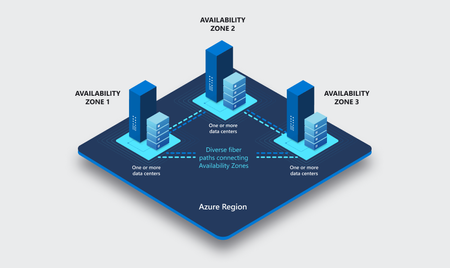
APIs are the backbone of modern applications, powering everything from mobile experiences and microservices to AI-driven applications and business-critical integrations. As customers continue to modernize their platforms on Azure, they increasingly expect their API infrastructure to remain available even in the face of datacenter-level disruptions. With zone redundancy in Standard v2, Azure API Management now enables customers to increase resilience against Availability Zone failures while continuing to benefit from the simplicity, performance, and cost efficiency of the v2 platform. Why Zone Redundancy Matters Azure Availability Zones are physically separate locations within an Azure region, each with independent power, cooling, and networking infrastructure. By distributing API Management resources across multiple zones, organizations can reduce the impact of a single datacenter failure and improve service continuity for their APIs. Until now, customers who required built-in zone-level resiliency often needed to evaluate higher-end deployment options. With this enhancement, Standard v2 customers can now deploy API gateways across Availability Zones and benefit from improved reliability while maintaining the streamlined operational model of the v2 platform. What’s New Zone Redundancy for Standard v2 extends the platform's resiliency by distributing service capacity across multiple Availability Zones within a supported Azure region. Key benefits include: Higher Availability: API traffic continues to flow even if a single Availability Zone experiences an outage. Built-in Resiliency: Redundancy is provided at the platform layer, reducing the need for customers to design and manage complex intra-region failover solutions. Production-Ready Reliability: Customers can confidently run critical API workloads on Standard v2 with stronger availability guarantees. Operational Simplicity: The service automatically manages capacity distribution, health monitoring, and recovery behavior across zones. Cost-Effective Resilience: Customers gain zone-level protection without requiring an enterprise-tier deployment model. Built on the Modern v2 Platform The v2 platform was designed from the ground up to provide a faster, more reliable, and more scalable API Management experience. Standard v2 already delivers capabilities such as rapid deployment, simplified networking, workspace support, and flexible scaling. Zone Redundancy further strengthens the platform by expanding its reliability story for production workloads. This announcement builds on our broader investment in making Azure API Management more accessible to a wider range of organizations, from digital-native startups to large enterprises modernizing their application estates. Ideal Scenarios Zone Redundancy in Standard v2 is particularly valuable for customers who: Run business-critical APIs that must remain available during datacenter incidents. Consolidate multiple application workloads behind a single API gateway. Expose APIs consumed by mobile, partner, and customer-facing applications. Support AI applications and agent-based architectures that depend on highly available API endpoints. For organizations adopting modern cloud and AI native architectures, this capability helps ensure that API infrastructure remains aligned with broader application resiliency strategies. A Foundation for Reliable AI and API Platforms As AI-powered applications continue to proliferate, APIs increasingly become the critical connection layer between models, agents, business systems, and data platforms. Downtime at the API layer can have a direct impact on application availability, customer experience, and business operations. By bringing zone redundancy to Standard v2, we are making it easier for organizations to build highly resilient API platforms that can serve as the foundation for next-generation AI and digital transformation initiatives. Getting Started Zone Redundancy for Standard v2 can be enabled in supported Azure regions, allowing customers to deploy API Management with built-in protection against Availability Zone failures. We recommend reviewing your application's overall resiliency architecture, including backend redundancy, traffic management, and disaster recovery requirements, to maximize the benefits of zone-resilient API infrastructure. Enable Zone Redundancy in the Azure Portal Getting started with Zone Redundancy in Azure API Management Standard v2 is straightforward and can be configured during service creation. Create a New Standard v2 Instance with Zone Redundancy Sign in to the Azure portal. Select Create a Resource and search for Azure API Management. Choose Standard v2 as the service tier. Select a region that supports Availability Zones. In the Availability Zones section, enable Zone Redundancy. Review and create the service. After deployment, Azure API Management automatically distributes service capacity across multiple Availability Zones within the selected region, helping maintain API availability during a zone-level outage. Looking Ahead This release represents another step in our ongoing investment in the Azure API Management v2 platform. We remain committed to delivering the reliability, scalability, security, and developer experiences that organizations expect from a modern API management service. We are excited to see what our customers build with a more resilient Standard v2 platform and look forward to your feedback as you continue modernizing and scaling your API ecosystems on Azure. Learn more by visiting the Azure API Management documentation and exploring the latest reliability guidance for API Management deployments.Give your Copilot agents real tools, without hand-wiring MCP
You’re running agents in the GitHub Copilot app - maybe three at once, each on its own branch, each working a task while you steer. It’s a good way to work, right up until an agent needs to reach outside your repo. It needs to read a SharePoint library, file a Salesforce record, or check an Outlook calendar, and suddenly it’s blind. An agent is only as capable as the tools you hand it. The usual way to hand it one of those tools is to wire up a Model Context Protocol (MCP) server by hand: find the endpoint, paste it into config, add an auth header, keep the token alive, and hope you got the casing right. Then your teammate does the same thing on their machine, and the next person after that. The MCP Connectors canvas removes the hand-wiring. It’s a plugin for the GitHub Copilot app: it lists the hosted MCP servers already published in your Azure Connector Namespace, and you connect one to Copilot by selecting it - no URL, no header, no local proxy. Where the servers come from Connector Namespace is the managed Azure service on the other end. It provides a list of curated MCP Servers that you can use to quickly create and manage MCPs connections. It also does the work you’d rather not: it stores and rotates the credentials, applies retry and throttling policies, and scales the server. Your machine never holds a raw secret related to the end systems that MCP touches, and access is governed by access policies, allowing fine grained control on who can use the MCP servers. So, when you connect a server from the canvas, you’re not standing up infrastructure. The server already exists, already authenticated, already managed. You’re pointing Copilot at it. Prerequisites GitHub Copilot app with canvas extension support. An Azure subscription with permission to cerate and view the namespace and to create connections and hosted managed MCP server configurations. Connector Namespace is in preview, and availability varies by region. Install From the GitHub Copilot app, add the following prompt. Install connector-namespaces v1.2.0 for my user account, reload it, verify it is running, then open the MCP Connectors canvas. Open the Connector Namespace canvas in a new session Once you install if you need to open the Connector Namespace in a new session, just request it in a prompt: Open the MCP Connectors canvas. Connect an MCP server Open the MCP Connectors canvas. Select Sign in to Azure, then choose a subscription and Connector Namespace. Browse or search the MCP servers grouped under Microsoft and Partners. Select Connect and complete the connector’s separate authentication or consent flow. Confirm the server appears under My MCPs. Restart GitHub Copilot so a new session loads the added tools. ℹ️Note That last step matters more than it look. Copilot loads an agent’s tools when a session starts, so a server you add mid-session shows up in the next one, not the one you’re in. Manage connected servers My MCPs shows the servers connected to Copilot. Sandbox opens a connected server in the Connector Namespace playground, so you can try a tool call yourself before you let an agent lean on it. Disconnect removes the MCP registration from your MCP configuration. The MCP is still available in Connector namespace to be added again later. Also if you are sharing the connector namespace with other developers, this only remove the your local configuration. Connect adds configured MCP connectors that are not registered locally yet to your local MCP configuration. Delete from namespace… removes the MCP registration from your MCP configuration and deletes the MCP connection from your connector namespace. If you are sharing the connector namespace with other developers this will affect any developer using this MCP connector – be careful when using this. Switch namespace switches the active subscription or namespace - useful when you keep dev and production connections apart. How it works and security The extension registers each server directly in Copilot’s user-scoped MCP configuration. There’s no local MCP proxy sitting in the tool path between the agent and the server. The canvas itself runs on loopback. Your Azure tokens stay in process memory, the selected namespace coordinates may be cached locally, and gateway credentials are sent only to the server’s configured HTTPS endpoints. The connector’s own secrets never reach your machine. That’s the namespace’s job, which is also why an admin can rotate or revoke a connection in one place instead of chasing down every developer’s config. Where can I use my connected MCP servers You manage the servers from the canvas, but they don’t only work there. The canvas writes to Copilot’s user-scoped MCP configuration at ~/.copilot/mcp-config.json, and the GitHub Copilot app is built on GitHub Copilot CLI. Connect a server once and it’s available to both. Agent sessions in the app. Any session on your machine picks the server up, whatever repository or branch it’s working on, because the config is user-scoped rather than per-project. Copilot CLI. The same server shows up in the terminal. Run copilot mcp list to confirm it, or /mcp show SERVER-NAME in an interactive session to see the tools it exposes. Two things to know: Tools load when a session starts, so connect first and start the session second. A project-level .mcp.json or .github/mcp.json takes precedence over your user config when the names collide, which is what you want if a repository pins its own version of a server. VS Code is the exception. Copilot Chat there reads .vscode/mcp.json, a separate file the CLI doesn’t use, so a server you connect in the canvas won’t appear in VS Code until you configure it there too. Where this all sits today The GitHub Copilot app went generally available in June 2026, and canvases shipped with it, so neither is a preview feature. The MCP Connectors canvas is a published extension you install at personal scope. You get the version we ship and tested, not one an agent generates on the fly from a prompt. Two caveats. GitHub doesn't publish a compatibility guarantee for the canvas extension format, so an app update may need a matching update from us. Re-run the install commands above to pick it up if you see any issues. On the Azure side, Connector Namespace is still in preview. Check the documentation for more details on this service outside the GitHub Copilot App support. If you're on Copilot Business or Enterprise, check with your admin that the GitHub Copilot app policy is enabled. It's on by default, and it's separate from the Copilot CLI policy. Try it Install the plugin, point it at a namespace, and connect one server your agents keep reaching for: the SharePoint library, the CRM, whatever it is. Then watch an agent actually use it in the next session. Tell me where the canvas saved you a config headache and where it got in your way. That’s the feedback we act on before general availability.Power Azure SRE Agent with the tools it needs
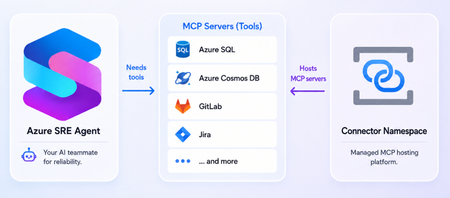
What is the Azure SRE Agent Azure SRE Agent is an AI-powered service designed to reduce operational toil. Teams can use it to: Investigate incidents and identify probable causes. Automate health checks, compliance reviews, and other scheduled work. Answer questions such as “What changed before this service became degraded?” Propose remediations while allowing teams to require human approval. An effective investigation rarely depends on one source of information. An alert might originate in Azure Monitor, while deployment history lives in source control, telemetry stored in another observability platform, and incident records in a service-management tool. Without access to those systems, you must retrieve and transfer the information manually, adding context switching and slowing diagnosis. MCP servers can give SRE Agent tools to query telemetry, inspect deployments, retrieve database records, look up incidents, etc. SRE Agent provides native connection for some servers such as GitHub, Datadog, New Relic, and Splunk. Connector Namespace makes it easier to host additional remote MCP servers you want the agent to use. Removing remote MCP server hosting burden Connecting SRE Agent to an existing remote endpoint is straightforward. Hosting that endpoint yourself is not. You must deploy the server, provide secure HTTPS infrastructure, configure authentication, manage downstream credentials, scale the runtime, monitor its health, recover failed instances, and maintain it over time. These responsibilities are necessary, but the value is in the server’s tools not in operating another service. Azure Connector Namespace is a fully managed service for hosting connectors and MCP servers. You select the server you need and let the namespace handles the operational and maintenance tasks. The offering is currently in preview. See documentation for supported regions and other preview considerations. You’ll find a wide variety of servers in the Connector Namespace’s catalog. Some examples of useful servers for the SRE agent include: Database servers such as Azure SQL and Azure Cosmos DB Source control and CI/CD servers like GitLab Incident management servers like Jira and PagerDuty A note on what's currently in development: We're building “bring-your-own” server support, allowing you to supply your own server image while the namespace handles hosting and operations. Please keep an eye out for the blog post about this! Deploy server and connect it to SRE Agent The following example deploys the SQL MCP server in Connector Namespace and connects it to Azure SRE Agent. 1. Server deployment Prerequisite: Install the Azure Developer CLI (azd). Clone the sql-server-samples repo: git clone https://github.com/microsoft/sql-server-samples.git Navigate to the azure-sql-mcp sample cd sql-server-samples/samples/applications/azure-sql-mcp From the azure-sql-mcp folder, run the following to log into your Azure subscription and then deploy the server and related resources: azd auth login azd up The last command will prompt for the following before deployment: Prompt Suggested value Explanation Enter a unique environment name mcp-dev This name added as prefix to Azure resources created Select an Azure Subscription Pick your subscription Resources will deploy under this subscription Enter value for connectorNamespaceIdentityType UserAssigned User assigned identity is recommended as it’s not tied to resource lifecycle Enter value for deployerLoginName Enter your Azure subscription login email To give your identity access to the MCP server Enter value for the location Pick a supported region Supported regions: West Central US, Central US, East Asia, North Europe Once deployment finishes, copy the MCP endpoint for use later. It looks similar to: https://<app-name>.<region>.logic.azure.com/api/connectorGateways/123abc456defg7890/mcpServerConfigs/sql-mcp/mcp (Optional) Test deployed server in Visual Studio Code GitHub Copilot: Open command palette > search MCP: Add server > pick HTTP > enter MCP endpoint and server name > pick Local Workspace. Inside .vscode/mcp.json, click Start above server name, then allow authentication with Microsoft in the popup and log into Azure subscription account. 2. Configure MCP connector in SRE Agent Connector Namespace does not create the connection in SRE Agent. Add the server endpoint through SRE Agent’s existing MCP connection experience. Open the Azure SRE Agent portal On the left menu, go to Builder > Connectors, and select + Add connector Under Choose a connector, select the MCP tab, choose MCP server, and select Next Configure the connector: Field Value Name A descriptive name for the server Connection type Streamable-HTTP URI The hosted server endpoint from Connector Namespace Authentication method Managed identity (Selecting managed identity automatically creates an identity for the connector.) Azure AD token scope https://apihub.azure.com/.default Select Next. Before testing the connection, grant the managed identity access to the MCP server. 3. Authorize the managed identity Open the Azure portal, search for the managed identity by name. In the identity’s Overview page, click JSON View (top right) and copy the tenantId and principalId. The principal ID is also called the object ID. Open Connector Namespace portal and search for the deployed namespace. Inside the namespace, navigate to the MCP Connectors tab on the left, then select the SQL MCP server. Inside the MCP server, click Access Policies, then select Add Access Policy. Enter the tenant ID and principal ID, then select Create. 4. Test and finish the connection Return to Azure SRE Agent portal and select Test connection. After the test succeeds, select the server tools the agent should use. Select Add connector. Establishing the connection can take a minute. Select Refresh at the top of the connectors page until its status changes to Connected. The agent can now use the selected server tools in chat threads. The azd deployment from previous created and seeded a SQL database with sample blog post data, so you can ask something like: What are the top blog posts? For more details, see MCP connectors and tools in Azure SRE Agent. Focus on the server, not its infrastructure MCP servers can give Azure SRE Agent access to the additional systems it needs to investigate incidents and perform operational work effectively. However, operating every remote server yourself introduces infrastructure, security, and maintenance responsibilities that distract from that goal. Connector Namespace removes much of that friction. Your primary question becomes “Which MCP server do I want to host?” rather than “How will I deploy, secure, scale, monitor, and maintain it?” Once deployed, the hosted endpoint can be added to Azure SRE Agent through its existing MCP connection experience. That gives teams a straightforward path to extending the agent with more operational tools, without turning MCP server hosting into another platform they must build and run. Try Connector Namespace with Azure SRE Agent and share your feedback! Resources Azure SRE Agent Overview Set up an MCP connector in Azure SRE Agent Connector Namespace Overview Hosted MCP servers in Connector Namespace746Views0likes0Comments