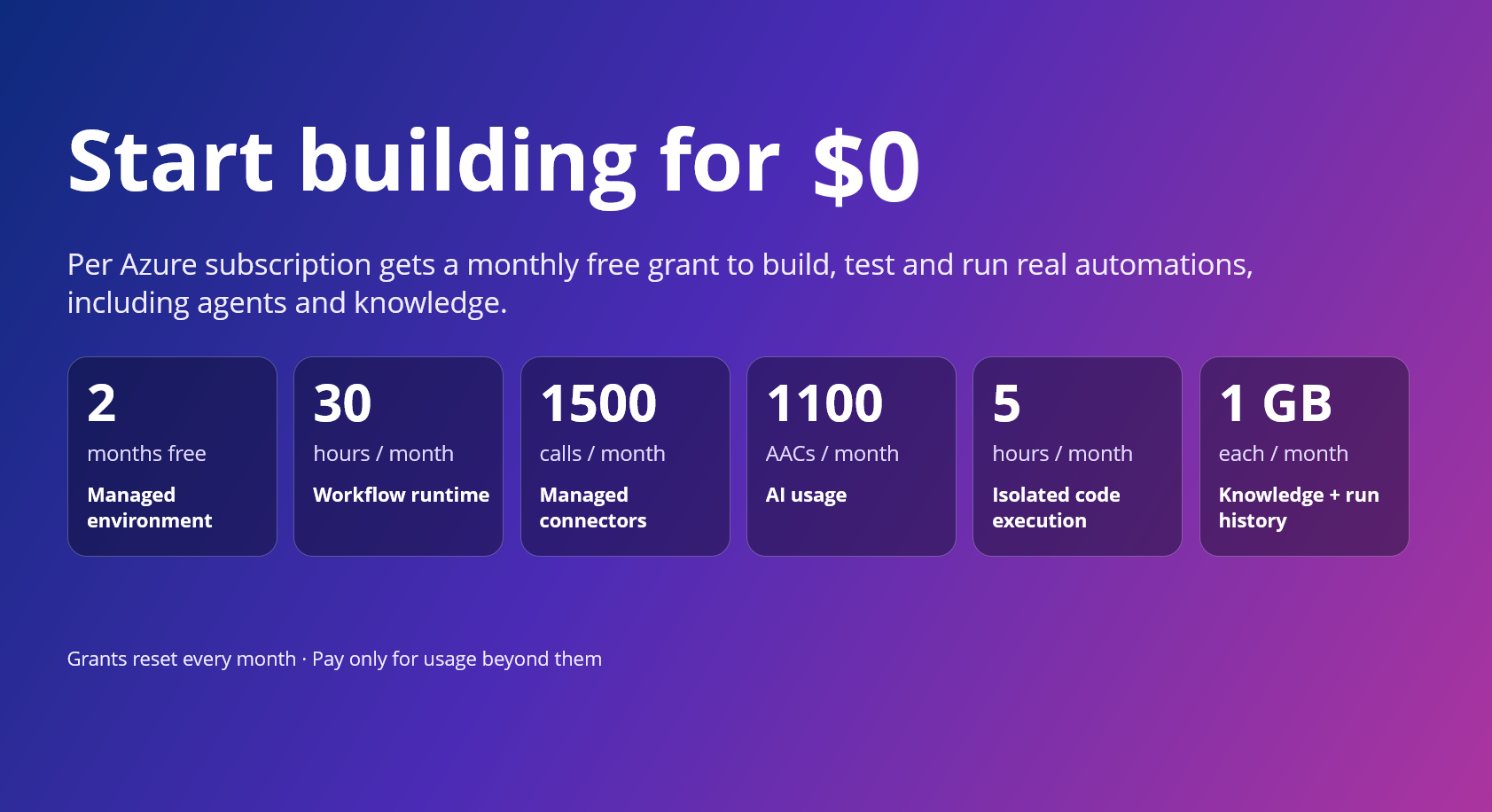
Today, we're announcing pricing for Azure Logic Apps Automation, now in public preview, along with monthly free grants that make it easier to start building, experimenting, and bringing automations to life.
Logic Apps Automation is Azure's fully managed platform for business process automation and orchestration, including AI-powered automation. It's built for every builder with an automation problem, not just developers, and the free grants make it easy to go from idea to a working automation without a purchase decision up front.
The free grant covers one managed environment per subscription and includes usage across key Logic Apps Automation capabilities, so you can start with your first use case, experiment with AI-powered automation, and run workloads in production within the included limits; then move to paid usage as your needs grow.
Start today @ https://auto.azure.com/
Start free with monthly grants
Every Azure subscription gets a monthly free grant across the platform. The only exception is Managed Environment which is a one-time free grant for first 60 days. When the usage stays within these limits you pay nothing. When it goes beyond these limits, you pay only for the additional usage.
|
Usage |
Component |
Monthly free grant (per subscription) |
|
Core Platform |
Managed environment |
One environment, free for the first 60 days (2 months) |
|
Core Platform |
Workflow runtime |
108,000 execution-seconds (about 30 hours) |
|
Core Platform |
Data retention |
1 GB |
|
Optional Capabilities |
Managed connector calls |
1,000 Standard + 500 Enterprise |
|
Optional Capabilities |
Knowledge storage |
1 GB |
|
Optional Capabilities |
AI usage |
1,100 AACs |
|
Optional Capabilities |
Isolated code execution |
18,000 seconds (about 5 hours) |
What this means in practice
- Explore the platform, not a trimmed-down experience. The grants include workflow runtime, AI usage, knowledge, connectors, and sandboxed code, so you can explore every capability from day one.
- Build and iterate without watching the meter. With approximately 30 hours of execution time included each month, you can author, test, and run workflows as you build out your automation.
- Scale into paid usage as your needs grow. Grants reset every month, and you pay only for usage beyond them.
Simple, usage-based pricing
Beyond the included grants, Logic Apps Automation uses a pay-as-you-go pricing model across the capabilities your automations use.
Billing has two parts:
- Core Platform: the managed environment, workflow runtime, and run-history retention that provide the foundation for your automations.
- Optional Capabilities: AI usage, knowledge storage, isolated code execution via sandbox and managed connectors, billed only when your workflows use them.
For rates, regional pricing, and a worked monthly cost example, see Azure Logic Apps Automation pricing.
How does the free grant works
The free grant applies to the first environment you create in a subscription. Look for the Free tag next to an environment's name to see which is the free one
- Free environment period: The managed environment is free for 60 days, starting from the time you create it.
- Existing customers: If you already use Logic Apps Automation, create a new environment to use the free grant. The first new environment you create in your subscription receives it.
- Track your usage: In your environment, go to Settings and select the Free Grants tab to see your monthly limits and how much you've used.
Important: Free grants are tied to the free environment. If you delete your free environment, you lose the ability to use the free grants, and you can't get them back by creating a new environment.
Availability
Logic Apps Automation is in public preview in Australia East, East Asia, North Central US, Southeast Asia, Sweden Central, UK South, and West US. Preview pricing and availability may change before general availability.
Get started
If you already have an Azure subscription, your included grants are available to help you start building today.
Create your first Automation project, start from a template or with the AI workflow assistant, and explore what you can build with Logic Apps Automation.
- Get started with Logic Apps Automation
- Quickstart: build your first workflow
- Read the full pricing details
- MS Learn documentation
- Watch the Logic Apps Automation video series
Share feedback or request a feature, or just let us know what you build with Automation!

 Microsoft