ai
95 TopicsAzure API Management Your Auth Gateway For MCP Servers
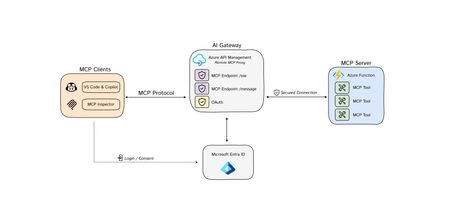
The Model Context Protocol (MCP) is quickly becoming the standard for integrating Tools 🛠️ with Agents 🤖 and Azure API Management is at the fore-front, ready to support this open-source protocol 🚀. You may have already encountered discussions about MCP, so let's clarify some key concepts: Model Context Protocol (MCP) is a standardized way, (a protocol), for AI models to interact with external tools, (and either read data or perform actions) and to enrich context for ANY language models. AI Agents/Assistants are autonomous LLM-powered applications with the ability to use tools to connect to external services required to accomplish tasks on behalf of users. Tools are components made available to Agents allowing them to interact with external systems, perform computation, and take actions to achieve specific goals. Azure API Management: As a platform-as-a-service, API Management supports the complete API lifecycle, enabling organizations to create, publish, secure, and analyze APIs with built-in governance, security, analytics, and scalability. New Cool Kid in Town - MCP AI Agents are becoming widely adopted due to enhanced Large Language Model (LLM) capabilities. However, even the most advanced models face limitations due to their isolation from external data. Each new data source requires custom implementations to extract, prepare, and make data accessible for any model(s). - A lot of heavy lifting. Anthropic developed an open-source standard - the Model Context Protocol (MCP), to connect your agents to external data sources such as local data sources (databases or computer files) or remote services (systems available over the internet through e.g. APIs). MCP Hosts: LLM applications such as chat apps or AI assistant in your IDEs (like GitHub Copilot in VS Code) that need to access external capabilities MCP Clients: Protocol clients that maintain 1:1 connections with servers, inside the host application MCP Servers: Lightweight programs that each expose specific capabilities and provide context, tools, and prompts to clients MCP Protocol: Transport layer in the middle At its core, MCP follows a client-server architecture where a host application can connect to multiple servers. Whenever your MCP host or client needs a tool, it is going to connect to the MCP server. The MCP server will then connect to for example a database or an API. MCP hosts and servers will connect with each other through the MCP protocol. You can create your own custom MCP Servers that connect to your or organizational data sources. For a quick start, please visit our GitHub repository to learn how to build a remote MCP server using Azure Functions without authentication: https://aka.ms/mcp-remote Remote vs. Local MCP Servers The MCP standard supports two modes of operation: Remote MCP servers: MCP clients connect to MCP servers over the Internet, establishing a connection using HTTP and Server-Sent Events (SSE), and authorizing the MCP client access to resources on the user's account using OAuth. Local MCP servers: MCP clients connect to MCP servers on the same machine, using stdio as a local transport method. Azure API Management as the AI Auth Gateway Now that we have learned that MCP servers can connect to remote services through an API. The question now rises, how can we expose our remote MCP servers in a secure and scalable way? This is where Azure API Management comes in. A way that we can securely and safely expose tools as MCP servers. Azure API Management provides: Security: AI agents often need to access sensitive data. API Management as a remote MCP proxy safeguards organizational data through authentication and authorization. Scalability: As the number of LLM interactions and external tool integrations grows, API Management ensures the system can handle the load. Security remains to be a critical piece of building MCP servers, as agents will need to securely connect to protected endpoints (tools) to perform certain actions or read protected data. When building remote MCP servers, you need a way to allow users to login (Authenticate) and allow them to grant the MCP client access to resources on their account (Authorization). MCP - Current Authorization Challenges State: 4/10/2025 Recent changes in MCP authorization have sparked significant debate within the community. 🔍 𝗞𝗲𝘆 𝗖𝗵𝗮𝗹𝗹𝗲𝗻𝗴𝗲𝘀 with the Authorization Changes: The MCP server is now treated as both a resource server AND an authorization server. This dual role has fundamental implications for MCP server developers and runtime operations. 💡 𝗢𝘂𝗿 𝗦𝗼𝗹𝘂𝘁𝗶𝗼𝗻: To address these challenges, we recommend using 𝗔𝘇𝘂𝗿𝗲 𝗔𝗣𝗜 𝗠𝗮𝗻𝗮𝗴𝗲𝗺𝗲𝗻𝘁 as your authorization gateway for remote MCP servers. 🔗For an enterprise-ready solution, please check out our azd up sample repo to learn how to build a remote MCP server using Azure API Management as your authentication gateway: https://aka.ms/mcp-remote-apim-auth The Authorization Flow The workflow involves three core components: the MCP client, the APIM Gateway, and the MCP server, with Microsoft Entra managing authentication (AuthN) and authorization (AuthZ). Using the OAuth protocol, the client starts by calling the APIM Gateway, which redirects the user to Entra for login and consent. Once authenticated, Entra provides an access token to the Gateway, which then exchanges a code with the client to generate an MCP server token. This token allows the client to communicate securely with the server via the Gateway, ensuring user validation and scope verification. Finally, the MCP server establishes a session key for ongoing communication through a dedicated message endpoint. Diagram source: https://aka.ms/mcp-remote-apim-auth-diagram Conclusion Azure API Management (APIM) is an essential tool for enterprise customers looking to integrate AI models with external tools using the Model Context Protocol (MCP). In this blog, we've emphasized the simplicity of connecting AI agents to various data sources through MCP, streamlining previously complex implementations. Given the critical role of secure access to platforms and services for AI agents, APIM offers robust solutions for managing OAuth tokens and ensuring secure access to protected endpoints, making it an invaluable asset for enterprises, despite the challenges of authentication. API Management: An Enterprise Solution for Securing MCP Servers Azure API Management is an essential tool for enterprise customers looking to integrate AI models with external tools using the Model Context Protocol (MCP). It is designed to help you to securely expose your remote MCP servers. MCP servers are still very new, and as the technology evolves, API Management provides an enterprise-ready solution that will evolve with the latest technology. Stay tuned for further feature announcements soon! Acknowledgments This post and work was made possible thanks to the hard work and dedication of our incredible team. Special thanks to Pranami Jhawar, Julia Kasper, Julia Muiruri, Annaji Sharma Ganti Jack Pa, Chaoyi Yuan and Alex Vieira for their invaluable contributions. Additional Resources MCP Client Server integration with APIM as AI gateway Blog Post: https://aka.ms/remote-mcp-apim-auth-blog Sequence Diagram: https://aka.ms/mcp-remote-apim-auth-diagram APIM lab: https://aka.ms/ai-gateway-lab-mcp-client-auth Python: https://aka.ms/mcp-remote-apim-auth .NET: https://aka.ms/mcp-remote-apim-auth-dotnet On-Behalf-Of Authorization: https://aka.ms/mcp-obo-sample 3rd Party APIs – Backend Auth via Credential Manager: Blog Post: https://aka.ms/remote-mcp-apim-lab-blog APIM lab: https://aka.ms/ai-gateway-lab-mcp YouTube Video: https://aka.ms/ai-gateway-lab-demo25KViews12likes4Comments📢Announcing agent loop: Build AI Agents in Azure Logic Apps 🤖
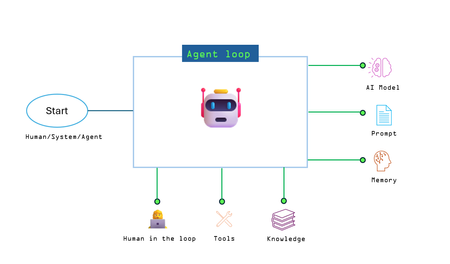
This post is written in collaboration with Kent Weare and Rohitha Hewawasam The era of intelligent business processes has arrived! Today, we are excited to announce agent loop, a groundbreaking new capability in Azure Logic Apps to build AI agents into your enterprise workflows. With agent loop, you can embed advanced AI decision-making directly into your processes – enabling your apps and automation to not just follow predefined steps, but to reason, adapt, and act autonomously towards goals. Agent loop becomes central to AI Agent development — it’s a new action type that brings together your AI model of choice, domain-specific tools, and enterprise knowledge sources. Whether you’re building an autonomous agent to process loan approvals, a conversational agent to support customers, or a multi-agent system that coordinates tasks such as Sales Report generation across agents, Agent Loop enables your workflows to go beyond static steps — making decisions, adapting to context, and delivering outcomes. Agent loop is implemented using kernel object in the Semantic Kernel. The kernel object, along with an LLM, creates the plan for what needs to be done, while Logic Apps runtime handles execution of that plan. Agent Loop is highly configurable, enabling you to build agents with diverse capabilities: Conversational or Autonomous Agents With Logic Apps' extensive gallery of connectors, you can build fully autonomous agents that respond to real-time events — like new records in a database, files added to a share, or messages in a queue. Agent Loop also supports conversational agents via Channels, allowing agents to interact with users through the Azure portal or custom chat clients. Bring your own Model Associate your AI agent with any Azure OpenAI model of your choice. As new models become available, you can easily switch or upgrade without re-architecting the solution. Define Agent Goals and Guardrails Specify your agent’s objective and behavioral boundaries through system prompts and user instructions. Using connectors like Outlook or Teams, you can easily introduce human-in-the-loop interactions for approvals or overrides — enabling safe, controlled autonomy. Tools and Knowledge, Built In Leverage hundreds of out-of-the-box connectors to equip agents with access to enterprise systems, APIs, and business data. Enrich their reasoning with knowledge from vector stores, structured databases, or unstructured files, and empower them to take meaningful actions across your environment. AI Agents in Action Here are some examples of AI Agents in Action that highlight the value and efficiencies of these agents across different domains and solution areas. A product return agent verifies order details, return eligibility, and refund rules, then processes the return or requests additional info from the customer. A loan approval agent evaluates credit score, income, and risk profile, applies business rules, and auto-approves or routes applications for review. A recruiting agent screens resumes, summarizes qualifications, and drafts personalized outreach to top candidates, streamlining early hiring stages. A sales report generation workflow uses a writer agent to draft content, a reviewer agent to verify accuracy, and a publisher agent to format and distribute the report. An IT operations agent triages alerts, checks recent changes, and either resolves common issues or escalates to on-call engineers when needed. A multi-agent retail supply chain solution combines inventory and logistics agents to ensure timely restocks and optimize fulfillment routes. Why agent loop matters Modern businesses thrive on agility and intelligence. Traditional workflows remain essential for deterministic tasks—especially those involving structured data or high-risk decisions. But when processes involve unstructured data, changing context, or require adaptive decision-making, AI agents excel. They can reason, act in real time, and dynamically sequence steps to meet goals. Agent Loop exactly serves this purpose. What makes Agent Loop especially powerful is its deep integration with the Logic Apps ecosystem. Logic Apps comes with over 1,400+ connectors for Microsoft and third-party services – from databases and ERP systems to SaaS applications and custom APIs. They can also invoke custom code and scripts, making it easy to tap into homegrown capabilities. The agent isn’t limited to information in its prompt; it can actively retrieve knowledge, perform transactions, and effect change in the real world via these connectors. Logic Apps is uniquely positioned to enable customers to leverage their API and connector ecosystem cohesively across their workflows and AI Agents to build agentic applications. Equally important, Agent Loop is designed for flexibility. You can orchestrate single-agent workflows or coordinate multiple agents working in tandem towards a common goal. Agent Loop can even involve humans in the loop when needed – for instance, pausing to get a manager’s approval or to ask for clarification – leveraging Logic Apps’ human workflow capabilities. All of this is handled within the familiar, visual Logic Apps designer, so you get a high-level view of the entire orchestration. How agent loop works At a high level, Agent Loop works by pairing the reasoning capabilities of large-scale AI models with the robust action framework of Logic Apps. Built on top of Semantic Kernel, the Agent loop operates in iterative cycles, allowing the agent to think, act, and learn from each step: Reasoning (Think): The agent (powered by an LLM like Azure OpenAI Service under the hood) and on Semantic Kernel, examines its goal and the current context. It decides what needs to be done next – whether that’s gathering more information, calling a specific connector, or formulating an answer. This step is essentially the AI “planning” its next action based on the goal you’ve provided and the data it has so far. Action (Act): The agent then carries out the decided action by invoking a tool or connector through Logic Apps. This could be anything from querying a database, calling a REST API, sending an email, to running a calculation. Thanks to Logic Apps’ extensive connector library, the agent has a rich toolbox at its disposal. Each action is executed as a Logic Apps step, meaning it’s secure, managed, and logged like any other workflow action. Reflection (Learn): After the action, the agent receives the results (e.g. data retrieved, outcome of the API call, user input, etc.). It then evaluates: Did this bring it closer to the goal? Does the plan need adjusting? The agent updates its understanding based on new information. This reflection is what lets the agent handle complex, open-ended tasks – it can correct course if needed, try alternative approaches, or conclude if the goal has been satisfied. These steps repeat in a loop. The Agent Loop action manages this cycle automatically – calling the AI model to reason, executing the chosen connector operations, feeding results back, and iterating. Why Build AI Agents in Logic Apps? Building AI agents is an emerging frontier in automation but doing it from the ground up can be daunting especially when organizations build them in large numbers. Agent Loop in Logic Apps makes this dramatically easier and more scalable for several reasons: Declarative Orchestration: Logic Apps provides a visual workflow canvas and a serverless runtime. The Agent Loop action plugs into this and the platform handles the sequence of steps and iterations, so you can focus on defining the goal and selecting the connectors (tools) the agent can use. Code extensibility: Logic Apps supports both declarative and code-first approaches to building agents. You can combine the two — using visual designer for orchestration and injecting code where needed through extensibility points. Write custom logic in C#, PowerShell, JavaScript, or use inline scripts for lightweight processing. Python support is coming soon, enabling even more flexibility. 1400+ Integrated Tools: With the rich connector ecosystem at its disposal, your agent can seamlessly tap into your enterprise systems and SaaS applications. Your entire ecosystem of connectors, APIs, custom code and agents can be used by deterministic workflows and agents to solve business problems Observability: Logic Apps offers full traceability into each agent’s decisions and actions. Every run is logged in the workflow history, with data stored within the customer’s own network and storage boundaries. The Agent Chat view provides insights into the agent’s reasoning, tool invocations, and goal progress. Developers can easily revisit these logs for debugging, auditing, or analysis. Enterprise-Grade Governance: Because it runs on Azure Logic Apps, agent loop inherits all the robust monitoring, logging, security and compliance capabilities of the platform You can secure connections with managed identities and leverage built-in rate limiting, retries, and exception handling. Your AI agents run with the same enterprise-ready guardrails as any mission-critical workflow. Human-in-the-Loop & Multi-Agent Coordination: Logic Apps makes it straightforward to involve people at key decision points or to coordinate multiple agents. You can chain Agent Loop actions or have agents invoke other workflows, enabling collaborative problem-solving that would be difficult to implement from scratch. The result is a system where AI and humans can smoothly interact and complement each other. Faster Time to Value: By eliminating the boilerplate work of building an agent architecture (managing memory, planning logic, connecting to services, etc.), Agent Loop lets developers and architects concentrate on high-value logic and business goals, accelerating how you bring AI-driven improvements to your business processes. In short, agent loop combines the brains of generative AI with the brawn of Azure’s integration platform. It offers a turnkey way to build sophisticated AI-driven automation without reinventing the wheel. Companies no longer have to choose between the flexibility of custom AI solutions and the convenience of a managed workflow service – with Logic Apps and Agent Loop, you get both. Getting Started Agent Loop is available in Logic Apps Standard starting today! Here are some resources to help you begin: Documentation: Explore the agent loop concepts and detailed guide with step-by-step instructions on how to configure and use Agent Loop. Samples & Demos: Watch pre-recorded demos showcasing both conversational and autonomous agent scenarios built with Agent Loop. You'll also get a preview of exciting features coming soon. Looking Ahead Agent Loop opens up a new realm of possibilities for what you can achieve with Azure Logic Apps. It blurs the line between application integration and AI, allowing workflows to evolve from static sequences into adaptive, self-directed processes. We can’t wait to see what you will build with Agent Loop! This is just the beginning. We’re actively investing in new capabilities that are planned for release soon Multi-agent Hand-off Support – A multi-agent application with hand-off capabilities enables different agent-loops to collaborate by transferring tasks between one another based on expertise or context, which is crucial for building agentic applications that can dynamically adapt to complex, evolving goals and user needs. A2A (Agent-to-Agent) protocol support – A2A is a communication standard that defines how autonomous agents exchange messages, share context, and coordinate actions in a secure and structured way. It’s especially important in building agentic applications because it ensures interoperability, enables seamless hand-offs between agents, and maintains context integrity across different agents working toward a shared goal. This will allow Logic Apps agents to seamlessly integrate with other agentic platforms. OBO Auth for Logic Apps Agents: On Behalf Of Auth support for logic Apps agents would allow Logic Apps agents to use logged-in users identity for authentication when invoking Logic Apps connectors as part of agent-loop execution. This will enable building conversational applications to dynamically perform OAuth flows for fetching consent from log-in users to invoke Logic Apps connectors on logged-in user’s behalf. Contact Us Have feedback or questions about Agent Loop? We’d love to hear from you. Reply directly to this blog post or reach out to us through this form. Your input helps shape the future of Logic Apps and agentic automation.12KViews4likes2CommentsBuild. Secure. Launch Your Private MCP Registry with Azure API Center.
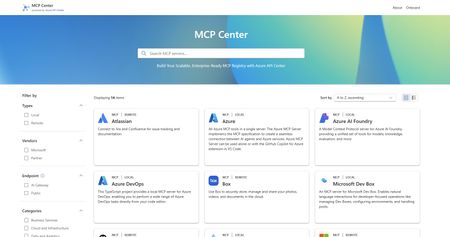
We are thrilled to embrace a new era in the world of MCP registries. As organizations increasingly build and consume MCP servers, the need for a secure, governed, robust and easily discoverable tools catalog has become critical. Today, we are excited to show you how to do just that with MCP Center, a live example demonstrating how Azure API Center (APIC) can serve as a private and enterprise-ready MCP registry. The registry puts your MCPs just one click away for developers, ensuring no setup fuss and a direct path to coding brilliance. Why a private registry? 🤔 Public OSS registries have been instrumental in driving growth and innovation across the MCP ecosystem. But as adoption scales, so does the need for tighter security, governance, and control, this is where private MCP registries step in. This is where Azure API Center steps in. Azure API Center offers a powerful and centralized approach to MCP discovery and governance across diverse teams and services within an organization. Let's delve into the key benefits of leveraging a private MCP registry with Azure API Center. Security and Trust: The Foundation of AI Adoption Review and Verification: Public registries, by their open nature, accept submissions from a wide range of developers. This can introduce risks from tools with limited security practices or even malicious intent. A private registry empowers your organization to thoroughly review and verify every MCP server before it becomes accessible to internal developers or AI agents (like Copilot Studio and AI Foundry). This eliminates the risk of introducing random, potentially vulnerable first or third-party tools into your ecosystem. Reduced Attack Surface: By controlling which MCP servers are accessible, organizations significantly shrink their potential attack surface. When your AI agents interact solely with known and secure internal tools, the likelihood of external attackers exploiting vulnerabilities in unvetted solutions is drastically reduced. Enterprise-Grade Authentication and Authorization: Private registries enable the enforcement of your existing robust enterprise authentication and authorization mechanisms (e.g., OAuth 2) across all MCP servers. Public registries, in contrast, may have varying or less stringent authentication requirements. Enforced AI Gateway Control (Azure API Management): Beyond vetting, a private registry enables organizations to route all MCP server traffic through an AI gateway such as Azure API Management. This ensures that every interaction, whether internal or external, adheres to strict security policies, including centralized authentication, authorization, rate limiting, and threat protection, creating a secure front for your AI services. Governance and Control: Navigating the AI Landscape with Confidence Centralized Oversight and "Single Source of Truth": A private registry provides a centralized "single source of truth" for all AI-related tools and data connections within your organization. This empowers comprehensive oversight of AI initiatives, clearly identifying ownership and accountability for each MCP server. Preventing "Shadow AI": Without a formal registry, individual teams might independently develop or integrate AI tools, leading to "shadow AI" – unmanaged and unmonitored AI deployments that can pose significant risks. A private registry encourages a standardized approach, bringing all AI tools under central governance and visibility. Tailored Tool Development: Organizations can develop and host MCP servers specifically tailored to their unique needs and requirements. This means optimized efficiency and utility, providing specialized tools you won't typically find in broader public registries. Simplified Integration and Accelerated Development: A well-managed private registry simplifies the discovery and integration of internal tools for your AI developers. This significantly accelerates the development and deployment of AI-powered applications, fostering innovation. Good news! Azure API Center can be created for free in any Azure subscription. You can find a detailed guide to help you get started: Inventory and Discover MCP Servers in Your API Center - Azure API Center Get involved 💡 Your remote MCP server can be discoverable on API Center’s MCP Discovery page today! Bring your MCP server and reach Azure customers! These Microsoft partners are shaping the future of the MCP ecosystem by making their remote MCP Servers discoverable via API Center’s MCP Discovery page. Early Partners: Atlassian – Connect to Jira and Confluence for issue tracking and documentation Box – Use Box to securely store, manage and share your photos, videos, and documents in the cloud Neon – Manage and query Neon Postgres databases with natural language Pipedream – Add 1000s of APIs with built-in authentication and 10,000+ tools to your AI assistant or agent - coming soon - Stripe – Payment processing and financial infrastructure tools If partners would like their remote MCP servers to be featured in our Discover Panel, reach out to us here: GitHub/mcp-center and comment under the following GitHub issue: MCP Server Onboarding Request Ready to Get Started? 🚀 Modernize your AI strategy and empower your teams with enhanced discovery, security, and governance of agentic tools. Now's the time to explore creating your own private enterprise MCP registry. Check out MCP Center, a public showcase demonstrating how you can build your own enterprise MCP registry - MCP Center - Build Your Own Enterprise MCP Registry - or go ahead and create your Azure API Center today!12KViews7likes4Comments
Expose REST APIs as MCP servers with Azure API Management and API Center (now in preview)
As AI-powered agents and large language models (LLMs) become central to modern application experiences, developers and enterprises need seamless, secure ways to connect these models to real-world data and capabilities. Today, we’re excited to introduce two powerful preview capabilities in the Azure API Management Platform: Expose REST APIs in Azure API Management as remote Model Context Protocol (MCP) servers Discover and manage MCP servers using API Center as a centralized enterprise registry Together, these updates help customers securely operationalize APIs for AI workloads and improve how APIs are managed and shared across organizations. Unlocking the value of AI through secure API integration While LLMs are incredibly capable, they are stateless and isolated unless connected to external tools and systems. Model Context Protocol (MCP) is an open standard designed to bridge this gap by allowing agents to invoke tools—such as APIs—via a standardized, JSON-RPC-based interface. With this release, Azure empowers you to operationalize your APIs for AI integration—securely, observably, and at scale. 1. Expose REST APIs as MCP servers with Azure API Management An MCP server exposes selected API operations to AI clients over JSON-RPC via HTTP or Server-Sent Events (SSE). These operations, referred to as “tools,” can be invoked by AI agents through natural language prompts. With this new capability, you can expose your existing REST APIs in Azure API Management as MCP servers—without rebuilding or rehosting them. Addressing common challenges Before this capability, customers faced several challenges when implementing MCP support: Duplicating development efforts: Building MCP servers from scratch often led to unnecessary work when existing REST APIs already provided much of the needed functionality. Security concerns: Server trust: Malicious servers could impersonate trusted ones. Credential management: Self-hosted MCP implementations often had to manage sensitive credentials like OAuth tokens. Registry and discovery: Without a centralized registry, discovering and managing MCP tools was manual and fragmented, making it hard to scale securely across teams. API Management now addresses these concerns by serving as a managed, policy-enforced hosting surface for MCP tools—offering centralized control, observability, and security. Benefits of using Azure API Management with MCP By exposing MCP servers through Azure API Management, customers gain: Centralized governance for API access, authentication, and usage policies Secure connectivity using OAuth 2.0 and subscription keys Granular control over which API operations are exposed to AI agents as tools Built-in observability through APIM’s monitoring and diagnostics features How it works MCP servers: In your API Management instance navigate to MCP servers Choose an API: + Create a new MCP Server and select the REST API you wish to expose. Configure the MCP Server: Select the API operations you want to expose as tools. These can be all or a subset of your API’s methods. Test and Integrate: Use tools like MCP Inspector or Visual Studio Code (in agent mode) to connect, test, and invoke the tools from your AI host. Getting started and availability This feature is now in public preview and being gradually rolled out to early access customers. To use the MCP server capability in Azure API Management: Prerequisites Your APIM instance must be on a SKUv1 tier: Premium, Standard, or Basic Your service must be enrolled in the AI Gateway early update group (activation may take up to 2 hours) Use the Azure Portal with feature flag: ➤ Append ?Microsoft_Azure_ApiManagement=mcp to your portal URL to access the MCP server configuration experience Note: Support for SKUv2 and broader availability will follow in upcoming updates. Full setup instructions and test guidance can be found via aka.ms/apimdocs/exportmcp. 2. Centralized MCP registry and discovery with Azure API Center As enterprises adopt MCP servers at scale, the need for a centralized, governed registry becomes critical. Azure API Center now provides this capability—serving as a single, enterprise-grade system of record for managing MCP endpoints. With API Center, teams can: Maintain a comprehensive inventory of MCP servers. Track version history, ownership, and metadata. Enforce governance policies across environments. Simplify compliance and reduce operational overhead. API Center also addresses enterprise-grade security by allowing administrators to define who can discover, access, and consume specific MCP servers—ensuring only authorized users can interact with sensitive tools. To support developer adoption, API Center includes: Semantic search and a modern discovery UI. Easy filtering based on capabilities, metadata, and usage context. Tight integration with Copilot Studio and GitHub Copilot, enabling developers to use MCP tools directly within their coding workflows. These capabilities reduce duplication, streamline workflows, and help teams securely scale MCP usage across the organization. Getting started This feature is now in preview and accessible to customers: https://aka.ms/apicenter/docs/mcp AI Gateway Lab | MCP Registry 3. What’s next These new previews are just the beginning. We're already working on: Azure API Management (APIM) Passthrough MCP server support We’re enabling APIM to act as a transparent proxy between your APIs and AI agents—no custom server logic needed. This will simplify onboarding and reduce operational overhead. Azure API Center (APIC) Deeper integration with Copilot Studio and VS Code Today, developers must perform manual steps to surface API Center data in Copilot workflows. We’re working to make this experience more visual and seamless, allowing developers to discover and consume MCP servers directly from familiar tools like VS Code and Copilot Studio. For questions or feedback, reach out to your Microsoft account team or visit: Azure API Management documentation Azure API Center documentation — The Azure API Management & API Center Teams9.5KViews5likes7CommentsAI Gateway tier of API Management now in public preview
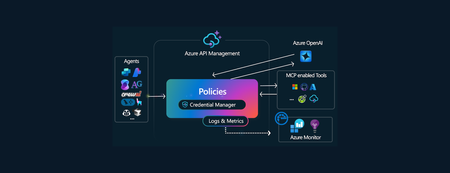
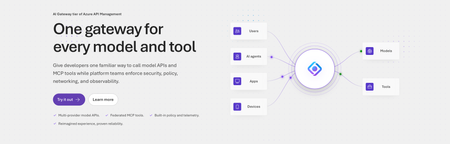
Today, we are introducing the AI Gateway tier of Azure API Management, now in public preview. It gives platform teams a purpose-built experience built specifically for AI workloads - publishing and governing models and MCP servers. Controls are configured through policy cards rather than XML and expressions, and the portal experience and control plane are structured around models, MCP servers, and tools rather than APIs. (For brevity, we refer to the AI Gateway tier as AI Gateway throughout the rest of this article.) AI Gateway is built on Azure API Management, bringing proven operational capabilities to AI workloads. The resource runs in your subscription, uses your Entra tenant, and sends telemetry to destinations you control. The operating model will be familiar to existing API Management customers, but the interface is built around AI workloads. The AI Gateway tier is intended for teams that want this focused experience; other API Management tiers remain the right choice when organizations also need general-purpose API management or capabilities not included in the AI Gateway experience. A practical model for platform teams The AI Gateway gives platform teams a shared place to manage models, MCP servers, policies, and observability destinations, with access controlled through Azure RBAC. For example, a central platform group can connect a set of approved models and tools and publish them for application teams. The application teams can test those assets in the test console and build against them without routing every change through the central group. The platform group still owns the shared guardrails and can see how the assets are being used. After an asset is published, developers can create a named runtime key and begin calling the gateway immediately. Bring the models and tools you already use Most organizations don't standardize on a single model provider. Different models are selected based on quality, latency, cost, geography, or specialized capabilities. The preview supports models from Microsoft Foundry including OpenAI, Anthropic, Mistral, and other Foundry hosted models, as well as models hosted in AWS Bedrock, Google Vertex AI, OpenAI, and Anthropic. A guided wizard simplifies importing models from Microsoft Foundry. Other providers can be added by configuring a connection, with backend authentication configured as part of that connection. All published models are available under the same stable endpoint. Applications continue to use supported API formats such as OpenAI Chat Completions and Responses or Anthropic Messages directly or via SDKs. The AI Gateway extends governance beyond models to the MCP servers and tools agents use to interact with enterprise systems. You can expose an existing MCP server over SSE or Streamable HTTP, turn all or selected operations from a REST API into an MCP server by uploading its OpenAPI specification, or use more than 1,400 connector-backed tools from the Power Platform and Logic Apps library. You can also federate multiple MCP servers behind a single server, so an agent connects once and sees the tools across those servers. Backend authentication supports an API key, OAuth client credentials, managed identity, or mTLS. Governance that's built in Organizations need consistent governance across models and MCP servers without requiring every application team to implement those capabilities independently. The AI Gateway portal presents governance policies through an intuitive card-based experience rather than requiring policy XML. The same policies are expressed as JSON properties, making them easy to manage as infrastructure as code and to audit and enforce across a fleet with Azure Policy. In the public preview, those cards cover request and token rate limits, token quotas, Azure AI Content Safety, and fallback to a secondary model. Policies are applied per asset, making it clear which controls protect each model or MCP server. OpenTelemetry-based token metrics The AI Gateway emits token-usage metrics through OpenTelemetry, with attributes following GenAI and cloud semantic conventions. Metrics can be sent to Application Insights, Datadog, Splunk, Grafana Cloud, or another OTLP endpoint. The portal provides a monitoring view over Application Insights data. Better together: Microsoft Foundry and AI Gateway With AI Gateway, teams can extend the same governance controls, for example token rate limits and quotas, across models hosted in Microsoft Foundry and models hosted elsewhere. Foundry and non-Foundry models are published through gateway-managed endpoints, giving applications and agents a consistent way to access governed models regardless of where they are hosted. Foundry-hosted agents can consume curated sets of tools from Foundry toolboxes, with access to the underlying MCP servers and APIs governed through AI Gateway. Together, Microsoft Foundry and AI Gateway cover the enterprise application lifecycle: Foundry for building and running AI applications, and AI Gateway for publishing, governing, and observing models, tools, and MCP servers across your AI estate. The new AI Gateway tier will soon be available through the gateway experience in Microsoft Foundry portal. We are working toward a seamless, integrated AI Gateway experience within Foundry portal and will share more about that work separately. Available today in public preview The AI Gateway tier is available today at no cost in public preview in East US 2 and Sweden Central. Pricing will be shared separately. To provision a resource, add a model or MCP server, and make a first call click this to go to the AI Gateway tier portal and try it. If you prefer to start from code, use a sample to deploy all the required resources for a Foundry-hosted agent configured to access its model and tools through AI Gateway. We look forward to your feedback as we continue to rapidly evolve AI Gateway.9KViews5likes10Comments
Designing and running a Generative AI Platform based on Azure AI Gateway
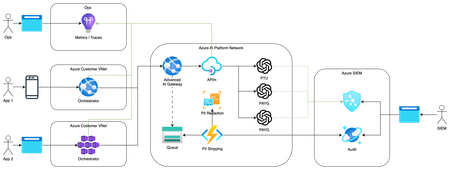
Are you in a platform team who has been tasked with building an AI Platform to serve the needs of your internal consumers? What does that mean? It’s a daunting challenge to be set, and even harder if you’re operating in a highly regulated environment. As enterprises scale out usage of Generative AI past a few initial use-cases they will face into a new set of challenges - scaling, onboarding, security and compliance to name a few. In this article we outline a set of common requirements and provide a reference implementation for an AI Platform.8.7KViews2likes0Comments📢 Announcing Built-In Knowledge for Azure Logic Apps
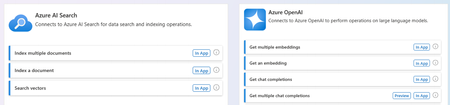
Now in Public Preview Turn your documents into a ready-to-use knowledge base without custom RAG pipelines. Today at Microsoft Build 2026, we are announcing the Public Preview of built-in Knowledge for Azure Logic Apps. It is a managed knowledge layer that transforms your documents into a ready-to-use knowledge base, removing the need to build custom Retrieval-Augmented Generation (RAG) pipeline, operate a vector store, or maintain retrieval logic. The result is grounded, accurate answers for the agents and workflows you are building today. Most organizations hold a significant amount of institutional knowledge such as HR policies, product manuals, support runbooks, contracts, and specifications distributed across documents, spreadsheets, and internal systems. The challenge has rarely been the availability of content. It has been making that content reliably and accurately retrievable by AI agents and workflows. Until now, addressing this challenge required building a RAG pipeline in-house. As any team that has implemented one can attest, a production-grade RAG pipeline involves substantial engineering effort and ongoing operational overhead. The complexity of building RAG in-house A production-grade RAG pipeline is not a single component. It is a set of interdependent systems that must be designed, integrated, and maintained: Ingestion: parsing multiple file formats, chunking content appropriately, summarizing, and generating embeddings. Storage: provisioning a vector database, defining indexing policies, and tuning for cost and performance. Retrieval: rewriting queries, vectorizing them, executing semantic search, and returning the most relevant chunks to the model. Operations: monitoring upload status, handling failures, managing credentials, and maintaining security. Each component represents a meaningful engineering investment. Together, they constitute a platform — one that diverts engineering capacity away from the business problems teams set out to solve. Introducing built-in Knowledge capability Built-in Knowledge in Logic Apps is a managed knowledge layer built into Azure Logic Apps that turns your documents into a ready-to-use knowledge base, without requiring you to build or operate a RAG pipeline. You provide the documents, and the platform manages the remainder of the process, both ingestion and retrieval, end to end. Built directly into Logic Apps, KBaaS provides an abstraction over the underlying vector store and AI models, enabling your workflows to consume structured, semantically searchable knowledge through a single connection. A knowledge base is a logical container that organizes related sources for a given domain. For example, an "HR Policies" knowledge base might hold all relevant HR documents. You create the knowledge base, upload your files, and attach it as a tool that your agent can call. How it works Managed Knowledge experience is built around two managed pipelines. Ingestion pipeline. When you upload a knowledge source, the service automatically parses, chunks, summarizes, and vectorizes the content, then stores the results, with no manual preprocessing required. The current preview supports a broad range of formats out of the box: DOC, DOCX, HTML, MD, PDF, PPT, PPTX, TXT, XLS, and XLSX. Each upload provides a progress status and a clear Completed or Failed result. Retrieval pipeline. When your agent queries the knowledge base, the service rewrites the query where beneficial, generates a vector representation, executes a semantic search, and returns the most relevant chunks to the language model for response generation. Query planning, vector search, and ranking are all handled by the service. The outcome is that your agents receive accurate, context-rich answers grounded in your own content, without requiring you to author retrieval logic. Built for agentic workflows Knowledge is available in Azure Logic Apps Standard, where it integrates directly with agentic workflows. Once a knowledge base has been created, it appears as a capability that can be attached to an agent loop. From there, the agent automatically queries the knowledge base to retrieve semantically relevant information from your uploaded documents at the point it is needed, as part of completing a task. Getting started involves three steps: Create the knowledge base connection - associate your vector store and your completions and embeddings models. Add knowledge sources - upload files into a knowledge base, optionally organized into groups. Add the knowledge base as a context - select it from the agent node so your agent can begin retrieving. The platform provisions and manages the required databases, containers, and indexing policies on your behalf, removing the burden of operating the underlying storage and search infrastructure. Two SKUs to consume it - Standard or Automation This feature is available across Logic Apps SKUs, with some differences in how you setup and manage them. Logic Apps Standard — bring your own resources. On Standard SKU, the model operates on your own Cosmos DB vector store and AI models, KBaaS integrates with them directly. You connect your existing resources, and the platform manages the complete ingestion and retrieval pipeline on top of them. This approach retains full control over your data and models while removing the need to build and maintain the RAG pipeline. Logic Apps Automation SKU — bring only your documents. On the Automation SKU, this feature operates on a hosted-on-behalf-of model, in which the platform provisions and manages both the underlying vector store and the AI models. There is no Cosmos DB to provision, no embeddings or completions model to deploy, and no connections to configure. You upload your documents and attach the knowledge base to your agent, and the entire knowledge layer, including the supporting infrastructure is fully managed for you. This delivers the same managed knowledge experience with the maximum degree of abstraction, providing the most direct path from source documents to a working, agent-ready knowledge base. Secure by design KBaaS supports authentication through Microsoft Entra ID using either a managed identity or an API key. We recommend managed identity wherever possible. It is the most secure option and eliminates the need to manually provision and rotate credentials, secrets, or access keys. Available today in Public Preview This initial release focuses on the most common starting point: uploading unstructured documents. Additional capabilities are planned, including support for more knowledge sources, richer ingestion (such as image parsing, semantic chunking, and multimodal embeddings), configurable retrieval settings, access checks during retrieval, and more. Built-in Knowledge in Logic Apps is available now in Public Preview. Provide your documents and give your agents a knowledge base that is ready to use, without building or operating a RAG pipeline. Read the MS Learn docs to get started Check out the demo below7.7KViews1like0CommentsLogic Apps - MCP Demos
We recently announced the ability to create MCP servers using Logic Apps connectors. In this post we are going to share some demo videos that will help you get started and provide you with some ideas on how you can build MCP servers to address your Agent connectivity needs. API Center + Logic Apps MCP Server Demos Getting Started - Salesforce Sales MCP Server In this video, we will leverage Azure API Center to create an MCP Server using Logic Apps connectors. Our solution will allow an end user to manage their Salesforce Contacts, Accounts and Opportunities. Building a Dataverse MCP Server In this video, we will leverage Azure API Center to create a Dataverse MCP Server using Logic Apps connectors. Our solution will allow an end user to gain insights on product returns and log an action for a quality control manager. Building a SharePoint MCP Server In this video, we will leverage Azure API Center to create a SharePoint MCP Server using Logic Apps connectors. Our solution will allow an end user to gain insights on product feedback and log new feedback on how to improve product. Calling Logic Apps MCP Server from Copilot Studio In this video, we will use API Center and Azure Logic Apps to expose an MCP Server that can be called from Copilot Studio securely. Logic Apps MCP Server Demos Getting Started - ServiceNow Incident MCP Server In this video, we will take an existing Logic App (Standard) instance and enable it as an MCP server. Our MCP server will expose tools that help users assign IT Incident tickets to ServiceNow. Resources Looking for more resources? Check out our product documentation: API Center and Logic Apps MCP server Logic Apps as an MCP server