ai
11 TopicsAI where and when you need it with Dragon Copilot's ability to focus
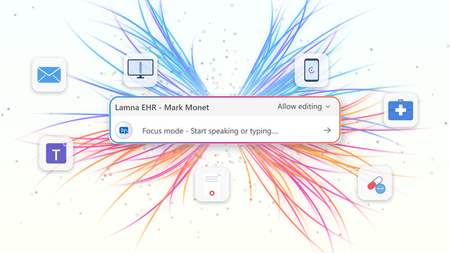
At HIMSS 2026, we showed that the most useful place to apply clinical intelligence is often not in a separate app or side window, but at the cursor, in the field where the clinician is already working. Our last post on this topic described the problem Dragon Copilot's focus capability is designed to solve: clinicians becoming data couriers, moving between windows, copying information from one system into another, and stitching together a day's work across multiple applications. That post looked ahead to what was coming. Now, it's here. What Dragon Copilot's focus capability does Dragon Copilot's focus capability brings AI directly into the text field where clinicians work, whether that's an EHR, a browser, Microsoft Word, SharePoint, or another desktop application. There is no separate application to launch and no workflow to rebuild. Simply place your cursor where you're working, select content if needed, and ask for help using natural language by voice or text. The focus capability works directly within the application you're already using, helping you stay in the flow of work. With focus, Dragon Copilot can: Read content from applications such as an EHR, browser, Microsoft Word, SharePoint, and other desktop applications. Answer questions about selected content and provide responses in context, using information from trusted sources and resources approved by the organization. Surface relevant information and insights without requiring manual searches, copying, or pasting. Generate, edit, and refine text directly where you're working. The experience is conversational and voice-first. Because the focus capability operates directly at the cursor, clinicians can take action without switching applications or rebuilding context. Questions are answered in context using information from the EHR and trusted sources, including resources approved by the organization. Focus in action The following examples illustrate how Dragon Copilot's focus capability helps clinicians read, answer, write, edit and surface information directly within their workflow. Journal and guideline Q&A Highlight a passage from a clinical guideline or journal article and ask: "Summarize the three key takeaways in patient-friendly language for the after-visit summary." The focus capability analyzes the selected content and generates a draft directly where you're working. Answer questions in context Clinicians often have the information they need in front of them but spend valuable time locating or interpreting it. Highlight relevant content and ask: "What does this recommendation mean for a patient with diabetes?" The focus capability reviews the selected information and delivers an answer within the workflow, without requiring clinicians to leave the application. The information is sourced from the EHR, a credible source such as MSD Manual, DailyMed, Medline Plus or from an organization’s internal source. Edit in place Select existing text and ask: "Convert this into a bulleted list." or "Summarize this HPI in two sentences." The focus capability reshapes the content directly where it already exists, helping clinicians refine documentation without disrupting their workflow. Surface relevant information Place your cursor inside a note and ask: "What's the patient's BMI?" The focus capability can retrieve relevant information available in context and return the answer inline, eliminating the need to navigate between screens, search for values, or perform calculations manually. Generate new content Need a referral letter, patient instruction, or summary? Simply ask. The focus capability can generate content directly within the destination field, helping clinicians create documentation where it belongs without copying and pasting between applications. Why this capability matters Bringing AI directly to the cursor is more than a convenience. It's what makes AI practical, visible, and actionable within everyday clinical workflows. Dragon Copilot's focus capability sits in a useful middle ground between ambient AI, which operates largely in the background, and traditional dictation, which requires clinicians to explicitly construct documentation themselves. Outputs are reviewable and editable before being finalized. Actions remain visible within the workflow, providing transparency and control. Clinicians can work without repeatedly navigating between applications or rebuilding context. Because the focus capability operates directly at the cursor, it creates an extensible foundation for future Dragon Copilot experiences and integrations from Microsoft and partners. When Dragon Copilot's focus capability brings AI directly to where clinicians are already working, copying, pasting, and window-switching fall away. Clinicians can access information, generate content, and take action without leaving their workflow, helping them spend less time managing technology and more time focused on patient care. Learn more about Dragon Copilot.Notes and documents – the way clinicians want them
The moment after the visit There is a moment in every patient encounter when the clinical story needs to become something more than a note. It may become a referral letter, a set of patient instructions, a school or work note, or a summary that helps a patient remember what was discussed. These documents matter as much as the note itself. A patient needs clear instructions they can understand and follow. A referring physician needs concise context and clinical reasoning. A specialist needs relevant background. Each audience is different; each document has a different purpose. For clinicians, these documents are not administrative leftovers. They are part of care itself. They carry the reasoning, reassurance, precision, and next steps that help patients and care teams move forward with confidence. And yet, creating them often happens under pressure and requires clinicians to rely on memory, whether they are documenting in between patients or after clinic hours. Introducing custom document templates in Dragon Copilot Dragon Copilot's custom document templates are designed to solve this problem by allowing the clinician to create these documents directly in the workflow. A custom document template is a reusable, AI-generated structure that turns a clinical encounter into the right finished document — a referral letter, after-visit summary, work note, pre-operative instructions — in the format the clinician defines. How it works A clinician describes what they need in plain language: "Create a patient-friendly follow-up letter after a cardiology visit." Dragon Copilot generates a draft template from that description. The clinician can then refine it — by speaking naturally— to adjust the tone, the structure, or the level of clinical detail until it reflects how they communicate. The finished template is saved and reusable, and ready to populate from the next encounter's notes. Templates can be built from scratch with a prompt, from a pasted sample, or from an uploaded file, with a preview before the template is used with real patient data. Built around how each clinician works Imagine a clinician finishing a consultation. The conversation was nuanced. The patient asked thoughtful questions. The next step requires a referral letter that reflects not only the diagnosis, but also the clinical reasoning behind it. Traditionally, that letter may be written later, when the clinician is already thinking about the next patient, the next inbox message, or the next task. With custom documents, the clinician can define the structure they need, save it, and generate the right type of output directly in the workflow. Referral letters are just one example. Clinicians create a wide range of documents every day, each designed for a different audience and purpose. A pediatrician needs parent-friendly discharge instructions — plain language, no jargon, clear next steps. A surgeon needs structured pre-operative guidance that follows a consistent format every time. A general practitioner needs a concise work note that takes seconds, not minutes. A specialist needs a referral response that reflects both the diagnosis and the clinical reasoning behind it. Each of these is a different template, built once, refined in conversation, and reused whenever it is needed. The AI adapts to the clinician's specialty, communication style, and intended audience — not the other way around. Clinical impact in real-world workflows Custom documents can create value where clinicians feel pressure most: in the moments after the encounter, when the clinical conversation needs to become clear, actionable communication. In practice, this means less time spent on repetitive drafting, manual rework, switching between documentation tasks, reconstructing details after the visit, creating routine letters, instructions, or summaries from scratch. Custom documents help make documentation more flexible, reusable, and aligned with how care is delivered. A step toward a more human future Less time spent drafting, reworking, and reconstructing details after the visit. More consistency across documents. And clinical communication that reflects how care was delivered — not a generic approximation of it. Custom documents help turn the conversation in the exam room into the right document for the right moment, with less friction and more consistency The goal is a future where clinicians do not have to choose between being present in the room and being precise in the record. Custom document templates in Dragon Copilot are a step toward that future. ------------- Click here to learn more about Dragon Copilot.382Views2likes0CommentsWhy AI Can't Find Your Files (And the Simple Fix)
I was watching someone the other day and learned something about AI that I believe is going to be important in the future. It wasn't a flashy new model or some prompt trick. It was something way more practical: how the way we name and build our files is either going to help AI or quietly work against it. And the more I sat with it, the more I realized this is going to matter a lot as we build for an AI-first world. We organize files for humans, not for AI Think about how most of us organize things today. We nest everything. A folder for 2026, then the customer, then the opportunity, and inside it a file called "Notes." Or maybe a policy and SOP folder tree that goes five levels deep with broad, generic titles. That structure makes sense to us (humans). We navigate by memory and location. We know the file is in the customer folder, under this opportunity. That's how humans think. But AI doesn't think like that. Now picture that same sales folder with three or four different "Notes" files spread across different subfolders under the same customer. When you ask AI to find something in there, it's going to guess. A lot. Especially when everything is named "Notes." And the messier the structure, the worse the guessing gets. It comes down to metadata So here's what I learned that actually helps. It comes down to metadata. When AI looks for a file, it isn't always reading every word of every file. It works in two levels, and once that clicked for me, the whole thing made sense. Level one: the title The first thing AI looks at is the title. And this is where most of us are leaving value on the table. A file called "Customer, Opportunity, Subject" gives AI so much more to work with than a file called "Notes." Same thing on the policy side. A file named "Benefits, Parental Leave, 2026" tells AI exactly what it's looking at before it even opens it. Compare these two: notes.docx acme-corp-renewal-q3-discovery-notes-2026 One of those is invisible to AI. The other one is basically answering the question before it's asked. Level two: the top of the file Once AI decides a file might be relevant, it starts reading it. And some of the most valuable real estate in the entire file is the very top. If you put a short structured block at the beginning that spells out what the file is about and the topics inside it, AI immediately understands what it's looking at. Something like this: Title: Parental Leave Policy (US) Type: HR policy Topics: parental leave, benefits, time off Effective date: January 1, 2026 Last reviewed: May 14, 2026 Version: 3.0 Status: active That little block does a lot of work. It tells AI what this is, who it's for, and just as important, whether it's current. So when I say metadata, that's really all I mean. It's the title of the file, plus a little bit of context right at the top, so that when AI scans it, it knows fast whether this is the file it actually needs. You don't need this on every file Now, I'm not saying do this for every file. That's overkill, and honestly it would be exhausting. But think about the static stuff. The files that don't change much. HR policies. Benefits. SOPs. The things people search for in a ServiceNow or SharePoint knowledge base using AI. For those files, a little structure does two things. First, it helps AI find the right answer for the person asking. When someone types "how much parental leave do I get," the right file basically raises its hand. Second, it cuts down the latency. If AI is sitting there scanning through a pile of vaguely named files, the user is just waiting around for it to think, and that gets annoying fast. When AI has the right context up front, it gets to the answer quicker. Pro Tip: You can use AI to create the metadata for you, just ask it!! Where this is headed I keep coming back to this because it's such a small change with a real payoff. We've spent years building file structures that make sense to people. Folders inside folders, organized by how we remember things. That's not wrong. But as more of how we find information runs through AI, the files that win are the ones that are easy for a machine to read, not just easy for a human to browse. I don't think every file needs this. But as we get more serious about how we build file structures for an AI-first world, I think this is one of the concepts that's going to really matter. Curious if anyone else is already thinking about this in how they build their knowledge bases. If you are, I'd love to hear how you're approaching it in the comments!1.1KViews2likes0Comments
Orchestrate multimodal AI insights within your healthcare data estate (Public Preview)
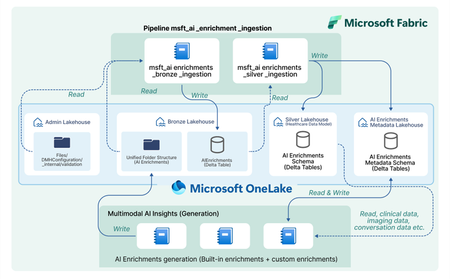
In today’s healthcare landscape, there is an increasing emphasis on leveraging artificial intelligence (AI) to extract meaningful insights from diverse datasets to improve patient care and drive clinical research. However, incorporating AI into your healthcare data estate often brings significant costs and challenges, especially when dealing with siloed and unstructured data. Healthcare organizations produce and consume data that is not only vast but also varied in format—ranging from structured EHR entries to unstructured clinical notes and imaging data. Traditional methods require manual effort to prepare and harmonize this data for AI, specify the AI output format, set up API calls, store the AI outputs, integrate the AI outputs, and analyze the AI outputs for each AI model or service you decide to use. Orchestrate multimodal AI insights is designed to streamline and scale healthcare AI within your data estate by building off of the data transformations in healthcare data solutions in Microsoft Fabric. This capability provides a framework to generate AI insights by connecting your multimodal healthcare data to an ecosystem of AI services and models and integrating structured AI-generated insights back into your data estate. When you combine these AI-generated insights with the existing healthcare data in your data estate, you can power advanced analytics scenarios for your organization and patient population. Key features: Metadata store lakehouse acts as a central repository for the metadata for AI orchestration to effectively capture and manage enrichment definitions, view definitions, and contextual information for traceability purposes. Execution notebooks define the enrichment view and enrichment definition based on the model configuration and input mappings. They also specify the model processor and transformer. The model processor calls the model API, and the transformer produces the standardized output while saving the output in the bronze lakehouse in the Ingest folder. Transformation pipeline to ingest AI-generated insights through the healthcare data solutions medallion lakehouse layers and persist the insights in an enrichment store within the silver layer. Conceptual architecture: The data transformations in healthcare data solutions in Microsoft Fabric allow you ingest, store, and analyze multimodal data. With the orchestrate multimodal AI insights capability, this standardized data serves as the input for healthcare AI models. The model results are stored in a standardized format and provide new insights from your data. The diagram below shows the flow of integrating AI generated insights into the data estate, starting as raw data in the bronze lakehouse and being transformed to delta tables in the silver lakehouse. This capability simplifies AI integration across modalities for data-driven research and care, currently supporting: Text Analytics for health in Azure AI Language to extract medical entities such as conditions and medications from unstructured clinical notes. This utilizes the data in the DocumentReference FHIR resource. MedImageInsight healthcare AI model in Azure AI Foundry to generate medical image embeddings from imaging data. This model leverages the data in the ImagingStudy FHIR resource. MedImageParse healthcare AI model in Azure AI Foundry to enable segmentation, detection, and recognition from imaging data across numerous object types and imaging modalities. This model uses the data in the ImagingStudy FHIR resource. By using orchestrate multimodal AI insights to leverage the data in healthcare data solutions for these models and integrate the results into the data estate, you can analyze your existing data alongside AI enrichments. This allows you to explore use cases such as creating image segmentations and combining with your existing imaging metadata and clinical data to enable quick insights and disease progression trends for clinical research at the patient level. Get started today! This capability is now available in public preview, and you can use the in-product sample data to test this feature with any of the three models listed above. For more information and to learn how to deploy the capability, please refer to the product documentation. We will dive deeper into more detailed aspects of the capability, such as the enrichment store and custom AI use cases, in upcoming blogs. Medical device disclaimer: Microsoft products and services (1) are not designed, intended or made available as a medical device, and (2) are not designed or intended to be a substitute for professional medical advice, diagnosis, treatment, or judgment and should not be used to replace or as a substitute for professional medical advice, diagnosis, treatment, or judgment. Customers/partners are responsible for ensuring solutions comply with applicable laws and regulations. FHIR® is the registered trademark of HL7 and is used with permission of HL7.1.4KViews2likes0CommentsBuilding AI-Powered Clinical Knowledge Stores with Azure AI Search
👀 Missed Session 01? Don’t worry—you can still catch up. But first, here’s what AI HLS Ignited is all about: What is AI HLS Ignited? AI HLS Ignited is a Microsoft-led technical series for healthcare innovators, solution architects, and AI engineers. Each session brings to life real-world AI solutions that are reshaping the Healthcare and Life Sciences (HLS) industry. Through live demos, architectural deep dives, and GitHub-hosted code, we equip you with the tools and knowledge to build with confidence. Session 01 Recap: In our first session, we introduced the accelerator MedIndexer - which is an indexing framework designed for the automated creation of structured knowledge bases from unstructured clinical sources. Whether you're dealing with X-rays, clinical notes, or scanned documents, MedIndexer converts these inputs into a schema-driven format optimized for Azure AI Search. This will allow your applications to leverage state-of-the-art retrieval methodologies, including vector search and re-ranking. Moreover, by applying a well-defined schema and vectorizing the data into high-dimensional representations, MedIndexer empowers AI applications to retrieve more precise and context-aware information... The result? AI systems that surface more relevant, accurate, and context-aware insights—faster. 🔍 Turning Your Unstructured Data into Value "About 80% of medical data remains unstructured and untapped after it is created (e.g., text, image, signal, etc.)" — Healthcare Informatics Research, Chungnam National University In the era of AI, the rise of AI copilots and assistants has led to a shift in how we access knowledge. But retrieving clinical data that lives in disparate formats is no trivial task. Building retrieval systems takes effort—and how you structure your knowledge store matters. It’s a cyclic, iterative, and constantly evolving process. That’s why we believe in leveraging enterprise-ready retrieval platforms like Azure AI Search—designed to power intelligent search experiences across structured and unstructured data. It serves as the foundation for building advanced retrieval systems in healthcare. However, implementing Azure AI Search alone is not enough. Mastering its capabilities and applying well-defined patterns can significantly enhance your ability to address repetitive tasks and complex retrieval scenarios. This project aims to accelerate your ability to transform raw clinical data into high-fidelity, high-value knowledge structures that can power your next-generation AI healthcare applications. 🚀 How to Get Started with MedIndexer New to Azure AI Search? Begin with our guided labs to build a strong foundation and get hands-on with the core capabilities. Already familiar with the tech? Jump ahead to the real-world use cases—learn how to build Coded Policy Knowledge Stores and X-ray Knowledge Stores. 🧪 Labs 🧪 Building Your Azure AI Search Index: 🧾 Notebook - Building your first Index Learn how to create and configure an Azure AI Search index to enable intelligent search capabilities for your applications. 🧪 Indexing Data into Azure AI Search: 🧾 Notebook - Ingest and Index Clinical Data Understand how to ingest, preprocess, and index clinical data into Azure AI Search using schema-first principles. 🧪 Retrieval Methods for Azure AI Search: 🧾 Notebook - Exploring Vector Search and Hybrid Retrieval Dive into retrieval techniques such as vector search, hybrid retrieval, and reranking to enhance the accuracy and relevance of search results. 🧪 Evaluation Methods for Azure AI Search: 🧾 Notebook - Evaluating Search Quality and Relevance Learn how to evaluate the performance of your search index using relevance metrics and ground truth datasets to ensure high-quality search results. 🏥 Use Cases 📝 Creating Coded Policy Knowledge Stores In many healthcare systems, policy documents such as pre-authorization guidelines are still trapped in static, scanned PDFs. These documents are critical—they contain ICD codes, drug name coverage, and payer-specific logic—but are rarely structured or accessible in real-time. To solve this, we built a pipeline that transforms these documents into intelligent, searchable knowledge stores. This diagram shows how pre-auth policy PDFs are ingested via blob storage, passed through an OCR and embedding skillset, and then indexed into Azure AI Search. The result: fast access to coded policy data for AI apps. 🧾 Notebook - Creating Coded Policies Knowledge Stores Transform payer policies into machine-readable formats. This use case includes: Preprocessing and cleaning PDF documents Building custom OCR skills Leveraging out-of-the-box Indexer capabilities and embedding skills Enabling real-time AI-assisted querying for ICDs, payer names, drug names, and policy logic Why it matters: This streamlines prior authorization and coding workflows for providers and payors, reducing manual effort and increasing transparency. 🩻 Creating X-ray Knowledge Stores In radiology workflows, X-ray reports and image metadata contain valuable clinical insights—but these are often underutilized. Traditionally, they’re stored as static entries in PACS systems or loosely connected databases. The goal of this use case is to turn those X-ray reports into a searchable, intelligent asset that clinicians can explore and interact with in meaningful ways. This diagram illustrates a full retrieval pipeline where radiology reports are uploaded, enriched through foundational models, embedded, and indexed. The output powers an AI-driven web app for similarity search and decision support. 🧾 Notebook - Creating X-rays Knowledge Stores Turn imaging reports and metadata into a searchable knowledge base. This includes: Leveraging push APIs with custom event-driven indexing pipeline triggered on new X-ray uploads Generating embeddings using Microsoft Healthcare foundation models Providing an AI-powered front-end for X-ray similarity search Why it matters: Supports clinical decision-making by retrieving similar past cases, aiding diagnosis and treatment planning with contextual relevance. 📣 Join Us for the Next Session Help shape the future of healthcare by sharing AI HLS Ignited with your network—and don’t miss what’s coming next! 📅 Register for the upcoming session → AI HLS Ignited Event Page 💻 Explore the code, demos, and architecture → AI HLS Ignited GitHub Repository