ai
11 TopicsAI where and when you need it with Dragon Copilot's ability to focus
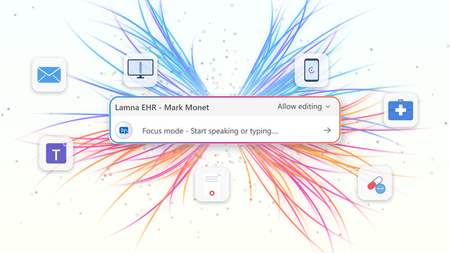
At HIMSS 2026, we showed that the most useful place to apply clinical intelligence is often not in a separate app or side window, but at the cursor, in the field where the clinician is already working. Our last post on this topic described the problem Dragon Copilot's focus capability is designed to solve: clinicians becoming data couriers, moving between windows, copying information from one system into another, and stitching together a day's work across multiple applications. That post looked ahead to what was coming. Now, it's here. What Dragon Copilot's focus capability does Dragon Copilot's focus capability brings AI directly into the text field where clinicians work, whether that's an EHR, a browser, Microsoft Word, SharePoint, or another desktop application. There is no separate application to launch and no workflow to rebuild. Simply place your cursor where you're working, select content if needed, and ask for help using natural language by voice or text. The focus capability works directly within the application you're already using, helping you stay in the flow of work. With focus, Dragon Copilot can: Read content from applications such as an EHR, browser, Microsoft Word, SharePoint, and other desktop applications. Answer questions about selected content and provide responses in context, using information from trusted sources and resources approved by the organization. Surface relevant information and insights without requiring manual searches, copying, or pasting. Generate, edit, and refine text directly where you're working. The experience is conversational and voice-first. Because the focus capability operates directly at the cursor, clinicians can take action without switching applications or rebuilding context. Questions are answered in context using information from the EHR and trusted sources, including resources approved by the organization. Focus in action The following examples illustrate how Dragon Copilot's focus capability helps clinicians read, answer, write, edit and surface information directly within their workflow. Journal and guideline Q&A Highlight a passage from a clinical guideline or journal article and ask: "Summarize the three key takeaways in patient-friendly language for the after-visit summary." The focus capability analyzes the selected content and generates a draft directly where you're working. Answer questions in context Clinicians often have the information they need in front of them but spend valuable time locating or interpreting it. Highlight relevant content and ask: "What does this recommendation mean for a patient with diabetes?" The focus capability reviews the selected information and delivers an answer within the workflow, without requiring clinicians to leave the application. The information is sourced from the EHR, a credible source such as MSD Manual, DailyMed, Medline Plus or from an organization’s internal source. Edit in place Select existing text and ask: "Convert this into a bulleted list." or "Summarize this HPI in two sentences." The focus capability reshapes the content directly where it already exists, helping clinicians refine documentation without disrupting their workflow. Surface relevant information Place your cursor inside a note and ask: "What's the patient's BMI?" The focus capability can retrieve relevant information available in context and return the answer inline, eliminating the need to navigate between screens, search for values, or perform calculations manually. Generate new content Need a referral letter, patient instruction, or summary? Simply ask. The focus capability can generate content directly within the destination field, helping clinicians create documentation where it belongs without copying and pasting between applications. Why this capability matters Bringing AI directly to the cursor is more than a convenience. It's what makes AI practical, visible, and actionable within everyday clinical workflows. Dragon Copilot's focus capability sits in a useful middle ground between ambient AI, which operates largely in the background, and traditional dictation, which requires clinicians to explicitly construct documentation themselves. Outputs are reviewable and editable before being finalized. Actions remain visible within the workflow, providing transparency and control. Clinicians can work without repeatedly navigating between applications or rebuilding context. Because the focus capability operates directly at the cursor, it creates an extensible foundation for future Dragon Copilot experiences and integrations from Microsoft and partners. When Dragon Copilot's focus capability brings AI directly to where clinicians are already working, copying, pasting, and window-switching fall away. Clinicians can access information, generate content, and take action without leaving their workflow, helping them spend less time managing technology and more time focused on patient care. Learn more about Dragon Copilot.Notes and documents – the way clinicians want them
The moment after the visit There is a moment in every patient encounter when the clinical story needs to become something more than a note. It may become a referral letter, a set of patient instructions, a school or work note, or a summary that helps a patient remember what was discussed. These documents matter as much as the note itself. A patient needs clear instructions they can understand and follow. A referring physician needs concise context and clinical reasoning. A specialist needs relevant background. Each audience is different; each document has a different purpose. For clinicians, these documents are not administrative leftovers. They are part of care itself. They carry the reasoning, reassurance, precision, and next steps that help patients and care teams move forward with confidence. And yet, creating them often happens under pressure and requires clinicians to rely on memory, whether they are documenting in between patients or after clinic hours. Introducing custom document templates in Dragon Copilot Dragon Copilot's custom document templates are designed to solve this problem by allowing the clinician to create these documents directly in the workflow. A custom document template is a reusable, AI-generated structure that turns a clinical encounter into the right finished document — a referral letter, after-visit summary, work note, pre-operative instructions — in the format the clinician defines. How it works A clinician describes what they need in plain language: "Create a patient-friendly follow-up letter after a cardiology visit." Dragon Copilot generates a draft template from that description. The clinician can then refine it — by speaking naturally— to adjust the tone, the structure, or the level of clinical detail until it reflects how they communicate. The finished template is saved and reusable, and ready to populate from the next encounter's notes. Templates can be built from scratch with a prompt, from a pasted sample, or from an uploaded file, with a preview before the template is used with real patient data. Built around how each clinician works Imagine a clinician finishing a consultation. The conversation was nuanced. The patient asked thoughtful questions. The next step requires a referral letter that reflects not only the diagnosis, but also the clinical reasoning behind it. Traditionally, that letter may be written later, when the clinician is already thinking about the next patient, the next inbox message, or the next task. With custom documents, the clinician can define the structure they need, save it, and generate the right type of output directly in the workflow. Referral letters are just one example. Clinicians create a wide range of documents every day, each designed for a different audience and purpose. A pediatrician needs parent-friendly discharge instructions — plain language, no jargon, clear next steps. A surgeon needs structured pre-operative guidance that follows a consistent format every time. A general practitioner needs a concise work note that takes seconds, not minutes. A specialist needs a referral response that reflects both the diagnosis and the clinical reasoning behind it. Each of these is a different template, built once, refined in conversation, and reused whenever it is needed. The AI adapts to the clinician's specialty, communication style, and intended audience — not the other way around. Clinical impact in real-world workflows Custom documents can create value where clinicians feel pressure most: in the moments after the encounter, when the clinical conversation needs to become clear, actionable communication. In practice, this means less time spent on repetitive drafting, manual rework, switching between documentation tasks, reconstructing details after the visit, creating routine letters, instructions, or summaries from scratch. Custom documents help make documentation more flexible, reusable, and aligned with how care is delivered. A step toward a more human future Less time spent drafting, reworking, and reconstructing details after the visit. More consistency across documents. And clinical communication that reflects how care was delivered — not a generic approximation of it. Custom documents help turn the conversation in the exam room into the right document for the right moment, with less friction and more consistency The goal is a future where clinicians do not have to choose between being present in the room and being precise in the record. Custom document templates in Dragon Copilot are a step toward that future. ------------- Click here to learn more about Dragon Copilot.364Views2likes0CommentsOperationalizing AI powered medical imaging pipeline for cohort building
Authors: Jared Erwin, Senior Software Engineer, HLS Nursing AI and Data Platform, Faculty UW School of Medicine Manoj Kumar, Director, HLS - Data & AI HLS Frontiers AI Alberto Santamaria-Pang, Principal Applied Data Scientist, HLS Frontiers AI and Adjunct Faculty, Johns Hopkins Medicine Overview In Part 1, of this series, we showed how natural language could be used to define medical imaging cohorts and retrieve relevant studies in seconds instead of months. That proof-of-concept demonstrated the value of the idea — but not how to make it repeatable, or production-ready. This post focuses on how we turned that prototype into a production-oriented Azure Machine Learning pipeline — to scale execution and produce clear, versioned artifacts that could drive an interactive cohort exploration UI. If you're building ML pipelines for medical imaging, or any domain where data is large, messy, and locked behind access controls, we hope our experience saves you time. From scripts to a pipeline: Why Azure ML components? The original hackathon implementation consisted of notebooks and scripts that required careful manual execution. To make the system repeatable and auditable, we standardized it using Azure ML pipelines. Azure ML pipelines gave us: Componentized execution — each processing step is a self-contained unit with defined inputs, outputs, and dependencies Parallel branches — steps that don't depend on each other run concurrently Reproducibility — every run is versioned and logged with full lineage Compute flexibility — run on CPU for metadata extraction, GPU for model inference, without manual orchestration The pipeline architecture The pipeline consists of 5 python components arranged in a DAG with two parallel branches: [0]scans a DICOM directory and extracts metadata from headers — study/series UIDs, modality, body part, slice counts. [1]classifies each series by anatomy and orientation using a multi-tier strategy (more on this below). [2] and [3] form the search pipeline: anatomy labels are converted to natural language text templates, then encoded with BiomedCLIP into a FAISS vector index. [4]generates 2D UMAP coordinates from the embeddings for the interactive scatter plot visualization in the UI. The image depicts a flowchart detailing the process of DICOM metadata extraction, anatomy classification, visualization enrichment, and text template generation, followed by the creation of a FAISS vector index. Components 2 and 4 run in parallel after component 1 completes, saving roughly 10-15% of total execution time. It's a modest gain for a single run, but it adds up when iterating on pipeline parameters. [1] Anatomy classification, integrating MedImageInsight The Anatomy classification component in the pipeline relies on MedImageInsight (MI2). MedImageInsight is Microsoft's foundation model for medical image understanding, available through the Azure AI Foundry model catalog. Unlike generative models, MedImageInsight is an embedding model — it maps medical images and text into a shared 1024-dimensional vector space, enabling tasks like classification and similarity search by comparing image embeddings against text label embeddings. Given a DICOM image, we compare its embedding against candidate labels (e.g., "Brain", "Chest", "Abdomen") to determine the body part, scan orientation, and other imaging characteristics through zero-shot classification. We also may get directly annotated anatomy from component 0, the DICOM metadata extractor component. We can combine both data points to build our final search index. [2] [3] FAISS index construction As an input to the FAISS index, we first run component 2, the text template generator. This component takes the metadata and anatomy information from components 0 and 1 and feeds them into 5 different agents with different instructions on how to describe the DICOM study. This results in textual descriptions which some variation, referred to as text templates, which can be indexed in the next component The FAISS index builder (component 3) uses BiomedCLIP to encode all text templates into 512-dimensional vectors: MODEL_NAME = "hf-hub:microsoft/BiomedCLIP-PubMedBERT_256-vit_base_patch16_224" @torch.no_grad() def encode(self, texts: List[str], batch_size: int = 256) -> np.ndarray: embeddings = [] for i in range(0, len(texts), batch_size): batch = texts[i:i+batch_size] tokens = self.tokenizer(batch).to(self.device) batch_embeddings = self.model.encode_text(tokens) batch_embeddings = F.normalize(batch_embeddings, dim=-1) # L2 normalize embeddings.append(batch_embeddings.cpu().numpy()) return np.vstack(embeddings) We L2-normalize all vectors and use faiss.IndexFlatIP (inner product), which is equivalent to cosine similarity on normalized vectors. For our current dataset sizes (thousands of series), flat indexing is fast enough. For hospital-scale datasets with millions of images, we might switch to IndexIVFFlat or IndexHNSW for approximate nearest neighbor search. In the cohort explorer app, a user will enter a natural language query, which is then converted to embeddings using the same BiomedCLIP model. This allows a search using the FAISS index to find relevant DICOM studies. [4] Visualization: making embeddings explorable The scatter plot in the UI is often the first thing users interact with. It needs to show meaningful clusters without requiring users to understand dimensionality reduction. Component 4 takes the embeddings from component 1 and projects them to 2D with UMAP: umap = UMAP( n_components=2, n_neighbors=10, # Balances local vs. global structure min_dist=0.5, # Prevents over-clustering metric='cosine', # Matches our embedding similarity metric random_state=42 # Reproducible layouts ) coordinates_2d = umap.fit_transform(features) Each point in the scatter plot corresponds to a single DICOM series produced by the pipeline, with color, grouping, and hover metadata derived directly from the JSON artifacts emitted by components 1 and 4. Each pipeline run produces a small set of well-defined artifacts — metadata tables, embedding vectors, UMAP coordinates, and the FAISS index — which are consumed directly by the cohort exploration UI. The cohort explorer application can reload or switch between datasets. The diagram is a screen capture of an Azure ML pipeline. It includes 5 pipeline components along with connecting arrows showing incoming and outgoing data, including the final outputs of the pipeline. Pipeline execution: time, cost, and what we learned Here's what a typical pipeline run looks like for a dataset of ~4,500 DICOM series: Component Task Approximate Time (CPU) Approximate Time (GPU) 0 - DICOM Metadata Extractor Scan files, extract headers 5-10 min 5-10 min 1 - Anatomy Classification Classify anatomy/orientation 90-120 min 5-10 min 2 - Text Template Generator Generate 5 templates per series 5-10 min 5-10 min 3 - FAISS Index Builder BiomedCLIP encoding + FAISS build 60-90 min 10-15 min 4 - Visualization Enrichment UMAP + color assignment 20-40 min 5-10 min Azure ML overhead Compute provisioning, env setup 5-10 min 5-10 min Total ~200-300 min ~30-50 min Key observations: Azure ML overhead is significant when doing quick iteration and testing. Compute provisioning, conda environment builds, and data mounting add several minutes before any component code runs. We first built each component as python code to run locally and debug before our first Azure ML run. This way we quickly iterated and avoided cost until we were ready. BiomedCLIP encoding dominates on CPU. Component 3 is the bottleneck. Moving to GPU compute for this component cuts encoding time roughly in half, but GPU clusters cost more. For a pipeline you run occasionally, CPU is fine. For frequent re-indexing, GPU pays for itself. Batch size tuning matters. The default BiomedCLIP batch size of 256 balances memory and throughput. On GPU, you can push to 512. On CPU with limited RAM, drop to 128. At Scale: 120,000 Images, CPU vs. GPU We ran the full pipeline against a larger dataset of ~120,000 images to understand how compute choice affects end-to-end time and cost: CPU Pipeline GPU Pipeline Pipeline compute time 4 days, 12 hours (108 hrs) 15 hours Pipeline compute cost ~$0.25/hr × 108 hrs = ~$27 ~$3.00/hr × 15 hrs = ~$45 MedImageInsight endpoint (MaaP on Standard_NC4as_T4_v3) ~$151 ~$21 Total estimated cost ~$178 ~$66 Both pipeline runs make the same ~120,000 classification calls to the MedImageInsight endpoint, but those calls are spread out over different time periods depending on how quickly and efficiently the pipeline can make the calls to MedImageInsight. The hourly cost for MedImageInsight on a Standard_NC4as_T4_v3 VM is ~$1.40/hr. Resulting in the estimated costs for MedImageInsight in the table above. GPU compute was roughly 7× faster at about 0.37× the total cost when endpoint costs are included. This was a key learning and clearly indicates the benefits of the more powerful compute resources. MedImageInsight can be deployed in two ways, depending on dataset size and operational needs. For smaller or infrequently processed datasets, we deploy MedImageInsight as a managed Azure ML online endpoint and invoke it from the pipeline. This keeps the pipeline simpler and avoids managing the MedImageInsight compute directly, while offering comparable performance at modest scale. For larger batch workloads, an alternative approach is to load MedImageInsight directly on the Azure ML pipeline’s GPU-backed compute. In this model, the pipeline handles both model loading and classification, eliminating per-request network round trips and the fixed cost of hosting a persistent endpoint. While this approach requires slightly longer pipeline run time, it becomes more cost‑effective at scale by avoiding endpoint overhead and improving throughput during bulk processing. Possible future enhancements Additional modalities: Extending the pipeline and classification to CT, X-ray, and ultrasound imaging, and build on the pattern for pathology images Image embeddings fusion: Combining MedImageInsight image embeddings with text embeddings for hybrid search Condition-aware search: Enabling queries about findings and conditions, not just imaging parameters The gap between a hackathon demo and a production system is where the real engineering happens. We hope sharing our journey helps others building similar systems. If you’re interested in partnering with us to work toward this goal or need access to the GitHub repo with the pipeline and UI code, contact authors through your Microsoft account team or reach out to Microsoft HLS AI frontier team The healthcare AI models in Microsoft Foundry are intended for research and model development exploration. The models are not designed or intended to be deployed in clinical settings as-is nor for use in the diagnosis or treatment of any health or medical condition, and the individual models' performances for such purposes have not been established. You bear sole responsibility and liability for any use of the healthcare AI models, including verification of outputs and incorporation into any product or service intended for a medical purpose or to inform clinical decision-making, compliance with applicable healthcare laws and regulations, and obtaining any necessary clearances or approvals.Right-Sizing Intelligence: Building a Multimodal Model Portfolio for Healthcare and Life Sciences
For two years, the AI conversation in healthcare fixated on a single question: which large language model is best? That question is now out of date. The frontier didn't just get smarter, it got plural. The most capable healthcare AI systems being built today are not one model but a portfolio: large reasoning models, small efficient models, and specialized models for voice, images, and video, each doing the part of the job it does best. Microsoft Foundry makes that portfolio practical. Its model catalog spans over 1,900 models from Microsoft, OpenAI, Anthropic, Meta, Mistral, xAI, DeepSeek, Hugging Face, and others, together with the tools to compare, ground, evaluate, and govern them in one place. For healthcare and life sciences (HLS) leaders, the strategic shift is from *pick the model* to *design the portfolio*. This post walks through one concrete, high-value pattern, turning a clinician's spoken encounter into a verified, structured note, and uses it to show how a model portfolio works end to end, what it costs at scale, and how to keep it safe. Several of the newest capabilities referenced here are in preview; confirm current naming and availability before you build. Why “model” is now a plural A modern model strategy spans two axes: capability size and modality. Getting both right is the whole game. On the size axis, Microsoft Foundry presents a clear menu. GPT-5-class models are the most capable for complex, multi-step reasoning and multimodal scenarios. GPT-4.1 strikes a balance of capability and cost for production workloads, and GPT-4.1 mini is tuned for the lowest-latency, highest-throughput jobs. Alongside them sit Microsoft's Phi small language models, Phi-4, Phi-4-mini, and Phi-4-multimodal, designed for strong reasoning with efficient deployment, including on-device through Foundry Local. On the modality axis, the catalog reaches well beyond text. Microsoft's MAI (Microsoft AI) family includes MAI-Voice-1, an expressive neural text-to-speech model for natural, long-form English speech, and MAI-Transcribe, a speech-recognition model tuned for both accuracy and efficiency. Phi-4-multimodal accepts text, images, and audio in a single model. And a dedicated set of healthcare AI models, such as MedImageInsight, MedImageParse, and CXRReportGen, brings multimodal reasoning to medical imaging, pathology, and radiology. The point isn't to use them all; it's that the right answer to almost any real HLS workflow is several of them, composed. A multimodal model portfolio in Microsoft Foundry: diverse inputs, the smallest capable model per task, governed outputs. The business problem: documentation, education, and unread data Start with the problem clinicians feel most acutely: documentation. Writing notes, orders, and after-visit summaries consumes hours that clinicians would rather spend with patients, and it is a leading contributor to burnout. Ambient AI scribing, listening to the visit and drafting the note, is one of the clearest near-term wins in healthcare AI. But documentation is only the first domino. The same portfolio that drafts a note can generate patient-education material in plain language and natural voice, summarize a specialist's imaging findings for a referring physician, and make dense clinical text understandable for caregivers. Much of healthcare's most valuable data, audio, images, and scanned documents, has historically gone unread by software. Multimodal models change that. The catch is economics. If every one of these tasks calls the largest available model, the combined cost and latency make the program impossible to scale. Right-sizing, matching each task to the smallest model that can do it well, is what turns a compelling demo into a sustainable service. A technical walkthrough: from voice to verified note Consider the ambient-documentation workflow in detail. It is a useful template because it touches every part of the portfolio, speech, small models, large models, retrieval, evaluation, and human review, in a single pass. The inputs The pipeline starts with two inputs: the ambient audio of the encounter, captured with patient consent, and structured context from the electronic health record (EHR), the patient's problem list, current medications, and recent results. Related images or documents can come along for the ride when the visit calls for them. Which model does what Here is where the portfolio earns its keep. No single model touches the whole job: Speech-to-text. A speech model (Azure AI Speech, or MAI-Transcribe for high accuracy and efficiency) converts the conversation into an accurate, timestamped transcript. Extraction and structuring. A small Phi model parses the transcript into discrete elements, problems, medications, and follow-ups, at a fraction of the cost and latency of a frontier model, and it can run close to the data. Grounding (RAG). A retrieval step injects only approved context, the organization's clinical guidelines and the specific patient's record, so the draft reflects real, current, permissioned information rather than the model's memory. Drafting. A larger GPT-class model composes the narrative note, reconciling the transcript, the structured extraction, and the grounded context into clean clinical prose. Patient-facing media. For the after-visit summary, MAI-Voice-1 can render a plain-language version as natural speech, and avatar or video generation can produce short education clips for patients or providers. Imaging insights. When images are involved, healthcare models such as MedImageInsight or CXRReportGen surface findings for a specialist to review, in supported, non-diagnostic configurations. Orchestration, evaluation, and the human checkpoint Foundry orchestrates these calls, and two stages matter as much as the models themselves. Evaluation runs automated checks on every draft, grounding and faithfulness, safety, and completeness, and routes low-confidence outputs for extra scrutiny. Human review is the non-negotiable final gate: the clinician reads, edits, and signs off before anything reaches the chart. The model drafts; the clinician decides. From voice to verified note: each stage uses the smallest capable model, and a clinician signs off before anything reaches the chart. Capture with consent. Record ambient audio and pull the relevant EHR context at the point of care. Transcribe. Convert audio to text with a speech model sized for accuracy and throughput. Extract. Use a small Phi model to structure the transcript into problems, medications, and actions. Ground. Retrieve only approved guidelines and the patient's own record as context (RAG). Draft. Have a larger model compose the note from transcript, structure, and grounded context. Evaluate. Score each draft for faithfulness, safety, and completeness; flag the doubtful ones. Review and sign off. The clinician edits and approves; the edits feed back to improve prompts and routing. The economics at scale: right-sizing the portfolio The difference between a pilot and a platform is cost-to-serve. A right-sized portfolio attacks it on several fronts at once. Match model to task. Most steps above, transcription, extraction, classification, routing, are high-volume but not cognitively hard. They belong on small models like Phi, which deliver strong results at far lower cost and latency. Reserve the large, expensive models for the genuinely difficult step: composing and reconciling the final note. Spending frontier-model dollars on routine extraction is the single most common way AI programs blow their budget. Cache and batch. Identical or near-identical requests, a common guideline lookup, a standard education snippet, can be cached and reused. Non-urgent work, overnight summarization or cohort processing, can be batched for throughput rather than instant response. Run small models close to the data. Through Foundry Local, eligible Phi workloads can run on-device or at the edge, cutting per-call cost and keeping sensitive audio and text on local infrastructure, valuable in a hospital where latency and data residency both matter. Make unit economics predictable. For specialized work, Microsoft's premium healthcare models are offered as pay-as-you-go serverless endpoints with predictable per-image economics, so finance can model cost per study rather than guess at infrastructure. The net effect: cost and latency scale with the difficulty of the work, not with raw volume. One large model for everything versus a right-sized portfolio: matching model size to task difficulty is what changes the economics. Governance: safety, responsible AI, and human oversight In healthcare, governance is not a layer you add at the end; it is the foundation. A right-sized portfolio actually makes governance easier, because each model has a narrower, better-understood job. Responsible AI by design. Foundry includes built-in evaluation, content safety, and observability, so teams can test models against their own data and monitor them in production. Data boundaries. The pipeline runs within your tenant, under your existing identity, permissions, and data-protection controls; grounding restricts the model to approved, permissioned sources. Human in the loop. Microsoft's healthcare models are explicitly designed to support, never replace qualified professionals; many are in preview and intended for research and development, not autonomous clinical decisions. A clinician signs off on every clinically meaningful output. Provenance and feedback. Capturing edits and approvals creates an audit trail and a continuous-improvement loop for prompts, routing, and model selection. Responsibility stays with the deploying organization: you remain accountable for verifying outputs, meeting applicable healthcare regulations, and obtaining any clearances required before a model informs clinical decision-making. The portfolio approach supports that accountability by keeping each step inspectable and each consequential decision human. How to start: a 30-day mini-playbook Pick one painful, high-volume workflow. Ambient documentation, referral summaries, or patient-education drafting are strong first candidates. Map the modalities. List the inputs (audio, text, images) and outputs (note, summary, voice) so you know which model types you need. Draft the portfolio, smallest-first. Assign each step to the smallest capable model and reserve large models for the hardest step only. Ground it. Connect approved guidelines and the relevant record through retrieval before you optimize anything else. Stand up evaluation early. Define faithfulness, safety, and completeness checks, and a human-review step, from day one, not after launch. Measure cost and latency per task, then tune routing, caching, and batching against real usage. Expand by reuse. Once the portfolio works for one workflow, most of it, speech, extraction, grounding, governance, carries straight over to the next. The organizations that win with healthcare AI over the next year won't be the ones who picked the single “best” model. They'll be the ones who designed the best portfolio, matching capability and modality to each task, grounding every output, and keeping clinicians firmly in the loop. Right-sizing isn't a cost-cutting afterthought; it is the architecture that makes AI affordable, fast, and safe enough to use everywhere. Subscribe to the Microsoft Healthcare & Life Sciences blog for weekly, practical deep dives on building AI that scales. And one question to leave you with: if you mapped your top clinical workflow today, how many of its steps actually need a frontier model, and how many are quietly overpaying for one? Sources What is Microsoft Foundry? Microsoft Foundry Models overview Healthcare AI models in Microsoft Foundry What is MAI-Voice? MAI-Transcribe in Azure Speech Phi open models Related links Microsoft Foundry — Build, evaluate, and deploy AI across a catalog of 1,900+ models. Phi small language models — Microsoft's efficient open models, including Phi-4-multimodal. Healthcare AI models in Microsoft Foundry — Multimodal foundation models for medical imaging and more. Azure AI Speech — Speech-to-text, text-to-speech, and the MAI voice and transcribe models. Microsoft Responsible AI — Principles and practices for building AI responsibly. Healthcare & Life Sciences Tech Community — More HLS deep dives and announcements.Why AI Can't Find Your Files (And the Simple Fix)
I was watching someone the other day and learned something about AI that I believe is going to be important in the future. It wasn't a flashy new model or some prompt trick. It was something way more practical: how the way we name and build our files is either going to help AI or quietly work against it. And the more I sat with it, the more I realized this is going to matter a lot as we build for an AI-first world. We organize files for humans, not for AI Think about how most of us organize things today. We nest everything. A folder for 2026, then the customer, then the opportunity, and inside it a file called "Notes." Or maybe a policy and SOP folder tree that goes five levels deep with broad, generic titles. That structure makes sense to us (humans). We navigate by memory and location. We know the file is in the customer folder, under this opportunity. That's how humans think. But AI doesn't think like that. Now picture that same sales folder with three or four different "Notes" files spread across different subfolders under the same customer. When you ask AI to find something in there, it's going to guess. A lot. Especially when everything is named "Notes." And the messier the structure, the worse the guessing gets. It comes down to metadata So here's what I learned that actually helps. It comes down to metadata. When AI looks for a file, it isn't always reading every word of every file. It works in two levels, and once that clicked for me, the whole thing made sense. Level one: the title The first thing AI looks at is the title. And this is where most of us are leaving value on the table. A file called "Customer, Opportunity, Subject" gives AI so much more to work with than a file called "Notes." Same thing on the policy side. A file named "Benefits, Parental Leave, 2026" tells AI exactly what it's looking at before it even opens it. Compare these two: notes.docx acme-corp-renewal-q3-discovery-notes-2026 One of those is invisible to AI. The other one is basically answering the question before it's asked. Level two: the top of the file Once AI decides a file might be relevant, it starts reading it. And some of the most valuable real estate in the entire file is the very top. If you put a short structured block at the beginning that spells out what the file is about and the topics inside it, AI immediately understands what it's looking at. Something like this: Title: Parental Leave Policy (US) Type: HR policy Topics: parental leave, benefits, time off Effective date: January 1, 2026 Last reviewed: May 14, 2026 Version: 3.0 Status: active That little block does a lot of work. It tells AI what this is, who it's for, and just as important, whether it's current. So when I say metadata, that's really all I mean. It's the title of the file, plus a little bit of context right at the top, so that when AI scans it, it knows fast whether this is the file it actually needs. You don't need this on every file Now, I'm not saying do this for every file. That's overkill, and honestly it would be exhausting. But think about the static stuff. The files that don't change much. HR policies. Benefits. SOPs. The things people search for in a ServiceNow or SharePoint knowledge base using AI. For those files, a little structure does two things. First, it helps AI find the right answer for the person asking. When someone types "how much parental leave do I get," the right file basically raises its hand. Second, it cuts down the latency. If AI is sitting there scanning through a pile of vaguely named files, the user is just waiting around for it to think, and that gets annoying fast. When AI has the right context up front, it gets to the answer quicker. Pro Tip: You can use AI to create the metadata for you, just ask it!! Where this is headed I keep coming back to this because it's such a small change with a real payoff. We've spent years building file structures that make sense to people. Folders inside folders, organized by how we remember things. That's not wrong. But as more of how we find information runs through AI, the files that win are the ones that are easy for a machine to read, not just easy for a human to browse. I don't think every file needs this. But as we get more serious about how we build file structures for an AI-first world, I think this is one of the concepts that's going to really matter. Curious if anyone else is already thinking about this in how they build their knowledge bases. If you are, I'd love to hear how you're approaching it in the comments!1.1KViews2likes0CommentsUshering in the Next Era of Cloud-Native AI Capabilities for Radiology
Introducing Dragon Copilot, your AI companion for PowerScribe One For radiologists, the reporting workflow of the future is here. At RSNA 2025, in Chicago, we’re showcasing Dragon Copilot, a cloud-native companion for PowerScribe One. Currently in preview, Dragon Copilot builds on the trusted capabilities of PowerScribe One to accelerate innovation and modernize reporting workflows while unlocking extensibility for radiology teams and partners. Why we built it: Technical drivers for a new era With growing demand for imaging services coupled with a workforce shortage, healthcare professionals face increased workloads and burnout while patients experience greater wait times. With our breadth of healthcare industry experience combined with our AI expertise and development at Microsoft, we immediately understood how we could help address these challenges. For radiologists, we sought to plugin into existing reporting workflows with rapid innovation, scalable AI, and open extensibility. How we built it: Modern architecture and extensibility By delivering Dragon Copilot as cloud-native solution built on Azure, we can enable new services globally. We apply the full capabilities of Azure for compute, storage, and security for high availability and compliance. Our modular architecture enables fast delivery of new features with APIs at the core to allow seamless integration, extensibility, and partner innovation. To imbue the workflow with AI through our platform, we harness the latest generative, multimodal, and agentic AI (both internal and through our partners) to support clinical reporting, workflow automation, and decision support. Key architectural highlights: AI services: Integrated large language models (LLMs) and vision-language models (VLMs) for multimodal data processing. API-first design: RESTful APIs expose core functions (draft report content generation, prior summarization, quality checks and chat) enabling partners and developers to build extensions and custom workflows. Extensibility framework: Open platform for 1st- and 3rd-party extensions, supporting everything from custom AI models to workflow agents. Inside the innovation Dragon Copilot alongside PowerScribe provides a unified AI experience. Radiologists can take advantage of the latest AI advancements without disruption to their workflows. They do not need another widget taking up room on their desktop. Instead, they need AI that fits seamlessly into existing workflows connecting their data to the cloud. Our cloud-first approach brings increased reliability, stability, and performance to a radiologists’ workflow. I’m thrilled to highlight the key capabilities of this dynamic duo: PowerScribe One with Dragon Copilot. Prior report summary: Automatically summarizes relevant prior reports, surfacing key findings, and context for the current study. AI-generated draft reports and quality checks: The most transformative aspect of Dragon Copilot is its open, extensible architecture for AI integration. We don’t limit radiology teams to a single set of AI tools. We enable seamless plug-ins for AI apps & agents from both Microsoft and our growing ecosystem of 3rd-parties. We provide a single surface for all your AI needs. This approach will enable radiology departments to discover, acquire, & deploy new AI-powered extensions. We’re enthusiastic about embarking on this journey with partners. We're also excited about collaborations with developers and academic innovators to bring their own AI models and services directly into the Dragon Copilot experience. Integrated chat experience with credible knowledge sources and medical safeguards: This chat interface connects radiologists to credible, clinically validated sources from Radiopedia and Radiology Assistant. It enables agentic orchestration and safeguards provided by Azure's Healthcare Agent Services for PHI and clinical accuracy. In the future, we expect to have a variety of other sources for radiology customers to choose from as well as the ability for organizations to add their own approved policies and protocols. This chat is designed to route questions to the right agent, provide evidence for claims, and filter responses for clinical validity. Over time, it will include extensions with custom agents powered by Copilot Studio. Help us shape what’s next As we continue to evolve Dragon Copilot alongside PowerScribe One, we invite innovators, developer partners, and academics to join us in shaping the future of radiology workflow. Dragon Copilot is more than a product; it’s a solution for rapid, responsible innovation in radiology. By combining cloud-native architecture, advanced AI capabilities, and open extensibility, we’re enabling radiology teams to work smarter, faster, and with greater confidence. Ready to see it in action? Visit us at RSNA 2025 (November 30–December 4), booth #1311 South Hall. Or contact our team to join the journey.Building Secure, Multi-User AI Workflows with the Responses API
With the recent GA (General Availability) of the Responses API, developers and enterprises now have access to a production-ready service purpose-built for stateful, multi-turn, tool-using AI agents. This milestone means you can confidently integrate the Responses API into real-world applications, knowing it’s fully supported, scalable, and designed for enterprise-grade use cases. Unlike traditional stateless APIs like Chat Completions, the Responses API maintains conversation history, supports tool orchestration, and enables multi-modal interactions. It’s ideal for building intelligent agents that need to remember context, call external tools, and interact with users over time. The Challenge: Securing AI Responses in Multi-User Environments As AI becomes more deeply embedded in enterprise apps, a new challenge emerges: response leakage. In multi-user environments, any user with a response ID could potentially access content they didn’t create—posing serious risks to privacy, data ownership, and compliance. By default, the Responses API allows retrieval of any response if you have the response ID. While this is convenient for prototyping, it’s not secure for production. There’s no built-in mechanism to verify who is making the request or whether they’re authorized to access that response. In this lab, I set out to solve that problem using Azure API Management (APIM). The goal? To ensure that only the user who created a response can retrieve or add to it, even if someone else has the response ID. This is especially important in scenarios where AI-generated content may include sensitive or proprietary information. The Problem: Response IDs Aren’t Enough The default behavior of the Responses API is simple: if you have a response ID, you can fetch the response. That’s convenient, but it’s also risky. There’s no built-in check to verify who is making the request. The Responses API is designed to be stateful, combining capabilities from chat completions and assistants into a unified experience. It’s powerful—but without additional safeguards, it can expose sensitive content to unintended users. This lab introduces a way to wrap the Responses API with APIM policies that enforce user-level access control. It’s a lightweight but powerful approach to securing AI-generated content. The Solution: APIM as a Gatekeeper Here’s how it works: A user sends a request to retrieve or update a response. APIM intercepts the request and extracts the user ID—either from the authentication token or, for testing purposes, from a custom header. APIM compares the user ID with the one associated with the response. If they match, the request proceeds. If not, it’s blocked. This ensures that only the original creator of a response can access or modify it. What’s in the Lab The lab in the AI Gateway repo includes: A sample API that mimics AI-generated responses. APIM policies that enforce user-level access. A test harness that lets you simulate requests with different user IDs. Header-based user ID injection for easier testing (ideal for labs and demos). This setup gives you a repeatable pattern for securing AI responses in production environments. Sample APIM Policy Snippet Here’s a simplified version of the APIM inbound policy that enforces user-level access: This policy checks the x-user-id header against the stored owner ID of the response. If they don’t match, the request is blocked with a 403 error. In a production scenario, you would want to use something other than just a userid in the header, for this I might suggest the userid from the authentication token. Why This Matters As AI becomes more embedded in our apps, we need to think beyond just securing the model—we need to secure the responses too. This lab shows how APIM can be used to: Enforce ownership of AI-generated content. Prevent unauthorized access to sensitive responses. Build trust into your AI workflows. Final Thoughts This lab is a great starting point for anyone building AI APIs in a multi-user environment. It’s simple, effective, and leverages tools you already know—like APIM. If you’re interested in extending this to token validation, role-based access, or integrating with Entra ID, let’s talk. I’d love to hear how you’re securing your AI stack.
Monitoring and Evaluating LLMs in Clinical Contexts with Azure AI Foundry
👀 Missed Session 02? Don’t worry—you can still catch up. But first, here’s what AI HLS Ignited is all about: What is AI HLS Ignited? AI HLS Ignited is a Microsoft-led technical series for healthcare innovators, solution architects, and AI engineers. Each session brings to life real-world AI solutions that are reshaping the Healthcare and Life Sciences (HLS) industry. Through live demos, architectural deep dives, and GitHub-hosted code, we equip you with the tools and knowledge to build with confidence. Session 02 Recap: In this session, we introduced MedEvals, an end-to-end evaluation framework for medical AI applications built on Azure AI Foundry. Inspired by Stanford’s MedHELM benchmark, MedEvals enables providers and payers to systematically validate performance, safety, and compliance of AI solutions across clinical decision support, documentation, patient communication, and more. 🧠 Why Scalable Evaluation Is Critical for Medical AI "Large language models (LLMs) hold promise for tasks ranging from clinical decision support to patient education. However, evaluating the performance of LLMs in medical contexts presents unique challenges due to the complex and critical nature of medical information." — Evaluating large language models in medical applications: a survey As AI systems become deeply embedded in healthcare workflows, the need for rigorous evaluation frameworks intensifies. Although large language models (LLMs) can augment tasks ranging from clinical documentation to decision support, their deployment in patient-facing settings demands systematic validation to guarantee safety, fidelity, and robustness. Benchmarks such as MedHELM address this requirement by subjecting models to a comprehensive battery of clinically derived tasks built on dataset (ground truth), enabling fine-grained, multi-metric performance assessment across the full spectrum of clinical use cases. However, shipping a medical LLM is only step one. Without a repeatable, metrics-driven evaluation loop, quality erodes, regulatory gaps widen, and patient safety is put at risk. This project accelerates your ability to operationalize trustworthy LLMs by delivering plug-and-play medical benchmarks, configurable evaluators, and CI/CD templates—so every model update triggers an automated, domain-specific “health check” that flags drift, surfaces bias, and validates clinical accuracy before it ever reaches production. 🚀 How to Get Started with MedEvals Kick off your MedEvals journey by following our curated labs. Newcomers to Azure AI Foundry can start with the foundational workflow; seasoned practitioners can dive into advanced evaluation pipelines and CI/CD integration. 🧪 Labs 🧪 Foundry Basics & Custom Evaluations: 🧾 Notebook Authenticate, initialize a Foundry project, run built-in metrics, and build custom evaluators with EvalAI and PromptEval. 🧪 Search & Retrieval Evaluations: 🧾 Notebook Prepare datasets, execute search metrics (precision, recall, NDCG), visualize results, and register evaluators in Foundry. 🧪 Repeatable Evaluations & CI/CD: 🧾 Notebook Define evaluation schemas, build deterministic pipelines with PyTest, and automate drift detection using GitHub Actions. 🏥 Use Cases 📝 Creating Your Clinical Evaluation with RevCycle Determinations Select a model and metric that best supports the determination behind the rationale made on AI-assisted prior authorizations based on real payor policy. This notebook use case includes: Selecting multiple candidate LLMs (e.g., gpt-4o, o1) Breaking down determinations both in deterministic results (approved vs rejected) and the supporting rationale and logic. Running evaluations across multiple dimensions Combining deterministic evaluators and LLM-as-a-Judge methods Evaluating the differential impacts of evaluators on the rationale across scenarios 🧾Get Started with the Notebook Why it matters: Enables data-driven metric selection for clinical workflows, ensures transparent benchmarking, and accelerates safe AI adoption in healthcare. 📝 Evaluating AI Medical Notes Summarization Applications Systematically assess how different foundation models and prompting strategies perform on clinical summarization tasks, following the MedHELM framework. This notebook use case includes: Preparing real-world datasets of clinical notes and summaries Benchmarking summarization quality using relevance, coherence, factuality, and harmfulness metrics Testing prompting techniques (zero-shot, few-shot, chain-of-thought prompting) Evaluating outputs using both automated metrics and human-in-the-loop scoring 🧾Get Started with the Notebook Why it matters: Ensures responsible deployment of AI applications for clinical summarization, guaranteeing high standards of quality, trustworthiness, and usability. 📣 Join Us for the Next Session Help shape the future of healthcare by sharing AI HLS Ignited with your network—and don’t miss what’s coming next! 📅 Register for the upcoming session → AI HLS Ignited Event Page 💻 Explore the code, demos, and architecture → AI HLS Ignited GitHub Repository1.4KViews0likes0Comments
Orchestrate multimodal AI insights within your healthcare data estate (Public Preview)
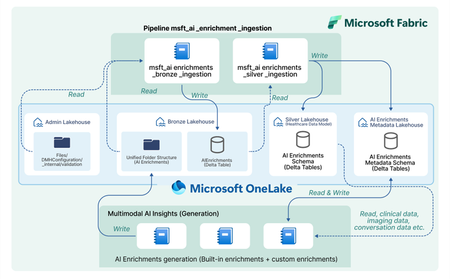
In today’s healthcare landscape, there is an increasing emphasis on leveraging artificial intelligence (AI) to extract meaningful insights from diverse datasets to improve patient care and drive clinical research. However, incorporating AI into your healthcare data estate often brings significant costs and challenges, especially when dealing with siloed and unstructured data. Healthcare organizations produce and consume data that is not only vast but also varied in format—ranging from structured EHR entries to unstructured clinical notes and imaging data. Traditional methods require manual effort to prepare and harmonize this data for AI, specify the AI output format, set up API calls, store the AI outputs, integrate the AI outputs, and analyze the AI outputs for each AI model or service you decide to use. Orchestrate multimodal AI insights is designed to streamline and scale healthcare AI within your data estate by building off of the data transformations in healthcare data solutions in Microsoft Fabric. This capability provides a framework to generate AI insights by connecting your multimodal healthcare data to an ecosystem of AI services and models and integrating structured AI-generated insights back into your data estate. When you combine these AI-generated insights with the existing healthcare data in your data estate, you can power advanced analytics scenarios for your organization and patient population. Key features: Metadata store lakehouse acts as a central repository for the metadata for AI orchestration to effectively capture and manage enrichment definitions, view definitions, and contextual information for traceability purposes. Execution notebooks define the enrichment view and enrichment definition based on the model configuration and input mappings. They also specify the model processor and transformer. The model processor calls the model API, and the transformer produces the standardized output while saving the output in the bronze lakehouse in the Ingest folder. Transformation pipeline to ingest AI-generated insights through the healthcare data solutions medallion lakehouse layers and persist the insights in an enrichment store within the silver layer. Conceptual architecture: The data transformations in healthcare data solutions in Microsoft Fabric allow you ingest, store, and analyze multimodal data. With the orchestrate multimodal AI insights capability, this standardized data serves as the input for healthcare AI models. The model results are stored in a standardized format and provide new insights from your data. The diagram below shows the flow of integrating AI generated insights into the data estate, starting as raw data in the bronze lakehouse and being transformed to delta tables in the silver lakehouse. This capability simplifies AI integration across modalities for data-driven research and care, currently supporting: Text Analytics for health in Azure AI Language to extract medical entities such as conditions and medications from unstructured clinical notes. This utilizes the data in the DocumentReference FHIR resource. MedImageInsight healthcare AI model in Azure AI Foundry to generate medical image embeddings from imaging data. This model leverages the data in the ImagingStudy FHIR resource. MedImageParse healthcare AI model in Azure AI Foundry to enable segmentation, detection, and recognition from imaging data across numerous object types and imaging modalities. This model uses the data in the ImagingStudy FHIR resource. By using orchestrate multimodal AI insights to leverage the data in healthcare data solutions for these models and integrate the results into the data estate, you can analyze your existing data alongside AI enrichments. This allows you to explore use cases such as creating image segmentations and combining with your existing imaging metadata and clinical data to enable quick insights and disease progression trends for clinical research at the patient level. Get started today! This capability is now available in public preview, and you can use the in-product sample data to test this feature with any of the three models listed above. For more information and to learn how to deploy the capability, please refer to the product documentation. We will dive deeper into more detailed aspects of the capability, such as the enrichment store and custom AI use cases, in upcoming blogs. Medical device disclaimer: Microsoft products and services (1) are not designed, intended or made available as a medical device, and (2) are not designed or intended to be a substitute for professional medical advice, diagnosis, treatment, or judgment and should not be used to replace or as a substitute for professional medical advice, diagnosis, treatment, or judgment. Customers/partners are responsible for ensuring solutions comply with applicable laws and regulations. FHIR® is the registered trademark of HL7 and is used with permission of HL7.1.4KViews2likes0CommentsReshape Business Processes
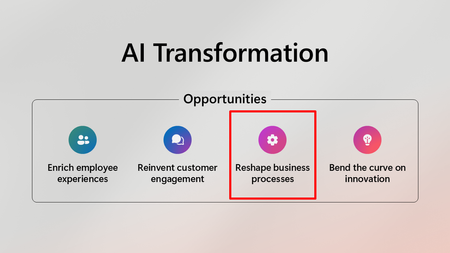
* To see all 4 pillars and links to the associated blog posts see AI Transformation with Microsoft 365 Copilot | Microsoft Community Hub Below is the list of Healthcare & Lifesciences Blog posts focused on Reshaping Business Processes: AGS Health: Call audits simplified Apollo Hospitals: Transforming clinical documentation audits Azure AI Foundry: Your AI App and agent factory | Microsoft Azure Blog Empower clinicians with trusted content and GenAI: MSD Manuals added to healthcare agent service Enhancing Genomics Annotation with GraphRAG How generative AI is reshaping business applications - Microsoft Dynamics 365 Blog SolutionHealth builds patient-focused workflows with Dragon for two health systems | Microsoft Customer Stories Syneos Health reduces time for clinical trial site activation by about 10% with Azure OpenAI Service | Microsoft Customer Stories