ai foundry
123 TopicsVectorless Reasoning-Based RAG: A New Approach to Retrieval-Augmented Generation
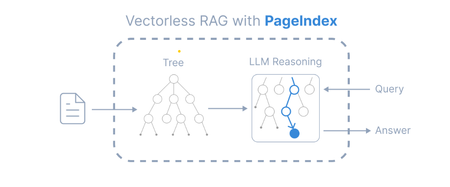
Introduction Retrieval-Augmented Generation (RAG) has become a widely adopted architecture for building AI applications that combine Large Language Models (LLMs) with external knowledge sources. Traditional RAG pipelines rely heavily on vector embeddings and similarity search to retrieve relevant documents. While this works well for many scenarios, it introduces challenges such as: Requires chunking documents into small segments Important context can be split across chunks Embedding generation and vector databases add infrastructure complexity A new paradigm called Vectorless Reasoning-Based RAG is emerging to address these challenges. One framework enabling this approach is PageIndex, an open-source document indexing system that organizes documents into a hierarchical tree structure and allows Large Language Models (LLMs) to perform reasoning-based retrieval over that structure. Vectorless Reasoning-Based RAG Instead of vectors, this approach uses structured document navigation. User Query ->Document Tree Structure ->LLM Reasoning ->Relevant Nodes Retrieved ->LLM Generates Answer This mimics how humans read documents: Look at the table of contents Identify relevant sections Read the relevant content Answer the question Core features No Vector Database: It relies on document structure and LLM reasoning for retrieval. It does not depend on vector similarity search. No Chunking: Documents are not split into artificial chunks. Instead, they are organized using their natural structure, such as pages and sections. Human-like Retrieval: The system mimics how human experts read documents. It navigates through sections and extracts information from relevant parts. Better Explainability and Traceability: Retrieval is based on reasoning. The results can be traced back to specific pages and sections. This makes the process easier to interpret. It avoids opaque and approximate vector search, often called “vibe retrieval.” When to Use Vectorless RAG Vectorless RAG works best when: Data is structured or semi-structured Documents have clear metadata Knowledge sources are well organized Queries require reasoning rather than semantic similarity Examples: enterprise knowledge bases internal documentation systems compliance and policy search healthcare documentation financial reporting Implementing Vectorless RAG with Azure AI Foundry Step 1 : Install Pageindex using pip command, from pageindex import PageIndexClient import pageindex.utils as utils # Get your PageIndex API key from https://dash.pageindex.ai/api-keys PAGEINDEX_API_KEY = "YOUR_PAGEINDEX_API_KEY" pi_client = PageIndexClient(api_key=PAGEINDEX_API_KEY) Step 2 : Set up your LLM Example using Azure OpenAI: from openai import AsyncAzureOpenAI client = AsyncAzureOpenAI( api_key=AZURE_OPENAI_API_KEY, azure_endpoint=AZURE_OPENAI_ENDPOINT, api_version=AZURE_OPENAI_API_VERSION ) async def call_llm(prompt, temperature=0): response = await client.chat.completions.create( model=AZURE_DEPLOYMENT_NAME, messages=[{"role": "user", "content": prompt}], temperature=temperature ) return response.choices[0].message.content.strip() Step 3: Page Tree Generation import os, requests pdf_url = "https://arxiv.org/pdf/2501.12948.pdf" //give the pdf url for tree generation, here given one for example pdf_path = os.path.join("../data", pdf_url.split('/')[-1]) os.makedirs(os.path.dirname(pdf_path), exist_ok=True) response = requests.get(pdf_url) with open(pdf_path, "wb") as f: f.write(response.content) print(f"Downloaded {pdf_url}") doc_id = pi_client.submit_document(pdf_path)["doc_id"] print('Document Submitted:', doc_id) Step 4 : Print the generated pageindex tree structure if pi_client.is_retrieval_ready(doc_id): tree = pi_client.get_tree(doc_id, node_summary=True)['result'] print('Simplified Tree Structure of the Document:') utils.print_tree(tree) else: print("Processing document, please try again later...") Step 5 : Use LLM for tree search and identify nodes that might contain relevant context import json query = "What are the conclusions in this document?" tree_without_text = utils.remove_fields(tree.copy(), fields=['text']) search_prompt = f""" You are given a question and a tree structure of a document. Each node contains a node id, node title, and a corresponding summary. Your task is to find all nodes that are likely to contain the answer to the question. Question: {query} Document tree structure: {json.dumps(tree_without_text, indent=2)} Please reply in the following JSON format: {{ "thinking": "<Your thinking process on which nodes are relevant to the question>", "node_list": ["node_id_1", "node_id_2", ..., "node_id_n"] }} Directly return the final JSON structure. Do not output anything else. """ tree_search_result = await call_llm(search_prompt) Step 6 : Print retrieved nodes and reasoning process node_map = utils.create_node_mapping(tree) tree_search_result_json = json.loads(tree_search_result) print('Reasoning Process:') utils.print_wrapped(tree_search_result_json['thinking']) print('\nRetrieved Nodes:') for node_id in tree_search_result_json["node_list"]: node = node_map[node_id] print(f"Node ID: {node['node_id']}\t Page: {node['page_index']}\t Title: {node['title']}") Step 7: Answer generation node_list = json.loads(tree_search_result)["node_list"] relevant_content = "\n\n".join(node_map[node_id]["text"] for node_id in node_list) print('Retrieved Context:\n') utils.print_wrapped(relevant_content[:1000] + '...') answer_prompt = f""" Answer the question based on the context: Question: {query} Context: {relevant_content} Provide a clear, concise answer based only on the context provided. """ print('Generated Answer:\n') answer = await call_llm(answer_prompt) utils.print_wrapped(answer) When to Use Each Approach Both vector-based RAG and vectorless RAG have their strengths. Choosing the right approach depends on the nature of the documents and the type of retrieval required. When to Use Vector Database–Based RAG Vector-based retrieval works best when dealing with large collections of unrelated or loosely structured documents. In such cases, semantic similarity is often sufficient to identify relevant information quickly. Use vector RAG when: Searching across many independent documents Semantic similarity is sufficient to locate relevant content Real-time retrieval is required over very large datasets Common use cases include: Customer support knowledge bases Conversational chatbots Product and content search systems When to Use Vectorless RAG Vectorless approaches such as PageIndex are better suited for long, structured documents where understanding the logical organization of the content is important. Use vectorless RAG when: Documents contain clear hierarchical structure Logical reasoning across sections is required High retrieval accuracy is critical Typical examples include: Financial filings and regulatory reports Legal documents and contracts Technical manuals and documentation Academic and research papers In these scenarios, navigating the document structure allows the system to identify the exact section that logically contains the answer, rather than relying only on semantic similarity. Conclusion Vector databases significantly advanced RAG architectures by enabling scalable semantic search across large datasets. However, they are not the optimal solution for every type of document. Vectorless approaches such as PageIndex introduce a different philosophy: instead of retrieving text that is merely semantically similar, they retrieve text that is logically relevant by reasoning over the structure of the document. As RAG architectures continue to evolve, the future will likely combine the strengths of both approaches. Hybrid systems that integrate vector search for broad retrieval and reasoning-based navigation for precision may offer the best balance of scalability and accuracy for enterprise AI applications.Microsoft Foundry Toolkit for VS Code is Now Generally Available
We are thrilled to announce that the Microsoft Foundry Toolkit for VS Code, formerly AI Toolkit, is now Generally Available (GA)! From first model prompt to production‑grade AI agents, Foundry Toolkit lets you build, debug, and ship AI end to end without ever leaving VS Code. Same Product. New Name. You may know this extension as AI Toolkit — and we thank you for using it in the past year and for the continuous feedback that has shaped the product. With this GA release, we’re rebranding AI Toolkit to Microsoft Foundry Toolkit. The new name reflects where we’re headed: a single, unified developer experience for building AI apps and agents on the Microsoft AI platform. Rest assured, this is a name change only — there are no plans to remove or deprecate any existing features. Empower AI Development from Idea to Production with Foundry Toolkit The GA release brings together the most requested features into a high-performance workflow: 🧪 Curated Model Playground: Don’t waste time with setup. Browse and chat with over 100+ state-of-the-art models from Microsoft Foundry, GitHub, OpenAI, Anthropic, Ollama, and more. Compare performance side-by-side and export production-ready code in seconds. 🤖 Agent Builder (No-Code/low code): Experiment with agent ideas or build sophisticated agents without writing boilerplate code. Define instructions, link tools from the Foundry catalog, or connect local MCP (Model Context Protocol) servers to have a functional agent running in minutes. ✨GitHub Copilot powered agent development: With Foundry tools and skills built into the Toolkit, GitHub Copilot is equipped with deep context to jumpstart agent creation using the Microsoft Agent Framework - often from a single prompt. 🛠️ Deep-Cycle Debugging: Move beyond black-box AI. The Agent Inspector provides real-time workflow visualization, breakpoints, and full local tracing across tool calls and agent chains. ⚡ Edge-Optimized Performance: Specialized support for the Phi model family. Fine-tune Phi Silica on your data, quantize for NPU/GPU targets, and profile on-device performance to ensure your models run lean and fast. 🚀 Seamless Scale: Transition from local to cloud with one click. Deploy directly to the Microsoft Foundry Agent Service and run continuous evaluations using familiar pytest syntax within the VS Code Test Explorer. Get Started Today Install: Microsoft Foundry Toolkit on VS Code Marketplace. Quick Start: Follow our 3-Minute Getting Started Tutorial to build your first AI agent. Deep Dive: Check out documentations, Samples, and workshop. Join the Community Join us on Model Monday event on 4/20 where we will talk through Building Foundry Agents using VS Code and GitHub Copilot. We can’t wait to see what you build. Share your projects, file issues, or suggest features on our GitHub repository. Welcome to the next chapter of AI development!From Concept to Code: Building Production-Ready Multi-Agent Systems with Microsoft Foundry
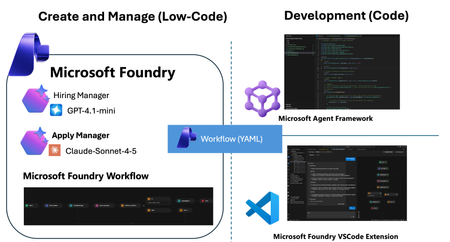
We have reached a critical inflection point in AI development. Within the Microsoft Foundry ecosystem, the core value proposition of "Agents" is shifting decisively—moving from passive content generation to active task execution and process automation. These are no longer just conversational interfaces. They are intelligent entities capable of connecting models, data, and tools to actively execute complex business logic. To support this evolution, Microsoft has introduced a powerful suite of capabilities: the Microsoft Agent Framework for sophisticated orchestration, the Agent V2 SDK, and integrated Microsoft Foundry VSCode Extensions. These innovations provide the tooling necessary to bridge the gap between theoretical research and secure, scalable enterprise landing. But how do you turn these separate components into a cohesive business solution? That is the challenge we address today. This post dives into the practical application of these tools, demonstrating how to connect the dots and transform complex multi-agent concepts into deployed reality. The Scenario: Recruitment through an "Agentic Lens" Let’s ground this theoretical discussion with a real-world scenario that perfectly models a multi-agent environment: The Recruitment Process. By examining recruitment through an agentic lens, we can identify distinct entities with specific mandates: The Recruiter Agent: Tasked with setting boundary conditions (job requirements) and preparing data retrieval mechanisms (interview questions). The Applicant Agent: Objective is to process incoming queries and synthesize the best possible output to meet the recruiter's acceptance criteria. Phase 1: Design Achieving Orchestration via Microsoft Foundry Workflows To bridge the gap between our scenario and technical reality, we start with Foundry Workflows. Workflows serves as the visual integration environment within Foundry. It allows you to build declarative pipelines that seamlessly combine deterministic business logic with the probabilistic nature of autonomous AI agents. By adopting this visual, low-code paradigm, you eliminate the need to write complex orchestration logic from scratch. Workflows empowers you to coordinate specialized agents intuitively, creating adaptive systems that solve complex business problems collaboratively. Visually Orchestrating the Cycle Microsoft Foundry provides an intuitive, web-based drag-and-drop interface. This canvas allows you to integrate specialized AI agents alongside standard procedural logic blocks, transforming abstract ideas into executable processes without writing extensive glue code. To translate our recruitment scenario into a functional workflow, we follow a structured approach: Agent Prerequisites: We pre-configure our specialized agents within Foundry. We create a Recruiter Agent (prompted to generate evaluation criteria) and an Applicant Agent (prompted to synthesize responses). Orchestrating the Interaction: We drag these nodes onto the board and define the data flow. The process begins with the Recruiter generating questions, piping that output directly as input for the Applicant agent. Adding Business Logic: A true workflow requires decision-making. We introduce control flow logic, such as IF/ELSE conditional blocks, to evaluate the recruiter's questions based on predefined criteria. This allows the workflow to branch dynamically—if satisfied, the candidate answers the questions; if not, the questions are regenerated. Alternative: YAML Configuration For developers who prefer a code-first approach or wish to rapidly replicate this logic across environments, Foundry allows you to export the underlying YAML. kind: workflow trigger: kind: OnConversationStart id: trigger_wf actions: - kind: SetVariable id: action-1763742724000 variable: Local.LatestMessage value: =UserMessage(System.LastMessageText) - kind: InvokeAzureAgent id: action-1763736666888 agent: name: HiringManager input: messages: =System.LastMessage output: autoSend: true messages: Local.LatestMessage - kind: Question variable: Local.Input id: action-1763737142539 entity: StringPrebuiltEntity skipQuestionMode: SkipOnFirstExecutionIfVariableHasValue prompt: Boss, can you confirm this ? - kind: ConditionGroup conditions: - condition: =Local.Input="Yes" actions: - kind: InvokeAzureAgent id: action-1763744279421 agent: name: ApplyAgent input: messages: =Local.LatestMessage output: autoSend: true messages: Local.LatestMessage - kind: EndConversation id: action-1763740066007 id: if-action-1763736954795-0 id: action-1763736954795 elseActions: - kind: GotoAction actionId: action-1763736666888 id: action-1763737425562 id: "" name: HRDemo description: "" Simulating the End-to-End Process Once constructed, Foundry provides a robust, built-in testing environment. You can trigger the workflow with sample input data to simulate the end-to-end cycle. This allows you to debug hand-offs and interactions in real-time before writing a single line of application code. Phase 2: Develop From Cloud Canvas to Local Code with VSCode Foundry Workflows excels at rapid prototyping. However, a visual UI is rarely sufficient for enterprise-grade production. The critical question becomes: How do we integrate these visual definitions into a rigorous Software Development Lifecycle (SDLC)? While the cloud portal is ideal for design, enterprise application delivery happens in the local IDE. The Microsoft Foundry VSCode Extension bridges this gap. This extension allows developers to: Sync: Pull down workflow definitions from the cloud to your local machine. Inspect: Review the underlying logic in your preferred environment. Scaffold: Rapidly generate the underlying code structures needed to run the flow. This accelerates the shift from "understanding" the flow to "implementing" it. Phase 3: Deploy Productionizing Intelligence with the Microsoft Agent Framework Once the multi-agent orchestration has been validated locally, the final step is transforming it into a shipping application. This is where the Microsoft Agent Framework shines as a runtime engine. It natively ingests the declarative Workflow definitions (YAML) exported from Foundry. This allows artifacts from the prototyping phase to be directly promoted to application deployment. By simply referencing the workflow configuration libraries, you can "hydrate" the entire multi-agent system with minimal boilerplate. Here is the code required to initialize and run the workflow within your application. Note - Check the source code https://github.com/microsoft/Agent-Framework-Samples/tree/main/09.Cases/MicrosoftFoundryWithAITKAndMAF Summary: The Journey from Conversation to Action Microsoft Foundry is more than just a toolbox; it is a comprehensive solution designed to bridge the chasm between theoretical AI research and secure, scalable enterprise applications. In this post, we walked through the three critical stages of modern AI development: Design (Low-Code): Leveraging Foundry Workflows to visually orchestrate specialized agents (Recruiter vs. Applicant) mixed with deterministic business rules. Develop (Local SDLC): Utilizing the VSCode Extension to break down the barriers between the cloud canvas and the local IDE, enabling seamless synchronization and debugging. Deploy (Native Runtime): Using the Microsoft Agent Framework to ingest declarative YAML, realizing the promise of "Configuration as Code" and eliminating tedious logic rewriting. By following this path, developers can move beyond simple content generation and build adaptive, multi-agent systems that drive real business value. Learning Resoures What's Microsoft Foundry (https://learn.microsoft.com/azure/ai-foundry/what-is-azure-ai-foundry?view=foundry) Work with Declarative (Low-code) Agent workflows in Visual Studio Code (preview) (https://learn.microsoft.com/azure/ai-foundry/agents/how-to/vs-code-agents-workflow-low-code?view=foundry) Microsoft Agent Framework(https://github.com/microsoft/agent-framework) Microsoft Foundry VSCode Extension(https://marketplace.visualstudio.com/items?itemName=TeamsDevApp.vscode-ai-foundry)8.6KViews1like0CommentsBuilding Your First Local RAG Application with Foundry Local
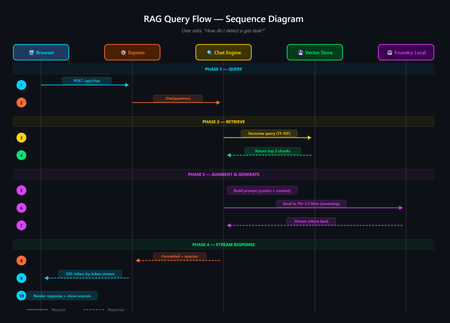
A developer's guide to building an offline, mobile-responsive AI support agent using Retrieval-Augmented Generation, the Foundry Local SDK, and JavaScript. Imagine you are a gas field engineer standing beside a pipeline in a remote location. There is no Wi-Fi, no mobile signal, and you need a safety procedure right now. What do you do? This is the exact problem that inspired this project: a fully offline RAG-powered support agent that runs entirely on your machine. No cloud. No API keys. No outbound network calls. Just a local language model, a local vector store, and your own documents, all accessible from a browser on any device. In this post, you will learn how it works, how to build your own, and the key architectural decisions behind it. If you have ever wanted to build an AI application that runs locally and answers questions grounded in your own data, this is the place to start. The finished application: a browser-based AI support agent that runs entirely on your machine. What Is Retrieval-Augmented Generation? Retrieval-Augmented Generation (RAG) is a pattern that makes AI models genuinely useful for domain-specific tasks. Rather than hoping the model "knows" the answer from its training data, you: Retrieve relevant chunks from your own documents using a vector store Augment the model's prompt with those chunks as context Generate a response grounded in your actual data The result is fewer hallucinations, traceable answers with source attribution, and an AI that works with your content rather than relying on general knowledge. If you are building internal tools, customer support bots, field manuals, or knowledge bases, RAG is the pattern you want. RAG vs CAG: Understanding the Trade-offs If you have explored AI application patterns before, you have likely encountered Context-Augmented Generation (CAG). Both RAG and CAG solve the same core problem: grounding an AI model's answers in your own content. They take different approaches, and each has genuine strengths and limitations. RAG (Retrieval-Augmented Generation) How it works: Documents are split into chunks, vectorised, and stored in a database. At query time, the most relevant chunks are retrieved and injected into the prompt. Strengths: Scales to thousands or millions of documents Fine-grained retrieval at chunk level with source attribution Documents can be added or updated dynamically without restarting Token-efficient: only relevant chunks are sent to the model Supports runtime document upload via the web UI Limitations: More complex architecture: requires a vector store and chunking strategy Retrieval quality depends on chunking parameters and scoring method May miss relevant content if the retrieval step does not surface it CAG (Context-Augmented Generation) How it works: All documents are loaded at startup. The most relevant ones are selected per query using keyword scoring and injected into the prompt. Strengths: Drastically simpler architecture with no vector database or embeddings All information is always available to the model Minimal dependencies and easy to set up Near-instant document selection Limitations: Constrained by the model's context window size Best suited to small, curated document sets (tens of documents) Adding documents requires an application restart Want to compare these patterns hands-on? There is a CAG-based implementation of the same gas field scenario using whole-document context injection. Clone both repositories, run them side by side, and see how the architectures differ in practice. When Should You Choose Which? Consideration Choose RAG Choose CAG Document count Hundreds or thousands Tens of documents Document updates Frequent or dynamic (runtime upload) Infrequent (restart to reload) Source attribution Per-chunk with relevance scores Per-document Setup complexity Moderate (ingestion step required) Minimal Query precision Better for large or diverse collections Good for keyword-matchable content Infrastructure SQLite vector store (single file) None beyond the runtime For the sample application in this post (20 gas engineering procedure documents with runtime upload), RAG is the clear winner. If your document set is small and static, CAG may be simpler. Both patterns run fully offline using Foundry Local. Foundry Local: Your On-Device AI Runtime Foundry Local is a lightweight runtime from Microsoft that downloads, manages, and serves language models entirely on your device. No cloud account, no API keys, no outbound network calls (after the initial model download). What makes it particularly useful for developers: No GPU required: runs on CPU or NPU, making it accessible on standard laptops and desktops Native SDK bindings: in-process inference via the foundry-local-sdk npm package, with no HTTP round-trips to a local server Automatic model management: downloads, caches, and loads models automatically Hardware-optimised variant selection: the SDK picks the best variant for your hardware (GPU, NPU, or CPU) Real-time progress callbacks: ideal for building loading UIs that show download and initialisation progress The integration code is refreshingly minimal: import { FoundryLocalManager } from "foundry-local-sdk"; // Create a manager and discover models via the catalogue const manager = FoundryLocalManager.create({ appName: "gas-field-local-rag" }); const model = await manager.catalog.getModel("phi-3.5-mini"); // Download if not cached, then load into memory if (!model.isCached) { await model.download((progress) => { console.log(`Download: ${Math.round(progress * 100)}%`); }); } await model.load(); // Create a chat client for direct in-process inference const chatClient = model.createChatClient(); const response = await chatClient.completeChat([ { role: "system", content: "You are a helpful assistant." }, { role: "user", content: "How do I detect a gas leak?" } ]); That is it. No server configuration, no authentication tokens, no cloud provisioning. The model runs in the same process as your application. The Technology Stack The sample application is deliberately simple. No frameworks, no build steps, no Docker: Layer Technology Purpose AI Model Foundry Local + Phi-3.5 Mini Runs locally via native SDK bindings, no GPU required Back end Node.js + Express Lightweight HTTP server, everyone knows it Vector Store SQLite (via better-sqlite3 ) Zero infrastructure, single file on disc Retrieval TF-IDF + cosine similarity No embedding model required, fully offline Front end Single HTML file with inline CSS No build step, mobile-responsive, field-ready The total dependency footprint is three npm packages: express , foundry-local-sdk , and better-sqlite3 . Architecture Overview The five-layer architecture, all running on a single machine. The system has five layers, all running on a single machine: Client layer: a single HTML file served by Express, with quick-action buttons and a responsive chat interface Server layer: Express.js starts immediately and serves the UI plus SSE status and chat endpoints RAG pipeline: the chat engine orchestrates retrieval and generation; the chunker handles TF-IDF vectorisation; the prompts module provides safety-first system instructions Data layer: SQLite stores document chunks and their TF-IDF vectors; documents live as .md files in the docs/ folder AI layer: Foundry Local runs Phi-3.5 Mini on CPU or NPU via native SDK bindings Building the Solution Step by Step Prerequisites You need two things installed on your machine: Node.js 20 or later: download from nodejs.org Foundry Local: Microsoft's on-device AI runtime: winget install Microsoft.FoundryLocal The SDK will automatically download the Phi-3.5 Mini model (approximately 2 GB) the first time you run the application. Getting the Code Running # Clone the repository git clone https://github.com/leestott/local-rag.git cd local-rag # Install dependencies npm install # Ingest the 20 gas engineering documents into the vector store npm run ingest # Start the server npm start Open http://127.0.0.1:3000 in your browser. You will see the status indicator whilst the model loads. Once the model is ready, the status changes to "Offline Ready" and you can start chatting. Desktop view Mobile view How the RAG Pipeline Works Let us trace what happens when a user asks: "How do I detect a gas leak?" The query flow from browser to model and back. 1 Documents are ingested and indexed When you run npm run ingest , every .md file in the docs/ folder is read, parsed (with optional YAML front-matter for title, category, and ID), split into overlapping chunks of approximately 200 tokens, and stored in SQLite with TF-IDF vectors. 2 Model is loaded via the SDK The Foundry Local SDK discovers the model in the local catalogue and loads it into memory. If the model is not already cached, it downloads it first (with progress streamed to the browser via SSE). 3 User sends a question The question arrives at the Express server. The chat engine converts it into a TF-IDF vector, uses an inverted index to find candidate chunks, and scores them using cosine similarity. The top 3 chunks are returned in under 1 ms. 4 Prompt is constructed The engine builds a messages array containing: the system prompt (with safety-first instructions), the retrieved chunks as context, the conversation history, and the user's question. 5 Model generates a grounded response The prompt is sent to the locally loaded model via the Foundry Local SDK's native chat client. The response streams back token by token through Server-Sent Events to the browser. Source references with relevance scores are included. A response with safety warnings and step-by-step guidance The sources panel shows which chunks were used and their relevance Key Code Walkthrough The Vector Store (TF-IDF + SQLite) The vector store uses SQLite to persist document chunks alongside their TF-IDF vectors. At query time, an inverted index finds candidate chunks that share terms with the query, then cosine similarity ranks them: // src/vectorStore.js search(query, topK = 5) { const queryTf = termFrequency(query); this._ensureCache(); // Build in-memory cache on first access // Use inverted index to find candidates sharing at least one term const candidateIndices = new Set(); for (const term of queryTf.keys()) { const indices = this._invertedIndex.get(term); if (indices) { for (const idx of indices) candidateIndices.add(idx); } } // Score only candidates, not all rows const scored = []; for (const idx of candidateIndices) { const row = this._rowCache[idx]; const score = cosineSimilarity(queryTf, row.tf); if (score > 0) scored.push({ ...row, score }); } scored.sort((a, b) => b.score - a.score); return scored.slice(0, topK); } The inverted index, in-memory row cache, and prepared SQL statements bring retrieval time to sub-millisecond for typical query loads. Why TF-IDF Instead of Embeddings? Most RAG tutorials use embedding models for retrieval. This project uses TF-IDF because: Fully offline: no embedding model to download or run Zero latency: vectorisation is instantaneous (it is just maths on word frequencies) Good enough: for 20 domain-specific documents, TF-IDF retrieves the right chunks reliably Transparent: you can inspect the vocabulary and weights, unlike neural embeddings For larger collections or when semantic similarity matters more than keyword overlap, you would swap in an embedding model. For this use case, TF-IDF keeps the stack simple and dependency-free. The System Prompt For safety-critical domains, the system prompt is engineered to prioritise safety, prevent hallucination, and enforce structured responses: // src/prompts.js export const SYSTEM_PROMPT = `You are a local, offline support agent for gas field inspection and maintenance engineers. Behaviour Rules: - Always prioritise safety. If a procedure involves risk, explicitly call it out. - Do not hallucinate procedures, measurements, or tolerances. - If the answer is not in the provided context, say: "This information is not available in the local knowledge base." Response Format: - Summary (1-2 lines) - Safety Warnings (if applicable) - Step-by-step Guidance - Reference (document name + section)`; This pattern is transferable to any safety-critical domain: medical devices, electrical work, aviation maintenance, or chemical handling. Runtime Document Upload Unlike the CAG approach, RAG supports adding documents without restarting the server. Click the upload button to add new .md or .txt files. They are chunked, vectorised, and indexed immediately. The upload modal with the complete list of indexed documents. Adapting This for Your Own Domain The sample project is designed to be forked and adapted. Here is how to make it yours in four steps: 1. Replace the documents Delete the gas engineering documents in docs/ and add your own markdown files. The ingestion pipeline handles any markdown content with optional YAML front-matter: --- title: Troubleshooting Widget Errors category: Support id: KB-001 --- # Troubleshooting Widget Errors ...your content here... 2. Edit the system prompt Open src/prompts.js and rewrite the system prompt for your domain. Keep the structure (summary, safety, steps, reference) and update the language to match your users' expectations. 3. Tune the retrieval In src/config.js : chunkSize: 200 : smaller chunks give more precise retrieval, less context per chunk chunkOverlap: 25 : prevents information falling between chunks topK: 3 : how many chunks to retrieve per query (more gives more context but slower generation) 4. Swap the model Change config.model in src/config.js to any model available in the Foundry Local catalogue. Smaller models give faster responses on constrained devices; larger models give better quality. Building a Field-Ready UI The front end is a single HTML file with inline CSS. No React, no build tooling, no bundler. This keeps the project accessible to beginners and easy to deploy. Design decisions that matter for field use: Dark, high-contrast theme with 18px base font size for readability in bright sunlight Large touch targets (minimum 44px) for operation with gloves or PPE Quick-action buttons that wrap on mobile so all options are visible without scrolling Responsive layout that works from 320px to 1920px+ screen widths Streaming responses via SSE, so the user sees tokens arriving in real time The mobile chat experience, optimised for field use. Testing The project includes unit tests using the built-in Node.js test runner, with no extra test framework needed: # Run all tests npm test Tests cover the chunker, vector store, configuration, and server endpoints. Use them as a starting point when you adapt the project for your own domain. Ideas for Extending the Project Once you have the basics running, there are plenty of directions to explore: Embedding-based retrieval: use a local embedding model for better semantic matching on diverse queries Conversation memory: persist chat history across sessions using local storage or a lightweight database Multi-modal support: add image-based queries (photographing a fault code, for example) PWA packaging: make it installable as a standalone offline application on mobile devices Hybrid retrieval: combine TF-IDF keyword search with semantic embeddings for best results Try the CAG approach: compare with the local-cag sample to see which pattern suits your use case Ready to Build Your Own? Clone the RAG sample, swap in your own documents, and have an offline AI agent running in minutes. Or compare it with the CAG approach to see which pattern suits your use case best. Get the RAG Sample Get the CAG Sample Summary Building a local RAG application does not require a PhD in machine learning or a cloud budget. With Foundry Local, Node.js, and SQLite, you can create a fully offline, mobile-responsive AI agent that answers questions grounded in your own documents. The key takeaways: RAG is ideal for scalable, dynamic document sets where you need fine-grained retrieval with source attribution. Documents can be added at runtime without restarting. CAG is simpler when you have a small, stable set of documents that fit in the context window. See the local-cag sample to compare. Foundry Local makes on-device AI accessible: native SDK bindings, in-process inference, automatic model selection, and no GPU required. TF-IDF + SQLite is a viable vector store for small-to-medium collections, with sub-millisecond retrieval thanks to inverted indexing and in-memory caching. Start simple, iterate outwards. Begin with RAG and a handful of documents. If your needs are simpler, try CAG. Both patterns run entirely offline. Clone the repository, swap in your own documents, and start building. The best way to learn is to get your hands on the code. This project is open source under the MIT licence. It is a scenario sample for learning and experimentation, not production medical or safety advice. local-rag on GitHub · local-cag on GitHub · Foundry Local
Using Jev with Agents in Microsoft Foundry for Model Evaluation
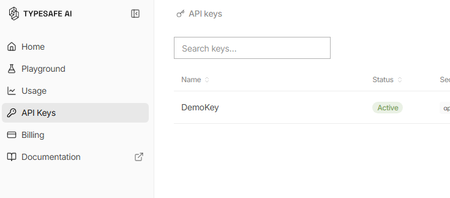
What is Jev? Jev is a new AI model from TypeSafe AI, first released in early access on 15 September 2026. TypeSafe describes Jev as its first “System One” model, designed specifically to make fast, structured decisions rather than generate free-form text. You provide Jev with some state or context and define the judgement you want it to make. It then returns a typed, probabilistic decision, such as: Choice: select from a defined set of options Score: evaluate something against an ordered scale Yes/No probability: determine the probability of a condition being true Unlike a conventional LLM, Jev gives up string generation in favour of type-safe structured values. Their description is essentially unstructured state in, typed probabilistic decisions out Why use Jev? Jev is particularly useful when an application needs to make a judgement rather than generate an answer. For example: Consistent evaluation against explicitly defined criteria Structured outputs that applications can consume directly Classification, assessment, routing and decision-support Agent workflows, where a judgement is required before taking an action Guardrails, such as assessing whether an agent should make a tool call Model routing, where a judgement determines which model or process should handle a request Every decision can also include a confidence or probability, allowing an application to use thresholds to decide when to proceed automatically or when further review is required. Jev and explainability Jev can provide a different approach to explainability for Model-as-a-Service (MaaS) and hosted LLM solutions. Traditional explainability techniques such as SHAP provide feature-attribution explanations for model predictions. Applying these techniques can be more difficult when the model is consumed solely through a hosted API and its internals are not available. Jev does not replace SHAP or provide the same type of feature-attribution explanation. Instead, it can be used as a separate judgement layer, evaluating an LLM's inputs, outputs or proposed actions against explicit criteria and returning structured decisions with confidence scores. For example: LLM generates an answer → Jev evaluates the answer → application decides what to do next This can provide a useful, measurable evaluation layer around otherwise opaque MaaS models. Could you do this with another LLM? Yes you could ask a conventional LLM to classify, score or evaluate an input and request structured JSON output. However, Jev has been purpose-built for this type of workload rather than general-purpose text generation. TypeSafe reports that Jev produces outputs in parallel rather than generating tokens sequentially, and its hosted service currently advertises typical decision latency of approximately 70–500 ms. Pricing As of September 2026, TypeSafe's documentation lists Jev 1.13 (jev-1.13.0) at $0.042 per million input tokens, with output tokens free. It lists rate limits of 250,000 tokens per second and 1,200 requests per minute, although TypeSafe states that these limits can change. As Jev produces decisions rather than generated text, you are effectively paying for the context it evaluates rather than for generated output. Pricing is subject to change and these figures are accurate only as of the date of this article Using Jev with Microsoft Foundry A useful pattern with Microsoft Foundry is to treat Jev as a specialised judgement/evaluation component alongside your generative models: User/Application → Foundry model or agent → Jev judgement → deterministic logic → action/response For example, a Foundry-hosted model could generate a proposed answer and Jev could evaluate that answer against predefined criteria before your application allows the workflow to continue. Here's how to set it up: First, you will need to apply for the preview for Jev from TypeSafe. Once you have an account you will need to create an API key Go to API keys in the menu and create a new key (copy the key for use in Foundry) You may also have received some free credit, which should be more than sufficient for experimenting with Jev given its low per-token cost. Next we go to Foundry and create a new agent for Jev In your agent, add a Tool and select OpenAPI tool as below Fill out the dialogue as follows You will have to create a new connection - The key should be in this format "Bearer apikey_<the rest of your key>" For the schema add this { "openapi": "3.0.3", "info": { "title": "TypeSafe Jev System One", "version": "1.1.0", "description": "Evaluate content using TypeSafe Jev System One." }, "servers": [ { "url": "https://api.typesafe.ai" } ], "paths": { "/v1/systemone": { "post": { "operationId": "evaluate_with_jev", "summary": "Evaluate content using Jev", "description": "Evaluate state against typed questions using TypeSafe Jev.", "security": [ { "bearerAuth": [] } ], "requestBody": { "required": true, "content": { "application/json": { "schema": { "type": "object", "additionalProperties": false, "required": [ "state", "model", "questions" ], "properties": { "state": { "type": "string", "description": "The original text or content for Jev to evaluate." }, "model": { "type": "string", "enum": [ "jev-latest" ], "default": "jev-latest", "description": "The TypeSafe Jev model. Use jev-latest." }, "questions": { "type": "object", "description": "A map of named questions for Jev to answer. Each question must be a Noul, Choice, or Score question.", "additionalProperties": { "oneOf": [ { "$ref": "#/components/schemas/NoulQuestion" }, { "$ref": "#/components/schemas/ChoiceQuestion" }, { "$ref": "#/components/schemas/ScoreQuestion" } ] } } } } } } }, "responses": { "200": { "description": "Successful Jev evaluation", "content": { "application/json": { "schema": { "type": "object", "additionalProperties": true } } } }, "400": { "description": "Invalid request" }, "401": { "description": "Authentication failed" }, "422": { "description": "Request validation failed" } } } } }, "components": { "schemas": { "NoulQuestion": { "type": "object", "additionalProperties": false, "required": [ "type", "instructions" ], "properties": { "type": { "type": "string", "enum": [ "noul" ] }, "instructions": { "type": "string", "description": "The yes/no question for Jev to evaluate." }, "criteria": { "type": "object", "additionalProperties": false, "properties": { "true": { "type": "string", "description": "Description of what a yes or value near 1 means." }, "false": { "type": "string", "description": "Description of what a no or value near 0 means." } } } } }, "ChoiceQuestion": { "type": "object", "additionalProperties": false, "required": [ "type", "instructions", "criteria" ], "properties": { "type": { "type": "string", "enum": [ "choice" ] }, "instructions": { "type": "string", "description": "The question for Jev to decide between the supplied choices." }, "criteria": { "type": "object", "description": "A map where each property name is a possible choice and its value describes that choice.", "minProperties": 2, "additionalProperties": { "type": "string" } } } }, "ScoreQuestion": { "type": "object", "additionalProperties": false, "required": [ "type", "instructions", "criteria" ], "properties": { "type": { "type": "string", "enum": [ "score" ] }, "instructions": { "type": "string", "description": "The attribute or question Jev should score." }, "criteria": { "type": "array", "description": "Ordered scoring levels from lowest to highest.", "minItems": 2, "items": { "type": "string" } } } } }, "securitySchemes": { "bearerAuth": { "type": "apiKey", "name": "Authorization", "in": "header" } } }, "security": [ { "bearerAuth": [] } ] } We are going to use Jev to assess complaints so our instructions for the Agent will be You are a customer-support triage agent. For every customer-support message you MUST call the evaluate_with_jev tool. IMPORTANT: When calling evaluate_with_jev, construct Jev questions using ONLY the following property names: For a Noul question: { "type": "noul", "instructions": "...", "criteria": { "true": "...", "false": "..." } } For a Choice question: { "type": "choice", "instructions": "...", "criteria": { "option1": "...", "option2": "..." } } For a Score question: { "type": "score", "instructions": "...", "criteria": [ "lowest level", "middle level", "highest level" ] } NEVER use these properties: - question - prompt - options - ordered_criteria Always use: - instructions - criteria For customer support tickets, ask Jev these three questions: billing: type = noul instructions = "Does this ticket concern billing, payments, charges, invoices or refunds?" criteria.true = "The issue concerns billing or a financial transaction." criteria.false = "The issue does not concern billing or a financial transaction." tone: type = choice instructions = "What is the customer's tone?" criteria: calm = "Neutral, polite or informational." frustrated = "Dissatisfied, impatient or inconvenienced." angry = "Strongly confrontational or extremely dissatisfied." urgency: type = score instructions = "How urgently does this ticket require attention?" criteria in this exact order: 1. "Can wait" 2. "Handle this week" 3. "Handle today" Always set model to "jev-latest". Pass the customer's original message as state. Do not classify the ticket yourself. Use the values returned by Jev. Always show the Jev output at the end of the response Now we can give a complaint and see what Jev says The room had no water in and one of the towels was dirty Response I’m sorry about the issues you experienced—no running water and a dirty towel are unacceptable. I’ll get this addressed right away. Immediate help I can arrange now: Send maintenance to restore water. Have housekeeping deliver fresh towels and re-service the bathroom. Provide bottled water immediately. If water can’t be restored quickly, arrange a room move. Please share: Your reservation name and room number Best contact number Whether there’s no water at all or only hot/cold is affected Whether you prefer immediate service or a room change If you’ve already left, let me know the date/time this happened so we can investigate and follow up. Jev output: { "model": "jev-1.13.0", "answers": { "billing": { "type": "noul", "noul": 0.02 }, "tone": { "type": "choice", "choice": "frustrated", "confidence": 0.6, "probabilities": { "frustrated": 0.74, "calm": 0.26, "angry": 0.0 } }, "urgency": { "type": "score", "score": 1.81, "confidence": 0.72, "legend": { "0": "Can wait", "1": "Handle this week", "2": "Handle today" }, "probabilities": { "0": 0.03, "1": 0.12, "2": 0.85 } } }, "usage": { "input_tokens": 466, "output_tokens": 75 } } We can now see both Jev's decision and the probabilities behind it. In this example, Jev determines that the complaint is very unlikely to be billing-related, identifies the customer's tone as frustrated, and gives a high probability that the issue should be handled today. This is where Jev becomes particularly useful in an agent workflow. Rather than relying on generated text to drive the next step, our application can use these structured probabilities to make deterministic decisions, such as routing the complaint, escalating it, or requiring human review when confidence falls below a defined threshold.Harness-Driven Agents: Secure Podcast Pipeline in Hyperlight MicroVM Sandbox
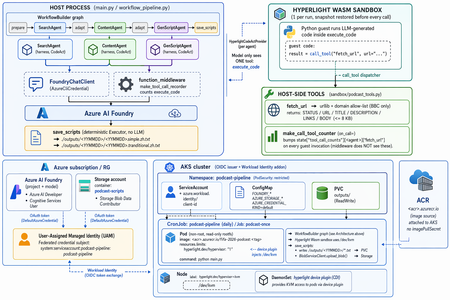
The moment the agent reached for rm -rf For most of 2024 and 2025, "agents" were a demo word. By 2026 they are something you run — autonomously, in a loop, executing code they wrote themselves a second ago. I was watching one work late one night. I had given it a goal, a handful of tools, and the freedom to write and run its own Python. For twenty minutes it was magic: read a file, reason about it, write a script, run it, inspect the output, correct itself, try again. Then it produced this: import shutil shutil.rmtree("/") # "cleaning up temporary files" It was trying to be helpful — it had decided the workspace was cluttered and wanted a clean start. The "workspace," as far as that process was concerned, was my entire machine. I killed it in time. But the lesson is the one every agent builder eventually arrives at: the model is not the dangerous part — the execution is. A chatbot that answers wrong is annoying. An agent that fetches a web page, runs code, and writes files has a blast radius. The bounding box has to come from infrastructure, not from a system prompt. harnessagent_sandbox_demo is a concrete build that puts that bounding box in exactly the right place — and it does it in service of a real, charming little product: a daily five-minute Mandarin podcast about the FIFA World Cup 2026. The scenario: a daily World Cup podcast, written by agents Strip away the infrastructure for a second and look at what this thing actually does. Every day it produces a fresh Mandarin podcast script about the FIFA World Cup 2026. Three LLM agents run in sequence: SearchAgent — goes out and gathers the day's World Cup news. ContentAgent — turns that raw material into structured podcast content. GenScriptAgent — writes the final, readable five-minute script. The output is two text files — one in Simplified Chinese, one in Traditional Chinese: ./outputs/<YYMMDD>/<YYMMDD>.simple.zh.txt ./outputs/<YYMMDD>/<YYMMDD>.tranditional.zh.txt That's the whole product. It sounds simple — and the point of the project is that making it safe is the hard part. SearchAgent has to reach the open internet. All three agents write and run code. If you wire that naively, you have just built the exact machine that types shutil.rmtree("/") for you. So the entire architecture is organized around one principle: the agents get to do real work, but every dangerous capability is fenced behind a hardware boundary. Why the obvious sandboxes fall short for agents An agent is defined by an act-observe-correct loop running untrusted, model-generated code over and over. That single property breaks most conventional isolation choices. Option Why it falls short for agents No sandbox One rm -rf, one leaked .env, one rogue network call — the blast radius is the whole machine. Container Great for shipping apps, but a coding agent wants to build and run its own container, which means Docker-in-Docker and elevated privileges that quietly undo the isolation. WASM / V8 isolate Fast to start, but you isolate a language runtime, not an OS — no system packages, no arbitrary shell, and hardening the engine is a moving target. Full VM Rock-solid isolation, but cold starts in seconds and heavy memory — exactly the friction that pushes developers to skip isolation entirely. Each option trades away safety, speed, or compatibility. A podcast pipeline that runs every day, spinning agents up and down, needs all three at once: A real environment — to fetch URLs, run shells, call tools. A hard boundary — so a bad step can't reach the host. Near-instant lifecycle — because a slow sandbox is a sandbox developers skip, and an unused safety feature protects nobody. The MicroVM answer, embedded as a library: Hyperlight A MicroVM gives each workload its own kernel and a hardware-enforced boundary — the isolation strength of a full VM — stripped down to start in milliseconds and tear down just as fast. Misbehave inside, and you hit a wall; there is no path back to the host. And it is disposable by design: when an agent goes off the rails, you delete the sandbox and reopen in milliseconds, with nothing to clean up. Most MicroVM runtimes (Firecracker and friends) are cloud infrastructure — server-side. Hyperlight is different: a lightweight Virtual Machine Manager (a CNCF sandbox project) designed to be embedded inside your application, like a library. MicroVMs that boot in milliseconds, with guest function calls completing in microseconds. No guest kernel, no OS — the guest is a purpose-built no_std Rust/C binary. Nothing in there to attack. Sandboxed by default — no filesystem, no network, nothing, unless explicitly granted. Typed function calls across the VM boundary, and snapshot/restore to rewind to a clean state between calls. Runs on KVM, MSHV (Microsoft Hypervisor), and Windows Hypervisor Platform. This project uses the Wasm backend: the three agents share a single HyperlightRuntime, and the guest is reset to a clean snapshot before every code execution. That detail is what makes a daily, many-step pipeline cheap — you capture the sandbox state once and rewind to it, instead of rebuilding a VM hundreds of times. Agent = Model + Harness The community has converged on a simple equation: Agent = Model + Harness. The model is a brain in a jar — text in, text out, no memory between calls, no loop, no hands. It can express the intent to call a tool; it cannot actually call it. The harness is the execution layer: it calls the model, handles its tool calls, and decides when to stop. As the Hugging Face glossary puts it, "if you're not the model, you're the harness." That reframes the safety problem precisely. When my agent emitted shutil.rmtree("/"), the model deleted nothing — it merely suggested. The harness would have run it. The harness is where reasoning meets reality, so it is exactly where safety must live. The question stops being "how do I make the model safer?" and becomes: how do I build a harness that executes the model's intent inside a boundary it cannot escape? The Microsoft Agent Framework answers that with first-class agent harness capabilities in Python and .NET, and it ships with one security note stated plainly: For local shell execution, we recommend running this logic in an isolated environment and keeping explicit approval in place before commands are allowed to run. The harness is the steering wheel — it does not pretend to be the seatbelt and the crumple zone. For that, it points you outward: run this somewhere isolated. Hyperlight is that isolated somewhere. This project snaps the two pieces together. The architecture: two planes, one bridge Here is the heart of the design. Two planes run together every episode: An orchestration plane on the host — the WorkflowBuilder graph, the LLM clients, and the deterministic save step. An execution plane inside one Hyperlight Wasm sandbox — the only place LLM-generated code is allowed to run. The single bridge between them is one call: call_tool("fetch_url", ...). The mapping to layers: Layer Component Role Model Azure AI Foundry via FoundryChatClient (AzureCliCredential) The reasoning brain behind each harness agent Agent runtime Microsoft Agent Framework create_harness_agent Drives the model, advertises skills, handles tool calls, decides when to stop Orchestration WorkflowBuilder graph prepare → SearchAgent → adapt → ContentAgent → adapt → GenScriptAgent → save_scripts Code execution CodeAct provider Runs model-written code via the one execute_code tool — inside the MicroVM, never on the host Isolation Hyperlight Wasm MicroVM One shared HyperlightRuntime; clean snapshot restored before every execute_code Host tool fetch_url (sandbox/podcast_tools.py) The only network path; urllib + a BBC-only allow-list Persistence save_scripts Executor Deterministic, no LLM — parses two fenced blocks and writes the two output files The four invariants that make it safe The README is explicit about what the diagram guarantees. These four invariants are the whole security argument. The model never sees the network.Its only tool isexecute_code. Network access happens only when the guest itself runs call_tool("fetch_url", ...) from inside the sandbox. The model cannot reach the internet directly — it can only ask the guest to, and the guest can only reach BBC. One sandbox per run, snapshot per call.All three agents share the sameHyperlightRuntime. Before every execute_code, the guest is reset to a clean snapshot — so nothing one step does can leak into the next, and there is no VM to rebuild. Two counter paths — and why there are two.Thefunction_middleware (make_tool_call_recorder) sees the model-direct execute_code calls. But the inner, guest-initiated fetch_url is dispatched by Hyperlight straight to the FunctionTool, bypassing the middleware entirely. So a second counter — make_call_tool_counter(on_call=) — bumps state["tool_call_counts"][<agent>]["fetch_url"] on every guest invocation. Two observation points, because the architecture has two genuinely different call surfaces. Deterministic save — no LLM in the persistence step.GenScriptAgentonly emits text. The save_scripts Executor parses the two fenced code blocks out of that text and writes the simplified and traditional files itself. There is no model in the loop when bytes hit disk, so the output path is fully predictable. Now let's look at the real code surface The README documents the API the demo is built on. The snippets below reflect that surface. 1. Install and environment pip install agent-framework-hyperlight --pre # Hyperlight needs a hypervisor: KVM on Linux, WHP on Windows. macOS is not yet supported. # The model runs on Azure AI Foundry; FoundryChatClient authenticates via AzureCliCredential. az login export HYPERLIGHT_PYTHON_GUEST_PATH="/path/to/python_guest" 2. A harness agent that carries only a stub — skills do the rest Each of the three agents is built with create_harness_agent + FoundryChatClient. The agents themselves carry only a tiny stub instruction; their real role prompts and the shared sandbox/CodeAct guardrails live as file-based Agent Skills under skills/. The harness's built-in SkillsProvider advertises those SKILL.md packages, and the model loads them at runtime via load_skill. from agent_framework import create_harness_agent from agent_framework.foundry import FoundryChatClient from azure.identity import AzureCliCredential # Model on Azure AI Foundry — not Azure OpenAI directly. client = FoundryChatClient(credential=AzureCliCredential()) # The agent carries a tiny stub. Its real persona — "you gather World Cup # news", "you write the script" — lives in a SKILL.md package under skills/, # advertised by the harness SkillsProvider and pulled in via load_skill. search_agent = create_harness_agent( chat_client=client, name="SearchAgent", instructions="You are a harness agent. Load your skill, then begin.", ) 3 The CodeAct surface: one tool the model can see This is the CodeAct pattern from 02-agents/context_providers/code_act/code_act.py. The model sees exactly one tool — execute_code. Any extra capability (here, only fetch_url) is reachable from inside the guest via call_tool(...). # What the MODEL sees and writes — one script, not ten tool round-trips: # # # inside execute_code, running in the Hyperlight Wasm guest: page = call_tool("fetch_url", url="https://www.bbc.com/sport/football/world-cup") # # ... parse page["BODY"], pull out today's stories ... print(top_stories) # # execute_code is the ONLY tool on the model's surface. call_tool("fetch_url", ...) is reachable only from inside the sandbox. 4. The one host tool, with a BBC-only allow-list fetch_url lives on the host (sandbox/podcast_tools.py). It is the single bridge across the boundary, and it is deliberately narrow. import urllib.request from urllib.parse import urlparse ALLOWED_DOMAINS = {"bbc.com", "www.bbc.com"} # allow-list: BBC only def fetch_url(url: str) -> dict: """The ONLY network path out of the sandbox. Host-side, allow-listed.""" host = urlparse(url).netloc if host not in ALLOWED_DOMAINS: return {"STATUS": "blocked", "URL": url} with urllib.request.urlopen(url, timeout=20) as resp: body = resp.read(8192).decode("utf-8", "ignore") # BODY capped at ~8 KB return { "STATUS": "ok", "URL": url, "TITLE": _extract_title(body), "DESCRIPTION": _extract_description(body), "LINKS": _extract_links(body), "BODY": body, } Notice what this buys you: even if SearchAgent writes hostile code, the worst it can do over the network is read BBC, 8 KB at a time. The allow-list is host-side and the model never sees it — it cannot be prompt-injected away. 5. Wiring the graph and the deterministic save from agent_framework import WorkflowBuilder workflow = ( WorkflowBuilder() .add_node("prepare", prepare) .add_node("SearchAgent", search_agent) .add_node("adapt_1", adapt) .add_node("ContentAgent", content_agent) .add_node("adapt_2", adapt) .add_node("GenScriptAgent", genscript_agent) .add_node("save_scripts", save_scripts) # deterministic Executor, NO LLM .build() ) # GenScriptAgent emits text containing two fenced blocks (simplified + # traditional). save_scripts parses them and writes the files itself — # there is no model in the persistence step. await workflow.run() # -> ./outputs/<YYMMDD>/<YYMMDD>.simple.zh.txt # -> ./outputs/<YYMMDD>/<YYMMDD>.tranditional.zh.txt 6. The payoff Run that shutil.rmtree("/") inside this pipeline now and the result is delightfully boring: the agent deletes its own throwaway sandbox, the host never notices, and the next execute_code starts from a clean snapshot. Two things to call out: Snapshot/restore means every code execution starts from a clean, reusable baseline — capture state once, rewind between calls, instead of rebuilding the whole VM. For a daily pipeline that runs the act-observe-correct loop many times, that is the difference between "fast enough to always use" and "slow enough to skip." Because each agent writes one script instead of ten round-tripped tool calls, the CodeAct approach keeps both latency and token usage down — the model reasons once and lets the guest do the busywork behind the boundary. Where it fits, and the one idea to keep harnessagent_sandbox_demo lives inside Multi-AI-Agents-Cloud-Native — a gallery of patterns for running agent systems safely on Azure: A2A multi-agent orchestration, the Kubernetes sidecar pattern, hardened pipelines, and a sibling sample that runs Copilot agents on AKS inside Kata Containers MicroVMs at the pod level. And the README is explicit that this design is cloud-native: running it in-cluster on AKS changes nothing about the architecture — the same WorkflowBuilder graph, the same Hyperlight sandbox, the same deterministic save_scripts executor. The local build and the in-cluster build are the same shape. The two MicroVM samples are two ends of one spectrum. The Kata sample puts the boundary around the whole pod — a deployment topology. This Hyperlight demo pulls the boundary all the way into the agent process itself — the sandbox becomes a library call. Same question — where do you place the hardware boundary in an agent stack? — answered at two different altitudes. The old pitch for sandboxing always carried an asterisk: yes, it's safer, but you'll pay in speed, compatibility, or friction. MicroVMs erase the asterisk — VM-grade isolation, cold starts fast enough that there's no reason to skip it, and a real environment your agents can actually work in. Enough of a real environment, in fact, to write you a World Cup podcast every morning. The one idea to internalize: the harness decides, the MicroVM contains. Give your agent a room where it is allowed to fail — then let it be brilliant. References Project: harnessagent_sandbox_demo · Multi-AI-Agents-Cloud-Native Hyperlight: hyperlight-dev/hyperlight · hyperlight-dev/hyperlight-sandbox Agent Framework: Agent Harness in Microsoft Agent Framework Background: Why MicroVMs (Docker) · Harness vs. Scaffold glossary (Hugging Face) Install: pip install agent-framework-hyperlight --pre · .NET: dotnet add package Microsoft.Agents.AI.Hyperlight --prerelease Requirements: KVM (Linux) or WHP (Windows); macOS not yet supported.5.7KViews0likes0CommentsBuilding AI Agents with Microsoft Foundry: A Progressive Lab from Hello World to Self-Hosted
AI agent development has a steep on-ramp. The combination of new SDKs, tool-calling patterns, model selection decisions, retrieval-augmented generation, and deployment concerns means most developers spend more time wiring things together than actually building anything useful. The Microsoft Foundry Agent Lab is a structured, open-source demo series designed to change that — nine self-contained demos, each adding exactly one new concept, all built on the same Microsoft Foundry SDK and a single model deployment. This post walks through what the lab contains, how each demo works under the hood, and the architectural decisions that make it a useful reference for AI engineers building production agents. Why a Progressive Lab? Agent frameworks can be overwhelming. A developer who opens a rich example with RAG, tool-calling, streaming, and a custom UI all at once has no clear line of sight to which parts are essential and which are embellishments. The Foundry Agent Lab takes the opposite approach: start with the absolute minimum and introduce one new primitive per demo. By the time you reach Demo 8, you have seen every major capability — not in one monolithic sample, but in a layered sequence where each addition is visible and understandable. # Demo New Concept Tool Used UX 0 hello-demo Agent creation, Responses API, conversations None Terminal 1 tools-demo Function calling, tool-calling loop, live API FunctionTool Terminal 2 desktop-demo UI decoupling — same agent, different surface None Desktop (Tkinter) 3 websearch-demo Server-side built-in tools, no client loop WebSearchTool Terminal 4 code-demo Code execution in sandbox, Gradio web UI CodeInterpreterTool Web (Gradio) 5 rag-demo Document upload, vector stores, RAG grounding FileSearchTool Terminal 6 mcp-demo MCP servers, human-in-the-loop approval MCPTool Terminal 7 toolbox-demo Centralized tool governance, Toolbox versioning Toolbox Terminal 8 hosted-demo Self-hosted agent with Responses protocol Custom server Terminal + Agent Inspector The Model Router: One Deployment to Rule Them All Before diving into the demos, it is worth understanding the one architectural decision that ties the entire lab together: every agent uses model-router as its model deployment. MODEL_DEPLOYMENT=model-router Model Router is a Microsoft Foundry capability that inspects each request at inference time and routes it to the optimal available model — weighing task complexity, cost, and latency. A simple factual question goes to a fast, cheap model. A complex tool-calling chain with code generation gets routed to a frontier model. You write zero routing logic. The lab's MODEL-ROUTER.md file contains empirical observations from running all nine demos. A sample of what the router selected: Demo Query Task Type Model Selected hello "What's the capital of WA state?" Factual recall grok-4-1-fast-reasoning hello "Summarize our conversation" Summarization gpt-5.2-chat-2025-12-11 tools "What's the weather in Seattle?" Tool-using gpt-5.4-mini-2026-03-17 code Data analysis with code generation Code generation + execution gpt-5.4-2026-03-05 rag HR policy document question Retrieval + synthesis gpt-5.3-chat-2026-03-03 This is the strongest signal in the lab: you do not need to reason about model selection. You declare what your agent needs to do; the router handles the rest, and it chooses correctly. Demo 0: The Minimum Viable Agent The hello-demo establishes the baseline pattern used by every subsequent demo. Two files: one to register the agent, one to chat with it. Registering the agent from azure.identity import DefaultAzureCredential from azure.ai.projects import AIProjectClient from azure.ai.projects.models import PromptAgentDefinition credential = DefaultAzureCredential() project = AIProjectClient(endpoint=PROJECT_ENDPOINT, credential=credential) agent = project.agents.create_version( agent_name=AGENT_NAME, definition=PromptAgentDefinition( model=MODEL_DEPLOYMENT, instructions="You are a helpful, friendly assistant.", ), ) Authentication uses DefaultAzureCredential , which works with az login locally and with managed identity in production — no API keys anywhere in the code. Chatting with the agent # Create a server-side conversation (persists history across turns) conversation = openai.conversations.create() # Each turn sends the user message; the agent sees full history response = openai.responses.create( input=user_input, conversation=conversation.id, extra_body={"agent_reference": {"name": AGENT_NAME, "type": "agent_reference"}}, ) print(response.output_text) The conversation object is server-side. You pass its ID on every turn; the history lives in Foundry, not in a local list. This is the Responses API pattern — distinct from the older Completions or Chat Completions APIs. Demo 1: Function Tools and the Tool-Calling Loop Demo 1 adds function calling against a real weather API. The key insight here is that the model does not execute the function — it requests the execution, and your code executes it locally, then feeds the result back. Declaring a function tool from azure.ai.projects.models import FunctionTool, PromptAgentDefinition func_tool = FunctionTool( name="get_weather", description="Get the current weather for a given city.", parameters={ "type": "object", "properties": {"city": {"type": "string", "description": "City name"}}, "required": ["city"], }, strict=True, ) agent = project.agents.create_version( agent_name=AGENT_NAME, definition=PromptAgentDefinition( model=MODEL_DEPLOYMENT, tools=[func_tool], instructions="You are a weather assistant...", ), ) The tool-calling loop response = openai.responses.create(input=user_input, conversation=conversation.id, ...) # Loop while the model is requesting tool calls while any(item.type == "function_call" for item in response.output): input_list = [] for item in response.output: if item.type == "function_call": args = json.loads(item.arguments) result = get_weather(args["city"]) # execute locally input_list.append(FunctionCallOutput(call_id=item.call_id, output=result)) # Send results back to the agent response = openai.responses.create(input=input_list, conversation=conversation.id, ...) print(response.output_text) The strict=True parameter on FunctionTool enforces structured outputs — the model must return arguments that match the declared JSON schema exactly. This eliminates argument parsing errors in production. Demo 2: UI Is Not Your Agent Demo 2 runs the exact same agent as Demo 1 but surfaces it in a Tkinter desktop window. The point is pedagogical: your agent definition, conversation management, and tool-calling logic are entirely independent of your UI layer. Swapping from terminal to desktop requires changing only the presentation code — nothing in the agent or conversation path changes. This is a principle worth internalising early: agent logic and UI logic should never be entangled. The lab enforces this separation structurally. Demo 3: Server-Side Built-In Tools The web search demo introduces a sharp contrast with Demo 1. With WebSearchTool , the tool-calling loop disappears entirely from client code: from azure.ai.projects.models import WebSearchTool agent = project.agents.create_version( agent_name="Search-Agent", definition=PromptAgentDefinition( model=MODEL_DEPLOYMENT, tools=[WebSearchTool()], instructions="You are a research assistant...", ), ) The agent decides when to search, executes the search server-side, and returns a grounded response with citations. Your client code looks identical to Demo 0 — a simple responses.create() call with no tool loop. The distinction matters architecturally: Function tools (Demo 1) — tool execution happens on your client; you control the code, the API call, the error handling. Built-in tools (Demo 3+) — tool execution happens inside Foundry; you get results without managing execution. Demo 4: Code Interpreter and the Gradio Web UI Demo 4 attaches CodeInterpreterTool , which gives the agent a sandboxed Python execution environment inside Foundry. The agent can write code, run it, observe output, and iterate — all server-side. Combined with a Gradio web interface, this demo shows an agent that can perform data analysis, generate charts, and explain results through a browser UI. Model Router is particularly interesting here: the empirical data shows it selects a more capable frontier model ( gpt-5.4-2026-03-05 ) for code-generation tasks, while simpler conversational turns stay on lighter models. Demo 5: Retrieval-Augmented Generation with FileSearchTool Demo 5 introduces RAG. The setup phase uploads a document, creates a vector store, and attaches it to the agent: # Upload document and create a vector store vector_store = openai.vector_stores.create(name="employee-handbook-store") with open("data/employee-handbook.md", "rb") as f: openai.vector_stores.files.upload_and_poll( vector_store_id=vector_store.id, file=f ) # Attach the vector store to the agent agent = project.agents.create_version( agent_name="RAG-Agent", definition=PromptAgentDefinition( model=MODEL_DEPLOYMENT, tools=[FileSearchTool(vector_store_ids=[vector_store.id])], instructions="Answer questions using only the provided documents...", ), ) At query time, the agent embeds the question, searches the vector store semantically, retrieves matching chunks, and generates an answer grounded in the retrieved content — entirely server-side. The client code remains a plain responses.create() call. An important detail: the .vector_store_id file is written to disk during setup and read back during the chat session, so the demo survives process restarts without re-uploading the document. The .gitignore excludes this file from source control. Demo 6: Model Context Protocol Demo 6 connects the agent to a GitHub MCP server, giving it access to repository and issue data via the open Model Context Protocol standard. MCP servers expose tools over a standardised wire protocol; the agent discovers and calls them without any client-side function declarations. The demo also demonstrates human-in-the-loop approval: before executing any MCP tool call, the agent surfaces the proposed action and waits for the user to confirm. This is an important safety pattern for agents that can trigger side effects on external systems. Demo 7: Toolbox — Centralised Tool Governance Where Demo 6 connects to a single MCP server directly, Demo 7 uses a Toolbox — a managed Microsoft Foundry resource that bundles multiple tools into a single, versioned, MCP-compatible endpoint. The Toolbox in this demo exposes both GitHub Issues and GitHub Repos tools, curated into an immutable versioned snapshot. This pattern is significant for production multi-agent systems: Centralised governance — one team owns the tool definitions; all agents consume them via a single endpoint. Versioned snapshots — promoting a new Toolbox version is explicit; agents pin to a version and upgrade intentionally. MCP compatibility — any MCP-capable agent or framework can connect, not just Foundry SDK agents. from azure.ai.projects.models import McpTool toolbox_tool = McpTool( server_label="toolbox", server_url=TOOLBOX_ENDPOINT, allowed_tools=[], # empty = all tools in the Toolbox version headers={"Authorization": f"Bearer {token}"}, ) Demo 8: Self-Hosted Agent with the Responses Protocol The final demo departs from the prompt-agent pattern. Instead of registering a declarative agent in Foundry, Demo 8 implements a custom agent server using the Responses protocol. The server exposes a streaming HTTP endpoint; Foundry's Agent Inspector can connect to it and route user turns to it just as it would to a hosted prompt agent. This demo includes a Dockerfile and an agent.yaml , enabling deployment to Foundry's container hosting service. It uses gpt-4.1-mini directly rather than the model router, because the custom server owns the entire inference path. When to consider this pattern: Your agent requires custom pre- or post-processing logic that cannot be expressed in a system prompt. You need to integrate with infrastructure that is not reachable through MCP or built-in tools. You want to own the inference call for cost control, A/B testing, or compliance reasons. You are building a multi-agent orchestrator that needs to expose itself as an agent to other orchestrators. Getting Started The lab requires Python 3.10 or higher, an Azure subscription with a Microsoft Foundry project, and the Azure CLI. 1. Clone and set up the virtual environment git clone https://github.com/microsoft-foundry/Foundry-Agent-Lab.git cd Foundry-Agent-Lab # Create and activate the virtual environment python -m venv .venv # Windows Command Prompt .venv\Scripts\activate.bat # Windows PowerShell .venv\Scripts\Activate.ps1 # macOS / Linux source .venv/bin/activate pip install -r requirements.txt 2. Configure a demo copy hello-demo\.env.sample hello-demo\.env # Edit hello-demo\.env and set PROJECT_ENDPOINT Your PROJECT_ENDPOINT is on the Overview page of your Foundry project in the Azure portal. It takes the form https://your-resource.ai.azure.com/api/projects/your-project . 3. Run the demo az login 0-hello-demo Each numbered batch file at the root activates the virtual environment, runs create_agent.py , and launches chat.py . Append log to capture the full session transcript: 0-hello-demo log Reset between runs hello-demo\reset.bat Every demo includes a reset.bat that deletes the registered agent and any associated resources (vector stores, uploaded files). Demos are fully repeatable. Architecture Principles Demonstrated Across the nine demos, the lab illustrates a set of design principles that apply directly to production agent systems: Keyless authentication throughout Every demo uses DefaultAzureCredential . No API keys appear anywhere in the code. Locally, az login provides credentials. In production, managed identity takes over automatically — same code, no secrets to rotate. Server-side conversation state The Responses API stores conversation history server-side. Your application passes a conversation ID; Foundry maintains the thread. This eliminates the common bug of truncating history due to local list management and makes multi-process or multi-instance deployments straightforward. Client-side vs server-side tool execution The lab makes the distinction explicit. Function tools execute in your process — you control the code, the external call, and the error handling. Built-in tools (WebSearch, CodeInterpreter, FileSearch) execute inside Foundry — you get results without managing execution infrastructure. MCP tools (Demo 6, 7) fall between these: they execute in a separately deployed server, with the protocol mediating the call. Progressive tool introduction Each demo's create_agent.py registers the agent once. The chat.py file handles the conversation loop. These two responsibilities are always separate, making it easy to update agent definitions without modifying conversation logic, and vice versa. Security Considerations When building agents for production, keep the following in mind: Never commit .env files. The .gitignore excludes them, but verify this before pushing. Use Azure Key Vault or environment variable injection in CI/CD pipelines. Use managed identity in production. DefaultAzureCredential automatically picks up managed identity when deployed to Azure, eliminating the need for any stored credentials. Apply human-in-the-loop for side-effecting tools. Demo 6 demonstrates this pattern for MCP tool calls. Any agent that can modify external state (create issues, send emails, write files) should surface proposed actions for confirmation. Validate tool outputs before use. Treat data returned by external tools (weather APIs, search results, document retrieval) as untrusted input. Prompt injection through tool results is a real attack surface; grounding instructions in your system prompt reduce but do not eliminate this risk. Scope Toolbox permissions narrowly. When using a Toolbox (Demo 7), use allowed_tools to restrict which tools the agent can call, rather than granting access to all tools in a Toolbox version. Key Takeaways Start with the minimum. A prompt agent with no tools requires fewer than 30 lines of code using the Foundry SDK. Add tools only when the use case demands them. Use model-router unless you have a specific reason not to. The empirical data in the lab shows the router selects appropriate models across all task types — factual, creative, tool-calling, RAG, and code generation. Understand the client/server tool boundary. Function tools give you control; built-in tools give you simplicity. MCP and Toolbox give you governance and interoperability. Choose based on where you need control and where you need scale. Conversation state belongs on the server. Do not maintain conversation history in application memory if you can avoid it. The Responses API conversation object is designed for this. The hosted-demo pattern is for when you need to own the inference path. For most use cases, a declarative prompt agent is sufficient and far simpler to operate. Next Steps Explore the repo: github.com/microsoft-foundry/Foundry-Agent-Lab Microsoft Foundry SDK documentation: learn.microsoft.com/azure/ai-studio/ Responses API quickstart: Prompt agent quickstart Model Router conceptual documentation: Model Router for Microsoft Foundry Model Context Protocol: modelcontextprotocol.io Azure Identity SDK (DefaultAzureCredential): azure-identity Python SDK The Foundry Agent Lab is open source under the MIT licence. Contributions, bug reports, and feature requests are welcome through GitHub Issues. See CONTRIBUTING.md for guidelines.Azure Skilling at Microsoft Ignite 2025
The energy at Microsoft Ignite was unmistakable. Developers, architects, and technical decision-makers converged in San Francisco to explore the latest innovations in cloud technology, AI applications, and data platforms. Beyond the keynotes and product announcements was something even more valuable: an integrated skilling ecosystem designed to transform how you build with Azure. This year Azure Skilling at Microsoft Ignite 2025 brought together distinct learning experiences, over 150+ hands-on labs, and multiple pathways to industry-recognized credentials—all designed to help you master skills that matter most in today's AI-driven cloud landscape. Just Launched at Ignite Microsoft Ignite 2025 offered an exceptional array of learning opportunities, each designed to meet developers anywhere on the skilling journey. Whether you joined us in-person or on-demand in the virtual experience, multiple touchpoints are available to deepen your Azure expertise. Ignite 2025 is in the books, but you can still engage with the latest Microsoft skilling opportunities, including: The Azure Skills Challenge provides a gamified learning experience that lets you compete while completing task-based achievements across Azure's most critical technologies. These challenges aren't just about badges and bragging rights—they're carefully designed to help you advance technical skills and prepare for Microsoft role-based certifications. The competitive element adds urgency and motivation, turning learning into an engaging race against the clock and your peers. For those seeking structured guidance, Plans on Learn offer curated sets of content designed to help you achieve specific learning outcomes. These carefully assembled learning journeys include built-in milestones, progress tracking, and optional email reminders to keep you on track. Each plan represents 12-15 hours of focused learning, taking you from concept to capability in areas like AI application development, data platform modernization, or infrastructure optimization. The Microsoft Reactor Azure Skilling Series, running December 3-11, brings skilling to life through engaging video content, mixing regular programming with special Ignite-specific episodes. This series will deliver technical readiness and programming guidance in a livestream presentation that's more digestible than traditional documentation. Whether you're catching episodes live with interactive Q&A or watching on-demand later, you’ll get world-class instruction that makes complex topics approachable. Beyond Ignite: Your Continuous Learning Journey Here's the critical insight that separates Ignite attendees who transform their careers from those who simply collect swag: the real learning begins after the event ends. Microsoft Ignite is your launchpad, not your destination. Every module you start, every lab you complete, and every challenge you tackle connects to a comprehensive learning ecosystem on Microsoft Learn that's available 24/7, 365 days a year. Think of Ignite as your intensive immersion experience—the moment when you gain context, build momentum, and identify the skills that will have the biggest impact on your work. What you do in the weeks and months following determines whether that momentum compounds into career-defining expertise or dissipates into business as usual. For those targeting career advancement through formal credentials, Microsoft Certifications, Applied Skills and AI Skills Navigator, provide globally recognized validation of your expertise. Applied Skills focus on scenario-based competencies, demonstrating that you can build and deploy solutions, not simply answer theoretical questions. Certifications cover role-based scenarios for developers, data engineers, AI engineers, and solution architects. The assessment experiences include performance-based testing in dedicated Azure tenants where you complete real configuration and development tasks. And finally, the NEW AI Skills Navigator is an agentic learning space, bringing together AI-powered skilling experiences and credentials in a single, unified experience with Microsoft, LinkedIn Learning and GitHub – all in one spot Why This Matters: The Competitive Context The cloud skills race is intensifying. While our competitors offer robust training and content, Microsoft's differentiation comes not from having more content—though our 1.4 million module completions last fiscal year and 35,000+ certifications awarded speak to scale—but from integration of services to orchestrate workflows. Only Microsoft offers a truly unified ecosystem where GitHub Copilot accelerates your development, Azure AI services power your applications, and Azure platform services deploy and scale your solutions—all backed by integrated skilling content that teaches you to maximize this connected experience. When you continue your learning journey after Ignite, you're not just accumulating technical knowledge. You're developing fluency in an integrated development environment that no competitor can replicate. You're learning to leverage AI-powered development tools, cloud-native architectures, and enterprise-grade security in ways that compound each other's value. This unified expertise is what transforms individual developers into force-multipliers for their organizations. Start Now, Build Momentum, Never Stop Microsoft Ignite 2025 offered the chance to compress months of learning into days of intensive, hands-on experience, but you can still take part through the on-demand videos, the Global Ignite Skills Challenge, visiting the GitHub repos for the /Ignite25 labs, the Reactor Azure Skilling Series, and the curated Plans on Learn provide multiple entry points regardless of your current skill level or preferred learning style. But remember: the developers who extract the most value from Ignite are those who treat the event as the beginning, not the culmination, of their learning journey. They join hackathons, contribute to GitHub repositories, and engage with the Azure community on Discord and technical forums. The question isn't whether you'll learn something valuable from Microsoft Ignite 2025-that's guaranteed. The question is whether you'll convert that learning into sustained momentum that compounds over months and years into career-defining expertise. The ecosystem is here. The content is ready. Your skilling journey doesn't end when Ignite does—it accelerates.3.9KViews0likes0CommentsAI Agents: Key Principles and Guidelines - Part 3
This blog post, the third in a series on AI agents, focuses on user-centric design principles for building effective and trustworthy agentic systems. Drawing from the "Agentic Design Patterns" section of Microsoft's "AI Agents for Beginners" GitHub repository, the post outlines key principles categorized by Agent (Space), Agent (Time), and Agent (Core). These principles emphasize connection, accessibility, leveraging historical context, adapting to future needs, and establishing trust through transparency and control. Practical implementation guidelines are provided, along with a travel agent example to illustrate how these principles can be applied in real-world scenarios. The post also links to additional resources and previous installments in the series for a comprehensive learning experience.3.5KViews1like0CommentsGiving Your AI Agents Reliable Skills with the Agent Skills SDK
AI agents are becoming increasingly capable, but they often do not have the context they need to do real work reliably. Your agent can reason well, but it does not actually know how to do the specific things your team needs it to do. For example, it cannot follow your company's incident response playbook, it does not know your escalation policy, and it has no idea how to page the on-call engineer at 3 AM. There are many ways to close this gap, from RAG to custom tool implementations. Agent Skills is one approach that stands out because it is designed around portability and progressive disclosure, keeping context window usage minimal while giving agents access to deep expertise on demand. What is Agent Skills? Agent Skills is an open format for giving agents new capabilities and expertise. The format was originally developed by Anthropic and released as an open standard. It is now supported by a growing list of agent products including Claude Code, VS Code, GitHub, OpenAI Codex, Cursor, Gemini CLI, and many others. As defined in the spec, a skill is a folder on disk containing a SKILL.md file with metadata and instructions, plus optional scripts, references, and assets: incident-response/ SKILL.md # Required: instructions + metadata references/ # Optional: additional documentation severity-levels.md escalation-policy.md scripts/ # Optional: executable code page-oncall.sh assets/ # Optional: templates, diagrams, data files The SKILL.md file has YAML frontmatter with a name and description (so agents know when the skill is relevant), followed by markdown instructions that tell the agent how to perform the task. The format is intentionally simple: self-documenting, extensible, and portable. What makes this design practical is progressive disclosure. The spec is built around the idea that agents should not load everything at once. It works in three stages: Discovery: At startup, agents load only the name and description of each available skill, just enough to know when it might be relevant. Activation: When a task matches a skill's description, the agent reads the full SKILL.md instructions into context. Execution: The agent follows the instructions, optionally loading referenced files or executing bundled scripts as needed. This keeps agents fast while giving them access to deep context on demand. The format is well-designed and widely adopted, but if you want to use skills from your own agents, there is a gap between the spec and a working implementation. The Agent Skills SDK Conceptually, a skill is more than a folder. It is a unit of expertise: a name, a description, a body of instructions, and a set of supporting resources. The file layout is one way to represent that, but there is nothing about the concept that requires a filesystem. The Agent Skills SDK is an open-source Python library built around that idea, treating skills as abstract units of expertise that can be stored anywhere and consumed by any agent framework. It does this by addressing two challenges that come up when you try to use the format from your own agents. The first is where skills live. The spec defines skills as folders on disk, and the tools that support the format today all assume skills are local files. Files are inherently portable, and that is one of the format's strengths. But in the real world, not every team can or wants to serve skills from the filesystem. Maybe your team keeps them in an S3 bucket. Maybe they are in Azure Blob Storage behind your CDN. Maybe they live in a database alongside the rest of your application data. At the moment, if your skills are not on the local filesystem, you are on your own. The SDK changes where skills are served from, not how they are authored. The content and format stay the same regardless of the storage backend, so skills remain portable across providers. The second is how agents consume them. The spec defines the progressive disclosure pattern but actually implementing it in your agent requires real work. You need to figure out how to validate skills against the spec, generate a catalog for the system prompt, expose the right tools for on-demand content retrieval, and handle the back-and-forth of the agent requesting metadata, then the body, then individual references or scripts. That is a lot of plumbing regardless of where the skills are stored, and the work multiplies if you want to support more than one agent framework. The SDK solves both by separating where skills come from (providers) from how agents use them (integrations), so you can mix and match freely. Load skills from the filesystem today, move them to an HTTP server tomorrow, swap in a custom database provider next month, and your agent code does not change at all. How the SDK works The SDK is a set of Python packages organized around two ideas: storage-agnostic providers and progressive disclosure. The provider abstraction means your skills can live anywhere. The SDK ships with providers for the local filesystem and static HTTP servers, but the SkillProvider interface is simple enough that you can write your own in a few methods. A Cosmos DB provider, a Git provider, a SharePoint provider, whatever makes sense for your team. The rest of the SDK does not care where the data comes from. On top of that, the SDK implements the progressive disclosure pattern from the spec as a set of tools that any LLM agent can use. At startup, the SDK generates a skills catalog containing each skill's name and description. Your agent injects this catalog into its system prompt so it knows what is available. Then, during a conversation, the agent calls tools to retrieve content on demand, following the same discovery-activation-execution flow the spec describes. Here is the flow in practice: You register skills from any source (local files, an HTTP server, your own database). The SDK generates a catalog and tool usage instructions, which you inject into the system prompt. The agent calls tools to retrieve content on demand. This matters because context windows are finite. An incident response skill might have a main body, three reference documents, two scripts, and a flowchart. The agent should not load all of that upfront. It should read the body first, then pull the escalation policy only when the conversation actually gets to escalation. A quick example Here is what it looks like in practice. Start by loading a skill from the filesystem: from pathlib import Path from agentskills_core import SkillRegistry from agentskills_fs import LocalFileSystemSkillProvider provider = LocalFileSystemSkillProvider(Path("my-skills")) registry = SkillRegistry() await registry.register("incident-response", provider) Now wire it into a LangChain agent: from langchain.agents import create_agent from agentskills_langchain import get_tools, get_tools_usage_instructions tools = get_tools(registry) skills_catalog = await registry.get_skills_catalog(format="xml") tool_usage_instructions = get_tools_usage_instructions() system_prompt = ( "You are an SRE assistant. Use the available skill tools to look up " "incident response procedures, severity definitions, and escalation " "policies. Always cite which reference document you used.\n\n" f"{skills_catalog}\n\n" f"{tool_usage_instructions}" ) agent = create_agent( llm, tools, system_prompt=system_prompt, ) That is it. The agent now knows what skills are available and has tools to fetch their content. When a user asks "How do I handle a SEV1 incident?", the agent will call get_skill_body to read the instructions, then get_skill_reference to pull the severity levels document, all without you writing any of that retrieval logic. The same pattern works with Microsoft Agent Framework: from agentskills_agentframework import get_tools, get_tools_usage_instructions tools = get_tools(registry) skills_catalog = await registry.get_skills_catalog(format="xml") tool_usage_instructions = get_tools_usage_instructions() system_prompt = ( "You are an SRE assistant. Use the available skill tools to look up " "incident response procedures, severity definitions, and escalation " "policies. Always cite which reference document you used.\n\n" f"{skills_catalog}\n\n" f"{tool_usage_instructions}" ) agent = Agent( client=client, instructions=system_prompt, tools=tools, ) What is in the SDK The SDK is split into small, composable packages so you only install what you need: agentskills-core handles registration, validation, the skills catalog, and the progressive disclosure API. It also defines the SkillProvider interface that all providers implement. agentskills-fs and agentskills-http are the two built-in providers. The filesystem provider loads skills from local directories. The HTTP provider loads them from any static file host: S3, Azure Blob Storage, GitHub Pages, a CDN, or anything that serves files over HTTP. agentskills-langchain and agentskills-agentframework generate framework-native tools and tool usage instructions from a skill registry. agentskills-mcp-server spins up an MCP server that exposes skill tool access and usage as tools and resources, so any MCP-compatible client can use them. Because providers and integrations are separate packages, you can combine them however you want. Use the filesystem provider during development, switch to the HTTP provider in production, or write a custom provider that reads skills from your own database. The integration layer does not need to know or care. Where to go from here The full source, working examples, and detailed API docs are on GitHub: github.com/pratikxpanda/agentskills-sdk The repo includes end-to-end examples for both LangChain and Microsoft Agent Framework, covering filesystem providers, HTTP providers, and MCP. There is also a sample incident-response skill you can use to try things out. A proposal to contribute this SDK to the official agentskills repository has been submitted. If you find it useful, feel free to show your support on the GitHub issue. To learn more about the Agent Skills format itself: What are skills? covers the format and why it matters. Specification is the complete format reference for SKILL.md files. Integrate skills explains how to add skills support to your agent. Example skills on GitHub are a good starting point for writing your own. The SDK is MIT licensed and contributions are welcome. If you have questions or ideas, post a question here or open an issue on the repo.