ai agents
16 TopicsStep-by-Step Tutorial: Building an AI Agent Using Azure AI Foundry
This blog post provides a comprehensive tutorial on building an AI agent using Azure AI Agent service and the Azure AI Foundry portal. AI agents represent a powerful new paradigm in application development, offering a more intuitive and dynamic way to interact with software. They can understand natural language, reason about user requests, and take actions to fulfill those requests. This tutorial will guide you through the process of creating and deploying an intelligent agent on Azure. We'll cover setting up an Azure AI Foundry hub, crafting effective instructions to define the agent's behavior, including recognizing user intent, processing requests, and generating helpful responses. We'll also discuss testing the agent's conversational abilities and provide additional resources for expanding your knowledge of AI agents and the Azure AI ecosystem. This hands-on guide is perfect for anyone looking to explore the practical application of Azure's conversational AI capabilities and build intelligent virtual assistants. Join us as we dive into the exciting world of AI agents.17KViews2likes2CommentsThe Launch of "AI Agents for Beginners": Your Gateway to Building Intelligent Systems
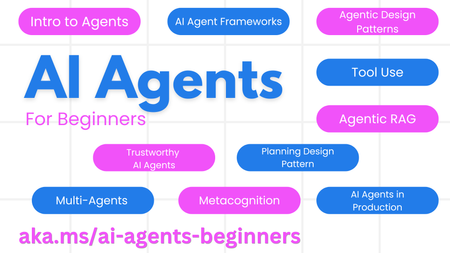
🌱 Getting Started Each lesson covers fundamental aspects of building AI Agents. Whether you're a novice or have some experience, you'll find valuable insights and practical knowledge. We also support multiple languages, so you can learn in your preferred language. To see the available languages, click here. If this is your first time working with Generative AI models, we highly recommend our "Generative AI For Beginners" course, which includes 21 lessons on building with GenAI. Remember to star (🌟) this repository and fork it to run the code! 📋 What You Need The course includes code examples that you can find in the code_samples folder. Feel free to fork this repository to create your own copy. The exercises utilize Azure AI Foundry and GitHub Model Catalogs for interacting with Language Models: Github Models - Free / Limited Azure AI Foundry - Azure Account Required We also leverage the following AI Agent frameworks and services from Microsoft: Azure AI Agent Service Semantic Kernel AutoGen For more information on running the code for this course, visit the Course Setup. 🙏 Want to Help? We welcome contributions from the community! If you have suggestions or spot any errors, please raise an issue or create a pull request. If you encounter any difficulties or have questions about building AI Agents, join our Azure AI Community on Discord. 📂 Each Lesson Includes A written lesson located in the README (Videos Coming March 2025) Python code samples supporting Azure AI Foundry and Github Models (Free) Links to extra resources to continue your learning 🗃️ Lessons Overview Intro to AI Agents and Use Cases Exploring Agentic Frameworks Understanding Agentic Design Patterns Tool Use Design Pattern Agentic RAG Building Trustworthy AI Agents Planning Design Pattern Multi-Agent Design Pattern Metacognition Design Pattern AI Agents in Production 🌐 Multi-Language Support We offer translations in several languages and will updating these on a regular basis. 🚀 Go Fork or Clone this repo and get started on your AI Agents journey 🤖 at https://aka.ms/ai-agents-beginners16KViews3likes4CommentsIntegrating Microsoft Foundry with OpenClaw: Step by Step Model Configuration
Step 1: Deploying Models on Microsoft Foundry Let us kick things off in the Azure portal. To get our OpenClaw agent thinking like a genius, we need to deploy our models in Microsoft Foundry. For this guide, we are going to focus on deploying gpt-5.2-codex on Microsoft Foundry with OpenClaw. Navigate to your AI Hub, head over to the model catalog, choose the model you wish to use with OpenClaw and hit deploy. Once your deployment is successful, head to the endpoints section. Important: Grab your Endpoint URL and your API Keys right now and save them in a secure note. We will need these exact values to connect OpenClaw in a few minutes. Step 2: Installing and Initializing OpenClaw Next up, we need to get OpenClaw running on your machine. Open up your terminal and run the official installation script: curl -fsSL https://openclaw.ai/install.sh | bash The wizard will walk you through a few prompts. Here is exactly how to answer them to link up with our Azure setup: First Page (Model Selection): Choose "Skip for now". Second Page (Provider): Select azure-openai-responses. Model Selection: Select gpt-5.2-codex , For now only the models listed (hosted on Microsoft Foundry) in the picture below are available to be used with OpenClaw. Follow the rest of the standard prompts to finish the initial setup. Step 3: Editing the OpenClaw Configuration File Now for the fun part. We need to manually configure OpenClaw to talk to Microsoft Foundry. Open your configuration file located at ~/.openclaw/openclaw.json in your favorite text editor. Replace the contents of the models and agents sections with the following code block: { "models": { "providers": { "azure-openai-responses": { "baseUrl": "https://<YOUR_RESOURCE_NAME>.openai.azure.com/openai/v1", "apiKey": "<YOUR_AZURE_OPENAI_API_KEY>", "api": "openai-responses", "authHeader": false, "headers": { "api-key": "<YOUR_AZURE_OPENAI_API_KEY>" }, "models": [ { "id": "gpt-5.2-codex", "name": "GPT-5.2-Codex (Azure)", "reasoning": true, "input": ["text", "image"], "cost": { "input": 0, "output": 0, "cacheRead": 0, "cacheWrite": 0 }, "contextWindow": 400000, "maxTokens": 16384, "compat": { "supportsStore": false } }, { "id": "gpt-5.2", "name": "GPT-5.2 (Azure)", "reasoning": false, "input": ["text", "image"], "cost": { "input": 0, "output": 0, "cacheRead": 0, "cacheWrite": 0 }, "contextWindow": 272000, "maxTokens": 16384, "compat": { "supportsStore": false } } ] } } }, "agents": { "defaults": { "model": { "primary": "azure-openai-responses/gpt-5.2-codex" }, "models": { "azure-openai-responses/gpt-5.2-codex": {} }, "workspace": "/home/<USERNAME>/.openclaw/workspace", "compaction": { "mode": "safeguard" }, "maxConcurrent": 4, "subagents": { "maxConcurrent": 8 } } } } You will notice a few placeholders in that JSON. Here is exactly what you need to swap out: Placeholder Variable What It Is Where to Find It <YOUR_RESOURCE_NAME> The unique name of your Azure OpenAI resource. Found in your Azure Portal under the Azure OpenAI resource overview. <YOUR_AZURE_OPENAI_API_KEY> The secret key required to authenticate your requests. Found in Microsoft Foundry under your project endpoints or Azure Portal keys section. <USERNAME> Your local computer's user profile name. Open your terminal and type whoami to find this. Step 4: Restart the Gateway After saving the configuration file, you must restart the OpenClaw gateway for the new Foundry settings to take effect. Run this simple command: openclaw gateway restart Configuration Notes & Deep Dive If you are curious about why we configured the JSON that way, here is a quick breakdown of the technical details. Authentication Differences Azure OpenAI uses the api-key HTTP header for authentication. This is entirely different from the standard OpenAI Authorization: Bearer header. Our configuration file addresses this in two ways: Setting "authHeader": false completely disables the default Bearer header. Adding "headers": { "api-key": "<key>" } forces OpenClaw to send the API key via Azure's native header format. Important Note: Your API key must appear in both the apiKey field AND the headers.api-key field within the JSON for this to work correctly. The Base URL Azure OpenAI's v1-compatible endpoint follows this specific format: https://<your_resource_name>.openai.azure.com/openai/v1 The beautiful thing about this v1 endpoint is that it is largely compatible with the standard OpenAI API and does not require you to manually pass an api-version query parameter. Model Compatibility Settings "compat": { "supportsStore": false } disables the store parameter since Azure OpenAI does not currently support it. "reasoning": true enables the thinking mode for GPT-5.2-Codex. This supports low, medium, high, and xhigh levels. "reasoning": false is set for GPT-5.2 because it is a standard, non-reasoning model. Model Specifications & Cost Tracking If you want OpenClaw to accurately track your token usage costs, you can update the cost fields from 0 to the current Azure pricing. Here are the specs and costs for the models we just deployed: Model Specifications Model Context Window Max Output Tokens Image Input Reasoning gpt-5.2-codex 400,000 tokens 16,384 tokens Yes Yes gpt-5.2 272,000 tokens 16,384 tokens Yes No Current Cost (Adjust in JSON) Model Input (per 1M tokens) Output (per 1M tokens) Cached Input (per 1M tokens) gpt-5.2-codex $1.75 $14.00 $0.175 gpt-5.2 $2.00 $8.00 $0.50 Conclusion: And there you have it! You have successfully bridged the gap between the enterprise-grade infrastructure of Microsoft Foundry and the local autonomy of OpenClaw. By following these steps, you are not just running a chatbot; you are running a sophisticated agent capable of reasoning, coding, and executing tasks with the full power of GPT-5.2-codex behind it. The combination of Azure's reliability and OpenClaw's flexibility opens up a world of possibilities. Whether you are building an automated devops assistant, a research agent, or just exploring the bleeding edge of AI, you now have a robust foundation to build upon. Now it is time to let your agent loose on some real tasks. Go forth, experiment with different system prompts, and see what you can build. If you run into any interesting edge cases or come up with a unique configuration, let me know in the comments below. Happy coding!8.6KViews2likes2CommentsLevel up your Python + AI skills with our complete series
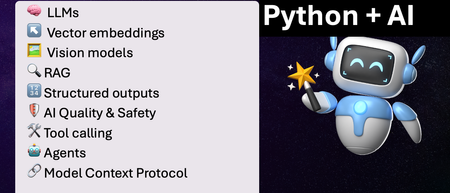
We've just wrapped up our live series on Python + AI, a comprehensive nine-part journey diving deep into how to use generative AI models from Python. The series introduced multiple types of models, including LLMs, embedding models, and vision models. We dug into popular techniques like RAG, tool calling, and structured outputs. We assessed AI quality and safety using automated evaluations and red-teaming. Finally, we developed AI agents using popular Python agents frameworks and explored the new Model Context Protocol (MCP). To help you apply what you've learned, all of our code examples work with GitHub Models, a service that provides free models to every GitHub account holder for experimentation and education. Even if you missed the live series, you can still access all the material using the links below! If you're an instructor, feel free to use the slides and code examples in your own classes. If you're a Spanish speaker, check out the Spanish version of the series. Python + AI: Large Language Models 📺 Watch recording In this session, we explore Large Language Models (LLMs), the models that power ChatGPT and GitHub Copilot. We use Python to interact with LLMs using popular packages like the OpenAI SDK and LangChain. We experiment with prompt engineering and few-shot examples to improve outputs. We also demonstrate how to build a full-stack app powered by LLMs and explain the importance of concurrency and streaming for user-facing AI apps. Slides for this session Code repository with examples: python-openai-demos Python + AI: Vector embeddings 📺 Watch recording In our second session, we dive into a different type of model: the vector embedding model. A vector embedding is a way to encode text or images as an array of floating-point numbers. Vector embeddings enable similarity search across many types of content. In this session, we explore different vector embedding models, such as the OpenAI text-embedding-3 series, through both visualizations and Python code. We compare distance metrics, use quantization to reduce vector size, and experiment with multimodal embedding models. Slides for this session Code repository with examples: vector-embedding-demos Python + AI: Retrieval Augmented Generation 📺 Watch recording In our third session, we explore one of the most popular techniques used with LLMs: Retrieval Augmented Generation. RAG is an approach that provides context to the LLM, enabling it to deliver well-grounded answers for a particular domain. The RAG approach works with many types of data sources, including CSVs, webpages, documents, and databases. In this session, we walk through RAG flows in Python, starting with a simple flow and culminating in a full-stack RAG application based on Azure AI Search. Slides for this session Code repository with examples: python-openai-demos Python + AI: Vision models 📺 Watch recording Our fourth session is all about vision models! Vision models are LLMs that can accept both text and images, such as GPT-4o and GPT-4o mini. You can use these models for image captioning, data extraction, question answering, classification, and more! We use Python to send images to vision models, build a basic chat-with-images app, and create a multimodal search engine. Slides for this session Code repository with examples: openai-chat-vision-quickstart Python + AI: Structured outputs 📺 Watch recording In our fifth session, we discover how to get LLMs to output structured responses that adhere to a schema. In Python, all you need to do is define a Pydantic BaseModel to get validated output that perfectly meets your needs. We focus on the structured outputs mode available in OpenAI models, but you can use similar techniques with other model providers. Our examples demonstrate the many ways you can use structured responses, such as entity extraction, classification, and agentic workflows. Slides for this session Code repository with examples: python-openai-demos Python + AI: Quality and safety 📺 Watch recording This session covers a crucial topic: how to use AI safely and how to evaluate the quality of AI outputs. There are multiple mitigation layers when working with LLMs: the model itself, a safety system on top, the prompting and context, and the application user experience. We focus on Azure tools that make it easier to deploy safe AI systems into production. We demonstrate how to configure the Azure AI Content Safety system when working with Azure AI models and how to handle errors in Python code. Then we use the Azure AI Evaluation SDK to evaluate the safety and quality of output from your LLM. Slides for this session Code repository with examples: ai-quality-safety-demos Python + AI: Tool calling 📺 Watch recording In the final part of the series, we focus on the technologies needed to build AI agents, starting with the foundation: tool calling (also known as function calling). We define tool call specifications using both JSON schema and Python function definitions, then send these definitions to the LLM. We demonstrate how to properly handle tool call responses from LLMs, enable parallel tool calling, and iterate over multiple tool calls. Understanding tool calling is absolutely essential before diving into agents, so don't skip over this foundational session. Slides for this session Code repository with examples: python-openai-demos Python + AI: Agents 📺 Watch recording In the penultimate session, we build AI agents! We use Python AI agent frameworks such as the new agent-framework from Microsoft and the popular LangGraph framework. Our agents start simple and then increase in complexity, demonstrating different architectures such as multiple tools, supervisor patterns, graphs, and human-in-the-loop workflows. Slides for this session Code repository with examples: python-ai-agent-frameworks-demos Python + AI: Model Context Protocol 📺 Watch recording In the final session, we dive into the hottest technology of 2025: MCP (Model Context Protocol). This open protocol makes it easy to extend AI agents and chatbots with custom functionality, making them more powerful and flexible. We demonstrate how to use the Python FastMCP SDK to build an MCP server running locally and consume that server from chatbots like GitHub Copilot. Then we build our own MCP client to consume the server. Finally, we discover how easy it is to connect AI agent frameworks like LangGraph and Microsoft agent-framework to MCP servers. With great power comes great responsibility, so we briefly discuss the security risks that come with MCP, both as a user and as a developer. Slides for this session Code repository with examples: python-mcp-demo8.5KViews3likes0CommentsAI Agents: The Multi-Agent Design Pattern - Part 8
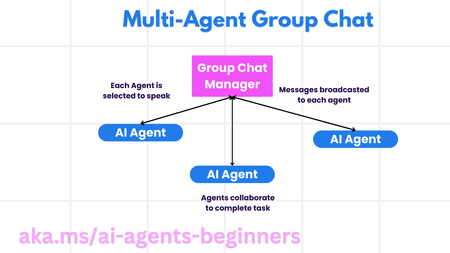
This blog post, Part 8 in a series on AI agents, explores the Multi-Agent Design Pattern, outlining the benefits and key components of building systems with multiple interacting agents. It details the scenarios where multi-agent systems excel (large workloads, complex tasks, diverse expertise), highlights their advantages over single-agent approaches (specialization, scalability, fault tolerance), and discusses the fundamental building blocks for implementation, including agent communication, coordination mechanisms, and architectural considerations. The post introduces common multi-agent patterns (group chat, hand-off, collaborative filtering) and illustrates these concepts with a refund process example. Finally, it includes a practical assignment and provides links to further resources and previous posts in the series.5.5KViews1like0CommentsHow to build Tool-calling Agents with Azure OpenAI and Lang Graph
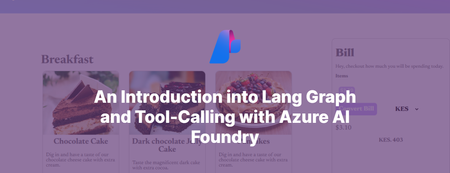
Introducing MyTreat Our demo is a fictional website that shows customers their total bill in dollars, but they have the option of getting the total bill in their local currencies. The button sends a request to the Node.js service and a response is simply returned from our Agent given the tool it chooses. Let’s dive in and understand how this works from a broader perspective. Prerequisites An active Azure subscription. You can sign up for a free trial here or get $100 worth of credits on Azure every year if you are a student. A GitHub account (not necessarily) Node.js LTS 18 + VS Code installed (or your favorite IDE) Basic knowledge of HTML, CSS, JS Creating an Azure OpenAI Resource Go over to your browser and key in portal.azure.com to access the Microsoft Azure Portal. Over there navigate to the search bar and type Azure OpenAI. Go ahead and click on + Create. Fill in the input boxes with appropriate, for example, as shown below then press on next until you reach review and submit then finally click on Create. After the deployment is done, go to the deployment and access Azure AI Foundry portal using the button as show below. You can also use the link as demonstrated below. In the Azure AI Foundry portal, we have to create our model instance so we have to go over to Model Catalog on the left panel beneath Get Started. Select a desired model, in this case I used gpt-35-turbo for chat completion (in your case use gpt-4o). Below is a way of doing this. Choose a model (gpt-4o) Click on deploy Give the deployment a new name e.g. myTreatmodel, then click deploy and wait for it to finish On the left panel go over to deployments and you will see the model you have created. Access your Azure OpenAI Resource Key Go back to Azure portal and specifically to the deployment instance that we have and select on the left panel, Resource Management. Click on Keys and Endpoints. Copy any of the keys as shown below and keep it very safe as we will use it in our .env file. Configuring your project Create a new project folder on your local machine and add these variables to the .env file in the root folder. AZURE_OPENAI_API_INSTANCE_NAME= AZURE_OPENAI_API_DEPLOYMENT_NAME= AZURE_OPENAI_API_KEY= AZURE_OPENAI_API_VERSION="2024-08-01-preview" LANGCHAIN_TRACING_V2="false" LANGCHAIN_CALLBACKS_BACKGROUND = "false" PORT=4556 Starting a new project Go over to https://github.com/tiprock-network/mytreat.git and follow the instructions to setup the new project, if you do not have git installed, go over to the Code button and press Download ZIP. This will enable you get the project folder and follow the same procedure for setting up. Creating a custom tool In the utils folder the math tool was created, this code show below uses tool from Langchain to build a tool and the schema of the tool is created using zod.js, a library that helps in validating an object’s property value. The price function takes in an array of prices and the exchange rate, adds the prices up and converts them using the exchange rate as shown below. import { tool } from '@langchain/core/tools' import { z } from 'zod' const priceConv = tool((input) =>{ //get the prices and add them up after turning each into let sum = 0 input.prices.forEach((price) => { let price_check = parseFloat(price) sum += price_check }) //now change the price using exchange rate let final_price = parseFloat(input.exchange_rate) * sum //return return final_price },{ name: 'add_prices_and_convert', description: 'Add prices and convert based on exchange rate.', schema: z.object({ prices: z.number({ required_error: 'Price should not be empty.', invalid_type_error: 'Price must be a number.' }).array().nonempty().describe('Prices of items listed.'), exchange_rate: z.string().describe('Current currency exchange rate.') }) }) export { priceConv } Utilizing the tool In the controller’s folder we then bring the tool in by importing it. After that we pass it in to our array of tools. Notice that we have the Tavily Search Tool, you can learn how to implement in the Additional Reads Section or just remove it. Agent Model and the Call Process This code defines an AI agent using LangGraph and LangChain.js, powered by GPT-4o from Azure OpenAI. It initializes a ToolNode to manage tools like priceConv and binds them to the agent model. The StateGraph handles decision-making, determining whether the agent should call a tool or return a direct response. If a tool is needed, the workflow routes the request accordingly; otherwise, the agent responds to the user. The callModel function invokes the agent, processing messages and ensuring seamless tool integration. The searchAgentController is a GET endpoint that accepts user queries (text_message). It processes input through the compiled LangGraph workflow, invoking the agent to generate a response. If a tool is required, the agent calls it before finalizing the output. The response is then sent back to the user, ensuring dynamic and efficient tool-assisted reasoning. //create tools the agent will use //const agentTools = [new TavilySearchResults({maxResults:5}), priceConv] const agentTools = [ priceConv] const toolNode = new ToolNode(agentTools) const agentModel = new AzureChatOpenAI({ model:'gpt-4o', temperature:0, azureOpenAIApiKey: AZURE_OPENAI_API_KEY, azureOpenAIApiInstanceName:AZURE_OPENAI_API_INSTANCE_NAME, azureOpenAIApiDeploymentName:AZURE_OPENAI_API_DEPLOYMENT_NAME, azureOpenAIApiVersion:AZURE_OPENAI_API_VERSION }).bindTools(agentTools) //make a decision to continue or not const shouldContinue = ( state ) => { const { messages } = state const lastMessage = messages[messages.length -1] //upon tool call we go to tools if("tool_calls" in lastMessage && Array.isArray(lastMessage.tool_calls) && lastMessage.tool_calls?.length) return "tools"; //if no tool call is made we stop and return back to the user return END } const callModel = async (state) => { const response = await agentModel.invoke(state.messages) return { messages: [response] } } //define a new graph const workflow = new StateGraph(MessagesAnnotation) .addNode("agent", callModel) .addNode("tools", toolNode) .addEdge(START, "agent") .addConditionalEdges("agent", shouldContinue, ["tools", END]) .addEdge("tools", "agent") const appAgent = workflow.compile() The above is implemented with the following code: Frontend The frontend is a simple HTML+CSS+JS stack that demonstrated how you can use an API to integrate this AI Agent to your website. It sends a GET request and uses the response to get back the right answer. Below is an illustration of how fetch API has been used. const searchAgentController = async ( req, res ) => { //get human text const { text_message } = req.query if(!text_message) return res.status(400).json({ message:'No text sent.' }) //invoke the agent const agentFinalState = await appAgent.invoke( { messages: [new HumanMessage(text_message)] }, {streamMode: 'values'} ) //const agentFinalState_b = await agentModel.invoke(text_message) /*return res.status(200).json({ answer:agentFinalState.messages[agentFinalState.messages.length - 1].content })*/ //console.log(agentFinalState_b.tool_calls) res.status(200).json({ text: agentFinalState.messages[agentFinalState.messages.length - 1].content }) } There you go! We have created a basic tool-calling agent using Azure and Langchain successfully, go ahead and expand the code base to your liking. If you have questions you can comment below or reach out on my socials. Additional Reads Azure Open AI Service Models Generative AI for Beginners AI Agents for Beginners Course Lang Graph Tutorial Develop Generative AI Apps in Azure AI Foundry Portal4.7KViews1like2CommentsLearn How to Build Smarter AI Agents with Microsoft’s MCP Resources Hub
If you've been curious about how to build your own AI agents that can talk to APIs, connect with tools like databases, or even follow documentation you're in the right place. Microsoft has created something called MCP, which stands for Model‑Context‑Protocol. And to help you learn it step by step, they’ve made an amazing MCP Resources Hub on GitHub. In this blog, I’ll Walk you through what MCP is, why it matters, and how to use this hub to get started, even if you're new to AI development. What is MCP (Model‑Context‑Protocol)? Think of MCP like a communication bridge between your AI model and the outside world. Normally, when we chat with AI (like ChatGPT), it only knows what’s in its training data. But with MCP, you can give your AI real-time context from: APIs Documents Databases Websites This makes your AI agent smarter and more useful just like a real developer who looks up things online, checks documentation, and queries databases. What’s Inside the MCP Resources Hub? The MCP Resources Hub is a collection of everything you need to learn MCP: Videos Blogs Code examples Here are some beginner-friendly videos that explain MCP: Title What You'll Learn VS Code Agent Mode Just Changed Everything See how VS Code and MCP build an app with AI connecting to a database and following docs. The Future of AI in VS Code Learn how MCP makes GitHub Copilot smarter with real-time tools. Build MCP Servers using Azure Functions Host your own MCP servers using Azure in C#, .NET, or TypeScript. Use APIs as Tools with MCP See how to use APIs as tools inside your AI agent. Blazor Chat App with MCP + Aspire Create a chat app powered by MCP in .NET Aspire Tip: Start with the VS Code videos if you’re just beginning. Blogs Deep Dives and How-To Guides Microsoft has also written blogs that explain MCP concepts in detail. Some of the best ones include: Build AI agent tools using remote MCP with Azure Functions: Learn how to deploy MCP servers remotely using Azure. Create an MCP Server with Azure AI Agent Service : Enables Developers to create an agent with Azure AI Agent Service and uses the model context protocol (MCP) for consumption of the agents in compatible clients (VS Code, Cursor, Claude Desktop). Vibe coding with GitHub Copilot: Agent mode and MCP support: MCP allows you to equip agent mode with the context and capabilities it needs to help you, like a USB port for intelligence. When you enter a chat prompt in agent mode within VS Code, the model can use different tools to handle tasks like understanding database schema or querying the web. Enhancing AI Integrations with MCP and Azure API Management Enhance AI integrations using MCP and Azure API Management Understanding and Mitigating Security Risks in MCP Implementations Overview of security risks and mitigation strategies for MCP implementations Protecting Against Indirect Injection Attacks in MCP Strategies to prevent indirect injection attacks in MCP implementations Microsoft Copilot Studio MCP Announcement of the Microsoft Copilot Studio MCP lab Getting started with MCP for Beginners 9 part course on MCP Client and Servers Code Repositories Try it Yourself Want to build something with MCP? Microsoft has shared open-source sample code in Python, .NET, and TypeScript: Repo Name Language Description Azure-Samples/remote-mcp-apim-functions-python Python Recommended for Secure remote hosting Sample Python Azure Functions demonstrating remote MCP integration with Azure API Management Azure-Samples/remote-mcp-functions-python Python Sample Python Azure Functions demonstrating remote MCP integration Azure-Samples/remote-mcp-functions-dotnet C# Sample .NET Azure Functions demonstrating remote MCP integration Azure-Samples/remote-mcp-functions-typescript TypeScript Sample TypeScript Azure Functions demonstrating remote MCP integration Microsoft Copilot Studio MCP TypeScript Microsoft Copilot Studio MCP lab You can clone the repo, open it in VS Code, and follow the instructions to run your own MCP server. Using MCP with the AI Toolkit in Visual Studio Code To make your MCP journey even easier, Microsoft provides the AI Toolkit for Visual Studio Code. This toolkit includes: A built-in model catalog Tools to help you deploy and run models locally Seamless integration with MCP agent tools You can install the AI Toolkit extension from the Visual Studio Code Marketplace. Once installed, it helps you: Discover and select models quickly Connect those models to MCP agents Develop and test AI workflows locally before deploying to the cloud You can explore the full documentation here: Overview of the AI Toolkit for Visual Studio Code – Microsoft Learn This is perfect for developers who want to test things on their own system without needing a cloud setup right away. Why Should You Care About MCP? Because MCP: Makes your AI tools more powerful by giving them real-time knowledge Works with GitHub Copilot, Azure, and VS Code tools you may already use Is open-source and beginner-friendly with lots of tutorials and sample code It’s the future of AI development connecting models to the real world. Final Thoughts If you're learning AI or building software agents, don’t miss this valuable MCP Resources Hub. It’s like a starter kit for building smart, connected agents with Microsoft tools. Try one video or repo today. Experiment. Learn by doing and start your journey with the MCP for Beginners curricula.3.4KViews2likes2CommentsAI Agents: Planning and Orchestration with the Planning Design Pattern - Part 7
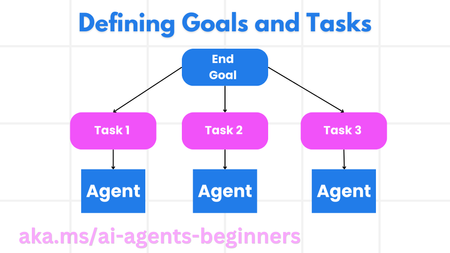
This blog post, Part 7 in a series on AI agents, focuses on the Planning Design Pattern for effective task orchestration. It explains how to define clear goals, decompose complex tasks into manageable subtasks, and leverage structured output (e.g., JSON) for seamless communication between agents. The post includes code snippets demonstrating how to create a planning agent, orchestrate multi-agent workflows, and implement iterative planning for dynamic adaptation. It also links to a practical example notebook (07-autogen.ipynb) and further resources like AutoGen Magnetic One, encouraging readers to explore advanced planning concepts. Links to the previous posts in the series are provided for easy access to foundational AI agent concepts.2.6KViews1like0CommentsUnleashing the Power of AI Agents: Transforming Business Operations
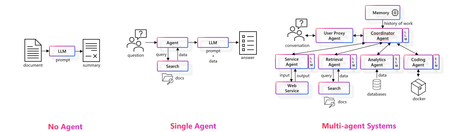
Let "Get Started with AI Agents," in this short blog I want explore the evolution, capabilities, and applications of AI agents, highlighting their potential to enhance productivity and efficiency. We take a peak into the challenges of developing AI agents and introduce powerful tools like Azure AI Foundry and Azure AI Agent Service that empower developers to build, deploy, and scale AI agents securely and efficiently. In today's rapidly evolving technological landscape, the integration of AI agents into business processes is becoming increasingly essential. Lets delve into the transformative potential of AI agents and how they can revolutionize various aspects of our operations. We begin by exploring the evolution of LLM-based solutions, tracing the journey from no agents to sophisticated multi-agent systems. This progression highlights the growing complexity and capabilities of AI agents, which are now poised to handle wide-scope, complex use cases requiring diverse skills. Lets now look at agentic AI capabilities. AI agents can significantly enhance employee productivity and process efficiency, making our operations faster and more effective. Lets examine the key applications of AI agents across industries, such as travel booking and expense management, employee onboarding, personalized customer support, and data analytics and reporting. However, developing AI agents is not without its challenges. Some of the primary considerations, including tool integration, interoperability, scalability, real-time processing, maintenance, flexibility, error handling, and security. These challenges underscore the need for robust platforms that enable rapid development and secure deployment of AI agents. To this end, we introduce Azure AI Foundry and Azure AI Agent Service. These tools empower developers to build, deploy, and scale AI agents securely and efficiently. Azure AI Foundry offers a comprehensive suite of tools, including model catalogs, content safety features, and machine learning capabilities. The Azure AI Agent Service, currently in public preview, provides flexible model selection, extensive data connections, enterprise-grade security, and rapid development and automation capabilities. When building multi agent or agentic based systems there is a huge importance of multi-agent orchestration. Tools like AutoGen and Semantic Kernel facilitate the orchestration of multi-agent systems, enabling seamless integration and collaboration between different AI agents. In conclusion, the transformative potential of AI agents in driving productivity, efficiency, and innovation. By leveraging the capabilities of Azure AI Foundry and Azure AI Agent Service, we can overcome the challenges of AI agent development and unlock new opportunities for growth and success. Resources Azure AI Discord - https://aka.ms/AzureAI/Discord Global AI community - https://globalai.community Generative AI for beginners – https://aka.ms/genai-beginners AI Agents for beginners - https://aka.ms/ai-agents-beginners Attend one of the Global AI Bootcamp near you - https://globalai.community/bootcamp/ Build AI Tour open content - https://aka.ms/aitour/repos Build your first Agent with Azure AI Agent Service - Slide deck and code - https://github.com/microsoft/aitour-build-your-first-agent-with-azure-ai-agent-service1.3KViews2likes0CommentsAI Agents: Building Trustworthy Agents- Part 6
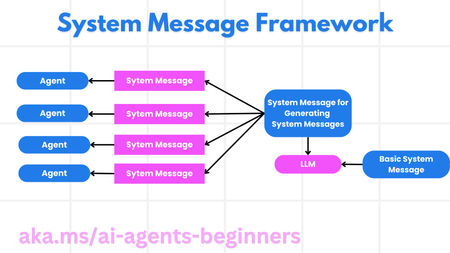
This blog post, Part 6 in a series on AI agents, focuses on building trustworthy AI agents. It emphasizes the importance of safety and security in agent design and deployment. The post details a system message framework for creating robust and scalable prompts, outlining a four-step process from meta prompt to iterative refinement. It then explores various threats to AI agents, including task manipulation, unauthorized access, resource overloading, knowledge base poisoning, and cascading errors, providing mitigation strategies for each. The post also highlights the human-in-the-loop approach for enhanced trust and control, providing a code example using AutoGen. Finally, it links to further resources on responsible AI, model evaluation, and risk assessment, along with the previous posts in the series.831Views3likes0Comments