ai agent
19 TopicsMCP safety & evaluation with the Agent 365 CLI & Agent Governance Toolkit
Co Author: JiteshThakur AI agents are useful because they can act. They call tools, query databases, send messages, and hand work to other agents. That same freedom creates a problem: access control can tell you which service an agent may reach, but it does not always tell you whether a particular action is sensible, safe, or permitted. MCP is how most agents now act. Two Control Points: This post examines two control points that address different parts of the MCP lifecycle. Agent 365 CLI evaluates the MCP server before an agent uses it. Agent Governance Toolkit (AGT) governs sensitive tool calls while the agent runs. One improves what the agent sees. The other governs what the agent does. The Agent 365 CLI is a cross-platform command-line tool for Agent 365 applications on Azure. Its evaluation command examines MCP tool definitions and scores their quality. AGT evaluates actions against policy and records each decision. Together, these tools support a practical model: evaluate the server first, then provide proper scaffolding for the developer to test this in a dry run. Agent 365 CLI: Score an MCP server from the command line: The Agent 365 CLI can evaluate an MCP server against research-based practices for production readiness. The result is more useful than a simple pass or fail. The evaluation gives you: A score for each tool name, description, and parameter schema; A prioritized list of improvements; An overall maturity score for the server; and Local output that you can use early in development. This report turns a vague question, "Is this MCP server ready?", into a concrete list of work. The evaluate command a365 develop-mcp evaluate --server-url <server-url> [--auth-token <auth-token>] [options] The command reads the tool schemas from the server. It then produces guidance for names, descriptions, parameters, and schema structure. A local coding-agent CLI scores the semantic checks. You can use GitHub Copilot CLI or Claude Code under your account and AI subscription. The command does not send tool-schema data to Microsoft. Prerequisites: Install the following software: Agent 365 CLI; Node.js 18 or later for GitHub Copilot CLI; and A supported coding-agent CLI for semantic scoring. For example, install GitHub Copilot CLI with this command: powershell npm install -g @github/copilot This bring-your-own-LLM model keeps the scoring step in your local development environment. It is useful when model calls must remain inside an approved deployment. How the evaluation works The command runs a five-step pipeline and logs progress as it goes. Fig 1: MCP Evaluation using Agent 365 Cli Connect to the MCP server and collect its tool schemas. Generate an evaluation checklist in the output directory. Score the semantic checks with the selected coding agent. Calculate the maturity level and action priorities. Write the JSON and HTML reports. The evaluation contains two types of checks: Deterministic checks use exact rules in the CLI. For example, a tool name cannot be empty. Semantic checks use a coding agent to score clarity and meaning. Each result includes a reason for the score. Examples Set the authentication token in an environment variable. Then evaluate an authenticated server and write the artifacts to a subfolder. powershell $env:A365_MCP_AUTH_TOKEN = "<bearer-token>" a365 develop-mcp evaluate --server-url "https://my-mcp-server.contoso.com/mcp" --output-dir "./eval" Use a specific scoring engine with the `--eval-engine` option: powershell a365 develop-mcp evaluate --server-url "http://localhost:5000/mcp" --eval-engine claude-code Scenario: Evaluate a malicious MCP server For this demonstration, we hosted a deliberately malicious MCP server at `http://127.0.0.1:8124/`. It exposes tools that demonstrate tool poisoning, credential leakage, prompt injection, schema mismatch, sandbox escape, and other attacks. The server is intentionally unsafe and is for demonstration only. Fig 2: Setting up a test MCP server for evaluation We ran the evaluation in two steps. First, we generated the checklist without automatic semantic scoring: a365 develop-mcp evaluate --server-url "http://127.0.0.1:8124/" --eval-engine none Fig 3: Agent365CLI MCP Evaluation The command wrote the checklist and a semantic-evaluation prompt to the output directory. It also displayed the next steps. Second, we gave the prompt and checklist to a coding agent. The agent completed each unscored semantic check with a Boolean score and a short reason. After we saved the completed checklist, we ran the command again to generate the report: a365 develop-mcp evaluate --server-url "http://127.0.0.1:8124/" --output-dir "C:\temp\MaliciousMCP" Fig 4: Creating the report with Agent365 CLI MCP Evaluate command Understanding the evaluation report Open `<server-name>_eval_report.html` from the output directory. The report contains: The overall score from 0 to 100; The maturity level from 0 to 4; Scores for each tool and quality category; and A prioritized action list for the next maturity level. Fig 5: MCP Evaluation Report In our demonstration, the server scored 86.0 and reached Level 3: Optimized for AI. That strong overall score did not mean that every tool was safe or clear. The report found 58 action items, including one critical item and 33 high-priority items. That contrast matters. A server can have valid schemas and consistent names while still exposing misleading or dangerous tools. Fig 6: MCP Evaluation Report - Tool-By-Tool Detail What to look for Read the per-tool results before the overall score. A single weak tool can create more risk than the server average suggests. Focus on these report sections: Tool names: Can an agent select the correct tool from its name? Tool descriptions: Does each description explain the purpose and correct use? Parameter names: Do the names identify the data that the tool requires? Parameter descriptions: Do they explain the format, type, and constraints? Schema structure: Are the schemas valid and processable? Action items: Which changes have the highest effect on tool selection and use? The command processes static tool schemas from `tools/list`. It does not process runtime payloads, end-user data, or personal data. The command keeps the `--auth-token` value in memory. It sends the value only in the HTTP `Authorization` header. It does not write the token to disk or give it to the coding agent. AGT: Put governance in the execution path: Microsoft's open-source Agent Governance Toolkit (AGT) evaluates an action before execution. It adds identity and policy context, records the decision, and can send risky work for approval. This can be used by developers during the build time for dynamic evaluation of the MCP server. AGT lets developers put part of that intent into the execution path. Remote tools still need secure implementations, sandboxes need hard boundaries, and audit records need appropriate storage and access controls. You do not need to replace your agent framework to use it. What sits in the decision path? AGT wraps the tools that an agent already uses. You can start to govern a tool with two lines of Python: python from agentmesh.governance import govern safe_tool = govern(my_tool, policy="policy.yaml") On each call, `safe_tool` evaluates the configured policy. An allowed action reaches the original tool. A denied action raises `GovernanceDenied` and creates a decision record. This wrapper model reduces the cost of adoption. Teams can add governance to an existing agent stack without rebuilding it. AGT supports Python, TypeScript, .NET, Rust, and Go. Its documented integrations include popular agent frameworks, MCP, and A2A. Teams can also adopt AGT in stages. A team can begin with policy checks and audit records. It can add identity, approvals, sandboxing, and operational controls as risk increases. Each control answers a different question: Policy: Is this action allowed? Identity and trust: Which agent made the request? Runtime controls: What limits apply to execution? Audit evidence: Why did AGT allow or deny the action? A low-risk assistant can need only a deny rule and basic logging. An agent that moves money or changes production systems needs stronger controls. Fig 7: AGT Architecture Scenario: Govern the same malicious MCP server For this scenario demonstration, we used AGT Python packages as an MCP gateway. The gateway sat between an agent and the same malicious server from the earlier evaluation. This setup let us examine both control points against one target. The Agent 365 CLI examined the server's static tool definitions. The AGT gateway examined real requests and responses for the developer during its testing. Fig 8: AGT findings at runtime In the policy interface, a developer can edit runtime limits and detection rules. The developer can also validate the policy against sample tool metadata, save a revision, and activate it with a recorded reason. Fig 9: AGT control coverage The control-coverage view shows which AGT capabilities are active in the gateway. It also links each capability to package checks and end-to-end evidence. In our demonstration, we included the following controls: Tool metadata poisoning detection; Tool change and rug-pull detection; Dangerous argument blocking; Tool-response content scanning; Per-client tool-call budgets; and A redacted decision audit trail. You can build your detection & input security by reading more about it here. The gateway detected malicious content. For one blocked `tools/list` request, it recorded the findings. The important result was not only that AGT blocked the request. It also preserved the matched evidence, affected tool locations, policy modes, and request context. Fig 10: Example detection via AGT The dashboard then summarized block-mode findings, leading risk drivers, and tools that required review. This evidence can help a team prioritize policy changes and investigate repeated attacks. Fig 11: Sample AGT metrics AGT does not require this UI, gateway, or architecture. Its structured decisions can feed an admin console, SIEM, incident workflow, or approval queue. AGT also includes an Agent Compliance package with mappings for OWASP and other controls. These mappings give developers and governance teams a common record of applied controls. Teams do not need to reconstruct the agent's behavior after an incident. Check Compliance - Agent Governance Toolkit for more information. Conclusion: MCP safety needs controls before and during execution. The Agent 365 CLI improves the MCP interface before deployment. It exposes unclear tool definitions, scores server maturity, and turns quality gaps into prioritized work. While AGT is implemented at the build phase, it provides developers the ability to test policy, identity, execution context & preserve evidence for allowed or denied decisions. Neither tool replaces secure server code, strong sandbox boundaries, or protected audit storage. Instead, they make those controls easier to evaluate and explain. Start with one MCP server and one consequential tool call. Evaluate the server with the Agent 365 CLI. Then put an AGT policy around the action that carries the most risk. While these controls help secure the build phase of an agent, once agents move into production, runtime controls become essential. Agent365 provides those controls at runtime. With thanks to Ashik Kuppil for his inputs and collaboration on this post.
The Microsoft AI and Agent Platform — The Platform Behind Intelligent Agents
Why the platform around the model is the real enterprise differentiator Enterprise AI has reached a turning point. Beyond answering questions, it can now reason over business context, retrieve knowledge, use tools, coordinate workflows, and act across enterprise systems. This shift raises a critical question: How can organizations build agents intelligent enough to transform work while ensuring they remain trusted, governed, and ready to operate at enterprise scale? The answer is not a single model, chatbot, or orchestration framework. Foundation models are advancing quickly and increasingly becoming a commodity input — Azure AI Foundry alone provides access to more than 11,000 models. What determines enterprise value is not the model alone, but the platform around the model: the data that grounds it, the tools it can use, the experiences where people engage it, the runtime where it operates, and the enterprise foundation that gives it identity, context, governance, and operational control. The Microsoft AI and Agent platform enables organizations to build, ground, govern, and operate AI apps and agents at scale, bringing together the full agent lifecycle with open development, built-in intelligence, and consistent security, compliance, and policy controls. One ecosystem, multiple experiences, shared intelligence, flexible build paths, multiple runtime choices, and an enterprise foundation that carries security, governance, compliance, and Responsible AI across the stack. The reference mental model below expresses this as a layered platform — Users → Experiences → Agents → Intelligence → Runtime → Foundation with security, governance, compliance, and Responsible AI applied across every layer. An agent that is brilliant but ungoverned never leaves the pilot stage. An agent that is locked down but context-blind never delivers real value. Impact compounds only when both dimensions advance together, on the same platform, so that intelligence and control share one identity model, one data plane, and one control plane. Part 1 — Intelligence (this post): dives into how Microsoft's platform helps organizations build agents that understand work, reason over trusted context, and act through business systems to deliver real business value. Part 2 — Trust: will go deeper on how those agents are secured, governed, monitored, and managed across their lifecycle. Intelligence + Trust = Frontier Transformation Part 1: Intelligence Most enterprise AI programs begin with model experimentation - prompts, model comparisons, prototypes, accuracy evaluations. That is necessary but not sufficient. A model alone does not know your organization, your processes, your permissions, your systems of record, your compliance obligations, or your operating model. Experience layer: meet users where work already happens Agents deliver value only when they reach people in the flow of work. Enterprise AI adoption rarely happens through a single interface or experience. A sales leader, financial analyst, security operator, developer, field technician, and HR specialist do not need the same interface they need agents surfaced in the tools and workflows they already use. Microsoft's approach is not to force every agent into one portal. The platform supports multiple experiences over a shared foundation: Microsoft 365 Copilot for productivity and business users. Security Copilot for security operations. Azure Copilot for IT operations, cloud, and infrastructure. GitHub Copilot for developers. Dynamics 365 experiences for sales, service, finance, and supply chain workflows. Power Platform and Copilot Studio experiences for business applications and low-code extensions. Custom experiences for line-of-business apps, portals, websites, and industry-specific workflows. Regardless of where users engage, the underlying intelligence, governance, and runtime capabilities remain consistent across experiences. Agent layer: specialize by domain, tools, and autonomy Specialization with a shared substrate Generic agents often fail because enterprise work is domain specific. A security agent must understand incidents, alerts, identities, and threat intelligence. A finance agent must understand reconciliations, receivables, approvals, and controls. A developer agent must understand repositories, branches, pull requests, tests, and pipelines. Microsoft's platform supports both prebuilt domain agents and custom agents. Organizations should leverage the domain specific agents where possible and focus custom development on capabilities that create unique business value. Whether an agent is out of the box or custom, it inherits the same governance, so built-in and custom are never two different compliance islands. Agent systems form an autonomy spectrum, allowing organizations to progressively increase capability while maintaining appropriate levels of human oversight. Assistive: The agent recommends; a human decides. Example - A finance agent drafts a reconciliation for review. Supervised autonomy: the agent acts within bounded authority and escalates exceptions. Example - An SRE agent auto-remediates known alert classes and escalates novel incidents. Multi-agent orchestration: A coordinating agent decomposes a goal and delegates to specialist agents. Example - One agent retrieves data, another analyzes it, another drafts a response, and another executes an approved action. Intelligence layer: grounding as a first-class platform tier An agent is only as good as the context it can reason over. The hardest part of building a useful enterprise agent is not calling a model. It is giving the agent the right context. Without trusted context, agents produce generic answers. The IQ Platform is the intelligence fabric that separates enterprise-grade agents from generic AI assistants. A generic model can answer questions based on its training data or a narrow retrieval source. A Microsoft agent, by contrast, can be grounded in multiple dimensions of your organizational intelligence: how people work, what business data means, which knowledge is authoritative, and what external signals matter. With the right intelligence fabric, agents become role-aware, process-aware, data-aware, and policy-aware. Microsoft's IQ model treats grounding as a reusable platform capability rather than per-project plumbing. IQ layer What it gives agents Why it matters Work IQ Collaboration context: people, skills, meetings, documents, decisions, workflows, and organizational relationships. Helps agents understand how work actually happens, not just what content exists. Fabric IQ Governed business data, metrics, semantic models, and analytical context. Helps agents reason over trusted enterprise data with consistent business definitions. Foundry IQ Models, curated knowledge, retrieval assets, memory, guardrails, and AI development capabilities delivered from Microsoft Foundry with plug-and-play memory, knowledge, and tool integrations. Helps teams build reliable, purpose-built agents with governed model and knowledge choices. Web IQ Public web, current external signals, research, news, and external context. Helps agents augment internal context with timely external intelligence. In a conventional application, data access is deterministic queries against known schemas. In an agentic system, the equivalent tier must serve retrieval for reasoning, semantically matching an ambiguous natural-language intent to the right passages, records, and metrics across unstructured collaboration content, structured business data, curated knowledge, and the live web. The four IQ sources correspond to those four retrieval modalities, and the IQ Platform gives agents a composable intelligence model. Each IQ layer adds a distinct signal, and together they allow agents to move from simple assistance to informed action. Intelligence is more than model capability. It emerges from the combination of grounding, memory, model selection, orchestration, and guardrails working together as a coordinated system. Grounding, fine-tuning, and adaptation Microsoft gives teams multiple adaptation levers within a governed environment rather than forcing every use case into one technique. Grounding is not a sidecar retrieval capability; it is an enterprise intelligence layer. Because the model layer is a platform tier rather than a single endpoint, adaptation techniques fine-tuning, distillation into smaller task models, and retrieval-augmented grounding are first-class options selected per workload. The common pattern: prefer grounding (RAG) for freshness and provenance, reserve fine-tuning for durable behavior, format, or domain-tone requirements, and distill to smaller models where latency and cost dominate. Memory In addition to retrieval and reasoning, enterprise agents increasingly rely on memory to preserve context across conversations, tasks, and workflows. Memory enables agents to maintain continuity, learn from prior interactions, and provide more personalized, adaptive, and goal-oriented experiences over time. Multi-model choice Agent workloads are not uniform. Some steps require simple classification. Others require complex reasoning, synthesis, code generation, or tool orchestration. Model choice is becoming a strategic architecture decision, balancing quality, latency, cost, sovereignty, and specialization requirements. Microsoft Foundry supports model choice as part of the platform rather than forcing all workloads through one endpoint with a curated catalog of leading foundation, open-source, and partner models spanning capabilities, performance trade-offs, and use cases so teams can move from experimentation to production confidently. Model routing Microsoft Foundry's Model Router selects the optimal LLM for each agent request per turn, not per session — a simple greeting can route to a fast, inexpensive model, while a complex tool-calling chain can route to a frontier model, all through one endpoint with zero routing logic. Model selection becomes a runtime policy, not hard-coded application logic providing automatic failover when an upstream provider is unavailable, prompt caching across models for identical inputs, and consistent tool-use semantics regardless of which underlying model handles a call. Key routing capabilities include per-request optimization, complexity-aware model selection, tool-aware routing, multi-agent support, resiliency, and cost optimization. Orchestration Orchestration transforms individual model interactions into coordinated agentic and multi-agent workflows. An LLM-driven planning layer that interprets user intent, breaks down complex requests, selects the right tools and knowledge, and executes multi-step plans and multi-agent workflows with guardrails for safety and compliance. Guardrails A guardrail is a named collection of controls; each control defines a risk to be detected, intervention points to scan the risk, and the response action to take when the risk is detected. Guardrails help ensure that agent behavior remains aligned with organizational policies, safety requirements, and business objectives. How agents are built: one continuum from no-code to pro-code Different builders. Different depth. One platform. The progression from no-code to low-code to pro-code is more than a tooling choice; it reflects increasing levels of customization, control, and organizational maturity. Different teams need different levels of control. A business user may need a simple knowledge agent. A process owner may need a workflow agent with connectors and approvals. An engineering team may need a custom multi-agent system with model routing, evaluation, tool use, and deployment automation. Organizations can start with simple productivity agents, evolve into governed workflow agents, and eventually build deeply integrated agentic systems. No-code - M365 Agent Builder: create simple agents from natural language and your organizational data. This is useful for lightweight departmental workflows, knowledge assistants, and task-specific copilots. Low-code - Copilot Studio: design, extend, and orchestrate agents with connectors, workflows, and enterprise governance. This is where business technologists and app makers can build more sophisticated agents that integrate with systems, automate processes, and enforce organizational rules. Pro-code - Microsoft Foundry: enables developers to build custom AI systems with full control over models, orchestration, infrastructure, and code. This is where organizations can build highly specialized agents with advanced reasoning patterns, custom retrieval, tool use, evaluation pipelines, and deployment strategies. The key principle is continuity; moving from no-code to low-code to pro-code should not require rethinking the architecture. Identity, grounding, governance, policy, and operational controls should carry forward including centralized identity and policy enforcement. Regardless of the development approach, the same intelligence, runtime, governance, and operational capabilities can be reused across the platform. Where agents run: one platform, multiple runtime choices Match the runtime to the requirement A mature enterprise platform must support more than one runtime pattern. Some agents need elastic cloud scale. Others need local execution because of latency, data sensitivity, offline operation, or regulated environments. Some need to interact with legacy applications that do not expose APIs. Runtime should be selected based on business, operational, and regulatory requirements rather than tooling limitations. Build path and runtime path should vary independently over a shared foundation. The ability to deploy the same agent architecture across multiple runtime environments helps organizations balance performance, compliance, and operational flexibility. Local / edge (Foundry Local, Windows AI): Local or edge execution supports scenarios where data sensitivity, latency, offline access, regulatory requirements, disconnected operation or device-specific context matter. Examples include on-device models, Windows AI capabilities, and local execution for regulated or disconnected environments. Cloud runtime (Azure / Copilot stack): supports scalable, API-driven agents with multi-agent orchestration running in Azure and Copilot with the default for enterprise workflows, multi-agent orchestration, connected systems, and data-connected scenarios that need elasticity. Cloud PC (Windows 365 agents): enables agents to operate in managed desktop environments. agents run on a Windows 365 Cloud PC using a check-out/check-in model, driving UI automation, browsers, and legacy apps as a human operator would in a managed and governed environment. This is the bridge to systems that expose no API, the agent operates the actual application UI in a governed, isolated desktop. Foundation layer: shared trust fabric The enterprise foundation for intelligence and trust The same enterprise services that secure, govern, and operate modern organizations now extend to agents, creating a shared foundation for both intelligence and trust. This inheritance model allows organizations to extend existing investments in identity, governance, security, compliance, and operations directly to agent systems rather than introducing a separate control model for AI. Key foundation services include: Microsoft Graph – Provides agents the context across users, groups, files, meetings, messages, relationships, and activity signals. It gives agents a permission-aware understanding of work, not just isolated documents. Microsoft Entra – Agents are governed using the same identity fabric that governs users, devices, apps, and resources enabling role-based and attribute-based access control plus risk-based Conditional Access policies. Microsoft Fabric - Governed data, analytics, semantic models, and business metrics. Foundry includes SharePoint and Microsoft Fabric among its built-in tools. Agents reason over trusted business definitions instead of disconnected raw tables. Microsoft Purview - Data protection, sensitivity labeling, DLP, compliance, and governance. Agent 365 uses Microsoft Purview for data protection and compliance controls on agent activity and data, complementing Microsoft Defender for threat detection and behavior monitoring. Agent interactions inherit enterprise compliance expectations. Azure - Provides enterprise-grade cloud infrastructure and operational maturity. Foundry emphasizes centralized observability, traces, evaluated runs, and production performance monitoring with full traceability for enterprise-scale security, audit, and compliance requirements. Microsoft 365 - Brings agents into the tools where employees already work. Agents can be surfaced in the productivity tools users already leverage. Dynamics 365 - Business application context for sales, service, finance, supply chain, and operations. Grounds agents in business processes and systems of record. Power Platform - Low-code apps, automation, connectors, and business process integration — reachable via Foundry through Azure Logic Apps integration with more than 1,400 connectors. Business technologists can extend agent workflows without building everything in code. GitHub - Developer workflows, repositories, pull requests, code context, and DevOps integration. Extends agentic assistance into software development lifecycle. Windows & Windows 365 - Endpoint and Cloud PC environments for local, desktop, and legacy app scenarios. Extends agent reach beyond APIs into managed desktop execution patterns. Alongside these services, Agent 365 and the Foundry Control Plane provide the trust layer for enterprise agents, combining security, governance, compliance, and Responsible AI with centralized visibility, policy enforcement, lifecycle management, and secure AI operations from development through production. End-to-end request journey: how the layers work together The true value of the platform emerges when all the layers work together as a coordinated system. Intelligence emerges from the combined effect of experience, domain specialization, grounding, memory, models, orchestration, runtime, and foundation. An example request, from a user - “Reconcile last month's receivables and flag anomalies for my region." Experience - The user asks from Microsoft 365 Copilot or a finance workflow surface, the agent is reached through the same stable endpoint used across Microsoft 365 and Teams. Identity context - The platform attaches user identity, and, for the agent, its Microsoft Entra Agent ID assigned in Foundry. Agent selection - A finance agent interprets the goal. If the request spans domains, Copilot Studio generative orchestration decomposes it into a plan, choosing tools, topics, knowledge sources, or connected agents. Grounding - Fabric IQ provides receivables data and metric definitions; Work IQ provides relevant approvals and prior decisions; Foundry IQ provides reconciliation rules and policy knowledge; Web IQ can add external signals when needed. Model routing - The Foundry Model Router selects the model per turn. A simple classification step goes to a nano-tier model; anomaly reasoning routes to a mid-tier model; multi-document synthesis routes to a frontier model, all through one endpoint with zero routing logic. Guardrails - Foundry guardrails scan user input, tool calls, tool responses, and final output for defined risks and take the configured action (annotate or annotate-and-block). Tool use - The agent queries systems, invokes reconciliation logic, runs anomaly detection, or calls another specialist agent via Copilot Studio connected agents or Foundry's MCP integration. Runtime execution - The workflow runs in cloud, local, or Windows 365 Cloud PC environments depending on system access, data sensitivity, latency, and legacy application constraints. Response - The agent returns a reconciled view, flagged anomalies, rationale, and recommended next steps — with citations pulled from the knowledge layer for transparency. Bridge to Trust - Every action generated by the agent remains observable, governable, and auditable through the platform's trust capabilities, which are explored further in Part 2. Conclusion The hard problem in enterprise AI was never obtaining a capable model; it was grounding that model in governed enterprise context, enabling it to act through governed tools, and doing so within the security, compliance, and operational controls organizations already rely on. Microsoft's answer is a platform approach: a dedicated grounding tier through the IQ Platform, a flexible intelligence layer spanning models, memory, routing, orchestration, and guardrails, specialized agent families aligned to business domains, a build-to-run continuum spanning no-code to pro-code, and a shared trust foundation that every agent inherits. Integrate once with this fabric, and the payoff compounds: one identity model, one grounding tier, and one governance spine become reusable across every persona surface, every agent family, every build-and-run target. Coming next — Part 2: Trust Intelligence is only half the equation. In Part 2 we turn to the other axis: how Microsoft secures and governs every component of an agent - models, tools, MCP connectors, memory, and orchestration across the full lifecycle.1.8KViews5likes2CommentsSecuring AI Agents at Runtime: Real-Time Protection and Threat Detection for Microsoft Agent 365
Organizations are rapidly adopting AI agents to automate workflows, access enterprise data, invoke tools, and take actions on behalf of users. This autonomy creates a fundamentally new security challenge. Unlike traditional AI applications, agents operate across dynamic execution flows, interacting with external content, calling tools, and accessing sensitive resources. These interactions create new attack paths that traditional security controls were not designed to address. Today, we're announcing two major milestones for Security for AI in Microsoft Defender for Microsoft Agent 365: Threat detection for Microsoft Agent 365 agents — now in public preview. Real-time protection for Microsoft Agent 365 tooling servers — now generally available. Together, these capabilities help security teams detect, investigate, and block attacks targeting AI agents, extending Microsoft Defender's threat protection capabilities into the agent runtime. Threat detection for Microsoft Agent 365 Agents (Public Preview) Threat detection provides SOC teams with detailed visibility into attacks and suspicious activity targeting AI agents. By analyzing runtime signals across agent interactions, tool usage, and execution patterns, Microsoft Defender identifies suspicious and malicious behavior throughout the agent execution lifecycle and surfaces actionable security alerts for SOC teams. Threat detection supports cloud agent types that emit observability logs to Microsoft Agent 365, including: Microsoft Copilot Studio Microsoft Foundry Microsoft 365 Copilot Agent Builder Agents integrated through the Microsoft Agent 365 SDK This provides consistent threat visibility across supported Microsoft Agent 365 agent experiences, regardless of how the agent was built. Fig. 1. Microsoft Security for AI alerts in Microsoft Defender XDR (Preview) Microsoft Defender identifies a broad range of AI-specific threats, including: Indirect prompt injection (XPIA) — malicious instructions embedded in external content designed to manipulate agent behavior. Evasion techniques — attempts to bypass agent instructions or security controls. Malicious content propagation — attempts to use agents to generate or distribute malicious content. Secret leakage — exposure of credentials, API keys, or other sensitive information through agent interactions. LLM reconnaissance — attempts to probe agent capabilities, instructions, or security boundaries. Suspicious IP access — agent access originating from anonymized or suspicious IP addresses. Alerts are surfaced directly in Microsoft Defender, enabling SOC analysts to investigate and respond using familiar workflows, Advanced Hunting queries, and the Defender XDR investigation experience. Real-time protection for WorkIQ and Custom MCP servers (General Availability) Real-time protection moves beyond detection by blocking threats inline when AI agents interact with WorkIQ and custom MCP servers (see Microsoft Agent 365 tooling servers). When an agent invokes a registered tool or receives a tool response, Defender evaluates the interaction against configured security policies and determines whether to allow or block it directly within the agent's execution flow. This helps prevent malicious actions and data leakage in real time, without requiring agent developers to implement custom security logic. Fig. 2. Microsoft Security for AI Real-Time Protection policy in Defender Real-time protection currently guards against high-impact threats, including: Evasion techniques — attempts to bypass agent guardrails or security controls. Malicious content propagation — preventing agents from spreading malicious content through tool actions. Secret leakage — blocking agents from inadvertently exposing credentials or sensitive data through tool calls. Communication with untrusted domains — preventing agents from sending email or data to high-risk or untrusted email domains. Better Together: Detection and Protection Threat detection and real-time protection address complementary parts of the agent security lifecycle. Real-time protection provides inline enforcement to block malicious interactions during execution, while threat detection gives SOC teams the visibility and investigation context needed to identify attack patterns, assess impact, and respond to suspicious activity. Together, they provide a defense-in-depth approach that combines runtime enforcement with SOC-driven detection and investigation, purpose-built for AI agents. Getting Started Both capabilities are available through Microsoft Defender, using a dedicated Security for AI workload experience that brings together AI threat detections, investigations, and runtime protection policies. To learn more: Enable security for AI agents using Microsoft Defender Detect and investigate threats to AI agents using Microsoft Defender (Preview) Protect AI agents in real time using Microsoft Defender As AI agents become more autonomous and gain access to enterprise data and tools, securing their runtime behavior becomes critical. With Threat Detection and Real-Time Protection, Microsoft Defender helps organizations adopt AI agents with security controls designed for how agents actually operate—detecting attacks, enabling SOC investigation, and blocking malicious interactions at runtime.1.5KViews1like0Comments
Why Your Copilot Studio Agent Fails in Production (And How to Fix It)
Most Copilot Studio tutorials show you how to build a chatbot. This post is about something harder: building agents that actually work in production. I architect enterprise agents at a hospitality company — handling customer email triage, HR workflows, helpdesk automation, and reporting pipelines across multiple systems. One of those agents reduced human handling time per customer email from ~12 minutes to under 2 minutes (88% reduction) by orchestrating sentiment analysis, CRM lookups, SOP research via child agents, and response drafting — all before a human agent ever opens the email. Here is what I've learned building at that scale. The Four Layers Every Enterprise Agent Needs Most teams design only the top layer and treat everything else as "we'll figure it out later." By the time the other layers become urgent — usually after an incident — they're too expensive to retrofit. Layer Component Conversation Topics · Entities · Adaptive Cards · NLU Orchestration Agent routing · Context passing · State Integration Connectors · Power Automate · Azure Functions Governance DLP · Auth · ALM · Monitoring · Logging Build the governance layer first. Design the conversation layer last. The demo will be slightly less impressive. The production deployment will be significantly more stable. The Three Mistakes I See Most Often 1. Slot-filling designed for the happy path The default Copilot Studio pattern collects parameters one by one. It breaks the moment your flow has conditional branches — which every real enterprise workflow does. Use intent-first routing instead: identify what the user wants before collecting any parameters, then branch to a sub-flow that collects only what that variant needs. 2. Multi-agent context that gets dropped When you delegate from a router agent to a capability agent, the receiving agent needs to know who the user is and what conversation state to preserve. Native session variables don't cross agent boundaries. Build an explicit context envelope — a JSON object passed at delegation time — that carries user identity, security scope, origin topic, and return context. Your agents become stateless with respect to each other. Context travels with the conversation. 3. No async pattern for slow integrations A synchronous request that works for a REST API returning in 200ms will silently fail for a legacy system query that takes 45 seconds. Design async from day one: submit to an Azure Service Bus queue, return a correlation ID, acknowledge the user, and use proactive messaging to deliver the result when it's ready. This is the single biggest gap between demos and production deployments. A Note on Authentication — Chatbots vs. Autonomous Agents This is a distinction most articles get wrong, so it's worth being explicit. Chatbots have a human on the other end of the conversation. Authentication options here include Entra ID SSO (works in Teams and SharePoint channels where the user's identity is delegated to the agent) or client ID + secret (validates against AD but without user delegation — the agent authenticates as itself, not as the user). Autonomous agents are different in a fundamental way: there is no human in the authentication loop. The agent authenticates using the identity of the account that owns and runs it. There is no SSO because there is no interactive user session. This distinction matters because the security model shifts entirely — you are no longer protecting a user session, you are protecting a service identity. This gets more interesting when your autonomous agent connects to non-Microsoft systems. There is no universal pattern here — it depends entirely on what the external system supports: - API Key / Secret — the most common pattern for SaaS integrations. The external system issues a scoped key specifically for this integration. Store it in Azure Key Vault or encrypted Power Platform environment variables, never hardcoded in a flow. The scoping question is critical: is this a full-admin key or a least-privilege key issued only for what this agent needs? - OAuth 2.0 Client Credentials (machine-to-machine) — the agent authenticates as itself using client ID + secret against the external system's auth server and receives a bearer token. No user involved, fully automated. - Basic Auth on legacy systems — still common in enterprise environments. Credentials must live in Key Vault, not in flow variables or connector configuration in plain text. - Custom connector with encrypted connection — Power Platform manages the auth at the connector level; credentials are stored encrypted and scoped to the environment. The governing principle across all of these: the identity the agent uses to call an external system should be issued specifically for that integration, scoped to only the permissions that agent needs, stored securely (Key Vault or encrypted environment variables), and auditable — meaning the external system's logs show the agent's calls as a distinct identity, not a shared admin account that 12 other things also use. Before You Go to Production — Quick Checklist [ ] Autonomous agent's owning account/service principal is scoped to least-privilege — access only to systems the agent needs, nothing broader [ ] Non-Microsoft system credentials stored in Azure Key Vault or encrypted environment variables — never hardcoded in flows [ ] Each external system integration uses a dedicated, scoped credential — not a shared admin account [ ] External system audit logs show the agent as a distinct, identifiable caller [ ] DLP policies configured per environment — production is strict, dev is permissive [ ] Dataverse schema finalized before topic design begins [ ] Error handling designed for every integration point with user-readable failure messages [ ] Async pattern in place for any integration that may take > 10 seconds [ ] ALM pipeline configured: Dev → Test → UAT → Prod with automated solution checker [ ] Application Insights connected with custom events for key agent actions [ ] Escalation rate baseline established with alert threshold configured The One Question to Ask Before Building Anything "What does success look like in six months, and what data does the agent need access to in order to achieve it?" That answer determines your Dataverse schema, your integration architecture, your authentication model, and your DLP policy — before a single topic is created. Agents designed from that question forward are maintainable and trusted by the business. Agents designed from the conversation layer down spend their first year in retrofitting mode. Happy to go deeper on any of these layers in the comments — particularly multi-agent context passing and the async pattern, which I find generate the most questions in enterprise deployments.604Views0likes0CommentsEvaluating the Evaluator: How to Test an LLM Judge with Microsoft Agent Framework
The four verdicts, up front Consistency: mean CV across posts 5.30% Pipeline format checks: pipeline pass rate 100% Rubric adherence (strict judge): 5.00 / 5, mean math drift 0.05 pts Calibration vs. labels: Pearson r = 0.51, MAE = 22.9 pts Three of those say the model is healthy. The last one is the only one that compared the model against anything real, and it tells a different story. Where we left off In Post 1 I built Viral or Fail, three Microsoft Agent Framework agents that pressure-test a gaming social post before you publish it. A Content Creator drafts the post, an Algorithm Simulator scores it the way a recommendation system might, and an Audience Persona reacts the way an actual viewer would. The whole thing runs on the GitHub Models free tier, with no paid API keys. That post ended on a cliffhanger I left deliberately open. The Algorithm Simulator scored the post 75/100, but how do I know the Simulator itself is any good? How consistent are its scores? Do they track real engagement? Would a human social strategist agree with its rubric weights? This post answers that empirically. I built four tests: consistency, pipeline format checks, rubric adherence, and calibration. Three came back healthy. The fourth caught a problem structural enough that it changed how I think about evaluating LLM judges in general. The surprising part isn't that the model failed somewhere but that it passed the three tests you naturally reach for first, and only failed the one most will skip. Why I built my own harness The Microsoft Agent Framework ships a real evaluation surface. You get evaluate_agent, LocalEvaluator, an @evaluator decorator, and the EvalItem / EvalResults data types. It's well designed, and for production agents it's the right choice. It also pairs most naturally with Azure AI Foundry. The path of least resistance assumes you already have an Azure project, a model deployment, and the budget for cloud-tier LLM-as-judge calls. Post 1 went the other way on purpose: zero paid keys, GitHub Models free tier only. To keep that footing, I wrote a small in-house harness that mirrors the call shape of evaluate_agent. The framework's evaluation surface is provider-agnostic in principle, but it leans toward Azure in practice. What the SDK hands you for free on Azure, you can rebuild for yourself on GitHub Models in as you would see shortly, and the patterns transfer directly when you upgrade. The harness is one file, roughly 150 lines. The trick that makes it more than a wrapper is that it tries to import the SDK's primitives first and only defines its own if they aren't there yet: try: from agent_framework import EvalItem, EvalResults, evaluator _USING_SDK_PRIMITIVES = True except ImportError: # agent-framework-core==1.0.0rc1 doesn't ship these yet, # so we define local equivalents with the same shape. @dataclass class EvalItem: query: str response: str expected_output: str | None = None scores: dict[str, float] = field(default_factory=dict) repetition: int = 0 # ... EvalResults, evaluator defined the same way The day Microsoft ships these types, the suite picks them up with no code change. An evaluator looks like this: @evaluator def correlates_with_truth(response: str, expected_output: str) -> float: sim = parse_weighted_total(response) if sim is None or expected_output is None: return 0.0 truth = float(expected_output) return 1.0 - (abs(sim - truth) / 100.0) If you've used the SDK's @evaluator, you've used this one. Same parameter-name dispatch (query, response, expected_output), same return convention (a float in [0, 1]). The runner wraps a retry-aware async loop around a list of these. GitHub Models caps this model at about 15 requests per minute, so the loop sleeps 4.5 seconds between calls (12 a minute, comfortably under the cap). When it does hit a 429 it waits 30 seconds and up, rather than the short exponential backoff it uses for ordinary transient failures. Boring glue code, and important glue code. When you eventually move to Azure, you swap runner.run(...) for evaluate_agent(...) and nothing else in your codebase has to change. What 'good' even means for a judge Before running anything, it's worth being precise about what "good" even means for a judge agent. There are four versions of it, and they split into two camps. The first three are process checks. They probe the model against itself. No external reference data, just the model and its own outputs. Consistency means same input, same output. Run the Simulator twice on the same post and the scores should land in roughly the same place. If they don't, the score is noise. Pipeline format checks ask whether each agent followed its required output shape. Did the Creator produce platform-native text? Did the Simulator emit a parseable weighted total? Did the Persona stay in character? These are the cheapest tests of all, just regex and keyword matching, no LLM judge needed. Rubric adherence is harder. The Simulator's prompt asks it to score five weighted criteria and report a weighted total. Did it actually do that, or did it list the criteria and then invent a number? Checking this needs an LLM. The cloud-tier equivalent is FoundryEvals.TaskAdherence, and I'll build the free-tier version below. The fourth check is a different animal. Validation against ground truth. Calibration asks whether the Simulator's scores correlate with real engagement. It's the same operation you'd run on any predictive model: predict, compare against a labeled set, report correlation and error. It's the only check that tells you the model is correct rather than merely consistent and well-formatted, and it's the only one that needs data the model didn't produce. That's the thesis of this post, and the reason the order matters. The three process checks can all come back green and still tell you nothing about the validation result. And because validation needs ground truth, the design of the ground-truth dataset becomes part of the result. I'll be explicit about that when we get there. The posts under test Every test runs against the same thing: a 10-post golden dataset of gaming social posts I wrote and hand-labeled. Each entry carries the post content, its real-world engagement numbers, a normalized engagement_score from 0 to 100, and a label (viral, decent, flop, or outlier). Here's the viral Valorant post that Test 1 keeps referencing, in full: json { "id": "post_001", "platform": "Twitter/X", "topic": "Valorant Champions 2025", "content": "EG winning Champions 2025 was the most underrated moment in Valorant esports history and people still don't talk about it enough.\n\nDemon1 carried that grand final on a level we won't see again until at least Champions '26. The map veto into Bind alone deserves a documentary.", "real_engagement": { "impressions": 2100000, "likes": 45000, "shares_or_retweets": 8000, "replies_or_comments": 1200, "engagement_rate_pct": 2.58 }, "engagement_score": 82, "label": "viral", "notes": "Hot take + esports nostalgia + named callout (Demon1) drove QRTs from competing fanbases." } The full set is in the repo at evals/golden_dataset.json: two viral hits, four decent posts, three flops, and one outlier, across Twitter/X, TikTok, YouTube, and Instagram. Test 1: Consistency The easiest test to write. Run the Simulator ten times on the same post with identical input. Compute the mean, standard deviation, and coefficient of variation. Repeat across five posts spanning viral, decent, flop, and outlier labels. The harness call is one line: runner = EvalRunner(rate_limit_sleep=4.5) # 12 RPM, under the cap results = await runner.run( agent=agent, queries=[_build_simulator_prompt(p) for p in selected], evaluators=[weighted_total_score], # parses the score out of each run num_repetitions=NUM_REPETITIONS, # 10 ) Fifty Simulator runs in total. Group by query, compute std/mean per post, then average the resulting CVs. Mean coefficient of variation across the five posts: 5.30%. With the rubric pinned, the Simulator is meaningfully non-deterministic, but it isn't chaotic. Most scores cluster within about four points of the per-post mean. That's the headline, and it's fine. Now look at the chart again. post_001 (the viral Valorant Champions post, mean 70.3) and post_003 (the decent Steam Deck OLED post, mean 72.4) sit at almost the same place on the x-axis. The decent post averages slightly higher than the viral one. Across ten reps each. Twenty data points, and the Simulator can't reliably tell which one is supposed to be the success. If you trace the mean diamonds left to right, the decent post outranks both viral posts. A consistency test won't flag this as a problem, because the Simulator is being consistent. It consistently rates these two posts in the same band. The problem is what that band means. If consistency were your only check, you'd close the laptop and ship. Hold onto that. It comes back. Test 4: Pipeline format checks Now zoom out from a single agent and run the full Viral or Fail pipeline (Creator, then Simulator, then Persona) on five live trending gaming topics, applying format-level checks to each agent's output. The checks are deliberately cheap. For the Creator: does the output contain Twitter/X-native vocabulary (the keyword list looks for things like thread, ratio, QRT, take, based)? For the Simulator: is there a parseable weighted total between 0 and 100? For the Persona (TryHard_Tyler, the competitive esports fan, in this run): does the output use any of the persona's keywords, like diff, cope, goated, ratio, cap? Five topics, fetched live from Google Trends: xbox game pass, the hobbit mtg collector booster, crimson desert patch notes, xbox, olden era steam. Per-agent pass rate: Creator 100%, Simulator 100%, Persona 100%. Pipeline pass rate 100%. The format checks are doing their job. Every agent produced output in the shape it was supposed to, on every topic. No regex misses, no missing weighted totals, no out-of-character personas. This is the point where, if you'd only run consistency and pipeline checks, you'd write the triumphant report. "Our agents are reliable. CV under 6%. Pipeline pass rate 100%. Ship it." That report would be true. It would also be wrong about whether the model is correct, because format adherence is not output validity. Keep going. Test 3: Rubric adherence, and a free-tier LLM-as-judge Format checks tell you what the output looks like. Rubric adherence asks whether the Simulator actually did the work it was prompted to do: score five weighted criteria, sum them correctly, and explain each score with platform-mechanic reasoning rather than vibes. There's no regex for that. You need an LLM to read the Simulator's full evaluation and judge whether it followed its own rubric. That's an LLM-as-judge, and the cloud-tier equivalent is FoundryEvals.TaskAdherence on Azure. Since we're staying free, I built it. The judge is just another Agent with a stricter system prompt: JUDGE_SYSTEM_PROMPT = """You are a Rubric Adherence Judge — strict and skeptical. You evaluate whether another AI agent ACTUALLY followed its scoring rubric, not just whether it produced output that looks like it did. You will check three things, in order of severity (the strictest failing check sets the score): A. MATHEMATICAL FIDELITY (most important). Compute sum(criterion_score × weight) yourself from the agent's per-criterion scores. Compare it to the agent's stated WEIGHTED TOTAL. If they differ by more than 2 points, the agent is doing the rubric wrong even if it looks correct on the surface. Report the difference as `math_diff`. B. REASONING SPECIFICITY. Each criterion's justification must reference platform-specific algorithm mechanics — "FYP retention threshold", "QRT velocity", "average view duration". Generic praise ("strong hook", "good engagement") is GENERIC and lowers the score. Classify reasoning as "specific", "mixed", or "generic". C. COVERAGE. Every criterion in the rubric must be explicitly scored. Missing criteria fail this check. ... Be strict. Format-following ≠ rubric-following.""" The full prompt is in the repo. The key decision is point A: the judge recomputes the math itself. That catches the failure where an agent lists every criterion with a score, but the weighted total it reports doesn't actually equal the weighted sum. That kind of quiet drift is exactly what format checks miss. The judge returns strict JSON: adherence_score (1 to 5), math_diff, reasoning_quality, criteria_present, missing_criteria, weight_drift, plus a few sentences of reasoning. Test 3 doesn't go through runner.run; it orchestrates the two agents by hand, one post at a time, so the judge sees the Simulator's full evaluation: for post in posts: sim_text = await call_agent_with_retry(simulator, build_simulator_prompt(post)) verdict = await judge.judge( rubric=PLATFORM_RULES[post["platform"]], post_content=post["content"], evaluation_output=sim_text, ) Run across all 10 posts in the golden dataset, here's what comes back. Mean adherence score: 5.00 / 5. Mean absolute math drift: 0.05 points (max 0.25). Reasoning quality classified "specific" on 100% of evaluations. Zero missing criteria, zero weight drift. This was not the result I expected. I built the judge to be strict on purpose, after my first version turned out too lenient (more on that in the bugs section). The strict version recomputes the weighted sum, classifies generic praise as a failure, and demands platform-mechanic citations. The Simulator passed every dimension anyway. The per-post reasoning is genuinely fun to read. On the Activision Blizzard flop, the judge noted that the Simulator's reasoning leaned on engagement velocity, quote-retweet incentives, topicality timing, and hashtag discoverability rather than generic praise. On the GTA 6 viral TikTok, it cited pattern interrupts, trending-cluster signals, and share-velocity drivers. That's the language I asked for, and the Simulator is producing it. So the Simulator does the rubric correctly. The math is right, the reasoning is specific, every criterion is covered. By every internal measure, it works. You can probably see where this is going. There's exactly one thing left to check, and it's the most expensive and most important one. Test 2: Calibration, the reckoning This one isn't a test in the same sense as the first three. They asked whether the model was malfunctioning. This asks whether it's correct, which is a different question entirely, because it's the only one that needs data the model didn't produce. And because it's a validation, what I validate against matters as much as the model. So before running anything, here's exactly what the ground truth is: a 10-post golden dataset that I built, not measured. I wrote the post content myself in platform-native style, then assigned each post an engagement_score from a back-of-envelope formula (impressions x engagement rate x shareability), calibrated against publicly observable performance for similar posts. The set spans two viral hits, four decent posts, three flops, and one deliberate outlier (a post that got ratio'd into orbit, with high reach and terrible reception). So when I show you a Pearson r in a moment, hold it loosely. The exact number is partly a function of how I designed the labels. The shape of the failure (whether the Simulator's predictions cluster, spread, invert, or track the labels) is what's actually informative, because the shape doesn't depend on the labels being precise. It only depends on them being roughly ordered: viral out-ranks decent, decent out-ranks flop. Whether viral is 91 against flop 18, or viral 85 against flop 25, doesn't change which way the comparison runs. With that on the table: run the Simulator once per post, compute Pearson r and Spearman rho, compute MAE. Pearson r = 0.51. Spearman rho = 0.52. MAE = 22.9 points. That r-value isn't a small problem. Here's what it means in practice, post by post: Post Topic Label Truth Simulator Error 001 Valorant Champions 2025 viral 82 69.75 12.25 002 GTA 6 reveal reaction viral 91 65.75 25.25 003 Steam Deck OLED price decent 55 71.00 16.00 004 Genshin Impact 5.0 pulls decent 48 65.00 17.00 005 Hollow Knight: Silksong decent 60 76.50 16.50 006 Xbox Showcase 2025 decent 42 74.75 32.75 007 Activision Blizzard acquisition flop 18 59.50 41.50 008 5 games to play this weekend flop 22 37.00 15.00 009 Pentiment retrospective flop 15 60.75 45.75 010 Concord shutdown post-mortem outlier 50 57.00 7.00 The pattern is structural. The Simulator's natural output band is roughly 60 to 76. Posts that should clear 80 get pulled down to 65 to 70. Posts that should land below 25 get pulled up toward 60, with one flop (post_008, the "5 games this weekend" listicle) the only exception at 37. The model has an attractor zone in the middle of the scale and refuses to leave it. Look at the most accurate prediction in the table. It's post_010, the outlier (truth 50, Simulator 57, error 7). Why is it the most accurate? Because 50 happens to sit inside the attractor zone. The Simulator's bias accidentally cancels out for posts that are supposed to be average. It isn't accurate, it's wrong in a way that lands near the truth for one specific case. This was the test I almost didn't run. It needs labeled data, which is annoying to gather, and three out of four tests had already declared the model healthy. By every internal measure, the Simulator was working as designed. It just couldn't tell viral from decent. It rated the GTA 6 reaction TikTok (truth 91) at 66, and the Steam Deck OLED post (truth 55) at 71. The model is consistent, rubric-faithful, and format-stable, and on real cases it literally inverts virality and decentness. The shape of that failure (flops pulled up hard, by 15, 42, and 46 points; virals pulled down by 12 and 25; the whole range collapsed into a narrow band) is what survives the synthetic-label uncertainty. If the labels were simply inaccurate, you'd see scatter. A symmetric squeeze toward the middle requires the Simulator itself to be conservative. The Pearson r of 0.51 (p around 0.13, not significant on n = 10) is the number to hold loosely. The squeeze is the result. Running this against measured engagement metrics is the natural Post 3, and I'd expect the qualitative finding to hold. Bugs the suite caught along the way This is something I want to keep doing in my write-ups. I usually publish the clean, glamorous version (here's what I built, here's what I learned, the end), which quietly erases the bugs that taught me the most about how the system actually behaves. So here are three real ones the eval suite caught while I was running it. The production parser regex was silently failing. Post 1's viral_or_fail.py extracts the Simulator's weighted total with a regex like Weighted\s*Total[^\n]+. That works for same-line layouts (Weighted Total: 73/100). It does not work for the multi-line layout the model produces about half the time: **WEIGHTED TOTAL:** = 22.5 + 15 + 14 + 12.75 + 9 = **73.25/100** When the regex misses, the production code silently falls back to a default of 50. Which means the public Viral or Fail demo had been quietly showing readers 50/100 on many of its runs since Post 1 went live. The eval suite caught it on the very first call: parse_weighted_total returned None, the harness logged it loudly, and the bug had nowhere to hide. The fix strips the bold markers, finds the header, then scans a few non-blank lines past it, preferring N/100, then a trailing = N, then the first number it sees: clean = response.replace("**", "") header = _WT_HEADER_RE.search(clean) # r"Weighted\s*Total\s*:?" if not header: return None after = clean[header.end():] window = [] for raw in after.splitlines()[: _WT_LOOKAHEAD_LINES + 1]: line = raw.strip() if not line and window: break if line: window.append(line) blob = " ".join(window) # prefer "N/100", then a trailing "= N", then the first number found That regex hunt alone justified the whole exercise. The Google Trends "Games" topic is contaminated. Test 4 originally fetched live trending topics and got back "kentucky derby 2026", "kentucky oaks", and "fanduel" alongside the actual gaming. The cause: Google's taxonomy bundles horse racing, gambling, and sportsbooks under the same Games topic ID it uses for video games, and the trends_tool.py filter from Post 1 was matching on that topic ID alone. The fix was a two-layer filter: require the games topic and not topic 17 (Sports), plus a small denylist for gambling keywords. Now the results come back as xbox game pass, crimson desert, and the hobbit mtg collector booster, with no horse racing. The first version of the judge was too lenient. My initial RubricAdherenceJudge rewarded "every criterion explicitly scored." But the Simulator's system prompt forces exactly that, so the judge handed out 5/5 trivially across all 10 posts and told me nothing. I tightened it to recompute the weighted sum and report math_diff, and to classify reasoning as specific, mixed, or generic based on whether justifications cite platform mechanics. Even under the strict judge the Simulator still scored 5/5, but now I'd earned that result instead of getting it for free. Why this matters in production I built four tests to evaluate the Algorithm Simulator from Post 1. Three of them (consistency, rubric adherence, pipeline format checks) declared it healthy. The fourth, calibration, compared its scores against labeled engagement and found systematic bias: the predictions are squashed into a narrow band regardless of how the post actually performed. A flop with engagement of 18 gets a 60. A viral hit with engagement of 91 gets a 66. The model isn't broken in any visible way. It's just consistently, faithfully, formally wrong. That's exactly why validation against ground truth isn't optional. It's the only check that catches a model doing everything right except being correct. Format, consistency, and rubric-coverage tests tell you the model isn't malfunctioning. They cannot tell you it's correct. They test the process, and only validation tests the output. A model can have a flawless process and still produce numbers that don't track reality. Now zoom out. Viral or Fail's Simulator is low stakes. Worst case, a creator publishes a post the Simulator liked and it flops. Embarrassing, not dangerous. The same failure at higher stakes is dangerous, and the same shape shows up everywhere in production AI. Ask a language model to be "objective" and it hedges toward the middle. Content moderation agents under-flag clearly harmful content and over-flag clearly benign content, because both extremes feel risky to the model. Resume screeners compress every candidate into a 60-to-80 band and call the lack of spread "fairness." Code-review bots return a comfortable 7/10 on a PR with real problems and on a PR with none. Support routing labels almost everything "medium priority" and quietly breaks the downstream automation that relied on the signal meaning something. Each of those has shipped in real deployments and then underperformed for months before anyone noticed. The teams weren't careless. They had observability, CI, process checks. What they lacked was a labeled validation set. And without one, a confidently miscalibrated model looks identical to a working one. A model that's wrong randomly gets caught, because outliers get flagged and reviewed. A model that's wrong consistently gets trusted, because it never trips an alarm. Once a downstream product depends on the miscalibrated output, the bias gets amplified at scale. Most production AI systems are not validated this way. Most LLM-as-judge components in agentic systems have never had their predictions compared against any external ground truth at all. And when something does feel off, teams reach for fine-tuning. But you can't fine-tune what you haven't characterized, and characterization is exactly what calibration testing produces. Without it, fine-tuning is guesswork in an engineering costume. "It works in eval" usually means it passed process checks, which is not the same thing as working. So evaluation is a discipline, not a phase. It belongs in the same loop as deployment, not as a one-off before launch. Internal-process checks belong in CI. Validation against labels belongs on a schedule. Both should alert when they regress, and both should be visible to the people accountable for the model's decisions. If there's one thing to take from this post: build a validation step into your eval suite from day one, even with synthetic labels, and especially if you can't get measured ones yet. Process tests keep you safe from regressions. Only the validation step keeps you honest about whether the model is right. What's next: the cloud-tier upgrade path Everything here runs on the GitHub Models free tier. That's deliberate, and it also means I've built the free-tier version of three things Microsoft already does better at production scale. The first is FoundryEvals in agent_framework_azure_ai. My RubricAdherenceJudge is a homemade FoundryEvals.TaskAdherence. Foundry's version uses Azure-hosted judges on a managed pipeline, with calibration handled internally and a portal for tracking runs over time. Same structural test, but operationally serious. The same idea applies to Relevance, Coherence, Groundedness, IntentResolution, and the rest of the catalogue. If you've built the harness from this post, swapping it for evaluate_agent plus FoundryEvals is mostly an import change. The second is the AI Red Teaming Agent. I didn't run any safety evaluation in this suite. The Audience Persona is the agent most likely to drift into unsafe territory, and the natural counterpart to quality evaluation is adversarial probing with PyRIT. The AI Red Teaming Agent wires that straight into Foundry. That's a Post 4. The third is observability. DevUI gives you real-time visualization of agent sessions, and OpenTelemetry traces flow into Azure Monitor. Both earn their keep when an eval flags a regression and you need to walk back through the failing run to find the cause. And then there's Post 3: the calibration test against real engagement data. If you have a Twitter, YouTube, or TikTok dataset with both post content and post-hoc engagement metrics, and you'd be open to collaborating, I'd love to hear from you. The full eval suite is on GitHub: github.com/HamidOna/viral-or-fail. Run pip install -r requirements.txt, set GITHUB_TOKEN, and run python -m evals.run_all. Six to eight minutes start to finish on the free tier. The suite runs, the JSONs write, the plots render, and you'll see the same thing I did: the easy tests will tell you everything is fine. The last test will tell you what's actually happening.388Views0likes0CommentsA Recap of the Build AI Agents with Custom Tools Live Session
Artificial Intelligence is evolving, and so are the ways we build intelligent agents. On a recent Microsoft YouTube Live session, developers and AI enthusiasts gathered to explore the power of custom tools in AI agents using Azure AI Studio. The session walked through concepts, use cases, and a live demo that showed how integrating custom tools can bring a new level of intelligence and adaptability to your applications. 🎥 Watch the full session here: https://www.youtube.com/live/MRpExvcdxGs?si=X03wsQxQkkshEkOT What Are AI Agents with Custom Tools? AI agents are essentially smart workflows that can reason, plan, and act — powered by large language models (LLMs). While built-in tools like search, calculator, or web APIs are helpful, custom tools allow developers to tailor agents for business-specific needs. For example: Calling internal APIs Accessing private databases Triggering backend operations like ticket creation or document generation Learn Module Overview: Build Agents with Custom Tools To complement the session, Microsoft offers a self-paced Microsoft Learn module that gives step-by-step guidance: Explore the module Key Learning Objectives: Understand why and when to use custom tools in agents Learn how to define, integrate, and test tools using Azure AI Studio Build an end-to-end agent scenario using custom capabilities Hands-On Exercise: The module includes a guided lab where you: Define a tool schema Register the tool within Azure AI Studio Build an AI agent that uses your custom logic Test and validate the agent’s response Highlights from the Live Session Here are some gems from the session: Real-World Use Cases – Automating customer support, connecting to CRMs, and more Tool Manifest Creation – Learn how to describe a tool in a machine-understandable way Live Azure Demo – See exactly how to register tools and invoke them from an AI agent Tips & Troubleshooting – Best practices and common pitfalls when designing agents Want to Get Started? If you're a developer, AI enthusiast, or product builder looking to elevate your agent’s capabilities — custom tools are the next step. Start building your own AI agents by combining the power of: Microsoft Learn Module YouTube Live Session Final Thoughts The future of AI isn't just about smart responses — it's about intelligent actions. Custom tools enable your AI agent to do things, not just say things. With Azure AI Studio, building a practical, action-oriented AI assistant is more accessible than ever. Learn More and Join the Community Learn more about AI Agents with https://aka.ms/ai-agents-beginnersOpen Source Course and Building Agents. Join the Azure AI Foundry Discord Channel. Continue the discussion and learning: https://aka.ms/AI/discord Have questions or want to share what you're building? Let’s connect on LinkedIn or drop a comment under the YouTube video!445Views0likes0CommentsAgent vs. Workflow in Copilot Studio - Which One Do I Actually Need?
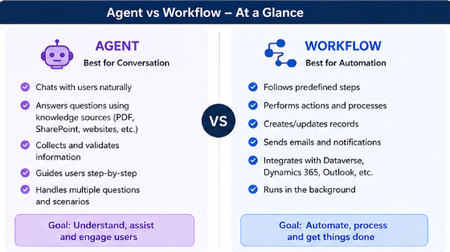
Hey everyone! 👋 Raise your hand if this has happened to you... You open Copilot Studio for the first time, you're excited, you're ready to build and then the very first screen asks you: "What would you like to build?" [ Agent ] [ Workflow ] And your brain just goes blank. 😅 Which one? What's the difference? Does it even matter which I pick? I've been there. I picked randomly, built halfway through, and then realized I probably chose the wrong one. So I put together this quick breakdown to save you that frustration! The One-Line Answer Agent = Conversation. Workflow = Automation. That's the core of it. But let me unpack what that actually means in practice. Here's a Visual That Makes It Click Let's Break It Down Simply 🤖 Choose an Agent when... Your tool needs to talk to people and actually understand what they're saying. An Agent is like a smart assistant that: Chats with users in a natural, back-and-forth way Pulls answers from your knowledge sources like PDFs, SharePoint, or websites Asks follow-up questions to collect and validate information Guides users through a process step by step Handles all kinds of different questions without breaking Its whole goal? Understand, assist, and engage the person in front of it. Real example: A customer types "I need help with my invoice" - the Agent reads that, asks the right follow-up questions, and helps them resolve it without any human stepping in. ⚙️ Choose a Workflow when... You need something to run in the background and get things done - no conversation needed. A Workflow is like a reliable robot that: Follows a fixed set of predefined steps every single time Performs actions and processes automatically Creates or updates records in your systems Sends emails and notifications at the right moment Connects with Dataverse, Dynamics 365, Outlook, and more Just runs — quietly, consistently, without anyone needing to interact with it Its whole goal? Automate, process, and get things done. Real example: When a new employee is added to the system → automatically create their accounts, send a welcome email, and notify their manager. No one has to lift a finger. The Simplest Way to Decide Ask yourself just one question: Does someone need to have a conversation with it? Yes → Build an Agent No → Build a Workflow That single question will get you to the right answer 90% of the time. The Mistake Most Beginners Make A lot of us (myself included!) jump straight to building an Agent because it sounds more exciting and powerful. But if your process is just a series of fixed steps with no real conversation involved, a Workflow will do the job faster, cleaner, and more reliably. You don't have to choose just one forever. A really powerful pattern is having your Agent handle the conversation and then trigger a Workflow to do the heavy lifting in the background. Best of both worlds! 🙌 Quick Recap Agent Workflow Best for Conversation Automation Talks to users? Yes No Follows fixed steps? Not always Always Runs in background? No Yes Connects to systems? Can Yes, natively Hope this clears things up! Drop your questions below especially if you have a specific use case you're trying to figure out. Happy to help you work out which one fits. 😊823Views2likes1CommentSecuring AI Agents End‑to‑End: Connecting Purview DSPM, Agent 365, and the AI Security Dashboard
The Challenge: Organizations deploying Microsoft Copilot and custom AI agents face a critical gap: security visibility is fragmented across data protection, identity governance, and threat detection tools. While Microsoft provides powerful capabilities through Purview Data Security Posture Management (DSPM), Agent 365, and the AI Security Dashboard, practitioners often struggle to understand how these components work together to deliver unified AI security posture management. This blog provides an architectural and operational blueprint for connecting these three pillars into a cohesive security framework that security architects can implement today. The Three Pillars: Capabilities Overview Microsoft Purview DSPM for AI Purview DSPM extends data‑centric security controls to AI interactions. Its key capabilities include: Sensitivity labels with EXTRACT usage rights that govern whether AI agents can read and process sensitive content Data Loss Prevention (DLP) policies that block or audit AI interactions involving confidential data across Copilot, SharePoint, OneDrive, and Teams Comprehensive audit logging that captures AI‑to‑data interactions, including user identity, agent identity, data classification, and the action taken Insider Risk Management integration that detects anomalous agent behavior patterns, such as bulk or unusual data access DSPM operates at the data layer, answering a foundational question: What sensitive information can this agent access, and what is it doing with that data? Microsoft Agent 365 Agent 365 provides a unified control plane for governing AI agent identity, access, and lifecycle across the Microsoft 365 ecosystem. Core components include: Agent Registry, backed by Entra Agent IDs, providing a unique identity for every Copilot Studio agent, custom agent, and supported third‑party AI integration Conditional Access policies that enforce real‑time access controls based on agent identity, user context, device compliance, and risk signals Centralized observability, with dashboards showing agent‑to‑agent interactions, agent‑to‑human conversations, and near real‑time telemetry Governance workflows that support agent approval, lifecycle management, suspension, and decommissioning Agent 365 operates at the identity and control layer, answering: Which agents exist, who authorized them, and what access boundaries are enforced? AI Security Dashboard The AI Security Dashboard aggregates security signals from Entra, Purview, and Defender to provide a unified risk view across all AI assets. It delivers: AI asset inventory, cataloging Copilot instances, custom agents, and third‑party models with associated risk context Misconfiguration detection, identifying agents with excessive permissions, missing conditional access policies, or DLP coverage gaps Attack path visualization, showing how compromised agents could pivot to sensitive data or escalate privileges Integration with Microsoft Security Copilot, enabling natural‑language investigation of AI security risks and incidents The Dashboard operates at the aggregation and recommendation layer, answering: What is my overall AI security posture, and where should remediation be prioritized? The Unified Architecture: How Signals Flow End-to-End Understanding the technical integration requires mapping how identity, data, and security signals flow across these three systems. Identity Foundation (Microsoft Entra): Every AI agent is assigned a unique Entra Agent ID at creation. This identity becomes the anchor for all security controls—conditional access policies in Agent 365, audit attribution in Purview, and risk correlation in the AI Security Dashboard. When a Copilot Studio agent is deployed, Entra automatically registers it with Agent 365 and propagates identity metadata to connected security services. Data Interaction Telemetry (Microsoft Purview): When an agent accesses SharePoint files, reads emails, or queries structured data, Purview captures detailed audit events that include agent identity, user context, data classification labels, and enforcement outcomes. These events flow into Purview’s unified audit log and are accessible through the Compliance portal, Microsoft Graph, and SIEM integrations. Crucially, Purview enforces sensitivity labels with EXTRACT usage rights—if a document is labeled Confidential without EXTRACT permission, the agent’s request is blocked before content reaches the AI model. Control Plane Enforcement (Agent 365): Agent 365 applies identity‑based governance by evaluating Entra signals and surfaced risk indicators. During policy evaluation, the control plane verifies whether the agent is registered, whether the invoking user satisfies authentication requirements, and whether recent signals (such as DLP violations) warrant blocking execution. Agent 365 also provides observability views that correlate agent activity with security events, helping administrators identify unmanaged or unauthorized (“shadow”) agents. Aggregated Risk View (AI Security Dashboard): The AI Security Dashboard correlates telemetry from: Entra — conditional access decisions, authentication anomalies, and privileged identity usage Purview — DLP violations, sensitivity label mismatches, and Insider Risk Management signals Defender — threat detections, application posture assessments, and suspicious activity indicators These signals are correlated by agent identity and time, then surfaced as risk cards with contextual severity and recommended remediation actions. The Dashboard does not replace the underlying tools; instead, it provides a consolidated view that helps teams focus on the most impactful risks. The diagram below illustrates how identity, data, and threat signals flow across the three AI security pillars. Figure 1: End‑to‑end AI security architecture. Enforcement happens at the data layer (Purview) and identity layer (Agent 365 via Entra). The AI Security Dashboard aggregates—rather than replaces—underlying security controls. From Architecture to Action: Telemetry & Enforcement Flow Understanding architecture is essential—but practitioners need to know when and where enforcement occurs during a real agent invocation. The sequence below illustrates runtime interaction between a user, an AI agent, and the three security pillars. The Critical Distinction: Two Enforcement Layers Enforcement occurs at two distinct points in the request lifecycle. First, Microsoft Entra validates agent identity and evaluates conditional access policies before execution begins. If the agent is not registered, if the user fails authentication requirements, or if policy conditions require blocking, execution is denied immediately. Second, when execution is permitted, Purview DSPM enforces data access controls inline. Every attempt to access documents, emails, or structured data is evaluated in real time. If a document is labeled Confidential without EXTRACT rights, Purview blocks the request and returns no sensitive content to the agent. Telemetry Generation Across the Stack Each step produces structured telemetry. Entra logs authentication attempts and policy decisions. Purview records AI interaction audit events, including enforcement outcomes. Agent 365 correlates identity and behavior signals to maintain agent posture and observability. These combined signals are surfaced in the AI Security Dashboard, which correlates activity across time and identity to present prioritized risk insights. Make the “where enforcement happens” distinction explicit (data vs. identity). Figure 2: Purview enforces data controls inline, Agent 365 enforces identity and execution controls, and the AI Security Dashboard correlates signals for prioritization. Practitioner Scenario: Detecting and Blocking Agent Data Exposure Context: Your organization deploys a custom Copilot Studio agent to summarize sales proposals stored in SharePoint. Several documents contain customer PII labeled "Highly Confidential" with no EXTRACT usage rights granted. Incident Timeline: Agent Data Exposure Detection → Remediation Detection The agent attempts to access SharePoint files through Microsoft Graph. Purview DSPM evaluates sensitivity labels and identifies restricted documents. A DLP policy blocks access and logs a violation with full context. The audit event appears in the Purview unified audit log within minutes. Visibility Agent 365 flags the blocked interaction in its observability dashboard. The AI Security Dashboard surfaces a High‑severity risk card titled “Agent accessing restricted data.” Security teams investigate the agent using Security Copilot to determine scope and recurrence. Remediation An administrator applies an Entra conditional access policy to suspend the agent. Data permissions are adjusted to restrict access or explicitly grant EXTRACT rights where justified. The AI Security Dashboard reflects a reduced risk score once controls are validated. Outcome: The incident is contained quickly, audit evidence is preserved, and the agent is restored with least‑privilege access—without disrupting legitimate business workflows. Figure 3: A single DLP violation triggers coordinated detection, investigation, and remediation across Purview, Agent 365, and the AI Security Dashboard within 30 minutes. Division of Responsibility: What Each Tool Does Tool Primary Function Key Signals Enforcement Capability Purview DSPM Data-layer protection and audit Sensitivity labels, DLP violations, data access patterns Blocks API calls violating DLP or label policies Agent 365 Identity and lifecycle governance Agent registry, conditional access hits, observability telemetry Denies agent invocation based on Entra policies AI Security Dashboard Unified risk aggregation Cross-product signals from Entra, Purview, Defender No direct enforcement—provides recommendations and prioritization Critical Distinction: Enforcement happens at two layers—Purview blocks data access violations, while Agent 365 (via Entra) blocks agent invocation. The Dashboard does not enforce policies but accelerates investigation and remediation by correlating signals that would otherwise require manual analysis across three separate consoles. Key Takeaways for Practitioners Agent identity is the integration anchor. Every security control—DLP policies, conditional access, audit logs, risk scoring—relies on Entra Agent IDs. Ensure all agents are properly registered in Agent 365 before production deployment. Purview enforces at the data layer, Agent 365 at the identity layer. Use both—Purview prevents unauthorized data exfiltration, while Agent 365 prevents unauthorized agent execution. Neither is redundant. The AI Security Dashboard is for prioritization, not replacement. Continue using Purview Compliance Portal for detailed DLP investigations and Agent 365 registry for operational monitoring. Use the Dashboard to identify which risks warrant immediate attention. Audit logs are your ground truth. All three tools consume Purview audit events. Integrate these logs with Microsoft Sentinel or your SIEM for long-term retention and advanced threat hunting. Shadow agents are your blind spot. Regularly audit the Agent 365 registry against actual AI deployments (Copilot Studio, Azure OpenAI, third-party integrations) to identify unregistered instances. As AI agents become embedded in everyday work, security teams must move beyond feature‑level understanding and adopt an end‑to‑end enforcement mindset. The combination of Purview DSPM, Agent 365, and the AI Security Dashboard provides the building blocks—but value is realized only when they are implemented as a unified model. How are you governing AI agents in your environment today? Share your experiences and patterns in the comments—especially where identity, data, and security signals intersect.4.4KViews4likes0Comments