agents
13 TopicsWhen Intent Becomes the Interface: Why Applications Are No Longer the Starting Point
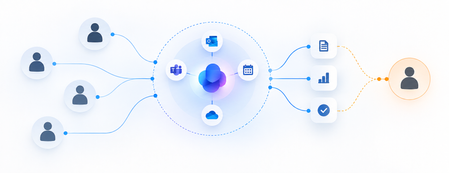
For decades, enterprise software has asked people to learn how applications work. Which screen to open. Which fields to complete. Which workflow to trigger. Which report to generate. And which application to visit next. Here is a situation I keep meeting. A sales executive is preparing a renewal proposal. Customer relationships live in CRM. Contract terms sit in SharePoint. Support issues are tracked elsewhere. Revenue data comes from finance. Relevant conversations are scattered across Outlook and Teams. The executive knows what needs to be accomplished. The software requires them to figure out how. But something interesting is happening. We are beginning to separate the intent to accomplish work from the applications traditionally required to perform it. Microsoft's developments across Copilot, Cowork, Code, Copilot Studio and Microsoft IQ suggest that this could become a defining shift in enterprise software. The question is no longer simply how to make applications more intelligent. What if enterprise software started with the work, rather than the application? Enterprise Software Was Built Around Navigation Traditional enterprise applications organize business capabilities into reliable systems. ERP manages transactions. CRM manages customer relationships. HR platforms manage employee processes. These systems aren't going away. Their data models, transaction controls and business rules remain essential. But their user experiences were designed for a world where software needed explicit instructions at almost every step. People became the integration layer. We retrieved information from one system, interpreted it, entered it into another, initiated approvals and followed up when something stalled. APIs and automation improved individual steps. Generative AI introduced conversational interfaces. But the underlying model often remained unchanged. People still needed to know which application to use and how to move the result into the next step. Now the architecture itself is beginning to change. Microsoft Is Bringing Three Capabilities Together One of Microsoft's more consequential recent developments is the convergence of applications, workflows and agents in Copilot Studio. These are fundamentally different capabilities. Applications provide structured experiences for people to view information, make decisions and act. Workflows provide predictable execution for repeatable processes, business rules and integrations. Agents bring reasoning and adaptation when the next step cannot always be predetermined. Not every business process needs an agent. Not every decision should be probabilistic. And not every interaction belongs in a chat window. A purchase approval may require deterministic policy enforcement. Evaluating an unusual supplier proposal may benefit from AI reasoning. A material exception may require human judgment through a purpose-built application. Microsoft Copilot Studio is bringing these capabilities into a more unified development experience, supported by agent orchestration, workflow execution, reusable skills and connected tools. And the audience for this convergence is already enormous: Microsoft noted on a recent earnings call that more than 80% of the Fortune 500 already have active agents built with its low-code tools. This suggests a useful architectural principle: Use reasoning where the path is uncertain. Use workflows where the rules are known. Use applications where human interaction adds value. I have started calling this the Composition Rule. The breakthrough isn't replacing one with another. It is combining them deliberately. From Application-Led to Intent-Led Work Return to our sales executive preparing a renewal proposal. Instead of visiting multiple systems, the executive could begin with a request: Prepare the renewal proposal. Incorporate the latest commercial terms, outstanding support issues and account commitments. Flag anything requiring approval. The system must interpret the request, retrieve authoritative information, apply business rules, assemble the deliverable and recognize where human judgment is necessary. Different Microsoft capabilities can contribute to that experience. Microsoft 365 Copilot Cowork enables delegation of complex, multi-step work across connected productivity experiences. Work IQ provides context from Microsoft 365 collaboration. Fabric IQ contributes business semantics and relationships across enterprise data. Foundry IQ supports reusable enterprise knowledge and retrieval. Together, they form the context layer I explored in The Context Advantage and intent-led work is where that investment begins to pay out. Dynamics 365 and Power Platform connect intelligence to operational records, business processes and actions. Copilot Studio enables agents to use tools and workflows, while applications can provide structured experiences for human review. These are complementary building blocks, not necessarily one automatically integrated execution path. Bringing them together requires deliberate solution architecture, connectors, permissions and orchestration. The executive receives a proposal, supporting evidence and decisions requiring attention. The underlying systems remain important. But navigating them is no longer necessarily the executive's responsibility. In traditional enterprise architecture, applications organize capabilities and users navigate between them. In an intent-led architecture, the desired outcome becomes the organizing principle. Applications, workflows, agents and enterprise services are composed around that intent. The application remains important. But it is no longer necessarily the primary unit of the user experience. When Software Can Be Assembled Another development deserves attention. Microsoft's Copilot Code and Copilot Studio capabilities are making it easier to create software experiences from natural-language requirements. Copilot Managed Runtime provides Microsoft-hosted infrastructure for running and governing supported applications. These capabilities are at different stages of availability, but their direction is significant. Traditionally, an enterprise application begins with a development project: requirements, design, engineering, testing, deployment and maintenance. That remains essential for complex, mission-critical systems. But not every business need justifies a conventional development cycle. A procurement manager may need a focused interface for comparing supplier proposals. A finance team may need a temporary application for reviewing reconciliation exceptions. Increasingly, some experiences can be generated, connected to governed data and shared with colleagues. The distance between recognizing a business need and creating a useful software experience may shrink dramatically. But faster creation also raises important questions. Who owns the generated application? How is it tested? Which identities and permissions does it use? How is it maintained or retired? Microsoft Copilot Managed Runtime, currently in preview, addresses part of this challenge through managed hosting, Microsoft Entra authentication and application governance capabilities. The ability to generate software is becoming easier. The ability to operate that software responsibly remains an engineering discipline. Software creation may become democratized. Software accountability cannot become optional. Reasoning Is Not Execution There is one distinction I find myself drawing on whiteboards more often than any other as AI moves deeper into enterprise processes. Large language models are useful when tasks require interpretation, synthesis and adaptation. But enterprises also depend on predictability. An invoice approval threshold shouldn't change because a model reasons differently. A financial transaction must preserve the integrity of the system recording it. Consider an insurance claim. An agent interprets submitted documentation and identifies missing information. A workflow applies established eligibility rules and routes the claim. A human reviewer examines complex exceptions through an application presenting the relevant evidence. The model contributes interpretation. The workflow contributes repeatability. The application supports human judgment. And the system of record preserves the authoritative transaction. This requires business capabilities to be accessible beyond application screens. APIs, Model Context Protocol (MCP) tools, Power Platform connectors and reusable services become building blocks through which intelligent workflows can operate across systems. Microsoft Copilot Studio supports this direction through workflow triggers, agent handoffs, connected tools and evaluation capabilities. Microsoft Foundry provides complementary capabilities for agent development, evaluation, tracing and operational monitoring. The quality of the experience increasingly depends on how well these capabilities can be composed - not simply on how intelligent the underlying model is. For enterprise architects, this introduces a more useful question than where to deploy another agent: Which parts of this process should be intelligent, which must be deterministic and which require human judgment? That is the Composition Rule at work. A New Architecture, Not Another Generation of Sprawl The counterargument comes up in almost every architecture conversation I am part of. If every employee can generate applications and every department can assemble workflows, enterprises could recreate decades of software fragmentation at unprecedented speed. A hundred individually useful applications don't necessarily create a coherent enterprise architecture. The answer isn't to prevent experimentation. It is to establish reusable foundations. Common identity through Microsoft Entra. Trusted business semantics through Fabric IQ. Approved connectors and MCP tools. Shared engineering standards. Managed execution environments. Clear ownership and lifecycle controls. Microsoft Agent 365 adds an enterprise control plane for discovering, securing and governing agents across supported environments. These capabilities address different parts of the challenge. They do not eliminate the need for enterprise architecture. The more accessible software creation becomes, the more important shared foundations become. Otherwise, we risk making software easier to build while making the enterprise harder to operate. When the Business Need Comes First I don't expect enterprise applications to disappear. Organizations will continue to need ERP, CRM, finance, HR and industry-specific platforms. Systems of record remain indispensable. But the relationship between people and applications is beginning to evolve. Today, enterprise users learn which application performs which function. Tomorrow, more experiences may begin with a desired result, with intelligence coordinating underlying capabilities and presenting the appropriate interface when needed. Sometimes that interface will be a conversation. Sometimes a generated application. Sometimes a familiar enterprise screen. And sometimes a workflow will complete a defined step without another interaction. Microsoft's convergence of Copilot, Copilot Studio, Microsoft IQ, Power Platform and managed execution infrastructure makes this architectural possibility increasingly tangible. We may be moving from a world where people navigate software to accomplish work toward one where software is assembled around the work people need to accomplish. That won't happen overnight. It requires strong architecture, trusted data, explicit execution boundaries and deliberate engineering choices. But it raises a question worth asking before the next enterprise software investment: Are we designing another application people must learn to operate or a capability that understands the work they are trying to accomplish? References Microsoft Copilot Studio Blog: “Build apps, workflows, and agents together” The Official Microsoft Blog: “Introducing the new Copilot with Home, Code and Autopilot” (September 25, 2026) Microsoft Copilot Studio Blog: “Microsoft Copilot Managed Runtime: Enterprise code execution for Microsoft 365” Microsoft 365 Blog: “Powering Frontier Transformation with Copilot and agents” (Copilot Cowork) Microsoft IQ Microsoft Agent 365 Microsoft FY26 Q2 earnings conference call — more than 80% of the Fortune 500 with active agents built using Microsoft's low-code tools Ashok Karania Articles on Microsoft Tech Community — “The Context Advantage”; “When AI Stops Waiting for Instructions”; “Beyond Tokens: Rethinking AI Economics with Microsoft Foundry” Image Credit: OpenAI34Views0likes0CommentsLand Your Offer - Anatomy of Revenue Generating Partner Offer - Part 3 - Copilot Deployment
In Part 1 we looked at Copilot in 30, a $0 trial for SMB customers. In Part 2 we looked at Envisioning & POC, a funded pre-sales engagement. Part 3 moves to post-sales. The customer has bought Copilot seats. The job now is to get people using them. That job has a new reward. From 1 October 2026, the Frontier Accelerate for Copilot: M365 Copilot Deployment Accelerator pays in two milestones: one when you deliver the deployment, and one when the customer's active users grow. It also lands just after Microsoft introduced the new Copilot with Home, Code and Autopilot, usage-based billing and FinOps for AI. Deployment now covers more ground, and customers need a partner to cover it. Package this engagement as a Microsoft Marketplace offer and you have a repeatable way to turn paid seats into active users across your whole customer base. Start Here: Why Publishing on Microsoft Marketplace Matters Microsoft Marketplace is Microsoft's partner-focused business platform. It helps you reach more customers and makes buying from you simpler. A published offer gives your practice a permanent storefront where customers and Microsoft sellers already look for Copilot help. An offer also makes your work repeatable. You define the phases, activities, deliverables and sizes once. Then you run the same engagement for every qualified customer instead of scoping each one from scratch. Partner Center supports both professional service and managed service offers, so one listing can carry the deployment and the ongoing services that follow. The Opportunity: Seats Bought, Value Waiting Many organisations have bought Copilot ahead of their people adopting it. The gap between paid seats and monthly active users is value still waiting to be realised. Take a customer with 3,000 paid Copilot seats and 1,000 monthly active users. That leaves 2,000 seats, about $720K a year of Copilot investment at $30 per user per month, not yet part of anyone's working day. Closing that gap is what this engagement is designed to do. Customer eligibility for each size is set by two numbers: purchased Copilot seats, and unused seats (purchased seats minus active users). Both are in Partner Center's growth insights reporting in the AI Business Solutions & Security Insights (ASPX) dashboard. Use the dashboard's filters to find customers to land this offer with, and you will know which size each one qualifies for before the first conversation. Why Deployment Is Where Copilot Value Is Won Copilot delivers its value through daily use. The more people build it into how they work, the more value the business sees, and the stronger the case to extend it to more teams. The new Copilot widens what a good deployment covers. Home is the new starting point, with the full power of Word, Excel and PowerPoint built in through Office in Copilot. Code lets people build apps, dashboards and automations in plain language. Autopilot is a persistent agent that keeps work moving without a prompt. Advanced capabilities run on usage-based billing, governed through FinOps for AI. So deployment now goes beyond assigning licences. It means securing data, governing Code apps and Autopilot agents, training people on Chat, Office in Copilot and Code, and putting spend controls in place before usage scales. Each of these takes skills many customers do not yet have in-house. Each one is a service you can deliver. Meet the Offer: M365 Copilot Deployment Accelerator, Paid in Two Milestones The M365 Copilot Deployment Accelerator is a post-sales, partner-led engagement. It covers technical deployment of Microsoft 365 Copilot and Microsoft 365 Copilot Business, security and governance controls, user training, and adoption and change management. The essentials: Who qualifies: Customers with a minimum number of purchased Copilot seats and unused seats for each size: XXS 50+ and 25+, XS 300+ and 250+, S 500+ and 500+, M 1,500+ and 1,500+, L 3,000+ and 3,000+. Strategic 500 customers are not eligible. EDU and non-profit customers are not eligible for XXS and XS. How it is sized: Five sizes: XXS (10 hours), XS (20 hours), S (40 hours), M (100 hours) and L (200 hours). How it pays: Milestone 1 (Solution Deployment) is paid once your proof of execution (POE) is approved. It is guaranteed and does not depend on any outcome. Milestone 2 (Consumption Growth) is paid if the customer's incremental paid Copilot monthly active users reach the nominated band within a six-month window. Going above the band does not increase the payment. Falling below it means no Milestone 2 payment. How it runs: Nominate the customer into a size band (the band is locked once submitted). Get customer consent within 30 days. Deliver the work and submit POE (partner survey, customer attestation and invoice) within 90 days of consent. Each customer tenant can have up to two approved claims, one at a time. Who can deliver: Partners at Copilot JumpStart Ready or higher until 31 December 2026. From 1 January 2027, the Microsoft 365 Copilot specialization is required. Term: 1 October 2026 to 30 June 2027, or until the program cap is reached. Microsoft funds the deployment and rewards the growth. You own the delivery, the relationship and everything that follows. Your Role: From Deployer to Adoption Partner A deployment is not finished when licences are assigned. It is finished when people use Copilot every week and the sponsor can see the value. Your job is to get the customer there, phase by phase. Plan: Confirm the first business functions to adopt. Validate priority scenarios across Chat, Office in Copilot and the Microsoft 365 apps. Set KPIs and Responsible AI guardrails. Build a measurable business case that includes usage-based billing. Assess the environment and sequence remediation before deployment. Implement: Prepare the environment and assign licences. Configure data controls, fix oversharing, and govern Code apps and Autopilot agents. Enable admin tools. Set up the Copilot Dashboard, reporting and FinOps for AI spend controls. Launch a champions programme and community. Train users on Chat, Office in Copilot and Code. Adopt: Run prompt-a-thons on real scenarios. Survey users on their experience. Track incremental paid active users every month against the Milestone 2 band. Review audit logs and Copilot reports. Monitor service health, demand, cost and AI spend. Manage and Improve: Extend analytics with custom impact reports. Refine the business case with real data. Align policies to Home, Code and Autopilot on a set schedule. Optimise operations and AI spend. Mine help desk tickets for new agentic use cases. Keep training going as adoption spreads. Close out: Deliver an executive summary with recommendations, risks, owners and dates. Submit POE. Agree the plan to reach the nominated active user band within the six-month Milestone 2 window. Every phase moves one number: active users. It is the number the customer's sponsor watches most closely, and the one both milestones are built around. Inside the Offer: Activities and Hours by Engagement Size Below is the full activity plan behind the offer, with hours for each of the five sizes. Use it to size your own offer plans and statements of work. ID Phase Activity XXS XS S M L Pre-req Eligibility Minimum Copilot seats / unused seats (unused = seats minus active users) 50+ / 25+ 300+ / 250+ 500+ / 500+ 1,500+ / 1,500+ 3,000+ / 3,000+ P1 Plan Identify priority business functions 0.25 0.5 1 2.25 4.5 P2 Plan Determine high-value scenarios 0.5 1.25 2.25 5.75 11.5 P3 Plan Define success metrics and guardrails 0.5 0.75 1.5 3.75 7.5 P4 Plan Develop the business case, incl. usage-based billing (UBB) 0.5 1.25 2.25 5.75 11.5 P5 Plan Plan readiness and remediation 0.5 1 1.75 4.5 9 I1 Implement Prepare environment and assign licenses 0.75 1.5 3 7.75 15.25 I2 Implement Configure security and data controls 0.75 1.5 3 7.75 15.25 I3 Implement Enable administrative tools 0.5 0.75 1.5 3.75 7.5 I4 Implement Deploy analytics and reporting, incl. FinOps for AI 0.5 0.75 1.5 3.75 7.5 I5 Implement Activate champions and communities 0.25 0.75 1.25 3 6 I6 Implement Conduct training and communications 0.75 1.5 2.75 6.75 13.75 A1 Adopt Drive cross-organizational adoption 0.5 1.25 2.5 6 12.25 A2 Adopt Gather user feedback and sentiment 0.25 0.5 1.25 3 6 A3 Adopt Measure business impact and usage 0.5 1 2 5.25 10.75 A4 Adopt Monitor security and audit reports 0.25 0.5 1 2.75 5.25 A5 Adopt Monitor and evaluate operations, cost and AI spend 0.25 0.5 1.25 3 6 M1 Manage and Improve Extend analytics 0.25 0.5 1.25 3 6 M2 Manage and Improve Evolve the business case, incl. UBB 0.25 0.5 1.25 3 6 M3 Manage and Improve Policy review and refinement 0.25 0.5 1.25 3 6 M4 Manage and Improve Optimize operations and AI spend 0.5 0.75 1.5 3.75 7.5 M5 Manage and Improve Continuous process improvement 0.25 0.5 1.25 3 6 M6 Manage and Improve Continuous training and adoption 0.5 0.75 1.5 3.75 7.5 C1 Close-out Executive summary, POE and Milestone 2 growth plan 0.5 1.25 2.25 5.75 11.5 TOTAL Hours 10 20 40 100 200 Land Your Offer: What One Customer Is Worth The table below is the revenue anatomy of one Deployment Accelerator engagement at each of the five sizes. Four revenue streams stack on top of each other: Milestone 1, Solution Deployment: Microsoft funds the deployment work, from $1,625 for an XXS engagement to $32,500 for an L engagement. It is paid once POE is approved and is guaranteed. Milestone 2, Consumption Growth: a further $875 to $17,500, paid when the customer's incremental paid active users reach the nominated band within six months. This is where adoption work earns its own reward. CSP incentive on Copilot revenue: earned on the Copilot seats you transact. Customers who see their people using Copilot every day tend to renew and extend, so adoption work supports this stream too. Managed services: the recurring engagement described in After Close-out, which is where the largest and most durable share of revenue lives. Item XXS XS S M L Minimum Copilot seats / unused seats 50+ / 25+ 300+ / 250+ 500+ / 500+ 1,500+ / 1,500+ 3,000+ / 3,000+ Engagement hours 10 20 40 100 200 Milestone 2 target: incremental paid Copilot active users in six months 25+ 250+ 500+ 1,500+ 3,000+ Milestone 1, Solution Deployment (K) $1.63K $3.25K $6.5K $16.25K $32.5K Milestone 2, Consumption Growth (K) $0.88K $1.75K $3.5K $8.75K $17.5K Frontier Accelerate total (K) $2.5K $5K $10K $25K $50K CSP incentive on Copilot revenue (K)† $3.51K $21.06K $35.1K $105.3K $210.6K † Milestone payments shown at Market A rates for claims nominated from 1 October 2026. CSP incentive shown at a blended 19.5% (direct bill 2.5 + 7 + 10; indirect reseller 7 + 12.5) on the minimum Copilot seats for each size at $30 per user per month for 12 months. Illustrative estimates from the offer plan. Confirm current rates, market rates, eligibility and geographic restrictions (which apply to the L size) in the latest Microsoft Commercial Partner Incentives Guide. Now multiply. Everything above is the anatomy of a single customer. Landing the offer means running it across every qualifying customer in your base. The same ASPX view you use to check eligibility is your target list: sort the customers you manage by the gap between paid Copilot seats and active users, and check MCI eligibility and potential earnings for each. Do not forget your Part 2 customers: every Envisioning & POC engagement that converted to paid seats is a natural next candidate. How the Offer Fits Together: From Sizing to Proof of Execution The offer runs left to right in three layers: Sizing and value: five sizes from XXS (10 hours) to L (200 hours). Milestone 1 is paid on POE approval. Milestone 2 is paid when the active user band is met. Bands are locked at nomination. Five phases: Plan (P1 to P5), Implement (I1 to I6), Adopt (A1 to A5), Manage and Improve (M1 to M6) and Close-out (C1, T1, T2, X1). Each phase produces something the sponsor can see. Proof of execution: prioritised scenarios and a business case that includes usage-based billing; a secure, licensed Copilot environment; analytics, reporting and admin controls; active champions and trained users; incremental paid active users, impact and ROI measured; an executive summary, roadmap and POE. Plus a named wave 2 expansion beyond the first teams. The highlighted activities are champions and communities (I5), training and communications (I6), cross-organizational adoption (A1), business impact and usage (A3), extended analytics (M1), policy review (M3), operations and AI spend (M4), continuous training (M6), trial to paid licence conversion (T1), commercial proposal and signature (T2) and the wave 2 expansion plan (X1). These are where the engagement stops being a project and becomes an ongoing relationship: managed services, ongoing optimisation and follow-on professional services after the engagement closes. The managed services below are built from exactly these activities. After Close-out: Managed Services That Keep Delivering Close-out is the start of the real engagement. Package these six recurring services in your offer. Each one carries forward a highlighted activity from the deployment, is sized in partner days so you can price it, and drives a business outcome the sponsor can put a number on. Managed service Partner activity: what you deliver and measure Customer business outcome: what it drives (illustrative targets, M-size customer) Champions and community management • Effort: 1 to 2 days a month • Activity: Run the champions network and a Viva Engage or Teams community, host monthly prompt-a-thons on real work, and carry adoption into every business function (I5, A1) • Reported as: Active champions per function; community questions answered; functions above the utilisation target • One active champion for every 50 users (60 champions across 3,000 seats) • Adoption spreads from the first 2 business functions to 6+ within six months • Copilot how-to tickets to the help desk down 30 to 50% as peers answer questions first Continuous learning and enablement • Effort: 2 days a month • Activity: Deliver role-based training and launch communications for each new group, onboard new joiners within their first 30 days, and refresh training as new Copilot capabilities arrive (I6, M6) • Reported as: People trained by role; new joiners onboarded within 30 days; trained users active within 30 days • 2 to 4 hours saved per active user a week (≈5,000 to 10,000 hours across 2,500 active users) • 90%+ of trained users active within 30 days of training • New joiners productive with Copilot in their first month, not their first quarter Usage and impact analytics • Effort: 1 to 2 days a month • Activity: Track incremental paid active users against the Milestone 2 band every month, extend the Copilot Dashboard with third-party data, and build custom impact reports by function (A3, M1) • Reported as: Incremental active users against the band; utilisation (active users ÷ paid seats); impact by function • Utilisation lifted from 33% to 83% (1,000 to 2,500 active users) within six months, meeting the M band floor • ≈$540K a year of Copilot investment moved from unused to in use • Return shown in the customer's own numbers: ≈$1.08M a year of seats against $9.6M+ of staff time released at $40 per hour Policy lifecycle management • Effort: 1 day a month • Activity: Review and refine security and governance policies on a set schedule, and align them to Home, Code and Autopilot before each capability reaches users (M3) • Reported as: Policy reviews completed on schedule; new capabilities assessed before rollout; open policy exceptions • New Copilot capabilities switched on in weeks, not quarters, because policies are ready • Zero Copilot-related oversharing incidents as usage grows • Audit evidence for every policy decision available on request Service and AI spend optimisation • Effort: 1 to 2 days a month • Activity: Review KPIs, user feedback and AI spend each month, update the service management plan, and focus usage-based capabilities on the users and scenarios that justify them (M4) • Reported as: KPI trend; AI spend against budget; feedback themes closed • AI spend held within ±10% of budget, with no unplanned overage • Cost per active user down 10 to 20% a year as usage matures • Top user feedback themes acted on within 30 days Licence growth and wave planning • Effort: 1 day a month, plus 2 to 3 days per expansion wave • Activity: Convert trial licences to paid, prepare commercial proposals for named teams, and plan and date the next expansion wave (T1, T2, X1) • Reported as: Trials converted; proposals signed; next wave dated with named teams • New seats added only where a named team and use case are ready • Each new wave at 80%+ utilisation within 60 days • Wave 2 adds 250 to 500 seats, each backed by usage data from wave 1 Outcomes are illustrative targets for an M-size customer with 3,000 paid Copilot seats and 1,000 active users at nomination, at $30 per user per month, a blended $40 per hour staff cost and 48 working weeks a year. Validate them with each customer when you define success metrics (P3) and build the business case (P4), then report against them from A3 onwards. Effort scales with seats in scope, as the engagement hours do. Add the recurring rows together and one M-size customer sustains roughly 8 to 9 partner days a month after close-out, before expansion waves are counted. Every row pairs a number you can invoice against with a number the sponsor can take to the board. That is what turns a recurring service into a renewable one. Ready to Build Your Copilot Deployment Accelerator Offer? Read the engagement terms and mechanics in the Microsoft Commercial Partner Incentives Guide, and download the delivery guide and pre-engagement planning resources. Check your eligibility: Copilot JumpStart Ready or higher until 31 December 2026, then the Microsoft 365 Copilot specialization from 1 January 2027. Publish your offer in Partner Center as a professional service (the deployment accelerator) with a managed service follow-on (community, learning, analytics, policy, spend optimisation and licence growth). Build your first cohort: in ASPX, filter the customers you manage for paid Copilot seats with low Copilot utilisation and an adoption status of starting or struggling, then check MCI eligibility and potential earnings for each. Start with customers from your Envisioning & POC engagements that converted to paid. Nominate the right band: the band is locked at nomination and Milestone 2 pays only if incremental paid active users reach its floor. Use ASPX to set it: take today's Copilot MAU as your baseline, look at the recent trend and adoption status, and pick the band whose floor you can realistically add in six months. A customer with 3,000 paid seats and 1,000 active users qualifies for M, and reaching the M floor means adding 1,500 active users. If your plan adds 600, S is the safer choice. Book the close-out before Plan begins, so the Milestone 2 plan and the wave 2 conversation are already on the calendar. Your customers have already chosen Copilot. Help every one of their people make it part of how they work. Resources Engagement mechanics for Copilot Deployment Accelerators | Microsoft Commercial Partner Incentives Guide Microsoft Commercial Partner Incentives Guide M365 Copilot Deployment Accelerator: Delivery Guide M365 Copilot Deployment Accelerator: Pre-Engagement Planning Partner investments: October 2026 updates Archived incentive terms for claims nominated before 1 October 2026 The new Copilot is here: the opportunity for Microsoft partners Introducing the new Copilot with Home, Code and Autopilot165Views1like0CommentsThe Context Advantage
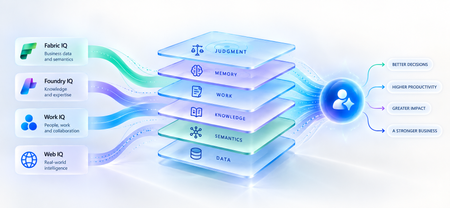
A strange thing happens when enterprises upgrade their AI models. The model gets smarter. The benchmarks improve. The demos become more impressive. And sometimes, the business outcome barely moves. The agent still asks questions the organization answered months ago. It recommends something policy doesn't allow. It treats a strategic customer like any other customer. It proposes an architecture your engineering team rejected six months ago. The problem isn't necessarily intelligence. It is ignorance of the business. That distinction matters because the world's most capable models are becoming available to almost everyone. Your competitors can increasingly access the same frontier intelligence you can. What they cannot access is your customer history, operating knowledge, organizational memory or understanding of how decisions actually get made. Models are becoming shared. Context remains proprietary. And that may be where the next enterprise AI advantage is built. Intelligence Without Context is Surprisingly Ordinary Consider a simple enterprise question: Can we offer this customer a larger discount? A powerful model can reason about discounts. But answering that question properly may require the customer's lifetime value, current contract, payment history, margins and approval thresholds and perhaps a conversation yesterday in which the account executive learned that a competitor had entered the deal. The model isn't missing intelligence. It is missing context. Humans rarely make important decisions from one piece of information. We combine data, experience, relationships, history and situational awareness almost unconsciously. Agents need a version of the same capability. That is why enterprise AI is moving from an era dominated by prompt engineering toward one increasingly shaped by context engineering. Satya Nadella recently described the emerging market simply as “a world of context engineering.” Prompt engineering asks: What should I tell the model? Context engineering asks the larger question: What does the model need to understand before it can act well? That difference becomes critical as AI moves from answering questions to performing work. The Enterprise Context Stack In discussions about enterprise agents, “context” can easily become shorthand for giving a model access to more data. That definition is too narrow. I think about enterprise context as a stack: DATA → SEMANTICS → KNOWLEDGE → WORK → MEMORY → JUDGMENT Data tells the agent what happened: orders, transactions, inventory, claims and customer records. Semantics tells it what that data means to the business: what constitutes a strategic customer, how margin is calculated, which assets belong to which production line. Knowledge tells it what the organization knows: policies, contracts, procedures, research and accumulated expertise. Work tells it what is happening now: who is involved, what has been discussed and which commitments already exist. Memory tells it what happened before: previous interactions, decisions, exceptions and outcomes. And judgment helps determine what should happen next. Memory deserves particular attention because it is context agents can accumulate through experience. Microsoft Foundry now distinguishes between session, user and procedural memory - moving agents beyond remembering a conversation toward remembering preferences and learning how work gets done across repeated interactions. Sometimes the cheapest way to make an agent meaningfully better may not be a bigger model. It may be a better memory. Not every agent needs every layer. But the more consequential its responsibility, the richer, and more carefully governed, its context usually needs to become. This is where context stops being a retrieval problem and starts becoming an enterprise architecture problem. Context Is Becoming Infrastructure This shift is now visible well beyond any one technology platform. Gartner increasingly describes a context layer as an architectural foundation for agentic AI - bringing together semantics, operational state, provenance and other enterprise signals so agents can act reliably. Anthropic, approaching the problem from AI engineering, argues that context should be treated as a finite resource that must be carefully curated rather than simply expanded. Microsoft's recent direction is particularly interesting through this lens. Work IQ, Fabric IQ, Foundry IQ and Web IQ increasingly form a shared intelligence layer across Microsoft's stack. Work IQ provides context about how work happens. Fabric IQ brings business semantics and relationships. Foundry IQ provides reusable enterprise knowledge and agentic retrieval. Web IQ extends that understanding with fresh external intelligence. The architectural implication matters more than the product names. Instead of every new agent rebuilding connectors, retrieval logic, semantic definitions and permissions, context becomes reusable infrastructure from which many agents can reason. Microsoft captured the shift particularly well: As agents become the new application model, context becomes critical infrastructure. Your Data Estate Is Not Automatically Your AI Moat For years, organizations have been told their data is a competitive advantage. Sometimes it is. But possessing data and making that data useful to an agent are very different things. Most enterprises don't suffer from a shortage of information. They suffer from an abundance of it -scattered across databases, documents, emails, meetings, applications and people's heads. The advantage doesn't come from connecting an agent to all of it. It comes from turning information into usable context: preserving business meaning, understanding relationships, distinguishing authoritative knowledge from convenient information, respecting permissions and retrieving what matters when a decision is being made. The enterprise with the most data may not build the best AI. The enterprise that makes its context most usable might. The Context Budget There is a trap on the other side too. If context improves AI, the natural instinct is to give the agent as much as possible. That is the wrong objective. Context consumes attention and compute. Irrelevant information creates noise. Stale information can mislead. Conflicting context can degrade reasoning rather than improve it. The objective should therefore not be maximum context. It should be minimum sufficient context the smallest trusted, relevant and permission-aware set of information required to produce the right outcome. In Beyond Tokens, I introduced the idea of an Intelligence Budget: How much intelligence does this outcome deserve? Enterprise agents increasingly need a companion concept. The Context Budget. How much context does this decision deserve? A scheduling agent may need calendars and preferences. A pricing agent may need customer economics, margins, commitments and approval policies. A clinical agent requires an entirely different level of completeness, provenance and governance. Every unnecessary token of context is cost. Every missing piece of necessary context is risk. Which gives us a useful way to think about enterprise agents: Right Intelligence × Right Context → Right Outcome Spend more intelligence where the outcome warrants it. Provide more context where the decision requires it. Do neither indiscriminately. What An Agent May Know Matters Too! There is another dimension to the Context Budget: permissions. Enterprise context belongs to someone. A system that retrieves the right answer but ignores whether the agent is entitled to see it isn't intelligent. It is a security problem. Enterprise context must therefore remain identity-aware and permission-aware as it moves from source systems into agent reasoning. This becomes especially important as agents gain persistent identities and greater autonomy. What an agent may know is as much a part of its job description as what it may do. Autonomy defines the boundary of action. Context defines the boundary of understanding. From RAG Projects To Context Architecture The first generation of enterprise GenAI often started with RAG: connect documents to a model and retrieve relevant passages. That was an important step. But an agentic enterprise cannot become a collection of hundreds of independent RAG pipelines, each separately rediscovering the organization's customers, products, policies, terminology and permissions. That risks creating another generation of technology fragmentation. The opportunity is to move from agent-specific retrieval toward reusable enterprise context. What knowledge should agents inherit? Which business entities should have common definitions? Which sources are authoritative? Which memories should persist—and which should be forgotten? And perhaps the hardest question: Who owns enterprise context? Today, responsibility is scattered across data teams, application teams, knowledge management, security, business functions and increasingly AI teams. In an agentic enterprise, context may need to be managed as a product, not everyone's side project. The Moat Is Not The Model Imagine two competing organizations using exactly the same frontier model. One connects it to fragmented documents and a handful of applications. The other has strong data foundations, shared business semantics, governed knowledge, connected workflows and organizational memory. They have access to the same AI. They do not have the same intelligence system. The second organization's agents understand customers more deeply, interpret signals more accurately and act with greater awareness of how the organization actually works. And that advantage compounds. Every workflow creates more context. Every interaction adds organizational memory. Every decision creates another signal from which future agents can reason. Models depreciate the moment a better one ships. Context appreciates every day you operate. That may be the most important strategic shift of all. Anyone can rent intelligence. No one can rent your context. Intelligence Is Becoming Abundant. Understanding Isn't. The first wave of enterprise AI taught us how powerful models could be. The next may teach us that models were only one part of the equation. An agent needs intelligence to reason. But it needs context to understand your business. As frontier intelligence becomes more accessible, enterprises may discover that their most defensible AI asset was never the model. It was everything the organization had learned before the model arrived: its data, semantics, knowledge, relationships, history, workflows and judgment. The organizations that turn those assets into trusted, reusable context will give every agent they build an advantage from day one. So perhaps the strategic question is no longer simply: Which model should we use? It is: What does our organization know that our competitors don't and can our AI actually use it? Because in a world where everyone can access intelligence, context may be what makes that intelligence uniquely yours. References Microsoft — FY2026 Q2 Earnings Conference Call Microsoft — FY2026 Q4 Earnings Conference Call Microsoft Learn — What is Foundry IQ? Microsoft Foundry — Foundry IQ: Build Smarter Agents Faster with Unified Knowledge and Serverless Retrieval Microsoft Foundry — What's New in Microsoft Foundry | Build 2026 Gartner — Context Engineering Is the New Prompt Engineering Gartner — Market Overview for AI Context Platforms Gartner — The 3 Core Components of the Context Layer for AI Agents167Views0likes1CommentLand Your Offer - Anatomy of Revenue Generating Partner Offer - Part 2 - Copilot Envisioning
In Part 1 we dissected Copilot in 30 — a $0 trial offer for SMB customers. This time the customer is larger, the engagement is funded rather than free, and the anatomy of revenue changes with it. It also lands when Microsoft just introduced the new Copilot — Home, Code and Autopilot, running on usage-based billing and governed through FinOps for AI — which makes a structured envisioning engagement the front door to a much bigger conversation. Most organisations with 300 or more seats already believe Copilot and agents matter. What they lack is a clear picture of where AI will pay off, what it will take to get ready, and how they'll prove it before committing budget. The Frontier Accelerate for Copilot: Envisioning & POC engagement gives you a pre-sales, partner-led answer to all three — funded by Microsoft and sized from a 10-hour readiness sprint to a 280-hour enterprise programme. Package it as a Microsoft Marketplace offer and you have a repeatable front door to every Copilot, Agent 365 and Microsoft 365 E7 opportunity in your territory. Start Here: Why Publishing on Microsoft Marketplace Matters Microsoft Marketplace is Microsoft's partner-focused business platform, designed to help you reach more customers and simplify how you sell. A published offer gives your practice a permanent, discoverable storefront in the place customers and Microsoft sellers already look for Copilot expertise. More importantly, an offer turns your expertise into something repeatable. Define the engagement once — phases, activities, deliverables, sizing — and run it across every qualified customer instead of scoping from scratch. Professional service and managed service offer types are available in Partner Center, so one listing can carry the envisioning engagement, the POC and the ongoing services that follow. The Enterprise Opportunity: Interest Is High, Direction Is Missing The customers for this offer are organisations with at least 300 Office 365 / Microsoft 365 seats — mid-market through to the largest enterprises. They are the customers with the most to gain from Copilot and agents, and the most complexity to work through first: security and governance, tenant and access dependencies, adoption and change, and a credible way to measure value. That gap between ambition and a plan is where partners win. Microsoft is investing in the full Copilot journey in FY27, from envisioning and proof of concept through deployment and adoption — and the envisioning stage is where you shape the roadmap, the scope and the commercial conversation before anyone else does. Why Copilot and Agents Are the Right Place to Start Microsoft 365 Copilot puts AI inside the apps people already use every day — Outlook, Teams, Word, Excel and PowerPoint — so value arrives without a platform change. For larger organisations, that is only the first layer: Agent 365, custom agents built with Copilot Studio, and Microsoft 365 E7 extend Copilot from personal productivity into role-based and process-level automation. The new Copilot adds a third layer. Cowork takes delegated work and returns a finished result; Code lets knowledge workers build apps, dashboards and automations in natural language, hosted on Copilot Managed Runtime; and Autopilot is a persistent agent with its own identity that keeps work moving without a prompt. All three run on usage-based billing rather than the per-user subscription, which means every customer now has to decide which users and which scenarios justify consumption spend — and how to govern it with FinOps for AI. Each layer brings its own questions — which personas, which scenarios, what governance, what consumption model, which capabilities are worth paying for by the task — and each question is an envisioning conversation a partner is best placed to lead. Meet the Offer: Envisioning & POC, Sized to the Customer The Frontier Accelerate for Copilot: Envisioning & POC engagement is a pre-sales, partner-led engagement that identifies personas and use cases and builds a business case for Microsoft 365 Copilot, Agent 365, Microsoft 365 E7 and/or agents — with an optional proof of concept. The essentials: Who qualifies: Customers with a minimum of 300 Office 365 / Microsoft 365 seats; larger tiers unlock at 500, 1,000, 1,500, 3,000 / 5,000 and 10,000+ seats How it's sized: Six tiers — XXS (10 hrs), XS (20 hrs), S (40 hrs), M (100 hrs), L/XL (150 hrs) and XXL (280 hrs) — with hours scaling with the seats in scope What it covers: Five phases — Assess, Inspire, Design, POC and Executive Summary — with a working POC and measured results from the S tier upward What Microsoft provides: A delivery guide, pre-engagement planning resources and Microsoft Commercial Incentives (MCI) funding tied to proof of execution What the customer gets: Readiness findings, a business case and value plan including usage-based billing and Copilot Credits, technical requirements and a remediation plan, an adoption roadmap, a working POC and an executive readout Microsoft funds the engagement. You own the scope, the relationship and everything that follows. Your Role: From Trusted Assessor to Transformation Partner An envisioning engagement is not a workshop; it is a guided decision. Your job is to move the customer from curiosity to a signed proposal, with evidence at every step. Assess — identify high-value scenarios, choose the right assessments, define what success looks like and deliver readiness findings the customer can act on. Inspire — show what Copilot and agents can do across roles; make security, governance, adoption and reporting concrete rather than abstract concerns. Design — turn findings into a business case and value plan (including usage-based billing), a remediation plan, technical requirements, an adoption roadmap and clear POC criteria with risks, owners and dates. Prove — scope the POC users and products, prepare the environment, build the agent or solution, train the users and measure results including Copilot Credits consumed. Summarise — deliver the executive readout on seat growth and consumption, then convert: trial to paid licences, commercial proposal and signature, and a named wave 2 expansion plan. Every phase produces something the customer keeps — and every deliverable positions you as the partner who should build what comes next. Inside the Offer: Activities and Hours by Engagement Size Below is the full activity plan behind the offer, with hours for each of the six engagement sizes. Use it to size your own offer plans and statements of work. ID Phase Activity XXS XS S M L/XL XXL — Pre-req Customer eligibility (min. O365/M365 seats) 300+ 500+ 1,000+ 1,500+ 3,000+ / 5,000+ 10,000+ A1 Assess Identify high-value scenarios 0.5 1 1.75 3.75 5.5 10.5 A2 Assess Select assessment(s) 0.5 0.5 1 2.25 3.5 6.25 A3 Assess Define success 0.5 0.75 1.5 3 4.5 8.5 A4 Assess Deliver readiness assessment(s) 1 1.75 2.75 6 9 16.75 I1 Inspire Product overviews & demos across Copilot and agent capabilities 1 1.5 2 4.5 6.75 12.5 I2 Inspire Security/governance overview, incl. tenant and access dependencies 0.5 1 1.5 3 4.5 8.5 I3 Inspire Adoption/change overview 0.5 0.75 1 2.25 3.5 6.25 I4 Inspire Reporting/analytics overview 0.5 0.75 1 2.25 3.5 6.25 I5 Inspire Stories & Scenario Library 0.5 1 1.5 3 4.25 8.5 D1 Design Business case/value plan, incl. usage-based billing (UBB) 1 1.75 2.75 6.25 9.5 17.5 D2 Design Remediation plan 0.5 1 1.75 3.75 5.5 10.5 D3 Design Technical/functional requirements 0.75 1.5 2.25 5 7.5 14 D4 Design Adoption roadmap 0.5 1 1.75 3.75 5.5 10.5 D5 Design POC success criteria & environment prep 0.5 1 1.75 3.75 5.5 10.5 D6 Design Recommendations/risks/owners/dates, incl. validation and next-step owners 0.25 0.75 0.75 2.5 4 7 P1 POC Scope/users/products/features 0 0.25 1 3.5 5.25 9.75 P2 POC Confirm requirements/design 0 0.25 1 3.5 5.25 9.75 P3 POC IT access & environment prep 0 0.25 1.75 5.25 8 14.75 P4 POC Trial licenses 0 0.25 1 3.5 5.25 9.75 P5 POC Build POC agent(s)/solution(s); confirm Copilot Credits consumption 0 0.5 3.75 12.25 18.5 34.25 P6 POC Train POC users 0 0.25 1 3.5 5.25 9.75 P7 POC Measure/evaluate results, incl. usage and Copilot Credits consumed 0 0.25 1.5 3.5 5 10 E1 Exec summary Executive readout: seat growth and consumption implications 1 2 4 10 15 28 TOTAL Hours 10 20 40 100 150 280 Land Your Offer: What One Customer Is Worth The table below is the revenue anatomy of one Envisioning & POC engagement at each of the six sizes — and it shows that the funded engagement is only the first of three revenue streams. They stack on top of each other: MCI engagement incentive — Microsoft funds the envisioning and POC work itself, from $2K for a 10-hour XXS engagement to $100K for a 280-hour XXL programme, paid against proof of execution. CSP incentive on the licences that follow — earned on the Copilot revenue the business case unlocks, from the trial-to-paid conversion (T1) through the wave 2 expansion (X1), and growing as agent consumption and Copilot Credits scale. Managed services and follow-on professional services — the recurring engagement described in After the Readout, which is where the largest and most durable share of revenue lives. Item XXS XS S M L/XL XXL Minimum customer seats 300+ 500+ 1,000+ 1,500+ 3,000+ / 5,000+ 10,000+ Engagement hours 10 20 40 100 150 280 Post-delivery outcomes: Copilot rev (K) | Agent consumption (K) | Agent MAU 10 | 6 | 300 25 | 15 | 500 50 | 30 | 1,000 125 | 75 | 1,500 250/375 | 150/225 | 3,000/5,000 500 | 300 | 10,000 MCI engagement incentive (K) $2K $5K $10K $25K $50K / $75K $100K CSP incentive on Copilot revenue (K)† $1.95K $4.88K $9.75K $24.38K $48.75K / $73.13K $97.5K † CSP incentive shown at a blended 19.5% of the Copilot revenue outcome (direct bill 2.5 + 7 + 10; indirect reseller 7 + 12.5). Illustrative estimates from the offer plan — confirm current MCI payouts, CSP rates, eligibility and proof-of-execution requirements in the Microsoft Commercial Partner Incentives Guide. Now multiply. Everything above is the anatomy of a single customer. Landing the offer means running it across every qualifying customer in your territory — and you don't need to guess who they are. Partner Center's growth insights reporting, available through the AI Business Solutions & Security Insights (ASPX) dashboard, gives you account-level Copilot eligibility and seat whitespace, E7 opportunity, data security maturity, MCI eligibility and potential earnings for the customers you already manage. How the Offer Fits Together: From Sizing to Proof of Execution The offer runs left to right in three layers: Sizing & value — six engagement sizes from XXS (10 hrs) to XXL (280 hrs). Hours scale with the seats in scope, and value is tracked in the customer's own metrics. Five phases — Assess (A1–A4), Inspire (I1–I5), Design (D1–D6), POC (P1–P7) and Executive Summary (E1, T1, T2, X1). Each phase produces a concrete output the sponsor can see. Proof of execution — readiness and assessment findings; a business case and value plan including usage-based billing and Copilot Credits; technical requirements and a remediation plan; an adoption roadmap; a working POC with measured results; an executive readout covering next steps and consumption implications — and a named wave 2 expansion beyond the pilot team. The highlighted activities — security & governance (I2), adoption & change (I3), remediation plan (D2), technical requirements (D3), adoption roadmap (D4), IT access & environment (P3), build POC solution (P5), train POC users (P6), trial-to-paid conversion (T1), commercial proposal (T2) and the wave 2 expansion plan (X1) — are where the engagement stops being a project and becomes an ongoing relationship: managed services, ongoing optimisation and follow-on professional services after the engagement closes. After the Readout: Managed Services That Keep Delivering The executive readout is the start of the real engagement. Package these as standing services in your offer. Each one is sized in partner days so you can price it, and each one is tied to a result the customer's sponsor will recognise without a glossary: Managed service Partner activity — what you deliver and measure Customer business outcome — what it drives (illustrative targets, 1,500-seat customer) Deployment and remediation delivery • Effort: 5–10 days per wave • Activity: Close every item on the remediation plan and technical requirements (D2, D3) against dated owners, then licence and activate the wave's users by the roadmap date • Reported as: Items closed on time; seats activated; days from readout to go-live • Wave 1 live within 30 days of the readout, not 90 — two extra months of value on every seat • ≥95% of paid seats assigned and active; 75 idle seats would waste ≈$27K a year • Roll-out delivered within ±5% of the business-case budget Security and governance management • Effort: 2 days a month • Activity: Maintain the admin-settings baseline and data-protection controls, review agent permissions and access dependencies, approve plugins through the plugin registry and govern apps hosted on Copilot Managed Runtime, act on every Admin Settings Recommendation • Reported as: Recommended settings enabled; findings opened and closed; agents, plugins and apps with a named owner • Zero Copilot-related oversharing incidents; one enterprise data breach averages $4M+ • 100% of recommended settings on; findings closed within 30 days • Audit evidence produced in hours, not weeks — Data Security Maturity at Advanced-Healthy Adoption and change management • Effort: 3–4 days a month • Activity: Run the adoption roadmap (D4): coach champions, deliver role-based training, refresh scenarios, hold the monthly Copilot Analytics business review • Reported as: Active users as a share of assigned seats; people trained; low-activity users re-engaged • ≥80% of assigned seats active every month • 2–4 hours saved per user a week (≈3,000–6,000 hours across 1,500 seats) • ≈$0.5–1M a month of staff time released at $40/hour Agent and solution build-out • Effort: 5–15 days per agent or solution, then half a day a month to tune • Activity: Take each POC agent (P5) into production with Copilot Studio and Agent 365; release new Copilot Studio agents, Code-built apps and Autopilot agents from the scenario backlog, hosted on Copilot Managed Runtime • Reported as: Agents and apps live; active users per agent; tasks completed; Copilot Credits per completed task • 20–40% of tier-1 tickets or cases deflected per automated process • Cycle time cut 30–50% on each agent-run workflow; 200–500 hours removed a month per agent • Cost per completed task tracked and falling quarter on quarter FinOps for AI: consumption and licence management • Effort: 1-2 days a month • Activity: Track Copilot Credits and usage-based billing across Cowork, Code and Autopilot; set budgets, limits and model-family policies per user group; route credit requests through the customer's approval workflow; forecast spend and align seat additions, renewals and terms to each wave • Reported as: Reported as: Forecast versus actual variance; credits per active user; spend per business outcome; seats added; renewals completed on schedule • AI spend held within ±10% of forecast — no unplanned overage • Zero unused seats at renewal; 100% of renewals on schedule • Cost per outcome down 10–20% a year as usage matures Quarterly value reviews • Effort: 2 days a quarter • Activity: Refresh the business case (D1) with actuals, capture proof points in the customer's own words, agree and date the next named expansion wave with the executive sponsor • Reported as: Realised versus forecast value; proof points captured; next wave scheduled • ROI in dollars: ≈$125K a year of Copilot seats vs. $6M+ of time released • ≥3 quantified proof points in the sponsor's words each quarter • Each review dates the next wave: +100–300 seats or +1–2 agents a quarter Effort shown is indicative for an M-tier customer (1,500+ seats) and scales with seats and agents in scope, exactly as the engagement hours above do. Add the recurring rows together and one M-tier customer with three agents in production sustains roughly 9–10 partner days a month after the readout, before wave deployments and new agent or solution builds are counted. Every row pairs a number you can invoice against with a result the customer already cares about, which is what turns a recurring service into a renewable one and keeps you positioned as the customer's AI transformation partner as their ambitions grow. Each of these is a recurring, outcome-based service rather than a one-off project — and each keeps you positioned as the customer's AI transformation partner as their ambitions grow. Ready to Build Your Envisioning & POC Offer? Read the engagement terms in the Microsoft Commercial Partner Incentives Guide and download the delivery guide and pre-engagement planning resources. Confirm your eligibility for Microsoft Commercial Incentives engagements in Partner Center and align your delivery team on the five-phase model. Publish your offer in Partner Center as a professional service (Envisioning & POC) with a managed service follow-on (deployment, adoption and optimisation). Pick your first cohort — customers with 300+ Microsoft 365 seats and no clear Copilot or agent roadmap yet, then size each one to the right tier. Book the executive readout before Assess begins — so the conversion, proposal and wave 2 conversation is already on the calendar. The customers are already in your base. Publish the offer and open the conversation. Resources Frontier Accelerate for Copilot: Envisioning & POC | Microsoft Commercial Partner Incentives Guide Copilot Envisioning & POC — Delivery Guide Copilot Envisioning & POC — Pre-Engagement Planning The new Copilot is here: the opportunity for Microsoft partners370Views1like0CommentsLand Your Offer - Anatomy of Revenue Generating Partner Offer - Part 1 - Copilot in 30
Copilot in 30: A Ready-Made Marketplace Offer to Grow Your SMB Practice Thirty days. Twenty-five users. One repeatable offer that turns AI curiosity into a long-term customer relationship. Small and medium businesses know AI matters. What they lack is a trusted guide and a low-risk way to start. Copilot in 30 gives you both: a $0, 25-user, 30-day Microsoft 365 Copilot Business trial from Microsoft, wrapped in a structured journey that only a partner can deliver. Package it as a Microsoft Marketplace offer and you have a scalable on-ramp to every SMB customer in your base — and to the managed services that follow. Start Here: Why Publishing on Microsoft Marketplace Matters Microsoft Marketplace is Microsoft's partner-focused business platform, designed to help you reach more customers and simplify how you sell. A published offer gives your practice a permanent, discoverable storefront in the place customers already look for Copilot help. More importantly, an offer turns your expertise into something repeatable. Instead of scoping every engagement from scratch, you define the journey once — activities, timeline, deliverables — and run it across dozens of customers. Professional service and managed service offer types are available in Partner Center, so the same offer can carry both the 30-day journey and what comes after it. The SMB Opportunity Hiding in Plain Sight SMB customer segment is still early in their AI journey. These are organisations with 300 or fewer users on Microsoft 365 Business Basic, Standard or Premium — typically without an in-house AI team. That combination is exactly where partners win: high demand, limited internal capacity, and a customer base large enough that a well-designed, repeatable offer scales far beyond what bespoke projects can. Why Copilot Is the Right First AI Step for SMBs Microsoft 365 Copilot Business is the cost-effective Copilot add-on built for SMB customers, delivering the same capabilities as Microsoft 365 Copilot inside the apps their people already use — Outlook, Teams, Word, Excel and PowerPoint. No platform overhaul, minimal training, immediate relevance. Copilot is also the on-ramp. Once a team works confidently with Copilot, the natural next steps are agents, automated workflows and Copilot Cowork — each one deepening the customer's dependence on the partner who guided them there. Meet Copilot in 30: 25 Users, 30 Days, $0 Copilot in 30 is a limited-time, CSP partner-led Microsoft 365 Copilot Business trial for SMB customers with fewer than 300 employees. The essentials: What the customer gets: 25 Microsoft 365 Copilot Business seats for 30 days at $0, transacted through CSP New Commerce (Product ID CFQ7TTC0MM8R · SKU 006Z) Who qualifies: Customers on Microsoft 365 Business Basic, Standard or Premium with no paid Microsoft 365 Copilot today — one trial per customer How long it runs: Available to transact until 31 December 2026 What happens at Day 30: The trial auto-converts to a paid subscription unless renewal settings are changed, with a 7-day cancellation window What Microsoft provides: A launch kit, campaign materials, setup guidance, the Copilot Success Planner and conversion guidance Microsoft supplies the licences and the assets. The offer — and the customer relationship — is yours. Your Role: The Guide Who Turns a Trial Into a Habit A trial alone rarely changes behaviour. A guided trial does. Your job across the 30 days is to make sure 25 people experience real value in real work, and that the sponsor can see it. Before Day 0 — pick the right customers, become "Customer Zero" by using Copilot in your own business, secure a named sponsor and Copilot admin, and build a 30-day success plan with agreed measures. Day 0 — transact the trial, set the paid renewal quantity and term, complete admin setup, assign all 25 licences and run the kick-off with starter prompts. Days 1–28 — lead a weekly scenario (Outlook, Teams, Apps, Agents), review Copilot Analytics, re-engage low-activity users and capture proof points in the customer's own words. Days 29–30 — run the outcome and ROI review, confirm the paid offer and open the expansion and consumption conversation. Every touchpoint is partner expertise the customer cannot get from a licence alone — and every one moves the decision at Day 30 from "should we?" to "how much more?" Inside the Offer: Activities, Timeline and Deliverables Below is the full activity plan behind the offer, ready to drop into your own offer description or statement of work. ID Stage Activity Trial day (of 30) Key deliverables — Pre-req Customer eligibility (Copilot Business trial) Before Day 0 Active M365 Business base licence; no paid M365 Copilot; one $0 trial per customer; CSP New Commerce transactable; offer open to 31 Dec 2026 I1 Identify Build the prioritised target list Pre-trial Tier A/B target list from ASPX and Cloud Ascent; 50–300 eligible seats I2 Identify Confirm eligibility and trial fit Pre-trial Eligibility check: M365 Business base licence, no paid Copilot, one trial I3 Identify Launch the acquisition campaign Pre-trial Campaign email sent; briefing delivered; responses triaged into pipeline I4 Identify Be Customer Zero: complete microskilling Pre-trial Microskilling complete; internal Copilot experience; team briefed P1 Plan Confirm sponsor and success measures Pre-trial Named sponsor and admin; 25 trial users; agreed success measures P2 Plan Build the 30-day success plan Pre-trial Personalised Success Planner output; weekly scenarios; admin and user views P3 Plan Confirm technical and compliance readiness Pre-trial Minimum requirements verified; data and compliance review; blocker log A1 Activate Transact the trial in CSP New Commerce Day 0 25-seat, 30-day, $0 trial ordered (CFQ7TTC0MM8R · SKU 006Z) A2 Activate Configure the paid renewal settings Day 0 Renewal quantity, term and billing set; Cowork usage-based billing if in scope A3 Activate Complete admin setup and assign licences Day 0 Recommended settings on; 25 licences assigned (starts the clock) A4 Activate Run the kick-off and share starter prompts Day 0 Kick-off email; starter prompts; four-week prompt series scheduled X1 Experience Week 1 · Outlook — catch up and communicate Days 1–7 Week 1 prompts landed; first-week activation rate reviewed X2 Experience Week 2 · Teams — meetings that run themselves Days 8–14 Copilot Analytics checkpoint; recaps adopted; low-activity users re-engaged X3 Experience Week 3 · Apps — create in minutes Days 15–21 App scenarios and proof points; week 3 training gate before day 30 X4 Experience Week 4 · Agents — unlock the next level Days 22–28 Role-built agents trialled; 30-day usage trends from the admin centre C1 Convert Outcome review, paid offer and expansion plan Days 29–30 ROI review; 50-seat offer confirmed in 7 days; wave 2 plan; consumption conversation opened Land Your Offer: What One Customer Is Worth The table below is the revenue anatomy of one Copilot in 30 engagement — and it shows that the money is not in the trial, but in what the trial sets up. Item Value Detail Offer duration 30 days Trial clock runs Days 1–30; identify, plan and Day 0 setup precede it Trial offer 25 seats M365 Copilot Business · 30 days · $0 · one per customer · to 31 Dec 2026 CSP incentive — 25 seats (K) $0.32K 5.0% direct bill (2.5% M365 CSP Core + 2.5% Strategic Product Accelerator Tier 1) on 25 M365 Copilot Business seats x $21/mo† ≈ $6.3K/yr; indirect reseller 2.5% ≈ $0.16K Conversion target 50 seats Lead with 50 paid seats at conversion; sets up the wave 2 expansion plan CSP incentive — 50 seats (K) $0.63K 5.0% direct bill (Core + SPA Tier 1) on 50 M365 Copilot Business seats x $21/mo† ≈ $12.6K/yr; indirect reseller 2.5% ≈ $0.32K Frontier Accelerate deployment funding (K) $2.5K Microsoft Commercial Incentives funding for the Copilot deployment engagement when the conversion lands with 50 paid seats†; funds the deployment and adoption work that leads into managed services † Illustrative estimates from the offer plan. Confirm current incentive rates, funding and eligibility in Partner Center. Three streams stack on top of each other: CSP incentive — earned on every paid Copilot Business seat from the moment the trial converts, and growing again when the customer expands from 25 to 50 seats. Frontier Accelerate deployment funding — $2,500 available when you lead the conversion with 50 paid seats, paying for the deployment work that makes the expansion stick. Managed services — the recurring engagement described in Day 31 and Beyond, which is where the largest and most durable share of revenue lives. Now multiply. Everything above is the anatomy of a single customer. Landing the offer means running it across every eligible customer in your base — and you don't need to guess who they are. Partner Center's growth insights reporting, available through the AI Business Solutions & Security Insights (ASPX) dashboard, gives you account-level Copilot eligibility, seat whitespace, free Copilot Chat usage and adoption signals for the customers you already manage. To turn that export into a ranked target list, my colleague Brian O'Shea has built a Copilot for 30 Power BI dashboard that sits over your ASPX data and scores each customer on a 0–100 priority scale from eligible seats, whitespace, free-to-paid potential and opportunity signals — so your first cohort is the ten customers most likely to convert, not the first ten who reply. How the Offer Fits Together: From Trial Inputs to Proof of Value The offer runs left to right in three layers: Trial inputs — 25 users, 30 days, $0 CSP trial SKU; an SMB with 50–300 eligible Microsoft 365 seats; no paid Copilot today; a Business Basic, Standard or Premium base; one trial per customer to 31 Dec 2026; a named sponsor and Copilot admin; auto-conversion to paid unless changed. Five stages — Identify (I1–I4), Plan (P1–P3), Activate (A1–A4), Experience (X1–X4) and Convert (C1, T1, T2, W2). Each stage produces a concrete output the sponsor can see. Proof of value — a prioritised list and campaign responses; agreed use cases and success measures; a provisioned trial with 25 licences assigned; weekly usage from the Microsoft 365 admin centre; adoption proof points in the customer's words; paid conversion confirmed in Partner Center — and a named wave 2 expansion beyond the first 25. The highlighted activities — admin setup (A3), Week 4 agents (X4), 25→50 paid seats (T1), Frontier Accelerate funding (T2) and the wave 2 expansion plan (W2) — are where the engagement stops being a project and starts becoming an ongoing relationship: managed services, agent build-out, Copilot Studio and Copilot Cowork follow-on once the trial converts. Day 31 and Beyond: Managed Services That Keep Delivering The end of the trial is the start of the real engagement. Package these as standing services in your offer: Copilot adoption management — monthly Copilot Analytics business reviews, prompt and scenario refreshes, champion programme and onboarding for each new wave of users Licence and expansion management — take the customer from 25 to 50 paid seats and on to wave 2, aligning renewals, terms and billing as the footprint grows Agent build-out — design, build and maintain role-based agents with Copilot Studio for sales, service, finance and operations scenarios surfaced in Week 4 Copilot Cowork enablement and governance — introduce consumption-based Cowork scenarios, set budgets and cost controls, and report on usage each month Security, compliance and readiness — keep data protection, permissions and governance in step with expanding AI use, including a path to Microsoft 365 Business Premium Quarterly value reviews — refresh success measures, capture new proof points and agree the next expansion plan with the sponsor Each of these is a recurring, outcome-based service rather than a one-off project — and each keeps you positioned as the customer's AI partner as their needs grow. Ready to Build Your Copilot in 30 Offer? Download the Copilot in 30 launch kit and Microsoft 365 Copilot Partner FAQ from the Microsoft AI Cloud Partner Program. Be Customer Zero — run Copilot and the microskilling series inside your own business first. Publish your offer in Partner Center as a professional service (the 30-day journey) with a managed service follow-on (Day 31 and beyond). Pick your first cohort — customers with 50–300 seats on a Microsoft 365 Business plan and no paid Copilot today. Transact your first trial through CSP New Commerce (Product ID CFQ7TTC0MM8R · SKU 006Z) and set the paid renewal on Day 0. Book the Day 30 review before Day 1 — so the conversion and expansion conversation is already on the calendar. The window closes on 31 December 2026. The customers are already in your base. Publish the offer and start the clock. Resources From AI curiosity to Copilot adoption in 30 days — Microsoft Partner Blog Copilot in 30 Launch Kit — partner GTM playbook, customer trial guide, invitation and weekly prompt emails, admin setup guidance Build Your 30-Day Copilot Success Plan Copilot Success Planner Walkthrough video Partner Skilling Hub | Microskilling for Copilot in 30 Power BI Dashboard that integrates with your ASPXi Partner Data · By Brian O'Shea Create compelling customer business cases744Views2likes1CommentWhen AI Stops Waiting for Instructions
Microsoft’s Autopilots mark a shift from AI that responds to prompts to persistent agents with identity, initiative and standing responsibilities. As AI begins to hold a “job,” the enterprise challenge moves beyond deploying agents to defining what they should own, how far their autonomy should extend, and where human accountability must remain.322Views1like0CommentsBeyond Tokens: Rethinking AI Economics with Microsoft Foundry
Beyond Tokens: Rethinking AI Economics with Microsoft Foundry From the cost of intelligence to the value of outcomes Enterprise AI has an accounting problem. Executives expect agentic AI to return roughly 171% on investment, according to one widely cited survey. Yet McKinsey finds only about 39% of organizations can attribute any earnings impact to AI at all. Both numbers can be true at once — because the gap between them is not a technology gap. It is a measurement gap. For the first few years of generative AI, one number dominated the economics conversation: tokens. How many tokens did a model consume? What was the cost per million tokens? Could a smaller model perform the same task? Those questions mattered when enterprises were experimenting with AI. They are no longer enough as AI moves into production. An enterprise agent doesn't simply consume tokens. It reasons, retrieves context, invokes tools, calls APIs, verifies its work, retries unsuccessful actions and sometimes escalates exceptions to humans. The model call might cost pennies. The business outcome could cost considerably more. Which leads to an increasingly important question: What is the right economic unit for intelligence? From AI experimentation to economic accountability The first wave of enterprise AI was about possibility: Can AI do this? The next wave is about production, as AI becomes embedded in software engineering, customer service, finance, healthcare and supply chains. And production changes the question: Should AI do this and at what cost? Microsoft has moved decisively onto this ground. In August 2026, the Microsoft Foundry team launched its Economics of Agent Optimization series, arguing that "tokens have become the new unit of technology spend" and that AI should be run as a managed investment system. On the latest earnings call, Satya Nadella described Microsoft's objective as "advancing the frontier on the cost-to-outcome curve, ensuring every customer can turn tokens into business results." The discipline is going mainstream too: 98% of FinOps teams now manage AI spend, up from 31% two years ago. Microsoft's series is largely about the numerator of that curve - making every request, agent and dollar more efficient. This article is about the denominator: what an outcome is, what it truly costs, and what it is worth. The evolution of Microsoft Foundry reflects the same shift. At Build 2026, Microsoft expanded the conversation beyond building agents toward tracing behavior, evaluating quality, monitoring production performance, optimizing agents and connecting their operation to ROI. Think of the progression as: Trace → Evaluate → Monitor → Optimize → ROI This is more than a technology roadmap. It represents a shift from observing AI as technology to managing AI as an economic asset. Tokens became the unit of spend. They were never the unit of value. Consider two AI agents handling the same customer-service workflow. Agent A costs $0.08 per interaction. Agent B costs $0.20. Agent A appears cheaper. But suppose Agent A successfully resolves only 55% of cases, while Agent B resolves 90%. The remainder require retries, additional reasoning or human intervention. Which agent is actually cheaper? The inexpensive interaction may produce the expensive resolution. This illustrates a fundamental problem: We often measure AI where it is consumed rather than where value is created. Tokens are a unit of consumption. Businesses operate in outcomes. A customer-service leader cares about issues resolved. An engineering leader cares about high-quality software reaching production. A finance leader cares about reconciliations completed accurately. The economic denominator needs to move closer to the business. The AI Economic Ladder I think of this evolution as an AI Economic Ladder: Tokens → Interactions → Tasks → Outcomes → Value Each step moves measurement closer to what the enterprise actually cares about. At the token level: What intelligence did we consume? At the interaction level: What did each AI run cost? At the task level: What did it cost to complete the work? At the outcome level: What did a successful result cost? At the value level: Was the outcome worth creating? An AI system can become more efficient at every technical metric while creating little economic value. Conversely, an expensive AI workflow could be extraordinarily valuable if it prevents revenue leakage, reduces operational risk or accelerates a critical business process. The objective isn't cheaper AI. It is better economics. Not every completed task is a successful outcome There is another complication. If an agent completes a workflow, should we count it as a successful outcome? Not necessarily. A meaningful outcome needs three characteristics: Completed. Quality-gated. Attributable. It must reach its intended end state, meet an explicit standard for quality, accuracy, safety or business acceptability, and be attributable to the agent or workflow that produced it. That gives us a more meaningful measure: Cost per Successful Outcome = Fully Loaded AI Workflow Cost / Completed, Quality-Gated, Attributable Outcomes The denominator becomes real only when named in business language: cost per prior authorization resolved in healthcare, per pull request triaged and tested in engineering, per disputed invoice reconciled in finance operations. If you cannot name the outcome in a sentence the process owner recognizes, you are not ready to measure it. The quality gate matters. With AI, "the system ran successfully" and "the system produced a good outcome" are not the same thing. Microsoft Foundry's tracing and evaluation capabilities become economically important for precisely this reason. Evaluation isn't merely quality control. It helps determine what gets counted as value. What does an AI outcome really cost? The true economic footprint goes far beyond inference: Model + Reasoning + Grounding + Tools + Orchestration + Infrastructure + Retries + Evaluation + Governance + Human Intervention Human intervention is particularly easy to overlook. Every time someone must review, correct, approve or recover an AI-generated outcome, the economics change. The same applies to verification. An agent reaching an acceptable result in three steps has different economics from one requiring fifteen steps and multiple retries. And verification is not a rounding error — it is the bulk of the bill. McKinsey's 2026 analysis of production agentic workflows found roughly 60% of an agentic task's cost is tied to refining answers — checking, repairing, re-verifying — not generating the initial response. Most of what you pay for is not intelligence. It is assurance. This means quality and economics are connected. The quality bar you set influences the cost you pay. The challenge isn't simply minimizing consumption. It is finding the right balance between quality, cost, speed and risk. Cost per outcome is only half the equation Now imagine two agents. Both cost $5 per successful outcome. One saves an employee ten minutes of administrative work. The other prevents $500 in revenue leakage. Their cost efficiency is identical. Their economics clearly aren't. So we need to move another step up the ladder: from Cost per Outcome to Value per Outcome. The question isn't only how cheaply AI can complete the work. It is: How much economic value does this outcome create relative to the intelligence required to produce it? Now the CIO, CFO, CAIO and business leader have a common conversation. Give every outcome an Intelligence Budget Not every problem deserves the smartest model available. Classifying an email may require relatively little intelligence. Resolving a complicated customer complaint may justify more context and reasoning. Assessing the risks in a multimillion-dollar contract may justify sophisticated reasoning, multiple validations and human review. Every business outcome therefore has an economically rational amount of intelligence worth spending on it. Call it an Intelligence Budget. This changes the architecture question from which model should we standardize on, to: What combination of model, reasoning, context, tools and human judgment does this outcome deserve? This is where Microsoft Foundry's model router becomes interesting. Individual requests can be dynamically routed so simpler work doesn't consume the same model resources as complex reasoning. If the Intelligence Budget is the economic principle, intelligent routing is one way of operationalizing it. The future enterprise AI architecture won't be about one model doing everything. It will route intelligence according to the economics, quality and risk of the outcome. Making AI economics observable None of this works without visibility. An AI system can be technically healthy and economically unhealthy — responsive and error-free while repeatedly choosing inefficient reasoning paths, invoking unnecessary tools or producing outputs requiring expensive human correction. AI economics and AI observability are becoming inseparable. Microsoft Foundry increasingly connects these disciplines. Tracing shows what an agent did. Evaluation determines whether it met required criteria. Observability helps monitor production behavior. Agent optimizer can test improvements across prompts, skills and models. Microsoft's emerging ROI capabilities take the next step by connecting operating costs with measures such as task completion, time saved and cost efficiency. Attribution is the bridge to the finance conversation. Teams place Azure API Management in front of Foundry endpoints as an AI Gateway, stream token telemetry into Application Insights, and use Entra Agent ID to give every agent run a discrete identity that maps cost to its cost center. Microsoft Agent 365 extends the discipline tenant-wide — spending policies, budget caps and departmental chargeback across Microsoft and third-party agents. Together, they create something enterprises have historically lacked: A feedback loop between how intelligence is consumed and what that intelligence accomplishes. The paradox of cheaper intelligence There is another reason AI economics will become more important as models get cheaper. The Jevons paradox suggests that when technology makes a resource cheaper and more efficient, total consumption can actually increase. AI may experience the same effect. Cheaper intelligence enables more agents, more reasoning and more workflows that were previously uneconomic. So we could see cost per unit of intelligence fall while total intelligence consumed rises. Cheaper AI may therefore produce larger AI bills. That isn't necessarily bad — provided value grows faster than consumption. The objective isn't minimum AI consumption. It is maximum economic value from AI consumption. From workload economics to portfolio economics As AI scales, economics becomes a capital-allocation question. I see three levels. Workload Economics: Is this AI system running efficiently? Outcome Economics: Is it producing quality outcomes economically? Portfolio Economics: Where should we put our next AI dollar? That final question will become increasingly important. An enterprise with hundreds of AI initiatives shouldn't assume every one deserves continued investment. Some should scale. Some need optimization. Some should be redesigned or consolidated. And some should be stopped. The ability to experiment cheaply created the first explosion of enterprise AI. The discipline to allocate capital intelligently will determine what scales. Who owns AI economics? Once an agent becomes part of how work gets done, its economics cannot remain purely an IT metric. The business understands the value of the outcome. Technology understands the architecture and optimization levers. Finance brings economic discipline and comparability. That suggests a shared model: Business owns the outcome. Technology owns the optimization levers. Finance owns the economic discipline. AI economics ultimately isn't just a technology-cost conversation. It is a business-performance and capital-allocation conversation. From abundant intelligence to intelligent economics We are entering an era where intelligence is becoming an increasingly abundant, programmable and variable-cost resource. Microsoft Foundry and the broader Microsoft AI stack are making it easier to build, evaluate, observe, optimize and govern that intelligence. But abundant intelligence does not guarantee abundant value. Enterprises still need to decide where AI belongs, how much intelligence each problem deserves, what defines a successful outcome, when humans should remain involved and which AI investments deserve more capital. The winners won't necessarily use the cheapest models. They won't consume the fewest tokens. And they won't be the organizations that build the most agents. They will become exceptionally good at moving up the AI Economic Ladder: from consumption, to outcomes, to value. Because the next era of AI won't be won by organizations that buy intelligence most cheaply. It will be won by those that convert intelligence into value most efficiently. Where to start: the first 90 days Define the denominator for your top three agents — what counts as done, what quality gate applies, who signs off. Instrument attribution — Azure API Management as an AI Gateway, token telemetry to Application Insights, Entra Agent ID on every run. Wire evaluations into the cost pipeline so only quality-gated outcomes count. Set Intelligence Budgets — model router per request, agent optimizer against your evaluators, Agent 365 policies as circuit breakers. Stand up a joint monthly review — business, technology and finance on one dashboard: outcomes delivered, cost per outcome, value per outcome. Frequently asked questions What is Cost per Successful Outcome in enterprise AI? The fully loaded cost of an AI workload divided by outputs that were completed, quality-gated and attributable - for example, cost per prior authorization resolved or per pull request triaged. It turns token metrics into the unit economics of AI-performed work. What is an Intelligence Budget? The economically rational amount of intelligence - model capability, reasoning, context, tools and human review — worth spending on a given outcome, based on its value and risk. Model router in Microsoft Foundry is one way to operationalize it. Why do AI agents cost more than single model calls? One agent task can involve planning, tool calls, retries and verification - many model calls with compounding context. Research on production agentic workflows attributes roughly 60% of task cost to refining and verifying answers, not generating the first response. Will falling model prices make AI cost management unnecessary? No. By the Jevons paradox, cheaper intelligence expands consumption, so total AI spend typically rises as unit prices fall. The discipline that matters is maximizing value per unit of intelligence. Who should own AI economics? A shared model: the business owns the outcome and its value, technology owns the optimization levers, and finance owns the economic discipline and review cadence. #MicrosoftFoundry #Agent365 #AzureAI #FinOps #AgenticAI #AIAgents #Azure #MicrosoftCostManagement #AIEconomics #Tokens References Microsoft Azure Blog: "The Economics of Agent Optimization: From pilots to measurable returns" (August 12, 2026) Microsoft FY26 Q4 earnings call (Satya Nadella, July 2026) McKinsey — "Cost versus value: managing agentic AI system performance" (July 2026) FinOps Foundation — State of FinOps 2026; Microsoft Learn — Model router for Microsoft Foundry; Agent optimizer; Foundry Control Plane cost optimization962Views1like2CommentsSizing Copilot Credits for Cowork? Let Your Users Use Cowork Investment Advisor Agent.
Right, let's talk about a headache. If you're helping a customer allocate Copilot Credits for M365 Copilot Cowork, you have to size it all up first — and doing that by hand is a fiddly, time-consuming job. Here's the problem, and a much easier way to solve it. Start with the Cowork Estimator Here's the good news: you don't have to start from scratch. Microsoft has published the Customer Cowork Estimator — a handy tool that turns personas, prompt complexity and expected usage into an estimated credit number. It's the perfect place to begin, and it does the core maths for you. To get the most out of it, you just need to feed it good inputs — and that's where a little groundwork comes in. For each part of the business, you'll want to: Work out who's who. There are four types of user — corporate knowledge workers, management and senior leaders, customer-facing folks, and technical staff. Count how many of each. Quick for a small team, a bit more involved for a big one. Pin down what they'd genuinely use Cowork for. The real multi-step workflows that hop across apps and actually do things — not just a quick chat or a summary. Judge how heavy each workflow is. Light, Medium or Heavy — since each level uses a different number of credits per run. Estimate how often it runs. Daily adds up to a lot of runs a month; weekly is far fewer. The estimator handles the sums beautifully once those inputs are in. Gathering the inputs themselves — persona by persona, workflow by workflow, across a few thousand people — is simply the part that takes time. And that's exactly where this agent lends a hand: it builds on the estimator by automating the groundwork that feeds it. How this agent helps This agent takes on that groundwork for you. Instead of sizing everyone from the outside, the admin simply switches the agent on for every user. Each person then sizes their own needs — and the agent does the clever bits for them, ready to drop into the estimator. Here's what it does behind the scenes: Spots the right persona. It works out which of the four personas each user fits. Finds the real workflows. It looks at the top Cowork scenarios the user would actually run. Keeps it honest. It checks each one is a genuine Cowork job — several steps, more than one app, real actions and a bit of decision-making — not something a Scheduled Prompt or plain Copilot Chat could do just as well. Grounds it in evidence. It reads the signals from recent work — emails, meetings, documents and Teams chats — so the estimate is based on what people actually do, not thin air. Does the sums. It maps each workflow's complexity to credits per run and totals it up — giving you numbers that line up neatly with the estimator. Shows the value. It gives a view of pay-as-you-go versus a pre-purchase plan, and a sense of the return on the spend. Stays transparent. It states its assumptions, flags how confident it is, and sticks to permitted data and the usual privacy and compliance rules. And here's the kind of report it hands back — persona, the top workflows, complexity, credits, cost and a clear recommendation, all in one place: Why this approach works better So why hand it to the users? A few good reasons: More accurate. The numbers come from each person's real workload, not a top-down guess. Consistent by design. Everyone follows the same method — same personas, same complexity bands, same maths — so the results line up and roll into one clean figure. No over-buying. Because it weeds out the workflows that don't really need Cowork, your customer only pays for credits they'll genuinely use. A proper business case. You get cost clarity and a feel for the return, so you're handing over more than just a number. It scales. Ten users or ten thousand — the effort on your side stays much the same. It saves you hours. You swap manual sizing for gathering and rolling up. Your time goes on advising, not tallying. Not ready to roll it out? Other ways in If an admin isn't quite ready to switch the agent on for everyone, that's OK— there's no need to. This agent is an M365 Copilot agent, and it has free access to Work IQ — the same engine that will eventually power Cowork. Because that access is free, the agent can read how people really work and take the guesswork right out of sizing. And there's more than one way to get at it: Build it with Agent Builder. Ready-made instructions, a description and a starter prompt are all sitting in the GitHub repo. Anyone with access to M365 Copilot can pop them into Agent Builder and stand the agent up in minutes. Prefer not to build an agent? Just use the prompt. There's a comprehensive prompt you can drop straight into the M365 Copilot Chat experience. Same sizing, same evidence — no agent to create. Ready to give it a go? Whichever route suits you best, getting started is dead simple. If you're rolling the agent out to your users: Have a quick word with your customer's admin about switching the agent on for their users. Let each person size their own Cowork needs. Gather it all up and roll it into a single estimate. Prefer to keep it in your own hands? Build the agent from the GitHub repo with Agent Builder, or drop the comprehensive prompt into M365 Copilot Chat — you'll get to the same place with even less setup. THE BOTTOM LINE That's the heavy lifting done for you. You'll save yourself hours, spare yourself the guesswork, and hand your customer a credit plan they can genuinely trust — with the numbers and the business case sitting right behind it. Give it a spin on your next engagement and see how much quicker it gets you there. Resources Everything you need is in one place: Customer Cowork Estimator — https://aka.ms/CustomerCoworkEstimator GitHub repo — agent instructions, description, starter prompt and the full Copilot Chat prompt: Cowork Investment Assessment1.5KViews1like0Comments
From insight to action: how Adobe and Microsoft are helping marketers move faster with AI
Today’s marketing leaders are under pressure to do more than ever—deliver meaningful personalization, accelerate execution, and prove measurable business impact. At the same time, teams are navigating increasing complexity: fragmented data, disconnected tools, and insights that arrive too late to act on. AI can change this—but only when it’s embedded directly into how people already work. That’s why Microsoft and Adobe are deepening our partnership: bringing customer experience intelligence, AI-powered workflows, and enterprise-grade AI directly into Microsoft 365 Copilot—so teams can move from insight to alignment to execution in one continuous workflow. The result is faster decisions, more coordinated execution, and clearer business outcomes—without breaking flow or context. Bringing customer experience intelligence into the flow of work Marketing teams don’t struggle because they lack data. They struggle because insights live in one place, collaboration in another, and execution somewhere else entirely. That disconnect slows teams down and creates unnecessary friction between analysis and action. Together, Adobe and Microsoft are changing that dynamic by connecting Adobe’s customer experience capabilities with Microsoft 365 Copilot and Copilot Cowork—so insight, collaboration, and next-best action can happen where work already happens: in Copilot Chat and in everyday apps like Teams, Word, and PowerPoint. Marketers can ask questions, explore insights, align with teammates, and take action without jumping between tools—turning intelligence into impact at the moment it matters. Adobe Marketing Agent for Microsoft 365 Copilot: now generally available A major milestone in this journey is the general availability of the Adobe Marketing Agent for Microsoft 365 Copilot, now available via Microsoft Commercial Marketplace. The Adobe Marketing Agent brings Adobe customer experience intelligence directly into Copilot, enabling marketing teams to: Accelerate time from insight to decision Move seamlessly from analysis to execution Keep humans firmly in control, with AI supporting—not replacing—decision‑making Importantly, the agent is enterprise-ready by design. IT administrators can deploy and manage the experience through the Microsoft 365 admin center, ensuring security, governance, and compliance at scale. Expanding executive experiences with Copilot Cowork Looking ahead, Adobe skills designed for customer experience orchestration will be accessible in Copilot Cowork—in a future release. This upcoming experience will enable customer experience leaders to engage with customer experience insights in a more direct, conversational way, bringing strategic visibility into the same Copilot environments where decisions are made and actions are coordinated. Built on Azure to scale securely and responsibly The technology foundation of this innovation is Azure. Adobe Experience Platform, Adobe Experience Platform Agent Orchestrator, and Adobe AI Agents are built on Azure and leverage Azure AI models, providing the scalability, security, and reliability enterprises require. By running on Azure, these agentic experiences benefit from Microsoft’s global infrastructure, enterprise‑grade security, and responsible AI commitments—supporting customer trust as organizations scale AI across their business. Designed for interoperability across agent ecosystems Modern enterprises don’t operate in a single ecosystem—and their agents shouldn’t either. Adobe agents are built to interoperate with agents created using Microsoft Azure AI Foundry or Copilot Studio, enabling customers to orchestrate richer, cross‑functional workflows across marketing, sales, service, and operations. This architecture is designed to enable organizations to compose agentic solutions that reflect how work actually happens—across systems, teams, and business processes. Moving from experimentation to execution This partnership reflects a broader shift in how organizations adopt AI—moving from experimentation to embedded, enterprise‑ready execution. By bringing the full power of Adobe Experience Platform together with Microsoft’s AI platform, cloud infrastructure, and Copilot experiences, we’re helping teams move faster with clarity, confidence, and control. This is how AI becomes not just powerful—but practical. Learn more Adobe + Microsoft partnership page Adobe Marketing Agent for Microsoft Copilot page399Views1like0CommentsPitch Maker Agent: Turn Copilot Chat Signals into Microsoft 365 Copilot Deals
Executive Summary Customers are already using free Copilot Chat at scale, but adoption is often ungoverned and disconnected from the Microsoft 365 workloads where measurable productivity and risk controls live. The Pitch Maker Agent (BETA) helps partners convert Partner Center Copilot growth opportunity signals into customer-ready narratives—reducing pitch preparation from days to minutes and improving consistency across stakeholders (replace with your measured baseline). What it enables (partner outcomes) Turn raw usage signals into an executive business case with clear opportunity, risk, and next steps. Standardize value conversations across IT and business buyers while keeping customer context specific. Accelerate conversion from exploration to governed deployment by anchoring on Microsoft 365 workloads. Why it’s different Evidence-led: uses Partner Center Copilot growth opportunities (ASPX) signals rather than generic prompts. Buyer-ready: outputs a structured narrative (not a feature list) designed for executive alignment and action. Inputs required Partner Center Copilot growth opportunities export (all columns) for the target customer. The Opportunity: From AI Exploration to Enterprise Direction The move from free Copilot Chat to Microsoft 365 Copilot is a timing advantage: customers have intent and familiarity, but need a governed path that ties AI to real work in Teams, Outlook, Excel, and beyond. Advisory gap: translate usage metrics into business insight executives can fund. Governance gap: balance opportunity with security, compliance, and lifecycle controls. Workflow gap: connect AI usage to measurable outcomes inside Microsoft 365 workloads. How the Agent Works (BETA) The Agent follows a simple, repeatable flow to generate an executive-ready pitch narrative from Partner Center Copilot growth opportunity signals. See the agent in action below. In three steps Upload the Partner Center Copilot growth opportunities export (all columns). Run the Agent to translate usage signals into a customer-specific executive narrative. Use the generated business case, recommendations, and next steps in the customer conversation. What the Output Enables Translate Partner Center signals into a fundable business case, faster. Improve executive alignment by presenting opportunity, risk, and plan in one narrative. Increase repeatability across accounts with a consistent structure and messaging. The figure below illustrates how the Agent turns usage signals into a concise, executive-ready pitch narrative and action plan. Figure 1. From Copilot Chat signals to an executive pitch narrative and next-step plan. For customers, the conversation shifts from features to outcomes—clear productivity impact, role-based change, and risk-aware governance. Deployment and Execution The Agent is delivered as a solution package and deployed through Copilot Studio with a straightforward publish-and-run flow. Prepare Partner Center ASPX export (all columns) and validate sensitivity labels. Import the solution package into Copilot Studio. Verify dependencies, publish the Agent, and enable access in Microsoft 365 Copilot and Teams. Run the guided pitch flow by uploading customer data and capturing the narrative output. The run guide provides step-by-step visuals for data preparation, import, publication, and how to use the output in customer conversations. Why This Matters for Partner Practices The Pitch Maker Agent (BETA) supports a repeatable value motion: identify opportunity, align stakeholders, and move customers from experimentation to governed Microsoft 365 Copilot adoption. Higher conversion: clearer executive rationale anchored in evidence and outcomes. Lower effort: less time drafting, more time on discovery and delivery. Better governance: built-in prompts to address risk, readiness, and controls early. Call to Action This week: 15-minute start Locate the solution package and run guide in the Agent folder. Deploy the Agent in Copilot Studio and publish to Microsoft 365 Copilot/Teams. Export Partner Center Copilot growth opportunities data and validate sensitivity labels. Upload the dataset and generate a customer-specific executive pitch narrative. Resources Helpful links to learn more and access supporting materials: Partner Center Copilot growth opportunities data GitHub repository Overview: Run guide1KViews0likes0Comments