agent flows
19 Topics
Adding a shared connected-agent bot to a solution pulls in all parent bots, no way to exclude?
I'm trying to add a single Copilot Studio bot to a solution, and it's pulling in every other bot that references it as a connected agent with no prompt and no way to include just the one bot. Repro: 1. Created a brand-new, empty solution (single publisher, no components added yet). 2. Objects → Add existing → Bot → selected only "agent_1" 3. No "include required components" dialog appeared the add just happened. Expected: the solution contains only the selected bot (at most, plus its own connection references). Actual: the solution jumped to 238 objects, 6 agents, 229 agent components, 3 connection references. It pulled in every other bot in the environment that has a connected-agent action pointing at "agent_1" (5 parent bots), plus their own further connected-agent dependencies. This makes it impossible to build a scoped solution around one client-facing agent when it shares a connected-agent bot with unrelated agents elsewhere in the tenant. Normal Dataverse solution dependencies pull in what a component requires; this also seems to pull in everything that depends on it, in reverse, with no override. Questions: 1. Is this expected/intended behavior for connected-agent solution dependency tracking? 2. Is there any supported way UI, PAC CLI, or Dataverse API to add a shared connected-agent bot to a solution without including every bot that references it?46Views0likes0CommentsEnvironment Variable - New Workflow (Use Credits)
I’m unable to access the environment variables in the new workflow designer. The workflow is part of the same solution, and everything appears to be configured correctly. However, the issue persists. Please let me know if there is a workaround.73Views0likes0Comments
Custom Agent can’t read scanned PDF/Image received from Flows
I'm trying to build a Flow in Copilot Studio that triggers when a PDF/image is uploaded to SharePoint/OneDrive, passes it to a Custom Agent, which is able to extract text from the PDF/image to generate a standardized filename. The Custom Agent works well standalone (drag-and-dropping scanned PDF/image directly into the Copilot chat box works fine!) But passing the file to the Custom Agent via Flow fails. What I tried Approach A (Base64): Used Get file content, converted it to Base64 via base64(...), and sent a JSON payload (fileName, mimeType, documentBase64) to the Agent. Approach B (SharePoint Link): Used Create share link and passed the file's webUrl to the Agent instead of raw file content The issues Issue with Base64: The Agent receives the payload, but fails on scanned/image-based PDFs, replying: "The uploaded file content is a base64 stream for a PDF and contains no extractable text... requires manual verification." Issue with SharePoint Link: The Agent can't open/read the link, replying: "Since I cannot read SharePoint content directly from just the path, please upload the PDF file here." (even after added a SharePoint MCP tool for the Agent). Questions How can I pass a scanned PDF/Image via Flow so the Custom Agent can read & extract the text (just like it does on direct chat upload)? Thanks for any help!73Views0likes0Comments
How to preserve document format and structure with Copilot Agent
Hi everyone, I was building a copilot agent that should be able to accept a document and then make changes to it before returning the new version of that document, which has the same format and structure as the original. What is the best way to accomplish this in copilot studio? So far, I have tried using a power automate flow and external tools but it seems that there is no free included tool that can achieve this task. All the document writing tools seem to be paid services requiring API keys. Is there an alternate free way of achieving this task? Thank you306Views0likes1CommentUpdate: Root Cause Identified
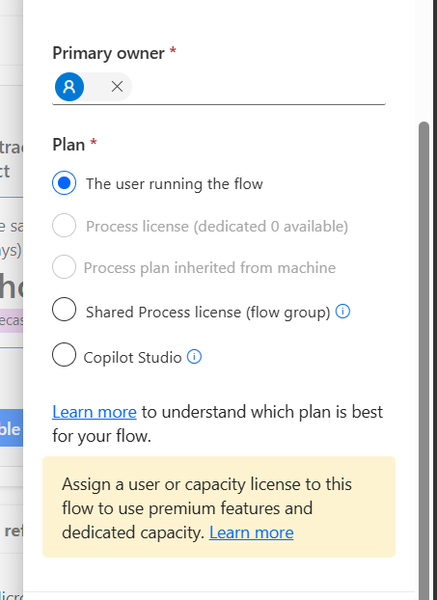
Hi everyone, I would like to share the root cause and solution in case someone else encounters the same issue. The Problem I created several agent flows directly in Power Automate using: https://make.powerautomate.com The flows were configured correctly: The flow starts with When an agent calls the flow The flow ends with Respond to the agent The flow and agent are in the same environment The flow is included in a solution The flow is published and fully functional The flows could be added to an agent and executed successfully. However, unlike flows created directly from Copilot Studio, they did not appear in the Global Tools directory. What I Investigated I verified: Trigger configuration Respond to the agent action Environment consistency Solution membership Publish all customizations Asynchronous response settings Synchronization delays between Power Automate and Copilot Studio None of these were the root cause. Root Cause The issue was related to the workflow Plan. I discovered that: Flows created directly in Power Automate were assigned: Plan = The user running the flow Flows created directly in Copilot Studio were assigned: Plan = Copilot Studio Although the Power Automate flow was fully functional and could be used by the agent, it was not visible in the Global Tools directory. Solution After changing the workflow Plan to: Plan = Copilot Studio the flow immediately appeared in the Global Tools directory. Configuration Location The setting can be found in the workflow properties under: Primary owner → Plan Important Note Based on my testing, changing the Plan to Copilot Studio appears to be a one-way operation and may not be reversible. It may be a good idea to export or save the flow before making the change. Acknowledgements Special thanks to sohnash for reproducing the scenario and providing troubleshooting suggestions, and to Patty_Velasquez for sharing similar observations that helped confirm the behavior. Hopefully this helps others who encounter the same issue. Best regards, Adhonaï KOUKA154Views1like0CommentsUnanswered Questions on GitHub Copilot Harness in Copilot Studio
We're piloting the GitHub Copilot harness in Copilot Studio (GA August 2026) and several operational and architectural details remain undocumented in the GA FAQ, Microsoft Learn, or licensing guides. Looking for official answers or PM contacts on: Architecture & Execution – When the harness breaks tasks into subtasks, does it use internal sub-agents or only skills/connected agents, what are the exact timeout/retry/max-execution-duration limits for long-running workflows, and are planning/context-retrieval/orchestration internals documented anywhere or is the orchestrator a black box? Model Selection – Can individual skills within one agent use different models or is selection strictly agent-level, how are models chosen internally when multiple skills execute, are any internal models developer-configurable, and what's the roadmap for models being added/retired/deprecated plus the lag between public release and Copilot Studio availability? Cost & Token Optimization – How exactly is the ~45% token reduction achieved, how much control do makers have over context/caching/retrieval/tool calls, what are per-model credit consumption characteristics, which models are most cost-effective for specific workloads, and what's the minimum credit cost for trivial interactions? Memory Management – What are retention periods for session/working/agent memory beyond the documented 28-day user-memory expiry, is true long-term memory supported, and what changed versus earlier implementations? Knowledge Retrieval – Can skills or system instructions influence retrieval strategy/document selection/prioritization/filtering, can planning stages perform conflict/duplicate/version detection before retrieval, and how does the harness decide which sources to search? Apps Feature – What is the "Apps (preview)" capability for, when does it GA, and how does it differ from workflows/skills/adaptive cards/agents? Billing & Credit Sizing – Is there a framework to classify users/agents by expected consumption and size credit allocation per group (citizen vs pro developers), and what's the minimum/typical consumption for simple/medium/heavy interactions? Governance & Admin – Can usage limits be set at user level (not just environment/agent), is there an API/IaC path for large-scale credit assignment, can non-admins view their own consumption/remaining allocation, and is there a self-service request-more-credits dashboard? ALM & Environments – What's the recommended path to move harness agents across Dev/Test/UAT/Prod (Solutions/ALM "setup differs" per parity chart—how?), does GitHub integration replace or complement solution-based deployment, are there recommended AgentOps practices for source control/releases/versioning, and what baseline credits and onboarding model are suggested for citizen developers under usage billing—any enterprise reference implementations?500Views2likes1Comment
Agent response duplicated in email
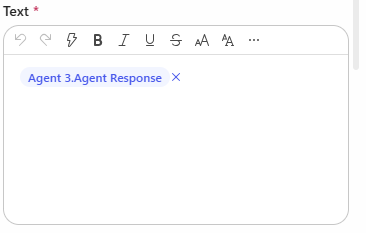
Hi, I have created a Copilot Studio Flow which has 3 agents. 2 agents do some research in parallel, I catch the results in 2 different string variables and hand the variables over to a third agent. The third agent should merge both variables, format them and hand them over to "Send Email". In the email body I add the output of agent 3. The workflow itself works. But I always have the complete email body text twice in the email received by the recipients. Where is the duplicate of the agent output coming from? I have this issue also when I add the agent response of agent 1 and agent 2 directly to the "send email" node. Does anyone have an idea? Would be great to get feedback. Appreciate it. Thanks!365Views0likes7Comments
New experience workflow can't use dynamic value in Business central connector bool
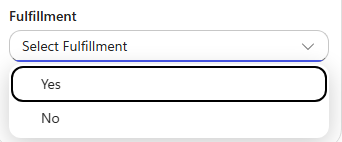
Hi all As the title states I have run into an issue when trying to use the Business central connector in a new experience workflow to create a record in my sales invoice lines. I am trying to create a prototype for an agent that can create invoices in my Business central environment based on certain criteria given by my customers. To let the agent do things in Business central I am trying to create workflows for it to use as tools, but when trying to add sales lines to the invoice, I can't seem to use dynamic values in two boolean fields, it only shows a dropdown with true/false. I know I could use a condition and use the create record four times depending on the combination of the two fields, but that seems messy, especially when this was possible back in power automate flows. Has anyone experienced this and do we know if this is considered a bug or won't it get fixed?72Views0likes0CommentsCopilot Studio consistent System Error issue
I have built an agent that invokes a Power Automate flow as a tool. Inside the flow, I'm using the Execute Agent and Wait activity, which calls another agent. This execution takes around 10–15 minutes to complete, after which the flow returns the result using Respond to Agent (asynchronous response). Although the flow completes successfully and the downstream agent finishes its execution, the calling agent still receives a System Error instead of the expected response. Why I'm using a Flow instead of directly connecting the agent Normally, I would connect the agent directly. However, the agent being invoked is already connected to another agent. Since agent → agent → agent chaining is not supported in Classic mode, I used a Power Automate flow as an orchestration layer to work around this limitation. Looking for someone who have faced this issue and has any solution to this.253Views0likes1Comment
Saving a Model Generated File in SharePoint - New Copilot Studio
Hi everyone, I have spent the last two days trying to solve a problem that to me should be a straightforward functionality. I have an agent I made which generates Word file reports. The agent is Cluade Opus 4.8 and it generates the file wonderfully as per my brand guidelines. The document in not a simple content file. Rather these documents can get complex based on the user requirement. Currently the document generates fine and the user gets a popup to download the file. I however need the file to be saved in our share SharePoint library. I created a workflow tool that accepts a file input and then saves it to SharePoint, however when I tried to configure this tool in the agent, the file input parameter was not showing. I then tried to set up a workflow which accepts a url, but the agent cannot seem to access any url or pass it to my workflow. Using a create file tool within the agent and having the agent fill in the file name and content parameters was slow, and the agent was actually attempting to rewrite the file byte-by-byte which lead to the file being re-created and is not scalable for large files. Based on the agent, this is how the file is currently saved: "The file is saved inside my sandboxed container at: /app/created/Sample_Report.docx /app/created/ is a special output directory: any file I place there is automatically packaged by the platform and returned to you as the chat attachment (the Sample_Report.docx chip you see). This is a private, ephemeral location inside my container — it is not a shared network path, and it is not the SharePoint library. Neither you nor the SharePoint tool can reach /app/created/ directly; the platform's attachment mechanism is the only bridge out of it, and as we established, that bridge delivers a direct download rather than a hosted HTTPS URL. So to be precise: the file exists only (a) here in my container at /app/created/Sample_Report.docx, and (b) as the downloadable attachment the platform generated from it. It has not been saved to SharePoint." I need this functionality working as I will have several automations flows around report generation so no human will be available to download the file from within Copilot. Note: I cannot use the old copilot studio as the file generation capabilities are not on par with the new copilot studio experience. The same agent model does not output files, and the create word file node does not output files at the depth and formatting complexity I require. Can anyone please help with a reliable way to get the file save in SharePoint from the New Copilot Studio experience? I'm at my wits end here.Solved467Views0likes1Comment