agent 365
19 Topics
Can Agent 365–registered 3rd-party agents be invoked outside MS 365 clients and still track usage?
Hello, The documentation describes how to register a third-party agent with the Microsoft Agent 365 platform (for example an agent hosted on Google Cloud Run) in order to benefit from capabilities such as observability, governance, security, and centralized management. Does this mean that users must access these agents through Microsoft 365 entry points (such as Copilot Chat, Teams, or other Microsoft clients) in order for those capabilities to apply? Or can the same registered agent also be invoked and interacted with from third-party clients or external services (for example applications running in GCP) while still benefiting from Agent 365 features like observability, governance and/or security? What if third party agent is registered to Agent 365, but it doesn't use EntraID? It's what observability, governance and/or security will be available then? Thank you.707Views2likes2Comments
Ownerless, Risky and Unmanaged agents aren't reflecting in Agent 365 in admin center
1. Ownerless, Risky, and Unmanaged agents are not appearing in Agent 365 Admin Center despite having the required Agent 365 license and appropriate administrative roles. Several agents have no active owner, and I even hard deleted the owner account to simulate an ownerless scenario, but the agents are still not being identified as ownerless. 2. Risky agent classification is also not working as expected. Conditional Access and Microsoft Purview policies have been configured, and the agents have performed activities that should trigger risk indicators, yet no agents are being categorized as risky in Agent 365. 3. All Microsoft-native agents, including Copilot Studio agents, Foundry agents, and Microsoft Copilot agents, are consistently displayed as Managed. Only externally connected agents are shown as Unmanaged. If external agents are correctly identified as unmanaged, why are Microsoft-native agents not being classified as unmanaged when they meet similar conditions? Please let me know the solution to overcome this issue, Do I need to enable something which I missed or I lack permission.448Views0likes2CommentsWelcome! Let's get started.
We're gathering the early adopters of Microsoft Agent 365 to connect, share, and answer questions about deploying agents in your organization with observability, security, and governance. Welcome! So... how many agents are in your Registry? -- Nichole383Views1like1Comment
Securing Enterprise AI Agents with Microsoft Sentinel
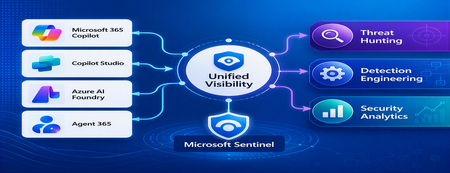
1. Introduction Enterprise adoption of Generative AI is accelerating rapidly through Microsoft 365 Copilot, Copilot Studio, Azure AI Foundry Agents, Security Copilot, and custom AI agents integrated with business applications. Unlike traditional SaaS applications, AI agents can: Access enterprise data Query internal knowledge repositories Invoke APIs and MCP tools Execute workflows Interact with business applications Make decisions on behalf of users While these capabilities improve productivity, they introduce a new attack surface that security teams must monitor and secure. Common AI threats include: Prompt Injection Cross Prompt Injection Attacks (XPIA) Jailbreak Attempts Unauthorized Tool Invocation Data Exfiltration through AI Agents Agent Identity Abuse Excessive Data Access Malicious MCP Tool Execution Traditional SOC monitoring platforms were designed for users, devices, applications and infrastructure—not autonomous AI systems. To address this challenge, Microsoft provides a comprehensive AI security monitoring framework built around: Agent 365 Observability Microsoft Agent Identities Microsoft Copilot Logs Defender XDR Defender for AI Microsoft Sentinel Together these components provide end-to-end observability of: User prompts Agent execution paths Tool invocations Safety signal detections Agent identities Security alerts 2. Reference Architecture AI Security Monitoring Architecture 3. Integration Architecture Microsoft provides multiple telemetry sources that complement one another. 3.1 Agent Runtime Telemetry Sentinel Data Connector Agent 365 Data Connector Table UnifiedAgentObservability Captures runtime behavior of AI agents including: User prompts Session IDs Conversation IDs Agent identities MCP tool invocations Connector invocations Tool arguments Tool responses Request payloads Response payloads Execution errors This dataset provides the forensic trail of everything an AI agent performed. 3.2 Agent Governance and Asset Inventory Sentinel Data Connector Microsoft Agent Identities Provides visibility into: Agent inventory Agent blueprint inventory Ownership Relationships Governance metadata Risk context This allows SOC teams to answer: Who owns this agent? What permissions does it have? Which business unit deployed it? Which related agents exist? 3.3 Copilot Audit and Usage Monitoring Sentinel Data Connector Microsoft Copilot Logs Connector Table CopilotActivity Provides: Copilot usage auditing Operational visibility User interaction tracking Useful for governance, compliance and adoption reporting. 3.4 AI Safety Telemetry Sentinel Data Connector Microsoft Defender XDR Connector Table CloudAppEvents CloudAppEvents provides AI safety signals such as: Prompt Shield detections Prompt Injection attempts Cross Prompt Injection Attacks (XPIA) Jailbreak-related verdicts Unsafe prompt classifications Think of CloudAppEvents as answering: "Was the prompt malicious?" 3.5 AI Security Alerts Sentinel Data Connectors Microsoft Defender XDR Microsoft Defender for Cloud Tables SecurityAlert SecurityIncident Used for: AI attack detections Security incidents Correlated investigation workflows 4. Understanding the Two Most Important AI Tables CloudAppEvents Focuses on AI Safety Questions answered: Was Prompt Shield triggered? Was this a jailbreak attempt? Was XPIA detected? Was the prompt suspicious? UnifiedAgentObservability Focuses on Agent Runtime Behavior Questions answered: What tool was invoked? Which connector executed? What arguments were passed? What data was returned? What actions did the agent perform? 5. Advanced Threat Hunting Scenarios The Agent365 Observability hunting guide contains several investigation scenarios that can be used directly in Microsoft Sentinel. Reference: Agent 365 Observability — AI Agent Telemetry Hunting https://github.com/SCStelz/security-investigator/blob/main/queries/cloud/agent365_observability.md 5.1 Prompt Injection Detection Detect prompts containing indicators such as: Ignore previous instructions Reveal system prompt Developer mode Disregard safety controls Investigation workflow: Review Tool Activity This allows analysts to determine whether a suspicious prompt resulted in downstream actions. 5.2 Session Reconstruction One of the most powerful capabilities of UnifiedAgentObservability is session reconstruction. Analysts can correlate: This creates complete forensic timelines. 5.3 MCP Tool Auditing Monitor all MCP activity including: query_lake Graph API tools ServiceNow connectors SharePoint connectors Custom enterprise tools Questions answered: Which tool was used? Who triggered it? What parameters were supplied? What data was returned? 5.4 Sensitive Data Access Monitoring Monitor AI agent interaction with: Employee records Customer data Financial information SharePoint repositories HR databases Useful for identifying: Data exfiltration attempts Excessive access patterns Sensitive data exposure 5.5 Query Lake Monitoring The GitHub hunting guide introduces monitoring of: query_lake RunAdvancedHuntingQuery Analysts can inspect: Actual KQL submitted Target workspaces Data sources queried Scope of access This provides visibility into AI-driven security investigations. 5.6 New Tool Detection Identify newly observed tool usage. Examples: Unauthorized MCP servers Newly registered connectors Unapproved tools Unexpected integrations This use case is particularly useful for governance programs. 5.7 Tool Failure Monitoring Monitor: Permission failures Connector failures Application errors Access-denied responses A sudden increase in failures may indicate: Reconnaissance activity Misconfiguration Privilege abuse attempts 6. Detection Engineering Opportunities Organizations can create Sentinel Analytics Rules for: 6.1 Prompt Injection Detection Developer Mode prompts Prompt Override attempts System Prompt disclosure requests 6.2 Jailbreak Attempt Detection Safety bypass attempts Role manipulation prompts Instruction override patterns 6.3 Unauthorized Tool Usage New MCP tools High-risk connectors Rare tool executions 6.4 Sensitive Data Access HR data queries Identity information retrieval Large-volume exports 6.5 Agent Identity Abuse Ownership changes Unexpected agent activity Agent-to-agent anomalies 7. Data Lake Exploration and Long-Term Analytics Because agent telemetry resides within Sentinel Data Lake, organizations can perform: Long-term AI investigations Historical AI attack analysis Agent baselining Governance reporting Trend analysis Tool inventory reporting Example dashboards include: Top Prompt Injection Attempts Most Active Agents High-Risk MCP Tools Agent Ownership Analysis AI Security Incidents Sensitive Data Access Trends 8. Summary AI agents represent the next major computing platform, but they also introduce a completely new attack surface. To effectively secure enterprise AI solutions, organizations require visibility across: User interactions Agent execution paths MCP tool usage Prompt safety signals Agent identities Security detections Microsoft Sentinel provides this unified view by integrating: Agent 365 Observability UnifiedAgentObservability Microsoft Agent Identities Microsoft Copilot Logs CloudAppEvents Defender XDR Defender for AI By combining AI runtime telemetry with AI safety signals and Defender detections, security teams can move beyond traditional monitoring and build a modern SOC capability for threat hunting, incident response, governance and forensic investigations across Microsoft 365 Copilot, Copilot Studio, Azure AI Foundry and future AI agent ecosystems. Reference: https://github.com/SCStelz/security-investigator/blob/main/queries/cloud/agent365_observability.mdAgent 365 | Identity & Access Controls in Entra
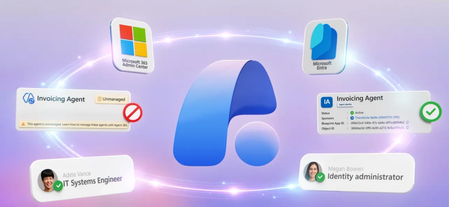
Surface agents across AWS Bedrock, Google Vertex, Databricks, and Salesforce in one registry, assign Entra Agent IDs via CLI or SDK, and enforce least-privilege access through Conditional Access policies and Agent Blueprints, all without rebuilding your existing identity infrastructure. Lock down agent activity with sign-in logs that capture every authentication attempt, policy hit, and failure. Govern agents as first-class identities alongside your users, apps, and devices, and draw a hard line between managed and unmanaged AI in your organization. Vince Smith, Microsoft Entra Principal Product Manager, shares how to establish full visibility, access control, and lifecycle governance for AI agents using Microsoft Entra and Agent 365. Transform unmanaged agents into a managed agent identity. CA policy enforcement, lifecycle controls, & full audit trail—start with Agent ID in Microsoft Entra. One Agent blueprint. Multiple agent identities. Use Agent blueprints in Microsoft Entra to enforce least-privilege access for agent identities at scale. Start here. Lock down agent activity in Microsoft Entra. Get full audit visibility into every sign-in, Conditional Access decision, and failure reason. See how it works. QUICK LINKS: 00:00 — Visibility and control with Agent 365 01:39 — Multi-platform registry sync 02:29 — Assign Agent ID 04:14 — Agent Blueprints 05:24 — Conditional Access for agents 06:24 — Sign-in logs audit trail 07:03 — Unblock the agent 07:54 — Wrap up Link References Check out https://aka.ms/EntraforAgents Unfamiliar with Microsoft Mechanics? As Microsoft’s official video series for IT, you can watch and share valuable content and demos of current and upcoming tech from the people who build it at Microsoft. Subscribe to our YouTube: https://www.youtube.com/c/MicrosoftMechanicsSeries Talk with other IT Pros, join us on the Microsoft Tech Community: https://techcommunity.microsoft.com/t5/microsoft-mechanics-blog/bg-p/MicrosoftMechanicsBlog Watch or listen from anywhere, subscribe to our podcast: https://microsoftmechanics.libsyn.com/podcast Keep getting this insider knowledge, join us on social: Follow us on Twitter: https://twitter.com/MSFTMechanics Share knowledge on LinkedIn: https://www.linkedin.com/company/microsoft-mechanics/ Enjoy us on Instagram: https://www.instagram.com/msftmechanics/ Loosen up with us on TikTok: https://www.tiktok.com/@msftmechanics Video Transcript: -Ensuring agents don’t operate unchecked in your environment means making sure their access to data and apps, along with other agents and resources, is appropriately scoped, and no more than necessary, so they’re never overprivileged. Agent 365 gives IT and security teams a unified control plane for agent activity. They can work together using the tools they already work in every day to see which agents are in use, understand the risk, and act before issues escalate. Today, in part 3 of this Agent 365 series, we look at how, as an identity admin using Microsoft Entra, you can establish the critical foundation to prevent agents from being both overprivileged or running without the right level of visibility. -This all starts with Agent 365, which gives you visibility into your agents, control over what they can access, and governance across the entire lifecycle. As a developer, you can use the Agent 365 CLI and SDK to create and integrate an Agent ID into your agent. This ensures your agents can be managed across their lifecycle, with continuous risk evaluation and least privileged conditional access controls in Microsoft Entra, ensuring that agents can only connect to and act on the resources they truly need, for as long as they need, no more, no less. -Just like with your users and apps today, with Agent ID, agents become explicitly manageable and governable, including conditional access policies and access packages. And by assigning an Entra identity to your agents, you establish a clear boundary between managed and unmanaged AI, which makes it much easier to detect which agents need to be brought under control. Let’s start in the Microsoft 365 Admin Center to see this in action. As an IT admin, you can access Agent 365 controls to view your agents, find unmanaged AI in use, and configure tools and settings. I’m in the Agent 365 overview page, where I can find top-level insights and metrics, as well as common actions. In fact, the Registry sync controls let me configure these options, so let’s take a look. And you can see that we’ve already configured sync for AWS Bedrock and Google Vertex, which gives us visibility into agents running on those platforms. -Just to show you what’s behind this and your options, I’ll click Connect a platform. And under External platforms, we can see Bedrock and Vertex here, along with Databricks Genie and Salesforce AgentForce. The respective agents will peer in the agent registry once I sync from these platforms. That said, while we were able to see the agents from those platforms running in our environment, without respective Agent IDs, we won’t have visibility into exactly what those agents are accessing. In fact, here we can see that all of our Amazon Bedrock agents are currently unmanaged. And when I click in, we can see a few details about the agent creation date and publisher, but not much else. So we know these agents exist, but again, without an Agent ID, we don’t know exactly what these agents are accessing to be able to apply the right controls for their needs. -Practically speaking, our first step here is to work with the unmanaged agent creators to get their agents an Entra ID. This is where, as a developer creating and updating agents, we can use the agent 365 CLI and SDK to create an assign and Agent ID, which also includes an Agent Blueprint. I’ve used a simple prompt here to generate the code and enter configuration needed. The cool thing about Agent Blueprints is that permissions granted on the blueprint can be inherited by all agent IDs using that blueprint, and I’ll explain more about this in a moment. And because this is standard OAuth, it is interoperable across agent platforms. In fact, the agent we’re updating is the one I showed earlier that’s running on AWS Bedrock. And once the agent is republished to Agent 365, it’s ready for management. -In fact, going back to the agent registry in Agent 365, viewing the details of the agent, we can move over to the right and expand this field for identity information. We can see it has an Agent ID along with a Blueprint ID, which wasn’t there when we looked at the unmanaged agent card before. And scrolling back up and opening the Security tab, I can see that the agent already has default protections applied from Microsoft Purview and Entra, including sensitive data protections and compliance evaluation as part of the Agent 365 platform. Because the agent is an object in our directory, provided we are entitled with the right management permissions, we can grant the appropriate level of access and get visibility into its details and activities. -I’ll start by first looking at what resources the developer has configured for the agent to access. In the agent identities page, we can see our agent. Importantly, this agent now has an agent sponsor assigned. This is the person responsible for the agent, and can be the agent builder themselves or someone they designate. And viewing its access and granted permissions, we can see a list of the requested permissions the agent has configured. Notice that the grant source is inherited from the parent, which is our Agent Blueprint. A blueprint is the template for a class of agents. It holds the credentials that associated agents use for authentication. The credentials can be managed in Entra, or federated outside of Entra, or even system managed, such as with an Azure Managed Identity. It also provides a way to define identity and permissions for agents at scale. -Here we see in this case, the agent’s permissions aren’t set directly on the agent itself. They come from its parent blueprint. The first permission for Agent365.Observability is a default to capture agent telemetry. And under that, you’ll see Microsoft Graph permissions to read groups, users, and mail. Under Developer settings in the Manifest, we can view and optionally edit the details as JSON that we saw earlier in the code. -As an Entra admin, I can control who is able to consent to the agent’s permissions, which gives me both security and scale, but I also want defense in depth. In our organization, as a blanket control, we have conditional access policies to block access to all unverified agents. Under conditional access, when I click into the AWS Bedrock policy, you’ll notice that this policy targets all agent identities and blocks their access to Entra-managed resources by default. To give our now verified agent access, we’ll need to exclude it from this conditional access block policy. -Before we do that, I’ll show you this policy in action from the agent testing experience in Amazon Bedrock. I’ll have the agent perform a simple look up for a user account in our tenant. And you’ll see that it’s blocked from retrieving the user information. In fact, if I move over to this agent’s logs, I can see all the invalid grant errors. And expanding on the first one and then scrolling down to the error description, it gives more specific detail about the conditional access block and what happened. -Now, if I move back to Microsoft Entra and look at the sign-in logs, we can see all of the sign-in activities for this agent. I’ll expand the same request we just saw in the Bedrock portal and move into this specific instance. And you’ll see the failure reason is exactly what the agent developers saw in Bedrock. In fact, digging into this Conditional Access tab, we can see the corresponding policies listed that apply to this agent, along with AWS Bedrock policy on top and the corresponding failure result. Now let’s look at how we can unblock this agent. As a Microsoft Entra administrator, once we verify that this agent’s identity is established and its permissions are appropriate, we can exclude it from our conditional access block policy to allow it access. -Back in our conditional access policy settings, under Assignments, I can set up an exclude condition. Then I search for my agent by its name. Here I’m typing, “widget.” There it is. Now I’ll select it and confirm, then I just need to save my policy. That’s it. With our exclusion setup, the agent will be able to perform its operation with least privileged access and Entra. So let’s test it out. Back in the Amazon Bedrock portal, I’ll run the same prompt that failed last time, our account look up. And as you can see, this time it works, and it was able to access and display the account information for this user from our tenant. -There we have it. That’s how easy it is to integrate Entra Agent ID into your agents and bring them under management. Agent 365 with identity and access controls in Microsoft Entra provides IT and security teams the management and visibility to assess and respond to agent risks. This lets you efficiently integrate agents into your existing systems and infrastructure as first-class identities, alongside existing users, applications, and devices. To learn more, check out aka.ms/EntraforAgents. Keep checking back to Microsoft Mechanics for the latest tech updates, and thanks for watching.741Views0likes0CommentsAgent 365 | Security Operations in Defender
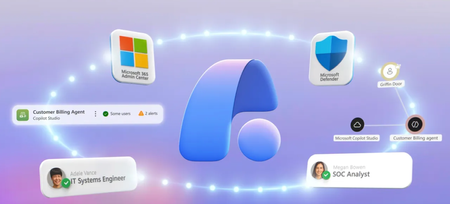
Triage high-severity alerts as IT in the Microsoft 365 admin center, then pivot into the full incident graph as a SOC analyst in Microsoft Defender. Block malicious tool invocations the instant they fire and catch jailbreak attempts on Copilot Studio agents before they take hold. Trace a compromised user back to suspicious agent activity, then trigger Microsoft Entra conditional access to revoke the session and force a password reset straight from the incident. Hunt overpermissioned agents with pre-built advanced hunting templates — including one that exposes every agent running MCP tools on the maker’s standing credentials — and pull risky builds from the Agent Store using the Agent Registry. Spencer Berg, AI & Security Product Manager, shares how to turn agent risk signals into coordinated remediation across Defender, Entra, and the Microsoft 365 admin center. One agent. Two security views. IT admins triage critical alerts in the M365 admin center. SOC analysts dig into the full incident graph in Microsoft Defender. Try Agent 365. Real-time agent defense. Microsoft Defender blocks malicious tool calls mid-execution and flags persistent jailbreak attempts on Copilot Studio agents the moment they happen. Watch it in action. Pull a risky AI agent from the Agent Store. Open the Agent Registry in the Microsoft 365 admin center, block the agent, and cut access for current users until the maker resubmits a safer build. See it here. QUICK LINKS: 00:00 — Stay in control with Agent 365 00:40 — Gain visibility with unified control plane 01:48 — Unified IT & SOC agent view 02:54 — Real-time blocking and jailbreak detection 04:08 — Auto-revoke via Entra conditional access 04:32 — Prevent future incidents 05:28 — Advanced hunting for AI agents 06:43 — Block risky agents 07:15 — Wrap up Link References Check out https://aka.ms/Agent365SecOps Unfamiliar with Microsoft Mechanics? As Microsoft’s official video series for IT, you can watch and share valuable content and demos of current and upcoming tech from the people who build it at Microsoft. Subscribe to our YouTube: https://www.youtube.com/c/MicrosoftMechanicsSeries Talk with other IT Pros, join us on the Microsoft Tech Community: https://techcommunity.microsoft.com/t5/microsoft-mechanics-blog/bg-p/MicrosoftMechanicsBlog Watch or listen from anywhere, subscribe to our podcast: https://microsoftmechanics.libsyn.com/podcast Keep getting this insider knowledge, join us on social: Follow us on Twitter: https://twitter.com/MSFTMechanics Share knowledge on LinkedIn: https://www.linkedin.com/company/microsoft-mechanics/ Enjoy us on Instagram: https://www.instagram.com/msftmechanics/ Loosen up with us on TikTok: https://www.tiktok.com/@msftmechanics Video Transcripts: -What if your next Sev 1 security incident isn’t a compromised user, but instead an autonomous agent, chaining actions across systems you didn’t even know it could reach? In the agentic era, SOC teams aren’t just defending endpoints or identities. They’re defending a machine-speed execution layer that collapses boundaries and turns small gaps into full attack paths. When agents act on their own while logged in as a user, on-behalf-of activity becomes user impersonation. They can access and interact with Teams, email, other internal apps, and your users’ devices. This blurs the lines between human and agent activity. So how do you gain visibility into these activities and stay in control? It starts with the fundamentals of agent defense, knowing what’s running, controlling what it can access, and seeing what it’s doing in real time. Agent 365 brings all these defense areas together through a unified control plane. -The Microsoft 365 admin center provides centralized inventory and governance of agents and tools. Entra establishes strong identity with least-privilege access and clear ownership. Defender delivers runtime protection and deep observability with end-to-end activity tracing and detection. And Purview enforces data protection and posture by monitoring how agents interact with sensitive information. Together, these capabilities create a shared, consistent view so security and IT can manage agent risk as one system, not in silos. Today, in the second episode of this series, we build on that foundation and dive deeper from the SOC perspective in Microsoft Defender, showing how unified agent visibility enables faster detection, stronger investigations, and coordinated response with IT before agent-driven risk escalates. -Starting off as an IT admin in the Microsoft 365 admin center, I can see agents which have risks associated with them. The agent risks tab in the registry has identified several agents that need my attention based on security risk signals surfaced here. And drilling into any of these agents exposes the security & compliance page, where the IT admin will see only unresolved alerts with high and critical severity from Defender. Switching perspectives, as a SOC analyst on the Zava security team, the Microsoft Defender portal is my go-to-solution for threat protection, including posture management and investigations. I also need detailed security information for the agents that run in our environment. -I can view the same agent within Defender with a security lens with related incidents and alerts. I mentioned before that an IT admin can see the big picture and even view unresolved alerts from critical incidents within their experience, but as a SOC analyst, I need the granular details to dig deeper into the incident. I can see all the lower priority and resolved incidents that provide more context on the activity of this agent. Microsoft Defender continuously monitors AI agent activity in real time. It can block malicious tool invocation attempts as they happen, and alert security teams that there have been attempts to jailbreak AI agents. -Let’s click into the critical incident to investigate further. In the details, I can see that this has been identified as a collection incident involving one user. It also includes the information that our SOC team needs. I can look at the incident description to see that the agent is connected to a tool that sends emails, which was blocked, thankfully. Let’s open the incident page to investigate further. -Now we can see a detailed explanation of what happened, who was involved, and additional context. Alerts related to the agent are combined into a more detailed incident view, including persistent jailbreak attempts on a Copilot Studio agent and an AI agent tool invocation by the same user, which was blocked by Microsoft Defender. The alert also provides recommended actions to remediate it. It shows all events related to our user, Griffin, where the agent tried to invoke the same email tool multiple times within a short period, each with details on the date, time, and the user’s IP address. Optionally, we could investigate the user further using advanced hunting to view additional activity across a longer period. -That said, for this incident, I have enough information to suspect that it’s potentially stolen credentials and is carrying out suspicious activity. I can then click on the user to view their details and confirm that they have been compromised. Defender can automatically trigger our Entra conditional access policy to revoke Griffin’s access and require them to reset their password. This would now show that their account has been compromised and let us resolve the incident without further impact. -And I can also prevent future incidents with this agent. For that, I’ll use advanced hunting to get more information and context. I’ll click on the agent within the incident graph to find out more about the purpose of the agent, its number of associated incidents and alerts, as well as other tools it’s connected to. Running this query gives me the most up-to-date information about this agent. I can see detailed attributes like the agent’s name and creation date, who last modified it, and when. It also shows its action triggers, which actually invokes the agent to run, and any connected or child agents it interacts with. -Now, tying this back to our earlier attack, we saw that Defender’s real-time protection blocked a tool invocation for the tool that sends emails. That’s already good news, but as the investigator, I want to know what else this agent can do and how risky it is. I’ll open Agent Tool Details and I can see that, in addition to sending emails, this agent also has access to an MCP server as a knowledge source. MCP servers often expose a broad set of actions. These are mostly used for read access, but sometimes write access too. Often, as a workaround for future permissions issues, developers or makers give write access even in cases where the agent only needs read access. That’s what we call overpermissioning, and it goes against the principle of least privilege. In turn, it introduces a lot more risk if the agent is ever compromised. But I don’t want to stop with just one agent. Let’s find out if other agents in my organization are exposing risks related to overpermissioning. -Here, I have a collection of pre-built queries designed specifically for AI agents, making it easy to spot misconfigurations, excessive permissions, and other risky setups across my environment. This specific template gives me a view into agents with MCP tools configured using the maker’s credentials. That’s not good. With these permissions, the MCP server tools can be accessed using the standing permissions of the agent maker. This can lead to privilege escalation and data exposure. The advanced hunting results show that multiple agents have access to MCP servers with maker privileges, which put them at high risk. -Now we have the information we need to notify each creator that changes are necessary to scope their agent’s permissions so that they can be used safely. From there, our Microsoft 365 administrator can prevent the current agents from being used until new versions are ready. To do that, as the IT admin, I’m signed into the Microsoft 365 admin center, and in the Agent Registry. There’s our Customer Billing Agent, and I’ll click into its details. I can take action from here and block it from being used, then confirm. That’s going to remove it from the Agent Store for new users, and prevent current users from accessing it. -Then, once a newer, safer version of the agent is ready, the maker can resubmit it for publishing approval. With Agent 365 using Microsoft Defender, you can strengthen agent security posture and protect against threats. This helps you proactively identify and mitigate risks before attacks occur. -To learn more, check out aka.ms/Agent365SecOps. And in the next episode of this series, we’ll explore Agent 365 with Microsoft Entra to prevent agent sprawl, unclear ownership, and weak lifecycle management. Keep watching Microsoft Mechanics for the latest AI and security updates. Thanks for watching.437Views0likes0CommentsMicrosoft 365 Champion community call | May 2026 | PM
Join our next community call on May 26, 2026, to explore the new Copilot Hub experience and learn more about Agent 365. Host: Tiffany Lee Guests: Jessie Hwang, Samer Baroudi Moderators: Jessie Hwang, Casandra Marrero, Abby Schilbach 📢 NOTE: our community call formats are Teams webinars so you must register at https://aka.ms/M365ChampionCallPM to receive the link to join. The join link will be sent to you in email with your webinar registration confirmation. 🗨️ Each call includes an open Q&A discussion section at the end, where you'll have a chance to ask your questions about Microsoft 365. 👋 Was this forwarded to you? Join the Microsoft 365 Champion program today! Champions combine technical acumen with people skills to drive meaningful change. Our community calls are open to everyone, but only Champion program members have access to the presentation resources (access link is in the initial welcome email and in the monthly newsletters). Join now: https://aka.ms/M365Champions. Note: If you are unable to watch the recording on YouTube, try watching it here.389Views0likes0CommentsMicrosoft 365 Champion community call | May 2026 | AM
Join our next community call on May 26, 2026, to explore the new Copilot Hub experience and learn more about Agent 365. Host: Tiffany Lee Guests: Jessie Hwang, Samer Baroudi Moderators: Jessie Hwang, Casandra Marrero, Abby Schilbach 📢 NOTE: our community call formats are Teams webinars so you must register at https://aka.ms/M365ChampionCallAM to receive the link to join. The join link will be sent to you in email with your webinar registration confirmation. 🗨️ Each call includes an open Q&A discussion section at the end, where you'll have a chance to ask your questions about Microsoft 365. 👋 Was this forwarded to you? Join the Microsoft 365 Champion program today! Champions combine technical acumen with people skills to drive meaningful change. Our community calls are open to everyone, but only Champion program members have access to the presentation resources (access link is in the initial welcome email and in the monthly newsletters). Join now: https://aka.ms/M365Champions. Note: If you are unable to watch the recording on YouTube, try watching it here.748Views1like0CommentsAgent 365 | Your Security & Compliance Controls
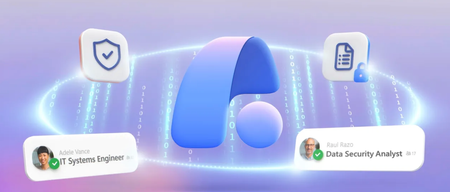
Block agent access to labeled files at runtime, stop sensitive data from leaving in agent-drafted emails, and catch agents that cross conduct lines using the same Microsoft Purview controls you already run for users. Map every risky agent action in Insider Risk Management, drill into Activity Explorer for interaction-level detail, and pull regulator-ready forensics from Purview Audit. Shilpa Ranganathan, Microsoft Purview Partner Group Squad Leader, shares how IT and data security teams can govern agent behavior on a single Agent 365 control plane built into the Microsoft tools that you're already using today. Block labeled files from agent access in real time. No policy bypass, no data leak. See how it works using Microsoft Purview as part of Agent 365. Same policies, now extended to agents. Purview DLP catches sensitive content and blocks the send. Watch it in action. Map the full chain of risky agent actions in one view. Insider Risk Management in Purview sequences sensitive file access & DLP blocks. See how it works. QUICK LINKS: 00:00 — Agent security, compliance, & IT 01:13 — IT & data security teams using Agent 365 02:22 — Visibility with Microsoft Purview 03:14 — End user perspective 04:05 — DLP on Agent-Initiated Messages 04:23 — Communication Compliance for Agent Behavior 04:50 — Data Security admin in the Purview portal 06:04 — Policy violations 06:39 — Purview Audit 07:06 — Microsoft 365 admin center 07:44 — Wrap up Link References Check out https://aka.ms/Agent365DataSecurity Unfamiliar with Microsoft Mechanics? As Microsoft’s official video series for IT, you can watch and share valuable content and demos of current and upcoming tech from the people who build it at Microsoft. Subscribe to our YouTube: https://www.youtube.com/c/MicrosoftMechanicsSeries Talk with other IT Pros, join us on the Microsoft Tech Community: https://techcommunity.microsoft.com/t5/microsoft-mechanics-blog/bg-p/MicrosoftMechanicsBlog Watch or listen from anywhere, subscribe to our podcast: https://microsoftmechanics.libsyn.com/podcast Keep getting this insider knowledge, join us on social: Follow us on Twitter: https://twitter.com/MSFTMechanics Share knowledge on LinkedIn: https://www.linkedin.com/company/microsoft-mechanics/ Enjoy us on Instagram: https://www.instagram.com/msftmechanics/ Loosen up with us on TikTok: https://www.tiktok.com/@msftmechanics Video Transcript: -How do you make sure agents don’t run unchecked across your environment? It starts with the right level of observability across security, compliance, and IT, insights that’s tailored to each team’s domain expertise, yet shared across teams, so issues can be identified early and addressed quickly when something goes wrong. This is where Agent 365 comes in to bring together security and IT teams so they can stay in control through a unified control plane, built to work with the Microsoft tools you already use. -Whether you’re viewing agents along with their configurations and high-level activities in the Microsoft 365 Admin Center, understanding agent activities and protecting sensitive information with Microsoft Purview, managing agent identities and permissions to apps, data, and resources with Microsoft Entra, or investigating and responding to incidents in Microsoft Defender, Agent 365 provides a common source of truth for agent activity, enabling teams to assess and respond to risks from their own domain expertise using the tools and workflows they know best. Today is the first episode in a series where we go deeper on using Agent 365 across your organization, starting with protecting your sensitive data. For example, if data isn’t properly classified and protected, AI, which uses powerful semantic search, can quickly surface information that was once hard to find, leading to data loss. -At the same time, it can potentially share it with the wrong people, and related other risks can escalate quickly. Microsoft Purview now extends the controls you have for users in your organization to agents so they stay aligned with your organization’s data security and compliance requirements. Let me show you how IT and data security teams can work together using Agent 365. Starting in Agent 365 in the Microsoft 365 Admin Center. As an IT admin, I can see a comprehensive list of agents in our organization. I can manage agent deployment requests to review the details for agent configurations and even leverage built-in security defaults for Agent 365 to quickly establish policy controls. -That said, as agents are used inside of your organization, Microsoft Purview, as part of the Agent 365 control plane, provides more granular controls with deeper visibility over data security. This includes rich AI observability, protection, and compliance. Right from Microsoft Purview, I can see agents running in my organization with the same left-to-right agent visibility we saw in the Microsoft 365 Admin Center. From Data Security Posture Management, or DSPM, for short, I can find key agent metrics and what’s important for data security, like which agents are active and their risk levels, whether they’re interacting with sensitive data, in which ways, along with interaction trends. I can also see if their activities are protected with sufficient policy coverage. -Let me show you an example of how this level of oversight and protection works, starting from the end user perspective. This is a custom, in-house-developed Zava supplier agent. It’s designed to review and summarize purchase orders for clients. Here, a member of the procurement team asks the agent to review a few linked purchase orders PDF files and check for delays and impacts. The reasoning agent gets to work almost immediately, providing a summary for the linked files. It then attempts to access a contract file to figure out the contractual impacts of any delays. -Now, because the contract has a label that the agent is not allowed to process, it stops and says that it cannot access the information contained in that file. This is Microsoft Purview enforcing least-privilege access in real time. Next, our same user asks the agent to email the summary to an external supplier. The agent tries, but Purview spots sensitive data in the message. In fact, if we move to Outlook and open the message, we can see that our sensitive information policies have blocked the email from being sent. Back in Teams, we can see that the same user is attempting to use the agent to draft an email that promises an exclusive gift incentive to fast track the PO approval. The agent stops again. It recognizes the request crosses ethical and compliance lines and explains why to our user. -Importantly, behind the scenes, Purview logs all activity as it happens and flags the interaction for review. In fact, let’s switch perspectives to the data security admin in the Purview portal after these activities have taken place. I’m back in DSPM under AI Observability with a view of my running agents. And on top of my list, Purview has flagged the supplier agent as high risk. Let’s drill into it. For that, I’m in insider risk management view for this activity. It maps out the sequence of events that our user and agent attempted to carry out, starting with sensitive file access in SharePoint, including the contract I mentioned. -Then the DLP policy block, which stopped the email summary from being sent to the external supplier. And, finally, the unethical behavior block when a user attempted to offer a gift in exchange for faster contract approval. All these activities raise the risk level of the agent, and each action is clearly outlined. To get more detailed context about the agent’s behavior, I can view the activity timeline, which links me directly into Activity Explorer in DSPM to see other interactions with this agent. It looks like there’s a mix of benign activity at the bottom of the list, and the higher risk activities for our user are at the top. All prompts and responses are evaluated against compliance policies and classifiers, and any matches are surfaced using the same investigation and remediation workflows you already use today. -In fact, you can find the details for agent policy violations across solutions in Microsoft Purview. For example, if your focus is on communication compliance, you can find the details for the agent interaction that was flagged as unethical. In this case, it matched the gifts and entertainment condition. And clicking in, you can see related matches for other sources too. And Purview Audit also captures every agent interaction, which you’ll find using an audit search. -Here we’ve searched across agent interactions that occurred between February 1st and March 1st for our agent, and you can see the exportable details for each interaction, including IP, user, agent, record, and activity details. So when a regulator asks: “How did this happen?” You can trace it instantly using Purview Audit. Of course, with Agent 365 at the foundation, everything is connected and integrated across the control plane. So now as an IT admin working in the Microsoft 365 Admin Center, I can see the agents running in our environment filtered by high risk, and there’s our supplier agent. In its details, under Security and Compliance, I can see it has performed a few risky activities. This is all signal that has been pulled in from Microsoft Purview as part of Agent 365. -From here, I can tune the agent configurations, including its permissions, or even block it all together from use. AI agents move fast, and without the right level of visibility and guardrails in place, they can easily access data they shouldn’t overshare, and even work against your company’s ethics. Agent 365 with Microsoft Purview keeps your agents in line, spots trouble before it happens, and makes sure that actions are recorded. -To learn more, check out aka.ms/Agent365DataSecurity. In the next episode of the series, we’ll explore Agent 365 with Microsoft Defender to investigate and respond to security incidents involving agentic activity. Subscribe to Microsoft Mechanics if you haven’t already, and thanks for watching.537Views0likes0CommentsAgent 365 adoption resources now available
We've created a Getting Started Guide for Agent 365! You can find it on our new Agent 365 Adoption Resources page, as well as links to articles for getting started with Agent 365 in Microsoft 365 Admin Center, Microsoft Defender, Entra, and Purview. Would love to hear what you think -- or what we've missed! Please leave a comment on this post. Thank you! -- Nichole Microsoft Agent 365 – Microsoft Adoption220Views1like0Comments