advanced message encryption
25 TopicsAnnouncing Office 365 Advanced Message Encryption
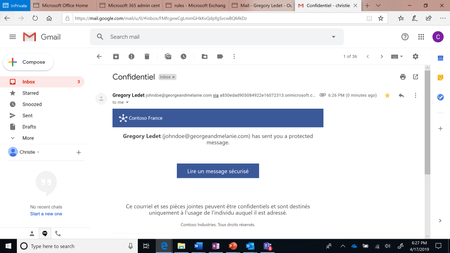
A year and a half ago, we launched new Office 365 Message Encryption capabilities, and at the heart of these updates, we made it easier for users to collaborate on protected messages with anyone and on any device. These updates included empowering end users to apply encryption and read encrypted emails directly in Outlook, and also making it easier for non-Office 365 recipients to use their Google or Yahoo identities to authenticate and read encrypted messages. Our goal continues to be to protect our customers’ sensitive data, by making it easier to apply and consume encrypted messages, regardless if your recipient is inside or outside your organization. Unfortunately, protecting and controlling sensitive data that’s shared outside your organization is more challenging than if it was shared inside your organization. That’s why we are investing in capabilities that not only enhance encryption, but also provide more control over access to encrypted emails by external recipients. Today, we are excited to share new Office 365 Advanced Message Encryption capabilities that enable admins to apply multiple custom email templates, and to expire and revoke encrypted emails accessed through the Office 365 web portal. Read further to understand what’s available in Advanced Message Encryption. Apply multiple custom email templates Many organizations require custom email templates that reflect the unique brand, logo or text of the department or region the encrypted email came from. For example, a regional office in France may require that the email template that external recipients receive are in French. With Advanced Message Encryption, customers can apply more than one custom email template. That means you can change, for example, the logo, color, and text of email template. Today, this is done through a PowerShell cmdlet. Once the custom template is created, in the Exchange admin center, you can create a mail flow rule that applies the custom template based on set conditions. For example, if the message contains the key word ‘confidentiel’, for example, the email will be automatically applied with the desired encryption policy and custom template. Expire access to encrypted emails Another benefit to creating custom branded email templates is the ability to also set an expiration date as an added option to the template. This may be valuable for organizations that have compliance obligations that require you to restrict how long external recipients can access sensitive emails per organizational policies or regulatory requirements. With Office 365 Advanced Message Encryption, you can apply automatic policies that can detect sensitive information types (e.g. PII, Financial or Health IDs) or keywords, then enhance protection by expiring access through the Office 365 web portal to encrypted emails. To enable this, once the custom email template is created in PowerShell with the desired expiration date, in the Exchange admin center, admins can apply the template based on the set conditions. After the template is applied, the sender can send email normally, and if the email meets the conditions of the policy, the expiration date will be invoked. From the perspective of the recipient, after the message is sent, they would see the branded template with the expiration date. Once the encrypted email has expired, the email will no longer be accessible through the Office 365 web portal. Revoke access to encrypted emails For organizations that collaborate and share sensitive emails with external recipients, we are also enabling the ability to revoke encrypted emails accessed through the Office 365 web portal. Whether it’s due to malicious attack, accidental sharing of encrypted emails, or changes in who is authorized to view encrypted emails, admins can now go into the encryption report to find encrypted emails and revoke access through a new UI experience inside the Office 365 Security and Compliance Center. Once the message is revoked, the external recipient no longer access the sensitive email through the Office 365 web portal. Get started Advanced Message Encryption is rolling out and will be available in eligible tenants by the end of May. Get started by leveraging the resources such as support documentation and interactive labs provided below. Note, you must set up Office 365 Message Encryption to leverage Advanced Message Encryption capabilities, which provide added protection on top of encrypted messages shared externally. If you do not have Office 365 Message Encryption learn how to set it up here. Office 365 Advanced Message Encryption requires an Office 365 E5 subscription or an Office 365 E3 subscription with the E5 Compliance add-on or Advanced Compliance add-on. If you don't have that plan and want to try Advanced Message Encryption, you can sign up for a trial of Office 365 Enterprise E5. Resources Documentation: https://docs.microsoft.com/en-us/office365/securitycompliance/ome-advanced-message-encryption Interactive guide: Enhance protection with Advanced Message Encryption in Office 365The CISO Cheat Sheet to Microsoft Digital Defense Report 2026
I know we’re all busy, so I’ve pulled the most important data from this year’s Microsoft Digital Defense Report into one short read. The full report is well worth exploring, but this article focuses on the numbers and trends most relevant to security leaders. This year’s edition shows that AI is lowering the time, expertise and cost required to discover and exploit weaknesses, enabling attackers to operate with greater speed, scale and autonomy. The report describes this as AI “changing the physics of cybersecurity”: attack timelines are compressing and agentic systems are beginning to automate more of the attack lifecycle. Trend 1: Time has collapsed The clearest finding is about speed. Vulnerability discovery is increasingly running ahead of remediation, while the time from discovery to weaponisation is shrinking. In the AI era, weaponisation can follow in hours. Vulnerability discovery and weaponisation now often needs only a well-written prompt. The median time from discovery in the wild to weaponisation is below 24 hours. Vulnerabilities were on track for a record estimated 72,000 CVEs in 2026. The report expects a multi-year period in which the number of known but unpatched vulnerabilities rises sharply before eventually declining. The median time from container start to first exploit attempt is 5.3 hours. The ransomware actor Storm-1175 moved from web-facing exploitation to deploying Medusa ransomware in as little as 24 hours. CISA added over 110 CVEs to its Known Exploited Vulnerabilities catalogue between November 2025 and May 2026, most within a week of disclosure. The mismatch with enterprise reality is the uncomfortable part. The report says the disclosure-to-exploitation window has shrunk to single-digit days. Between November 2025 and May 2026, CISA added more than 110 vulnerabilities to its Known Exploited Vulnerabilities catalogue, most within a week of disclosure. In one example, Storm-1175 moved from exploiting a web-facing vulnerability to deploying Medusa ransomware in as little as 24 hours. Microsoft’s Red Team makes an important point: a patch is also a disclosure. Every fix points attackers towards the flaw it closes. As AI-assisted analysis makes reversing patches faster and more reliable, the report argues that patch velocity, not simply patch availability, becomes the control that matters. Trend 2: Attack chains are gaining autonomy The report charts a clear progression: September–November 2025: AI assists in orchestrating a campaign, as in the Anthropic-reported espionage case. April–June 2026: Full-chain autonomy is demonstrated in labs. July 2026: Real-world autonomous attacks of increasing complexity appear. Two frontier models, Mythos and GPT-5.5, completed a 32-step attack chain against an emulated enterprise with no human help. The test environment had no defenders. The UK AI Security Institute reached a similar finding independently. GPT-5.5 was the second model to solve its end-to-end corporate network attack simulation, a task AISI estimates would take a human about 20 hours. Open-weight models lag closed models at orchestrating attacks by about seven months. In the wild, early July 2026 saw the first documented automated ransomware extortion attack, named JADEPUFFER by Sysdig. Microsoft has seen AI-orchestrated intrusions that share elements with it. Initial access consistently came from internet-exposed services running known-vulnerable software. The report is measured on this point. Volumes of AI-orchestrated activity remain low. In most observed real-world operations, complex end-to-end intrusions still retain meaningful human direction. The Red Team's framing is the most useful one: AI doesn't create a new class of attack, it collapses the effort needed to find and exploit existing attack paths. Trend 3: AI has become an attack surface The report's second takeaway is that attackers are already targeting AI itself. The adoption numbers explain why. 88% of enterprises are experimenting with agents, and 82% of leaders plan broader rollouts within 12–18 months. The report cites industry projections of roughly 1.3 billion agents in production by 2028. What attackers are doing to AI systems: Four techniques accounted for roughly 90% of observed attack activity in telemetry from Azure AI workloads: malicious link injection (52%), jailbreaks (16%), tool and agent abuse (12%), and identity and credential abuse (10%). Memory poisoning: An attacker who can place content anywhere an agent reads can often place it where the agent remembers. Email is the dominant pathway the Red Team has observed. Human-in-the-loop isn't a complete control: Red team testing saw approval prompts ignored, or bypassed by a policy stored in poisoned memory. Developer tools turned against their owners: The "s1ngularity" malware hijacked locally installed AI command-line tools to hunt for secrets. It leaked about 2,000 secrets and 20,000 files across 225 victims. AI browsers: In daily use at more than 40% of organisations in Microsoft's dataset, they were the initial infection vector in incidents involving 57 malware families in a May 2026 analysis. Chat histories as a target: Malicious AI-assistant extensions reached nearly 900,000 installs and more than 20,000 enterprise tenants, harvesting AI chat histories that often contain code, architecture and credentials. The identity implications are direct. Each agent needs its own identity, not one borrowed from an employee, and a named human sponsor. The report also treats revocation latency, the time to cut off a compromised agent, as a measured outcome. Trend 4: The front door is still identity AI changes the speed and personalisation of social engineering. It hasn't changed where attacks start. Initial access in Defender Experts data: User execution: 30% Valid accounts: 20% Malicious copy-and-paste: 13% Phishing: 11% Together, user execution and valid accounts account for over half of observed activity. In incident response engagements, phishing as an initial access vector jumped from 7% to 23% year on year. The standout numbers: ClickFix: Defender saw user-pasted malicious commands on more than 1.1 million unique devices between February and early May 2026, roughly an 8x increase. AiTM: URLs accounted for 45% of the identified phishing techniques in the report’s breakdown. Separately, the share of AiTM phishing and token-theft attacks more than doubled during the first six months of 2026, although the report notes that their overall share remained comparatively small. Teams vishing: Weekly confirmed malicious volume increased 502% year on year. Per attempt, 48% of vishing calls kept the victim engaged for more than 20 seconds, and 30% lasted more than one minute. When a call succeeds, attackers can persuade the victim to install a remote-management tool and complete reconnaissance in two minutes or less. Business contact impersonation (BCI): The report introduces this term for conversations that start with a trusted-looking contact. Microsoft detected more than 46 million attacks in 12 months, with a 121% spike in April 2026. The share of first-contact messages that explicitly asked for money or documents fell from 17% to 3%. The first message is deliberately bland, like "Are you at your desk?" Password attacks declined 26% year on year, which the report describes as strong evidence that MFA and passkeys are forcing attackers to pivot. That pivot includes techniques such as fatigue attacks, AiTM phishing and token theft designed to circumvent conventional MFA. Trend 5: Attackers are inheriting trust rather than breaking in The report's headline theme is that risk is increasingly interconnected. Threats travel through the trusted relationships between identities, software supply chains, partners and cloud platforms. The numbers: Supply chain: Major open-source ecosystems saw attacks roughly every ten days, accelerating through Q2 2026. Shai-Hulud 2.0 affected 25,000 repositories. Megalodon backdoored 5,561 GitHub repositories in under six hours. Trusted signing: In May 2026, Microsoft disrupted Fox Tempest, a "malware-signing-as-a-service" operation that obtained genuine certificates for ransomware loaders and infostealers. Microsoft revoked over a thousand fraudulent code-signing certificates. Legitimate access: An unsanctioned remote monitoring tool is now one of the most reliable mid-stage indicators of a human-operated intrusion. Cloud identity: Cloud identity abuse was the most observed technique against critical infrastructure, representing 78% of the technique mix in Microsoft’s data for March to June 2026. Hybrid intrusions: The Storm-2885 case showed an attacker using a privileged cloud identity to close and downgrade security alerts. The report says identity governance and alert-handling workflows deserve Tier 0 treatment. Dwell time: DART data shows a statistically significant increase in dwell time year on year, meaning organisations took longer to detect intrusions. Ransomware shows the same ecosystem pattern. Qilin led leak-site data with 16.4% of victims, up 386%. Defender detections tell a different story, with Akira at 22%. Trend 6: Defence works best when it's connected The report is not only a catalogue of threats. The strongest defensive evidence: Disruption works. Following the March 2026 disruption, Tycoon2FA activity had fallen 95% from its November 2025 peak by June. Its share of CAPTCHA-gated phishing declined from 76% in December 2025 to 12% in June 2026. Correlation is the highest-leverage variable. The report argues that how well defenders share and correlate signals across endpoint, identity, cloud, email and network is one of the highest-leverage strategic variables under their control. AI is also changing defensive operations. The report describes AI-assisted triage, incident summarisation, hunting-query generation and detection engineering as ways to accelerate investigations and allow analysts to concentrate on higher-value work. Automated disruption can compress response time. The report says that when a correlated incident reaches a defined confidence threshold, defensive systems can automatically isolate devices, disable compromised accounts, revoke sessions or quarantine affected cloud resources. It also stresses the importance of appropriate governance and human oversight for high-risk AI actions. The report also recommends changing what leaders measure. It suggests moving from patches deployed to exposure reduced, detection coverage increased and time-to-mitigate compressed. What the MDDR recommends: ten security priorities The report starts its recommendations with the foundations: Secure by Design, Secure by Default and Secure Operations, applied through identity-centric Zero Trust. Microsoft says these keep the priorities below durable as AI adds more identities, applications, agents and dependencies to govern. Govern cyber risk at leadership level. Report identity exposure, patch latency, agent permissions, critical dependencies, dwell time and recovery readiness to the board. Defend identity as the primary control plane. Deploy passkeys and phishing-resistant MFA, reduce privilege and govern human and non-human identities. Invalidate and rotate tokens and session credentials quickly. Establish governance, visibility and data controls for AI. Keep visibility of approved AI tools, services and agents, and monitor for unauthorised or unmanaged use. Apply sensitivity-aware access and data protection to the data those systems can reach. Reduce exposure and edge risk. Continuously discover internet-facing assets and patch edge devices quickly. Centralise high-fidelity logging, enforce strong authentication and combine network visibility with threat intelligence. Focus on cross-signal correlation. Correlate endpoint, identity, cloud, application, email and network signals to detect intrusions earlier. Correlation also helps defenders anticipate attack paths and likely targets. Enact a continuous threat and vulnerability management model. Combine asset visibility, vulnerability identification, threat detection and AI-accelerated insight into a single continuous programme. Validate exposure through proactive testing. Run assume-breach exercises on cloud services, SaaS platforms, APIs and workflow automation. Prioritise them by where your highest-value data is stored, accessed or aggregated. Secure software dependencies. Harden software installation, keep a software inventory and validate provenance. Monitor packages and prepare for rapid containment. Participate in collective defence. Share actionable threat indicators and victim-informed intelligence with trusted partners and law enforcement. This supports coordinated tracking, investigation and disruption. Prepare for long-horizon technology transitions. Build a cryptographic inventory and advance post-quantum planning alongside AI governance. Read together, the numbers tell one story: the attacker’s workflow is becoming faster and less expensive. AI can shorten vulnerability discovery, exploitation, secret discovery and lateral movement, while organisations still face the slower operational work of testing, coordinating and deploying safe changes across complex environments. At the same time, agent identities can proliferate faster than organisations can inventory, govern and revoke them The defining question for boards today is not whether disruption will occur, but whether the organization can continue operating, contain harm, recover quickly, and maintain trust when it does. Source: Microsoft Digital Defense Report 2026, Version 1.1. Reporting period: July 2025–June 2026.
Device Stuck on Restart Screen After Update - Error Code: ATTEMPTED WRITE TO READONLY MEMORY
Hi everyone, I’m experiencing an issue with my Windows device that started after a recent update. For the past three days, my device has been stuck on a restart screen with the following error message: Your device ran into a problem and needs to restart. We'll restart for you. For more information about this issue and possible fixes, visit https://www.windows.com/stopcode If you call a support person, give them this info: Stop Code: ATTEMPTED WRITE TO READONLY MEMORY I’ve tried restarting the device multiple times, but it keeps returning to this screen. I’m unable to access my system or troubleshoot further. Has anyone else encountered this issue after an update? Any suggestions on how to resolve this would be greatly appreciated. Thank you in advance for your help!817Views1like2Comments
PL-200 Exam Success Story
I recently passed my PL-200 exam, and I owe a lot of my success to CertsExpert practice tests. Initially, preparing for the exam was tough, but these https://www.certsexpert.com/PL-200-exam-online.html changed the game for me. They were made by experts and helped me understand all the important concepts for the real test. On exam day, I felt confident and managed to answer all the questions easily, leading to great results. I'm really grateful for the help Certs Expert provided in my journey to success.496Views1like0CommentsCan't set expiration date for Mails outside the organization
I am trying to set up a DLP-Policy or a mailflow rule to encrypt and set an expiration date for Mails with recipients outside my organization. For both ways I created a custom OME template with the expiration date after 7 days via PowerShell: Creating my mailflow rule I get the following error: I configured my DLP-Rule in the following way: and get the following error: Can anybody help me?784Views1like2Comments
Product Feedback for Advanced Message Encryption
Hi there, I've just evaluated Advanced Message Encryption for Exchange Online so thought I would feedback my thoughts. It's a good product if your only goal is to guarantee that emails are encrypted. However if your goal is to limit data breaches, there are two minor features missing which significantly limit its usefulness:- It's not possible to revoke encrypted emails* sent to Microsoft tenanted email accounts (basically almost everyone), since they are displayed inline in Outlook clients, rather than using a link-based experience (where the recipient is required to sign in to the OME portal to view the message). *This applies to emails encrypted In Outlook by selecting the Encrypt drop down menu, or by applying a Sensitivity Label. It's not possible for the user (or an admin) to query whether a sent link-based encrypted email has been read or not by the recipient, and if so at what date and time. These two features are likely easy to implement, and would make this product much more useful. End users would be able to rectify their own accidental email data breaches, for example forgetting to use the BCC field, or fat-fingering the Outlook To field autocomplete and selecting the wrong recipient. I understand that products such as Mimecast and Egress Protect already have these features. Being able to reliably revoke an email, and know for sure whether it was accessed or not by the recipient (and prove so), is the difference between being legally required to report a breach to your region's data regulator or not. I understand that some organisations may have the priority of an easy user experience, so would want to keep the encrypted message inline in Outlook, but for those whose priority is data breach minimisation, being able to switch this off and use the link-based experience for all recipients would be very useful. I understand that it's possible to setup a transport rule to force recipients to use the OME portal, but this only works if you encrypt *all* of your organisation's messages, rather than those the user has selected to encrypt. If this feature became available I would have no hesitation to roll it out organisation-wide.2.5KViews1like6Comments