adoption
4 Topics
How to configure shared bookings page in Bookings App
I've set everything up and it displays correctly on the end user page but it does not work and provides a vague error message "something went wrong". I'm certain it is the way i have configured it, but I don't know how to fix it. I have 5 staff all offering 1 hour appointments whose available time and days vary between people week to week. I have set up one shared page previously for me and one other member of staff that worked perfectly - as our availability at that time (a 2 weeks period) fit a 'recurring' availability pattern (e.g., we both offered the same times on the same days on both weeks) there were no overlaps or oddities. I used the business hours page to indicate our specific availability e.g., instead of our true hours Mon-Fri 8-6pm, I set it to only the days and times of when we could take appointments - Mondays 1-2 and 3-4pm, and Wednesdays 9-10, 11-12, and 2-4pm. Under service availability, I just had to check the 'default schedule' box, and under 'staff' I went into each of our pages and set our availability appropriate e.g., Mondays at the above times for me, and Wed's at the above times for colleague. This time, I've been advised this will not work and that I should configure ours by simply 'booking' appointments directly into the bookings shared calendar and then assigning to a staff member (without customers). Using this method, our availability displays perfectly on the user booking page but it fails when someone tries to actually book an appointment. I think it fails because they system thinks the staff member is busy due to the fact the appt. is booked and in both the bookings calendar and their personal calendar. However, this contradicts the fact that it is displaying these times as 'available' to book. Even when the 'events in calendar affect bookings' box is unchecked, it still won't work. I've been messing with this for 2 weeks and at this point I think we either need to try to provide recurring availability or assign appointments to staff after the customer has chosen them (don't know how to do this), but neither of these are good solutions. Please help.SharePoint Framework (SPFx) The Modern Development Model for SharePoint
SharePoint Framework (SPFx) is the modern development model for customizing and extending SharePoint Online and on-premises (SharePoint 2016 and later). It provides a client-side approach to developing solutions with full support for open-source tooling, JavaScript frameworks, and responsive design. Whether you are building web parts, extensions, or full applications, SPFx empowers developers to create seamless and engaging experiences within SharePoint. In this blog, we will explore what makes SPFx a preferred choice for SharePoint development, its architecture, key features, and how to get started with building an SPFx solution. https://dellenny.com/sharepoint-framework-spfx-the-modern-development-model-for-sharepoint/
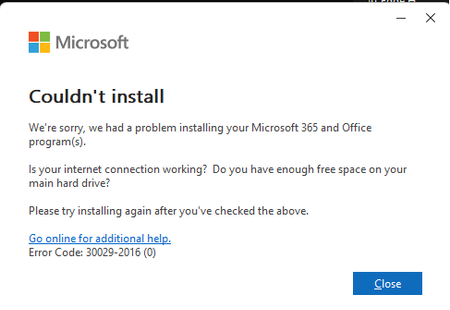
Setup error installation Office 365
Hello everyone, I am having problems installing Office within my company, and I cannot find a solution to this problem. The following errors appear to me both when using the setup.exe that I download from my Office365 profile, and when using the xml configuration file. I hope for your help, I am quite desperate.1.1KViews0likes1Comment
Searchable add-in list for Office 365 ProPlus
We are very pleased to let you know that the first searchable list of Office add-ins is now available. It contains over 950 popular COM add-ins, along with their Office 365 ProPlus readiness classification. You can use this list to search for your addin by name in your local language and find out whether it is already being used by enterprises who are on Office 365 ProPlus. What does the classification mean? This file provides a readiness classification for a set of popular Office add-ins. The classification is based on information from devices that share telemetry data with Microsoft and represents the usage patterns for these addins in Office 365 ProPlus environments. The classifications are: Insufficient Data - too few devices are sharing information for this add-in for Microsoft to categorize its adoption. Adopted - we see a positive usage pattern on Office 365 ProPlus. Contact Developer - there may be compatibility issues with this solution, and thus Microsoft recommends contacting the software provider to learn more. How can I use this file? You can access the classification list at http://aka.ms/addinreadiness. Simply select your required filters using the dropdowns, and search (Ctrl-F) for the name of the add-in you are interested in. You will find the classification to the right of the add-in name detail. If you don’t find the add-in you are looking for, please fill out this form: Office Add-in List Feedback Form. Please provide as much information as you can to help us identify the relevant add-in. What’s next? We will continue to improve our add-in classification list over time. Using your feedback, we will expand the set of add-ins that are included in the list, and provide a readiness classification for them. As our telemetry data grows, we will use it to improve the way we classify add-ins and the accuracy of our readiness information. We will also add new information such as the publisher of the add-in, to make it even easier to find the add-ins that you are interested in. Note: This list relates to Office COM add-ins and as such is separate from the Web add-ins which are found in the store. COM add-ins are usually obtained directly from the company that develops them, and may be installed by themselves or as part of a larger solution.