administrator
163 Topics
Static Tab and Chat Tab Order Is Not Persisting in Microsoft Teams
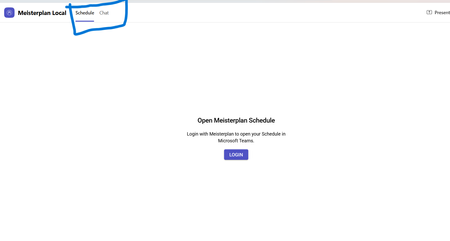
manifest file: "staticTabs": [ { "entityId": "schedule", "name": "Schedule", "contentUrl": "...", "websiteUrl": "...", "scopes": ["personal"] }, { "entityId": "conversations", "scopes": ["personal"] } ] the Schedule tab is intentionally place before conversations: it initially appears correctly, but after navigating away from the app and returning, Teams places Chat/Conversations before Shcedule. I'm using schema version 1.12. The tabs are configured in the specified order in the manifest file, and the expected tab order is displayed correctly when the app is initially opened. However, when I navigate to the Chat section, the tab order changes and does not persist as defined in the manifest file.93Views0likes0Comments
Regarding Teams Meeting Media Transport Behavior in VDI Optimization Scenario
Hello Microsoft Teams Engineering Team, I am currently working on a Browser Content Redirection / media offload implementation for a VDI environment, where WebRTC media transport is handled through a local native component while the Teams application continues running inside the virtual desktop session. While testing, I observed that: 1:1 calls successfully receive audio and video media But in meetings auido / video RTP is never forwarded despite successful ICE, DTLS, and SRTP establishment DTLS ApplicationData traffic is present during meetings, suggesting DataChannel/SCTP activity Based on transport-level observations, it appears that Teams meetings may rely on SCTP/DataChannel communication for SFU video subscription management, while 1:1 calls do not require the same subscription flow. I wanted to ask whether: Teams meeting video forwarding depends on active bidirectional SCTP/DataChannel connectivity Meeting video subscriptions are expected to be coordinated over the WebRTC data channel/control plane Split ownership of media transport and control-plane transport could affect expected Teams meeting behavior in VDI optimization scenarios Thank you for your time and guidance. Best regards,Rajdev99Views0likes0Comments
Feature Request: Real-Time Multilingual Voice Translation in Microsoft Teams
Hello Microsoft Teams Community, I would like to suggest a feature for Microsoft Teams that could help multilingual users communicate more naturally during meetings. Feature Idea: Each participant can speak in their own native language, and Teams will automatically translate and play the speech audio in the listener’s selected language in real time. Example: Telugu speaker talks in Telugu Kannada user hears Kannada audio Hindi user hears Hindi audio English user hears English audio This would be more powerful than subtitles because users can continue conversations naturally in their mother tongue without needing to read captions constantly. Possible Technologies: Speech-to-Text AI Translation Text-to-Speech Real-Time Voice Streaming Benefits: Better communication in multilingual countries like India Improved accessibility Easier collaboration for global teams More inclusive meetings I believe this feature could significantly improve communication in international and regional meetings. Thank you.135Views0likes0CommentsIssue with Teams 'Add a User to Group Chat' API call?
I am getting a very strange error when trying to add a new user to an existing group chat using a GraphQL call. I have looked through the documentation, asked AI, and even contacted Microsoft support and no one can seem to explain why this API call is failing. Below is the API call that I am making. I can find no reason that I should be receiving the error message '#microsoft.graph.aadUserConversationMember' To get the basic questions out of the way.... Yes, the account making the API call DOES have permission to add users to the channel (and can do so using the frontend as normal.) Yes, the thread in question is a group chat, so adding members to that chat should be a valid command. Yes, ALL members in the group chat currently have the type '#microsoft.graph.aadUserConversationMember', so it is definitely a valid type for users in this channel. Yes, I have tried both the beta and stable channel; each gives the same error message. Yes, the invited user is internal to our organization, and is a valid target for the invite (invites work through frontend as well.) No, I cannot use the 'add member to channel' endpoint, because the chat is a group chat, not a channel. I can only assume, at this point, that the error message is a red herring and there's something else wrong with my API call?Why am I receiving this error message when trying to add a member to a pre-existing group chat? Thanks in advance for any assistance. POST to URL: https://graph.microsoft.com/beta/chats/[[THREAD_ID]]@thread.v2/members BODY: { "@odXXX.type": "#microsoft.graph.aadUserConversationMember", "roles": [], "email address removed for privacy reasons": "https://graph.microsoft.com/v1.0/users/[[USER_ID]]" } ERROR MESSAGE: {"error":{"code":"BadRequest","message":"The provided '#microsoft.graph.aadUserConversationMember' for 'odXXX.type' is not valid for this operation.","innerError":{"date":"2026-01-29T18:10:32","request-id":"<PII:moderator removed>","client-request-id":"<PII:moderator removed>"}}}688Views0likes9CommentsCreate Bot without Developer Studio
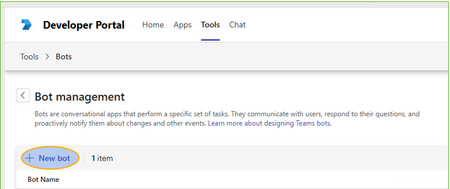
Hi, We have a bit hard policies and users are not able to use the Developer Studio by they own to make new Bot: If you press [New Bot] you can give the name, but then [Create Bot] start hanging and does nothing. Previously on Azure had a user setting which block or allow users to register apps. Now I need our tenant admins or application administrators (?) to setup the bot(s) manually. Does anybody knows if the bot registration for Teams is possible to do without developer studio? The Developer Studio shows only your own Bots, so they cannot do that for me using Developer Studio.341Views0likes3Comments
SSO for a Python Teams Bot (M365 Agents SDK + FastAPI) — Single-Tenant, Multi-Tenant, and UAMI
We're building, a Teams bot (Python / FastAPI) that uses the M365 Agents SDK (microsoft-agents-hosting-fastapi + microsoft-agents-authentication-msal, v0.8.0) with a CloudAdapter and MsalConnectionManager. The bot is currently scoped to personal only and runs behind an Azure Bot resource. We are trying to implement SSO to authenticate users, so far we are not successful. The main blocker is that we failed to authenticate users from tenant different than the Azure Bot resource of our app. If anyone has successfully managed to authenticate users on Teams using a setup similar than ours please do share your experience. We would love to learn from your experience. So far this was our main source of documentation: https://learn.microsoft.com/en-us/microsoftteams/platform/bots/how-to/authentication/bot-sso-overview Many thanks205Views0likes1Comment
Get all AA/CQ with Resource Accounts
Hello Is it possible to have a script that pulls out all AA/CQ with resource accounts. I would like to pull it to find out which of the AA/CQ do not have resource account. If there is no resource account the field would be empty. Regards JFM_12Solved288Views0likes4CommentsAll Teams Bots Not Working At All
This morning all of a sudden all our Teams bots stopped working. These are bots built using bot framework running on Azure Bot Teams Channel. Is this related to the current Teams API issue we talking about? All of a sudden all our client and test bots stopped working. But the Web Channel is working as expected. Only the teams channel. We even checked with ngrok and its not even hitting the service. We checked the app registrations and their credentials as well to ensure not issues there too. Completely lost whats happening. Help?447Views0likes2CommentsAdd Teams Chat Member API call inexplicably Failing
I have tried every possible permutation of this API call that I can imagine. Nothing works. I already started a thread on this, but now it appears to be glitched and I can no longer reply to message sin that thread for some reason. What can I do to contact Microsoft Support and speak directly to their API team? The responses I have gotten all appear to be AI generated and NONE ARE CORRECT. I really need help, from a human, that actually might understand what's going on here. Please help. "#microsoft.graph.aadUserConversationMember' for 'odata.type' is not valid for this operation." <- I am receiving this error despite the fact that we already have several users in this channel with that same type. This API call is intended to invite a user to an existing group chat. This should really be a very simple thing. 1. ALL users in the group chat already have type = '#microsoft.graph.aadUserConversationMember' so the error message doesn't even make sense. 2. This IS a Group chat. NOT a channel. NOT a one on one chat. 3. The Inviter has permission to invite users to this groupchat through the frontend. (and in fact can do so using the frontend.) Why is this API call failing? I have tried scrubbing the API call of special characters, I have tried using the beta endpoint, I have tried several different formats for the input. ERROR: {"error":{"code":"BadRequest","message":"The provided '#microsoft.graph.aadUserConversationMember' for 'odata.type' is not valid for this operation.","innerError":{"date":"2026-02-10T19:11:28","request-id":"XXXXX","client-request-id":"XXXXXX"}}} POST URL: https://graph.microsoft.com/v1.0/chats/IDHERE/members BODY: { "chatType": "group", "\u0040odata.type": "#microsoft.graph.aadUserConversationMember", "user\u0040odata.bind": "https://graph.microsoft.com/v1.0/users/IDHERE", "roles": [] }329Views1like4Comments