administrator teams
10 Topics
Can I block upload of data based on DLP Policy and/or Sensitivity Label?
Hi everyone, Is there a way to block users from uploading files to the cloud that are identified as Sensitive Information Type/DLP or marked with a Sensitivity Label (SL) via OneDrive Sync and Teams (Windows app)? I know you can block the web version of Teams through Defender for Cloud, but that is not enough. This is because some customers don't want their data to be sent or stored in the cloud. This means that the data needs to be blocked before it reaches the cloud. Users' devices are all managed by Intune and use M365 Apps for Enterprise. Only certain customer data must not be uploaded to the cloud, so we want to use SIT/DLP and SL to identify the data. The solution can be a third party agent/app that needs to be installed on the device. Thanks in advance.Solved17KViews1like3Comments
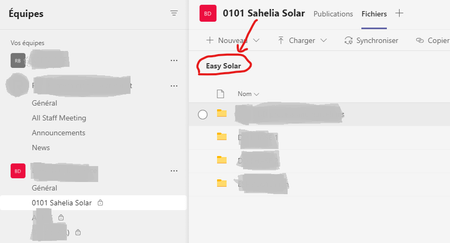
Name in "Files" tab isn't the same as Channel's name
I have the same problem as described in the discussion 1538516 , i.e. user created a channel on teams, later the name of the channel was changed, but the name of the "Files" folder keeps the original channel's name (see image below). The resolution in the discussion 1538516 was "Within the files tab, click the globe in the top right corner and this will take you to the SharePoint document library where you can update the settings." I conducted the steps as described, but I am getting the following error (I am performing this operation using a Channel Owner user): Any ideas? Best,Solved4.1KViews1like2Comments