admin
34 TopicsMigrate content from Box, Dropbox, and Google Workspace into Microsoft 365 - release update
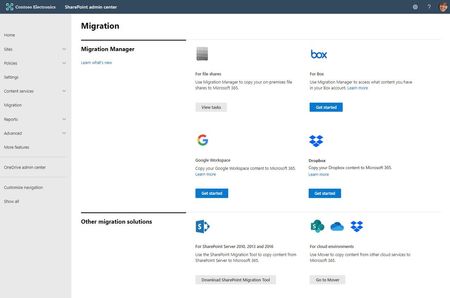
Microsoft focuses on providing a seamless move to Microsoft 365 with as much expertise and tooling we and our ecosystem can offer – across the globe. Our goal is to help move to the cloud with confidence. At times, you need to move content cloud-to-cloud. We’re pleased to highlight Mover integration progress, to bring more of their technology directly inside the SharePoint admin center in Microsoft 365. Now, the Migration Manager admin tab is the home to manage all content migrations into Microsoft 365 (primarily into OneDrive, SharePoint, and Microsoft Teams) – without leaving the service.22KViews6likes4CommentsSharePoint Online Content Security Policy (CSP): Enforcement Dates and Guidance
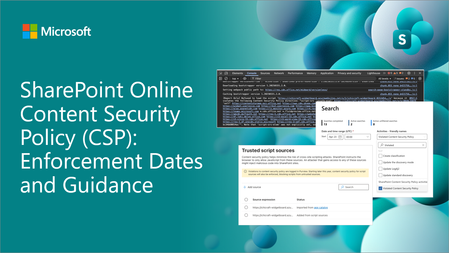
Content Security Policy (CSP) is a critical browser security feature designed to protect web applications. SharePoint Online is rolling out CSP enforcement for all tenants starting March 1, 2026.2.7KViews1like10CommentsMigrate your content into Microsoft 365
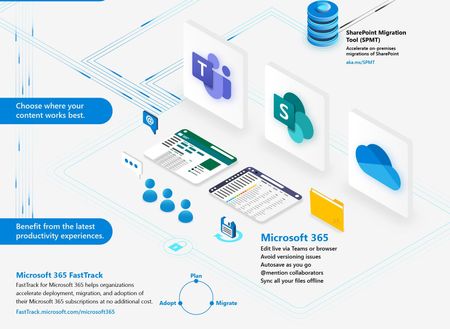
The latest productivity experiences await you and your content. Once in Microsoft 365 – you will see improved collaboration, increased security, and compliance. Our goal is to help all customers to easily migrate their content to Microsoft 365. Learn about the numerous content migration tools and services from Microsoft and our 3 rd -party migration partners. This is collectively the broadest set of offerings to assist your migration into Microsoft 365 – from assessment, to planning and onboarding.43KViews8likes3CommentsAnnouncing SharePoint eSignature for Microsoft Word
We are excited to announce that SharePoint’s native eSignature service is now integrated with Microsoft Word. This new capability allows you to request electronic signatures directly from Word documents, without the need to manually create PDFs. By bringing eSignatures into the flow of Word, you can create eSignature templates, accelerate document approvals, eliminate physical signing steps, and maintain compliance and security within the Microsoft 365 environment. Figure: Invoking SharePoint eSignature in Word Key features: Seamless Word integration: You can insert signature fields into Word documents and request signatures without leaving the familiar Word interface. The eSignature functionality is accessed from the Word Insert ribbon and eliminates toggling between applications or converting files to PDFs before sending for signature. Automatic PDF creation & storage: When you send a signature request from Word, recipients will sign an automatically generated PDF copy of the Word document. The signed PDF is saved in the same SharePoint location as the original Word file. Your document never leaves the Microsoft 365 trust boundary during this process, ensuring end-to-end security and compliance. Word documents as eSignature templates: You can reuse your Word files as eSignature templates, streamlining repetitive signing processes. Integrated audit trail and notifications: SharePoint eSignature provides built-in tracking. Both senders and signers get email notifications throughout the signing process, and you can view the activity history (audit trail) in the signed PDF to verify when and by whom it was signed. Security and compliance controls: Administrators have control over how eSignature for Word is used in the organization – it can be enabled for specific users via an Office group policy and even limited to certain SharePoint sites. And SharePoint eSignature enables logging of eSignature activities in the Purview Audit log. “SharePoint eSignature for Word gives us a seamless, compliant, and secure way to complete documents directly within Microsoft 365. It streamlines our workflows and increases security by keeping sensitive content inside our trusted environment—eliminating the cost and complexity of third-party tools.” Cloudwell, SharePoint eSignature for Word early adopter How to request a signature in Word Figure: Requesting eSignatures from Word Open a document in Word Desktop: Make sure your Word document is saved in a SharePoint site that has SharePoint eSignature enabled. Insert a signature field: Go to the Insert tab on the ribbon. You will see an option ‘eSignature fields’ (if enabled by your admin). Insert signature fields at the appropriate location in your document where a signature is required. Add recipients and a note: Add the internal or external signers email addresses and optionally include a note for the signers. The note will be included in the mail sent to the signers. Send for signature: Once you’ve filled in the request details, send the request. SharePoint eSignature will automatically create a PDF version of your document and send a secure signing link to the designated signers. The signer will receive an email invitation to review and sign the PDF document. Automatic saving and notification: The signed PDF is saved into the SharePoint library, right next to your original Word document. You can now open the signed PDF to review the document. Once the request is sent, you can immediately send a new request or use the document (with the eSignature fields already inserted) as a template for future agreements. “I can see the integration of SharePoint eSignature, in Microsoft Word, being a game changer for our users. With native eSignature capabilities, our users can initiate and complete the signing process without ever leaving Word. This eliminates friction points allowing our users to stay in the flow of their work.” SharePoint eSignature for Word early adopter, Europe. Benefits of SharePoint eSignature for Word SharePoint eSignature for Word simplifies and accelerates the signing process, offering several key benefits: Faster turnaround: By enabling direct signature requests from Word, you remove manual steps (like printing, scanning, or converting Word documents to a PDF). Enhanced productivity: Users stay in the flow of work. There’s no need to switch focus to send documents for signature. Reusing Word documents as eSignature templates means you don’t have to start from scratch for each new request. Compliance and security: Documents are kept within your Microsoft 365 trust boundary during the signing process. "The feature itself is very user-friendly. One aspect that we particularly appreciated was the automation of the PDF conversion step. Being able to initiate the e-signature directly from Word eliminates the need for manual PDF conversion, making the entire process much more efficient.” SharePoint eSignature for Word early adopter, North America Availability and rollout SharePoint eSignature for Microsoft Word is now rolling out to devices on the M365 Beta and Current Channels and will complete by early July for the United States, Canada, United Kingdom, Europe, and the Australia-Pacific region. It will be available globally by the end of 2025. Getting started: How to enable this feature To use eSignature in Word, a few steps are required by administrators: Enable SharePoint eSignature: First, your tenant needs to have SharePoint eSignature configured in the Microsoft 365 Admin Center and the Word checkbox enabled. Apply a policy to allow Word integration: Once the service is enabled, apply the policy “Allow the use of SharePoint eSignature for Microsoft Word.” Once this policy is enabled (via Intune, Group Policy manager, or the Cloud Policy service for Microsoft 365) it will activate the Word ribbon capabilities for your users. Client requirements: Users will need to be on Word Desktop using the Microsoft 365 Current Channel (or Beta Channel). To learn more about SharePoint eSignature configuration and usage, check out Overview of SharePoint eSignature - Microsoft Syntex | Microsoft Learn Feel free to add any comments or questions below. Thanks!5.3KViews9likes0CommentsRemote Event Receivers retirement update in SharePoint Online
Remote Event Receivers are retiring as part of the announced SharePoint Add-In and Azure ACS retirements in SharePoint Online, but we've listened to your feedback and provided an option that will stay longer available and we're further improving webhooks to be a better alternative for Remote Event Receivers8.2KViews4likes32CommentsGoodnight Subsites - a holiday story for IT
In the great server room, propped up in the cloud, is an IT Pro with solutions so proud. "Goodnight subsites, goodnight single bloated site collection." And to all the modernized things in the humming datacenter—to the picture of weary site owners not sleeping nights, to frustrated users suffering frights, to broken links and broken permissions, to everything one by one—the brave information architect says goodnight. One of the most beloved tech PDFs of 2021, Goodnight Subsites is a must read for every IT bookshelf and a holiday gift for Microsoft 365 migrators and each and every hub site creation event.15KViews20likes9CommentsJust One Week Away from Our Digital SharePoint Event!
Join us next week Wed, Jan. 29, 2025, at 9 AM – 10 AM PST for our upcoming SharePoint event! 📝Register today-https://aka.ms/SharePointEvent And now, a word from Jeff_Teper about what to expect from the event: From Concept, to Creation, to Impact! Join Jeff Teper, CJ Tan, & Melissa Torres to explore the latest SharePoint capabilities and see how our customers are leveraging some of the latest tools. Discover new features, tips, and tricks to push boundaries. Whether you create sites, publish news, manage workflows, collaborate, or just want to learn more, this event is for you! Skill up your SharePoint IQ with the latest on: Simpler authoring & more compelling content – Lower barriers to create professional-looking content and ensure you can harness the best of what the web has to offer for your intranet Greater engagement & reach – Scale your message to meet people where they work. Copilot and agents, powerful workflows, and automation– Build automated subject matter experts and save your team time while managing and automating content workflows. We will also have dedicated time during the event for live Q&A where you will get to interact with multiple product makers – bring your questions and feedback. Summary of event information Event name | SharePoint: From Concept, to Creation, to Impact + Live AMA Date/time | Wednesday, January 29, 2025, 9:00 AM – 10:00 AM PST. Location | Online - Register today: https://aka.ms/SharePointEvent. Add to calendar | Save this event to your calendar. Engage with us on social You can engage with our current social posts or show us your excitment using #SharePoint or #SharePointevent M365 LinkedIn SharePoint X social handle Related resources Jeff Teper announcement blog-https://aka.ms/SharePointEvent/Blog "Ignite 2024: Agents in SharePoint now in general availability” by Adam Harmetz. Microsoft Ignite 2024 breakout session: Reimagine content management with agents in SharePoint. Subscribe to the SharePoint blog. Follow us on social. Learn more about SharePoint.1.3KViews1like0Comments