admin
17 Topics
Subtasks - What level is needed?
My company is looking into utilizing our Planner so that multiple people have access to the same plan, but for the team to create subtasks we have to purchase premium plans. What level (1, 3 or 5) is needed to create a subtask? The breakdown found https://www.microsoft.com/en-us/microsoft-365/planner/microsoft-planner-plans-and-pricing does not specify subtasks.3KViews1like2Comments
Microsoft Project Service Core Jan 2026 Update locked Plans table
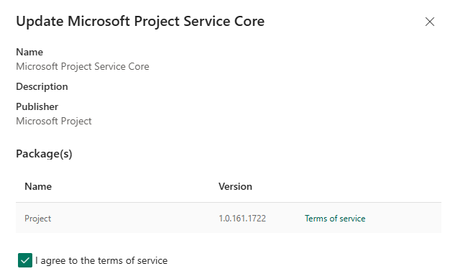
We recently noted the Microsoft Project Service Core was updated to 1.0.161.1772: This update has locked our Plans table, no changes are allowed to the forms and creating new columns is greyed out: We cannot make use of Planner in our model driven app (Planner Premium, non-default environment). After a new Plan is created, the user receives this message when opening the Plan: Two days ago we were in this version 1.0.160.2874): and everything was working as expected. Any guidance would be much appreciated as we are not sure if this is a permanent lock or once the update cycle is completed we will be able to go back to edit Plan forms and columns. Thank you in advanceSolved2.2KViews9likes14Comments
Can we customize; Create a Premium Planner, Bucket and Tasks using Graph api
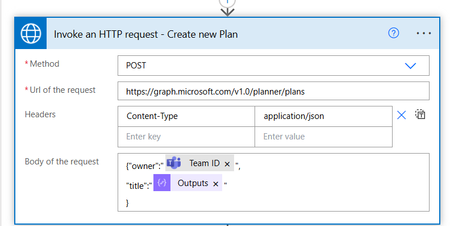
I have the following 3 Graph API calls to create a standard planner , then bucket inside it and its tasks:- This is working for standard planner, but not sure how to do the same for premium planner ? Thanks1.7KViews1like1Comment
Nested Parent/Subtasks in Board View
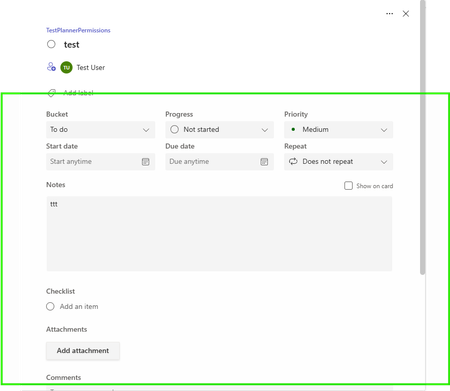
I recently upgraded to planner and project plan 5 (planner premium), with one of my most anticipated features being subtasks and dependencies. My group usually uses board view to look at our tasks, but if I make a parent/subtask relationship in the grid view, the parent task is not shown in the board view. I know most people use one plan for one specific project, but my tech impaired supervisors need one place to look at all projects, so I need to have everything in one plan to reduce difficulties in navigating planner and finding tasks. I am testing out using portfolios for this reason as well. I am hoping someone else has the same wish and this can become an action item in the future.499Views2likes1Commentlicense to access Planner Premium from Power Apps
We want to create a Power Apps that connect to those main sources:- 1) SharePoint 2) Premium Planner now i know that connects Power Apps to Premium Planner will make the Power Apps as premium app, and users will need premium power apps license to access it. and also accessing Premium Planner will need atleast Planner Plan1. so what is the minimum license for those 3 groups of users:- 1) normal users will be accessing SharePoint lists only through the Power Apps 2) Admin users will be accessing SharePoint lists and Premium Planner through the Power Apps + Premium Planner through the Premium Planner UI. 3) Senior user will be accessing SharePoint lists and Premium Planner through the Power Apps only. does Planner Plan1 is enough for Senior user? and does Power Apps Premium is enough for admins? Thanks398Views0likes1CommentError importing Project Accelerator for Project on the web in power apps
I want to import the Project Accelerator solution for Project for the web (Project Plan 3). The solution can be downloaded form github https://github.com/OfficeDev/Project-Accelerator I am using a 30 day free trial version of M365 Business premium and Project planner premium with Project Plan 3. The suggested method to install the solution (as per above github repo Maintained by microsoft) is using http://powerapps.com/ > solutions > import solution upload the zip file download from the github page. I have global admin rights and using the default environment, and Rights to create Power Automate flows using the Common Data Service connector. However, when I get the following error message Solution "Project for the web Accelerator" failed to import: OptionSets import: FAILURE: SecLib::CheckPrivilege failed. User: XXXXXXXXX-XXXXX-XXXXXX, PrivilegeName: prvCreateOptionSet, PrivilegeId: XXXX-XXXX-XXXXX Required Depth: Basic, BusinessUnitId: XXXXX-XXXXXX--XXXXXX, MetadataCache Privileges Count: 5443, User Privileges Count: 1632 I am login in as the global administrator so all permissions must be already in place. In the Power Platform Admin Center, Environments > Settings > Users + Permissions > Security Roles and checked the user's assigned roles. All seems ok. Any help will be most useful.284Views1like2Comments