activity
645 Topics
Is Teams especially the class notebook being very slow?
Has anyone else noticed Teams being slower this last two weeks? What about class notebooks? Ours are taking more than an hour to distribute a simple page. Is that just us, or is anyone else experiencing that? What can you suggest to make it faster, how it was previously? Thank you.67Views0likes0Comments
Teams to show offline despite having mobile app
Hi, So I'm sure most of us aware, if you have Teams mobile app installed and signed in, you never show as offline, unless you appear offline. If you go offline on your desktop app, you simply show as "Away" due to having the app on your mobile device. Is there anyway to stop this, and have it show as offline once you quit the desktop app, regardless of having the mobile app? Thanks, Zeb13KViews1like2Comments
Automatic initials are taking my business
Hello everyone, I'm a software developer, mostly based in Germany. I have a M365 Business Account and am using Teams as part of it. Since automatic initials, instead of generic profile pictures, became a thing, I'm constantly in a hurry to change my profile picture as soon as possible. This is because my initials are SS, which in the German culture is the abbreviation of the company responsible for the death camps during Nazi Germany. People are so upset about it that I even had customers not do business with me. They saw the SS initials in calls and thought I was using this on purpose to make a political stand, i.e. being in favour of the industrial scale mass murder of several million people. I'm not. So here is where my frustration is with Teams, which I'm paying for, and which is taking my business away with its stupid initials: I cant change the initials without changing my name I cant populate my picture to outside orgs preventing the initials from being shown This leads me to the incredibly uncomfortable situation that every time I connect to a new client, I need to discuss my distancing of the genocide 80 years ago before actually being able to commence a meeting. Not a very happy topic and as mentioned before I have lost business because of it. Is there please, any solution to this, that doesn't involve having to change my name? Kind Regards Sebastian235Views1like4Comments
Planner task comments no longer send email notifications – critical regression
This change removed a previously existing core functionality without providing an adequate replacement. With the new Planner experience, task comments no longer trigger automatic email notifications to assigned users. This breaks a critical communication mechanism that many teams relied on for reliable task coordination. As a result, assigned users are no longer consistently informed about updates, introducing a high risk of missed information and operational issues in day-to-day work. There is currently no supported or enforceable alternative to ensure users are notified. Previous behavior: Task comments triggered automatic email notifications Assigned users were reliably informed Communication was traceable and consistent Current behavior: No automatic email notifications No configuration to restore this @mentions required (manual, error-prone, not enforceable) Microsoft Support has confirmed that this is by design and cannot be reverted. From an enterprise perspective, this is not just a design change, but a regression of critical functionality without an equivalent replacement. Request: Please restore automatic email notifications for task discussions or provide a reliable, enforceable alternative for notifying assigned users. Question to the community: How are you handling this change in real-world scenarios? Switching tools? Enforcing @mentions? Moving communication out of Planner? Would appreciate hearing how others are dealing with this.1.5KViews4likes8Comments
Teams meeting history
Seems like I have to be missing something, but I can't find this anywhere: where do I see a history of meetings I have joined in Teams (e.g., when I joined, when it stopped, and the duration)? I see "calls" under "History" in the "Activity" space, but don't see meetings, and through searching on here and online more generally, don't see a way to get that info.294KViews3likes15Comments
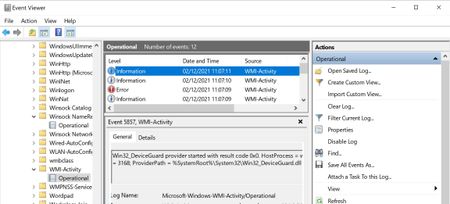
Win32_DeviceGuard and Win32_TpmProvider triggering errors and network spikes since 20H2!
Hello, since upgrading to Windows 10 Pro 20H2 from 1903. The following start up after 5 minutes. These are... Win32_TpmProvider provider started with result code 0x0. HostProcess = wmiprvse.exe; ProcessID = 3188; ProviderPath = C:\Windows\System32\wbem\Win32_TPM.dll And Win32_DeviceGuard provider started with result code 0x0. HostProcess = wmiprvse.exe; ProcessID = 3188; ProviderPath = %SystemRoot%\System32\Win32_DeviceGuard.dll Unfortunately they are triggering massive network activity even if it is for a few seconds.. This is triggering this error Id 5858 = {00000000-0000-0000-0000-000000000000}; ClientMachine = DESKTOP-XXXXX; User = NT AUTHORITY\SYSTEM; ClientProcessId = 4912; Component = Unknown; Operation = Start IWbemServices::ExecQuery - ROOT\CIMV2 : SELECT ID FROM Win32_ServerFeature; ResultCode = 0x80041010; PossibleCause = Unknown After restarting computer, no more errors and this doesn't occur again until the next day, back to square one again. But this is just like UPFC.exe. I think this is some sort of telemetry that Microsoft implemented every day to happen once at least.6.7KViews1like6CommentsImages compressing and sending on team.
Hey everyone, I'm facing an issue with Team. When I try to send over 20 images, each around 20MB to 10MB in size, they won't go through. I've tried using online tool such as https://jpegcompressor.com/ to compress them, but it only supports up to 10MB images. I need a solution or software that can compress them easily so I can share them with my colleagues hassle free. Thanks, and regards, Jiya Hana.829Views0likes1Comment
Teams auto selecting "Missed Calls"
I have the calls tab selected. On that tab I have "All" selected. I then click the Activity tab. Teams is selecting "Missed" on that tab. Why is it selecting "Missed"? The issue is when I click back to the calls tab Teams then selects the "Missed" on the calls area. Now if I click on "All" on the Activity tab and then click back to the Calls tab everything is fine. Seems like it is auto selecting stuff for me I didn't ask it to do.178Views0likes2Comments
Teams availability status - admin way to manage this?
We have some staff here who seem to be abusing the Teams status feature: they indicate they are "available" when they are away from their desk/computer. Management here as inquired if there is a way to enforce the Teams feature where it normally shows inactive after a few minutes. Is this possible?580Views0likes3Comments
Teams Reconnecting
Every time I reconnect to Teams I get the following message at the top of my Teams windows "Loading latest updates... in the meantime, you can still send and respond to messages". The message does not go away. It does not make it clear whether if I can really send and respond to messages. Does anyone have insight to how this behavior works?4KViews4likes3Comments