accessibility
24 TopicsI want to turn off or hide the draft with copilot dingbat that follows my cursor around in MS Word.
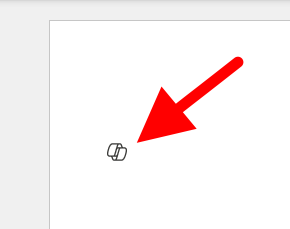
I have seen a few articles on this website, and I know it's not possible but I'm going to ask anyway. For reference this is what I'm referring to: It's more I find the little thing following me around on my screen to be annoying and distracting, I've managed to hide or disable anything related to copilot on my system except this little dingbat. When a new document is open you get a little message that says "Select the icon or press Alt + i to draft with copilot" It would be nice if I could hide that as well, yes copilot is a *feature*, and I don't care about it. I also want to hide the paste with copilot and just used the local paste options that were built into previous versions of word. I suspect that there is a copilot dingbat that is stored somewhere on my system, possibly in a font, and as I have already made a few detrimental modifications to my operating system registry, I'm not wary of messing up my computer any more than it could be. The only saving grace I have at the moment is there is an issue with my account, so any accidental triggering of the feature causes it to crap out. (So long as I don't accidentally press the 'fix account" button) I know that if it was easy to turn off there would be a button for it, I know Microsoft probably wants us to use this feature because it means more data for them to collect, an I'm disappointed in the loss of user agency that's resulted from this rollout, and there's a spike in animosity towards AI in general.Solved43KViews22likes39Comments
Agent not visible in M365 Copilot
I created an agent in M365, including its name, description, instructions, and required actions. The agent is properly tested in Copilot Studio and published, but it is not visible in the M365 Copilot agent list. Interestingly, one agent is visible while the other is not, and I am unable to determine the issue.14KViews0likes9Comments
Copilot connection to Powerbi
Hi Everyone. Currently trying to make a connection to our PowerBi platform through Copilot Studios. So far i keep getting a connection failure. I have tried to adjust our security settings in Active Directory. I have tried adjusting the permission on the workspace and access to the datasheet. When i use the Json query to extract on the columns in the giving table i just get a connection error. even though the connection seems valid. Any suggestions on how to proceed?263Views1like1Comment
Issues with copilot
Until today, I have linked my univeristy email with copilot which has given me access to copilot plus. I have been able to upload files and have multiple chats open. Now it has deleted my previous chats and gone down to 1MB file limits. Was it only a free trial or is it broken?295Views0likes2CommentsCopilot+ PC keyboard - How to make the "Copilot button" work with Microsoft 365 Copilot
Hi All, I am using a Lenovo ThinkPad T14s Gen 6 - 14" - Qualcomm Snapdragon X Elite - X1E-78-100 - 32 GB RAM - 1 TB SSD - Nordic. It has the Copilot+ PC keyboard with the "Copilot button". I also have a Microsoft 365 E5 license and the add-on Microsoft 365 Copilot license. I am seeking guidance on how to configure the "Copilot button" on my Copilot+ PC. I have noticed that this button reacts differently on various devices, and I understand that it may connect to different versions of Copilot, from the “Home” version to the Microsoft 365 Copilot Enterprise version. Specifically, I am looking for a Microsoft guide or any instructions on how to configure the "Copilot button" so that it brings up the Copilot on my device, rather than acting as a regular menu button. My assumption is that some of the configuration can be done locally on the device, while other settings might need to be adjusted in Intune. Thank you for your assistance.407Views0likes1Comment
Copilot thinks I am not an adult
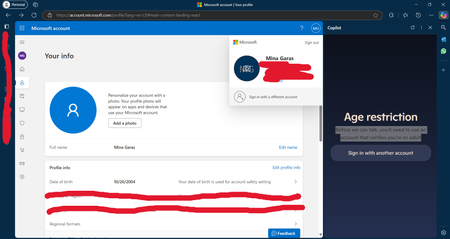
a few days ago, my copilot account stopped working with an error message "Age restriction" I checked my birthdate set in my account and it is set right. I am 20 years old. Contacted microsoft support and they said I should post here. Any help?771Views2likes4Comments