accessibility
143 Topics
output sound just stopped win 11
Hello, Recent upgrade to win 11 from win 10, from a certified MS reseller. All was fine for about 2 months.......THEN... one day my old guy analog mini jack plug in speakers just stop working. Have verified the following: Driver OK, Win Update OK, mini jack cord OK, speakers verified with other source-OK I do get a buzzing in the speakers when I first introduce the jack to the inlet, but when fully inserted, silence. Also no sound in PC speaker and no sound to plug in head phones. Neither youtube, nor zoom has sound output. Brower window does not have option for any sound. Speaker icon is "x"'d out. PC Settings has no option for adding wired device. No pop up to acknowledge new plugged in device, like win 10 had.Solved7.3KViews0likes1CommentList of all RSS feeds?
Before the community update, I've been programmatically collecting a list of RSS feeds to subscribe to, by scraping https://techcommunity.microsoft.com/t5/custom/page/page-id/Blogs. The page is gone and the "successor" https://techcommunity.microsoft.com/Blogs does not include a list of blogs in the HTML. Can you please point me to the new resource?3.7KViews0likes3Comments
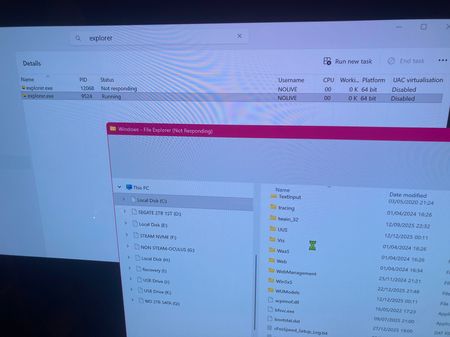
W11 Black screen on Desktop. Explorer issue
Hello. first post in this community as I am having a dreadful issue. I was transferring some files form a my PC to a smartphone and Explorer crashed, without warning. I rebooted my PC and after the W11 Opening screen where you enter your password, I got stuck on a black screen. My mouse was working and I could get to the Task Manager with my wireless keyboard too. Looking at similar issues on the net, I believed that my System files got corrupted during the files transfer I was doing, lucky me....... Anyway, I managed to open a CMD and get SFC/ scannow and the 3DISM commands to run fully. I was optimistic it would fix the issue. It didn't. If I open Task Manager I can see Explorer "running" but without any CPU activity. And trying to access the Exe location got me stuck at Not responding prompt. what are my Options before a Windows reinstall? I am on W11 PRO H2/2025 if that helps at all. thanks so much2.8KViews1like2CommentsRSS feed parameters?
I'm setting up my new RSS reader and I'd like to also have the history in my reader. I know that I can pass the size parameter to the RSS endpoint, like so: https://techcommunity.microsoft.com/plugins/custom/microsoft/o365/custom-blog-rss?size=200 But a size of 200 does not cover the entire blog post history. This is only good for daily aggregation, although 25 should be enough on an hourly basis. Anyway, when I increase the number, at a certain point I receive a "Gateway Timeout: The proxy server did not receive a timely response from the upstream server." I'm wondering if there are more parameters to shape the returned RSS result. Perhaps even pagination? I know that there is a parameter label and a parameter board. I tried if there is a parameter page, but there isn't. Is pagination available with your RSS plugin? Or perhaps, if you could share the list of options I have, that would be greatly appreciated!2.2KViews0likes1Comment
Cant install ElGato Studio
unable to downlaod the latest framwork performed clean boot Hello! I contacted Windows support, but they couldn't help me. The guy tried to help me download Elgato Studio, but he still wouldn't let me because it needs: Microsoft.VCLibs.140.00.UWPDesktop. The above are the steps he took.Solved1.8KViews1like2CommentsTrouble zooming in on an image in a post
Let's say I visit a blog post like this one: What’s New in Microsoft Teams | May 2023 - Microsoft Community Hub. There is a screenshot on this post that I want to look at more closely but it's too small to read the text. If I hover my mouse over the image, the cursor changes to a "plus sign magnifying glass". Great—I should be able to see it bigger! However, when I click on the image, it opens in a "lightbox"-style popover as I might expect, but it's now smaller than it was in the post itself. I eventually discover that there is a "full-screen" button barely visible in the top-right corner when I mouse over the picture which does display it larger, but it also switches my browser to full-screen mode, which I did not want. I hope you will agree that there is an opportunity here to improve the user experience.Solved1.7KViews2likes7Comments
Unable to post, flooding error
Help!! I have just wasted 3 hours trying to post a question. I kept seeing errors of asking me to correct the highlighted errors and try again. And it said that maximum flood limited reached. I found previous message of someone facing the same issue. And some said to disable the setting of allowing HTML. I did it but it doesn't work. Please help!! Thanks, Jason1.6KViews1like23Comments
My Files Explorer not working on Xbox One
So I have been trying for a week now to get My Files Explorer on my Xbox One to work. There is this folder that should show up called Isolated Stroage which allows everyone to access all of their files and no matter what I do or no matter how hard I try, it is still not showing up! I re-purchased the app because maybe I thought that is what I needed to do. Before that, I clicked on “add new folder” and selected “add folder to library” multiple times because I looked up video tutorials which said to do that. Nothing is working! I don’t know what to do! Is there anyone that could help me figure out this solution? I would really appreciate it.1.5KViews1like1Comment
MSN news community forum sign in issues
I have Edge 11, when I attempt to sign into an MSN community forum and sign in, the sign in window pops up with options, I choose to sign in with my MSN account, I click it, a new window shows up then goes away, the sign in popup is still there. I refresh the page and for a millisecond I am able to sign in, I know it is a millisecond because by the time I reply to anything, the next message is stating your session has expired. I have sent several feedback messages to MSN, as of today's date I have not receive a reply.1.5KViews1like1Comment