accessibility
18 Topics
Allow muting a person only for me
Sometimes I am in a meeting where one of the persons in the meeting is actually near me in the world outside the screen. In this case the sound is a bit maddening since there is a small delay between the sound from the person and the sound through the teams interface. In these cases, I would like to mute the person only for me since I am sitting near and can hear the person fine without headphones. Right now I need to takeoff headphones when the person is talking and putting it back as the person finishes talking.134KViews218likes162CommentsURL Shortener for Tasks by Planner
A URL shortener for links to Tasks would be very useful. Currently the URLs are incredibly long, cumbersome and not conducive to easy sharing. URLs from Task by Planner currently appear like this: https://teams.microsoft.com/l/entity/com.microsoft.teamspace.tab.planner/mytasks?tenantId=[REDACTED]&webUrl=https%3A%2F%2Ftasks.teams.microsoft.com%2Fteamsui%2FpersonalApp%2Falltasklists%26context%3D%7B%22subEntityId%22%3A%22%2FtaskListType%2FteamTaskList%2Fteam%2F%5BREDACTED%5D%2Fchannel%2F%5BXX%5D%3A%5BREDACTED%5D%40thread.tacv2%2Fplan%2F%5BREDACTED%5D%22%7D This is unacceptably long and not easy to share. Something like Bit.Ly or similar URL shortening would be much appreciated for ease of sharing Task links.3KViews4likes2Comments
Inaccessible colour contrast for high text in Microsoft Teams in Dark mode on desktop
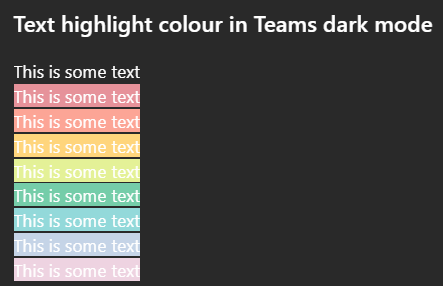
Issue: All highlighted text in Teams has poor colour contrast when in Dark mode on desktop. While some may be readable, none of the highlight colour options meet WCAG colour contrast minimums. How to reproduce Go to MS teams app on Win 11 and set appearance to dark mode. Create any default coloured text (this is white in dark mode) and apply any text highlight colour The result is inaccessible: it does not meet WCAG colour contrast thresholds and is very hard to read. Notes on behaviour On mobile (android MS Teams app) - the text colour changes to black which does meet the colour contrast minimum. This behaviour (illegible white text) on light backgrounds is also found on high contrast mode. This is different behaviour from MS word, which meets colour contrast minimum in a different way. Here highlight colours in dark mode are adjusted (e.g. the background highlight ffff00 --> is shifted to 393900 when dark mode is selected), and the text colour remains unchanged so there is enough contrast between the highlight and the white text colour. What happens next This needs a fix in make this accessible to users in dark mode so content can be read if another user has highlighted text. I'm not sure if this is the right place to post this but I was unable to register my MS account on the https://learn.microsoft.com/en-gb/answers/267Views1like0CommentsDeep links through a Teams tag to initiate a conversation.
Hello, I'm looking for a solution to initiate a Teams conversation via a deep link on a Teams tag/balises (label). I've found all the information for initiating a conversation via emails, groups, or channels, but it seems impossible to start a conversation via a Teams tag/balises (label). Did I misread the documentation? Or does this functionality not exist ? And if it doesn't exist, is it possible to implement it in a future update ? Thanks in advance.697Views1like2CommentsCannot read some contents on Dark Feature
I have dark feature set on Teams as it helps my eyes, but some contents are not viewable on Dark feature- such as the transcriptions unless I highlight it or put it into the Default mode. Anyway around this besides the two solutions I mentioned?2.1KViews1like4Comments