aad
42 Topics
Error creating Azure BOT: Failed to store new BOT
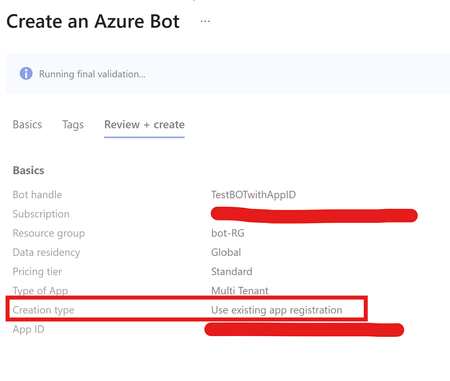
SCENARIO You are trying to create Azure BOT where you are already provided with an existing App registration. After adding relevant details, validation is passed however, the BOT fails to create with Internal Server error. CAUSE This error usually comes up if we are using the same APP ID which is already registered with another Azure BOT resource. { "status": "Failed", "error": { "code": "UnknownError", "message": "Failed to store new bot." } } RESOLUTION Azure BOT requires one to one mapping with the app registration. You can only have one BOT mapped to one App ID. Hence recommendation is to use single app registration for every BOT resource we create.830Views1like1Comment
How can I monitor Entra Connect Health Sync?
Hello, How can I monitor Entra Connect Health Sync events and get alerts on failures? I have set up to be alearted to events in the Entra portal but I only get a summary email, and not instant notifications. I wish to informed if there is a loss of sync between OP and Entra, or with SSPR? Is this possible other than what MS give us in the Portal. Thanks2.7KViews0likes5Comments
Repeated requests to approve 3rd party app consent
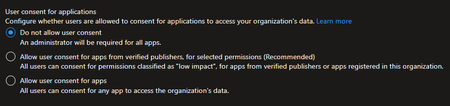
Hello - I am coming across an issue in an environment where Azure Cloud App Admins / Global Admins are receiving repeated email approval requests to approve permissions for 3rd party apps when admin access on behalf of the tenant has been previously approved and granted. Does anyone know why this happens or a way to stop it? The tenant is configured with this: This issue occurs for multiple apps. When the second or third request from an end user comes in for the same app, I have already gone into the Enterprise App in Azure AD and confirmed that the permissions the end user and app is requesting have already been granted by an admin. Example: Thank you!1.8KViews0likes2CommentsLesson Learned #396: Fixing 'Invalid value for key 'authentication' using System.Data.SqlClient
Our customer is getting the following error message: Application Error System.ArgumentException: Invalid value for key 'authentication'. at System.Data.Common.DbConnectionStringBuilderUtil.ConvertToAuthenticationType(String keyword, Object value) at System.Data.SqlClient.SqlConnectionString.ConvertValueToAuthenticationType() at System.Data.SqlClient.SqlConnectionString..ctor(String connectionString) at System.Data.SqlClient.SqlConnectionFactory.CreateConnectionOptions(String connectionString, DbConnectionOptions previous) at System.Data.ProviderBase.DbConnectionFactory.GetConnectionPoolGroup(DbConnectionPoolKey key, DbConnectionPoolGroupOptions poolOptions, DbConnectionOptions& userConnectionOptions) at System.Data.SqlClient.SqlConnection.ConnectionString_Set(DbConnectionPoolKey key) using in the authentication keyword in the connection string the value Active Directory Managed Identity.Lesson Learned #380:Unable to load adalsql.dll (Authentication=XYZ).Error code:0x2
Analyzing a support case that our customer got the following error faced: "Unable to load adalsql.dll (Authentication=ActiveDirectoryPassword). Error code: 0x2" using an older application to the Azure SQL database. Following I would like to share my lessons learned about it.
Apps for Office 365 - App without Authentication allowed?
Hi, The requirement to publish an add-in for Office 365 states that "Your app must allow Azure Active Directory federated single sign-on (AAD federated SSO) with consent enabled." (https://smp-prod-pb-wus-cdn.azureedge.net/documents/AppsourceGuidelines/Microsoft%20AppSource%20app%20review%20guidelines_v5.pdf) If the add-in only uses an API key for authentication, will publishing it be allowed?Retain the same email address value across two objects in Azure AD (Guest and Local)
Howdy Techies! This might sound stupid but thought to throw it here anyway to see if anyone managed to work around this in any possible alternative ways. I have a very specific need to retain the same email address across two Azure AD accounts. One is a guest and the other is a local account in the same tenancy. The purpose is to allow one of the SaaS app to use the local account while the other Guest Account will be used to access Teams channel. I have tried to create a separate accounts and some other workarounds but failed due to conflicts. Why not a single account for both purposes!, you may ask. Its a very specific scenario and could not afford to use a single account due to multiple business reasons. Really appreciate any thoughts/ideas !! Thank you! Manoj K772Views0likes1Commentaccess Azure File share on Azure AD joined Devices with Azure AD Credentials
Hi everyone We're currently testing Azure File for a customer. The customer already has an AVD environment, and we need an Azure File share for a specific application that runs on the AVD instance. We can mount the Azure File share on AVD with no problems and Azure AD credentials. All local and physical Windows Devices from the employees, which they use to open the AVD Application, are Azure AD joined. However, we also need to mount the Azure File share locally on every Azure AD joined Device. Problem is that we're not able to do that. We're able to mount the Azure File share with the storage account key, but this is a no-brainer. We're not giving out the storage account key to achieve this. Tbh, I'm not very fit in all these Azure Stuff but I think it's an authentication issue, because we're able to mount the Azure File share locally with the Storage Account Key. If we want to mount the share with the user logged on Azure AD credentials, it throws an error back that the network path could not be found (0x80070035). I think there is smth I'm missing out, which prevents me to mount the Azure File share on a Azure AD joined Devices and authenticate it with the user logged on AAD creds. Thanks for every reply, advice & help ❤️7.4KViews0likes3Comments