sharepoint
3995 TopicsSharePoint Showcase: How SharePoint uses AI to strengthen Work IQ’s data layer
A recently published whitepaper from Omdia, “Expanding Your Knowledge with Microsoft’s AI in SharePoint” highlights a consistent conclusion. AI performance depends on content readiness which underscores the importance of content quality, structure, freshness, and governance to shape the reliability of AI outputs. As a load-bearing structural component of Work IQ’s data layer, SharePoint serves as a primary knowledge platform across many organizations. With over a billion users each year, SharePoint is also the number 1 grounding source for Microsoft 365 Copilot and agents. Consequently, the AI capabilities currently available inside SharePoint –which support how content is created, structured, governed, and discovered –significantly influence the quality of the Data layer within Work IQ as the “brain” behind Copilot. This month’s Showcase offers four AI capabilities in SharePoint that help strengthen how Copilot and agents reason over enterprise knowledge. Please note, there are some prerequisites that need to met which are summarized on MS Learn, HERE. Now let’s dive into the four capabilities, including instructions on how to access and steps to optimize usage. Content management practices that improve AI outcomes AI performance reflects the quality of the information it uses; accurate, structured, and current content leads to reliable results. Omdia’s whitepaper points to common patterns across enterprises which include: Diffusion of content spreads across sites and libraries. Multiple versions of documents exist. Link degradation and diminished relevance of pages over time. These conditions affect how AI surfaces answers because AI reasons over content as stored. AI in SharePoint evaluates content quality across sites and libraries. It surfaces improvement recommendations for site owners and content managers with an emphasis on actions that raise content clarity and usability. Examples may include identifying pages with low engagement, highlighting broken links, and surfacing gaps where users search for information. AI also prompts content refresh actions when guidance no longer reflects current needs. This capability operates directly within SharePoint experiences that teams already use, and supports ongoing readiness without introducing separate review cycles or tooling. Action to take Select high impact sites such as HR, Legal, or IT guidance. Within a site, choose the floating button and select Improve this site. Review AI-driven recommendations for stale content, content gaps, and broken links. Update, consolidate, and refresh content based on those signals. Learn more: SharePoint Advanced Management overview - SharePoint in Microsoft 365 | Microsoft Learn Metadata extraction that improves AI responses Metadata provides essential signals for AI reasoning. In this scenario we define metadata as structured information that enables AI systems to understand meaning, relationships, and context. While many SharePoint libraries contain valuable documents, in the past, tagging documents with metadata was a manual task resulting in inconsistent tagging across libraries. Furthermore, inconsistent structure across high-value content (e.g., contracts, policies, and technical documentation) can adversely affect precision for search, filtering, and AI responses. AI in SharePoint helps address metadata gaps. It can suggest metadata columns based on document patterns, extract and populate values directly from file content, as well as infer additional details using context across the library. Once applied, metadata supports accurate filtering, grouping, and discovery – improving how Copilot and agents interpret relevance and scope. As a result, manual effort for content owners is greatly reduced while simultaneously increasing consistency at scale. Over time, structured metadata strengthens confidence in AI-generated summaries and answers. Action to take Identify one library with high business value. Within the library, choose the floating button and select Add autofill columns. Ask SharePoint to create columns for the metadata you want AI to extract. Review results and refine as needed. Learn more about metadata and response quality in the October, SharePoint Showcase. Admin agent support for content cleanup and governance Governance plays an important role in AI outcomes; content lifecycle, storage usage, and permissions all influence what AI surfaces. The SharePoint Admin Agent applies generative AI to SharePoint Advanced Management insights. It enables administrators to ask natural language questions about site lifecycle, storage patterns, and permissions exposure. The agent analyzes reports regarding inactivity, storage usage, and permissions distribution and then summarizes findings along with sharing recommended actions. This approach helps administrators focus attention on sites that affect risk and efficiency. Examples include identifying inactive sites with large storage footprints, surfacing ownerless sites, and highlighting broad access patterns. These insights support informed cleanup and governance planning. As such, cleaner and well- governed environments improve AI grounding. Permissions accuracy ensures responses align with access boundaries and reduced duplication improves signal quality for AI reasoning. The Admin Agent supports a human review model. It’s recommended that administrators evaluate insights and determine next steps which is in keeping with common responsible AI practices. Action to take Use the SharePoint Admin Agent to review inactive and storage heavy sites. Prioritize cleanup and ownership alignment. Strengthen permissions governance for high visibility content. Learn more: SharePoint Admin Agent overview - SharePoint in Microsoft 365 | Microsoft Learn Practical improvements in document libraries and content organization AI capabilities in SharePoint support everyday work inside document libraries with an emphasis on structure, clarity, and usability. Within libraries, AI is ready to help organize files using metadata-driven views and groupings. In addition, new content is classified on a consistent basis as it arrives. And, it can enable automation tied to content changes. Examples include triggering review workflows when documents update and surfacing grouped views based on inferred attributes. These features help reduce friction for users navigating large collections. At the site level, AI surfaces improvement suggestions based on usage patterns and can identify areas where users search for information. These insights are then leveraged to recommend content updates or new pages that align with observed needs. Continuous improvement of the knowledge platform in response to real usage signals helps evolve the content and improve the structure over time. As a result, not only are AI outcomes strengthened within familiar SharePoint experiences, but daily productivity is improved. Action to take Review frequently used document libraries. Apply metadata-based views and groupings. Use AI recommendations to refine site structure and content placement. Learn more: Create document library with AI - SharePoint in Microsoft 365 | Microsoft Learn In closing Teams that invest in content readiness will see strategic advantage in the long run as they will have strengthened content trust, alongside improved AI accuracy, higher productivity, and decision quality across Microsoft 365. Looking ahead, the Microsoft 365 Conference (April 21-23, Orlando, Florida) includes several sessions which dive into the latest innovations coming in SharePoint including latest AI capabilities and best practices around libraries and metadata management. You can find out more about the conference via this blog post or register for the conference HERE. Recommended sessions: From Chaos to AI-Ready in 30 Days: Meet the SharePoint Admin Agent, Grounded by SAM (Tuesday, 11:30 AM – 12:15 PM EST) Meet AI in SharePoint (Tuesday, 2:45-3:30 PM EST) AI in SharePoint: From Content Chaos to Clarity and Impact. Get Copilot Ready (Wednesday, 11:15 AM – 12:00 PM EST) The Future of SharePoint: AI Ready to Discover, Publish and Build (Wednesday, 1:30 – 2:15 PM EST) Using SharePoint AI to Solve Business Processes (Wednesday, 1:30 – 2:15 PM EST) SharePoint: AI‑Forward Content Creation & Curation for the Modern Intranet (Thursday, 10:00 – 10:45 AM EST)103Views0likes0Comments
PowerShell 7 PnP.PowerShell Header Issue
I am trying to connect to the PnPOnline module using PS7. I am running PowerShell version 7.6.0 (Core), PnP.PowerShell PSEdition Core, and have my PnP PowerShell App registered in Azure I have my top level site as the $siteURL variable, my ClientID number as the $clientID variable and the ClientSecret value as the $clientSecret variable... When using the command Connect-PnPOnline -Url $siteUrl -ClientId $clientId -ClientSecret $clientSecret the following is returned: WARNING: Connecting with Client Secret uses legacy authentication and provides limited functionality. We can for instance not execute requests towards the Microsoft Graph, which limits cmdlets related to Microsoft Teams, Microsoft Planner, Microsoft Flow and Microsoft 365 Groups. You can hide this warning by using Connect-PnPOnline [your parameters] -WarningAction Ignore Connect-PnPOnline: The given header was not found. I have double checked my variables, and all components and still receiving this error. I know there is a certificate method for the App Registration, but what else need to happen to make my connection successful? Or should I go the certificate route for the App Registration?5Views0likes0CommentsAnnouncing the 2026 Microsoft 365 Community Conference Keynotes
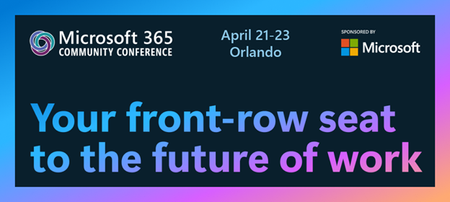
The Microsoft 365 Community Conference returns to Orlando this April, bringing together thousands of builders, innovators, creators, communicators, admins, architects, MVPs, and product makers for three unforgettable days of learning and community. This year’s theme, “A Beacon for Builders, Innovators & Icons of Intelligent Work,” celebrates the people shaping the AI‑powered future — and the keynote lineup reflects exactly that. These leaders will set the tone for our biggest, boldest M365 Community Conference. Below is your first look at the official 2026 keynote order and what to expect from each session. Opening Keynote Jeff Teper — President, Microsoft 365 Collaborative Apps & Platforms Building for the future: Microsoft 365, Agents and AI, what's new and what's next Join Jeff Teper, to discover how AI-powered innovation across Copilot, Teams, and SharePoint is reshaping how people communicate, create, and work together. This session highlights what’s new, what’s fundamentally different, and why thoughtful design continues to matter. See the latest advances in AI and agents, gain insight into where collaboration is headed, and learn why Microsoft is the company to continue to bet on when it comes to building what’s next. Expect: New breakthroughs in collaboration powered by AI and agents Fresh innovations across Teams, Copilot, and SharePoint Practical guidance on how design continues to shape effective teamwork Real world demos that show how AI is transforming communication and content Insight into what is new, what is changing, and what is coming next Business Apps & Agents Keynote Ryan Cunningham — Corporate Vice President, Power Platform In this keynote, Ryan Cunningham will share how Microsoft 365 Copilot, Copilot Studio, Power Apps, and Agent 365 come together to help makers build powerful agents and help IT teams deploy and govern them at scale. We’ll share how organizations can design, extend, and govern a new model for the intelligent workplace – connecting data, workflows, and systems into intelligent agents that move work forward. Copilot, apps, and agents: the next platform shift for Microsoft 365 Microsoft 365 Copilot has changed how we interact with software. Now AI agents are changing how work gets done – moving from responding to prompts to taking action, across the tools and data your organization already relies on. Expect: A clear explanation of how to leverage and build with Copilot and agents How agents access data, use tools, and complete multi-step work A deeper look at the latest capabilities across Microsoft 365 Copilot, Copilot Studio, and Power Apps End-to-end demos of agents in action Security, Trust & Responsible AI Keynote Vasu Jakkal — Corporate Vice President, Microsoft Security & Rohan Kumar — Corporate Vice President, Microsoft Security, Purview & Trust In our third keynote, Vasu Jakkal and Rohan Kumar join forces to address one of the most urgent topics of the AI era: trust and security at scale. As organizations accelerate into AI‑powered work, safeguarding identities, data, compliance, and governance is mission‑critical. Securing AI: Building Trust in the Era of AI Join Vasu Jakkal and Rohan Kumar as they unveil Microsoft’s vision for securing the new frontier of AI—showing how frontier firms are protecting their data, identities, and models amid rapid AI adoption. This session highlights how Microsoft is embedding security and governance into every layer of our AI platforms and unifying Purview, Defender, Entra, and Security Copilot to defend against threats like prompt injection, model tampering, and shadow AI. You’ll see how built-in protections across Microsoft 365 enable responsible, compliant AI innovation, and gain practical guidance to strengthen your own security posture as AI transforms the way everyone works. Expect: Microsoft's unified approach to secure AI transformation Forward‑looking insights across Security, Purview & Trust Guidance for building safe, responsible AI environments How to protect innovation without slowing momentum Future of Work Fireside Keynote Dr. Jaime Teevan — Chief Scientist & Technical Fellow, Microsoft Dr. Jaime Teevan, one of the foremost thought leaders on AI, productivity, and how work is evolving. In this intimate fireside‑style session, she’ll share research, real‑world insights, and Microsoft’s learnings from being both the maker and the first customer of the AI‑powered workplace. Expect: Insights from decades of workplace research The human side of AI transformation Practical guidance for leaders, creators, and practitioners Why collaboration is essential to unlock the true potential of AI. Community Closer Keynote Karuana Gatimu - Director, Microsoft Customer Advocacy Group & Heather Cook - Principal PM, MIcrosoft Customer Advocacy Group From Momentum to Movement: Where Community Goes Next As the final moments of Microsoft 365 Community Conference come to a close, Heather Cook and Karuana Gatimu invite the community to pause, reflect, and look forward together. This Community Closer keynote connects the breakthroughs, conversations, and shared experiences of the week into a bigger story—one about people, purpose, and progress. Together, they’ll explore how community transforms technology into impact, how advocates and builders shape what’s next across Microsoft 365, and why this moment matters more than ever. More than a recap, this session is a call to action—challenging attendees to take the energy of the conference back to their teams, regions, and communities, and turn inspiration into sustained momentum. You’ll leave not just with ideas, but with clarity, confidence, and a renewed sense of belonging—because community doesn’t end when the conference does. It’s where the real work begins. More Than Keynotes: Why You’ll Want to Be in Orlando The M365 Community Conference brings together: 200+ sessions and breakouts 21 hands‑on workshops 200+ Microsoft engineers and product leaders onsite The Microsoft Innovation Hub Ask the Experts, Meet & Greets, and Community Studio Women in Tech & Allies Luncheon SharePoint’s 25th Anniversary Celebration And an epic attendee party at Universal’s Islands of Adventure Whether you create, deploy, secure, govern, design, or lead with Microsoft 365 — this is your community, and this is your moment. Join Us for the Microsoft 365 Community Conference April 21–23, 2026 Loews Sapphire Falls & Loews Royal Pacific 👉 Register now: https://aka.ms/M365Con26 Use the SAVE150 code for $150USD off current pricing Come be part of the global community building the future of intelligent work.2.5KViews3likes2CommentsI built a free, open-source M365 security assessment tool - looking for feedback
I work as an IT consultant, and a good chunk of my time is spent assessing Microsoft 365 environments for small and mid-sized businesses. Every engagement started the same way: connect to five different PowerShell modules, run dozens of commands across Entra ID, Exchange Online, Defender, SharePoint, and Teams, manually compare each setting against CIS benchmarks, then spend hours assembling everything into a report the client could actually read. The tools that automate this either cost thousands per year, require standing up Azure infrastructure just to run, or only cover one service area. I wanted something simpler: one command that connects, assesses, and produces a client-ready deliverable. So I built it. What M365 Assess does https://github.com/Daren9m/M365-Assess is a PowerShell-based security assessment tool that runs against a Microsoft 365 tenant and produces a comprehensive set of reports. Here is what you get from a single run: 57 automated security checks aligned to the CIS Microsoft 365 Foundations Benchmark v6.0.1, covering Entra ID, Exchange Online, Defender for Office 365, SharePoint Online, and Teams 12 compliance frameworks mapped simultaneously -- every finding is cross-referenced against NIST 800-53, NIST CSF 2.0, ISO 27001:2022, SOC 2, HIPAA, PCI DSS v4.0.1, CMMC 2.0, CISA SCuBA, and DISA STIG (plus CIS profiles for E3 L1/L2 and E5 L1/L2) 20+ CSV exports covering users, mailboxes, MFA status, admin roles, conditional access policies, mail flow rules, device compliance, and more A self-contained HTML report with an executive summary, severity badges, sortable tables, and a compliance overview dashboard -- no external dependencies, fully base64-encoded, just open it in any browser or email it directly The entire assessment is read-only. It never modifies tenant settings. Only Get-* cmdlets are used. A few things I'm proud of Real-time progress in the console. As the assessment runs, you see each check complete with live status indicators and timing. No staring at a blank terminal wondering if it hung. The HTML report is a single file. Logos, backgrounds, fonts -- everything is embedded. You can email the report as an attachment and it renders perfectly. It supports dark mode (auto-detects system preference), and all tables are sortable by clicking column headers. Compliance framework mapping. This was the feature that took the most work. The compliance overview shows coverage percentages across all 12 frameworks, with drill-down to individual controls. Each finding links back to its CIS control ID and maps to every applicable framework control. Pass/Fail detail tables. Each security check shows the CIS control reference, what was checked, what the expected value is, what the actual value is, and a clear Pass/Fail/Warning status. Findings include remediation descriptions to help prioritize fixes. Quick start If you want to try it out, it takes about 5 minutes to get running: # Install prerequisites (if you don't have them already) Install-Module Microsoft.Graph, ExchangeOnlineManagement -Scope CurrentUser Clone and run git clone https://github.com/Daren9m/M365-Assess.git cd M365-Assess .\Invoke-M365Assessment.ps1 The interactive wizard walks you through selecting assessment sections, entering your tenant ID, and choosing an authentication method (interactive browser login, certificate-based, or pre-existing connections). Results land in a timestamped folder with all CSVs and the HTML report. Requires PowerShell 7.x and runs on Windows (macOS and Linux are experimental -- I would love help testing those platforms). Cloud support M365 Assess works with: Commercial (global) tenants GCC, GCC High, and DoD environments If you work in government cloud, the tool handles the different endpoint URIs automatically. What is next This is actively maintained and I have a roadmap of improvements: More automated checks -- 140 CIS v6.0.1 controls are tracked in the registry, with 57 automated today. Expanding coverage is the top priority. Remediation commands -- PowerShell snippets and portal steps for each finding, so you can fix issues directly from the report. XLSX compliance matrix -- A spreadsheet export for audit teams who need to work in Excel. Standalone report regeneration -- Re-run the report from existing CSV data without re-assessing the tenant. I would love your feedback I have been building this for my own consulting work, but I think it could be useful to the broader community. If you try it, I would genuinely appreciate hearing: What checks should I prioritize next? Which security controls matter most in your environment? What compliance frameworks are most requested by your clients or auditors? How does the report land with non-technical stakeholders? Is the executive summary useful, or does it need work? macOS/Linux users -- does it run? What breaks? I have tested it on macOS, but not extensively. Bug reports, feature requests, and contributions are all welcome on GitHub. Repository: https://github.com/Daren9m/M365-Assess License: MIT (free for commercial and personal use) Runtime: PowerShell 7.x Thanks for reading. Happy to answer any questions in the comments.434Views1like1CommentMicrosoft 365 & Power Platform Community call
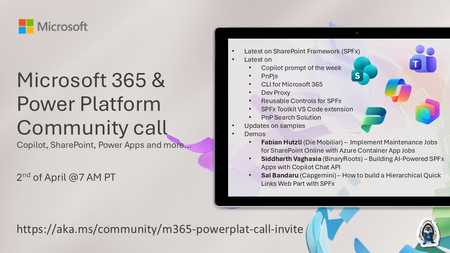
💡 Microsoft 365 & Power Platform Development bi-weekly community call focuses on different use cases and features within the Microsoft 365 and Power Platform - across Microsoft 365 Copilot, Copilot Studio, SharePoint, Power Apps and more. Demos in this call are presented by the community members. 👏 Looking to catch up on the latest news and updates, including cool community demos, this call is for you! 📅 On 19th of March we'll have following agenda: Latest on SharePoint Framework (SPFx) Latest on Copilot prompt of the week PnPjs CLI for Microsoft 365 Dev Proxy Reusable Controls for SPFx SPFx Toolkit VS Code extension PnP Search Solution Demos this time Fabian Hutzli (Die Mobiliar) – Implement Maintenance Jobs for SharePoint Online with Azure Container App Jobs Siddharth Vaghasia (BinaryRoots) – Building AI-Powered SPFx Apps with Copilot Chat API Sai Bandaru (Capgemini) – How to build a Hierarchical Quick Links Web Part with SPFx 📅 Download recurrent invite from https://aka.ms/community/m365-powerplat-dev-call-invite 📞 & 📺 Join the Microsoft Teams meeting live at https://aka.ms/community/m365-powerplat-dev-call-join 💡 Building something cool for Microsoft 365 or Power Platform (Copilot, SharePoint, Power Apps, etc)? We are always looking for presenters - Volunteer for a community call demo at https://aka.ms/community/request/demo 👋 See you in the call! 📖 Resources: Previous community call recordings and demos from the Microsoft Community Learning YouTube channel at https://aka.ms/community/youtube Microsoft 365 & Power Platform samples from Microsoft and community - https://aka.ms/community/samples Microsoft 365 & Power Platform community details - https://aka.ms/community/home 🧡 Sharing is caring!19Views0likes0CommentsMicrosoft 365 & Power Platform product updates call
💡Microsoft 365 & Power Platform product updates call concentrates on the different use cases and features within the Microsoft 365 and in Power Platform. Call includes topics like Microsoft 365 Copilot, Copilot Studio, Microsoft Teams, Power Platform, Microsoft Graph, Microsoft Viva, Microsoft Search, Microsoft Lists, SharePoint, Power Automate, Power Apps and more. 👏 Weekly Tuesday call is for all community members to see Microsoft PMs, engineering and Cloud Advocates showcasing the art of possible with Microsoft 365 and Power Platform. 📅 On the 31st of March we'll have following agenda: News and updates from Microsoft Together mode group photo Sébastien Levert – Advance manifest capabilities for Copilot Chat declarative agent Lesha Bhansali – Introducing new Markdown support in SharePoint and OneDrive Ayça Baş – Build and Run Your First Custom Engine Agent with Agent Framework 📞 & 📺 Join the Microsoft Teams meeting live at https://aka.ms/community/ms-speakers-call-join 🗓️ Download recurrent invite for this weekly call from https://aka.ms/community/ms-speakers-call-invite 👋 See you in the call! 💡 Building something cool for Microsoft 365 or Power Platform (Copilot, SharePoint, Power Apps, etc)? We are always looking for presenters - Volunteer for a community call demo at https://aka.ms/community/request/demo 📖 Resources: Previous community call recordings and demos from the Microsoft Community Learning YouTube channel at https://aka.ms/community/youtube Microsoft 365 & Power Platform samples from Microsoft and community - https://aka.ms/community/samples Microsoft 365 & Power Platform community details - https://aka.ms/community/home 🧡 Sharing is caring!77Views0likes0CommentsThe Retirement of SharePoint Alerts is a Pain in the Rear
I’ve used a SharePoint alert to create an emailed daily digest of changes made to files in a document library for seven years. Microsoft plans to retire SharePoint Alerts in July 2026, and the race is on to find a replacement. Regretfully, neither Power Automate nor SharePoint Rules seem capable of generating an equivalent daily digest, perhaps because these solutions don’t handle the number of file versions created by AutoSave well. https://office365itpros.com/2026/03/27/sharepoint-alerts-replacement/62Views1like1CommentStructured document generation with forms now in preview
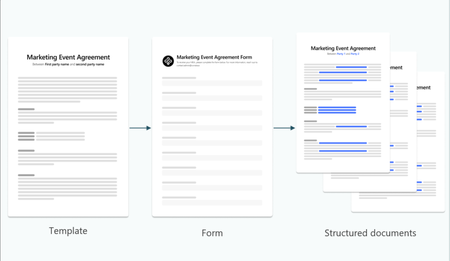
We’re excited to announce the preview of structured document generation with forms, a new capability in Microsoft 365 that helps organizations generate consistent, structured documents directly from form-based inputs. Last year, we enhanced Microsoft Lists forms with features to help you quickly capture data and documents using dynamic, customized, and efficient forms. This preview brings together document templates, structured data, and forms to streamline how teams create repeatable, high-quality documents without having to copy and paste or create custom code or complex workflows. Consistent document generation & management Across industries, teams require consistent and templated documents every day. These structured documents are part of common processes— letters, invoices, contracts, reports, receipts, statements of work, compliance artifacts, and more. While the content in these documents is standardized, many businesses struggle to regulate how these documents are created, resulting in inaccurate or incomplete outputs and disorganization across files. External AI tools can increase speed, but often bring additional costs due to errors, rework, and compliance issues. Structured document generation addresses this gap by allowing you to: Create templates backed by forms Share those forms and capture inputs when employees fill out the form Automatically generate documents that follow the template’s structure, formatting, and required fields The result is faster document creation, improved consistency, and reduced manual effort. How it works Create AI-assisted document templates without code Templates define the layout and structure of the generated document, making it easier to standardize outputs across teams and business processes. AI automatically detects fields in the document and creates reusables forms. Generate documents from structured form inputs Use forms to collect standardized information and automatically populate that data into a document template. This means documents are created with the right structure and fields every time. Share form links After a form is published, you can share the form link with users in your organization, enabling them to submit forms and generate documents. Each submission creates a new document that preserves the approved document’s layout and language — only the field values change. Keep documents connected to structured data Because documents are generated from a template, the output has consistent metadata, downstream workflows, and governance (including retention and sensitivity labels). Example scenarios This capability is designed for repeatable, high-value document workflows, such as: HR and people operations: Generate offer letters, onboarding documents, benefits notices, policy acknowledgements and more from standardized form inputs. Legal and compliance: Create structured agreements, contracts, audit reports and other compliance documents that follow consistent templates. Operations and program management: Produce reports, project documents and other standardized deliverables with predictable structure. Stored in SharePoint. Integrated with Word. Structured document generation with forms natively stores all content in SharePoint, allowing organizations to take advantage of existing document management, permissions, and lifecycle capabilities. Using forms to generate structured documents in SharePoint document libraries with templates, teams can reduce document sprawl while improving consistency and quality. The features also integrate directly and natively with Word, unlocking rich, no-code template management capabilities. A Microsoft 365 Copilot license is required to build the forms and workflows, but not to generate a document using the template. Getting started To learn more about how structured document generation with forms works and what’s supported in this preview, see the Generate structured documents in a SharePoint document library article on Microsoft Learn. This preview is now rolling out to tenants in the AI in SharePoint public preview. You can follow the steps in this article to enable it for your tenant. Please share your feedback as we continue to work towards making document creation more structured, automated, and scalable in Microsoft 365.3.4KViews3likes1Comment
e: Tabs and Accordian page layout SPO Modern
Hi, Has anyone been able to obtain a preview or seen beta testing of the option to insert tabs and accordians into page sections? It is due for rollout in April but am just wondering what kind of functionality it will have: SharePoint: Collapsible sections on modern pages – You’ll have the ability to show page sections in an accordion view (collapsed or expanded) or as tabs. The accordion view will be collapsed by default, but can be set to show expanded. https://www.microsoft.com/en-us/microsoft-365/roadmap?filters=&searchterms=67147 Thanks Alan3KViews0likes2Comments