search
18 Topics
Is there possibly no official documentation for Windows 11 search?
I have looked far and wide to find a definitive, official technical reference for the Windows 11 search service... especially for the various search parameters and the syntax they require from a savvy user to conduct a well specified, precision search for something. Is it possible that Microsoft has not produced a formal specification of Windows' search feature? Would someone from Microsoft please, please, please provide a link to such a document? Is it possible to buy it? Does it exist anywhere? Am I deluded to think that that is something that the provider of the world's most used desktop OS would have had to create, as a matter of course? I'm talking here about conducting searches, within the file system of a Windows 11 (Pro) machine, that one initiates from the "Search Home" box at the top right of every File Explorer window that gets opened by the user. Any thoughts from someone actually involved in creating the search tool? Imploringly yours, SJB26Views0likes0Comments
Microsoft accounts
Hi all. I have a problem with my daughters Microsoft accounts which I'm hoping you can help with. She set up an account for her X Box on my email address (without asking me first) which is preventing me from setting up my own account for Windows. Since then she has also set up a Hotmail account with her own email address. I understand we can set up an alias on the X Box account using her email but will this conflict with the Hotmail account. The problem is she doesn't want to change her gamer tag which was set up on my email address. Any help / advice will be gratefully received. Many thanks in advance30Views0likes0Comments
Help Needed to Make PowerApp Visible in Search Bookmark
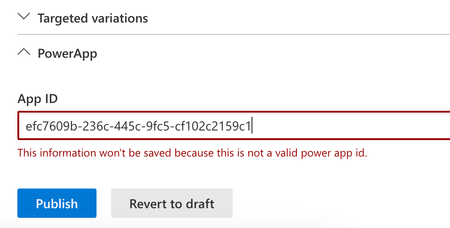
Hello everyone, I have a problem that I can't seem to solve and I hope someone here can help me. I created a PowerApp that I want to make visible through a bookmark in Search. When I select, copy, and paste the app ID from PowerApps into the field in the bookmark settings, I get a message saying it's incorrect. For comparison, I created a page on a SharePoint site, placed the PowerApps web part there, and pasted the same ID. It works fine there. Does anyone have any idea what might be going wrong or what I might be overlooking? Any suggestions are welcome! Thanks in advance!124Views1like1Comment
ServiceNow Connector connection not accepted. Message is a red bar
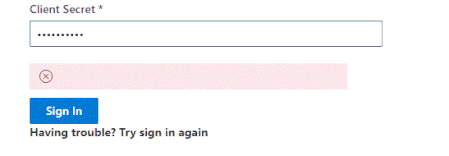
After making the connection to the servicenow environment when getting to the screen to allow the connection from search to servicenow even though all logins etc have been going through i receive the below and am not able to continue. anyone?372Views0likes0CommentsMicrosoft Search Vertical for Nintex Promapp how to ?
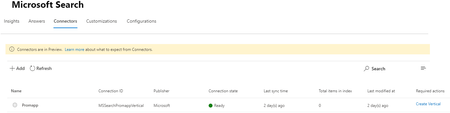
Hi All, I need help getting Microsoft Search Connector setup to return Nintex Promapp results. Our situation We have had Nintex promapp search results showing up in our Classic SharePoint search results as per https://help.nintex.com/en-US/promapp/Admin/SharePoint/SharePointOnlineSearch.htm BUT since we moved over to SharePoint online Modern search results we have had to get our users to go to Promapp to do their searching. Microsoft Search is increasingly where we control the search experience for our users. https://admin.microsoft.com/Adminportal/Home?source=applauncher#/MicrosoftSearch Just recently Microsoft Search for our tennant has had Connectors, Result types and Verticals enabled. Basically re-enabling the ability for us to include Promapp results in the All search results vertical AND OR to have a Promapp vertical that can be used by our staff. Could someone please tell me how to get Microsoft Search "Enterprise website connector" to return results to Microsoft search. I've got a connector ready, BUT it isn't picking up any items in the index (see image) My guess is that because I used a variation of the URL from our Classic Sharepoint search integration that is why it isn't working. https://go.promapp.com/<companyname>/SharePoint?token=<tokenGUID> Any suggestions , tips , or full blown instructions would be welcome. #nintexpromapp #microsoftsearch #sharepointsearch2KViews0likes4Comments
Unable to clear custom filter
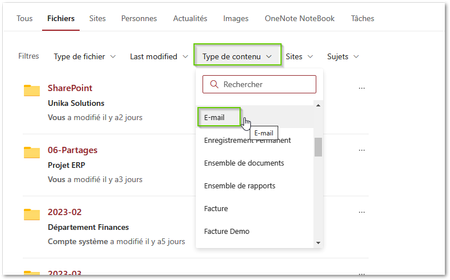
Hi, Anyone having this behavior with custom filters? When I select a filter value, I can see for a fraction of second the selected filter criteria and it disappears after returning the search results. So I can't clear the value afterward. Here is an example: Thanks!418Views0likes0Commentsbookmark keyword not matching single term in multi term search
Hi Wendy_MSFT and everyone else, I've been using Bookmarks ever since they became available in my tenant. We've tried to stop using SharePoint search best bets and move everything over. BUT When our users do a search with multiple terms e.g. pnid christchurch I would expect that they then see any bookmark with the PNID keyword or any bookmark with the CHRISTCHURCH keyword What I find is that only book marks with keywords that exactly the match the terms used in the search show up. What am I doing wrong ? When our users search from the black bar at the top of the intranet site they are taken directly to the Organizational search (we want them to have a broad search experience) straight away. If they search for PNID they will get the bookmarks I've setup in https://admin.microsoft.com/Adminportal/Home?source=applauncher#/MicrosoftSearch/bookmarks that have the PNID keyword. But if they search for pnid christchurch they don't get shown any bookmark. Is there some setting I can change that makes bookmarks appear when ANY term matches a Keyword in the bookmark ?662Views0likes0Comments
No Results for /sites?search=test
Hello, first of all I whish you a Happy New Year! I want to search in my sharepoint sites for specific names and moreover I want to get a list of all sharpoint sites. Therefore I am using the following URL in the Graph Explorer: https://graph.microsoft.com/v1.0/sites?search=test or https://graph.microsoft.com/v1.0/sites?search=* Now it becomes strange: When using an account from Company A everything works correctly. I receive a nice list of all results. But when i am using an account from Company B, I only get the following 404 NOT FOUND response for all queries (although there should be multiple results): { "error": { "code": "itemNotFound", "message": "Item not found", "innerError": { "date": "2022-01-01T14:59:35", "request-id": "xxxxxx", "client-request-id": "xxxxxx" } } } It would be great, if someone has an idea of how to solve the problem. Thanks, Claudio466Views0likes0Comments
How to Show Floor Plan Details in Outlook Card?
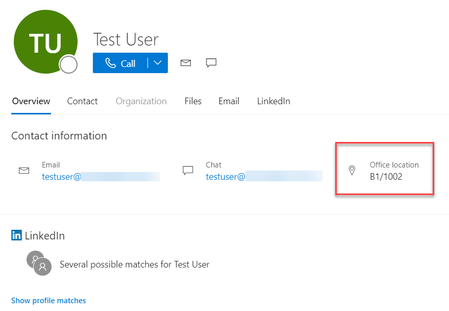
Is it possible to show floor plan locations for a user in their Outlook / Teams card like how it shows when you look up the user via Microsoft Search? Below you can see a test user with office location B1/1002. You can't click on it to get more details. However on MS Search (Bing) you can click on the office location to get where it is on the map: Is there any way to extend this functionality to Outlook/Teams? Especially in regards to scheduling meetings, being able to see the floor plan location for a specific conference room account when booking.1.7KViews2likes0Comments