powerbi
50 Topics
Data Driven Analytics for Responsible Business Solutions, learning how to work with Power BI
Introduction In this blog post, we will be showcasing the project that we have worked on for the last couple of weeks. Here, we analysed a dataset using Power BI and its machine learning capabilities. For this, we were given the fictitious case of VenturaGear. The company was faced with the challenge of new competition, and it was our job to provide a data-driven insight into customer behaviour, feedback, and preferences. The objective was to support more effective customer targeting by identifying patterns and segments that could inform strategic decision-making, while ensuring ethical and responsible use of data. Before we jump into the course and our final results, we would like to introduce ourselves and the roles we had. Product Owner: Kylie Eggen Hello everyone! My name is Kylie, and I'm currently busy finishing my Master Responsible Digitalisation. During the DARBS course, I had the role of the product owner. This allowed me to develop a deeper understanding of both data analysis and the ethics of handling sensitive data. The course provides you with skills that could be useful in your future career, which is very nice. I liked the learning experience a lot and will definitely use it in the future! Kylie Eggen | LinkedIn Data Analyst: Ha Nguyen I am currently in the final stage of my Master’s degree in Responsible Digitalisation, focusing on the ethical and strategic use of data-driven technologies. With five years of experience using Excel for data analysis, I have developed a strong foundation in data handling and visualisation. This course allows me to expand my skills by learning to create interactive dashboards and generate actionable insights using Power BI. These competencies strengthen my ability to support responsible, data-driven decision-making in my future professional career. Ha Nguyen | LinkedIn Data Analyst: Rianne van Ee Hello! My name is Rianne, and I am currently in the process of completing my Master’s degree in Responsible Digitalisation. I chose this specialisation because I am very interested in new technologies and different perspectives. I am very interested in data analysis and learning about new software, so the DARBS course was very interesting to me. I am excited to apply my new skills in a professional environment. Rianne van Ee | LinkedIn Data Visualisation Consultant: Aya Torqui Hello! My name is Aya Torqui, and I am a Master’s student in Responsible Digitalisation at Radboud University. One of the reasons I chose this specialisation is my strong interest in how companies transform raw and sometimes ambiguous data into valuable business decisions. The DARBS course, therefore, provided the perfect opportunity for me to gain new and deeper insights into this process. In my role as a Data Visualisation Consultant, I developed new skills not only in designing visually attractive and interesting dashboards, but also in communicating a meaningful and coherent story through them. I am grateful for the opportunity to have developed these skills during the course, and I look forward to further broadening and strengthening them in my future career. Aya Torqui | LinkedIn Data Visualisation Consultant: Ting Yu Hi! My name is Ting Yu. I am currently a Master’s student of Civil Law and Responsible Digitalisation. I found the DARBS course quite interesting, and it was a whole new experience for me, because I learned that numbers are not boring. With a dashboard, it is possible to tell a story and help organisations. What I also really liked about this course was the creative side. Not only was it fun to play around with different charts and colour schemes for the dashboard, but also the video we had to make! I am curious to see what the future possibilities are. Ting Yu | LinkedIn Project Overview The goal of this project was to provide data-driven managerial recommendations to the fictitious company, VenturaGear. Eventually, it was our task to deliver a final report and a video blog in which we discussed their data and gave them recommendations on how to improve. Our focus was on supporting more effective customer targeting by identifying patterns and segments that could inform strategic decision-making. During the process, one of our main goals was to keep the data analysis responsible and ethical. Project Journey The course followed a nice structure, allowing us to learn about PowerBi gradually and expand our skills and knowledge over a couple of weeks. We started off by completing lab work. Every week we completed several online courses, and spent one lecture applying the knowledge from these courses in a lab work assignment. After a few weeks, we applied our knowledge in a milestone assignment. This was the first time we really applied our newfound skills in a practical manner. This was a really nice opportunity to see whether we could actually apply what we learned. This also came with a machine learning aspect. Even though we had a short introduction to the topic in class, none of us had worked with machine learning before. We were able to apply the knowledge we gathered about learning how to use a new system, like Power BI, on another system, in this case, machine learning. While we really struggled here at the start, after some time we figured it out and were able to work with the technology. This milestone assignment was the perfect preparation for the actual final assignment, which also had this machine learning aspect. We now knew where to start, what data to include, etc. We now also knew what to consider when looking at the ethical side of things. Like what information needs to be anonymised, or left out completely. Eventually, all our newfound knowledge was combined into making the final assignment and video blog. Technical Details Microsoft Power BI served as the main analytical environment throughout the project. We began by importing multiple CSV datasets into Power BI and preparing the data using Power Query. This involved cleaning duplicate records, correcting formatting inconsistencies, and transforming variables to ensure accurate calculations and reliable analysis. We then created a relational data model connecting key tables such as sales transactions, product information, customer behaviour, and sales reasons. Establishing these relationships allowed us to analyse data across multiple dimensions and generate deeper insights into customer activity and online purchasing patterns. Interactive dashboards were developed using Power BI’s visualisation tools, accessible colour themes, and slicers, allowing users to explore insights dynamically. Rather than presenting static results, the dashboard encouraged managers to interact with the data and investigate patterns independently. In addition to descriptive analytics, we applied a machine learning model (XGBoost) to identify factors influencing the sales of the top revenue-generating products. This introduced us to predictive analytics and highlighted the importance of feature selection, handling missing values, and critically interpreting model outputs. Combining visualisation with machine learning enabled us to move beyond reporting toward data-driven decision support. Results and Outcomes Before we could analyse our data, we ran into a few problems. Firstly, our unit prices seemed to be inflated in the dataset. The decimal was removed, leading to unreasonably high prices. To solve this, we recalculated the LineTotal, using the formula that can be seen below. Another problem we ran into was that we seemed to have a lot of missing data. We noticed this while looking at the sales reasons. A third of the data ended up blank. We ended up excluding the blank values, so that we were still able to analyse the remaining data. To really effectively target customers, we felt it was important to analyse the reasons people made their purchases. Through our analysis, we found that for VentureGear, the biggest contributor was price. We found that VenturaGear mainly made its sales in Australia. Lesson Learned Working with new systems The main lesson that we learned is how to start using a new system. The way in which we were taught how to use Power BI showed us a nice way of approaching new things. We believe this can be useful in other areas of our professional lives. 2. Data analysis Most of us were a little intimidated when we first heard that we were going to be analysing data through a new program. However, once we started, we noticed that when we all put our minds to it, it is quite manageable. We have all gained some understanding of data analysis and how to visualise this. 3. Teamwork A big factor during this project was teamwork. Our team was divided up into different roles. That meant that there was teamwork between the two data analysts and data visualisation consultants, but also between different roles. We found it to be really important to have teamwork between all these actors. We noticed that the further we got into the project, the smoother this interaction went. Collaboration and Teamwork On this project, we worked as a team. Our team consists of five people. Kylie Eggen was the Product Owner. Her role was to take care of the overview of the project. Ha Nguyen and Rianne van Ee were the Data Analysts for this project. Aya Torqui and Ting Yu were the Data Visualisation Consultants. We mostly stuck to our roles, but noticed that everything needed to happen in collaboration. So even though we were all mainly busy with our own roles, we were all involved in each other as well. We noticed this really helped in making the project a coherent whole. Future Development While this project generated valuable insights, there are several opportunities for further development. A potential next step would be integrating real-time data into Power BI. Expanding the dashboard with automated data refresh will allow managers to track performance continuously and respond more quickly to changing customer behaviour. Another area for future development involves extending the machine learning component. Rather than focusing only on identifying predictors of key revenue-generating products, the model could be expanded to include customer segmentation, such as grouping customers into categories like high-value customers, discount-sensitive buyers, or frequent online shoppers. In addition, the model could be developed further to support purchase prediction, enabling forecasts of seasonal demand, identifying customers likely to make repeat purchases, and determining which products are most preferred by specific customer groups. These enhancements would provide a more dynamic understanding of customer behaviour and support more targeted, data-driven decision-making. Incorporating more complete behavioural data or improving survey participation rates would also help reduce missing values and increase the reliability of insights. And finally, for future research, the organisation could consider introducing clear consent options on the web shop to help customers better understand what data is being collected. These options would also allow customers to choose what information they want to share, improving transparency and strengthening customer trust. Conclusion This project allowed us to learn how data analytics can help organisations make smarter and more responsible business decisions. Using Power BI, we transformed complex customer and sales data into clear, interactive insights that help managers better understand online behaviour, purchasing motivations, and performance trends. Beyond building technical skills, we also learned how important data quality, transparency, and ethical considerations are when working with sensitive customer data. Throughout the project, we discovered that data analysis is an iterative process that requires continuous evaluation, critical thinking, and careful interpretation of results. Most importantly, we realised that meaningful analytics is never an individual effort but a collaborative process, where teamwork and shared problem-solving play a key role in turning data into valuable insights. Overall, this project strengthened our ability to bridge technical analytics with responsible digitalisation principles. By combining business understanding, visualisation skills, and ethical awareness, we gained a clearer perspective on how tools like Power BI can enable professionals to create meaningful, data-driven solutions that are both impactful and responsible. Call to Action After experiencing this learning journey, we encourage you to engage with tools such as Power BI. As our teacher told us, ‘‘You are going to hit a wall.’’ That is exactly what happened to us, but pushing through those moments allowed us to create a deeper understanding and develop new skills. At the same time, we tried to stay aware of the ethical implications of working with data. During the project, we always ensured to stay transparent and responsible in our analysis. We encourage you to challenge yourself! Experiment with new technologies and step outside of your comfort zone. What we also think you should remember is that a strong analysis is not only dependent on technical skills, but it is also about staying transparent, responsible, and trustworthy. On behalf of group 3, thank you for taking the time to read our summary. Wehope it has been useful. Feel free to reach out for any remaining questions! 126Views1like0Comments
🚀 Git-Driven Deployments for Microsoft Fabric Using GitHub Actions
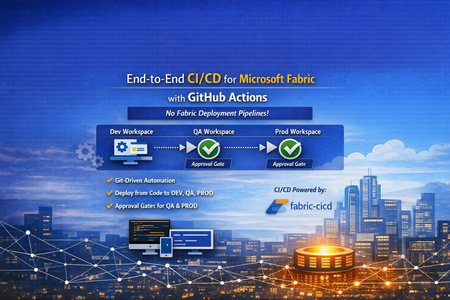
👋 Introduction If you've been working with Microsoft Fabric, you've likely faced this question: "How do we promote Fabric items from DEV → QA → PROD reliably, consistently, and with proper governance?" Many teams default to the built-in Fabric Deployment Pipelines — and they work great for simpler scenarios. But what happens when your enterprise demands: 🔒 Centralized governance across all platforms (infra, app, and data) 📜 Full audit trail of every change tied to a Git commit ✅ Approval gates with reviewer-based promotion 🔑 Per-environment service principal isolation 🧩 Alignment with your existing DevOps standards That's exactly the problem we set out to solve. In this post, I'll walk you through a production-ready, enterprise-grade CI/CD solution for Microsoft Fabric using the fabric-cicd Python library and GitHub Actions — with zero dependency on Fabric Deployment Pipelines. 🎯 What Problem Are We Solving? Traditional Fabric promotion workflows often look like this: Step Method Problem Build in DEV workspace Fabric Portal UI ✅ Works fine Promote to QA Fabric Deployment Pipeline or manual copy ⚠️ No Git traceability Promote to PROD Fabric Deployment Pipeline with approval ⚠️ Separate governance model from app/infra CI/CD Rollback 🤷 Manual recreation ❌ No deterministic rollback path Audit "Who clicked what, when?" ❌ Limited trail The Core Issue Fabric Deployment Pipelines introduce a parallel governance model that's disconnected from how your platform and application teams already work. You end up with: 🔀 Two different promotion systems (GitHub Actions for apps, Fabric Pipelines for data) 🕳️ Governance blind spots between the two 😰 Cultural friction ("Why do data teams have a different process?") Our Approach: Git as the Single Source of Truth 📖 ┌─────────────┐ push to main ┌─────────────┐ │ Developer │ ──────────────────▶ │ GitHub │ │ commits to │ │ Actions │ │ Git repo │ │ Workflow │ └─────────────┘ └──────┬──────┘ │ ┌─────────────────┼─────────────────┐ ▼ ▼ ▼ ┌──────────┐ ┌──────────┐ ┌──────────┐ │ 🟢 DEV │ │ 🟡 QA │ │ 🔴 PROD │ │ Auto │────▶│ Approval │────▶│ Approval │ │ Deploy │ │ Required │ │ Required │ └──────────┘ └──────────┘ └──────────┘ Every deployment originates from Git. Every promotion is traceable to a commit SHA. Every environment has its own approval gate. One pipeline model — across everything. 🏗️ Solution Architecture 📁 Repository Structure fabric-cicd-project/ │ ├── 📂 .github/ │ ├── 📂 workflows/ │ │ └── 📄 fabric-cicd.yml # GitHub Actions pipeline │ ├── 📄 CODEOWNERS # Review enforcement │ └── 📄 dependabot.yml # Automated dependency updates │ ├── 📂 config/ │ └── 📄 parameter.yml # Environment-specific parameterization │ ├── 📂 deploy/ │ ├── 📄 deploy_workspace.py # Main deployment entrypoint │ └── 📄 validate_repo.py # Pre-deployment validation │ ├── 📂 workspace/ # Fabric items (Git-integrated / PBIP) │ ├── 📄 .env.example # Environment variable template ├── 📄 .gitignore ├── 📄 ruff.toml # Python linting config ├── 📄 requirements.txt # Pinned dependencies ├── 📄 SECURITY.md # Vulnerability disclosure policy └── 📄 README.md 🔧 Key Components Component Purpose fabric-cicd Python library Deploys Fabric items from Git to workspaces (handles all Fabric API calls internally) deploy_workspace.py CLI entrypoint — authenticates, configures, deploys, logs parameter.yml Find-and-replace rules for environment-specific values (connections, lakehouse IDs, etc.) validate_repo.py Pre-flight checks — validates repo structure, parameter.yml presence, .platform files fabric-cicd.yml GitHub Actions workflow — orchestrates validate → DEV → QA → PROD ✨ Feature Deep Dive 1️⃣ Per-Environment Service Principal Isolation 🔐 Instead of a single shared service principal, each environment gets its own: DEV_TENANT_ID / DEV_CLIENT_ID / DEV_CLIENT_SECRET QA_TENANT_ID / QA_CLIENT_ID / QA_CLIENT_SECRET PROD_TENANT_ID / PROD_CLIENT_ID / PROD_CLIENT_SECRET Why this matters: 🛡️ Least-privilege access — the DEV SP can't touch PROD 🔍 Audit clarity — you know which identity deployed where 💥 Blast radius reduction — a compromised DEV secret doesn't affect PROD The deploy script automatically resolves the correct credentials based on TARGET_ENVIRONMENT, with fallback to shared FABRIC_* variables for simpler setups. 2️⃣ Environment-Specific Parameterization 🎛️ A single parameter.yml drives all environment differences: find_replace: - find: "DEV_Lakehouse" replace_with: DEV: "DEV_Lakehouse" QA: "QA_Lakehouse" PROD: "PROD_Lakehouse" - find: "dev-sql-server.database.windows.net" replace_with: DEV: "dev-sql-server.database.windows.net" QA: "qa-sql-server.database.windows.net" PROD: "prod-sql-server.database.windows.net" ✅ Same Git artifacts → different runtime bindings per environment ✅ No manual edits between promotions ✅ Easy to review in pull requests 3️⃣ Approval-Gated Promotions ✅ The GitHub Actions workflow uses GitHub Environments with reviewer requirements: Environment Trigger Approval 🟢 DEV Automatic on push to main None — deploys immediately 🟡 QA After successful DEV deploy ✅ Requires reviewer approval 🔴 PROD After successful QA deploy ✅ Requires reviewer approval Reviewers see a rich job summary in GitHub showing: 📌 Git commit SHA being deployed 🎯 Target workspace and environment 📦 Item types in scope ⏱️ Deployment duration ✅ / ❌ Final status 4️⃣ Pre-Deployment Validation 🔍 Before any deployment runs, a dedicated validate job checks: Check What It Does 📂 workspace exists Ensures Fabric items are present 📄 parameter.yml exists Ensures parameterization is configured 📄 .platform files present Validates Fabric Git integration metadata 🐍 ruff check deploy/ Lints Python code for syntax errors and bad imports If validation fails, no deployment runs — across any environment. 5️⃣ Full Git SHA Traceability 📜 Every deployment logs and surfaces the exact Git commit being deployed: Why this matters: 🔄 Rollback = git revert <sha> + push → pipeline redeploys previous state 🕵️ Audit = every PROD deployment tied to a specific commit, reviewer, and timestamp 🔀 Diff = git diff v1..v2 shows exactly what changed between deployments 6️⃣ Concurrency Control 🚦 concurrency: group: fabric-deploy-${{ github.ref }} cancel-in-progress: false Two rapid pushes to main won't cause parallel deployments fighting over the same workspace. The second run queues until the first completes. 7️⃣ Smart Path Filtering 🧠 paths-ignore: - "**.md" - "docs/**" - ".vscode/**" A README-only commit? A docs update? No deployment triggered. This saves runner minutes and avoids unnecessary approval requests for QA/PROD. 8️⃣ Retry Logic with Exponential Backoff 🔁 The deploy script wraps fabric-cicd calls with retry logic: Attempt 1 → fails (HTTP 429 rate limit) ⏳ Wait 5 seconds Attempt 2 → fails (HTTP 503 transient) ⏳ Wait 15 seconds Attempt 3 → succeeds ✅ Transient Fabric service issues don't break your pipeline — the deployment retries automatically. 9️⃣ Orphan Cleanup 🧹 Set CLEAN_ORPHANS=true and items that exist in the workspace but not in Git get removed: Workspace has: Notebook_A, Notebook_B, Notebook_C Git repo has: Notebook_A, Notebook_B → Notebook_C gets removed (orphan) This ensures your workspace exactly matches your Git state — no drift, no surprises. 🔟 Dependency Management with Dependabot 🤖 # .github/dependabot.yml updates: - package-ecosystem: "pip" schedule: interval: "weekly" - package-ecosystem: "github-actions" schedule: interval: "weekly" fabric-cicd, azure-identity, and GitHub Actions versions are automatically monitored. When updates are available, Dependabot opens a PR — keeping your pipeline secure and current. 1️⃣1️⃣ CODEOWNERS Enforcement 👥 # .github/CODEOWNERS /deploy/ @platform-team /config/ @platform-team /.github/workflows/ @platform-team Changes to deployment scripts, parameterization, or the workflow require review from the platform team. No one accidentally modifies the pipeline without oversight. 1️⃣2️⃣ Job Timeouts ⏱️ Job Timeout Validate 10 minutes Deploy (DEV/QA/PROD) 30 minutes A hung process won't burn 6 hours of runner time. It fails fast, alerts the team, and frees the runner. 1️⃣3️⃣ Security Policy 🛡️ A dedicated SECURITY.md provides: 📧 Responsible vulnerability disclosure process ⏰ 48-hour acknowledgement SLA 📋 Best practices for contributors (no secrets in code, least-privilege SPs, 90-day rotation) 🔄 The Complete Workflow Here's what happens end-to-end when a developer merges a PR: 1. 👨💻 Developer merges PR to main │ 2. 🔍 VALIDATE job runs │ ✅ Repo structure checks │ ✅ Python linting (ruff) │ ✅ parameter.yml validation │ 3. 🟢 DEPLOY-DEV job runs (automatic) │ 🔑 Authenticates with DEV SP │ 📦 Deploys all items to DEV workspace │ 📝 Logs commit SHA + summary │ 4. 🟡 DEPLOY-QA job waits for approval │ 👀 Reviewer checks job summary │ ✅ Reviewer approves │ 🔑 Authenticates with QA SP │ 📦 Deploys all items to QA workspace │ 5. 🔴 DEPLOY-PROD job waits for approval │ 👀 Reviewer checks job summary │ ✅ Reviewer approves │ 🔑 Authenticates with PROD SP │ 📦 Deploys all items to PROD workspace │ 6. 🎉 Done — all environments in sync with Git 🆚 Comparison: This Approach vs. Fabric Deployment Pipelines Capability Fabric Deployment Pipelines This Solution (fabric-cicd + GitHub Actions) Source of truth Workspace ✅ Git Promotion trigger UI click / API call ✅ Git push + approval Approval gates Fabric-native ✅ GitHub Environments (same as app teams) Audit trail Fabric activity log ✅ Git commits + GitHub Actions history Rollback Manual ✅ git revert + auto-redeploy Cross-platform governance Separate model ✅ Unified with infra/app CI/CD Parameterization Deployment rules ✅ parameter.yml (reviewable in PR) Secret management Fabric-managed ✅ GitHub Secrets + per-env SP isolation Drift detection Limited ✅ Orphan cleanup (CLEAN_ORPHANS=true) 🚀 Getting Started Prerequisites 3 Fabric workspaces (DEV, QA, PROD) Service principal(s) with Contributor role on each workspace GitHub repository with Actions enabled GitHub Environments configured (dev, qa, prod) Quick Setup # 1. Clone the repo git clone https://github.com/<your-org>/fabric-cicd-project.git # 2. Install dependencies pip install -r requirements.txt # 3. Copy and fill environment variables cp .env.example .env # 4. Run locally against DEV python deploy/deploy_workspace.py GitHub Actions Setup Create GitHub Environments: dev, qa (add reviewers), prod (add reviewers) Add secrets to each environment: DEV_TENANT_ID, DEV_CLIENT_ID, DEV_CLIENT_SECRET QA_TENANT_ID, QA_CLIENT_ID, QA_CLIENT_SECRET PROD_TENANT_ID, PROD_CLIENT_ID, PROD_CLIENT_SECRET DEV_WORKSPACE_ID, QA_WORKSPACE_ID, PROD_WORKSPACE_ID Push to main — the pipeline takes over! 🎉 💡 Lessons Learned After implementing this pattern across several engagements, here are the key takeaways: ✅ What Works Well Teams love the Git traceability once they experience a clean rollback Approval gates in GitHub feel natural to platform engineers Parameter.yml changes in PRs create great review conversations about environment differences Job summaries give reviewers confidence to approve without digging into logs ⚠️ Watch Out For Cultural resistance is the #1 blocker — invest in enablement, not just automation Fabric items with runtime state (data in lakehouses, refresh history) aren't captured in Git Secret rotation across 3+ environments needs process discipline (consider OIDC federated credentials) Run a "portal vs. pipeline" side-by-side demo early — it changes minds fast 🤝 For CSAs: Sharing This With Customers This solution is ideal for customers who: ☑️ Already use GitHub Actions for application or infrastructure CI/CD ☑️ Have governance requirements that demand Git-based audit trails ☑️ Operate multiple Fabric workspaces across environments ☑️ Want to standardize their promotion model across all workloads ☑️ Are moving from Power BI Premium to Fabric and want to modernize their DevOps practices 🗣️ Conversation Starters "How are you promoting Fabric items between environments today?" "Is your data team using the same CI/CD patterns as your app teams?" "If something goes wrong in production, how quickly can you roll back to the previous version?" 📚 Resources 📦 fabric-cicd on PyPI 📖 fabric-cicd Documentation 🐙 GitHub Actions Documentation 🏗️ Microsoft Fabric Git Integration 🌐Git Repository URL: vinod-soni-microsoft/FABRIC-CICD-PROJECT: Enterprise-grade CI/CD solution for Microsoft Fabric using fabric-cicd Python library and GitHub Actions. Git-driven deployments across DEV → QA → PROD with environment approval gates, per-environment service principal isolation, and parameterized promotion — no Fabric Deployment Pipelines required. 🏁 Conclusion The shift from UI-driven promotion to Git-driven CI/CD for Microsoft Fabric isn't just a technical upgrade — it's a governance and cultural alignment decision. By using fabric-cicd with GitHub Actions, you get: 📖 One source of truth (Git) 🔄 One promotion model (GitHub Actions) ✅ One approval process (GitHub Environments) 🔍 One audit trail (Git history + Actions logs) 🔐 One security model (GitHub Secrets + per-env SPs) No parallel governance. No hidden drift. No "who clicked what in the portal." Just Git, code, and confidence. 💪 Have questions or want to share your experience? Drop a comment below — I'd love to hear how your team is approaching Fabric CI/CD! 👇1.2KViews0likes0Commentsمرحبا بكم
Leina Future Data & AI Hub – Microsoft User Group! مرحبا بكم في مجتمع والاكسل Power BIيسعدنا انضمامكم إلى هذا المجتمع المتخصص في تعلّم تقنيات البيانات والذكاء الاصطناعي ومايكروسوفت فابريك و وتطوير مهاراتكم العملية لبناء مستقبل مهني قوي في عالم البيانات نحن هنا لنتعلم معا، نشارك المعرفة، ونفتح آفاق جديدة للفرص المهنية والتطوير المستمر شاركنا: من أي مدينة أو دولة تنضمون إلينا؟ وللبقاء على اطلاع بجميع الدورات، المحاضرات، الأخبار، والفرص، تابعوا قنوات المجتمع مجتمع الواتساب https://chat.whatsapp.com/ExSz1fgxxs72fMANVzVeXH قناة اليوتيوب https://www.youtube.com/@leinanazar LinkedIn صفحة https://www.linkedin.com/company/leina-future-data-ai-hub/Solved138Views2likes3CommentsLessons Learned #537: Copilot Prompts for Troubleshooting on Azure SQL Database
We had the opportunity to share our experience in several community sessions how SSMS Copilot can help across multiple phases of troubleshooting. In this article, I would like to share a set of prompts we found in those sessions and show how to apply them to an example query. During a performance incident, we captured the following query, generated by PowerBI. SELECT TOP (1000001) * FROM ( SELECT [t2].[Fiscal Month Label] AS [c38], SUM([t5].[Total Excluding Tax]) AS [a0], SUM([t5].[Total Including Tax]) AS [a1] FROM ( SELECT [$Table].[Sale Key] as [Sale Key], [$Table].[City Key] as [City Key], [$Table].[Customer Key] as [Customer Key], [$Table].[Bill To Customer Key] as [Bill To Customer Key], [$Table].[Stock Item Key] as [Stock Item Key], [$Table].[Invoice Date Key] as [Invoice Date Key], [$Table].[Delivery Date Key] as [Delivery Date Key], [$Table].[Salesperson Key] as [Salesperson Key], [$Table].[WWI Invoice ID] as [WWI Invoice ID], [$Table].[Description] as [Description], [$Table].[Package] as [Package], [$Table].[Quantity] as [Quantity], [$Table].[Unit Price] as [Unit Price], [$Table].[Tax Rate] as [Tax Rate], [$Table].[Total Excluding Tax] as [Total Excluding Tax], [$Table].[Tax Amount] as [Tax Amount], [$Table].[Profit] as [Profit], [$Table].[Total Including Tax] as [Total Including Tax], [$Table].[Total Dry Items] as [Total Dry Items], [$Table].[Total Chiller Items] as [Total Chiller Items], [$Table].[Lineage Key] as [Lineage Key] FROM [Fact].[Sale] as [$Table] ) AS [t5] INNER JOIN ( SELECT [$Table].[Date] as [Date], [$Table].[Day Number] as [Day Number], [$Table].[Day] as [Day], [$Table].[Month] as [Month], [$Table].[Short Month] as [Short Month], [$Table].[Calendar Month Number] as [Calendar Month Number], [$Table].[Calendar Month Label] as [Calendar Month Label], [$Table].[Calendar Year] as [Calendar Year], [$Table].[Calendar Year Label] as [Calendar Year Label], [$Table].[Fiscal Month Number] as [Fiscal Month Number], [$Table].[Fiscal Month Label] as [Fiscal Month Label], [$Table].[Fiscal Year] as [Fiscal Year], [$Table].[Fiscal Year Label] as [Fiscal Year Label], [$Table].[ISO Week Number] as [ISO Week Number] FROM [Dimension].[Date] as [$Table] ) AS [t2] ON [t5].[Delivery Date Key] = [t2].[Date] GROUP BY [t2].[Fiscal Month Label] ) AS [MainTable] WHERE ( NOT([a0] IS NULL) OR NOT([a1] IS NULL) ) I structure the investigation in three areas: Analysis – understand the data model, sizes, and relationships. List all tables in the 'Fact' and 'Dimension' schemas with space usage in MB and number of rows. The name of the tables and their relations among them. Please, provide a textual representation for all relations. List all foreign key relationships between tables in the 'Fact' and 'Dimension' schemas, showing the cardinality and referenced columns. Could you please let me know what is the meaning of every table? Describe all schemas in this database, listing the number of tables and views per schema. Create a textual data model (ER-style) representation showing how all Fact and Dimension tables are connected. Maintenance Plan Check – verify statistics freshness, index health/fragmentation, partition layout, and data quality. List all statistics in the database that have not been updated in the last 7 days, showing table name, number of rows, and last update date. List all indexes in the database with fragmentation higher than 30%, including table name, index name, and page count. Please, provide the T-SQL to rebuild all indexes in ONLINE mode and UPDATE STATISTICS for all tables that are automatic statistics. Check for fact table rows that reference dimension keys which no longer exist (broken foreign key integrity). Find queries that perform table scans on large tables where no indexes are used, based on recent execution plans. Performance Improvements – simplify/reshape the query and consider indexed views, columnstore, partitioning, and missing indexes. In this part, I would like to spend more time about these prompts, for example the following ones, help me to understand the performance issue, simplify the query text and also, explains what the query is doing. Identify the longest-running query in the last 24 hours provide the full text of the query Please simplify the query Explain me the query Explain in plain language what the following SQL query does, including the purpose of each subquery and the final WHERE clause. Show a histogram of data distribution for key columns used in joins or filters, such as SaleDate, ProductCategory, or Region. Finally, using this prompt I could find a lot of useful information how to improve the execution of this query: Analyze the following SQL query and provide a detailed performance review tailored for Azure SQL Database Hyperscale and Power BI DirectQuery scenarios. For each recommendation, estimate the potential performance improvement as a percentage (e.g. query runtime reduction, I/O savings, etc.). 1. Could this query benefit from a schemabound indexed view or a materialized view? Estimate the performance gain if implemented. 2. Is there any missing index on the involved tables that would improve join or filter efficiency? Include the suggested index definition and expected benefit. 3. Would using a clustered or nonclustered columnstore index on the main fact table improve performance? Estimate the potential gain in query time or storage. 4. Could partitioning the fact table improve performance by enabling partition elimination? If so, suggest the partition key and scheme, and estimate improvement. 5. Are current statistics sufficient for optimal execution plans? Recommend updates if needed and estimate impact. 6. Does this query preserve query folding when used with Power BI DirectQuery? If not, identify what breaks folding and suggest how to fix it. 7. Recommend any query rewrites or schema redesigns, along with estimated performance improvements for each. I got a lot of improvements suggestions about it: Evaluated a schemabound indexed view that pre‑aggregates by month (see Reference Implementations), then pointed Power BI to the view. Ensured clustered columnstore on Fact.Sale; considered a targeted rowstore NCI on [Delivery Date Key] INCLUDE ([Total Excluding Tax], [Total Including Tax]) when columnstore alone wasn’t sufficient. Verified statistics freshness on join/aggregate columns and enabled incremental stats for partitions. Checked partitioning by date to leverage elimination for common slicers.324Views0likes0Comments
M365 Roadmap Management
Wondering if others have tips & tricks on how they stay up to date with the https://www.microsoft.com/en-us/microsoft-365/roadmap? I find it tedious to stay on top of all the features being announced, switching launch phases, moving target dates, and so on. I was hoping to use the RSS feed in a PowerBI Dashboard or find a solution in Planner similar to syncing the Admin Centre messages, and after some quick searches online could not find an example of anyone doing something similar. I was hoping any members of this community may be able to shed some light on how they approach the roadmap site and what tools if any they use to manage the constant influx of information? TIA!1.6KViews4likes9Comments
Mine your Azure backup data, it could save you 💰💡
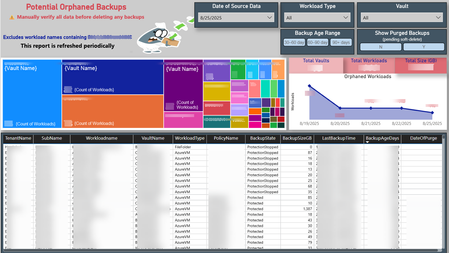
Your data has a story to tell. Mine it, decipher it, and turn it into actionable outcomes. 📊🔍 Azure backups can become orphaned in several ways (I'll dive into that in a future post). But here’s a key point: orphaned doesn’t always mean useless, hence the word “Potential” in the title of my Power BI report. Each workload needs to be assessed individually. If a backup is no longer needed, you might be paying for it - unnecessarily and unknowingly. 🕵️♂️💸 To uncover these hidden costs, I combined data from the Azure Business Continuity Center with a PowerShell script I wrote to extract LastBackupTime and other metadata. This forms the foundation of my report, helping visualize and track backup usage over time. This approach helped me identify forgotten one-time backups, VMs deleted without stopping the backup, workloads excluded due to policy changes, and backups left behind after resource migrations. If you delete unneeded backups and have soft-delete enabled, the backup size drops to zero and Azure stops charging for it. ✅🧹 💡 Do your Azure backups have their own untold story to tell? 📸 Here's a snapshot of my report that helped me uncover these insights 👇106Views0likes0Comments
Teams Auto Attendant & Call Queue Historical Report
Hello everyone, We are slowly moving some of our hotlines to Teams, so I was searching for a way to get the data effectively. With this, I came across the PowerBI report https://learn.microsoft.com/en-us/microsoftteams/aa-cq-cqd-historical-reports. Sadly it seems the data source https://api.interfaces.records.teams.microsoft.com/Teams.VoiceAnalytics/getanalytics is no longer valid. If I try to connect to it, I'm getting error message: Web.Contents failed to get contents from 'https://api.interfaces.records.teams.microsoft.com/Teams.VoiceAnalytics/getanalytics?query=**** (500): Internal Server Error Do you know what is the correct data source which should be used? I do have access to Teams admin center and QER (Microsoft Call Quality data source) report without any issues so this should be a problem of the incorrect data source. Also is there a way how to display a full E164 number in the call history? It seems the last four digits are always replaced with stars which I suppose is due to privacy. Thanks. Best Regards LukasSolved14KViews0likes6CommentsData-driven Analytics for Responsible Business Solutions, a Power BI introduction course:
Want to gain inside on how students at Radboud University are introduced, in a praticle manner, to Power BI? Check out our learning process and final project. For a summary of our final solution watch our Video Blog and stick around till the end for some "wise words"!2.5KViews0likes1Comment
Microsoft PowerBI Template and Project Web App
Hello all! Got the PowerBI Template up and running and enjoying it. However, I have noticed that for some reason, my projects that are showing up correctly, Example, Project 1, is showing the right people who are tasked in Project 1, however the taskings are showing them working on another project, which is and has been inactive over a year and not showing the new correct taskings. Anyone have ideas that can help there?137Views0likes1Comment
Seeking On-Premise Power BI P1 Capacity (Academic) or Suitable Alternative for Government Customer
Hello everyone, We are working with a government agency customer who requires Power BI P1 Capacity (On-Premise) with Academic classification. Unfortunately, we’ve been informed by Microsoft that this product has been discontinued and is now only available through Azure. However, due to strict data security policies, our customer is unable to use Azure as they cannot send data to external servers. We are looking for guidance on the following: Is there a direct successor to the Power BI P1 Capacity (On-Premise) with Academic classification that would meet these requirements? Are there any similar on-premise solutions for Power BI that could work for this customer? Any suggestions on how we can provide a suitable solution would be greatly appreciated! Thanks in advance for your assistance!160Views0likes2Comments