operating system deployment
29 Topics
MECM OSD TS Application Installations fail randomly to download content.
We are experiencing a persistent and well-documented issue with MECM OSD Task Sequences where Applications randomly fail to install after the MECM client has been installed. This behavior seems to affect many environments and has been an ongoing problem for years, yet a definitive solution remains elusive. In our case, we have over 30 Applications included in the OSD Task Sequence. Despite implementing all commonly recommended mitigations—such as inserting an additional restart after the MECM client installation and including a two-minute delay before the Application install task group begins—we still encounter random failures. The issue is not limited to any specific Application; it can be any one of the 30+ Apps, and the failure to download appears to occur entirely at random. Occasionally, most of the Applications install successfully, and only one will fail, which subsequently causes the entire Task Sequence to fail with the same error. Importantly, all of these Applications install without any issues post-OSD, further confirming that the problem lies not with the Applications themselves but with the process during the Task Sequence. The randomness of which App fails also suggests an underlying process, feature, or timing issue—not an App configuration problem. We have thoroughly validated all related infrastructure settings: Boundaries and boundary groups have been triple-checked. No boundary is assigned to multiple groups. Site system assignments are correct. We are using PKI certificates and HTTPS, and the client authentication certificate is present on the device at the time of failure. The issue has been replicated across both Windows 10 and Windows 11, ruling out any specific cumulative updates or OS version anomalies. No additional language packs are being installed—only language fallback is applied via the "Apply Windows Settings" step. One suspicious observation is the lack of any reference to our local Distribution Point in the LocationServices or CAS logs during failure events. Initially, this pointed to a possible boundary misconfiguration, but after multiple checks, no issues have been identified. Unfortunately, we are unable to use the common workaround of converting Applications to Packages, due to internal policies and deployment requirements. Therefore, we need to resolve this while continuing to use Applications in the Task Sequence. Given the number of years this issue has persisted across customer environments, it's surprising there isn’t more formal guidance or documentation available to help isolate the root cause. If anyone has encountered a similar scenario or has any advanced troubleshooting tips, we would greatly appreciate your insight.249Views0likes1Comment
Issues with OSD in secondary MCM 2509 site
Hi, having upgraded primary and secondary MCM site to version 2509 I cannot perform OSD anymore on secondary site location - errors: Failed to query Management Point locator QueryMPLocator: no valid MP locations are received Boundary Group in secondary site does have assigned MP and that is secondary MCM site server - however I get this as well: <MPLocation SiteCode="" AssignedSiteCode="" MP="" MPCertificatesEx="" x86UnknownMachineGUID="" x64UnknownMachineGUID=""/> Any help would be highly appreciated.61Views1like0CommentsSCCM - 23/24H2 to 25H2 Upgrade
Hello SCCM Community! Having an issue with upgrading devices from 23 and 24H2 to 25H2, I am downloading the newest version in SCCM under Windows Servicing and Feature Upgrades and deploying it to the targeted collection, but nothing shows in Software Center. Upon checking the UpdatesDeployment log, it shows Actionable Updates = 0 in one of the lines, but I'm wondering why WUA is determining updates do not apply to the machine. I believed this could be a GPO restriction but I've confirmed that there are no conflicting GPOs or Registry Edits. Any suggestions? Thanks!687Views1like1Comment
SYSTEM CENTER IMPLEMENTATION & LICENSING Guide
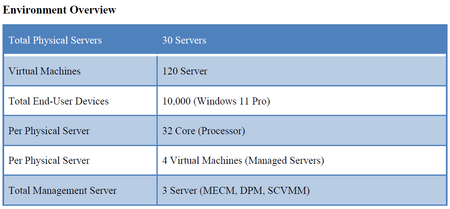
Dear Microsoft Community, Our organization is planning to deploy a comprehensive IT management solution using the Microsoft System Center Suite. The goal is to streamline infrastructure operations, enhance backup and recovery, manage both virtual and physical resources, oversee endpoints, and maintain security and compliance. We need guidance regarding the number and type of licenses required, specifically Client Management Licenses (CML), Server Management Licenses (ML), and System Center Suite licenses.383Views0likes5Comments
Issues with Capturing Windows11 25H2
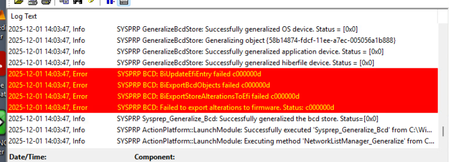
I have been trying to capture an updated image from vsphere8 and sccm. I had zero issues with 22H2 and 23H2 but now I cannot get sysprep to pass generalizing. This error keeps coming up but I have tried most things the great Google had to offer. Any one else running into this issue?1.1KViews0likes1CommentUsing REST API to get / set device variables
Hi, I'm trying to set a couple of variables against a machine name, through using the REST API. These are the variables that are set that you can see in the console if you right click properties on a device and go to the 'Variables' tab. These are handy because they can later be referenced during Task Sequences / OSD. I just can't figure out how to do it with the REST API. I have no issues doing it with the powershell module using the 'New-CMDeviceVariable' command, but my solution i'm building at the moment requires the solution to be done with rest api, not with ps modules... I can connect to REST API using powershell using commands such as the below. This all works fine. $ConfigMgrServerURL = "https://SCCMserver.domain.local" $MachineName = "MachineName1" # Following command is a sample GET request, which works. (Invoke-RestMethod -Method Get -Uri "$ConfigMgrServerURL/AdminService/wmi/SMS_R_System?`$filter=Name eq '$MachineName'" -Credential $Credential) #I can also fetch "Custom Properties" via this command (Invoke-RestMethod -Method Get -Uri "$ConfigMgrServerURL/AdminService/v1.0/Device($ResourceID)/AdminService.GetExtensionData" -Credential $Credential) Now i just can't see where i can go to set a variable on the machine. Does anyone have any ideas ? Thanks!73Views0likes0CommentsWin11 24H2 slow to restart TS task execution following reboot task in bare metal OS deployment
When comparing OS deployment bare metal task sequence times between Windows 11 24H2 and Windows 10 22H2 I could see that 24H2 was considerably slower even though the task sequences were almost identical other than the OS being laid down on the device. I did a timing comparison and noticed two things in particularly that were taking considerably longer on the 24H2 device: 1) reboot tasks 2) time to finish up the task sequence work after the last step. For reboot tasks, I can see that the delay is between these two events in the SMSTS.log log: Waiting for policy to be compiled in 'root\ccm\policy\machine' namespace and Policy verification done within the OSDSetupHook component. On the Windows 10 device the time between those log entries was 1 second, but on Windows 11 24H2 those log entries vary, but it's usually around 2 minutes. At the end of the task sequence, after executing the last task, following The task execution engine successfully completed the current task sequence step smsts.log entry to when the smsts.log stops being written to, it takes 14 seconds for the Windows 10 device, but it takes 4:29 seconds for the Windows 11 device. The delays are similar, between these two events in SMSTS.log (see attached screen shot): End Task Sequence policy cleanup and Policy evaluation initiated within the TSManager component. Any reason policy work should take considerably longer on Win11 24H2? Any suggestions on where I can look to see as to why it's taking such a longer time to deal with policy work in 24H2? Is this a Win11 24H2 issue, a ConfigMan issue, or ConfigMan configuration issue? I am welcome to entertain any thoughts or suggestions folks have. Anyone else seeing this issue in their environment? Environment details: CM 2503 (5.0.9135.1000) without KB33177653 or KB34503790 installed. Windows 11 = 24H2 customized reference image built from August 2025 ISO. ADK = 21H2 (10.1.22000.1).220Views0likes1CommentRe-Join SCCM Client to Intune for Co-Managed join Type
Hello, I have been using SCCM for a long time, I have it is setup for Co-management, and all my workloads are moved over to Intune. I have a few clients that for one reason or other have not been added to Intune. I can get them onboarded, but the join type always ends up Intune. I am trying to find out the correct recipe to reenroll an SCCM client to Intune. I have tried uninstalling the SCCM client and reinstalling. I have tried removing registry keys for Intune to ensure it joins again. I have used DSREGCMD to leave and join back. I have completely removed from Domain and deleted from Intune. I have tried combinations of all of these things together. I have yet to come up with a specific order to do them in. I still think there is some remnant that is preventing a rejoin. Does anyone have details that help me to get systems to rejoin via SCCM? Some may say what is the difference. The difference is there are tools that are not present if the Join type is incorrect. Best regards and thanks.146Views0likes0CommentsProblem with running TS OSD from Windows
Hello everyone. I have a problem that I can't solve for a long time... This trouble is happening during with only running TS OSD from Windows (step - Restart in Winpe). If booted from PXE - works ok. I having trouble with a particular model (Acer Veriton Vero B650). There is no problem on many other different models. UEFI. Bitlocker and antivirus disabled. Windows 11 x64 ltsc 2024. SecureBoot enabled or disabled - does not matter. All drivers added to boot.wim Maybe someone has encountered something similar. Could you please explain the mechanism of deployment not from PXE, but from Windows, or help to find out the reason for the impossibility of TS OSD running from Windows (step - Restart in Winpe). apparently the error occurs at the stage of saving bcd104Views0likes0CommentsMicrosoft Patching is not working until User logon to the newly imaged device
Hi All, I have a customer that they have two separate SCCM and WSUS environments in the same domain and they use SCCM for OS imaging and WSUS for patch updates. The problem is end user hast to logon to the device after imaging the OS using SCCM to kick start the patching process from WSUS. My client's understanding is that it should work without user logon to the device since GPO targeted to all authenticated users. Please also note that the computer objects and other settings are working without any issues. I would appreciate if anyone come across such a behavior and there is any workaround that we can do kick start the patching regardless of user login or is this behavior by design? Thanks, Dilan622Views0likes0Comments