Microsoft Project
27 TopicsMicrosoft Project and Planner AMA
Join us for this AMA to learn about new and upcoming features for Project for the web, Planner, and Tasks that can help you run projects more efficiently for successful delivery and engage with product experts. Project for the web supports simplified planning, collaboration, and dynamic scheduling while providing visibility across projects to help you execute with greater agility so you and your team can deliver impactful results. If you manage complex projects across your organization, need better ways to manage tasks, or just getting started, this event is for you. In this session, you will: Hear about the latest features and get a peek into the future. See demos of the new and upcoming features. Engage with the product team to answer your questions and listen to your feedback. At this AMA, learn how our new and upcoming features can help you stay organized and deliver results across projects of varying complexity with Microsoft’s connected project experiences. We have a request for the amazing community, please help us understand your needs and challenges better by filling this small survey below. Would help us to prioritize the features effectively and make Project for web better. https://forms.office.com/pages/responsepage.aspx?id=v4j5cvGGr0GRqy180BHbR1OvUA7nnfFIvhslqRMb4yNUQ0hLTENPTDgySTBSTTQ4NUhFS1dRV01WRC4u33KViews7likes220Comments
Stage Gate of new product process with employee resource Management
I am looking for Project Management Software. It looks like Teams does have a lot of the tools I am looking for in a software except for a couple of things. I am not finding a tool for implementing Microsoft Project. The Gantt chart would have things like new product development with design, validation, prototype build, testing and launch, etc. I am also trying to enter a staged product development workflow with resource management.Solved3.8KViews0likes1Comment
using Office365 project i continue to receive your session has expired.
I have an on-line project that i am trying to maintain. every minute or so the project goes into a read-only mode, give a message that my session has expired, and i need to refresh. This started today (12/4/2020). I originally created the project yesterday.1.6KViews0likes1Comment
Project integration with powerBI
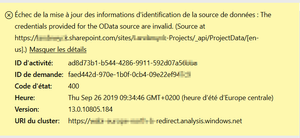
Hello all, I am trying to configure a project site into powerBI. Go to apps add the site URL and then try to auhenticate with auth2. I try this in ie and firefox browser (also in private navigation for both) But I get the following error message: Can you help me?1.3KViews0likes1CommentUsing Microsoft Project for Agile Project Management
Leveraging Agile Methodologies in Microsoft Project Agile methodologies have gained immense popularity in project management due to their flexibility and iterative approach. While Microsoft Project is traditionally known for its waterfall project management capabilities, it can also be adapted to support Agile methodologies, including sprint planning and backlog management. Here’s how you can leverage Microsoft Project for Agile project management. Note: Microsoft Project is not included in the Business Premium licenses and must be purchased separately. Getting Started with Agile in Microsoft Project Using Agile in Microsoft Project can streamline your project management process by incorporating Agile methodologies. In this blog, we'll cover the manual setup of sprints, a core component of Agile methodologies in Microsoft Project. Sprints represent short, time-boxed periods during which specific tasks are completed. Now that you know what sprints are, let's get started: 1. Setting Up Agile Frameworks: Open Agile Views: Open your project in Microsoft Project and switch to the Board view. Select "Group by" and choose "Sprint" to enable sprint planning. Create Sprints: Add new sprints by selecting "Add sprint." Rename and set start and finish dates for each sprint. Add Tasks to Sprints: Start by adding your tasks in your “Backlog” bucket. From there you can drag and drop tasks from the backlog into the appropriate sprint. This helps in organizing tasks based on their priority and sprint timelines. 2. Sprint Planning: Sprint planning is a crucial aspect of agile project management. Microsoft Project facilitates this through its sprint planning tools which include: Backlog Management: Create and prioritize a backlog of tasks. Tasks can be added in both Grid and Board views. Task Assignment: Assign tasks to specific sprints by dragging them from the backlog to the sprint. This visual approach makes it easy to manage and track tasks. Sprint Review: At the end of each sprint, review completed tasks and plan for the next sprint. Use the Board view to see tasks assigned to specific sprints and their progress. 3. Backlog Management: Managing the product backlog is essential for agile projects. Microsoft Project provides tools to effectively manage backlog items which includes: Create Backlog Items: Add new tasks to the backlog by selecting "+ Add task" in the Board view. Prioritize Backlog: Reorder tasks in the backlog based on priority. High-priority tasks can be moved to the top of the list. Detailing Tasks: Add details and estimates to backlog items to ensure clarity and proper planning. 4. Collaboration and Tracking: Agile project management emphasizes collaboration and continuous tracking. Microsoft Project supports these principles through various features: Team Collaboration: Use Microsoft Teams integration to collaborate with team members. Share files, chat, and hold meetings directly within the project. Real-Time Tracking: Track task progress in real-time using the Board view. Update task statuses and monitor sprint progress continuously. Agile Reports: Generate agile reports to visualize sprint performance, task completion rates, and overall project progress. Conclusion Microsoft Project's adaptability to agile methodologies makes it a powerful tool for modern project management. By leveraging its sprint planning, backlog management, and collaboration features, project managers can effectively implement agile practices and enhance project outcomes. Whether you are managing software development projects or other types of projects, Microsoft Project provides the flexibility and tools needed to succeed in an agile environment. For more information on planning a project in sprints in Project for the web, please visit: Plan a project in sprints in Project for the web - Microsoft Support. To learn more about Projects in general, please visit Microsoft Project for the Web | Manage Projects Online.1.2KViews0likes1Comment
Microsoft Teams / Project Integration trouble
Hello! I'm having trouble accessing/adding a Project that I created (externally to Teams) to my channel. The message says that I can't create a Project because I don't have a Projects license. I double checked my subscriptions and I have a Project Plan 3. I haven't found any information online saying that that is a limitation of the Project Plan 3 license, can someone please help? Thank you in advance!1.1KViews0likes1Comment