microsoft intune
471 TopicsWelcome to the Microsoft Security Community!
Protect it all with Microsoft Security Eliminate gaps and get the simplified, comprehensive protection, expertise, and AI-powered solutions you need to innovate and grow in a changing world. The Microsoft Security Community is your gateway to connect, learn, and collaborate with peers, experts, and product teams. Gain access to technical discussions, webinars, and help shape Microsoft’s security products. Get there fast To stay up to date on upcoming opportunities and the latest Microsoft Security Community news, make sure to subscribe to our email list. Find the latest skilling content and on-demand videos – subscribe to the Microsoft Security Community YouTube channel. Catch the latest announcements and connect with us on LinkedIn – Microsoft Security Community and Microsoft Entra Community. Index Community Calls: January 2026 | February 2026 Upcoming Community Calls January 2026 Jan. 15 | 8:00am | Microsoft Purview | Purview Data Security and Entra Global Secure Access Deep Dive Learn how Microsoft Global Secure Access (GSA) and Purview extend data loss prevention to the network, inspecting traffic to and from sanctioned and unsanctioned apps, including AI, and block sensitive data exfiltration in real time. The guidance in this session will provide actionable steps to security teams getting started with extending data security to the network layer to support compliance and zero trust strategies. Jan. 20 | 8:00am | Microsoft Defender for Cloud | What’s New in Microsoft Defender CSPM Cloud security posture management (CSPM) continues to evolve, and Microsoft Defender CSPM is leading the way with powerful enhancements introduced at Microsoft Ignite. This session will showcase the latest innovations designed to help security teams strengthen their posture and streamline operations. Jan. 21 | 8:00am | Microsoft Entra | Microsoft Agent Identity Platform Fundamentals In this session, we take a deep technical dive into the Microsoft Agent Identity Platform. You’ll learn how the platform’s core building blocks—Agent Identity Blueprints, Agent Identities, Agent Users, and the Agent Registry—work together to enable secure, scalable agent authentication and authorization. Jan. 22 | 8:00am | Azure Network Security | Advancing web application Protection with Azure WAF: Ruleset and Security Enhancements Explore the latest Azure WAF ruleset and security enhancements. Learn to fine-tune configurations, reduce false positives, gain threat visibility, and ensure consistent protection for web workloads—whether starting fresh or optimizing deployments. Jan. 22 | 8:00am | Security Copilot Skilling Series | Building Custom Agents: Unlocking Context, Automation, and Scale Microsoft Security Copilot already features a robust ecosystem of first-party and partner-built agents, but some scenarios require solutions tailored to your organization’s specific needs and context. In this session, you'll learn how the Security Copilot agent builder platform and MCP servers empower you to create tailored agents that provide context-aware reasoning and enterprise-scale solutions for your unique scenarios. RESCHEDULED for Jan. 27 | 9:00am | Microsoft Sentinel | AI-Powered Entity Analysis in Sentinel’s MCP Server Simplify entity risk assessment with Entity Analyzer. Eliminate complex playbooks; get unified, AI-driven analysis using Sentinel’s semantic understanding. Accelerate automation and enrich SOAR workflows with native Logic Apps integration. Jan. 28 | 8:00am | Security Copilot Skilling Series | Security Copilot in Purview Technical Deep Dive Discover how AI-powered alert triage agents for Data Loss Prevention (DLP) and Insider Risk Management (IRM) are transforming incident response and compliance workflows. Explore new Data Security Posture Management (DSPM) capabilities that deliver deeper insights and automation to strengthen your security posture. This session will showcase real-world scenarios and actionable strategies to help you protect sensitive data and simplify compliance. February 2026 Feb. 2 | 9:00am | Microsoft Sentinel | Accelerate your SIEM migration to Microsoft Sentinel Join us for an insightful webinar to discover how Microsoft Sentinel simplifies SIEM migration and enables true SOC transformation. Experience the new AI-powered SIEM migration tool that goes beyond syntax conversion—delivering advanced correlation, actionable insights, and accurate intent-based mapping for improved detection coverage and continuous optimization. Feb. 10 | 8:00am | Microsoft Security Store | From Alert to Resolution: Using Security Agents to Power Real‑World SOC Workflows In this webinar, we’ll show how SOC analysts can harness security agents from Microsoft Security Store to strengthen every stage of the incident lifecycle. Through realistic SOC workflows based on everyday analyst tasks, we will follow each scenario end to end, beginning with the initial alert and moving through triage, investigation, and remediation. Along the way, we’ll demonstrate how agents in Security Store streamline signal correlation, reduce manual investigation steps, and accelerate decision‑making when dealing with three of the most common incident types: phishing attacks, credential compromise, and business email compromise (BEC), helping analysts work faster and more confidently by automating key tasks, surfacing relevant insights, and improving consistency in response actions. Feb. 26 | 9:00am | Azure Network Security | Azure Firewall Integration with Microsoft Sentinel Learn how Azure Firewall integrates with Microsoft Sentinel to enhance threat visibility and streamline security investigations. This webinar will demonstrate how firewall logs and insights can be ingested into Sentinel to correlate network activity with broader security signals, enabling faster detection, deeper context, and more effective incident response. Looking for more? Join the Microsoft Customer Connection Program (MCCP)! As a MCCP member, you’ll gain early visibility into product roadmaps, participate in focus groups, and access private preview features before public release. You’ll have a direct channel to share feedback with engineering teams, influencing the direction of Microsoft Security products. The program also offers opportunities to collaborate and network with fellow security experts and Microsoft product teams. Join the MCCP that best fits your interests: www.aka.ms/joincommunity. Additional resources Microsoft Security Hub on Tech Community Virtual Ninja Training Courses Microsoft Security Documentation Azure Network Security GitHub Microsoft Defender for Cloud GitHub Microsoft Sentinel GitHub Microsoft Defender XDR GitHub Microsoft Defender for Cloud Apps GitHub Microsoft Defender for Identity GitHub Microsoft Purview GitHub15KViews4likes3Comments
Device Migration from On-prem AD to Azure AD
Hello All, We want to migrate our On-Prem AD devices to Azure AD and enroll into intune. We have Azure AD sync and all but needs to convert machine to Azure AD join only not Hybrid AD. So we would like to create new user profile on machine. We have used two methods so far. 1) Reset the machine and use join to Azure AD from OOBE. ( Issue - This will make user a Administrator for that machine and we dont want that ) 2) Unbind from on-prem AD, join to Azure AD manually but the same issue like number 1. 3) Using Hardware Hash, register devices to Autopilot and then reset all the machines. ( Issue - This will take too long to migrate 250 machines and helping remote workers are quite difficult ) Has anyone tried any different method or is there any expert suggestion ? Thanks!147KViews1like30Comments
Intune Kiosk setup steps
I'm using intune to create a kiosk mode machine but im finding I have to perform a few pre config tasks first before applying the Kiosk Profile. For example. I have a kiosk profile template created that uses a kiosk template adding multiple apps. I also want to add some shortcuts to websites on the desktop along with the tiles for the applications. To do this I used a PowerShell script using Scripts and Remediation. I'm finding I have to do it in following stages: Install the apps before applying the Kiosk Profile Apply the kiosk profile Run PowerShell script under the kiosk profile to add the shortcuts Anyone know a way to run this as an all-in-one configuration?25Views0likes1CommentIntune iPhone apply policy based on user
Hello, I am pre-enrolling corporate iPhone in Apple Business Manager to point new mobiles to my Intune and deploy a default set of policies. Im wondering if there is a way to specify want device configurations are applied at the "build" stage based on the persons using the phone. For example, we have certain people who need specific configurations versus the default. There are large number of these people, and I'd rather do this at build time hands off rather than having to come back and add a phone to a group to get a policy etc. I also prefer not too if possible, to set some kind of filter etc ahead of time to differentiate what policies a phone gets. Again, it's based on the user, not the device so prefers to not have to go into a portal and set a filter of some sort to make this happen. Any suggestions if this is even possible.22Views0likes1CommentAccelerate Your Security Copilot Readiness with Our Global Technical Workshop Series
The Security Copilot Technical Customer Readiness team is delivering free, virtual hands-on workshops year-round, available across multiple time zones to fit global schedules. These sessions are designed specifically for technical practitioners who want to deepen their AI for Security expertise with Microsoft Entra, Intune, Microsoft Purview, and Microsoft Threat Protection. What You’ll Learn Our workshop series combines scenario-based instruction, live demos, hands-on exercises, and expert Q&A to help you operationalize Security Copilot across your security stack. These sessions are all moderated by experts from Microsoft’s engineering teams and are aligned with the latest Security Copilot capabilities. Who Should Attend These workshops are ideal for: Security Architects & Engineers SOC Analysts Identity & Access Management Engineers Endpoint & Device Admins Compliance & Risk Practitioners Partner Technical Consultants Customer technical teams adopting AI powered defense Every session delivers 100% technical content, designed to accelerate real-world Security Copilot adoption. Register now for these upcoming Security Copilot Virtual Workshops Start building Security Copilot skills—choose the product area and time zone that works best for you. Please take note of pre-requisites for each workshop in the registration page Security Copilot Virtual Workshop: Copilot in Intune January 14, 2026 8:00-9:00 AM (PST) - register here January 15, 2026 2:00 – 3:30 PM (AEDT) - register here Note this is an Asia Pacific optimized delivery. Time conversion: 4:00-5:30 PM NZDT; 11:00-12:30 AM GMT +8; 8:30-10:00 AM IST; Jan. 14 7:00-8:30 PM PST Security Copilot Virtual Workshop: Copilot in Purview January 21, 2026 8:00 – 9:30 AM (PST) - register here January 22, 2026 2:00 – 3:30 AEDT - register here Note this is an Asia Pacific optimized delivery. Time conversion: 4:00-5:30 PM NZDT; 11:00-12:30 AM GMT +8; 8:30-10:00 AM IST; Jan. 14 7:00-8:30 PM PST Security Copilot Virtual Workshop: Copilot in Defender Sign in and click 'follow' above this blog to be notified on new delivery dates, or bookmark this page and check back in. Security Copilot Virtual Workshop: Copilot in Entra Sign in and click 'follow' above this blog to be notified on new delivery dates, or bookmark this page and check back in. ______________ Learn and Engage with the Microsoft Security Community Log in and follow this Microsoft Security Community Blog and post/ interact in the Microsoft Security Community discussion spaces. Follow = Click the heart in the upper right when you're logged in 🤍 Join the Microsoft Security Community and be notified of upcoming events, product feedback surveys, and more. Get early access to Microsoft Security products and provide feedback to engineers by joining the Microsoft Customer Connection Community. Learn about the Microsoft MVP Program. Join the Microsoft Security Community LinkedIn and the Microsoft Entra Community LinkedIn604Views4likes0CommentsSecurity Copilot Skilling Series
Starting this October, Security Copilot joins forces with your favorite Microsoft Security products in a skilling series miles above the rest. The Security Copilot Skilling Series is your opportunity to strengthen your security posture through threat detection, incident response, and leveraging AI for security automation. These technical skilling sessions are delivered live by experts from our product engineering teams. Come ready to learn, engage with your peers, ask questions, and provide feedback. Upcoming sessions are noted below and will be available on-demand on the Microsoft Security Community YouTube channel. Coming Up January 22 | Security Copilot Skilling Series | Building Custom Agents: Unlocking Context, Automation, and Scale Speakers: Innocent Wafula, Sean Wesonga, and Sebuh Haileleul Microsoft Security Copilot already features a robust ecosystem of first-party and partner-built agents, but some scenarios require solutions tailored to your organization’s specific needs and context. In this session, you'll learn how the Security Copilot agent builder platform and MCP servers empower you to create tailored agents that provide context-aware reasoning and enterprise-scale solutions for your unique scenarios. January 28 | Security Copilot in Purview Technical Deep Dive Speakers: Patrick David, Thao Phan, Alexandra Roland Discover how AI-powered alert triage agents for Data Loss Prevention (DLP) and Insider Risk Management (IRM) are transforming incident response and compliance workflows. Explore new Data Security Posture Management (DSPM) capabilities that deliver deeper insights and automation to strengthen your security posture. This session will showcase real-world scenarios and actionable strategies to help you protect sensitive data and simplify compliance. Now On-Demand December 18 | What's New in Security Copilot for Defender Speaker: Doug Helton Discover the latest innovations in Microsoft Security Copilot embedded in Defender that are transforming how organizations detect, investigate, and respond to threats. This session will showcase powerful new capabilities—like AI-driven incident response, contextual insights, and automated workflows—that help security teams stop attacks faster and simplify operations. Why Attend: Stay Ahead of Threats: Learn how cutting-edge AI features accelerate detection and remediation. Boost Efficiency: See how automation reduces manual effort and improves SOC productivity. Get Expert Insights: Hear directly from product leaders and explore real-world use cases. Don’t miss this opportunity to future-proof your security strategy and unlock the full potential of Security Copilot in Defender! December 4 | Discussion of Ignite Announcements Speakers: Zineb Takafi, Mike Danoski and Oluchi Chukwunwere, Priyanka Tyagi, Diana Vicezar, Thao Phan, Alex Roland, and Doug Helton Ignite 2025 is all about driving impact in the era of AI—and security is at the center of it. In this session, we’ll unpack the biggest Security Copilot announcements from Ignite on agents and discuss how Copilot capabilities across Intune, Entra, Purview, and Defender deliver end-to-end protection. November 13 | Microsoft Entra AI: Unlocking Identity Intelligence with Security Copilot Skills and Agents Speakers: Mamta Kumar, Sr. Product Manager; Margaret Garcia Fani, Sr. Product Manager This session will demonstrate how Security Copilot in Microsoft Entra transforms identity security by introducing intelligent, autonomous capabilities that streamline operations and elevate protection. Customers will discover how to leverage AI-driven tools to optimize conditional access, automate access reviews, and proactively manage identity and application risks - empowering them into a more secure, and efficient digital future. October 30 | What's New in Copilot in Microsoft Intune Speaker: Amit Ghodke, Principal PM Architect, CxE CAT MEM Join us to learn about the latest Security Copilot capabilities in Microsoft Intune. We will discuss what's new and how you can supercharge your endpoint management experience with the new AI capabilities in Intune. October 16 | What’s New in Copilot in Microsoft Purview Speaker: Patrick David, Principal Product Manager, CxE CAT Compliance Join us for an insider’s look at the latest innovations in Microsoft Purview —where alert triage agents for DLP and IRM are transforming how we respond to sensitive data risks and improve investigation depth and speed. We’ll also dive into powerful new capabilities in Data Security Posture Management (DSPM) with Security Copilot, designed to supercharge your security insights and automation. Whether you're driving compliance or defending data, this session will give you the edge. October 9 | When to Use Logic Apps vs. Security Copilot Agents Speaker: Shiv Patel, Sr. Product Manager, Security Copilot Explore how to scale automation in security operations by comparing the use cases and capabilities of Logic Apps and Security Copilot Agents. This webinar highlights when to leverage Logic Apps for orchestrated workflows and when Security Copilot Agents offer more adaptive, AI-driven responses to complex security scenarios. All sessions will be published to the Microsoft Security Community YouTube channel - Security Copilot Skilling Series Playlist __________________________________________________________________________________________________________________________________________________________________ Looking for more? Keep up on the latest information on the Security Copilot Blog. Join the Microsoft Security Community mailing list to stay up to date on the latest product news and events. Engage with your peers one of our Microsoft Security discussion spaces.1.7KViews1like0Comments
From “No” to “Now”: A 7-Layer Strategy for Enterprise AI Safety
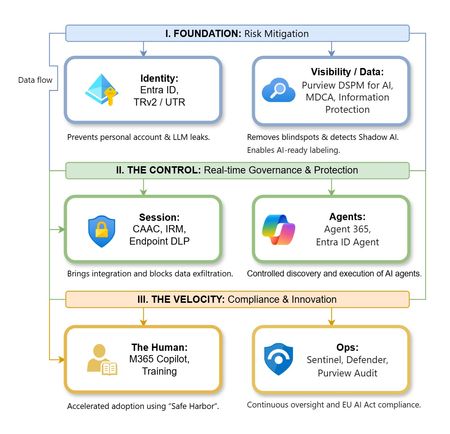
The “block” posture on Generative AI has failed. In a global enterprise, banning these tools doesn't stop usage; it simply pushes intellectual property into unmanaged channels and creates a massive visibility gap in corporate telemetry. The priority has now shifted from stopping AI to hardening the environment so that innovation can run at velocity without compromising data sovereignty. Traditional security perimeters are ineffective against the “slow bleed” of AI leakage - where data moves through prompts, clipboards, and autonomous agents rather than bulk file transfers. To secure this environment, a 7-layer defense-in-depth model is required to treat the conversation itself as the new perimeter. 1. Identity: The Only Verifiable Perimeter Identity is the primary control plane. Access to AI services must be treated with the same rigor as administrative access to core infrastructure. The strategy centers on enforcing device-bound Conditional Access, where access is strictly contingent on device health. To solve the "Account Leak" problem, the deployment of Tenant Restrictions v2 (TRv2) is essential to prevent users from signing into personal tenants using corporate-managed devices. For enhanced coverage, Universal Tenant Restrictions (UTR) via Global Secure Access (GSA) allows for consistent enforcement at the cloud edge. While TRv2 authentication-plane is GA, data-plane protection is GA for the Microsoft 365 admin center and remains in preview for other workloads such as SharePoint and Teams. 2. Eliminating the Visibility Gap (Shadow AI) You can’t secure what you can't see. Microsoft Defender for Cloud Apps (MDCA) serves to discover and govern the enterprise AI footprint, while Purview DSPM for AI (formerly AI Hub) monitors Copilot and third-party interactions. By categorizing tools using MDCA risk scores and compliance attributes, organizations can apply automated sanctioning decisions and enforce session controls for high-risk endpoints. 3. Data Hygiene: Hardening the “Work IQ” AI acts as a mirror of internal permissions. In a "flat" environment, AI acts like a search engine for your over-shared data. Hardening the foundation requires automated sensitivity labeling in Purview Information Protection. Identifying PII and proprietary code before assigning AI licenses ensures that labels travel with the data, preventing labeled content from being exfiltrated via prompts or unauthorized sharing. 4. Session Governance: Solving the “Clipboard Leak” The most common leak in 2025 is not a file upload; it’s a simple copy-paste action or a USB transfer. Deploying Conditional Access App Control (CAAC) via MDCA session policies allows sanctioned apps to function while specifically blocking cut/copy/paste. This is complemented by Endpoint DLP, which extends governance to the physical device level, preventing sensitive data from being moved to unmanaged USB storage or printers during an AI-assisted workflow. Purview Information Protection with IRM rounds this out by enforcing encryption and usage rights on the files themselves. When a user tries to print a "Do Not Print" document, Purview triggers an alert that flows into Microsoft Sentinel. This gives the SOC visibility into actual policy violations instead of them having to hunt through generic activity logs. 5. The “Agentic” Era: Agent 365 & Sharing Controls Now that we're moving from "Chat" to "Agents", Agent 365 and Entra Agent ID provide the necessary identity and control plane for autonomous entities. A quick tip: in large-scale tenants, default settings often present a governance risk. A critical first step is navigating to the Microsoft 365 admin center (Copilot > Agents) to disable the default “Anyone in organization” sharing option. Restricting agent creation and sharing to a validated security group is essential to prevent unvetted agent sprawl and ensure that only compliant agents are discoverable. 6. The Human Layer: “Safe Harbors” over Bans Security fails when it creates more friction than the risk it seeks to mitigate. Instead of an outright ban, investment in AI skilling-teaching users context minimization (redacting specifics before interacting with a model) - is the better path. Providing a sanctioned, enterprise-grade "Safe Harbor" like M365 Copilot offers a superior tool that naturally cuts down the use of Shadow AI. 7. Continuous Ops: Monitoring & Regulatory Audit Security is not a “set and forget” project, particularly with the EU AI Act on the horizon. Correlating AI interactions and DLP alerts in Microsoft Sentinel using Purview Audit (specifically the CopilotInteraction logs) data allows for real-time responses. Automated SOAR playbooks can then trigger protective actions - such as revoking an Agent ID - if an entity attempts to access sensitive HR or financial data. Final Thoughts Securing AI at scale is an architectural shift. By layering Identity, Session Governance, and Agentic Identity, AI moves from being a fragmented risk to a governed tool that actually works for the modern workplace.287Views0likes0Comments