microsoft graph api
60 TopicsExporting all Microsoft Intune Enterprise App Management catalog apps to CSV using Microsoft Graph
By: Joe Lurie, Sr. Product Manager | Microsoft Intune Managing applications at scale is one of the biggest time-consuming tasks for IT admins. Between packaging installers, writing detection rules, and keeping everything up to date - it adds up fast. That's exactly the problem Enterprise App Management in Microsoft Intune is designed to address. Enterprise App Management gives you access to a curated Enterprise App Catalog with hundreds of popular Win32 apps that are pre-packaged, pre-tested, and ready to deploy. Microsoft handles the install commands, detection logic, and update-ready packaging. Automatic updates for catalog apps are expected to roll out in mid-2026, making the experience even more hands-off. You just pick the app, assign it, and move on. But what if you want a full inventory of what's available in the catalog? Maybe you're evaluating which apps your organization can migrate from manual packaging, or you want to share the list with your app owners for review. In this post, I'll show you how to pull the complete catalog using Microsoft Graph PowerShell and export it to a CSV file. Prerequisites Before you start, make sure you have: Intune admin permissions: An account with Intune permissions to read app and catalog data (such as Intune Administrator or a custom role with app read access). You will also need Microsoft Graph delegated scope: DeviceManagementApps.Read.All (you'll consent to this when connecting). An Intune Suite or Enterprise App Management add-on license: Enterprise App Management is part of the Intune Suite or available as a standalone add-on. Note: Microsoft has announced that Enterprise App Management will also be included in Microsoft 365 E5 licensing starting July 1, 2026 - check current licensing guidance to confirm availability for your tenant. Microsoft Graph PowerShell SDK (Beta module) installed: Note that the catalog API is currently in the beta endpoint which means cmdlet names and properties may change before reaching v1.0. If you don't have the beta module installed yet, run: Install-Module Microsoft.Graph.Beta.Devices.CorporateManagement -Scope CurrentUser -Force Step 1: Connect to Microsoft Graph First, authenticate to Microsoft Graph with the required scope: Connect-MgGraph -Scopes "DeviceManagementApps.Read.All" You'll get a browser prompt to sign in and consent. Once connected, you're ready to query the catalog. Step 2: Retrieve all Catalog apps Microsoft Graph exposes the Enterprise App Catalog through the /beta/deviceAppManagement/mobileAppCatalogPackages collection. The PowerShell cmdlet for it is: $catalogApps = Get-MgBetaDeviceAppManagementMobileAppCatalogPackage -All The -All parameter is important as it handles pagination automatically so you get every catalog package, not just the first page of results. 💡 Tip To see every property available on a catalog package object, pipe the first result to Format-List . $catalogApps | Select-Object -First 1 | Format-List * Step 3: Export to CSV Next, let's select the most useful fields and write them to a CSV file: $csvPath = "C:\Temp\IntuneCatalogApps.csv" New-Item -ItemType Directory -Path (Split-Path $csvPath) -Force | Out-Null $catalogApps | Select-Object ProductDisplayName, VersionDisplayName, PublisherDisplayName | Export-Csv -Path $csvPath -NoTypeInformation Open the CSV in Excel and you've got a clean, sortable list of every catalog package in the Intune Enterprise App Catalog. Putting it all together Here's the complete script you can save and run: # Connect to Microsoft Graph Connect-MgGraph -Scopes "DeviceManagementApps.Read.All" # Pull all Enterprise App Catalog packages $catalogApps = Get-MgBetaDeviceAppManagementMobileAppCatalogPackage -All # Export to CSV $csvPath = "C:\Temp\IntuneCatalogApps.csv" New-Item -ItemType Directory -Path (Split-Path $csvPath) -Force | Out-Null $catalogApps | Select-Object ProductDisplayName, VersionDisplayName, PublisherDisplayName | Export-Csv -Path $csvPath -NoTypeInformation Write-Host "Exported $($catalogApps.Count) catalog apps to $csvPath" -ForegroundColor Green # Disconnect when done Disconnect-MgGraph Sample output Your CSV will look something like this: Product Version Publisher Mozilla Firefox 137.0.1 Mozilla Corporation Google Chrome 135.0.6998.89 Google LLC Zoom Workplace 6.4.6 Zoom Video Communications, Inc. Adobe Acrobat Reader DC 25.001.20467 Adobe Inc. 7-Zip 24.09 Igor Pavlov Why this matters Having a complete list of what's in the catalog is useful for a few scenarios: App rationalization - Share the list with app owners and identify which apps you can stop manually packaging and switch to the catalog instead. Gap analysis - Compare the catalog against your current app portfolio to see what's missing. Change management - Track what's available over time as Microsoft continues to add new apps. Compliance and auditing - Document which catalog apps are available for your tenant. Wrapping up Enterprise App Management is one of the most impactful features in the Intune Suite. It takes the most tedious parts of endpoint management - app packaging and updates - and just handles it for you. And with a short Graph script, you can get full visibility into what's available. And to see how Enterprise App Management secures your app catalog, check out the companion post here: aka.ms/Intune/EAM-Security. Give the script a try and let us know what you think along with other Enterprise App Management topics you’d like to see by leaving a comment below or reaching out on X @IntuneSuppTeam. Want to learn more about Enterprise App Management? Check out the official documentation for the full details. Join our community! Discuss real-world scenarios, get expert guidance, connect with peers, and influence the future of Microsoft Security products. Learn more at https://aka.ms/JoinIntuneCommunity.1.7KViews0likes1Comment
Microsoft Graph: Private channel SharePoint site URL naming appears to have changed
📄 Question We are creating private channels using the Microsoft Graph API: POST https://graph.microsoft.com/v1.0/teams/{team-id}/channels With the following payload: { "@odata.type": "#microsoft.graph.channel", "displayName": "Project-Channel-001", "description": "Sample private channel for testing", "membershipType": "private", "members": [ { "@odata.type": "#microsoft.graph.aadUserConversationMember", "******@odata.bind": "https://graph.microsoft.com/v1.0/users/{user-id}", "roles": ["owner"] } ] } 🔍 Observed Behavior When the private channel is created, the associated SharePoint site is provisioned automatically (as expected). However, the URL format appears to have changed. Previously observed behavior: https://{tenant}.sharepoint.com/sites/ProjectTeamURL-Project-Channel-001 Current behavior: https://{tenant}.sharepoint.com/sites/ProjectTeamName-Project-Channel-001 ❗ Impact This change introduces several issues: Breaks deterministic URL generation logic Produces longer and less predictable URLs Introduces dependency on display name, which is mutable and may contain unexpected characters Impacts existing automation and integrations relying on the previous pattern ❓ Questions Has there been a recent change in how SharePoint site URLs are generated for private channels? Is this behavior intentional and documented, or a regression? Is there any way (via Graph or otherwise) to: Control the generated SharePoint site URL, or Retrieve the final site URL deterministically without relying on pattern assumptions? Is the previous {ParentTeamUrl}-{ChannelName} format still expected in some scenarios, or has it been deprecated? 🧪 Additional Notes This behavior is observed when creating channels via Microsoft Graph (v1.0) The issue is reproducible across multiple test scenarios 🙏 Any clarification from Microsoft or others encountering this would be appreciated.63Views0likes0Comments
Unable to retrieve all attachments from forwarded Outlook emails using Graph API
We have integrated Outlook with our system using Microsoft Graph API and subscribed to message events. Whenever we receive an event, we process the email message at our end. Currently, we are facing an issue related to attachments in forwarded email conversations. Scenario An email conversation contains multiple replies. Some of these replies contain attachments. When a user forwards the entire email thread, Outlook generates a forwarded email that includes the conversation history in the email body. Problem When we receive the forwarded email event and fetch the message details using the Microsoft Graph API, we observe the following: The forwarded email only contains the latest reply's attachment. Attachments from earlier replies in the thread are not included in the forwarded message attachments. In some cases: The first reply contains an attachment. Subsequent replies do not contain attachments. When the user forwards the email, the forwarded message JSON shows: hasAttachments: false But, the forwarded email body still contains the previous conversation that had attachments. Our Questions Is there a way to retrieve all attachments from the entire email thread when a conversation is forwarded? Can we retrieve these attachments using the current user's access token via Microsoft Graph API? If there is a way, please also let us know how we can identify forwarded emails using the Microsoft Graph API, so that we can apply this solution only for forwarded emails. Our Requirement We need a reliable solution that works in production to ensure that all attachments from the email conversation are retrieved, even when the email thread is forwarded. This issue is currently impacting our production system, so we would greatly appreciate any guidance on the correct approach. Thank you in advance for your support.91Views0likes0Comments
Is principalId Always a GUID in Microsoft Graph ??
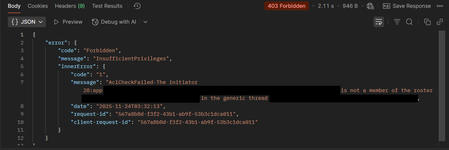
{ "error": { "code": "Request_BadRequest", "message": "Invalid GUID:HR", "innerError": { "date": "2026-02-13T06:44:24", "request-id": "87678d90-1d94-4131-a705-4356ad3568a4", "client-request-id": "63569c7b-1dea-42d4-8d72-aa3668c78418" } } } We’re encountering an issue with the Microsoft Graph API response for directoryRole Recently, one of our Graph API calls started returning a response where the principalId value appears to be a custom string instead of the expected GUID. In our code, we loop through each id from the delta response, assuming it will always be a valid GUID. However, we are now getting errors because one of the returned principalId values does not match the expected format. Our questions: Is it possible for Microsoft Graph API to return a custom string instead of a GUID for principalId? Has anyone experienced similar behavior with delta queries for directoryRole or any other object? Are there any known scenarios where the principalId format differs from the standard GUID? Any insights would be appreciated.63Views0likes0CommentsResource not found while trying to access the available resource
I am attempting to automate CRUD operations on Microsoft Entra objects using the Microsoft Graph API. However, I am encountering a Resource not found error when accessing a resource programmatically, even though the same resource is accessible without issue when invoking the API endpoint via Postman.205Views0likes2Comments
Alias for Refinable Managed Property Not Working in Search Queries
Hi, The alias for the refinable managed property has worked as expected in sortProperties for the past year, but it has recently stopped working and now returns an error. Using the original managed property name (RefinableDateSingle01) continues to work as expected. The error is shown below, together with the trace ID. Unfortunately, we are unable to switch to using RefinableDateSingle01 in sortProperties as it does not meet our business requirements. We are currently facing challenges due to the large number of SharePoint sites, many of which we do not have permission to access. As a result, we can only confirm that the refinable managed property RefinableDateSingle01 and its associated alias are configured correctly on the SharePoint sites where we have full access. What is the root cause of this issue, and how can it be resolved? https://graph.microsoft.com/v1.0/search/query { "requests": [ { "entityTypes": [ "listItem" ], "query": { "queryString": "* AND SiteId:\"siteId\"" }, "from": 0, "size": 50, "sortProperties": [ { "name": "RefinableDateSingle01", // This works when I use the refinable managed property name (RefinableDateSingle01), but it does not work when I use the alias I defined for this property "isDescending": false } ] } ] } 500 Internal Server Error (When I used alias in sortProperties) { "error": { "code": "InternalServerError", "message": "The call failed, please try again.", "target": "", "details": [ { "code": "InternalServerError", "message": "The call failed, please try again.", "target": "", "details": [ { "code": "InternalServerError", "message": "The call failed, please try again.", "target": "", "details": [ { "code": "InternalServerError", "message": "The call failed, please try again.", "target": "", "details": [ { "code": "InternalServerError", "message": "The call failed, please try again.", "target": "", "details": [ { "code": "InternalServerError", "message": "The call failed, please try again.", "target": "", "details": [ { "code": "InternalServerError", "message": "The call failed, please try again.", "target": "", "details": [ { "code": "InternalServerError", "message": "The call failed, please try again.", "target": "", "details": [ { "code": "FanoutDownstreamContradiction", "message": "The call failed, please try again.", "target": "", "details": [ { "code": "TwoStepFanout_FirstStepFailed", "message": "The call failed, please try again.", "target": "", "serviceName": "Xap", "moduleName": "SubstrateSearch.FanoutV2.MultiDimensionSearchFanoutPluginV3", "contactTeam": "3sdri", "httpCode": 500 }, { "code": "FanoutDownstreamContradiction", "message": "The call failed, please try again.", "target": "", "serviceName": "FanoutService", "moduleName": "Fanout", "contactTeam": "3STenantSearchDevs", "httpCode": 500 } ], "serviceName": "FanoutService", "moduleName": "Fanout", "contactTeam": "3STenantSearchDevs", "httpCode": 500 } ], "moduleName": "SubstrateFanoutSearchWorkflow", "httpCode": 500 } ], "moduleName": "AscUserSearchFanoutWorkflowV2", "httpCode": 500 } ], "moduleName": "AscUserSearchFanoutWorkflowV2", "httpCode": 500 } ], "moduleName": "G21AscWorkflow", "httpCode": 500 } ], "moduleName": "TenantFileSearchFederationWorkflow_ASC", "httpCode": 500 } ], "moduleName": "TenantFileSearchFederationWorkflow", "httpCode": 500 } ], "moduleName": "FederationWorkflow", "httpCode": 500 } ], "moduleName": "TopLevelWorkflowBase", "httpCode": 500 }, "Instrumentation": { "TraceId": "57c005b9-07fc-453b-8c73-2650d90670e0" } }98Views0likes0Comments
❓ Can't remove member from Microsoft Teams Group Chat using Graph API with Application Permission
Hi everyone, I’m currently working on creating a Teams group chat using Microsoft Graph API with application permissions, and I’ve run into several issues that I hope someone here can help clarify. Creating group chat with members and installed app (works) I followed the documentation here: “Create a one-on-one chat with installed apps” ➜ https://learn.microsoft.com/en-us/graph/api/chat-post?view=graph-rest-1.0&tabs=http#example-3-create-a-one-on-one-chat-with-installed-apps Using application permissions, I successfully: - Created a group chat - Added multiple members - Installed my Teams app into the chat automatically My application has already been granted the following permissions: ChatMember.ReadWrite.All ChatMember.ReadWrite.WhereInstalled The purpose is to allow the app to add or remove chat members without requiring a signed-in user, since I am using fully non-delegated application permissions. However, when I try to remove a member from the group chat using Graph API with the application token, the request fails and returns an error. Trying RSC-granted approach – app not installed Next, I tried creating a group chat using the RSC-granted app approach: https://learn.microsoft.com/en-us/graph/api/chat-post?view=graph-rest-1.0&tabs=http#example-4-create-a-one-on-one-chat-with-rsc-granted-apps With the following permission: - ChatMember.ReadWrite.All And permission type: application The group chat is created successfully, but the app is not installed inside the chat, which means I still can’t proceed with removing a member using the app context. So this solution also stops midway. Creating chat first, then installing the app (also fails) Lastly, I attempted another method: Create the group chat normally After creation, install the app into it using this endpoint: https://learn.microsoft.com/en-us/graph/api/chat-post-installedapps?view=graph-rest-1.0&tabs=http I used an application access token again, but the request returns the same error as case #1 when attempting to remove a member.297Views0likes2Comments
Validate Guest/Member users for accounts created before 2014
Old exchange accounts that were created before 2014-2015 don't have userType field. When we query such users their userType returns null: https://graph.microsoft.com/v1.0/users/xxx?$select=createdDateTime,userType How do we differ in such case between Guest and Member accounts?784Views0likes3CommentsThe specified object was not found in the store., The process failed to get the correct properties.
Hi, I've set up a change notification using the Microsoft Graph API so that Microsoft sends webhook notifications to our server whenever a new email arrives in a specific mailbox. Each notification includes the ID of the new email. Our server then uses this ID to retrieve the email body via an HTTP GET request to Microsoft Graph. However, we've encountered a few instances where the server receives a error when attempting to retrieve the email. The error message is: Error Message: Exception: Microsoft.Graph.Models.ODataErrors.ODataError: The specified object was not found in the store., The process failed to get the correct properties. Has anyone experienced this before or have any insights into why this might be happening? Thanks!107Views0likes0Comments
How to Send-As a Distribution Group (via SSIS ScriptTask) via Exchange Online using Modern Auth?
We have a SQL Server Integration Services (SSIS) task that retrieves emails from a table in our Customer Relationship Management (CRM) system. The emails contain From:, To:, Cc, and Bcc: addresses, in addition to the body and other data. The SSIS task then reads the data, connects to a local on-premises Exchange 2016 server to send the emails, and allows the SQL Server IP address to log in anonymously and send emails as any user in the From field, provided the address is valid on the Exchange server. We are considering removing the local on-premises Exchange 2016 server and need to modify the SSIS task to connect to Exchange Online to send the emails. We are exploring the use of Modern Authentication, App Registration, and Microsoft Graph to send the emails. The From addresses in the CRM can be an address of a User Mailbox, Shared Mailbox, or Distribution Group. Based on my research, it appears there is no way to send emails as a Distribution Group via Microsoft Graph. Therefore, I am forced to use SmtpClient and logging in as a user with Send-As permissions on all of the groups, which has its own drawbacks. What is the proper way to programmatically send as a Distribution Group? We have about 40 Groups we send as.221Views0likes3Comments