microsoft graph
463 TopicsThe Grief and Joys of New PowerShell Releases
A new version of the Microsoft Graph PowerShell SDK (V2.38) is available, as is a new version of the Exchange Online Management module. They don’t work well together. It’s annoying and beyond frustrating that two critical PowerShell modules in the Microsoft 365 ecosystem cannot work together. If anything, the situation is getting worse. On the upside, I found out about two cmdlets that I might never use – but who knows! https://office365itpros.com/2026/06/22/powershell-woes-and-cmdlets/42Views0likes1CommentI built a free, open-source M365 security assessment tool - looking for feedback
I work as an IT consultant, and a good chunk of my time is spent assessing Microsoft 365 environments for small and mid-sized businesses. Every engagement started the same way: connect to five different PowerShell modules, run dozens of commands across Entra ID, Exchange Online, Defender, SharePoint, and Teams, manually compare each setting against CIS benchmarks, then spend hours assembling everything into a report the client could actually read. The tools that automate this either cost thousands per year, require standing up Azure infrastructure just to run, or only cover one service area. I wanted something simpler: one command that connects, assesses, and produces a client-ready deliverable. So I built it. What M365 Assess does https://github.com/Daren9m/M365-Assess is a PowerShell-based security assessment tool that runs against a Microsoft 365 tenant and produces a comprehensive set of reports. Here is what you get from a single run: 57 automated security checks aligned to the CIS Microsoft 365 Foundations Benchmark v6.0.1, covering Entra ID, Exchange Online, Defender for Office 365, SharePoint Online, and Teams 12 compliance frameworks mapped simultaneously -- every finding is cross-referenced against NIST 800-53, NIST CSF 2.0, ISO 27001:2022, SOC 2, HIPAA, PCI DSS v4.0.1, CMMC 2.0, CISA SCuBA, and DISA STIG (plus CIS profiles for E3 L1/L2 and E5 L1/L2) 20+ CSV exports covering users, mailboxes, MFA status, admin roles, conditional access policies, mail flow rules, device compliance, and more A self-contained HTML report with an executive summary, severity badges, sortable tables, and a compliance overview dashboard -- no external dependencies, fully base64-encoded, just open it in any browser or email it directly The entire assessment is read-only. It never modifies tenant settings. Only Get-* cmdlets are used. A few things I'm proud of Real-time progress in the console. As the assessment runs, you see each check complete with live status indicators and timing. No staring at a blank terminal wondering if it hung. The HTML report is a single file. Logos, backgrounds, fonts -- everything is embedded. You can email the report as an attachment and it renders perfectly. It supports dark mode (auto-detects system preference), and all tables are sortable by clicking column headers. Compliance framework mapping. This was the feature that took the most work. The compliance overview shows coverage percentages across all 12 frameworks, with drill-down to individual controls. Each finding links back to its CIS control ID and maps to every applicable framework control. Pass/Fail detail tables. Each security check shows the CIS control reference, what was checked, what the expected value is, what the actual value is, and a clear Pass/Fail/Warning status. Findings include remediation descriptions to help prioritize fixes. Quick start If you want to try it out, it takes about 5 minutes to get running: # Install prerequisites (if you don't have them already) Install-Module Microsoft.Graph, ExchangeOnlineManagement -Scope CurrentUser Clone and run git clone https://github.com/Daren9m/M365-Assess.git cd M365-Assess .\Invoke-M365Assessment.ps1 The interactive wizard walks you through selecting assessment sections, entering your tenant ID, and choosing an authentication method (interactive browser login, certificate-based, or pre-existing connections). Results land in a timestamped folder with all CSVs and the HTML report. Requires PowerShell 7.x and runs on Windows (macOS and Linux are experimental -- I would love help testing those platforms). Cloud support M365 Assess works with: Commercial (global) tenants GCC, GCC High, and DoD environments If you work in government cloud, the tool handles the different endpoint URIs automatically. What is next This is actively maintained and I have a roadmap of improvements: More automated checks -- 140 CIS v6.0.1 controls are tracked in the registry, with 57 automated today. Expanding coverage is the top priority. Remediation commands -- PowerShell snippets and portal steps for each finding, so you can fix issues directly from the report. XLSX compliance matrix -- A spreadsheet export for audit teams who need to work in Excel. Standalone report regeneration -- Re-run the report from existing CSV data without re-assessing the tenant. I would love your feedback I have been building this for my own consulting work, but I think it could be useful to the broader community. If you try it, I would genuinely appreciate hearing: What checks should I prioritize next? Which security controls matter most in your environment? What compliance frameworks are most requested by your clients or auditors? How does the report land with non-technical stakeholders? Is the executive summary useful, or does it need work? macOS/Linux users -- does it run? What breaks? I have tested it on macOS, but not extensively. Bug reports, feature requests, and contributions are all welcome on GitHub. Repository: https://github.com/Daren9m/M365-Assess License: MIT (free for commercial and personal use) Runtime: PowerShell 7.x Thanks for reading. Happy to answer any questions in the comments.2.8KViews2likes2Comments
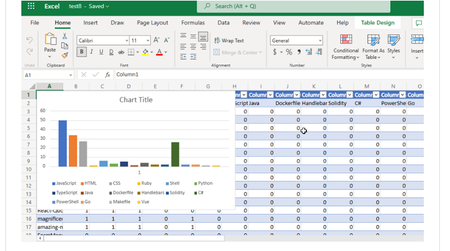
Visualizing Top GitHub Programming Languages in Excel with Microsoft Graph .NET SDK
Have you ever thought about going through all your GitHub Repositories, taking note of the languages used, aggregating them and visualizing it on Excel? Well, that is what this post is all about except you don’t have to do it manually in a mundane way.9.5KViews1like1CommentMicrosoft Blocks Graph Access to Non-IPM Folders
An app written to fetch details of Copilot interactions from the TeamsMessagesData folder suddenly stopped working when the Graph refused to return items. The 403 forbidden error can’t be argued with. Fortunately, the aiInteractionHistory API fills the gap, even if the API does not return the full text of Copilot responses. That information is available, but you’ll need to use eDiscovery to get it. https://office365itpros.com/2026/06/18/copilot-interaction-app/34Views0likes0CommentsMicrosoft Wants PowerShell Developers to Change How They Download Microsoft Modules
A Microsoft blog describes some changes for PowerShell developers in terms of installing modules and the role of the Microsoft Artifact Registry (MAR). In a nutshell, Microsoft intends the MAR to be the go-to place to download first-party PowerShell modules and other artifacts. This solves the problem of potentially compromised modules found in the PowerShell Gallery, but MAR can’t work if it doesn’t contain the modules people use. https://office365itpros.com/2026/06/05/microsoft-artifact-registry/39Views0likes0CommentsMicrosoft Cans Power BI App for Reporting Microsoft 365 Usage
Microsoft has announced that the Microsoft 365 Usage Analytics Power BI app will retire on August 1, 2026. The alternative is the usage reports in the Microsoft 365 admin center or to develop a custom Power BI dashboard based on data imported through the Graph usage reports API. The decision isn’t surprising, but I’m sure that some will mourn the passing of Microsoft’s first tool to report usage information. https://office365itpros.com/2026/05/29/microsoft-365-usage-analytics/142Views0likes0CommentsSending a Welcome Message to New Employees Part 2
Recently, I wrote about how to use PowerShell to send a welcome email to new employees together with attached ICS files for corporate events. Although new employees can add the ICS files to their calendars (so the solution works), simply inviting employees to attend those events by updating the participant list with PowerShell is an easier and better approach. This article explains how to find calendar events, update participant lists, and update events with the Microsoft Graph PowerShell SDK. https://office365itpros.com/2026/05/27/new-employee-email2/49Views0likes0CommentsAutomating Microsoft 365 with PowerShell Second Edition
The Office 365 for IT Pros team are thrilled to announce the availability of Automating Microsoft 365 with PowerShell (2nd edition). This completely revised 350-page book delivers the most comprehensive coverage of how to use Microsoft Graph APIs and the Microsoft Graph PowerShell SDK with Microsoft 365 workloads (Entra ID, Exchange Online, SharePoint Online, Teams, Planner, and more). Existing subscribers can download the second edition now free of charge. https://office365itpros.com/2025/06/30/automating-microsoft-365-with-powershell2/1.1KViews2likes12CommentsWhy Graph-added People Skills Don’t Show Up on the User Profile Card
Microsoft’s People Skills service can use AI to attribute 16,000 different skills to users. Those skills show up on the user profile card. However, once a Microsoft 365 tenant enables People Skills, they lose the ability to add custom skills for user profiles via Graph APIs or People Connectors. It’s a curious situation where Microsoft blocks custom additions because its AI-powered service is active. Couldn’t both exist alongside each other? https://office365itpros.com/2026/05/14/people-skills-graph/27Views0likes0CommentsUnderstanding How Graph Permissions for Groups Work
Understanding the set of Graph permissions required by apps can be challenging. In this article we discuss how the Group.Read.All and GroupMember.Real.All permissions work and why you should choose one permission over the other so that you respect the principle of least permission when it comes to assigning Graph permissions to your apps and PowerShell scripts. Experience of reviewing scripts shows that too many people use Group.Read.All without needing to. Don't over-permission your scripts! https://office365itpros.com/2026/05/13/graph-permissions-groups/40Views0likes0Comments