identity
70 Topics
Microsoft Feedback Portal account is not working
I changed my Microsoft password a year ago, and it updated everywhere other than the Feedback Portal. As a result, I get an error when I try to login, or do anything on the page. Microsoft account support's suggestion was to login to the Feedback Portal which is insane given I'm having issues accessing it. How can I get this issue resolved? I've got three separate support tickets now and they keep asking me to wait 24 hours to get the issue resolved. Can someone from the Feedback Portal team please contact me to resolve this?" This is what Microsoft Support have said: "understand your frustration, and yes—this is an account‑related issue because the Feedback Portal is still tied to your old alias, which causes login conflicts and forces you out. Your Microsoft account itself signs in correctly, but the Feedback Portal is pulling outdated identity data that you cannot update on your own. Since you cannot access the Portal to submit feedback, directing you back there is not a workable solution. What you need is for Support to escalate this to the internal Identity/Feedback Platform engineering team so they can manually correct the outdated alias mapping on the backend. In this situation, the Feedback Portal and Tech Community teams are the ones who manage and maintain that specific platform. Because the issue appears on the Feedback Portal side—even though your Microsoft account is working normally—only their dedicated team can make the necessary corrections on their end. That’s why we are guiding you to connect with them through the links provided: https://techcommunity.microsoft.com/ or https://feedbackportal.microsoft.com/feedback. They will be able to review the portal‑specific account data and assist you further. I understand why this is frustrating. Since you’re unable to stay signed in to the Feedback Portal, I completely see why posting there isn’t possible for you. However, I do need to be transparent: I’m not able to escalate this issue directly to the Feedback Portal team, as they don’t provide internal escalation channels for us and only accept requests through their own platform. "41Views0likes1CommentHow Do I Target the Azure VPN Client in a Conditional Access Policy?
I am using the Azure VPN Client to connect users to an Azure VPN Gateway using their Entra ID credentials to authenticate. I want to target this application with a CA policy that requires MFA every time it connects. The problem is that I don't see the applications in my Enterprise Apps and all of my searching says that it won't appear because it was "pre-certified" by Microsoft. In the Gateway setup I used the Audience GUID of c632b3df-fb67-4d84-bdcf-b95ad541b5c8. And this is working as expected. The only solution that I have found for targeting the Azure VPN Client app is to create a Service Principal using that Audience GUID. This seems like a bit of a hack, so I am posting here to see if there are any other methods that I am missing to target this app when it doesn't appear in my Enterprise Apps list.235Views0likes3CommentsAccount Hacked
Hello Community, My account has been hacked, copied and/or duplicated with some other account as I was originally Sids1 with this email for more than 6 months now and this has changed somehow. It's very concerning to me since I also found some other person named Siddhartha when I was logging into my account. I reported that to the Microsoft Account Team but have not received any replies yet. Please suggest anything that can be done to catch this hacker who is stealing my identity to and fro. Best Regards Siddhartha SharmaSolved1.1KViews1like4Comments
Hacked Live account
Hello, On of our customers accounts was hacked. This is a Live account linked to his own emailadres (not hotmail) from his Internet Provider. A few weeks ago someone gained access to this account. They changed the recovery email address and the phone number. The customer has a paid Office 36 family account, which is paid for with his MasterCard and he can provide the invoice from the last years.. We tried the account recovery Form multiple times, opened a case with CDOC Case Management. We simply got the reply that they could not do anything but to suspend the account. I Think this is crazy, is there no solution to this ? Thanks,131Views0likes2CommentsMicrosoft Authenticator Passkeys for Entra ID on unmanaged devices
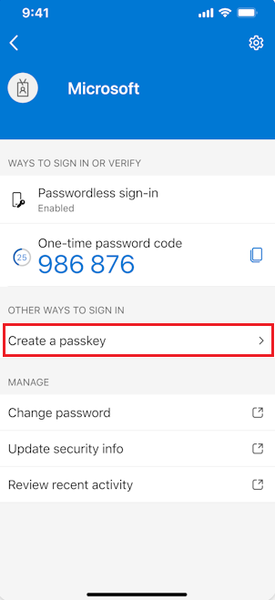
Hello, has anyone successfully registered passkeys on an unmanaged phone in an organisation with device compliance policies? Use case is to provide a phishing-resistant MFA option via Authenticator app for logging into apps on their desktop. Users already have authenticator app on their phone and do number matching MFA. https://learn.microsoft.com/en-us/entra/identity/authentication/how-to-register-passkey-authenticator?tabs=iOS When I select "Create a passkey" - I need to log into my account. However I'm blocked from successful authentication because I have conditional access policies to require compliant devices. As my mobile phone is not enrolled into Intune, I never get to the step where the passkey is created and registered. Based on the constraints - it seems like passkeys cannot be used for unmanaged/BYOD devices for organisations that have device compliance policies. It can only be used for users who have enrolled their mobile phone. Looking to see if anyone has tips or different experience using passkeys on unmanaged mobile phones to log into Entra?451Views0likes1Comment
Microsoft Authenticator issues
I’m simply locked out of my personal account because I lost access to my 2FA and the recovery form rejects due to active two-step verification. I’ve tried my verifying email and phone number but it rejects is due the active two step verification. I need manual identity verification or an escalation so my 2FA can be reset. Can you point me to the correct support channel for personal account recovery, because the link you sent is not working193Views0likes1CommentWindows Hello for Business 0x80090010 NTE_PERM
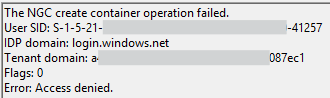
Hi all, I'm encountering an issue with Windows Hello for Business on the latest version of Windows (July 2025 update). The setup process fails during initialisation, and no biometric or PIN options are being provisioned for the user. Environment: Windows version: 11 24H2 Enterprise (latest update) Deployment mode: Hybrid Cloud Trust Hybrid joined devices Symptoms: Users are prompted to set up WHfB but the process fails at the last step with error 0x80090010 Users who already have WHfB authentication methods created can successfully login Event ID 311 & 303 in the User Device Registration logs Screenshots: Troubleshooting so far: Unjoined and rejoined to Entra ID Granted modify permissions on folder in which NGC container would be created Rolled back to June 2025 update (this worked) So it seems like this is caused or related to the latest Windows Update, which is rather unfortunate for us as we are just beginning to rollout WHfB for our organisation. I'm posting here to raise awareness of the issue, if there is a more appropriate place to post then please suggest.16KViews6likes18Comments
Escalation Inquiry: IP Logs Request for MS Account
Hello, I am seeking advice regarding a security issue with my Microsoft account. There were unauthorized login attempts on my account between May 23 and May 25, 2025. I submitted a ticket to Microsoft Privacy / Security Incident Response (SIR) regarding IP activity logs. My ticket was created on August 7, 2025 and escalated to the IP/SIR team on August 11, 2025. Since then, I have sent multiple follow-ups, but no response has been received. I also created a new ticket on September 17, 2025, but only received the automatic acknowledgment; no agent has contacted me. I am concerned because the logs are important for verifying my account security and ensuring no unauthorized access occurred. Could anyone advise typical processing times for IP activity requests or suggest ways to escalate this issue effectively? Thank you in advance for any guidance.120Views0likes1Comment
Conditional Access enforces MFA but Service Account still ask to secure account
Hi, I've setup Conditional Access policies to enforce MFA. But it excludes a group for service accounts. Whenever we login to a Service Account, they all ask to secure your account. Hit next > It says no MFA options are available > Skip. Both our own MFA conditional access policy and MS per-user conditional access policy excludes this group. The Legacy per-user authentication policy has all accounts disabled there in favour of the conditional access policy. We must be missing something here. Some of these are shared inboxes, others regular user accounts. Many of these services requires login through the typical Microsoft sign in screen to authorize access. Some does not support OpenID. So how do I 100% exclude service accounts from MFA? And how do I get rid of this popup to secure these accounts when it says no MFA options are available? TIA368Views0likes1CommentMicrosoft’s Effort to Develop a Broad People Platform
Microsoft 365 users see the profile card and might wonder where the information displayed on the card comes from. Entra ID is the obvious source, but the people platform that Microsoft is developing is another and could include information imported through a Copilot connector to build out a complete picture of users and contacts within a Microsoft 365 tenant. It’s early days yet, but beta code is available. https://office365itpros.com/2025/09/10/people-platform/138Views1like2Comments